1. 소개
이 명세는 WebXR 명세에 `composition` 레이어 지원을 추가합니다. 레이어의 이점은 다음과 같습니다.
-
성능 및 저더: 컴포지션 레이어는 애플리케이션 프레임 레이트가 아니라 컴포지터의 프레임 레이트(즉 HMD의 네이티브 재생률)로 표시됩니다. 애플리케이션이 레이어의 렌더링을 컴포지터의 네이티브 재생률로 업데이트하지 않더라도, 컴포지터는 기존 렌더링을 적절한 포즈로 다시 투영할 수 있습니다. 이는 더 부드러운 렌더링과 더 적은 저더로 이어집니다. 레이어의 또 다른 특징은 각각 다른 해상도를 가질 수 있다는 점입니다. 이를 통해 애플리케이션은 저성능 시스템에서 기본 눈 버퍼 해상도를 낮추면서도, 텍스트나 지도와 같은 필수 정보는 자체 레이어에 더 높은 해상도로 유지할 수 있습니다.
-
가독성/시각적 충실도: 일반 WebXR에서는 눈 버퍼의 해상도가 특히 저성능 시스템에서 비교적 낮은 값으로 줄어들 수 있습니다. 이는 텍스트와 같은 고충실도 콘텐츠를 렌더링하기 어렵게 만듭니다. Composition Layers를 사용하면, 정적인 실린더 또는 사각형 레이어를 한 번 고해상도로 그린 뒤 컴포지터가 한 번만 리샘플링할 수 있습니다. 이는
XRWebGLLayer를 렌더링하는 전통적인 방식과 대조됩니다. 기존 방식에서는 콘텐츠가 장치의 재생률로 생성되고 적어도 두 번 리샘플링됩니다. 한 번은 WebGL 눈 버퍼에 렌더링할 때 (낮은 눈 버퍼 해상도로 인해 세부 정보가 손실될 수 있음), 두 번째는 컴포지터에 의해 수행됩니다. -
전력 소비 / 배터리 수명: 축소된 렌더링 파이프라인, 이중 샘플링의 부재, 그리고 매 프레임마다 레이어의 렌더링을 업데이트할 필요가 없기 때문에, 전력 소비가 개선될 것으로 예상됩니다.
-
지연 시간: 컴포지션 레이어의 포즈 샘플링은 프레임의 매우 마지막에 발생할 수 있으며, 이후 특정 재투영 기법을 사용하여 레이어의 포즈를 최신 HMD 포즈와 일치하도록 업데이트할 수 있습니다. 이는 레이어 렌더링의 유효 지연 시간을 크게 줄일 수 있으며, 결과적으로 전체 경험을 개선할 수 있습니다.
-
더 많은 색상 유형 지원: WebXR은 RGB 값만 지원합니다. 컴포지션 레이어는 색상 유형에 대한 더 넓은 지원을 제공하므로 작성자는 압축 형식이나 sRGB를 사용할 수 있습니다.
1.1. 용어
1.2. 애플리케이션 흐름
작성자가 GL 레이어를 사용하려는 경우, 다음 단계를 거쳐야 합니다.
-
XRProjectionLayer이외의 모든 레이어 유형에 대해서는requiredFeatures또는optionalFeatures를 통해requestSession()에서 지원을 요청합니다. -
XRWebGLBinding또는XRMediaBinding을 생성합니다. -
이 객체들로 레이어를 생성합니다.
-
레이어를
XRRenderStateInit에 추가하고updateRenderState()를 호출합니다. -
WebGL 레이어의 경우
requestAnimationFrame()동안 각 WebGL 레이어에 콘텐츠를 그립니다.
2. 초기화
애플리케이션이 세션 중 XRProjectionLayer
유형 이외의 레이어를 생성하려는 경우,
해당 세션은 적절한 feature
descriptor와 함께 요청되어야 합니다. 문자열 "layers"는
이 모듈에서 WebXR Layers 기능을 위한 새로운 유효한 feature
descriptor로 도입됩니다.
XRProjectionLayer
유형의 레이어는 feature
descriptor가 요청되었는지 여부와 관계없이 항상 지원되어야 합니다.
navigator. xr. requestSession( 'immersive-vr' , { optionalFeatures: [ 'layers' ] }
레이어는 XRSessionMode가 "immersive-vr"
또는 "immersive-ar"인
XRSessions에 대해서만 지원됩니다.
"inline"
세션은 레이어를 지원해서는 안 됩니다.
"layers" feature descriptor는 feature requirement를 가지며, 이는 active immersive session이 있을 때 활성화될 수 없다는 것입니다.
NOTE: 이는 "layers"와 함께 request(permissionDesc)
API를 실행해도 현재 활성 세션에 대한 layers 지원이 활성화되지 않음을 의미합니다.
3. 레이어 유형
3.1. 모노 및 스테레오 레이어
스테레오 레이어는 각 뷰에 대해 렌더링 대상이 되는XRSubImage를
제공해야 합니다.
모노 레이어는 각 뷰에 표시되는 단일 XRSubImage를
제공해야 합니다.
XR Compositor는 레이어가 관찰자에게 스테레오로 올바르게 표시되도록 보장해야 합니다.
3.2. XRLayerLayout
XRLayerLayout
enum은 레이어의 레이아웃을 정의합니다.
enum {XRLayerLayout "default" ,"mono" ,"stereo" ,"stereo-left-right" ,"stereo-top-bottom" };
-
default레이아웃은 레이어가 세션의 list of views의 모든 뷰를 수용할 수 있음을 나타냅니다. -
mono레이아웃은 레이어가 모노임을 나타냅니다. -
stereo레이아웃은 레이어가 스테레오임을 나타냅니다. -
stereo-left-right레이아웃은 레이어가 스테레오이며 왼쪽에서 오른쪽으로 분할됨을 나타냅니다. -
stereo-top-bottom레이아웃은 레이어가 스테레오이며 위에서 아래로 분할됨을 나타냅니다.
NOTE: XRCompositionLayer가
"default"
또는 "stereo"
XRLayerLayout으로
생성되는 경우,
"texture-array"
텍스처 유형으로 할당하는 것을 강력히 권장합니다.
Note: "stereo-left-right"
및 "stereo-top-bottom"
레이아웃은 이미 스테레오인 콘텐츠(예: 스테레오 비디오 또는 이미지)에 대한 draw
호출을 최소화하도록 설계되었습니다. 이러한 자산 유형이 필요하지 않은 경험은
"default"
또는 "stereo"
레이아웃을 사용해야 합니다.
3.3. XRLayerQuality
XRLayerQuality
enum은 레이어의 표시 품질을 정의합니다.
enum {XRLayerQuality "default" ,"text-optimized" ,"graphics-optimized" };
-
default레이아웃은 레이어가 일반 설정으로 표시됨을 나타냅니다. -
text-optimized레이아웃은 XR Compositor가 레이어를 가장 읽기 쉽도록 렌더링하려고 시도함을 나타냅니다. -
graphics-optimized레이아웃은 XR Compositor가 레이어를 추가 선명도로 렌더링하려고 시도함을 나타냅니다.
NOTE: text-optimized
및 graphics-optimized
플래그는 XR Compositor의
추가 처리를 초래할 수 있으며, 이는 성능에 영향을 줄 수 있습니다.
3.4. XRCompositionLayer
XRCompositionLayer는 특정 레이어 유형 전반에 공통되는 속성과 동작의 집합을 정의합니다.[Exposed =Window ]interface :XRCompositionLayer XRLayer {readonly attribute XRLayerLayout layout ;attribute boolean blendTextureSourceAlpha ;attribute boolean forceMonoPresentation ;attribute float opacity ;readonly attribute unsigned long mipLevels ;attribute XRLayerQuality quality ;readonly attribute boolean needsRedraw ;undefined (); };destroy
layout 속성은 레이어의 레이아웃을 반환합니다.
blendTextureSourceAlpha 속성은
레이어의 텍스처 알파 채널을 활성화합니다.
forceMonoPresentation 속성은
오른쪽 눈이 왼쪽 눈과 동일한 레이어 구성을 사용하도록 강제합니다. 이는 XR Compositor에
신호를 보내 이 XRCompositionLayer의
stereo
효과를 제거해야 합니다.
true로 설정해도 mono
레이어에는 아무 효과가 없습니다.
NOTE: 이 속성은 XRSession이
반환하는 다른 정보에는 부수 효과가 없습니다.
이 설정의 영향을 받는 것은 XR Compositor의 동작뿐이며, 경험은 양쪽 눈 모두에 계속 그려야 합니다.
opacity 속성은 레이어의 픽셀에 적용되는
불투명도를 설정합니다. XR Compositor는
각 픽셀(프리멀티플라이드 공간에서)에 이 값을 곱해야 합니다.
opacity의
기본값은 1.0입니다. opacity를
0보다 작은 값으로 설정하면 0으로 설정되고, 1.0보다 큰
값으로 설정하면 1.0으로 설정됩니다.
needsRedraw 속성은 XRCompositionLayer가
다음 XR animation frame에서 다시 렌더링되어야 함을 나타냅니다. 이는 레이어의 기본 리소스가
손실되었거나
XR
Compositor가 더 이상 레이어를 재투영할 수 없을 때 설정될 수 있습니다.
다음 XR animation frame에서
콘텐츠를 다시 그리지 않으면 깜박임이나 기타 부수 효과가 발생할 수 있습니다.
mipLevels 속성은 mip 체인의 깊이를 반환합니다.
이는 mipLevels에서
요청한 값과 같거나 작아야 합니다.
NOTE: 일부 플랫폼은 mip 레벨을 지원하지 않습니다. 작성자는
특정 mip 레벨을 대상으로 할 수 있는지 확인하기 위해 mipLevels를
질의해야 하며, mipLevels에
전달한 값에 의존해서는 안 됩니다.
quality 속성은 XRCompositionLayer의
품질을 설정하고 반환합니다.
default가
초기값입니다.
XRCompositionLayer
layer에 대해,
사용자 에이전트는 반드시 다음 단계를 실행해야 한다:
-
layer의
needsRedraw를true로 설정한다. -
layer가
XRProjectionLayer가 아니면, 태스크를 큐에 넣어redraw라는 이름의 이벤트를 발생시킨다. 이때XRLayerEvent를 layer에서 사용한다.
각 XRCompositionLayer에는
연결된 destroyed 불리언이 있으며, 초기값은 false이다.
destroy()는
즉시 레이어를 destroyed로 표시하고, 해당 그래픽 리소스를 향후
렌더링에 사용할 수 없게 한다.
이미 destroyed인 레이어에서 destroy()를
호출해도 아무 작업도 수행하지 않는다.
destroyed 레이어는 보류 중인 렌더 상태 업데이트가 적용되는 동안 레이어가 여전히 layers
배열에 존재하더라도 XR
컴포지터에 의해 표시되어서는 안 된다.
destroyed 레이어에 대한 XRSubImage를
얻기 위해 메서드를 호출하면, 해당 메서드는 반드시 InvalidStateError를
발생시켜야 한다.
이전에 반환된 XRSubImage
객체 자체는 해당 레이어가 파괴되어도 파괴되지 않는다. 해당 객체의 속성은 계속 동일한
객체와 값을 반환하지만, 해당 객체가 노출하는 모든 그래픽 리소스는 향후
렌더링 작업에 사용할 수 없도록 무효화되어야 한다. 리소스가 무효화되기 전에 큐에 넣어진 GPU 작업은 완료될 수 있다.
XRCompositionLayer
layer에 대해 레이어의 리소스를 파괴하려면, 사용자 에이전트는 반드시 다음 단계를 실행해야 한다:
-
존재하는 layer의 colorTextures, depthStencilTextures 또는 motionVectorTextures 배열 중 하나에 있는 각 불투명 텍스처에 대해, layer의 context에서 해당 텍스처를 인수로
deleteTexture를 호출한 것처럼 텍스처를 삭제 대상으로 표시한다. 이는 내부 사용자 에이전트 작업이며INVALID_OPERATION오류를 발생시켜서는 안 된다. -
layer가
XRProjectionLayer이면:-
layer의 보조 뷰용 colorTextures가
null이 아니면, 해당 배열의 각 불투명 텍스처에 대해 동일한 방식으로 텍스처를 삭제 대상으로 표시한다. -
layer의 보조 뷰용 depthStencilTextures가
null이 아니면, 해당 배열의 각 불투명 텍스처에 대해 동일한 방식으로 텍스처를 삭제 대상으로 표시한다.
-
-
layer에 colorTextures 배열이 있으면, 빈 배열로 설정한다.
-
layer에 depthStencilTextures 배열이 있으면, 빈 배열로 설정한다.
-
layer에 motionVectorTextures 배열이 있으면, 빈 배열로 설정한다.
-
layer가
XRProjectionLayer이면, 해당 보조 뷰용 colorTextures 및 보조 뷰용 depthStencilTextures를 빈 배열로 설정한다. -
layer의 각 기반 리소스에 대해, 해당 리소스가 무효화되기 전에 큐에 넣어진 모든 GPU 작업이 완료되고 XR 컴포지터가 더 이상 해당 리소스에 접근하지 않으면, 사용자 에이전트는 해당 리소스를 물리적으로 해제할 수 있다.
XRSession
session과 선택적인 WebGLRenderingContext
또는 WebGL2RenderingContext
context의 인스턴스를 사용하여 컴포지션 레이어를 초기화하려면, 사용자 에이전트는 반드시 다음 단계를 실행해야 한다:
XRCompositionLayer
layer에서 destroy()를
호출할 때,
사용자 에이전트는 다음 단계를 반드시 실행해야 합니다:
-
layer의 destroyed가
true이면 반환한다. -
layer의 destroyed를
true로 설정한다. -
layer를 사용하여 레이어의 리소스를 파괴한다를 실행한다.
-
session을 layer의 session으로 설정한다.
-
session의 보류 중인 렌더 상태가
null이면:-
session의 보류 중인 렌더 상태를 session의 활성 렌더 상태의 복사본으로 설정한다.
-
state를 session의 보류 중인 렌더 상태로 설정한다.
-
state의
layers가null이거나 layer를 포함하지 않으면 반환한다. -
state의
layers를, state의layers에서 layer를 제외한 각 항목을 순서대로 포함하는 새로운 동결 배열로 설정한다.
각 XRCompositionLayer에는
null 또는 WebGLRenderingContext
또는 WebGL2RenderingContext의
인스턴스인 context 객체와, null 또는 HTMLVideoElement의
인스턴스인 media
객체가 있다.
각 XRCompositionLayer에는
연결된 session이 있으며, 이는 생성될 때 함께 사용된
XRSession이다.
XRSpace
space와 XRCompositionLayer
layer를 사용하여 레이어의
공간을 설정할 때, 사용자 에이전트는 space가
유효한지 검증하기 위해 반드시 다음 단계를 실행해야 한다:
XRCompositionLayer에는
작성자가 needsRedraw가
true일 때만 이 레이어에 그릴 수 있음을 나타내는 내부 불리언 isStatic이 있다.
참고: isStatic이
true이면 작성자는 생성 후 한 번 또는
redraw 이벤트 후 한 번만 레이어에 그릴 수 있다. 이를 통해 사용자 에이전트는 단일 GPU 버퍼만 할당할 수 있다.
XRCompositionLayer
또는 그 파생 클래스 중 하나에서 쓰기 가능한 속성을 설정하면,
해당 속성을 읽을 때 반드시 그 값을 반환해야 한다.
requestAnimationFrame()
콜백이 끝날 때, 그 값은
기반 XR
컴포지터로 전송되어야 한다. XR 컴포지터는
다음에 XRFrame을
표시할 때 해당 값을 적용해야 한다.
이 XRFrame은 requestAnimationFrame()
콜백에 전달된 것이다.
참고: 이는
XR
컴포지터가 새 XRFrame을
사용해 장면을 다시 그릴 때,
colorTexture에
변경이 없었더라도 해당 값이 적용되어야 함을 의미한다.
이 colorTexture는 XRCompositionLayer와
연결되어 있으며, 미디어 레이어와 연결된 비디오 프레임의 경우도 마찬가지다. XR
컴포지터가 이전 XRFrame의
상태로 장면을 다시 그리는 경우, 새
값을 사용해서는 안 된다.
3.5. XRProjectionLayer
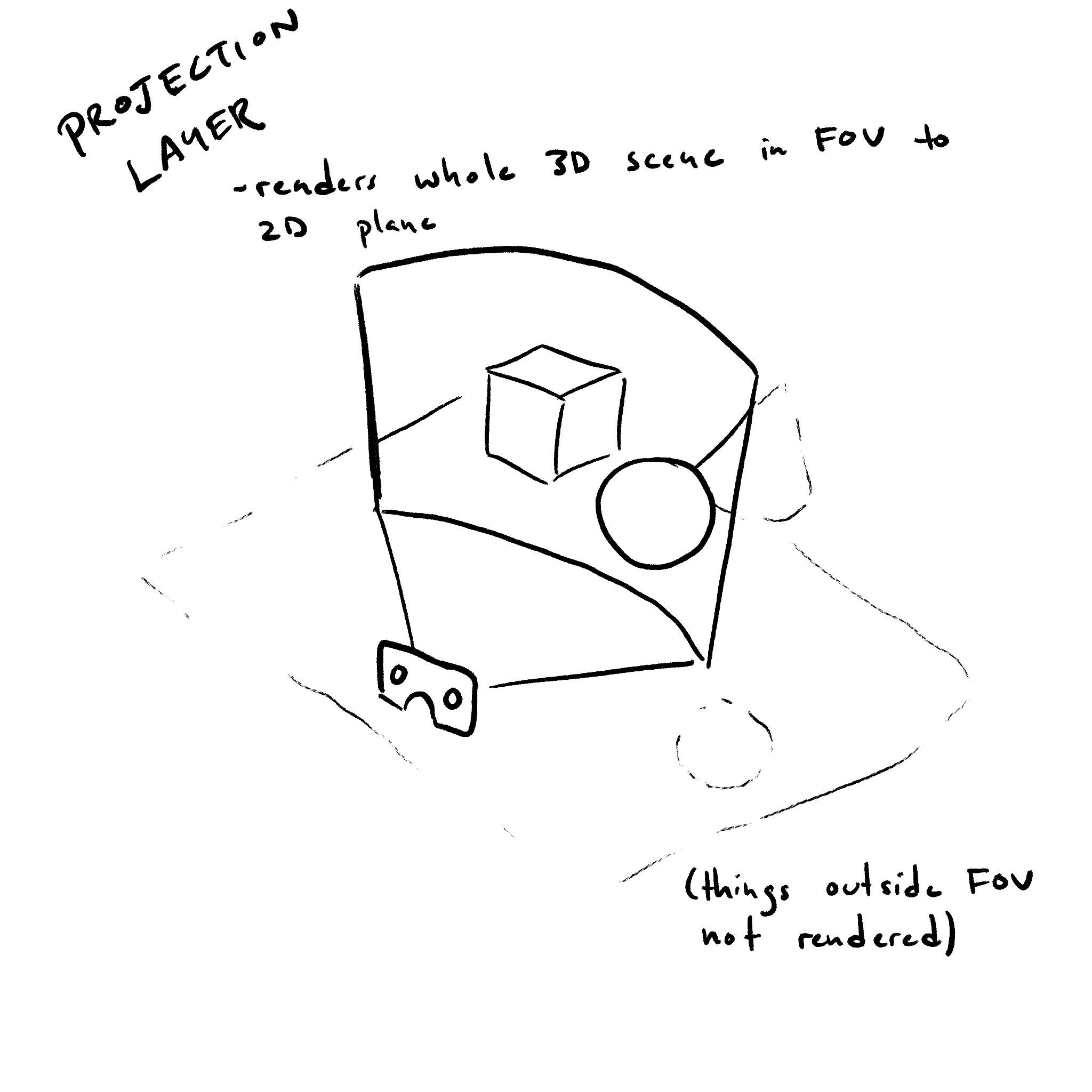
AnXRProjectionLayer
는 관찰자의 전체 뷰를 채우는 레이어이다.
프로젝션 레이어는 장치의 네이티브 프레임 속도에 가까운 속도로 새로 고쳐져야 한다.
[Exposed =Window ]interface :XRProjectionLayer XRCompositionLayer {readonly attribute unsigned long textureWidth ;readonly attribute unsigned long textureHeight ;readonly attribute unsigned long textureArrayLength ;readonly attribute boolean ignoreDepthValues ;attribute float ?fixedFoveation ;attribute XRRigidTransform ?deltaPose ; };
textureWidth 속성은
이 레이어의 colorTextures 텍스처의
픽셀 단위 너비를 반환한다.
textureHeight 속성은
이 레이어의 colorTextures 텍스처의
픽셀 단위 높이를 반환한다.
textureArrayLength 속성은
XRProjectionLayer가
textureType을
"texture-array"로
하여 초기화된 경우,
이 레이어의 colorTextures 텍스처의
레이어 수를 반환한다.
그렇지 않으면 1을 반환한다.
fixedFoveation 속성은
XR
컴포지터가 사용하는 중심와 렌더링의 양을 제어한다. 사용자 에이전트 또는 장치가 이 속성을 지원하지 않는 경우,
값을 가져올 때 null을 반환해야 하며, 설정 작업은 no-op이어야 한다.
fixedFoveation을
0보다 작은 값으로 설정하면 0으로 설정되고,
1보다 큰 값으로 설정하면 1로 설정된다. 0은 중심와 렌더링의 최소량을 설정하고
1은 최대량을 설정한다. XR 컴포지터가
이러한 값을 어떻게 해석할지는 사용자 에이전트가 결정한다.
fixedFoveation
수준이 변경된 경우, 다음 XRFrame부터
적용된다.
ignoreDepthValues 속성이
true이면,
XR
컴포지터는 렌더링할 때 깊이 버퍼 어태치먼트의 값을 사용해서는 안 됨을 나타낸다. 이 속성이
false이면 깊이 버퍼 어태치먼트의 내용이
XR
컴포지터에 의해 사용되며, 레이어에 렌더링된 장면을 나타내는 값일 것으로 예상됨을 나타낸다.
deltaPose 속성은 이전 프레임 이후
뷰에 영향을 미치는 애플리케이션 적용 증분 변환이 있는 경우 이를 설명한다.
사용자 에이전트 또는 장치가 이 속성을 지원하지 않거나 "space-warp" 기능 설명자가 요청되지
않은 경우, 사용자 에이전트는 값을 가져올 때
null을 반환해야 하며, 설정 작업은 no-op이어야 한다.
null 값은 애플리케이션에서 적용한 변환이 제공되지 않았음을 나타낸다.
deltaPose의
값은 작성자가 변경할 때까지 유지되며, 사용자 에이전트는 requestAnimationFrame()
콜백이 끝날 때 이를 재설정하지 않는다.
인공 이동이 프레임 사이에서 월드를 한 애플리케이션 포즈에서 다른 포즈로 변환하는 경우,
deltaPose를
해당 포즈 간의 차이로 설정하면 XR 컴포지터가
누락된 프레임을 합성하는 데 도움이 된다.
작성자는 해당 변환이 변경될 때 deltaPose를
업데이트해야 하며, 애플리케이션에서 적용한 변환이 발생하지 않은 프레임에서는 이를 null 또는 항등 변환으로 설정해야 한다.
3.6. XRQuadLayer
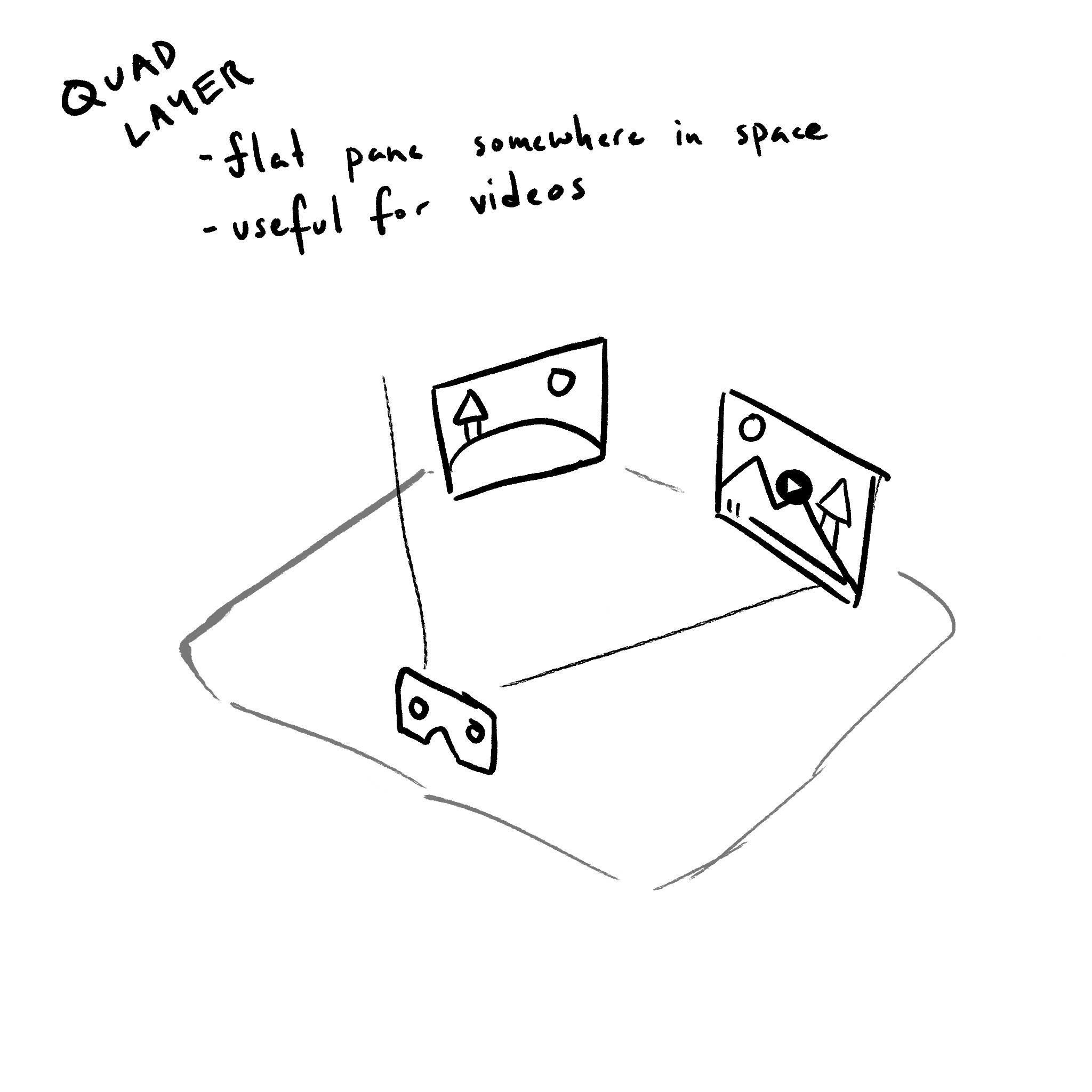
AnXRQuadLayer
는 가상 환경에서 평평한 직사각형 공간을 차지하는 레이어를 렌더링한다.
레이어의 앞면만 보여야 하며, 뒷면은 XR 컴포지터가 그려서는 안 된다.
XRQuadLayer에는 두께가 없다. 이는 3D 공간에 배치되고 방향이 지정된 2차원 객체이다. 쿼드의 위치는 쿼드의 중심을 가리킨다.
[Exposed =Window ]interface :XRQuadLayer XRCompositionLayer {attribute XRSpace space ;attribute XRRigidTransform transform ;attribute float width ;attribute float height ; // 이벤트attribute EventHandler onredraw ; };
transform 속성은
space 속성에 대한 상대적 오프셋과 방향을 설정하고 반환합니다.
transform
및 space
속성은
사용자의 물리적 환경 내에서 레이어의 공간적 관계를 설정합니다.
space를
설정할 때는 먼저 레이어의 space를 설정하는 단계를 실행합니다.
width 및 height 속성은
레이어의 너비와 높이를 미터 단위로 설정하고 반환합니다.
XRQuadLayerInit
init으로 XRQuadLayer
layer를 초기화할 때, 사용자 에이전트는 다음 단계를 실행해야 합니다.
-
layer의
transform을 다음과 같이 초기화합니다.- init의
transform이 설정된 경우 - layer의
transform을 layer의 relevant realm에서 newXRRigidTransform로 두고, init의transform의position및orientation으로 초기화합니다. - 그렇지 않은 경우
- layer의
transform을 layer의 relevant realm에서 newXRRigidTransform로 두고,DOMPointInitposition{ x: 0.0, y: 0.0, z: 0.0, w: 1.0 }로 초기화합니다.
- init의
onredraw 속성은 redraw
이벤트 유형에 대한 Event handler IDL 속성입니다.
3.7. XRCylinderLayer
AnXRCylinderLayer
는 가상 환경에서 곡선형 직사각형 공간을 차지하는 레이어를 렌더링한다.
레이어의 앞면만 보여야 하며, 뒷면은 XR 컴포지터가 그려서는 안 된다.
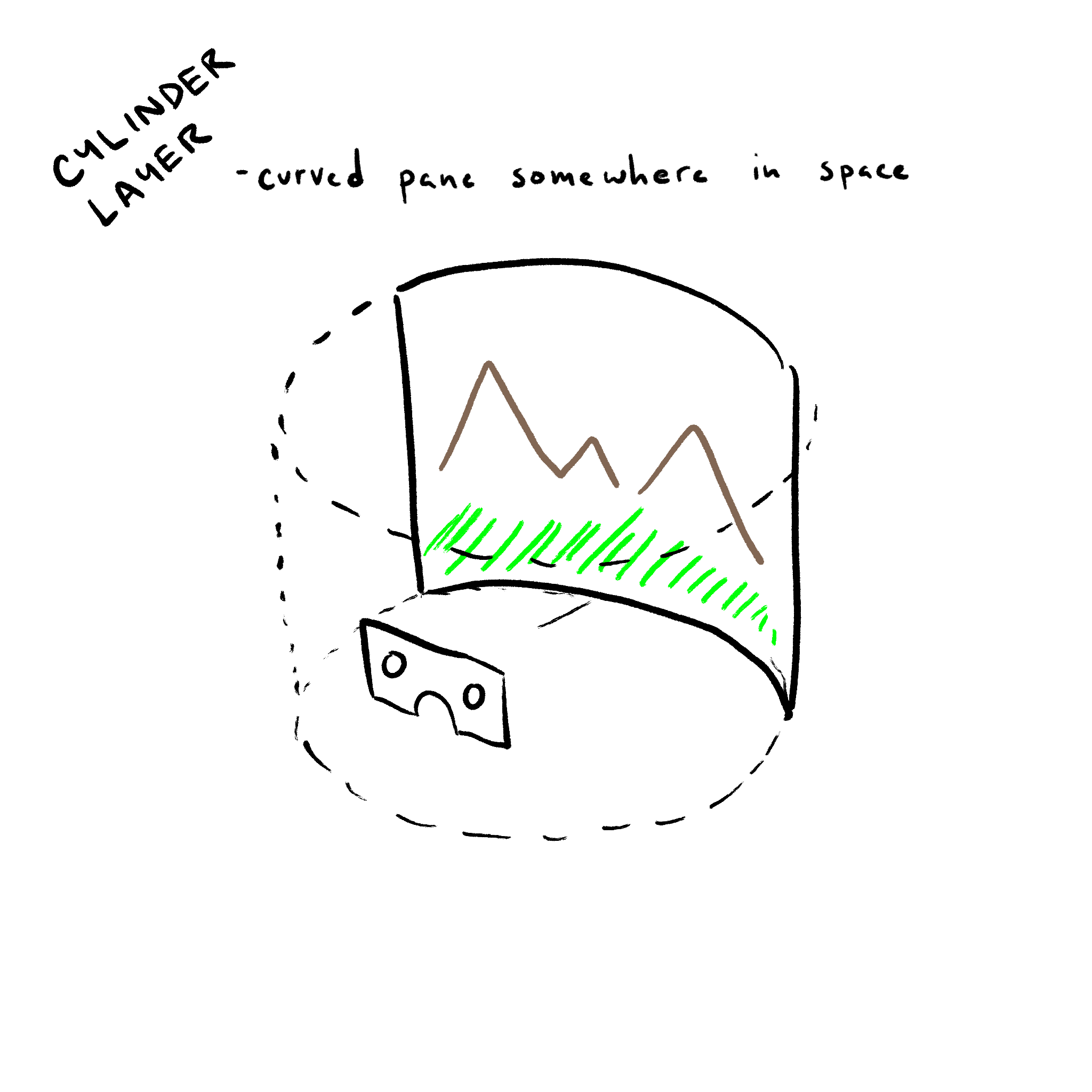
XRCylinderLayer에는 두께가 없다. 이는 3D 공간에 배치되고 방향이 지정된 2차원 객체이다. 실린더의 위치는 쿼드의 중심을 가리킨다.
[Exposed =Window ]interface :XRCylinderLayer XRCompositionLayer {attribute XRSpace space ;attribute XRRigidTransform transform ;attribute float radius ;attribute float centralAngle ;attribute float aspectRatio ; // 이벤트attribute EventHandler onredraw ; };
transform 속성은
space 속성에 대한 상대적 오프셋과 방향을 설정하고 반환합니다.
transform
및 space
속성은
사용자의 물리적 환경 내에서 레이어의 공간적 관계를 설정합니다.
space를
설정할 때는 먼저 레이어의 space를 설정하는 단계를 실행합니다.
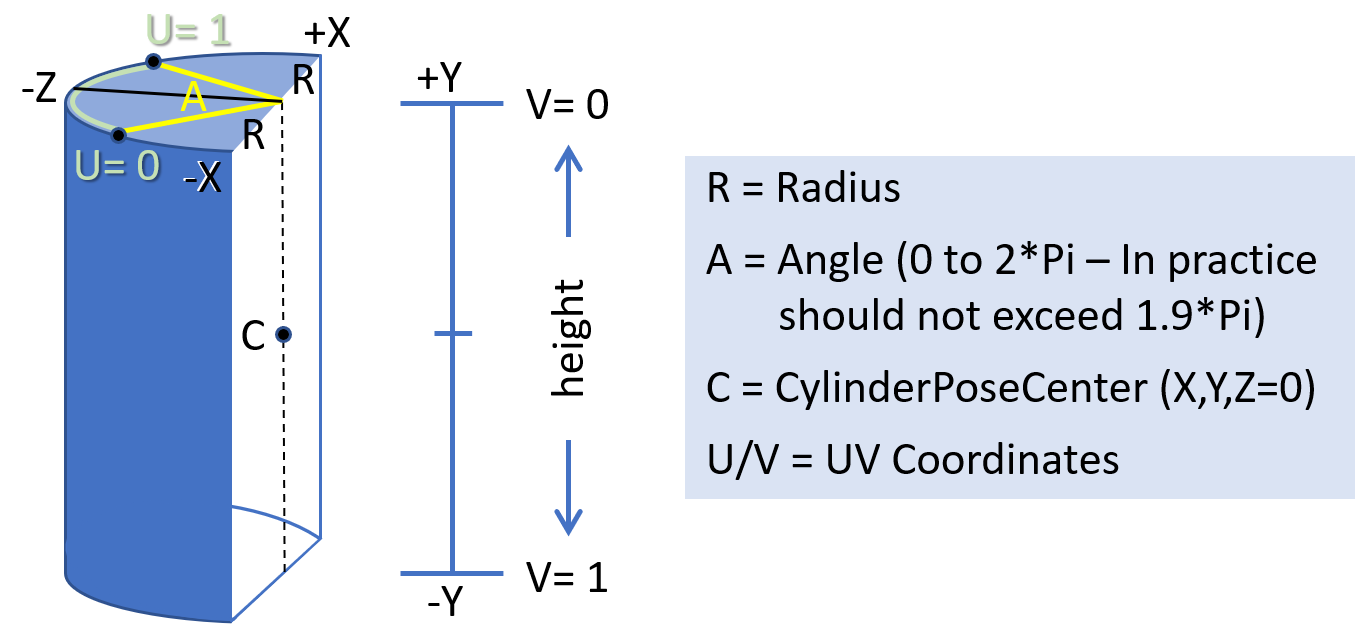
radius 속성은 cylinder의 반지름을 미터 단위로
제어합니다.
centralAngle 속성은 cylinder의 보이는 부분의
각도를 라디안 단위로 제어합니다.
이는 0 각도를 중심으로 대칭적으로 커집니다.
aspectRatio 속성은 보이는 cylinder 부분의 비율을
제어합니다. 이는 cylinder의 보이는 부분의 너비를 그 높이로 나눈 비율입니다. 너비는 radius에
centralAngle을
곱하여 계산됩니다.
XRCylinderLayerInit
init으로 XRCylinderLayer
layer를 초기화할 때, 사용자 에이전트는 다음 단계를 실행해야 합니다.
-
layer의
centralAngle를 init의centralAngle로 초기화합니다. -
layer의
aspectRatio를 init의aspectRatio로 초기화합니다. -
layer의
transform을 다음과 같이 초기화합니다.- init의
transform이 설정된 경우 - layer의
transform을 layer의 relevant realm에서 newXRRigidTransform로 두고, init의transform의position및orientation으로 초기화합니다. - 그렇지 않은 경우
- layer의
transform을 layer의 relevant realm에서 newXRRigidTransform로 두고,DOMPointInitposition{ x: 0.0, y: 0.0, z: 0.0, w: 1.0 }로 초기화합니다.
- init의
onredraw 속성은 redraw
이벤트 유형에 대한 Event handler IDL 속성입니다.
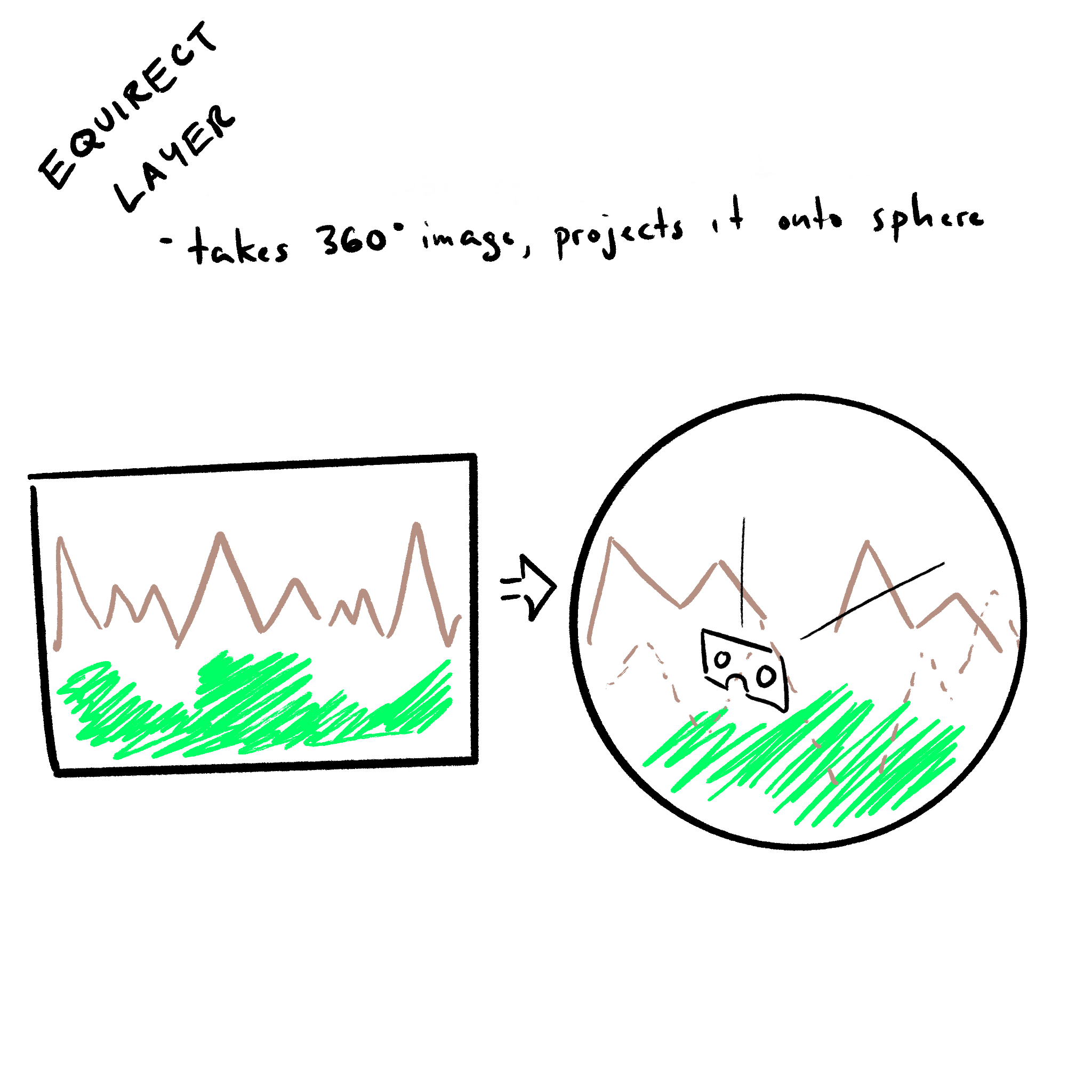
3.8. XREquirectLayer
AnXREquirectLayer
는 XR
컴포지터가 등거리 원통 도법으로 인코딩된 데이터를 구의 내부에 매핑해야 하는 레이어를
렌더링한다.
[Exposed =Window ]interface :XREquirectLayer XRCompositionLayer {attribute XRSpace ;space attribute XRRigidTransform transform ;attribute float radius ;attribute float centralHorizontalAngle ;attribute float upperVerticalAngle ;attribute float lowerVerticalAngle ; // 이벤트attribute EventHandler onredraw ; };
transform 속성은
space에
대한 상대적 오프셋과 방향을 설정하고 반환합니다.
transform
속성과 space는
사용자의 물리적 환경 내에서 레이어의 공간적 관계를 설정합니다.
radius 속성은 구의 음수가 아닌 반지름을 미터 단위로
나타냅니다. zero 또는 infinity 값은 무한한 구로 취급됩니다.
radius를
0보다 작은 값으로 설정하면 0으로 설정됩니다.
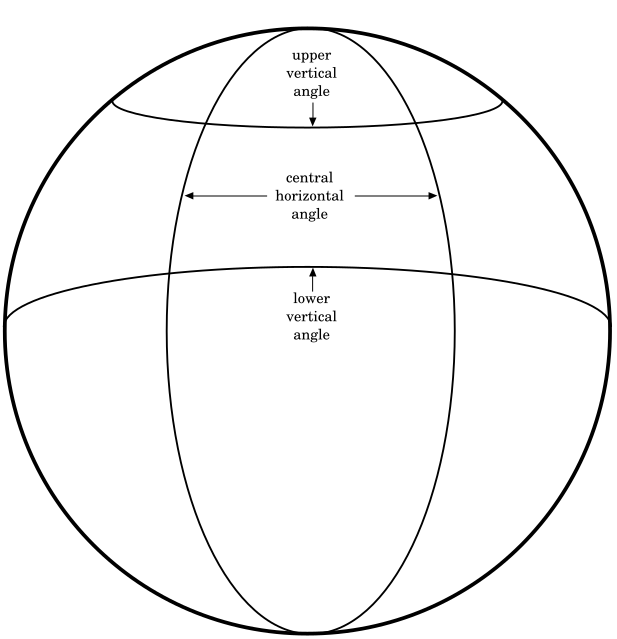
centralHorizontalAngle, upperVerticalAngle
및 lowerVerticalAngle 속성은 텍스처가 구에
매핑되는 방식을 설정하고 반환합니다.
centralHorizontalAngle을
0보다 작은 값으로 설정하면 0으로 설정되고,
2π보다 큰 값으로 설정하면 2π로 설정됩니다.
upperVerticalAngle
또는 lowerVerticalAngle을
-π/2보다 작은 값으로 설정하면
-π/2로 설정되고, π/2보다 큰 값으로 설정하면 π/2로 설정됩니다.
XRSpace를
space
속성에 할당할 때는 먼저 다음 단계를 실행합니다.
XRSpace
space 및 XREquirectLayer
layer로 setting the space on an equirect layer를 수행할 때, 사용자 에이전트는
space가 유효한지 검증하기 위해 다음 단계를 실행해야 합니다.
-
init의
space가XRReferenceSpace유형의 인스턴스가 아니면,TypeError를 throw하고 이 단계를 중단합니다. -
init의
space가"viewer"type을 가지면,TypeError를 throw하고 이 단계를 중단합니다. -
space 및 layer로 레이어의 space를 설정하는 단계를 실행합니다.
XREquirectLayerInit
init으로 XREquirectLayer
layer를 초기화할 때, 사용자 에이전트는 다음 단계를 실행해야 합니다.
-
layer의
centralHorizontalAngle를 init의centralHorizontalAngle로 초기화합니다. -
layer의
upperVerticalAngle를 init의upperVerticalAngle로 초기화합니다. -
layer의
lowerVerticalAngle를 init의lowerVerticalAngle로 초기화합니다. -
layer의
transform을 다음과 같이 초기화합니다.- init의
transform이 설정된 경우 - layer의
transform을 layer의 relevant realm에서 newXRRigidTransform로 두고, init의transform의position및orientation으로 초기화합니다. - 그렇지 않은 경우
- layer의
transform을 layer의 relevant realm에서 newXRRigidTransform로 둡니다.
- init의
onredraw 속성은 redraw
이벤트 유형에 대한 Event handler IDL 속성입니다.
3.9. XRCubeLayer
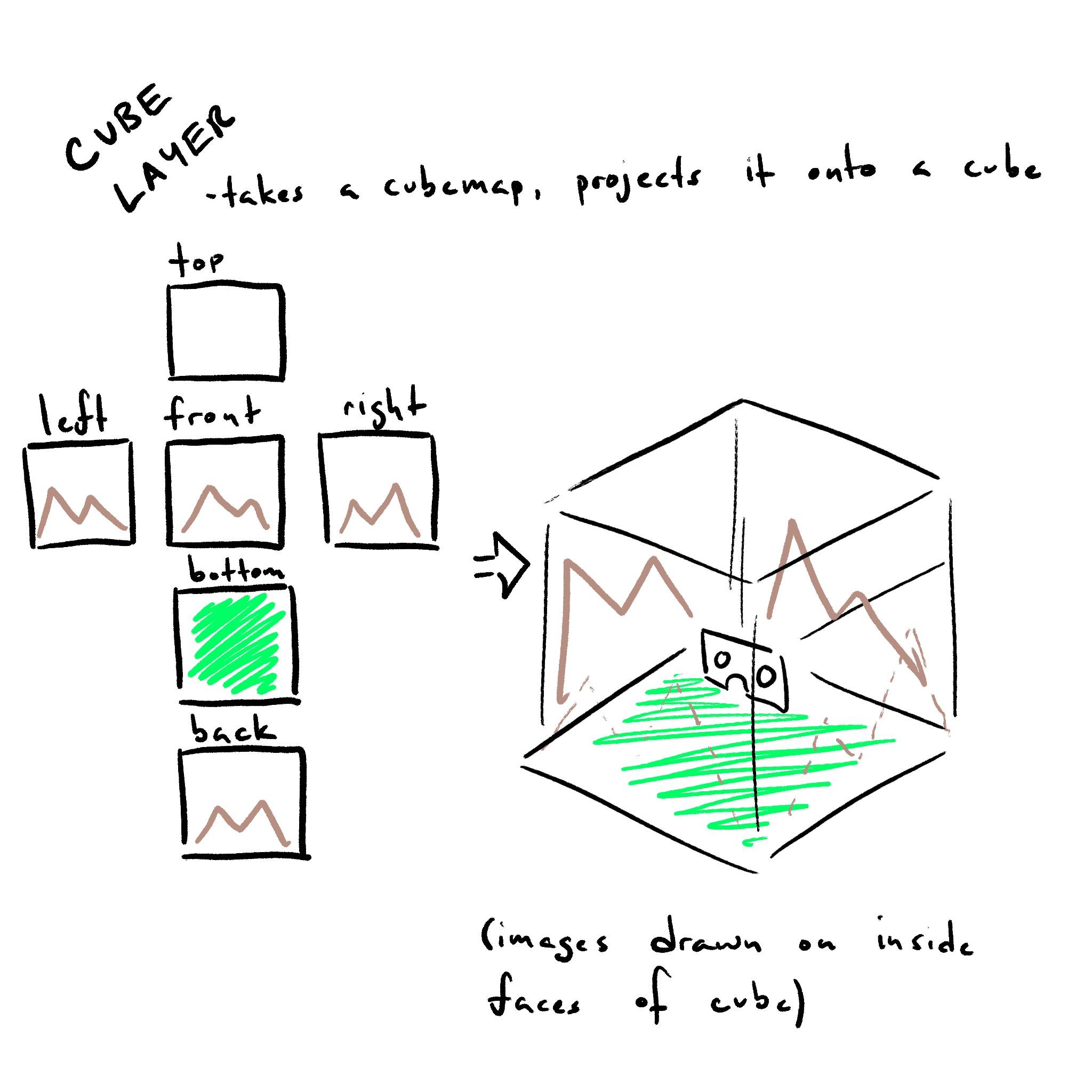
XRCubeLayer
는 XR
컴포지터가 큐브맵에서 직접 렌더링하는 레이어이다.
[Exposed =Window ]interface :XRCubeLayer XRCompositionLayer {attribute XRSpace space ;attribute DOMPointReadOnly orientation ; // 이벤트attribute EventHandler onredraw ; };
orientation 속성은
space 속성에 대한 상대적 방향을 설정하고 반환합니다.
orientation
및 space
속성은
사용자의 물리적 환경 내에서 레이어의 공간적 관계를 설정합니다.
XRCubeLayer를
배치할 때는 space의
방향만 고려됩니다. cube 레이어는 항상
시점이 중심에 있는 상태로 렌더링됩니다.
XRSpace를
space
속성에 할당할 때는 먼저 다음 단계를 실행합니다.
XRSpace
space 및 XRCubeLayer
layer로 setting the space on an cube layer를 수행할 때, 사용자 에이전트는
space가 유효한지 검증하기 위해 다음 단계를 실행해야 합니다.
-
init의
space가XRReferenceSpace유형의 인스턴스가 아니면,TypeError를 throw하고 이 단계를 중단합니다. -
init의
space가"viewer"type을 가지면,TypeError를 throw하고 이 단계를 중단합니다. -
space 및 layer로 레이어의 space를 설정하는 단계를 실행합니다.
onredraw 속성은 redraw
이벤트 유형에 대한 Event handler IDL 속성입니다.
4. 공간
XRProjectionLayer
및 XRWebGLLayer에는
관련 XRSpace가
없습니다. 이들은 전체 프레임에 렌더링하기 때문입니다.
XRCubeLayer
및 XREquirectLayer는
XRReferenceSpaces
중
"viewer"
유형이 아닌 것만 지원해야 합니다.
XRQuadLayer
및 XRCylinderLayer는
모든 XRSpace
유형을 지원해야 합니다.
일반적으로 개발자는 레이어를 안정화하기 위해 "viewer"
space를 사용하지 않는 것이 좋습니다. 이는 거의 항상 위치 또는 회전 재투영을 무력화하여, 월드에 대한 렌더링된
콘텐츠의 안정성을 잃게 하기 때문입니다.
예외는 gaze cursor나 targeting reticle과 같은 작은 UI 요소입니다.
다음은 레이어 유형과 함께 사용할 space에 대한 몇 가지 모범 사례입니다.
-
XRQuadLayerwith"viewer"space: 화면 중앙의 head-locked 고정 크기 reticle. -
XRQuadLayer또는XRCylinderLayerin"local","unbounded"space: 탄성 있는 body-locked UI. -
XRQuadLayer또는XRCylinderLayerin"local","local-floor","unbounded","bounded-floor"또는 anchor space: 사용자가 배치한 world-locked 비디오. -
XREquirectLayer또는XRCubeLayerin"local"space: 360도 비디오 또는 skybox.
5. 렌더링
5.1. XRSubImage
XRSubImage
객체는 사용할 색상 GPU 텍스처의 뷰포트를 나타낸다.
[Exposed =Window ]interface { [XRSubImage SameObject ]readonly attribute XRViewport viewport ; };
참고: 이 클래스는 향후 확장을 수용하도록 설계되었다
The viewport 특성은 하위 이미지의 색상 첨부를 렌더링할 때 사용할 XRViewport를
반환한다.
5.2. XRWebGLSubImage
XRWebGLSubImage
객체는 레이어 렌더링 중에 사용됩니다.
[Exposed =Window ]interface :XRWebGLSubImage XRSubImage { [SameObject ]readonly attribute WebGLTexture colorTexture ; [SameObject ]readonly attribute WebGLTexture ?depthStencilTexture ; [SameObject ]readonly attribute WebGLTexture ?motionVectorTexture ;readonly attribute unsigned long ?imageIndex ;readonly attribute unsigned long colorTextureWidth ;readonly attribute unsigned long colorTextureHeight ;readonly attribute unsigned long ?depthStencilTextureWidth ;readonly attribute unsigned long ?depthStencilTextureHeight ; };
colorTexture 속성은
XRCompositionLayer의
색상 불투명 텍스처를 반환한다.
viewport는
요청된 뷰에 해당하는 colorTexture의
영역을 설명한다. 이는 depthStencilTexture
또는 motionVectorTexture의
영역을 설명하지 않는다.
depthStencilTexture 속성은
XRCompositionLayer의
깊이/스텐실 불투명
텍스처를 반환한다.
레이어가 깊이/스텐실 없이 생성된 경우, 이 속성은 null을 반환한다.
motionVectorTexture 속성은
XRProjectionLayer의
모션 불투명 텍스처를
반환한다.
XRSession이
space-warp 기능
설명자 없이 생성되었거나 레이어가 XRProjectionLayer가
아닌 경우,
이 속성은 반드시 null을 반환해야 한다.
imageIndex 속성은
텍스처 배열 내의 오프셋을 반환한다. texture-array로
요청된 레이어에 대해서만 유효하다.
colorTextureWidth 및 colorTextureHeight 속성은
GL 색상 어태치먼트의 픽셀 단위 너비와 높이를 반환한다.
depthStencilTextureWidth 및 depthStencilTextureHeight
속성은
GL 깊이/스텐실 어태치먼트의 픽셀 단위 너비와 높이를 반환한다. 레이어가
깊이/스텐실 없이 생성된 경우, 이 속성들은 null을 반환한다.
5.3. XRTextureType
XRTextureType
enum은 어떤 유형의 텍스처가 할당되는지를 정의합니다.
enum {XRTextureType "texture" ,"texture-array" };
-
texture텍스처 유형은XRWebGLSubImage의 텍스처가TEXTURE_2D유형이어야 함을 나타냅니다 -
texture-array텍스처 유형은XRWebGLSubImage의 텍스처가TEXTURE_2D_ARRAY유형이어야 함을 나타냅니다
6. GPU 레이어 및 뷰 생성
6.1. 개요
레이어가 생성되면, 일반적으로 Web
플랫폼의 그래픽 API 중 하나가 제공하는 텍스처인 GPU 리소스가 그 뒤를 받친다. 레이어의 GPU 리소스를 제공하는 API를
지정하기 위해서는 해당 API에 대한 XRWebGLBinding을
생성해야 한다.
각 그래픽 API에는 레이어 생성에 컨텍스트를 사용하기 전에 충족되어야 하는 고유한 요구사항이 있을 수 있다. 예를 들어,
WebGLRenderingContext는
XRWebGLBinding
인스턴스의 생성자에 전달되기 전에 xrCompatible 플래그가 설정되어 있어야 한다.
텍스처를 할당하거나 가져오는 것과 같은, XRSession과
그래픽 API 사이의 모든 상호작용은 이 XRWebGLBinding
인스턴스를 거쳐 이루어지며, 상호작용의 정확한 메커니즘은
일반적으로 API별로 다르다. 이를 통해 나머지 WebXR API는 그래픽 API에 구애받지 않고,
향후 렌더링 기법의 발전에 더 쉽게 적응할 수 있다.
XRWebGLBinding
인스턴스를 얻으면, 이를 사용하여 다양한 XRCompositionLayer를
생성할 수 있다.
그 인스턴스가 생성한 모든 레이어는 이후
매 프레임마다 관련 GPU 리소스를 조회할 수 있으며, 일반적으로 네이티브 API의 텍스처
인터페이스일 것으로 예상된다.
다양한 레이어 타입은 XRWebGLBinding
인스턴스의 create____Layer 계열 메서드로 생성된다. 깊이 버퍼나 알파 채널을 할당할지 여부와 같이
필요한 그래픽 리소스에 관한 정보는 레이어 생성 시점에 전달되며,
레이어의 수명 동안 변경할 수 없다.
이 메서드는 관련 XRCompositionLayer 타입을 반환한다.
XRSession이
"layers" 기능
디스크립터와 함께 생성된 경우, 모든 레이어 타입을 지원해야 한다.
레이어 타입이 지원되지 않는 경우 해당 생성 메서드는 예외를 던져야 한다. XRProjectionLayer는
"layers" 기능
디스크립터와 함께 생성되었는지 여부와 관계없이, 모든 XRSession에서
지원되어야 한다.
6.2. Opaque 텍스처
When WebXR GPU 레이어를 사용할 때,XRWebGLBinding
객체는 색상 및 깊이/스텐실 어태치먼트에 대한 불투명
텍스처의 인스턴스를 반환한다.
불투명 텍스처는
다음 변경 사항을 제외하면 표준 WebGLTexture와
동일하게 동작한다:
-
불투명 텍스처는 해당 세션의
requestAnimationFrame()콜백 외부에서는 유효하지 않은 것으로 간주된다. -
불투명 텍스처는
getSubImage()또는getViewSubImage()호출에 의해 반환될 때까지 유효하지 않다. -
XR 컴포지터는 색상 어태치먼트의 불투명 텍스처에 미리 곱해진 알파가 적용된 색상이 포함되어 있다고 간주해야 한다.
-
requestAnimationFrame()콜백이 끝날 때 텍스처는 반드시 바인딩 해제되고 모든WebGLShader객체에서 분리되어야 한다. -
불투명 텍스처는 WebGL 1.0 컨텍스트를 사용하는 경우에도 적절하게 texStorage2D 또는 texStorage3D로 할당된 것처럼 동작해야 한다.
-
불투명 텍스처를 사용하여
deleteTexture를 호출하면 반드시INVALID_OPERATION오류가 발생해야 한다.
불투명 텍스처에 연결된 버퍼는 clearOnAccess가
true일 때 각 XR 애니메이션 프레임에서 getViewSubImage()
또는 getSubImage()의
첫 번째 호출을 처리하는 동안 아래 표의 값으로 지워져야 한다.
clearOnAccess가
false이면, 불투명
텍스처에 연결된 버퍼는 처음 접근될 때 지워져야 한다.
이후 프레임에서의 후속 접근에서는 버퍼를 지우지 않을 수 있다.
| 버퍼 | 초기화 값 |
|---|---|
| 색상 | (0, 0, 0, 0) |
| 깊이 | 1.0 |
| 스텐실 | 0 |
불투명 텍스처가
2개 이상의 mipLevels로
생성된 경우, 작성자는 모든 밉 레벨을 채워야 한다. 사용자 에이전트는 밉 레벨을 생성해야 한다고
가정해서는 안 된다.
참고: 불투명 텍스처는 레이어가 생성될 때
색상
텍스처 할당 및 깊이 텍스처 할당 알고리즘을 사용하여 할당된다. 이러한
사전 할당의 부수 효과로, 동일한 매개변수를 사용하여
getSubImage()
및 getViewSubImage()를
호출하면 항상 동일한 텍스처 객체가 반환된다.
참고: 불투명 텍스처의 크기 또는 형식을 변경하는 것은 허용되지 않는다. GL 명령은 텍셀 값과 텍스처 매개변수만 변경할 수 있다. 다음 명령 중 하나를 WebGLTexture와 함께 사용하면 크기 또는 형식에 영향을 주지 않더라도 INVALID_OPERATION 오류가 발생한다: TexImage*, CompressedTexImage*, CopyTexImage* 및 TexStorage*. OpenGL ES 3.0 사양의 "불변 형식 텍스처 이미지" 섹션에서는 이러한 제한 사항을 더 자세히 정의한다.
레이어의 리소스(예: 메모리) 할당은 WebGL과 동일한 메커니즘을 통해 수행되어야 한다.
XRLayer가
RGBA
또는 RGB
colorFormat으로
할당된 경우, 해당 colorTextures는
WebGLRenderingContext
컨텍스트에 RGBA
또는 RGB로
노출되어야 한다.
그러나 XR 컴포지터는 colorTextures의 픽셀을
SRGB8_ALPHA8
또는 SRGB8
colorFormat인
것처럼 처리해야 한다.
참고: 이는 XR 컴포지터가
colorTextures를 처리할 때 선형 RGBA
또는 RGB에서
어떠한 감마 변환도 수행해서는 안 된다는 의미이다. 그렇지 않으면 최종 렌더링의 픽셀이
너무 밝게 표시되어 일반적인 2D WebGLRenderingContext
컨텍스트에서의 렌더링과 일치하지 않게 된다.
6.3. XRProjectionLayerInit
TheXRProjectionLayerInit
사전은 XRProjectionLayer가
초기화되는 방식을 설명하는 구성 가능한 값의 집합을 나타낸다.
dictionary {XRProjectionLayerInit XRTextureType textureType = "texture";GLenum colorFormat = 0x1908; // RGBAGLenum depthFormat = 0x1902; // DEPTH_COMPONENTdouble scaleFactor = 1.0;boolean clearOnAccess =true ; };
textureType 속성은
레이어가 갖게 될 텍스처 유형을 정의한다.
colorFormat 속성은
색상 텍스처 데이터의 데이터 유형을 정의한다.
다음은 XR 컴포지터가 반드시 지원해야 하는 프로젝션 레이어의 색상 형식 목록이다:
WebGL2 컨텍스트에서는 다음 추가 형식이 지원된다:
depthFormat 속성은
깊이 텍스처 데이터의 데이터 유형을 정의한다.
depthFormat이
0이면 레이어는 깊이/스텐실 텍스처를 제공하지 않는다.
다음은 XR 컴포지터가 반드시 지원해야 하는 프로젝션 레이어의 깊이 형식 목록이다:
'WEBGL_depth_texture'
확장이 활성화된 WebGLRenderingContext
컨텍스트 또는 WebGL2 컨텍스트의 경우:
확장이 활성화되지 않은 경우, 깊이 텍스처 요청은 무시된다.
참고: 작성자는 깊이 텍스처를 예상할 수 있으므로 혼란스러울 수 있다. 가능하면 텍스처가 생성되지 않은 이유와 함께 경고를 제공한다.
WebGL2RenderingContext
컨텍스트에서는 다음 추가 형식이 지원된다:
scaleFactor 속성은
레이어 어태치먼트의 해상도를 결정할 때 session의
권장 WebGL 프레임버퍼 해상도에 반드시
곱해야 하는 값을 정의한다.
clearOnAccess 속성은
이 레이어와 연결된 텍스처를 초기 프레임에서 지울지 또는 모든 프레임에서 지울지를 정의한다.
참고: XRProjectionLayerInit
사전은
XRLayerInit처럼
mipLevels를
구성하는 기능을 지원하지 않는다.
사용자 에이전트가 프로젝션 레이어에서 밉매핑을 지원하려는 경우, 밉을 포함하여 텍스처를 자유롭게 할당할 수 있다.
이 경우 모든 밉 레벨을 생성하는 책임은 작성자가 아니라 사용자 에이전트에 있다.
6.4. XRLayerInit
XRLayerInit
dictionary는 XRQuadLayer,
XRCylinderLayer,
XREquirectLayer
및 XRCubeLayer에
대한 공통 구성 가능 값의 집합을 나타냅니다.
dictionary {XRLayerInit required XRSpace space ;XRTextureType textureType = "texture";GLenum colorFormat = 0x1908; // RGBAGLenum ?depthFormat ;unsigned long mipLevels = 1;required unsigned long viewPixelWidth ;required unsigned long viewPixelHeight ;XRLayerLayout layout = "mono";boolean =isStatic false ;boolean clearOnAccess =true ; };
space 속성은 사용자의 물리적 환경과의 공간적 관계를
정의합니다.
textureType 속성은 레이어 텍스처의 유형을
정의합니다. XR Compositor는 다음을 지원해야 합니다.
WebGL2RenderingContext의
경우 다음 추가 유형이 지원됩니다.
colorFormat 속성은
color texture 데이터의 데이터 유형을 정의합니다.
다음은 XR Compositor가 지원해야 하는 non-projection 레이어의 color format 목록입니다.
-
SRGB_ALPHA_EXT'EXT_sRGB' extension이 활성화된 context용
WebGL2 context의 경우 다음 추가 형식이 지원됩니다.
'WEBGL_compressed_texture_etc'
extension이 활성화된 context의 경우 다음 추가 형식이 지원됩니다.
'WEBGL_compressed_texture_astc'
extension이 활성화된 context의 경우 해당 extension의 모든 형식이 지원됩니다.
depthFormat 속성은
depth texture 데이터의 데이터 유형을 정의합니다.
depthFormat이
제공되지 않으면 레이어는 depth/stencil texture를 제공하지 않습니다.
다음은 XR Compositor가 지원해야 하는 non-projection 레이어의 depth format 목록입니다.
'WEBGL_depth_texture'
extension이 활성화된 WebGLRenderingContext
context 또는 WebGL2 context의 경우:
WebGL2RenderingContext
context의 경우 다음 추가 형식이 지원됩니다.
mipLevels 속성은 color 및 texture 데이터에서 원하는
mip 레벨 수를 정의합니다.
사용자 에이전트가 요청된 수를 생성할 수 없는 경우 더 적게 생성할 수 있습니다. 작성자는 실제 mip 레벨 수를 확인하기 위해
mipLevels를
질의해야 합니다.
viewPixelWidth 및 viewPixelHeight 속성은
XRCompositionLayer의
직사각형 치수를 정의합니다.
layout 속성은 레이어의 레이아웃을 정의합니다.
clearOnAccess 속성은 이 레이어와 관련된 texture가
초기 프레임에서 지워져야 하는지, 또는 매 프레임마다 지워져야 하는지를 정의합니다.
6.5. XRQuadLayerInit
XRQuadLayerInit
dictionary는 XRQuadLayer가
어떻게 초기화되는지를 설명하는 구성 가능한 값의 집합을 나타냅니다.
dictionary :XRQuadLayerInit XRLayerInit {XRRigidTransform ?;transform float = 1.0;width float = 1.0; };height
6.6. XRCylinderLayerInit
XRCylinderLayerInit
dictionary는 XRCylinderLayer가
어떻게 초기화되는지를 설명하는 구성 가능한 값의 집합을 나타냅니다.
dictionary :XRCylinderLayerInit XRLayerInit {XRRigidTransform ?;transform float = 2.0;radius float = 0.78539;centralAngle float = 2.0; };aspectRatio
centralAngle의
기본값은 π / 4입니다.
6.7. XREquirectLayerInit
XREquirectLayerInit
dictionary는 XREquirectLayer가
어떻게 초기화되는지를 설명하는 구성 가능한 값의 집합을 나타냅니다.
dictionary :XREquirectLayerInit XRLayerInit {XRRigidTransform ?;transform float = 0;radius float = 6.28318;centralHorizontalAngle float = 1.570795;upperVerticalAngle float = -1.570795; };lowerVerticalAngle
centralHorizontalAngle의
기본값은 2π입니다.
upperVerticalAngle의
기본값은 π/2입니다.
lowerVerticalAngle의
기본값은 -π/2입니다.
6.8. XRCubeLayerInit
XRCubeLayerInit
dictionary는 XRCubeLayer가
어떻게 초기화되는지를 설명하는 구성 가능한 값의 집합을 나타냅니다.
dictionary :XRCubeLayerInit XRLayerInit {DOMPointReadOnly ?; };orientation
6.9. XRWebGLBinding
XRWebGLBinding
객체는 GPU 백엔드를 가지는 레이어를 생성하는 데 사용됩니다.
[Exposed =Window ]interface {XRWebGLBinding constructor (XRSession ,session XRWebGLRenderingContext );context readonly attribute double nativeProjectionScaleFactor ;readonly attribute boolean usesDepthValues ;XRProjectionLayer createProjectionLayer (optional XRProjectionLayerInit = {});init XRQuadLayer createQuadLayer (optional XRQuadLayerInit = {});init XRCylinderLayer createCylinderLayer (optional XRCylinderLayerInit = {});init XREquirectLayer createEquirectLayer (optional XREquirectLayerInit = {});init XRCubeLayer createCubeLayer (optional XRCubeLayerInit = {});init XRWebGLSubImage getSubImage (XRCompositionLayer ,layer XRFrame ,frame optional XREye = "none");eye XRWebGLSubImage getViewSubImage (XRProjectionLayer ,layer XRView );view undefined foveateBoundTexture (GLenum ,target float ); };fixed_foveation
init 사전은 선택 사항이어서는 안 된다. 이는 Bikeshed 이슈 1566이다.
각 XRWebGLBinding에는
XRWebGLRenderingContext
유형의 context 객체가 있으며, 이는
WebGLRenderingContext
또는 WebGL2RenderingContext의
인스턴스이다.
각 XRWebGLBinding에는
연결된 session이 있으며, 이는 해당 객체가 생성될 때 사용된
XRSession이다.
각 XRWebGLBinding에는
foveateBoundTexture를
호출할 때
지정된 대상에 바인딩되어 있던 텍스처에 대한 약한 참조를 보관하는 내부 WeakSet
foveatedTextures가 있다.
참고: 둘 이상의 XRWebGLBinding을
생성할 수 있다.
XRWebGLBinding의
인스턴스로 생성된 모든 레이어는
두 인스턴스가 동일한 session과 동일한
context로
생성되었다면
다른 XRWebGLBinding
인스턴스와 함께
사용할 수 있다. 레이어 또는 XRWebGLSubImage
인스턴스의 수명은 이를 생성한 XRWebGLBinding의
수명과 연결되어 있지 않다.
XRWebGLBinding을
통해
생성된 각 XRCompositionLayer에는
색상 텍스처용 WebGLTextures의
array인 내부 colorTextures 배열,
깊이/스텐실 텍스처용 불투명 텍스처의
array인 내부 depthStencilTextures,
그리고 모션 텍스처용 불투명 텍스처의
array인
내부 motionVectorTextures가 있다.
XRWebGLBinding을
통해
생성된 각 XRProjectionLayer에는
색상 텍스처용 불투명 텍스처의
array인 내부 보조 뷰용 colorTextures
배열과, 보조 뷰를 렌더링하는 데 사용되는 깊이/스텐실 텍스처용 불투명 텍스처의 array인 내부 보조 뷰용 depthStencilTextures
배열이 있다.
XRWebGLBinding(session, context)
생성자는
호출될 때 반드시 다음 단계를 수행해야 한다:
-
binding을 session의 관련 Realm에 있는 새
XRWebGLBinding으로 설정한다. -
session의
ended값이true이면,InvalidStateError를 발생시키고 이 단계들을 중단한다. -
context가 손실된 경우,
InvalidStateError를 발생시키고 이 단계들을 중단한다. -
session이 몰입형 세션이 아니면,
InvalidStateError를 발생시키고 이 단계들을 중단한다. -
context의 XR 호환 불리언이
false이면,InvalidStateError를 발생시키고 이 단계들을 중단한다. -
binding의 context를 context로 초기화한다.
-
binding의 session을 session으로 초기화한다.
-
binding을 session의 bindings에 추가한다.
-
binding을 반환한다.
nativeProjectionScaleFactor
함수는 session의 권장 WebGL 프레임버퍼 해상도에
곱하여 session의 네이티브 WebGL 프레임버퍼 해상도를 얻는
값을 반환한다.
크기로 인해 레이아웃이
변경되는 경우의 특수한 사용자 에이전트 동작(예: "stereo-left-right"에서
요청된 너비가 제한을 초과하는 경우)
usesDepthValues 속성이
false이면 깊이 버퍼 어태치먼트가 있더라도
XR
컴포지터가 해당 값을 사용해서는 안 됨을 나타낸다. 속성이
true이면 깊이 버퍼 어태치먼트의 내용이
XR
컴포지터에 의해 사용되며 레이어에 렌더링된 장면을 나타내는 것으로 예상됨을 나타낸다.
XRTextureType
textureType, XRWebGLRenderingContext
context, 그리고 XRLayerLayout
layout을 사용하여 layout 속성을 결정하려면, 사용자 에이전트는 반드시 다음 단계를 실행해야 한다:
-
context가
WebGL2RenderingContext가 아니고 textureType이"texture-array"이면,TypeError를 발생시키고 이 단계들을 중단한다. -
textureType이
"texture-array"이고 뷰 목록에 있는 세션의 모든 뷰가 동일한 권장 WebGL 색상 텍스처 해상도를 갖지 않는 경우,NotSupportedError를 발생시키고 이 단계들을 중단한다. -
layout이
"mono"이면, layout을 반환하고 이 단계들을 중단한다. -
layout이
"default"이면, 다음 단계를 실행한다:-
textureType이
"texture-array"이면, layout을 반환하고 이 단계들을 중단한다.
-
layout이
"default"또는"stereo"이고 textureType이"texture"이면, 다음 단계를 실행한다:-
사용자 에이전트가
"stereo-left-right"레이아웃을 선호하면,"stereo-left-right"를 반환하고 이 단계들을 중단한다. -
사용자 에이전트가
"stereo-top-bottom"레이아웃을 선호하면,"stereo-top-bottom"을 반환하고 이 단계들을 중단한다.
-
-
layout을 반환한다.
XRSession
session, XRWebGLRenderingContext
context, 그리고 XRLayerLayout
layout을 사용하여 최대 scaleFactor를 결정하려면, 사용자 에이전트는 반드시 다음 단계를 실행해야 한다:
-
largest width를 session의 뷰 목록에서 보조 뷰를 제외한 각 뷰의 권장 WebGL 색상 텍스처 해상도 중 가장 큰 너비로 설정한다.
-
largest height를 session의 뷰 목록에서 보조 뷰를 제외한 각 뷰의 권장 WebGL 색상 텍스처 해상도 중 가장 큰 높이로 설정한다.
-
layout이
"stereo-left-right"레이아웃이면, largest width에2를 곱한다. -
layout이
"stereo-top-bottom"레이아웃이면, largest height에2를 곱한다. -
largest view dimension을 largest width와 largest height 중 더 큰 값으로 설정한다.
-
largest texture dimension을 context가 생성한
WebGLTexture의 최대 치수로 설정한다. -
largest texture dimension을 largest view dimension으로 나눈 값을 반환한다.
XRProjectionLayer
layer, XRTextureType
textureType, GLenum
textureFormat, 그리고 float scaleFactor를 사용하여 프로젝션 레이어용 색상
텍스처를
할당하려면, 사용자 에이전트는 반드시 다음 단계를 실행해야 한다:
-
context를 layer의 context로 설정한다.
-
session을 layer의 session으로 설정한다.
-
width를 view의 권장 WebGL 색상 텍스처 해상도의 너비에 scaleFactor를 곱한 값으로 설정한다.
-
height를 view의 권장 WebGL 색상 텍스처 해상도의 높이에 scaleFactor를 곱한 값으로 설정한다.
-
textureFormat이 프로젝션 레이어의 색상 형식 목록에 없으면,
NotSupportedError를 발생시키고 이 단계들을 중단한다. -
layer의
layout이"mono"또는"default"이면:- textureType이
"texture-array"인 경우: - 뷰 목록에 있는 세션의 뷰가 보조 뷰를 제외하고 모두 동일한 권장 WebGL 색상 텍스처
해상도를 갖지 않으면,
NotSupportedError를 발생시키고 이 단계들을 중단한다.- array를 context의 관련 Realm에 있는 새 불투명 텍스처 인스턴스 1개로 초기화한다. 이 텍스처는 context, textureFormat, width, height를 사용하여 numViews개의 레이어가 있는
TEXTURE_2D_ARRAY텍스처로 생성된다.- 어떤 이유로든 불투명 텍스처를 생성할 수 없으면,
OperationError를 발생시키고 이 단계들을 중단한다.- array를 반환하고 이 단계들을 중단한다.
- array를 context의 관련 Realm에 있는 새 불투명 텍스처 인스턴스 1개로 초기화한다. 이 텍스처는 context, textureFormat, width, height를 사용하여 numViews개의 레이어가 있는
- 그 외의 경우
-
session의 뷰 목록에 있는 각 view에 대해:
-
view가 보조 뷰이면 계속한다.
-
width를 view의 권장 WebGL 색상 텍스처 해상도의 너비에 scaleFactor를 곱한 값으로 설정한다.
-
height를 view의 권장 WebGL 색상 텍스처 해상도의 높이에 scaleFactor를 곱한 값으로 설정한다.
-
texture를 context의 관련 Realm에 있는 새 불투명 텍스처 인스턴스로 설정한다. 이는 context, textureFormat, width, height를 사용하여
TEXTURE_2D텍스처로 생성된다. -
어떤 이유로든 texture를 생성할 수 없으면,
OperationError를 발생시키고 이 단계들을 중단한다. -
texture를 array에 추가한다.
- array를 반환하고 이 단계들을 중단한다.
-
- textureType이
-
뷰 목록에 있는 세션의 뷰가 보조 뷰를 제외하고 모두 동일한 권장 WebGL 색상 텍스처 해상도를 갖지 않으면,
NotSupportedError를 발생시키고 이 단계들을 중단한다. -
layer의
layout이stereo-left-right이면, array를 context의 관련 Realm에 있는 새 불투명 텍스처 인스턴스 1개로 초기화한다. 이 텍스처는 context, textureFormat, numViews에 width를 곱한 값, 그리고 height를 사용하여 textureType 텍스처로 생성된다. -
layer의
layout이stereo-top-bottom이면, array를 context의 관련 Realm에 있는 새 불투명 텍스처 인스턴스 1개로 초기화한다. 이 텍스처는 context, textureFormat, width, 그리고 numViews에 height를 곱한 값을 사용하여 textureType 텍스처로 생성된다. -
어떤 이유로든 불투명 텍스처를 생성할 수 없으면,
OperationError를 발생시키고 이 단계들을 중단한다. -
array를 반환한다.
XRProjectionLayer
layer, XRTextureType
textureType, GLenum
textureFormat, 그리고 float scaleFactor를 사용하여 프로젝션 레이어용 깊이
텍스처를
할당하려면, 사용자 에이전트는 반드시 다음 단계를 실행해야 한다:
-
context를 layer의 context로 설정한다.
-
session을 layer의 session으로 설정한다.
-
textureFormat이
0이면, array를 반환하고 이 단계들을 중단한다. -
context가
WebGLRenderingContext이고WEBGL_depth_texture확장이 context에서 활성화되어 있지 않으면, array를 반환하고 이 단계들을 중단한다. -
textureFormat이 프로젝션 레이어의 깊이 형식 목록에 없으면,
NotSupportedError를 발생시키고 이 단계들을 중단한다. -
recommendedDepthResolution을 view의 권장 WebGL 깊이 텍스처 해상도로 설정한다.
-
session이 "space-warp" 기능 설명자와 함께 생성되었다면, recommendedDepthResolution을 view의 권장 모션 벡터 텍스처 해상도로 설정한다.
-
width를 recommendedDepthResolution의 너비에 scaleFactor를 곱한 값으로 설정한다.
-
height를 recommendedDepthResolution의 높이에 scaleFactor를 곱한 값으로 설정한다.
-
layer의
layout이"mono"또는"default"이면:- textureType이
"texture-array"인 경우: - array를 context의 관련 Realm에 있는 새 불투명
텍스처 인스턴스 1개로 초기화한다. 이는 context, textureFormat,
stencil, width, height를 사용하여
numViews개의 레이어를 가진
TEXTURE_2D_ARRAY텍스처로 생성된다.- 어떤 이유로든 불투명 텍스처를 생성할 수 없으면,
OperationError를 발생시키고 이 단계들을 중단한다.- array를 반환하고 이 단계들을 중단한다.
- 어떤 이유로든 불투명 텍스처를 생성할 수 없으면,
- 그 외의 경우
-
session의 뷰 목록에 있는 각 view에 대해:
-
view가 보조 뷰이면 계속한다.
-
recommendedDepthResolution을 view의 권장 WebGL 깊이 텍스처 해상도로 설정한다.
-
session이 "space-warp" 기능 설명자와 함께 생성되었다면, recommendedDepthResolution을 view의 권장 모션 벡터 텍스처 해상도로 설정한다.
-
width를 recommendedDepthResolution의 너비에 scaleFactor를 곱한 값으로 설정한다.
-
height를 recommendedDepthResolution의 높이에 scaleFactor를 곱한 값으로 설정한다.
-
texture를 context의 관련 Realm에 있는 새 불투명 텍스처 인스턴스로 설정한다. 이는 context, textureFormat, stencil, width, height를 사용하여
TEXTURE_2D텍스처로 생성된다. -
어떤 이유로든 texture를 생성할 수 없으면,
OperationError를 발생시키고 이 단계들을 중단한다. -
texture를 array에 추가한다.
- array를 반환하고 이 단계들을 중단한다.
-
- textureType이
-
session이 "space-warp" 기능 설명자와 함께 생성되었고, 뷰 목록에 있는 세션의 뷰가 보조 뷰를 제외하고 모두 동일한 권장 모션 벡터 텍스처 해상도를 갖지 않으면,
NotSupportedError를 발생시키고 이 단계들을 중단한다. -
session이 "space-warp" 기능 설명자와 함께 생성되지 않았고, 뷰 목록에 있는 세션의 뷰가 보조 뷰를 제외하고 모두 동일한 권장 WebGL 깊이 텍스처 해상도를 갖지 않으면,
NotSupportedError를 발생시키고 이 단계들을 중단한다. -
layer의
layout이stereo-left-right이면, array를 context의 관련 Realm에 있는 새 불투명 텍스처 인스턴스 1개로 초기화한다. 이 텍스처는 context, textureFormat, stencil, numViews에 width를 곱한 값, 그리고 height를 사용하여 textureType 텍스처로 생성된다. -
layer의
layout이stereo-top-bottom이면, array를 context의 관련 Realm에 있는 새 불투명 텍스처 인스턴스 1개로 초기화한다. 이 텍스처는 context, textureFormat, stencil, width, 그리고 numViews에 height를 곱한 값을 사용하여 textureType 텍스처로 생성된다. -
어떤 이유로든 불투명 텍스처를 생성할 수 없으면,
OperationError를 발생시키고 이 단계들을 중단한다. -
array를 반환한다.
XRProjectionLayer
layer, XRTextureType
textureType, 그리고 float scaleFactor를 사용하여 프로젝션
레이어용 모션 벡터 텍스처를
할당하려면, 사용자 에이전트는 반드시 다음 단계를 실행해야 한다:
-
context를 layer의 context로 설정한다.
-
session을 layer의 session으로 설정한다.
-
session이 "space-warp" 기능 설명자와 함께 생성되지 않았다면, array를 반환하고 이 단계들을 중단한다.
-
context가
WebGLRenderingContext이고WEBGL_depth_texture확장이 context에서 활성화되어 있지 않으면, array를 반환하고 이 단계들을 중단한다. -
width를 view의 권장 모션 벡터 텍스처 해상도의 너비에 scaleFactor를 곱한 값으로 설정한다.
-
height를 view의 권장 모션 벡터 텍스처 해상도의 높이에 scaleFactor를 곱한 값으로 설정한다.
-
layer의
layout이"mono"또는"default"이면:- textureType이
"texture-array"인 경우: - array를 context의 관련 Realm에 있는 새 불투명
텍스처 인스턴스 1개로 초기화한다. 이는 context,
RGBA16F, width, height를 사용하여 numViews개의 레이어를 가진TEXTURE_2D_ARRAY텍스처로 생성된다.- 어떤 이유로든 불투명 텍스처를 생성할 수 없으면,
OperationError를 발생시키고 이 단계들을 중단한다.- array를 반환하고 이 단계들을 중단한다.
- 어떤 이유로든 불투명 텍스처를 생성할 수 없으면,
- 그 외의 경우
-
session의 뷰 목록에 있는 각 view에 대해:
-
view가 보조 뷰이면 계속한다.
-
width를 view의 권장 모션 벡터 텍스처 해상도의 너비에 scaleFactor를 곱한 값으로 설정한다.
-
height를 view의 권장 모션 벡터 텍스처 해상도의 높이에 scaleFactor를 곱한 값으로 설정한다.
-
texture를 context의 관련 Realm에 있는 새 불투명 텍스처 인스턴스로 설정한다. 이는 context,
RGBA16F, width, height를 사용하여TEXTURE_2D텍스처로 생성된다. -
어떤 이유로든 texture를 생성할 수 없으면,
OperationError를 발생시키고 이 단계들을 중단한다. -
texture를 array에 추가한다.
- array를 반환하고 이 단계들을 중단한다.
-
- textureType이
-
뷰 목록에 있는 세션의 뷰가 보조 뷰를 제외하고 모두 동일한 권장 모션 벡터 텍스처 해상도를 갖지 않으면,
NotSupportedError를 발생시키고 이 단계들을 중단한다. -
layer의
layout이stereo-left-right이면, array를 context의 관련 Realm에 있는 새 불투명 텍스처 인스턴스 1개로 초기화한다. 이는 context,RGBA16F, numViews에 width를 곱한 값과 height를 사용하여 textureType 텍스처로 생성된다. -
layer의
layout이stereo-top-bottom이면, array를 context의 관련 Realm에 있는 새 불투명 텍스처 인스턴스 1개로 초기화한다. 이는 context,RGBA16F, width와 numViews에 height를 곱한 값을 사용하여 textureType 텍스처로 생성된다. -
어떤 이유로든 불투명 텍스처를 생성할 수 없으면,
OperationError를 발생시키고 이 단계들을 중단한다. -
array를 반환한다.
XRProjectionLayer
layer, XRTextureType
textureType, GLenum
textureFormat, 그리고 float scaleFactor를 사용하여 보조 뷰용 색상
텍스처를
할당하려면, 사용자 에이전트는 반드시 다음 단계를 실행해야 한다:
-
context를 layer의 context로 설정한다.
-
session을 layer의 session으로 설정한다.
-
textureFormat이 프로젝션 레이어의 색상 형식 목록에 없으면,
NotSupportedError를 발생시키고 이 단계들을 중단한다. -
session의 뷰 목록에 있는 각 view에 대해:
-
view가 보조 뷰가 아니면 계속한다.
-
width를 view의 권장 WebGL 색상 텍스처 해상도의 너비에 scaleFactor를 곱한 값으로 설정한다.
-
height를 view의 권장 WebGL 색상 텍스처 해상도의 높이에 scaleFactor를 곱한 값으로 설정한다.
-
texture를 다음과 같이 초기화한다:
- textureType이
"texture-array"인 경우: - texture를 context의 관련 Realm에 있는 새 불투명
텍스처 인스턴스로 설정한다. 이는
context, textureFormat, width,
height를 사용하여
TEXTURE_2D_ARRAY텍스처로 생성된다. - 그 외의 경우
- texture를 context의 관련 Realm에 있는 새 불투명
텍스처 인스턴스로 설정한다. 이는
context, textureFormat, width,
height를 사용하여
TEXTURE_2D텍스처로 생성된다.
- textureType이
-
어떤 이유로든 texture를 생성할 수 없으면,
OperationError를 발생시키고 이 단계들을 중단한다. -
texture를 array에 추가한다.
-
-
array를 반환하고 이 단계들을 중단한다.
XRProjectionLayer
layer, XRTextureType
textureType, GLenum
textureFormat, 그리고 float scaleFactor를 사용하여 보조 뷰용 깊이
텍스처를
할당하려면, 사용자 에이전트는 반드시 다음 단계를 실행해야 한다:
-
context를 layer의 context로 설정한다.
-
session을 layer의 session으로 설정한다.
-
textureFormat이
0이면, array를 반환하고 이 단계들을 중단한다. -
context가
WebGLRenderingContext이고WEBGL_depth_texture확장이 context에서 활성화되어 있지 않으면, array를 반환하고 이 단계들을 중단한다. -
textureFormat이 프로젝션 레이어의 깊이 형식 목록에 없으면,
NotSupportedError를 발생시키고 이 단계들을 중단한다. -
session의 뷰 목록에 있는 각 view에 대해:
-
view가 보조 뷰가 아니면 계속한다.
-
width를 view의 권장 WebGL 깊이 텍스처 해상도의 너비에 scaleFactor를 곱한 값으로 설정한다.
-
height를 view의 권장 WebGL 깊이 텍스처 해상도의 높이에 scaleFactor를 곱한 값으로 설정한다.
-
texture를 다음과 같이 초기화한다:
- textureType이
"texture-array"인 경우: - texture를 context의 관련 Realm에 있는 새 불투명
텍스처 인스턴스로 설정한다.
이는 context, textureFormat, stencil,
width, height를 사용하여
TEXTURE_2D_ARRAY텍스처로 생성된다. - 그 외의 경우
- texture를 context의 관련 Realm에 있는 새 불투명
텍스처 인스턴스로 설정한다.
이는 context, textureFormat, stencil,
width, height를 사용하여
TEXTURE_2D텍스처로 생성된다.
- textureType이
-
texture를 array에 추가한다.
-
-
array를 반환하고 이 단계들을 중단한다.
보조 뷰에 대해 scaleFactor를 다시 계산해야 한다.
XRCompositionLayer
layer, XRTextureType
textureType, 그리고 XRLayerInit
init을 사용하여 색상
텍스처를 할당하려면, 사용자 에이전트는 반드시 다음 단계를 실행해야 한다:
-
context를 layer의 context로 설정한다.
-
init의
colorFormat이 비프로젝션 레이어의 색상 형식 목록에 없으면,NotSupportedError를 발생시키고 이 단계들을 중단한다. -
init의
mipLevels가1보다 작으면,InvalidStateError를 발생시키고 이 단계들을 중단한다. -
init의
mipLevels가1보다 크고viewPixelWidth및viewPixelHeight가2의 거듭제곱이 아니면,InvalidStateError를 발생시키고 이 단계들을 중단한다 -
- textureType이
"texture-array"인 경우: - array를 이 context의 관련 Realm에 있는 새 불투명
텍스처 인스턴스 1개로 초기화한다. 이는 context와 init의
colorFormat,mipLevels,viewPixelWidth및viewPixelHeight값을 사용하여 내부 텍스처 1개가 있는TEXTURE_2D_ARRAY텍스처로 생성된다. - 그 외의 경우
- array를 context의 관련 Realm에 있는 새 불투명
텍스처 인스턴스 1개로 초기화한다. 이는 context와 init의
colorFormat,mipLevels,viewPixelWidth및viewPixelHeight값을 사용하여TEXTURE_2D텍스처로 생성된다.
- textureType이
-
- textureType이
"texture-array"인 경우: - array를 context의 관련 Realm에 있는 새 불투명
텍스처 인스턴스 1개로 초기화한다. 이는 context와 init의
colorFormat,mipLevels,viewPixelWidth및viewPixelHeight값을 사용하여 2개의 레이어가 있는TEXTURE_2D_ARRAY텍스처로 생성된다.- array를 반환하고 이 단계들을 중단한다.
- 그 외의 경우
- array를 context의 관련 Realm에 있는 새 불투명
텍스처 인스턴스 2개로 초기화한다. 이는 context와 init의
colorFormat,mipLevels,viewPixelWidth및viewPixelHeight값을 사용하여TEXTURE_2D텍스처로 생성된다.- array를 반환하고 이 단계들을 중단한다.
- textureType이
-
layer의
layout이stereo-left-right이면, array를 context의 관련 Realm에 있는 새 불투명 텍스처 인스턴스 1개로 초기화한다. 이는 context와 init의colorFormat,mipLevels,viewPixelWidth의 두 배 및viewPixelHeight값을 사용하여 textureType 텍스처로 생성된다. -
layer의
layout이stereo-top-bottom이면, array를 context의 관련 Realm에 있는 새 불투명 텍스처 인스턴스 1개로 초기화한다. 이는 context와 init의colorFormat,mipLevels,viewPixelWidth및viewPixelHeight의 두 배 값을 사용하여 textureType 텍스처로 생성된다. -
array를 반환한다.
XRCompositionLayer
layer, XRTextureType
textureType, 그리고 XRLayerInit
init을 사용하여 깊이
텍스처를 할당하려면, 사용자 에이전트는 반드시 다음 단계를 실행해야 한다:
-
context를 layer의 context로 설정한다.
-
init의
depthFormat이 설정되지 않았으면, array를 반환하고 이 단계들을 중단한다. -
init의
depthFormat이 비프로젝션 레이어의 깊이 형식 목록에 없으면,NotSupportedError를 발생시키고 이 단계들을 중단한다. -
init의
mipLevels가1보다 작으면,InvalidStateError를 발생시키고 이 단계들을 중단한다. -
init의
mipLevels가1보다 크고viewPixelWidth및viewPixelHeight가2의 거듭제곱이 아니면,InvalidStateError를 발생시키고 이 단계들을 중단한다. -
- textureType이
"texture-array"인 경우: - array를 context의 관련 Realm에 있는 새 불투명
텍스처 인스턴스 1개로 초기화한다. 이는 context와 init의
depthFormat,mipLevels,viewPixelWidth및viewPixelHeight값을 사용하여 내부 텍스처 1개가 있는TEXTURE_2D_ARRAY텍스처로 생성된다. - 그 외의 경우
- array를 context의 관련 Realm에 있는 새 불투명
텍스처 인스턴스 1개로 초기화한다. 이는 context와 init의
depthFormat,mipLevels,viewPixelWidth및viewPixelHeight값을 사용하여TEXTURE_2D텍스처로 생성된다.
- textureType이
-
- textureType이
"texture-array"인 경우: - array를 context의 관련 Realm에 있는 새 불투명
텍스처 인스턴스 1개로 초기화한다. 이는 context와 init의
depthFormat,mipLevels,viewPixelWidth및viewPixelHeight값을 사용하여 2개의 레이어가 있는TEXTURE_2D_ARRAY텍스처로 생성된다.- array를 반환하고 이 단계들을 중단한다.
- 그 외의 경우
- array를 context의 관련 Realm에 있는 새 불투명
텍스처 인스턴스 2개로 초기화한다. 이는 context와 init의
depthFormat,mipLevels,viewPixelWidth및viewPixelHeight값을 사용하여TEXTURE_2D텍스처로 생성된다.- array를 반환하고 이 단계들을 중단한다.
- textureType이
-
layer의
layout이stereo-left-right이면, array를 context의 관련 Realm에 있는 새 불투명 텍스처 인스턴스 1개로 초기화한다. 이는 context와 init의depthFormat,mipLevels,viewPixelWidth의 두 배 및viewPixelHeight값을 사용하여 textureType 텍스처로 생성된다. -
layer의
layout이stereo-top-bottom이면, array를 context의 관련 Realm에 있는 새 불투명 텍스처 인스턴스 1개로 초기화한다. 이는 context와 init의depthFormat,mipLevels,viewPixelWidth및viewPixelHeight의 두 배 값을 사용하여 textureType 텍스처로 생성된다. -
array를 반환한다.
createProjectionLayer(optional XRProjectionLayerInit init)
메서드는 새로운 XRProjectionLayer
layer를 생성한다.
이 메서드가 호출되면, 사용자 에이전트는 반드시 다음 단계를 실행해야 한다:
-
layer를 this의 관련 Realm에 있는 새
XRProjectionLayer로 설정한다. -
session의
ended값이true이면,InvalidStateError를 발생시키고 이 단계들을 중단한다. -
context가 손실된 경우,
InvalidStateError를 발생시키고 이 단계들을 중단한다. -
session과 context를 사용하여 layer에서 컴포지션 레이어 초기화를 실행한다.
-
layer의 isStatic을
false로 초기화한다. -
layer의
ignoreDepthValues를 다음과 같이 초기화한다:- session이 "space-warp" 기능 설명자와 함께 생성된 경우
- layer의
ignoreDepthValues를false로 초기화한다 - init의
depthFormat이false이고 XR 컴포지터가 깊이 값을 사용하는 경우 - layer의
ignoreDepthValues를false로 초기화한다 - 그 외의 경우
- layer의
ignoreDepthValues를true로 초기화한다
-
layer의
fixedFoveation을0으로 초기화한다. -
layout을 init의
textureType, context, 그리고"default"를 사용하여 layout 속성을 결정한 결과로 설정한다. -
maximum scalefactor를 session, context, 그리고 layout을 사용하여 최대 scaleFactor를 결정한 결과로 설정한다.
-
scaleFactor가 maximum scalefactor보다 크면,scaleFactor를 maximum scalefactor로 설정한다. -
layer의
layout을 layout으로 초기화한다. -
layer의
needsRedraw를true로 초기화한다. -
layer의 colorTextures를 layer, init의
textureType, init의colorFormat및 init의scaleFactor를 사용하여 프로젝션 레이어용 색상 텍스처를 할당한 결과로 설정한다. -
layer의 depthStencilTextures를 layer, init의
textureType, init의depthFormat및 init의scaleFactor를 사용하여 프로젝션 레이어용 깊이 텍스처를 할당한 결과로 설정한다. -
layer의 motionVectorTextures를 layer, init의
textureType및 init의scaleFactor를 사용하여 프로젝션 레이어용 모션 벡터 텍스처를 할당한 결과로 설정한다. -
보조 뷰용 colorTextures를 다음과 같이 초기화한다:
- session이 "secondary-views"를 활성화하여 생성된 경우
- 보조 뷰용
colorTextures를 layer, init의
textureType, init의colorFormat및 init의scaleFactor를 사용하여 보조 뷰용 색상 텍스처를 할당한 결과로 설정한다. - 그 외의 경우
- 보조 뷰용
colorTextures를
null로 설정한다.
-
보조 뷰용 depthStencilTextures를 다음과 같이 초기화한다:
- session이 "secondary-views"를 활성화하여 생성된 경우
- 보조 뷰용
depthStencilTextures를 layer, init의
textureType, init의depthFormat및 init의scaleFactor를 사용하여 보조 뷰용 깊이 텍스처를 할당한 결과로 설정한다. - 그 외의 경우
- 보조 뷰용
depthStencilTextures를
null로 설정한다.
-
XR 컴포지터가 어떤 이유로든 layer의 리소스를 생성할 수 없음을 알고 있다면,
OperationError를 발생시키고 이 단계들을 중단한다. -
layer를 반환한다.
createQuadLayer(XRQuadLayerInit init)
메서드는 새로운 XRQuadLayer
layer를 생성한다.
이 메서드가 호출되면, 사용자 에이전트는 반드시 다음 단계를 실행해야 한다:
-
session이 "layers"를 활성화하여 생성되지 않았다면,
NotSupportedError를 발생시키고 이 단계들을 중단한다. -
session의
ended값이true이면,InvalidStateError를 발생시키고 이 단계들을 중단한다. -
context가 손실된 경우,
InvalidStateError를 발생시키고 이 단계들을 중단한다. -
layer를 this의 관련 Realm에 있는 새
XRQuadLayer로 설정한다. -
session과 context를 사용하여 layer에서 컴포지션 레이어 초기화를 실행한다.
-
layer와 init을 사용하여 쿼드 레이어 초기화를 실행한다.
-
layout을 init의
textureType, context 및 init의layout을 사용하여 layout 속성을 결정한 결과로 설정한다. -
layer의
layout을 layout으로 초기화한다. -
layer의
needsRedraw를true로 초기화한다. -
layer의 colorTextures를 layer, init의
textureType및 init을 사용하여 색상 텍스처를 할당한 결과로 설정한다. -
layer의 depthStencilTextures를 layer, init의
textureType및 init을 사용하여 깊이 텍스처를 할당한 결과로 설정한다. -
layer의 motionVectorTextures를 context의 관련 Realm에 있는 새 배열로 설정한다.
-
XR 컴포지터가 어떤 이유로든 layer의 리소스를 생성할 수 없음을 알고 있다면,
OperationError를 발생시키고 이 단계들을 중단한다. -
layer를 반환한다.
createCylinderLayer(XRCylinderLayerInit init)
메서드는 새로운 XRCylinderLayer
layer를 생성한다.
이 메서드가 호출되면, 사용자 에이전트는 반드시 다음 단계를 실행해야 한다:
-
session이 "layers"를 활성화하여 생성되지 않았다면,
NotSupportedError를 발생시키고 이 단계들을 중단한다. -
session의
ended값이true이면,InvalidStateError를 발생시키고 이 단계들을 중단한다. -
context가 손실된 경우,
InvalidStateError를 발생시키고 이 단계들을 중단한다. -
layer를 this의 관련 Realm에 있는 새
XRCylinderLayer로 설정한다. -
session과 context를 사용하여 layer에서 컴포지션 레이어 초기화를 실행한다.
-
layer와 init을 사용하여 실린더 레이어 초기화를 실행한다.
-
layout을 init의
textureType, context 및 init의layout을 사용하여 layout 속성을 결정한 결과로 설정한다. -
layer의
layout을 layout으로 초기화한다. -
layer의
needsRedraw를true로 초기화한다. -
layer의 colorTextures를 layer, init의
textureType및 init을 사용하여 색상 텍스처를 할당한 결과로 설정한다. -
layer의 depthStencilTextures를 layer, init의
textureType및 init을 사용하여 깊이 텍스처를 할당한 결과로 설정한다. -
layer의 motionVectorTextures를 context의 관련 Realm에 있는 새 배열로 설정한다.
-
XR 컴포지터가 어떤 이유로든 layer의 리소스를 생성할 수 없음을 알고 있다면,
OperationError를 발생시키고 이 단계들을 중단한다. -
layer를 반환한다.
createEquirectLayer(XREquirectLayerLayerInit init)
메서드는 새로운 XREquirectLayer
layer를 생성한다.
이 메서드가 호출되면, 사용자 에이전트는 반드시 다음 단계를 실행해야 한다:
-
session이 "layers"를 활성화하여 생성되지 않았다면,
NotSupportedError를 발생시키고 이 단계들을 중단한다. -
session의
ended값이true이면,InvalidStateError를 발생시키고 이 단계들을 중단한다. -
context가 손실된 경우,
InvalidStateError를 발생시키고 이 단계들을 중단한다. -
init의
space가XRReferenceSpace유형의 인스턴스가 아니면,TypeError를 발생시키고 이 단계들을 중단한다. -
init의
space의 type이"viewer"이면,TypeError를 발생시키고 이 단계들을 중단한다. -
layer를 this의 관련 Realm에 있는 새
XREquirectLayer로 설정한다. -
session과 context를 사용하여 layer에서 컴포지션 레이어 초기화를 실행한다.
-
layer와 init을 사용하여 등거리 원통형 레이어 초기화를 실행한다.
-
layout을 init의
textureType, context 및 init의layout을 사용하여 layout 속성을 결정한 결과로 설정한다. -
layer의
layout을 layout으로 초기화한다. -
layer의
needsRedraw를true로 초기화한다. -
layer의 colorTextures를 layer, init의
textureType및 init을 사용하여 색상 텍스처를 할당한 결과로 설정한다. -
layer의 depthStencilTextures를 layer, init의
textureType및 init을 사용하여 깊이 텍스처를 할당한 결과로 설정한다. -
layer의 motionVectorTextures를 context의 관련 Realm에 있는 새 배열로 설정한다.
-
XR 컴포지터가 어떤 이유로든 layer의 리소스를 생성할 수 없음을 알고 있다면,
OperationError를 발생시키고 이 단계들을 중단한다. -
layer를 반환한다.
createCubeLayer(XRCubeLayerInit init)
메서드는 새로운 XRCubeLayer
layer를 생성한다.
이 메서드가 호출되면, 사용자 에이전트는 반드시 다음 단계를 실행해야 한다:
-
session이 "layers"를 활성화하여 생성되지 않았다면,
NotSupportedError를 발생시키고 이 단계들을 중단한다. -
session의
ended값이true이면,InvalidStateError를 발생시키고 이 단계들을 중단한다. -
context가
WebGL2RenderingContext컨텍스트가 아니면,InvalidStateError를 발생시키고 이 단계들을 중단한다. -
context가 손실된 경우,
InvalidStateError를 발생시키고 이 단계들을 중단한다. -
init의
space가XRReferenceSpace유형의 인스턴스가 아니면,TypeError를 발생시키고 이 단계들을 중단한다. -
init의
space의 type이"viewer"이면,TypeError를 발생시키고 이 단계들을 중단한다. -
layer를 this의 관련 Realm에 있는 새
XRCubeLayer로 설정한다. -
session과 context를 사용하여 layer에서 컴포지션 레이어 초기화를 실행한다.
-
layer의
orientation을 다음과 같이 초기화한다:- init의
orientation이 설정된 경우 - layer의
orientation을 init의orientation을 사용하여fromPoint를 실행한 결과로 설정한다. - 그 외의 경우
- layer의
orientation을 this의 관련 Realm에 있는 새DOMPointReadOnly으로 설정한다.
- init의
-
layout을 init의
layout으로 설정한다. -
textureType을 init의
textureType으로 설정한다. -
layer의
needsRedraw를true로 초기화한다. -
layout이
"default"또는"stereo-left-right"또는"stereo-top-bottom"이면,TypeError를 발생시키고 이 단계들을 중단한다. -
layer의 colorTextures를 이
XRCubeLayer의 관련 Realm에 있는 새 배열로 설정한다. -
layout의 값에 따라 layer의 colorTextures를 다음과 같이 초기화한다:
-
- textureType이
"texture-array"인 경우: - colorTextures를 이
XRCubeLayer의 관련 Realm에 있는 새 불투명 텍스처 인스턴스 1개로 초기화한다. 이는 context와 init의colorFormat,mipLevels,viewPixelWidth및viewPixelHeight값을 사용하여 6개의 레이어가 있는TEXTURE_2D_ARRAY텍스처로 생성된다. - 그 외의 경우
- colorTextures를 이
XRCubeLayer의 관련 Realm에 있는 새 불투명 텍스처 인스턴스 1개로 초기화한다. 이는 context와 init의colorFormat,viewPixelWidth및viewPixelHeight값을 사용하여TEXTURE_CUBE_MAP텍스처로 생성된다.
- textureType이
-
그 외에 layer의
layout이"stereo"이면:- textureType이
"texture-array"인 경우: - colorTextures를 이
XRCubeLayer의 관련 Realm에 있는 새 불투명 텍스처 인스턴스 1개로 초기화한다. 이는 context와 init의colorFormat,mipLevels,viewPixelWidth및viewPixelHeight값을 사용하여 12개의 레이어가 있는TEXTURE_2D_ARRAY텍스처로 생성된다. - 그 외의 경우
- colorTextures를 이
XRCubeLayer의 관련 Realm에 있는 새 불투명 텍스처 인스턴스 2개로 초기화한다. 이는 context와 init의colorFormat,viewPixelWidth및viewPixelHeight값을 사용하여TEXTURE_CUBE_MAP텍스처로 생성된다.
- textureType이
-
-
layer의 depthStencilTextures를 이
XRCubeLayer의 관련 Realm에 있는 새 배열로 설정한다. -
layer의 motionVectorTextures를 이
XRCubeLayer의 관련 Realm에 있는 새 배열로 설정한다. -
init의
depthFormat이 설정되어 있으면, layer의 depthStencilTextures를 다음과 같이 초기화한다:-
context가
WebGL2RenderingContext가 아니고WEBGL_depth_texture확장이 context에서 활성화되어 있지 않으면,TypeError를 발생시키고 이 단계들을 중단한다. -
- textureType이
"texture-array"인 경우: - depthStencilTextures를 이
XRCubeLayer의 관련 Realm에 있는 새 불투명 텍스처 인스턴스 1개로 초기화한다. 이는 context와 init의depthFormat,mipLevels,viewPixelWidth및viewPixelHeight값을 사용하여 6개의 레이어가 있는TEXTURE_2D_ARRAY텍스처로 생성된다. - 그 외의 경우
- depthStencilTextures를 이
XRCubeLayer의 관련 Realm에 있는 새 불투명 텍스처 인스턴스 1개로 초기화한다. 이는 context와 init의depthFormat,viewPixelWidth및viewPixelHeight값을 사용하여TEXTURE_CUBE_MAP텍스처로 생성된다.
- textureType이
-
그 외에 layer의
layout이"stereo"이면:- textureType이
"texture-array"인 경우: - depthStencilTextures를 이
XRCubeLayer의 관련 Realm에 있는 새 불투명 텍스처 인스턴스 1개로 초기화한다. 이는 context와 init의depthFormat,mipLevels,viewPixelWidth및viewPixelHeight값을 사용하여 12개의 레이어가 있는TEXTURE_2D_ARRAY텍스처로 생성된다. - 그 외의 경우
- depthStencilTextures를 이
XRCubeLayer의 관련 Realm에 있는 새 불투명 텍스처 인스턴스 2개로 초기화한다. 이는 context와 init의depthFormat,viewPixelWidth및viewPixelHeight값을 사용하여TEXTURE_CUBE_MAP텍스처로 생성된다.
- textureType이
-
-
XR 컴포지터가 어떤 이유로든 layer의 리소스를 생성할 수 없음을 알고 있다면,
OperationError를 발생시키고 이 단계들을 중단한다. -
layer를 반환한다.
textureType으로
"texture-array"를
사용할 때,
XRCubeLayer는
큐브맵의 면을 다음 순서로 저장하기 위해 반드시 6개의 텍스처 레이어를 사용해야 한다:
[TEXTURE_CUBE_MAP_POSITIVE_X, TEXTURE_CUBE_MAP_NEGATIVE_X, TEXTURE_CUBE_MAP_POSITIVE_Y, TEXTURE_CUBE_MAP_NEGATIVE_Y, TEXTURE_CUBE_MAP_POSITIVE_Z, TEXTURE_CUBE_MAP_NEGATIVE_Z]
textureType으로
"texture-array"를
사용하고 layout으로
"stereo"를
사용할 때,
왼쪽 눈의 콘텐츠는 반드시 레이어 인덱스 0부터 저장해야 하고 오른쪽 눈의 콘텐츠는
반드시 레이어 인덱스 6부터 저장해야 한다.
공간은 어떻게 처리해야 하는가. 큐브맵의 가장자리까지 걸어갈 수 있는가?
orientation의
초기 상태를 결정한다.
XRWebGLBinding
binding의 XRWebGLSubImage 생성 함수의
상태를 검증하려면, 매개변수로 XRCompositionLayer
layer와 XRFrame
frame을 사용하여 사용자 에이전트는 반드시 다음 단계를 실행해야 한다:
-
frame의
session이 layer의 session과 같지 않으면,false를 반환하고 이 단계들을 중단한다. -
frame의 active 불리언이
false이면,false를 반환하고 이 단계들을 중단한다. -
frame의 animationFrame 불리언이
false이면,false를 반환하고 이 단계들을 중단한다. -
binding의 session이 layer의 session과 같지 않으면,
false를 반환하고 이 단계들을 중단한다. -
binding의 context가 layer의 context와 같지 않으면,
false를 반환하고 이 단계들을 중단한다. -
layer의 colorTextures 배열이 비어 있거나 존재하지 않으면,
false를 반환하고 이 단계들을 중단한다. -
layer의 isStatic이
true이고 layer의needsRedraw가false이면,false를 반환하고 이 단계들을 중단한다. -
true를 반환한다.
불투명 텍스처
texture, XRLayerLayout
layout, 정수 offset, 그리고 정수 num을 사용하여 XRViewport
viewport를 초기화하려면,
사용자 에이전트는 반드시 다음 단계를 실행해야 한다:
-
viewport의
x를0으로 설정한다. -
viewport의
y를0으로 설정한다. -
viewport의
width를 texture의 픽셀 너비로 설정한다. -
viewport의
height를 texture의 픽셀 높이로 설정한다. -
viewport를 다음과 같이 업데이트한다:
- layout이
"stereo-left-right"인 경우 - viewport의
x를 texture의 픽셀 너비에 offset을 곱하고 num으로 나눈 값으로 설정한다.- viewport의
width를 subimage의 texture의 픽셀 너비를 num으로 나눈 값으로 설정한다. - viewport의
- 그 외에 layout이
"stereo-top-bottom"인 경우 - viewport의
y를 texture의 픽셀 높이에 offset을 곱하고 num으로 나눈 값으로 설정한다.- viewport의
height를 subimage의 texture의 픽셀 높이를 num으로 나눈 값으로 설정한다. - viewport의
- layout이
getSubImage(XRCompositionLayer layer, XRFrame frame, optional XREye eye = "none")
메서드는 새로운 XRWebGLSubImage를
생성한다.
이 메서드가 XRWebGLBinding
binding에서 호출되면, 반드시 다음 단계를 실행해야 한다:
-
subimage를 다음과 같이 초기화한다:
- 이전에 동일한 binding, layer, eye를 사용하여
getSubImage()가 호출된 경우, 사용자 에이전트는 다음을 수행할 수 있다 - subimage를 동일한 인수를 사용한 이전 호출에서 반환된 것과 동일한
XRWebGLSubImage객체로 설정한다. - 그 외의 경우
- subimage를 this의 관련 Realm에 있는 새
XRWebGLSubImage로 설정한다.- subimage의
viewport를 this의 관련 Realm에 있는 새XRViewport로 설정한다. - subimage의
- 이전에 동일한 binding, layer, eye를 사용하여
-
layer의 destroyed가
true이면,InvalidStateError를 발생시키고 이 단계들을 중단한다. -
layer가 session의
layers배열에 없으면,TypeError를 발생시키고 이 단계들을 중단한다. -
layer의 유형이
XRProjectionLayer이면,TypeError를 발생시키고 이 단계들을 중단한다. -
layer의
layout속성이"default"이면,TypeError를 발생시키고 이 단계들을 중단한다. -
index를
0으로 설정한다. -
-
eye가
"right"이면:- layer가
XRCubeLayer유형인 경우 - index를
6으로 설정한다 - 그 외의 경우
- index를
1로 설정한다
- layer가
-
layer와 frame을 사용하여 XRWebGLSubImage 생성 함수의 상태를 검증한 결과가
false이면,InvalidStateError를 발생시키고 이 단계들을 중단한다. -
subimage의
imageIndex를 다음과 같이 초기화한다:- layer가 textureType
"texture-array"로 생성된 경우 - subimage의
imageIndex를 index로 초기화한다. - 그 외의 경우
- subimage의
imageIndex를0으로 초기화한다.
- layer가 textureType
-
subimage의
colorTexture를 다음과 같이 초기화한다:- layer가 textureType
"texture"로 생성된 경우 - subimage의
colorTexture를 layer의 colorTextures 배열에서 오프셋 index에 있는 요소로 초기화한다. - 그 외의 경우
- subimage의
colorTexture를 layer의 colorTextures 배열의 첫 번째 요소로 초기화한다.
- layer가 textureType
-
subimage의
depthStencilTexture를 다음과 같이 초기화한다:- layer의 depthStencilTextures가 빈 배열인 경우
- subimage의
depthStencilTexture를null로 초기화한다. - 그 외에 layer가 textureType
"texture"로 생성된 경우 - subimage의
depthStencilTexture를 layer의 depthStencilTextures 배열에서 오프셋 index에 있는 요소로 초기화한다. - 그 외의 경우
- subimage의
depthStencilTexture를 layer의 depthStencilTextures 배열의 첫 번째 요소로 초기화한다.
-
subimage의
depthStencilTextureWidth,depthStencilTextureHeight, 그리고motionVectorTexture를null로 초기화한다. -
subimage의
colorTextureWidth를 subimage의colorTexture의 픽셀 너비로 설정한다. -
subimage의
colorTextureHeight를 subimage의colorTexture의 픽셀 높이로 설정한다. -
subimage의
depthStencilTexture가null이 아니면, subimage의depthStencilTextureWidth를depthStencilTexture배열에 있는 첫 번째 텍스처의 픽셀 너비로 설정한다. -
subimage의
depthStencilTexture가null이 아니면, subimage의depthStencilTextureHeight를depthStencilTexture배열에 있는 첫 번째 텍스처의 픽셀 높이로 설정한다. -
viewsPerTexture를
1로 설정한다. -
layer의
layout속성이"stereo-left-right"또는"stereo-top-bottom"이면, viewsPerTexture를2로 설정한다. -
subimage의
viewport에서 subimage의colorTexture, layer의layout, index 및 viewsPerTexture를 사용하여 viewport 초기화를 실행한다. -
needsRedraw를false로 설정하는 태스크를 큐에 넣는다. -
subimage를 반환한다.
getViewSubImage(XRProjectionLayer layer, XRView view)
메서드는 새로운 XRWebGLSubImage를
생성한다.
이 메서드가 XRWebGLBinding
binding에서 호출되면, 반드시 다음 단계를 실행해야 한다:
-
subimage를 다음과 같이 초기화한다:
- 이전에 동일한 binding, layer, view를 사용하여
getViewSubImage()가 호출된 경우, 사용자 에이전트는 다음을 수행할 수 있다 - subimage를 동일한 인수를 사용한 이전 호출에서 반환된 것과 동일한
XRWebGLSubImage객체로 설정한다. - 그 외의 경우
- subimage를 this의 관련 Realm에 있는 새
XRWebGLSubImage로 설정한다.- subimage의
viewport를 this의 관련 Realm에 있는 새XRViewport로 설정한다. - subimage의
- 이전에 동일한 binding, layer, view를 사용하여
-
frame을 view의
frame으로 설정한다. -
layer의 destroyed가
true이면,InvalidStateError를 발생시키고 이 단계들을 중단한다. -
layer와 frame을 사용하여 XRWebGLSubImage 생성 함수의 상태를 검증한 결과가
false이면,InvalidStateError를 발생시키고 이 단계들을 중단한다. -
layer가 session의
layers배열에 없으면,TypeError를 발생시키고 이 단계들을 중단한다. -
view의 active 플래그가
false이면,InvalidStateError를 발생시키고 이 단계들을 중단한다. -
index를 다음과 같이 초기화한다:
-
subimage의
imageIndex를 다음과 같이 초기화한다:- layer가 textureType
"texture-array"로 생성된 경우: - subimage의
imageIndex를 index로 초기화한다. - 그 외의 경우
- subimage의
imageIndex를0으로 초기화한다.
- layer가 textureType
-
subimage의
colorTexture를 다음과 같이 초기화한다:- view가 session의 뷰 목록에 있는 보조 뷰인 경우
- subimage의
colorTexture를 layer의 보조 뷰용 colorTextures에서 오프셋 index에 있는 요소로 초기화한다. - 그 외에 layer의
layout이"default"이고, layer가 textureType"texture"로 생성된 경우 - subimage의
colorTexture를 layer의 colorTextures 배열에서 오프셋 index에 있는 요소로 초기화한다. - 그 외의 경우
- subimage의
colorTexture를 layer의 colorTextures 배열의 첫 번째 요소로 초기화한다.
-
subimage의
depthStencilTexture를 다음과 같이 초기화한다:- layer의 depthStencilTextures가 빈 배열인 경우
- subimage의
depthStencilTexture를null로 초기화한다. - 그 외에 view가 session의 뷰 목록에 있는 보조 뷰인 경우
- subimage의
colorTexture를 layer의 보조 뷰용 depthStencilTextures에서 오프셋 index에 있는 요소로 초기화한다. - 그 외에 layer의
layout이"default"이고, layer가 textureType"texture"로 생성된 경우 - subimage의
depthStencilTexture를 layer의 depthStencilTextures 배열에서 오프셋 index에 있는 요소로 초기화한다. - 그 외의 경우
- subimage의
depthStencilTexture를 layer의 depthStencilTextures 배열의 첫 번째 요소로 초기화한다.
-
subimage의
motionVectorTexture를 다음과 같이 초기화한다:- layer의 motionVectorTextures가 빈 배열이거나 view가 session의 뷰 목록에 있는 보조 뷰인 경우
- subimage의
motionVectorTexture를null로 초기화한다. - 그 외에 layer가 textureType
"texture"로 생성된 경우 - subimage의
motionVectorTexture를 layer의 motionVectorTextures 배열에서 오프셋 index에 있는 요소로 초기화한다. - 그 외의 경우
- subimage의
motionVectorTexture를 layer의 motionVectorTextures 배열의 첫 번째 요소로 초기화한다.
-
subimage의
colorTextureWidth를 subimage의colorTexture의 픽셀 너비로 설정한다. -
subimage의
colorTextureHeight를 subimage의colorTexture의 픽셀 높이로 설정한다. -
subimage의
depthStencilTextureWidth및depthStencilTextureHeight를null로 초기화한다. -
subimage의
depthStencilTexture가null이 아니면, subimage의depthStencilTextureWidth를depthStencilTexture배열에 있는 첫 번째 텍스처의 픽셀 너비로 설정한다. -
subimage의
depthStencilTexture가null이 아니면, subimage의depthStencilTextureHeight를depthStencilTexture배열에 있는 첫 번째 텍스처의 픽셀 높이로 설정한다. -
subimage의
viewport에서 subimage의colorTexture, layer의layout, index 및 session의 뷰 목록의 개수를 사용하여 viewport 초기화를 실행한다. -
needsRedraw를false로 설정한다. -
subimage를 반환한다
참고: 세션은 getSubImage()
및 getViewSubImage()
호출을 경험이 WebGL을 사용하여 그리기를 시작하는 시점까지 지연하려고 해야 한다.
일반적으로 이는 게임 로직이 실행된 이후가 된다. 일부 사용자 에이전트에서는 CPU 및
GPU 의존 코드에 별도의 단계를 두면 시스템 리소스를 동적으로 최적화할 수 있다.
foveateBoundTexture(GLenum target, float fixed_foveation)은
현재 바인딩된 텍스처 또는 텍스처 배열에 중심와 렌더링을 적용한다.
이 메서드가 XRWebGLBinding
binding에서 호출되면, 반드시 다음 단계를 실행해야 한다:
-
target이
TEXTURE_2D또는TEXTURE_2D_ARRAY유형이 아니면,InvalidStateError를 발생시키고 이 단계들을 중단한다. -
사용자 에이전트 또는 장치가 중심와 렌더링을 지원하지 않으면, 이 단계들을 중단한다.
-
fixed_foveation이
0보다 작으면,0으로 설정한다. -
fixed_foveation이
1보다 크면,1로 설정한다. -
binding의 context에서 target에 바인딩된 텍스처가 없으면,
InvalidStateError를 발생시키고 이 단계들을 중단한다. -
binding의 context를 사용하여
fixedFoveation과 동일한 알고리즘으로 fixed_foveation을 target에 적용한다. -
binding의 context를 사용하여 target에 바인딩된 텍스처를 foveatedTextures에 추가한다.
참고: 중심와 렌더링의 효과는 즉시 적용된다.
XRLayer가
layers
배열의 멤버인 경우, XR 애니메이션 프레임이 완료된 직후 몰입형 XR
장치에 표시되어야 한다. 단, 이전 XR 애니메이션
프레임 이후 다음 중 하나 이상이 발생한 경우에만 그러하다:
-
XRLayer가 이전 XR 애니메이션 프레임 이후layers에 추가되었다. -
XRLayer가XRWebGLLayer이고,clear,drawArrays,drawElements, 또는 프레임버퍼의 색상 값에 유사하게 영향을 주는 다른 렌더링 작업이, 불투명 프레임버퍼가XRWebGLLayer와 연결된WebGLRenderingContext의 현재 바인딩된 프레임버퍼인 동안 호출되었다. -
XRLayer가XRCompositionLayer이고,getSubImage()또는getViewSubImage()가 호출되었으며colorTexture텍스처의 색상 값에 영향을 주는 렌더링 작업이 호출되었다.
불투명 프레임버퍼 또는 colorTexture
텍스처가 몰입형 XR 장치에 표시되기 전에, 사용자 에이전트는 모든 렌더링
작업이 플러시되었음을 반드시 보장해야 한다.
7. Video layer 생성
7.1. XRMediaLayerInit
XRMediaLayerInit
사전은 비디오를 포함하는 XRCompositionLayer가
초기화되는 방식을 설명하는 구성 가능한 값의 집합을 나타낸다.
dictionary {XRMediaLayerInit required XRSpace space ;XRLayerLayout layout = "mono";boolean invertStereo =false ; };
space 속성은 사용자의 물리적 환경과의
공간적 관계를 정의한다.
layout 속성은 XRCompositionLayer에서
비디오의 레이아웃을 정의한다.
invertStereo 속성은 비디오에서 각 뷰의 자연스러운
위치를 반전할지 여부를 정의한다.
7.2. XRMediaQuadLayerInit
XRMediaQuadLayerInit
dictionary는 video를 포함하는 XRQuadLayer가
어떻게 초기화되는지를 설명하는 configurable 값들의 집합을 나타냅니다.
dictionary :XRMediaQuadLayerInit XRMediaLayerInit {XRRigidTransform ?;transform float ?;width float ?; };height
7.3. XRMediaCylinderLayerInit
XRMediaCylinderLayerInit
dictionary는 video를 포함하는 XRCylinderLayer가
어떻게 초기화되는지를 설명하는 configurable 값들의 집합을 나타냅니다.
dictionary :XRMediaCylinderLayerInit XRMediaLayerInit {XRRigidTransform ?;transform float = 2.0;radius float = 0.78539;centralAngle float ?; };aspectRatio
7.4. XRMediaEquirectLayerInit
XRMediaEquirectLayerInit
dictionary는 video를 포함하는 XREquirectLayer가
어떻게 초기화되는지를 설명하는 configurable 값들의 집합을 나타냅니다.
dictionary :XRMediaEquirectLayerInit XRMediaLayerInit {XRRigidTransform ?;transform float = 0.0;radius float = 6.28318;centralHorizontalAngle float = 1.570795;upperVerticalAngle float = -1.570795; };lowerVerticalAngle
7.5. XRMediaBinding
XRMediaBinding
객체는 HTMLVideoElement의
콘텐츠를 표시하는 layer를 생성하는 데 사용됩니다.
[Exposed =Window ]interface {XRMediaBinding constructor (XRSession );session XRQuadLayer createQuadLayer (HTMLVideoElement ,video optional XRMediaQuadLayerInit = {});init XRCylinderLayer createCylinderLayer (HTMLVideoElement ,video optional XRMediaCylinderLayerInit = {});init XREquirectLayer createEquirectLayer (HTMLVideoElement ,video optional XRMediaEquirectLayerInit = {}); };init
init dictionary들은 optional이어서는 안 됩니다. 이는 bikeshed issue 1566입니다.
각 XRMediaBinding에는
연결된 session이 있으며, 이는 생성 시 사용된
XRSession입니다.
NOTE: 둘 이상의 XRMediaBinding를
생성할 수 있습니다. layer의 수명은 이를 생성한 XRMediaBinding의
수명에 묶이지 않습니다.
XRMediaBinding을
통해 생성된 각 layer에는 내부 HTMLVideoElement
media가
있습니다.
layer가 session의 renderState의
일부이면, video의 현재 frame을 표시합니다. layer는 XR device 또는 video 중
더 낮은 native framerate로 update됩니다.
NOTE: layer에는 video frame만 표시됩니다. Video controls는 작성자가 구현해야 하며, 다른 layer에 그려야 합니다.
video가 layer에 어떻게 blit되는지에 대한 더 많은 명확화가 필요합니다.
XRCompositionLayer
layer와 HTMLVideoElement
media를 렌더링해야 할 때, 사용자 에이전트는
반드시 다음 단계를 실행해야 한다:
-
usability를 media의 사용 가능성을 확인한 결과로 설정한다.
-
usability가
bad이면, layer를 투명한 검은색으로 채우고 이 단계들을 중단한다. -
layer를 media 요소의 콘텐츠로 채운다.
XRMediaBinding(XRSession session)
생성자는
호출될 때 반드시 다음 단계를 수행해야 한다:
-
session의
ended값이true이면,InvalidStateError를 발생시키고 이 단계들을 중단한다. -
session이 몰입형 세션이 아니면,
InvalidStateError를 발생시키고 이 단계들을 중단한다. -
binding을 session의 관련 Realm에 있는 새
XRMediaBinding으로 설정한다. -
binding의 session을 session으로 초기화한다.
-
binding을 반환한다.
HTMLVideoElement
video와 XRLayerLayout
layout의 종횡비를
계산하려면, 다음 단계를 실행한다:
-
width를 video의
videoWidth로 설정한다. -
height를 video의
videoHeight로 설정한다. -
layout이
"stereo-left-right"이면, width를2로 나눈다. -
layout이
"stereo-top-bottom"이면, height를2로 나눈다. -
width를 height로 나눈 값을 반환한다.
createQuadLayer(HTMLVideoElement video, XRMediaQuadLayerInit init)
메서드는 새로운 XRQuadLayer
layer를 생성한다.
이 메서드가 호출되면, 사용자 에이전트는 반드시 다음 단계를 실행해야 한다:
-
session이 "layers"를 활성화하여 생성되지 않았다면,
NotSupportedError를 발생시키고 이 단계들을 중단한다. -
session의
ended값이true이면,InvalidStateError를 발생시키고 이 단계들을 중단한다. -
layer를 this의 관련 Realm에 있는 새
XRQuadLayer로 설정한다. -
session을 사용하여 layer에서 컴포지션 레이어 초기화를 실행한다.
-
layer의 media를 video로 초기화한다.
-
layer의
needsRedraw를false로 초기화한다. -
init의
height가undefined이면,height를width를 aspectRatio로 나눈 값으로 설정한다. -
init의
width가undefined이면,width를height에 aspectRatio를 곱한 값으로 설정한다. -
layer와 init을 사용하여 쿼드 레이어 초기화를 실행한다.
-
XR 컴포지터가 어떤 이유로든 layer의 리소스를 생성할 수 없음을 알고 있다면,
OperationError를 발생시키고 이 단계들을 중단한다. -
layer를 반환한다.
createCylinderLayer(HTMLVideoElement video, XRMediaCylinderLayerInit init)
메서드는 새로운 XRCylinderLayer
layer를 생성한다.
이 메서드가 호출되면, 사용자 에이전트는 반드시 다음 단계를 실행해야 한다:
-
session이 "layers"를 활성화하여 생성되지 않았다면,
NotSupportedError를 발생시키고 이 단계들을 중단한다. -
session의
ended값이true이면,InvalidStateError를 발생시키고 이 단계들을 중단한다. -
layer를 this의 관련 Realm에 있는 새
XRCylinderLayer로 설정한다. -
session을 사용하여 layer에서 컴포지션 레이어 초기화를 실행한다.
-
layer의 media를 video로 초기화한다.
-
layer의
needsRedraw를false로 초기화한다. -
init의
aspectRatio가undefined이면,aspectRatio를 aspectRatio로 설정한다. -
layer와 init을 사용하여 실린더 레이어 초기화를 실행한다.
-
XR 컴포지터가 어떤 이유로든 layer의 리소스를 생성할 수 없음을 알고 있다면,
OperationError를 발생시키고 이 단계들을 중단한다. -
layer를 반환한다.
createEquirectLayer(HTMLVideoElement video, XRMediaEquirectLayerInit init)
메서드는 새로운 XREquirectLayer
layer를 생성한다.
이 메서드가 호출되면, 사용자 에이전트는 반드시 다음 단계를 실행해야 한다:
-
session이 "layers"를 활성화하여 생성되지 않았다면,
NotSupportedError를 발생시키고 이 단계들을 중단한다. -
session의
ended값이true이면,InvalidStateError를 발생시키고 이 단계들을 중단한다. -
init의
space가XRReferenceSpace유형의 인스턴스가 아니면,InvalidStateError를 발생시키고 이 단계들을 중단한다. -
init의
space의 type이"viewer"이면,InvalidStateError를 발생시키고 이 단계들을 중단한다. -
layer를 this의 관련 Realm에 있는 새
XREquirectLayer로 설정한다. -
session을 사용하여 layer에서 컴포지션 레이어 초기화를 실행한다.
-
layer의 media를 video로 초기화한다.
-
layer의
needsRedraw를false로 초기화한다. -
layer와 init을 사용하여 등거리 원통형 레이어 초기화를 실행한다.
-
XR 컴포지터가 어떤 이유로든 layer의 리소스를 생성할 수 없음을 알고 있다면,
OperationError를 발생시키고 이 단계들을 중단한다. -
layer를 반환한다.
XREquirectLayer의
매개변수가 비디오 표시에 어떤 영향을 미치는지 정의한다.
8. Events
8.1. XRLayerEvent
XRLayerEvent는
XRLayer의
상태 변경을 나타내기 위해 fire됩니다.
[SecureContext ,Exposed =Window ]interface :XRLayerEvent Event {(constructor DOMString ,type XRLayerEventInit ); [eventInitDict SameObject ]readonly attribute XRLayer layer ; };dictionary :XRLayerEventInit EventInit {required XRLayer ; };layer
layer attribute는 event를 생성한 XRLayer를
나타냅니다.
8.2. Event Types
사용자 에이전트는 다음 새 event를 제공해야 합니다. event의 등록 및 firing은 DOM4 Events의 일반적인 동작을 따라야 합니다.
사용자 에이전트는 layer의 underlying resources가
lost되거나
XR
Compositor가 더 이상 layer를 reproject할 수 없을 때, XRLayer
객체에서 redraw event를 fire할 수 있습니다.
작성자는 다음 XR animation
frame에서 layer의 콘텐츠를 다시 그려야 합니다. event는 XRLayerEvent
type이어야 합니다.
9. Layer 간 depth sorting
기본적으로, layers
배열은 layer들의 합성 순서를 정의하며, 각 layer는 이전
layer 위에 그려진다.
애플리케이션이 깊이 기준으로 정렬되는 layer들을 가지려면,
"depth-sorted-layers" 기능
설명자로 세션을 반드시 요청해야 한다.
XRSession이
"depth-sorted-layers" 기능
설명자로 생성된 경우, XRProjectionLayer,
XRQuadLayer
및 XRCylinderLayer
layer들은 layers
배열 내 위치가 아니라 그 깊이에 기반하여 반드시 표시되어야 한다.
다른 layer 타입들은 이전과 같이 계속 정렬되어야 한다.
XRQuadLayer
및 XRCylinderLayer
layer들은 그 치수(예: width
또는 centralAngle),
transform 및 space에 따라 반드시 정렬되어야 한다.
XRProjectionLayer
layer들은 그 depthStencilTexture의
값에 따라 반드시 정렬되어야 한다.
이는 또한 "depth-sorted-layers"가 활성화된 경우, XR Compositor가 반드시 깊이 값을 사용해야 하며 ignoreDepthValues
및 usesDepthValues가
반드시 `true`로 설정되어야 함을 의미한다.
10. Space warp
스페이스 워프는
XR
컴포지터의 재투영을 개선하는 기술이다.
motionVectorTexture를
depthStencilTexture와
함께 제출하면 XR 컴포지터는 고품질 프레임 외삽 및 재투영을 수행할 수 있으며,
이를 통해 사용자 에이전트는 낮은 프레임 속도로 실행하면서도 사용자에게 부드러운 경험을 제공할 수 있다.
requestAnimationFrame()
콜백이 전달되는 속도는 디스플레이의 네이티브 재생률보다 낮을 수 있다. XR 컴포지터는
경험이 제공한 모션 벡터와 깊이 정보를 사용하여 누락된 프레임을 합성한다.
스페이스 워프를 활성화하려면 XRSession을
"space-warp" 기능
설명자와 함께 생성해야 한다.
"space-warp"가 활성화된 경우, XR 컴포지터는
반드시 깊이 값을 사용해야 하고, ignoreDepthValues는
반드시 `false`로 설정해야 하며 usesDepthValues는
반드시 `true`로 설정해야 한다.
space-warp 기능
설명자가 활성화된 경우, 경험은 제출하는 각 XRProjectionLayer의
depthStencilTexture에
장면을 대표하는 깊이 값을 렌더링해야 한다.
depthStencilTexture와
motionVectorTexture는
동일한 크기를 가지며, 이는 colorTexture의
크기와 다를 수 있다.
작성자는 depthStencilTextureWidth와
depthStencilTextureHeight를
사용하여 깊이/스텐실 및 모션 벡터 어태치먼트 모두의 크기를 결정할 수 있다.
작성자는 깊이/스텐실 및 모션 벡터 정보를 viewport가
아니라
해당 어태치먼트의 전체 범위에 렌더링해야 한다.
참고: 깊이/스텐실 및 모션 벡터
어태치먼트는 색상 어태치먼트와 다른 크기를 가질 수 있으므로, colorTexture에
렌더링하는 데 사용되는 프레임버퍼에 연결하도록 의도된 것이 아니다.
작성자는 깊이/스텐실 및 모션 벡터 정보를 각각 해당 어태치먼트의 크기에 맞게 별도로 렌더링해야 한다.
motionVectorTexture는
반드시 RGBA16F
형식이어야 한다. 작성자는 이 텍스처의 RG 구성 요소를 현재 프레임과 이전 프레임 사이에서
정규화 장치
좌표(NDC)의 델타로 표현되는 해당 영역의
2D 화면 공간 모션 벡터로
채워야 한다.
모션 벡터는 `(currentClipPos / currentW) - (prevClipPos / prevW)`로 계산되며, 여기서
`currentClipPos`와 `prevClipPos`는 각각 현재 프레임과 이전 프레임에서 프래그먼트의 클립 공간 위치이다.
빨간색 채널은 NDC X(수평)의 델타에 해당하고, 녹색 채널은 NDC Y(수직)의 델타에 해당한다. 파란색 채널은
NDC Z(깊이)의 델타를 포함할 수 있으며, 알파 채널은
사용되지 않는다.
motionVectorTexture
또는 depthStencilTexture가
XRFrame을
처리하는 동안 제출되지 않았다면, XR 컴포지터는 스페이스 워프가
활성화되지 않은 것처럼 XRFrame을
처리해야 한다.
11. WebXR Device API 통합
11.1. XRRenderState 변경 사항
이 모듈은XRRenderStateInit
및 XRRenderState
인터페이스를 확장하여 layers라는
새로운 선택적 배열을 추가하며, 이 배열에는
XRLayer의
인스턴스가 포함된다.
[SecureContext ,Exposed =Window ]partial interface XRRenderState {readonly attribute FrozenArray <XRLayer >layers ; };
layers 속성은
XR
컴포지터가 표시하는 XRLayer
인스턴스를 포함하는 배열을 반환한다.
기본적으로 layers
배열은 레이어의 합성 순서를 정의한다. XR 컴포지터는
배열에서 각 레이어의 위치 순서대로 source-over 블렌딩을 사용하여 각 레이어를
그려야 한다. "depth-sorted-layers" 기능
설명자가 활성화되어 있지 않은 한, XR 컴포지터는 레이어에 어떠한 깊이 정렬도 적용해서는 안 된다.
참고: 이는 이전 레이어가 가상 공간에서 뷰어에 더 가까운지 여부와 관계없이 각 레이어가 이전 레이어를 덮어쓸 가능성이 있음을 의미한다.
XRRenderState
객체 state가
XRSession
session을 위해 생성될 때, 사용자 에이전트는 다음 단계를 실행하여 반드시 렌더 상태를 초기화해야 한다:
11.2. updateRenderState 변경 사항
이 모듈은 WebXR 사양의 "보류 중인 레이어 상태 업데이트"에 지정된 단계를
대체한다. 대신 사용자 에이전트가 XRSession
session과 XRRenderStateInit
newState를 사용하여 보류 중인 레이어 상태를 업데이트할 때는
반드시 다음 단계를 실행해야 한다:
-
newState의
baseLayer와 newState의layers가 모두 설정되어 있으면,NotSupportedError를 발생시키고 이 단계들을 중단한다. -
activeState를 session의 활성 렌더 상태로 설정한다.
-
newState의
baseLayer가 설정되어 있으면:-
session의 보류 중인 렌더 상태가
null이면, 이를 activeState의 복사본으로 설정한다. -
session의 보류 중인 렌더 상태의
layers를null로 설정한다.
-
-
newState의
layers가 설정되어 있으면:-
newState의
layers에 destroyed 불리언이true인XRCompositionLayer가 포함되어 있으면,InvalidStateError를 발생시키고 이 단계들을 중단한다. -
session이 "layers"를 활성화하여 생성되지 않았고 newState의
layers에1개보다 많은 인스턴스가 포함되어 있으면,NotSupportedError를 발생시키고 이 단계들을 중단한다. -
newState의
layers에maxRenderLayers보다 많은 항목이 포함되어 있으면,NotSupportedError를 발생시키고 이 단계들을 중단한다. -
session의 보류 중인 렌더 상태가
null이면, 이를 activeState의 복사본으로 설정한다. -
newState의
layers에 중복 인스턴스가 포함되어 있으면,TypeError를 발생시키고 이 단계들을 중단한다. -
newState의
layers에 있는 각 layer에 대해:-
layer가
XRCompositionLayer이고 layer의 session이 session과 다르면,TypeError를 발생시키고 이 단계들을 중단한다. -
layer가
XRWebGLLayer이고 layer의 session이 session과 다르면,TypeError를 발생시키고 이 단계들을 중단한다.
-
-
session의 보류 중인 렌더 상태의
baseLayer를null로 설정한다. -
session의 보류 중인 렌더 상태의
layers를 newState의layers로 설정한다.
-
11.3. XRCompositor 변경 사항
XR 컴포지터는layers
배열의 모든 XRLayer
인스턴스가 동시에 합성되도록 확장되어야 한다.
WebXR에 대한 다른 모든 요구 사항도 계속
적용되어야 한다.
XR
컴포지터가 XREye가
"none"인
뷰에 렌더링하고 있으며,
XRCompositionLayer를
그리고 있는데, 이 레이어가
XRProjectionLayer가
아니고
layout이
"mono"도
아니라면,
XR
컴포지터는 해당 레이어를
뷰의
XREye가
"left"인
것처럼 렌더링해야 한다.
참고: 이는 레이어의 오른쪽 눈용 측면이 무시된다는 의미이다. 이를 통해 작성자는 입체시 장치와 단안 장치에 동일한 에셋을 사용할 수 있다.
11.4. XRView 변경 사항
각 뷰는 해당 뷰를 포함하기에 충분히 큰 WebGL 텍스처 해상도의 최선의 추정치를 나타내는 권장 WebGL 컬러 텍스처 해상도를 정의해야 한다.XRSession이
"space-warp" 기능
디스크립터와 함께 생성된 경우, 각 뷰는 권장 WebGL 컬러 텍스처
해상도를 기반으로 하는 권장 모션 벡터 텍스처 해상도를
정의해야 한다.
각 뷰는 또한
해당 뷰를 포함하기에 충분히 큰 WebGL 깊이 텍스처
해상도의 최선의 추정치를 나타내는 권장 WebGL 깊이 텍스처 해상도를
정의해야 한다.
XRSession이
"space-warp" 기능
디스크립터와 함께 생성된 경우, 권장 WebGL 깊이 텍스처 해상도는
권장 모션 벡터 텍스처
해상도와 같아야 한다.
"depth-sorted-layers" 기능 디스크립터가 활성화된 경우, 권장 WebGL 깊이 텍스처 해상도는 권장 WebGL 컬러 텍스처 해상도와 같아야 한다.
11.5. Animation frames 변경 사항
renderState
state를 사용하여 레이어
상태를 확인하려면,
사용자 에이전트는 반드시 다음 단계를 실행해야 한다:
-
state의
baseLayer가null이 아니면,true를 반환한다. -
state의
layers에 있는 각 layer에 대해:-
layer가
XRCompositionLayer가 아니거나 layer의 destroyed 불리언이false이면,true를 반환한다.
-
-
false를 반환한다.
11.6. XRSession 변경 사항
이 모듈은 XRSession 인터페이스를 확장하고 다음 항목을 추가한다:[SecureContext ,Exposed =Window ]partial interface XRSession {readonly attribute unsigned long maxRenderLayers ; };
maxRenderLayers는 컴포지터가 반드시 처리해야 하는
최대 레이어 수를 나타내며, 따라서 모든 XRRenderStateInit의
layers
배열의 최대 크기이기도 하다. 주어진 시점에 이 수보다 많은 레이어를 생성할 수 있어야 한다.
참고: 이 지침은 레이어 할당에
설명된 것처럼 사용자 에이전트가 할당할 수 있는
레이어 수에 제한을 두기 위한 것이 아니다. 예를 들어 사용자 에이전트는 20개의 레이어 생성을
허용하면서도 updateRenderState()를
통해
한 번에 10개만 설정하도록 허용할 수 있다.
또한 서로 다른 레이어는 서로 다른 양의 백엔드 처리 능력이나 객체를 필요로 할 수 있으므로, 사용자 에이전트는 적어도
그 수만큼의 레이어를 렌더링할 수 있도록 `maxRenderLayers` 값을 설정하는 데 어느 정도 재량이 있다는 점도 주목할 필요가 있다.
그러나 사용자 에이전트는 여전히 더 많은 레이어가 전달될 때는 거부해야 하며, updateRenderState에 더 적은 수가 전달될 때는 거부할 수 없다.
각 XRSession에는
해당 세션으로 생성된 각 XRWebGLBinding에
대한 약한 참조를 보관하는 내부 WeakSet bindings가 있다.
이 모듈은 WebXR 사양의 "세션 종료"에 단계를 하나 추가한다. 다음 항목을 목록에 추가한다:
-
session|의 bindings에 있는 각 binding에 대해:
-
binding의 foveatedTextures에 있는 각 texture에 대해:
-
texture에서 중심와 렌더링을 제거한다.
-
12. 보안 및 개인정보 보호 고려사항
12.1. Composition의 timing
Composition timing은 rendering되는 콘텐츠와 독립적이어야 합니다. 또한 layer 안의 콘텐츠는 다른 layer에서 observable해서는 안 됩니다.
가능하다면 layer의 composition은 timing attack 또는 기타 보안 취약점의 위험을 줄이기 위해 브라우저 밖에서 발생해야 합니다.
12.2. Layer 할당
사용자 에이전트는 GPU hardware의 식별 가능성을 줄이기 위해 최대 pixel size 또는 layer 수와 같은 모든 resource allocation에 제한을 둘 수 있습니다.
변경 사항
2020년 12월 3일 최초 공개 작업 초안 이후 변경 사항
새 기능:
-
XRCompositionLayer에 opacity 지원 추가 (GitHub #284
-
Layer 간 depth testing 지원 추가 (GitHub #271)
-
XRWebGLBinding에 usesDepthValues 지원 추가 (GitHub #269)
-
context에서 depth support가 활성화되지 않은 경우에도 projection layer 생성을 허용 (GitHub #250)
-
생성된 mip level 수를 반환하는 지원 추가 (GitHub #245)
-
mipmapping 지원 추가 (GitHub #243)
-
Texture size attributes (GitHub #241)
변경 사항:
-
layout 알고리즘 및 opaque textures clearing의 작은 issue 수정 (GitHub #257)
-
aspectratio 명확화 (GitHub #256)
-
layer memory allocation에 대한 일부 문구 추가 (GitHub #255)
-
layer 생성에서 synchronous GPU allocation 제거 + getsubimage/getviewsubimage에 validation 추가 (GitHub #254)
-
getSubImage 및 getViewSubImage의 일부 수정 (GitHub #253)
-
side-by-side textures 처리 누락에 대한 수정 (GitHub #251)
-
optional dictionary arguments에 default value {} 추가 (GitHub #248)
-
foveation을 projection layer로 이동 (GitHub #247)
-
textureLayers를 textureArrayLength로 이름 변경 (GitHub #242)
-
opaque textures가 frame 시작 시 항상 초기화된다는 점 명확화 (GitHub #234)