다음도 참조하십시오: 번역.
Initial Author of this Specification was Ian Hickson, Google Inc., with
the following copyright statement:
© Copyright 2004-2011 Apple Computer, Inc., Mozilla Foundation, and Opera
Software ASA. You are granted a license to use, reproduce and create
derivative works of this document. All subsequent changes since 26 July
2011 done by the W3C WebRTC Working Group are under the following
Copyright:
Copyright © 2011-2025 World Wide Web Consortium. W3C® liability, trademark and permissive document license rules apply.
이 문서는 미디어 및 일반 애플리케이션 데이터를 적절한 실시간 프로토콜 집합을 구현하는 다른 브라우저 또는 장치로 보내고 받을 수 있도록 WebIDL로 작성된 ECMAScript API 집합을 정의한다. 이 명세는 IETF RTCWEB 그룹에서 개발한 프로토콜 명세 및 로컬 미디어 장치에 접근하기 위한 API 명세와 함께 개발되고 있다.
이 절에서는 이 문서가 발행된 시점의 상태를 설명한다. 현재 W3C 간행물 목록과 이 기술 보고서의 최신 개정판은 https://www.w3.org/TR/의 W3C 기술 보고서 색인에서 확인할 수 있다.
이 문서에는 후보 수정안이 포함되어 있다.
이 문서의 관련 테스트 스위트는 API가 권고안으로 처음 발행될 당시의 구현 보고서를 작성하는 데 사용되었다. 그 이후 식별된 제안 수정안과 후보 수정안을 통합하도록 이 테스트 스위트가 업데이트되었으며, 이러한 수정안의 구현 상태에 중점을 둔 업데이트된 구현 보고서는 두 개의 구현이 있는 기능을 제안 수정안으로 선택하는 데 사용되었고, 이제 이 권고안 버전에 완전히 통합되었다.
이 문서는 웹 실시간 통신 워킹 그룹에서 권고안 트랙을 사용하여 권고안으로 발행했다. 이 문서에는 이전 권고안 이후의 실질적인 변경 사항과 새로운 기능을 도입하는 후보 수정안이 포함되어 있다.
W3C는 이 명세를 웹의 표준으로 널리 배포할 것을 권고한다.
W3C 권고안은 광범위한 합의 형성 후 W3C와 그 회원들이 승인하고, 워킹 그룹 회원들이 구현에 대한 로열티 없는 라이선스를 약속한 명세이다. 이 권고안의 향후 업데이트에는 새로운 기능이 포함될 수 있다.
후보 추가 사항은 문서에 표시되어 있다.
후보 수정 사항은 문서에 표시되어 있다.
이 문서는 W3C 특허 정책에 따라 운영되는 그룹에서 작성했다. W3C는 이 그룹의 산출물과 관련하여 이루어진 모든 특허 공개의 공개 목록을 유지한다. 해당 페이지에는 특허 공개 지침도 포함되어 있다. 자신이 실제로 알고 있는 특허에 필수 청구항이 포함되어 있다고 믿는 개인은 W3C 특허 정책 제6절에 따라 해당 정보를 공개해야 한다.
이 문서는 2023년 11월 3일 W3C 프로세스 문서의 적용을 받는다.
이 절은 비규범적이다.
이 명세에서는 HTML의 피어 투 피어 통신 및 화상 회의와 관련된 다음과 같은 여러 측면을 다룬다.
이 문서는 이러한 기능에 사용되는 API를 정의한다. 이 명세는 IETF RTCWEB 그룹에서 개발한 프로토콜 명세 및 WebRTC 워킹 그룹에서 개발한 로컬 미디어 장치에 접근하기 위한 API 명세 [GETUSERMEDIA]와 함께 개발되고 있다. 시스템에 대한 개요는 [RFC8825] 및 [RFC8826]에서 확인할 수 있다.
비규범적이라고 표시된 절뿐만 아니라 이 명세의 모든 작성 지침, 다이어그램, 예제 및 참고 사항은 비규범적이다. 이 명세의 그 밖의 모든 내용은 규범적이다.
이 문서에서 할 수 있다, 해야 한다, 해서는 안 된다 및 하는 것이 좋다라는 핵심어는 여기에 표시된 것처럼 모두 대문자로 나타나는 경우에만 BCP 14 [RFC2119] [RFC8174]에 설명된 대로 해석해야 한다.
이 명세는 하나의 제품, 즉 이 명세에 포함된 인터페이스를 구현하는 사용자 에이전트에 적용되는 적합성 기준을 정의한다.
알고리즘이나 특정 단계로 표현된 적합성 요구 사항은 최종 결과가 동등하다면 어떤 방식으로든 구현할 수 있다. (특히 이 명세에서 정의하는 알고리즘은 쉽게 따라갈 수 있도록 작성되었으며, 성능 향상을 목적으로 하지 않는다.)
ECMAScript를 사용하여 이 명세에서 정의한 API를 구현하는 구현은 Web IDL 명세 [WEBIDL]에서 정의한 ECMAScript 바인딩과 일관된 방식으로 이를 구현해야 한다. 이 명세에서는 해당 명세와 용어를 사용하기 때문이다.
이벤트 처리기에 사용되는 콜백을 나타내는
EventHandler
인터페이스는 [HTML]에서
정의한다.
작업을 큐에 넣기 및 네트워킹 작업 소스 개념은 [HTML]에서 정의한다.
이벤트, 이벤트 처리기 및 이벤트 처리기 이벤트 타입이라는 용어는 [HTML]에서 정의한다.
Performance.timeOrigin 및 Performance.now()는
[hr-time]에서
정의한다.
직렬화 가능한 객체, 직렬화 단계 및 역직렬화 단계라는 용어는 [HTML]에서 정의한다.
MediaStream,
MediaStreamTrack
및
MediaStreamConstraints라는 용어는 [GETUSERMEDIA]에서
정의한다. 이 문서에서
MediaStream은
9.2
MediaStream에서 확장되고, MediaStreamTrack은 이 문서의 9.3
MediaStreamTrack에서 확장된다는 점에 유의한다.
미디어 설명이라는 용어는 [RFC4566]에서 정의한다.
미디어 전송이라는 용어는 [RFC7656]에서 정의한다.
세대라는 용어는 [RFC8838] 제2절에서 정의한다.
통계 객체 및 모니터링되는 객체라는 용어는 [WEBRTC-STATS]에서 정의한다.
예외를 참조할 때 사용하는 던지기 및 생성됨이라는 용어는 [WEBIDL]에서 정의한다.
VoidFunction 콜백은
[WEBIDL]에서
정의한다.
“예외를 던진다”라는 용어는 [INFRA]에 명시된 대로 사용한다. 즉, 현재 처리 단계를 종료한다.
Promise의 문맥에서 사용하는 이행됨, 거부됨, 결정됨 및 확정됨이라는 용어는 [ECMASCRIPT-6.0]에서 정의한다.
AlgorithmIdentifier는 [WebCryptoAPI]에서 정의한다.
완료될 때까지 실행
원칙과 [API-DESIGN-PRINCIPLES]에서 정의한 데이터 경합 없음 원칙을 포함하여
JavaScript API의 일반 원칙이 적용된다. 즉,
작업이 실행되는 동안 외부 이벤트는 JavaScript 애플리케이션에
표시되는 내용에 영향을 주지 않는다. 예를 들어 JavaScript가 실행되는 동안
“send” 호출로 인해 데이터 채널에 버퍼링된 데이터의 양은 증가하며,
패킷 전송으로 인한 감소는 작업 체크포인트 이후 표시된다.
애플리케이션에 제공되는 값의 집합이 일관되도록 보장하는 것은
사용자 에이전트의 책임이다. 예를 들어 getContributingSources()는
동기식이며, 동일한 시점에 측정된 모든 소스의 값을 반환해야 한다.
이 절은 비규범적이다.
RTCPeerConnection 인스턴스를
사용하면
애플리케이션이 다른 브라우저에 있는 또 다른
RTCPeerConnection
인스턴스 또는 필수 프로토콜을 구현하는 다른 엔드포인트와
피어 투 피어 통신을 설정할 수 있다. 통신은 지정되지 않은
방식으로 제공되지만 일반적으로 서버를 경유하는 페이지의
스크립트에서 제공하는 시그널링 채널을 통해 제어 메시지
(시그널링 프로토콜이라고 함)를 교환하여 조정된다. 예를 들어 WebSocket 또는
XMLHttpRequest를
사용한다.
RTCConfiguration은
RTCPeerConnection을 통해 설정되는
피어 투 피어 통신을 설정하거나
다시 설정하는 방법을 구성하는 매개변수 집합을 정의한다.
WebIDLdictionary RTCConfiguration {
sequence<RTCIceServer> iceServers = [];
RTCIceTransportPolicy iceTransportPolicy = "all";
RTCBundlePolicy bundlePolicy = "balanced";
RTCRtcpMuxPolicy rtcpMuxPolicy = "require";
sequence<RTCCertificate> certificates = [];
[EnforceRange] octet iceCandidatePoolSize = 0;
};
RTCConfiguration 멤버
iceServers의 타입은 sequence<RTCIceServer>이며,
기본값은 []이다.
STUN 및 TURN 서버와 같이 ICE에서 사용할 수 있는 서버를 설명하는 객체 배열이다. ICE 서버 수가 구현에서 정의한 제한을 초과하면 임계값을 넘는 ICE 서버를 무시한다. 구현에서 정의한 이 제한은 최소 32여야 한다.
iceTransportPolicy의 타입은
RTCIceTransportPolicy이며,
기본값은 "all"이다.
ICE 에이전트가 사용할 수 있는 후보를 나타낸다.
bundlePolicy의 타입은 RTCBundlePolicy이며,
기본값은
"balanced"이다.
ICE 후보를 수집할 때 사용할 미디어 번들링 정책을 나타낸다.
rtcpMuxPolicy의 타입은 RTCRtcpMuxPolicy이며,
기본값은
"require"이다.
ICE 후보를 수집할 때 사용할 rtcp-mux 정책을 나타낸다.
certificates의 타입은 sequence<RTCCertificate>이며,
기본값은 []이다.
RTCPeerConnection이
인증에 사용하는 인증서 집합이다.
이 매개변수에 유효한 값은
generateCertificate()
함수를 호출하여 생성한다.
주어진 DTLS 연결은 하나의 인증서만 사용하지만
이 속성을 사용하면 호출자가 서로 다른 알고리즘을 지원하는
여러 인증서를 제공할 수 있다. 최종 인증서는
허용되는 인증서를 설정하는 DTLS 핸드셰이크를
기반으로 선택한다. RTCPeerConnection
구현은 주어진 연결에 사용할
인증서를 선택한다. 인증서 선택 방법은
이 명세의 범위를 벗어난다.
기존 구현은 제공된 첫 번째 인증서만 사용하며 나머지는 무시한다.
이 값이 없으면 각 RTCPeerConnection
인스턴스에 대해 기본 인증서 집합을 생성한다.
이 옵션을 사용하면 애플리케이션이 키
연속성을 설정할 수 있다. RTCCertificate는
[INDEXEDDB]에 영구 저장하고 재사용할 수 있다. 영구 저장과
재사용은 키 생성 비용도
방지한다.
이 구성 옵션의 값은 처음 선택된 후에는 변경할 수 없다.
iceCandidatePoolSize의 타입은
octet이며, 기본값은
0이다.
RTCIceServer 딕셔너리는
ICE 에이전트가 피어와
연결을 설정하는 데 사용할 수 있는 STUN 및
TURN 서버를 설명하는 데 사용된다.
WebIDLdictionary RTCIceServer {
required (DOMString or sequence<DOMString>) urls;
DOMString username;
DOMString credential;
};
RTCIceServer 멤버
urls의 타입은 (DOMString or
sequence<DOMString>)이며, 필수이다.
username의 타입은 DOMString이다.
이 RTCIceServer 객체가
TURN 서버를 나타내는 경우
이 속성은 해당 TURN 서버에 사용할 사용자 이름을
지정한다.
credential의 타입은 DOMString이다.
이 RTCIceServer 객체가
TURN 서버를 나타내는 경우
이 속성은 해당 TURN 서버에 사용할 자격 증명을
지정한다.
credential은
[RFC5389]
제10.2절에 설명된 장기 인증
비밀번호를 나타낸다.
RTCIceServer 객체 배열의 예는 다음과
같다.
[
{urls: 'stun:stun1.example.net'},
{urls: ['turns:turn.example.org', 'turn:turn.example.net'],
username: 'user',
credential: 'myPassword',
];
[RFC9429] (제4.1.1절)에
설명된 대로 iceTransportPolicy
멤버가
RTCConfiguration에 지정되면
브라우저가 허용된 후보를 애플리케이션에 노출하는 데 사용하는
ICE 후보 정책 [RFC9429] (제3.5.3절)을 정의한다.
연결성 검사에는 이러한 후보만
사용된다.
WebIDLenum RTCIceTransportPolicy {
"relay",
"all"
};
| 열거형 값 | 설명 |
|---|---|
relay
|
ICE 에이전트는 TURN 서버를 통과하는 후보와 같은 미디어 릴레이 후보만 사용한다.
참고
특정 사용 사례에서 필요할 수 있는 사용자 IP 주소를
원격 엔드포인트가 알아내지 못하도록 하는 데 사용할 수
있다. 예를 들어 “통화” 기반 애플리케이션에서는
수신자가 어떤 방식으로든 동의할 때까지 알 수 없는
발신자가 수신자의 IP 주소를 알아내지 못하도록
할 수 있다.
|
all
|
이 값을 지정하면 ICE 에이전트가 모든 타입의 후보를 사용할 수 있다.
참고
구현은
RTCIceCandidate.address의
설명에 언급된 것처럼 애플리케이션에 노출되는
IP 주소를 제한하기 위해 자체 후보
필터링 정책을 계속 사용할 수 있다.
|
[RFC9429] (제4.1.1절)에 설명된 대로 원격 엔드포인트가 번들을 인식하지 못하는 경우 번들 정책은 협상되는 미디어 트랙과 수집되는 ICE 후보에 영향을 준다. 원격 엔드포인트가 번들을 인식하면 모든 미디어 트랙과 데이터 채널을 동일한 전송에 번들로 묶는다.
WebIDLenum RTCBundlePolicy {
"balanced",
"max-compat",
"max-bundle"
};
| 열거형 값 | 설명 |
|---|---|
balanced
|
사용 중인 각 미디어 타입(오디오, 비디오 및 데이터)에 대해 ICE 후보를 수집한다. 원격 엔드포인트가 번들을 인식하지 못하면 별도의 전송에서 오디오 트랙 하나와 비디오 트랙 하나만 협상한다. |
max-compat
|
각 트랙에 대해 ICE 후보를 수집한다. 원격 엔드포인트가 번들을 인식하지 못하면 별도의 전송에서 모든 미디어 트랙을 협상한다. |
max-bundle
|
하나의 트랙에 대해서만 ICE 후보를 수집한다. 원격 엔드포인트가 번들을 인식하지 못하면 미디어 트랙 하나만 협상한다. |
[RFC9429] (제4.1.1절)에
설명된 대로 RTCRtcpMuxPolicy는 다중화되지 않은
RTCP를 지원하기 위해 수집되는 ICE 후보에
영향을 준다. 이 명세에서 정의하는 유일한 값은
"require"이다.
WebIDLenum RTCRtcpMuxPolicy {
"require"
};
| 열거형 값 | 설명 |
|---|---|
require
|
RTP에 대해서만 ICE 후보를 수집하고 RTP 후보에서 RTCP를 다중화한다. 원격 엔드포인트가 rtcp-mux를 지원하지 않으면 세션 협상이 실패한다. |
이 딕셔너리들은 제안/응답 생성 프로세스를 제어하는 데 사용할 수 있는 옵션을 설명한다.
WebIDLdictionary RTCOfferAnswerOptions {};
WebIDLdictionary RTCOfferOptions : RTCOfferAnswerOptions {
boolean iceRestart = false;
};
iceRestart의 타입은 boolean이며, 기본값은
false이다.
이 딕셔너리 멤버의 값이
true이거나 관련 RTCPeerConnection
객체의 [[LocalIceCredentialsToReplace]]
슬롯이
비어 있지 않으면 생성된 설명에는 현재 자격 증명
(currentLocalDescription
속성의 SDP에
표시됨)과 다른 ICE 자격 증명이 포함된다. 생성된 설명을
적용하면 [RFC5245]
제9.1.1.1절에 설명된 대로 ICE가 다시 시작된다.
이 딕셔너리 멤버의 값이
false이고 관련 RTCPeerConnection
객체의 [[LocalIceCredentialsToReplace]]
슬롯이
비어 있으며
currentLocalDescription
속성에
유효한 ICE 자격 증명이 있으면 생성된 설명에는
currentLocalDescription
속성의 현재 값과 동일한 ICE 자격 증명이
포함된다.
iceConnectionState가
"failed"로
전이될 때 ICE를 다시 시작하는 것이 좋다.
애플리케이션은 추가로
iceConnectionState가
"disconnected"로
전이되는 것을 수신 대기한 다음
다른 정보 소스(예:
getStats를
사용하여 다음 몇 초 동안 송수신된
바이트 수가 증가하는지 측정)를 이용해 ICE를
다시 시작하는 것이 적절한지 판단할 수 있다.
RTCAnswerOptions 딕셔너리는
"answer"
타입의 세션 설명에 특정된 옵션을 설명한다
(이 명세 버전에는 없음).
WebIDLdictionary RTCAnswerOptions : RTCOfferAnswerOptions {};
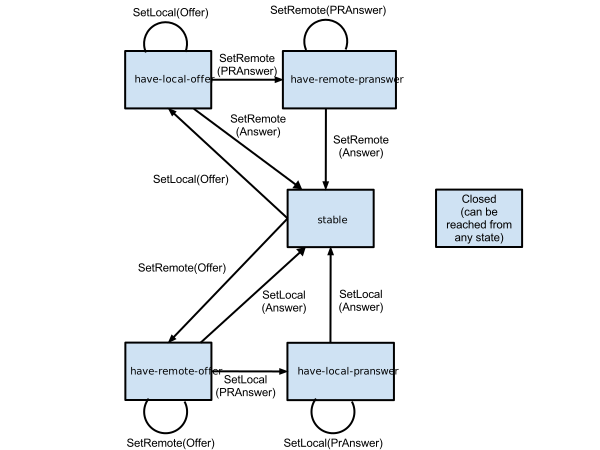
WebIDLenum RTCSignalingState {
"stable",
"have-local-offer",
"have-remote-offer",
"have-local-pranswer",
"have-remote-pranswer",
"closed"
};
| 열거형 값 | 설명 |
|---|---|
stable
|
진행 중인 제안/응답 교환이 없다. 이는 로컬 및 원격 설명이 비어 있는 초기 상태이기도 하다. |
have-local-offer
|
"offer" 타입의
로컬 설명이 성공적으로 적용되었다.
|
have-remote-offer
|
"offer" 타입의
원격 설명이 성공적으로 적용되었다.
|
have-local-pranswer
|
"offer" 타입의 원격 설명이
성공적으로 적용되었으며
"pranswer" 타입의
로컬 설명이 성공적으로 적용되었다.
|
have-remote-pranswer
|
"offer" 타입의 로컬 설명이
성공적으로 적용되었으며
"pranswer" 타입의
원격 설명이 성공적으로 적용되었다.
|
closed
|
RTCPeerConnection이
닫혔으며 그
[[IsClosed]] 슬롯은
true이다.
|
전이 집합의 예는 다음과 같다.
stable"
have-local-offer"
have-remote-pranswer"
stable"
stable"
have-remote-offer"
have-local-pranswer"
stable"
WebIDLenum RTCIceGatheringState {
"new",
"gathering",
"complete"
};
| 열거형 값 | 설명 |
|---|---|
new
|
RTCIceTransport 중 하나가
"new" 수집
상태이고 어떤 전송도
"gathering"
상태가 아니거나
전송이 없다.
|
gathering
|
RTCIceTransport 중 하나가
"gathering"
상태이다.
|
complete
|
하나 이상의 RTCIceTransport가
존재하며 모든
RTCIceTransport가
"complete"
수집 상태이다.
|
고려되는 전송 집합은 현재
RTCPeerConnection의
트랜시버 집합에서 참조하는 전송과 RTCPeerConnection의
[[SctpTransport]]
내부 슬롯이 null이 아닌 경우 그 슬롯에서 참조하는 전송이다.
WebIDLenum RTCPeerConnectionState {
"closed",
"failed",
"disconnected",
"new",
"connecting",
"connected"
};
| 열거형 값 | 설명 |
|---|---|
closed
|
[[IceConnectionState]]가
"closed"이다.
|
failed
|
이전 상태가 적용되지 않으며
[[IceConnectionState]]가
"failed"이거나
RTCDtlsTransport 중
하나가
"failed"
상태이다.
|
disconnected
|
이전 상태 중 어느 것도 적용되지 않으며
[[IceConnectionState]]가
"disconnected"이다.
|
new
|
이전 상태 중 어느 것도 적용되지 않고
[[IceConnectionState]]가
"new"이며 모든
RTCDtlsTransport가
"new" 또는
"closed"
상태이거나
전송이 없다.
|
connected
|
이전 상태 중 어느 것도 적용되지 않고
[[IceConnectionState]]가
"connected"이며
모든
RTCDtlsTransport가
"connected"
또는
"closed"
상태이다.
|
connecting
|
이전 상태 중 어느 것도 적용되지 않는다. |
"connecting"
상태에서는 하나 이상의
RTCIceTransport가 "new"
또는 "checking" 상태이거나
하나 이상의
RTCDtlsTransport가
"new"
또는 "connecting"
상태이다.
고려되는 전송 집합은 현재
RTCPeerConnection의
트랜시버 집합에서 참조하는 전송과 RTCPeerConnection의
[[SctpTransport]]
내부 슬롯이 null이 아닌 경우 그 슬롯에서 참조하는 전송이다.
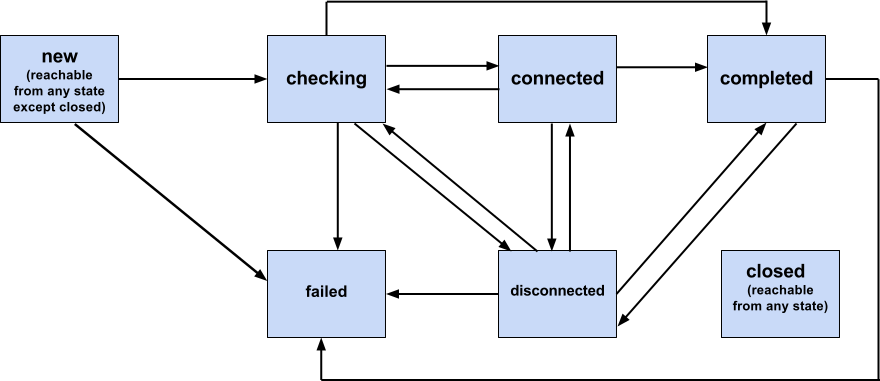
WebIDLenum RTCIceConnectionState {
"closed",
"failed",
"disconnected",
"new",
"checking",
"completed",
"connected"
};
| 열거형 값 | 설명 |
|---|---|
closed
|
RTCPeerConnection
객체의 [[IsClosed]]
슬롯이 true이다.
|
failed
|
이전 상태가 적용되지 않고
RTCIceTransport 중
하나가
"failed"
상태이다.
|
disconnected
|
이전 상태 중 어느 것도 적용되지 않고
RTCIceTransport 중
하나가
"disconnected"
상태이다.
|
new
|
이전 상태 중 어느 것도 적용되지 않고 모든
RTCIceTransport가
"new" 또는
"closed"
상태이거나
전송이 없다.
|
checking
|
이전 상태 중 어느 것도 적용되지 않고
RTCIceTransport 중
하나가
"new" 또는
"checking"
상태이다.
|
completed
|
이전 상태 중 어느 것도 적용되지 않고 모든
RTCIceTransport가
"completed"
또는
"closed"
상태이다.
|
connected
|
이전 상태 중 어느 것도 적용되지 않고 모든
RTCIceTransport가
"connected",
"completed"
또는
"closed"
상태이다.
|
고려되는 전송 집합은 현재
RTCPeerConnection의
트랜시버 집합에서 참조하는 전송과 RTCPeerConnection의
[[SctpTransport]]
내부 슬롯이 null이 아닌 경우 그 슬롯에서 참조하는 전송이다.
시그널링의 결과(예: RTCP 다중화 또는 번들링)로
RTCIceTransport가 폐기되거나
시그널링의 결과(예: 새 미디어 설명 추가)로 생성되면 상태가
한 상태에서 다른 상태로 직접 진행될 수 있다는 점에 유의한다.
[RFC9429] 명세는 전체적으로
RTCPeerConnection의 작동 방식에
관한 세부 사항을 설명한다.
[RFC9429]의 특정
하위 절에 대한 참조는 적절한 곳에 제공된다.
다음을 호출하면
new
RTCPeerConnection(configuration)RTCPeerConnection 객체가 생성된다.
configuration.iceServers에는
ICE에서 사용하는 서버를 찾고 접근하는 데 쓰이는 정보가 포함된다.
애플리케이션은 각 유형의 서버를 여러 개 제공할 수 있으며, 모든 TURN
서버를 서버 반사 후보를
수집하기 위한 STUN 서버로도 사용할 수 있다.
RTCPeerConnection 객체에는
[[SignalingState]]와
집계된 상태인
[[ConnectionState]],
[[IceGatheringState]],
그리고
[[IceConnectionState]]가 있다.
이러한 상태는 객체가 생성될 때 초기화된다.
RTCPeerConnection의 ICE 프로토콜 구현은
ICE 에이전트로 표현된다
[RFC5245].
일부
RTCPeerConnection 메서드는
ICE 에이전트와 상호 작용하며, 해당 메서드는 addIceCandidate, setConfiguration,
setLocalDescription, setRemoteDescription 및
close이다.
이러한 상호 작용은 이 문서의 관련 절과
[RFC9429]에 설명되어 있다. 또한 ICE 에이전트는
RTCIceTransport의 내부 표현
상태가 변경될 때
사용자 에이전트에 알림을 제공한다. 이는
5.6
RTCIceTransport 인터페이스에 설명되어 있다.
이 절에 나열된 태스크의 태스크 소스는 네트워킹 태스크 소스이다.
SDP 협상의 상태는 내부 변수
[[SignalingState]],
[[CurrentLocalDescription]],
[[CurrentRemoteDescription]],
[[PendingLocalDescription]] 및
[[PendingRemoteDescription]]로
표현된다.
이들은
setLocalDescription
및 setRemoteDescription
작업 내부에서만 설정되며,
addIceCandidate 작업과
후보를 노출하는
절차에 의해 수정된다. 각각의 경우
다섯 변수 모두에 대한 모든 수정은 해당 절차가 이벤트를 발생시키거나
콜백을 호출하기 전에 완료되므로,
수정 사항은 단일 시점에 표시된다.
문서 언로드 정리 단계 중 하나로 다음 단계를 실행한다:
window를 document의 관련 전역 객체로 둔다.
관련 전역 객체가 window인 각
RTCPeerConnection 객체
connection에 대해,
connection 및 값 true를 사용하여
연결을 닫는다.
RTCPeerConnection.constructor()가
호출되면 사용자 에이전트는 다음 단계를 반드시 실행해야 한다:
아래에 열거된 단계 중 하나라도 여기에
명시되지 않은 이유로 실패하면, 적절한 설명으로
message
속성이 설정된
UnknownError를 던진다.
connection을 새로 생성된
RTCPeerConnection 객체로 둔다.
connection에 [[DocumentOrigin]] 내부 슬롯을 두고, 관련 설정 객체의 출처로 초기화한다.
configuration의
certificates 값이
비어 있지 않으면 certificates의 각 certificate에 대해 다음
단계를 실행한다:
certificate.expires 값이
현재 시간보다 작으면
InvalidAccessError를 던진다.
certificate.[[Origin]]이
connection.[[DocumentOrigin]]과
동일 출처가
아니면
InvalidAccessError를 던진다.
certificate를 저장한다.
그렇지 않으면 이 RTCPeerConnection 인스턴스로
하나 이상의 새 RTCCertificate 인스턴스를
생성하여 저장한다. 이는 비동기적으로
수행될 수 있으며, 이후 단계에서
certificates의
값은
undefined로 유지된다. [RFC8826]의
4.3.2.3절에 언급된 것처럼 WebRTC는 공개 키 기반 구조(PKI)
인증서가 아닌 자체 서명 인증서를 사용한다. 따라서 만료 검사는
키가 무기한 사용되지 않도록 하기 위한 것이며 추가 인증서
검사는 필요하지 않다.
connection의 ICE 에이전트를 초기화한다.
connection에
[[Configuration]]
내부 슬롯을 두고 null로 초기화한다.
configuration으로 지정된 구성을 설정한다.
connection에 [[IsClosed]]
내부 슬롯을 두고 false로 초기화한다.
connection에
[[NegotiationNeeded]] 내부 슬롯을 두고
false로 초기화한다.
connection에
[[SctpTransport]] 내부 슬롯을 두고
null로 초기화한다.
connection에 [[DataChannels]] 내부 슬롯을 두고 빈 순서 있는 집합으로 초기화한다.
connection에 [[Operations]] 내부 슬롯을 둔다. 이 슬롯은 작업 체인을 나타내며 빈 목록으로 초기화한다.
connection에
[[UpdateNegotiationNeededFlagOnEmptyChain]]
내부 슬롯을 두고 false로 초기화한다.
connection에
[[LastCreatedOffer]] 내부 슬롯을 두고
""로 초기화한다.
connection에
[[LastCreatedAnswer]] 내부 슬롯을 두고
""로 초기화한다.
connection에 [[EarlyCandidates]] 내부 슬롯을 두고 빈 목록으로 초기화한다.
connection에
[[SignalingState]]
내부 슬롯을 두고 "stable"로 초기화한다.
connection에
[[IceConnectionState]]
내부 슬롯을 두고 "new"로 초기화한다.
connection에
[[IceGatheringState]]
내부 슬롯을 두고 "new"로 초기화한다.
connection에
[[ConnectionState]]
내부 슬롯을 두고 "new"로 초기화한다.
connection에
[[PendingLocalDescription]] 내부 슬롯을 두고
null로 초기화한다.
connection에
[[CurrentLocalDescription]] 내부 슬롯을 두고
null로 초기화한다.
connection에
[[PendingRemoteDescription]] 내부 슬롯을 두고
null로 초기화한다.
connection에
[[CurrentRemoteDescription]] 내부 슬롯을 두고
null로 초기화한다.
connection에 [[LocalIceCredentialsToReplace]] 내부 슬롯을 두고 빈 집합으로 초기화한다.
connection을 반환한다.
RTCPeerConnection 객체에는 작업
체인인 [[Operations]]이 있으며, 이는 체인에서
하나의 비동기 작업만 동시에 실행되도록 한다. 이전 호출이 반환한
프로미스가 아직 결정되지 않은 동안
후속 호출이 이루어지면 해당 호출은 체인에 추가되고,
모든 이전 호출의 실행이 완료되고 그 프로미스가
결정된 후 실행된다.
RTCPeerConnection 객체의
작업 체인에 작업을
연결하려면 다음 단계를 실행한다:
connection을 해당
RTCPeerConnection
객체로 둔다.
connection.[[IsClosed]]가
true이면, 새로 생성된 InvalidStateError로
거부된
프로미스를 반환한다.
operation을 연결할 작업으로 둔다.
p를 새 프로미스로 둔다.
operation을 [[Operations]]에 추가한다.
[[Operations]]의 길이가 정확히
1이면 operation을 실행한다.
operation이 반환한 프로미스가 이행되거나 거부되면 다음 단계를 실행한다:
connection.[[IsClosed]]가
true이면 이 단계를 중단한다.
connection.[[IsClosed]]가
true이면 이 단계를 중단한다.
[[Operations]]의
첫 번째 요소를 제거한다.
[[Operations]]가
비어 있지 않으면
[[Operations]]의
첫 번째 요소가 나타내는 작업을 실행하고
이 단계를 중단한다.
connection.[[UpdateNegotiationNeededFlagOnEmptyChain]]이
false이면 이 단계를 중단한다.
connection.[[UpdateNegotiationNeededFlagOnEmptyChain]]을
false로 설정한다.
connection에 대해 협상 필요 플래그를 업데이트한다.
p를 반환한다.
RTCPeerConnection 객체에는 집계된
[[ConnectionState]]가
있다.
RTCDtlsTransport의 상태가 변경될 때마다
사용자 에이전트는 다음 단계를 실행하는 태스크를 반드시 큐에 넣어야 한다:
connection을 상태가 변경된
RTCDtlsTransport 객체와
연결된 이 RTCPeerConnection
객체로 둔다.
connection.[[IsClosed]]가
true이면 이 단계를 중단한다.
newState를
RTCPeerConnectionState
열거형에 설명된 방식으로 새 상태 값을 도출한 결과로 둔다.
connection.[[ConnectionState]]이
newState와 같으면 이 단계를 중단한다.
connection.[[ConnectionState]]을
newState로 설정한다.
connection에서 connectionstatechange라는
이름의 이벤트를 발생시킨다.
RTCPeerConnection 객체
connection에 description을
로컬 세션 설명으로 설정하려면, 추가 값
false를 사용하여 connection에
description을 세션
설명으로 설정한다.
RTCPeerConnection 객체
connection에 description을
원격 세션 설명으로 설정하려면, 추가 값
true를 사용하여 connection에
description을 세션
설명으로 설정한다.
불리언 remote가 주어진 경우,
RTCPeerConnection 객체
connection에 description을
세션
설명으로 설정하려면 다음 단계를 실행한다:
p를 새 프로미스로 둔다.
description.type이
"rollback"이고
connection.[[SignalingState]]이
"stable",
"have-local-pranswer",
또는
"have-remote-pranswer"
중 하나이면, 새로 생성된
InvalidStateError로
p를 거부하고 이
단계를 중단한다.
jsepSetOfTransceivers를 connection의 트랜시버 집합의 얕은 복사본으로 둔다.
[RFC9429] (5.5절 및 5.6절)에 설명된 대로 description을 적용하는 프로세스를 병렬로 시작하되, 다음 추가 제한 사항을 적용한다:
어떤 "RtpTransceivers"가 존재하는지를 판단하는
기준 정보로 jsepSetOfTransceivers를 사용하고,
해당 트랜시버의 [[JsepMid]] 내부 슬롯을
해당 트랜시버의 "mid
속성"으로 사용한다.
remote가 false이고 이로 인해
[RFC9429]
(5.9절)의
ICE 후보 수집 프로세스가 시작되면, ICE 에이전트는
관리상
금지되는 후보를 수집해서는 안 된다.
remote가 true이고 이로 인해
[RFC9429]
(5.10절)의
ICE 연결성 검사가 시작되면,
ICE 에이전트는
관리상
금지된 후보에 연결을 시도해서는 안 된다.
remote가 true이면,
연속된 제안 사이에 응답이 적용된 것처럼,
후속 제안에 대한 검사를 안정 상태에서 수행하는 것처럼 실행하여
연속된 제안을 검증한다.
description을 적용하여 트랜시버 transceiver가 수정되고, transceiver.[[Sender]].[[SendEncodings]]가 비어 있지 않으며 description 처리의 결과로 생성될 인코딩과 같지 않으면, description 적용 프로세스가 실패한다. 이 명세는 원격에서 시작된 RID 재협상을 허용하지 않는다.
어떤 이유로든 description 적용 프로세스가 실패하면 사용자 에이전트는 다음 단계를 실행하는 태스크를 반드시 큐에 넣어야 한다:
connection.[[IsClosed]]가
true이면 이 단계를 중단한다.
description.type이
[RFC9429]
(5.5절
및 5.6절)에
설명된 현재
connection.[[SignalingState]]에
유효하지 않으면, 새로 생성된 InvalidStateError로
p를 거부하고
이 단계를 중단한다.
description의 내용이 유효한
SDP 구문이 아니면 p를
RTCError로 거부한다(
errorDetail을
"sdp-syntax-error"로
설정하고,
sdpLineNumber
속성을 구문 오류가 감지된
SDP의 줄 번호로
설정한다). 그런 다음 이 단계를 중단한다.
remote가 true이고,
connection의 RTCRtcpMuxPolicy가
require이며
설명에서 RTCP mux를
사용하지 않으면, 새로 생성된
InvalidAccessError로
p를 거부하고 이
단계를 중단한다.
위에서 설명한 대로 설명에서 RID 재협상을
시도했으면, 새로 생성된
InvalidAccessError로
p를 거부하고 이
단계를 중단한다.
description의 내용이 유효하지 않으면,
새로 생성된 InvalidAccessError로
p를 거부하고
이
단계를 중단한다.
다른 모든 오류의 경우 새로 생성된 OperationError로
p를 거부한다.
description이 성공적으로 적용되면 사용자 에이전트는 다음 단계를 실행하는 태스크를 반드시 큐에 넣어야 한다:
connection.[[IsClosed]]가
true이면 이 단계를 중단한다.
remote가 true이고
description이
"offer" 유형이며,
description을 적용하는 프로세스 중
connection의
addTrack()
메서드 중 하나라도 성공한 경우,
이 단계를 중단하고 해당 메서드가 이전에
성공한 것처럼 프로세스를 다시 시작하여 추가
트랜시버를 프로세스에 포함한다.
connection과 연결된
RTCRtpSender의
setParameters
메서드에서 반환된 프로미스 중 하나라도
결정되지 않았으면,
이 단계를 중단하고 프로세스를 다시 시작한다.
description이
"offer" 유형이고
connection.[[SignalingState]]이
"stable"이면,
connection의 트랜시버
집합에 있는 각 transceiver에 대해 다음 단계를 실행한다:
transceiver.[[Sender]].[[LastStableStateSenderTransport]]를
transceiver.[[Sender]].[[SenderTransport]]로
설정한다.
transceiver.[[Sender]].[[SendEncodings]].length가
1이고 유일한 인코딩에
rid
멤버가 포함되어 있지 않으면,
transceiver.[[Sender]].[[LastStableRidlessSendEncodings]]를
transceiver.[[Sender]].[[SendEncodings]]로
설정한다.
그렇지 않으면,
transceiver.[[Sender]].[[LastStableRidlessSendEncodings]]를
null로 설정한다.
transceiver.[[Receiver]].[[LastStableStateReceiverTransport]]를
transceiver.[[Receiver]].[[ReceiverTransport]]로
설정한다.
transceiver.[[Receiver]].[[LastStableStateAssociatedRemoteMediaStreams]]를
transceiver.[[Receiver]].[[AssociatedRemoteMediaStreams]]로
설정한다.
transceiver.[[Receiver]].[[LastStableStateReceiveCodecs]]를
transceiver.[[Receiver]].[[ReceiveCodecs]]로
설정한다.
remote가 false이면 다음 단계 중
하나를 실행한다:
description이
"offer"
유형이면,
connection.[[PendingLocalDescription]]을
description으로 생성한 새
RTCSessionDescription
객체로 설정하고,
connection.[[SignalingState]]을
"have-local-offer"로
설정한 다음 초기
후보를 해제한다.
description이
"answer"
유형이면
제안-응답 협상이
완료된다.
connection.[[CurrentLocalDescription]]을
description으로 생성한 새
RTCSessionDescription
객체로 설정하고,
connection.[[CurrentRemoteDescription]]을
connection.[[PendingRemoteDescription]]으로
설정한다.
connection.[[PendingRemoteDescription]]과
connection.[[PendingLocalDescription]]을
모두 null로 설정한다.
connection.[[LastCreatedOffer]]와
connection.[[LastCreatedAnswer]]를
모두 ""로 설정하고,
connection.[[SignalingState]]을
"stable"로
설정한 다음 초기
후보를 해제한다. 마지막으로,
connection.[[LocalIceCredentialsToReplace]]의
ICE 자격 증명 중 어느 것도 description에 없으면,
connection.[[LocalIceCredentialsToReplace]]을
빈 집합으로 설정한다.
description이
"pranswer"
유형이면,
connection.[[PendingLocalDescription]]을
description으로 생성한 새
RTCSessionDescription
객체로 설정하고,
connection.[[SignalingState]]을
"have-local-pranswer"로
설정한 다음
초기
후보를 해제한다.
그렇지 않으면(remote가
true이면) 다음 단계 중 하나를 실행한다:
description이
"offer"
유형이면,
connection.[[PendingRemoteDescription]]
속성을 description으로 생성한 새
RTCSessionDescription
객체로 설정하고,
connection.[[SignalingState]]을
"have-remote-offer"로
설정한다.
description이
"answer"
유형이면
제안-응답 협상이
완료된다.
connection.[[CurrentRemoteDescription]]을
description으로 생성한 새
RTCSessionDescription
객체로 설정하고,
connection.[[CurrentLocalDescription]]을
connection.[[PendingLocalDescription]]으로
설정한다.
connection.[[PendingRemoteDescription]]과
connection.[[PendingLocalDescription]]을
모두 null로 설정한다.
connection.[[LastCreatedOffer]]와
connection.[[LastCreatedAnswer]]를
모두 ""로 설정하고,
connection.[[SignalingState]]을
"stable"로
설정한다.
마지막으로, 새로 설정된
connection.[[CurrentLocalDescription]]에
connection.[[LocalIceCredentialsToReplace]]의
ICE 자격 증명이 하나도 없으면,
connection.[[LocalIceCredentialsToReplace]]을
빈 집합으로 설정한다.
description이
"pranswer"
유형이면,
connection.[[PendingRemoteDescription]]을
description으로 생성한 새
RTCSessionDescription
객체로 설정하고
connection.[[SignalingState]]을
"have-remote-pranswer"로
설정한다.
description이
"answer" 유형이고
[RFC8841]의
10.3절 및 10.4절에 정의된 대로 기존 SCTP 연결의
종료를 시작하면,
connection.[[SctpTransport]]의
값을
null로
설정한다.
trackEventInits, muteTracks, addList, removeList 및 errorList를 빈 목록으로 둔다.
description이
"answer" 또는 "pranswer"
유형이면 다음 단계를 실행한다:
description이
[RFC8841]의
10.3절 및 10.4절에 정의된 대로
새 SCTP 연결 설정을 시작하면,
초기 상태가
"connecting"인
RTCSctpTransport를
생성하고, 그 결과를
[[SctpTransport]]
슬롯에 할당한다. 그렇지 않고
SCTP 연결이 설정되어 있지만
max-message-size SDP
속성이 업데이트되면,
connection.[[SctpTransport]]의
데이터
최대 메시지 크기를 업데이트한다.
description이 SCTP 전송의 DTLS
역할을 협상하면, null
id를 가진
각
RTCDataChannel
channel에 대해
다음 단계를 실행한다:
[[ReadyState]]를
"closed"로
설정하고
channnel을 errorList에 추가한다.
description이
"rollback"
유형이 아니면 다음
단계를 실행한다:
remote가 false이면
description의 각 미디어 설명에 대해
다음 단계를 실행한다:
미디어
설명이 아직
RTCRtpTransceiver
객체와 연결되지 않았으면 다음 단계를
실행한다:
transceiver를
미디어
설명을 생성하는 데 사용된
RTCRtpTransceiver로
둔다.
transceiver.[[Mid]]를
transceiver.[[JsepMid]]로
설정한다.
transceiver.[[Stopped]]가
true이면 이 하위
단계를 중단한다.
[RFC8843]에
따라
미디어
설명에서 기존 미디어
미디어
전송을 사용하는 것으로
표시하면, transport를 해당 전송의
RTP/RTCP 구성 요소를 나타내는
RTCDtlsTransport
객체로 둔다.
그렇지 않으면 transport를
새로운 기반
RTCIceTransport를
가진,
새로 생성된 RTCDtlsTransport
객체로
둔다.
transceiver.[[Sender]].[[SenderTransport]]를
transport로 설정한다.
transceiver.[[Receiver]].[[ReceiverTransport]]를
transport로 설정한다.
transceiver를
미디어
설명과 연결된
RTCRtpTransceiver로
둔다.
transceiver.[[Stopped]]가
true이면 이 하위 단계를 중단한다.
direction을 미디어
미디어
설명의 방향을 나타내는
RTCRtpTransceiverDirection
값으로
둔다.
direction이
"sendrecv"
또는
"recvonly"이면,
transceiver.[[Receptive]]를
true로 설정하고, 그렇지 않으면
false로 설정한다.
transceiver.[[Receiver]].[[ReceiveCodecs]]를
description에서 수신용으로 협상하고
사용자 에이전트가 현재 수신할 준비가
된 코덱으로 설정한다.
description이
"answer"
또는
"pranswer"
유형이면 다음
단계를 실행한다:
transceiver.
[[Sender]].[[SendEncodings]]
.length가 1보다 크면
다음 단계를 실행한다:
description에 이전에 협상한
모든 계층이
없으면,
transceiver.[[Sender]].[[SendEncodings]]에서
첫 번째 사전을 제외한 모든 사전을 제거하고
다음
단계를 건너뛴다.
description에
이전에 협상한 계층 중 하나라도
없으면,
누락된 계층에
대응하는 사전을
transceiver.[[Sender]].[[SendEncodings]]에서
제거한다.
transceiver.[[Sender]].[[SendCodecs]]를
description에서 송신용으로 협상하고
사용자 에이전트가 현재 송신할 수
있는 코덱으로 설정하고,
transceiver.[[Sender]].[[LastReturnedParameters]]를
null로 설정한다.
direction이
"sendonly"
또는
"inactive"이고,
transceiver.[[FiredDirection]]이
"sendrecv"
또는
"recvonly"
중 하나이면 다음 단계를 실행한다:
transceiver.[[Receiver]],
빈 목록, 또 다른 빈 목록 및
removeList가 주어졌을 때
연결된
원격 스트림을 설정한다.
transceiver와
muteTracks가 주어졌을 때
미디어
설명에 대해 원격
원격
트랙 제거를 처리한다.
transceiver.[[CurrentDirection]]과
transceiver.[[FiredDirection]]을
direction으로 설정한다.
그렇지 않으면(remote가
true이면)
description의 각 미디어 설명에 대해
다음 단계를 실행한다:
description이
"offer"
유형이고
미디어
설명에 동시 송출 수신 요청이
포함되어 있으면, simulcast 속성에
지정된 rid 값의 순서를 사용하여
각 동시 송출 계층에 대한
RTCRtpEncodingParameters
사전을 생성하고,
대응하는 rid 값값에
따라(쉼표로 구분된 대안이 있으면
첫 번째 값만 사용하여)
rid
멤버를 채운 다음,
sendEncodingsproposedSendEncodings를
생성된 사전을 포함하는 목록으로
목록으로 둔다.
그렇지 않으면 sendEncodings를
proposedSendEncodings를
빈
목록으로
목록으로 둔다.
proposedSendEncodings의 각 인코딩
encoding에 대해 역순으로,
encoding의
rid가
proposedSendEncodings에 있는
다른 인코딩의 값과 일치하면
encoding을
proposedSendEncodings에서 제거한다.
scaleResolutionDownBy를
2^(length of sendEncodingsproposedSendEncodings -
encoding index - 1)로 설정한다.
[RFC8829RFC9429]
(5.10절)에
설명된 대로,
미디어
설명을 나타낼 기존
RTCRtpTransceiver
객체
transceiver를 찾으려고 시도한다.
적합한 트랜시버를 찾았고
(transceiver가 설정됨),
sendEncodingsproposedSendEncodings가
비어 있지 않으면,
transceiver.[[Sender]].[[SendEncodings]]를
sendEncodings로 설정하고,
transceiver.[[Sender]].[[LastReturnedParameters]]를
다음
단계를 실행한다:
null로 설정한다.
transceiver.[[Sender]].[[SendEncodings]]의
길이가 1이고 유일한 인코딩에
rid
멤버가 포함되어 있지 않으면,
transceiver.[[Sender]].[[SendEncodings]]를
proposedSendEncodings로 설정하고,
transceiver.[[Sender]].[[LastReturnedParameters]]를
null로 설정한다.
적합한 트랜시버를 찾지 못한 경우 (transceiver가 설정되지 않은 경우), 다음 단계를 실행한다:
RTCRtpSender를
생성하여,
sender로 하고, 미디어
미디어
설명에서
sendEncodingsproposedSendEncodings을
사용한다.
RTCRtpReceiver를
생성하여,
receiver로 하고, 미디어
미디어
설명을 사용한다.
RTCRtpTransceiver
생성에
sender, receiver
및 RTCRtpTransceiverDirection
값
"recvonly"를
사용하고, 그 결과를 transceiver로
한다.
transceiver를
connection의 트랜시버 집합에
집합에
추가한다.
description의 유형이
"answer"
또는
"pranswer"이고,
또한
transceiver.
[[Sender]].[[SendEncodings]]
.length가 1보다 크면, 다음
단계를 실행한다:
description이 동시 송출을
지원하지 않거나 원하지 않음을 나타내거나, 또는
description에 이전에 협상된
모든 계층이 누락된 경우,
transceiver.[[Sender]].[[SendEncodings]]에서
첫 번째 사전을 제외한 모든 사전을 제거하고 이 하위
단계들을 중단한다.
description이 거부한
누락한
제안된
이전에
협상된 계층이 하나라도 있으면, 그런
다음
그런
다음
transceiver.[[Sender]].[[SendEncodings]]에서
거부된
누락된
계층에 대응하는 해당
해당
사전을 제거한다.
각 동시 송출 계층의 일시 중지 상태를
[RFC8853]에
명시된 대로 갱신한다. 이를 위해
transceiver.[[Sender]].[[SendEncodings]]의
대응하는 사전에 있는
멤버를 일시 중지되지 않은 경우
activetrue로, 일시 중지된 경우
false로 설정한다.
transceiver.[[Mid]]를
transceiver.[[JsepMid]]로
설정한다.
direction을 미디어
미디어
설명의 방향을 나타내되, 송신 및 수신
방향을 반대로 하여 이 피어의 관점에서 나타내는
RTCRtpTransceiverDirection
값으로
한다. 미디어
설명이
거부된 경우, direction을
"inactive"로
설정한다.
direction이
"sendrecv"
또는
"recvonly"인
경우, msids를 미디어 설명이
transceiver.[[Receiver]].[[ReceiverTrack]]과
연결되어야 한다고 나타내는 MSID의 목록으로 한다.
그렇지 않으면 msids를 빈 목록으로 한다.
원격 트랙 처리에 transceiver, direction, msids, addList, removeList 및 trackEventInits를 사용한다.
transceiver.[[Receiver]].[[ReceiveCodecs]]를
description이 수신용으로 협상하고 사용자
에이전트가 현재 수신할 준비가 된 코덱으로 설정한다.
description의 유형이
"answer"
또는
"pranswer"이면,
다음
단계를 실행한다:
transceiver.[[Sender]].[[SendCodecs]]를
description이 송신용으로 협상하고 사용자
에이전트가 현재 송신할 수 있는 코덱으로 설정한다.
transceiver.[[CurrentDirection]]
및
transceiver.[[Direction]]들
을 direction으로 설정한다.
transport를
transceiver에 연결된
미디어
설명이 사용하는 미디어
미디어
전송의 RTP/RTCP 구성요소를
나타내는
RTCDtlsTransport
객체로 하며, 이는
[RFC8843]을
따른다.
transceiver.[[Sender]].[[SenderTransport]]를
transport로 설정한다.
transceiver.[[Receiver]].[[ReceiverTransport]]를
transport로 설정한다.
transport의 [[IceRole]]을
[RFC8445]의
규칙에 따라 설정한다.
[[IceRole]]이
unknown이
아니면,
[[IceRole]]을
수정하지 않는다.
controlling으로
설정한다.
a=ice-lite를
포함하면,
[[IceRole]]을
controlling으로
설정한다.
a=ice-lite를
포함하지 않으면,
[[IceRole]]을
controlled로
설정한다.
[[IceRole]]이
항상 값을
갖게 된다.
미디어
설명이 거부되었고,
transceiver.[[Stopped]]이
false이면,
transceiver RTCRtpTransceiver를
중지
중지
한다.
그렇지 않으면(description의 유형이
"rollback"인
경우)
다음 단계를 실행한다:
pendingDescription을
connection.[[PendingLocalDescription]]
또는
connection.[[PendingRemoteDescription]]
중 null이 아닌 것으로 한다.
connection의 트랜시버 집합에 있는 각 transceiver에 대해 다음 단계를 실행한다:
pendingDescription이 설정되기
전에 transceiver가 미디어
설명과 연결되어 있지
않았다면 연결을 해제하고,
transceiver.[[JsepMid]]와
transceiver.[[Mid]]를 모두
null로 설정한다.
transceiver.[[Sender]].[[SenderTransport]]를
transceiver.[[Sender]].[[LastStableStateSenderTransport]]로
설정한다.
transceiver.[[Sender]].[[LastStableRidlessSendEncodings]]이
null이 아니고,
transceiver.[[Sender]].[[SendEncodings]]의
인코딩 중 하나라도
rid
멤버를 포함하면,
transceiver.[[Sender]].[[SendEncodings]]을
transceiver.[[Sender]].[[LastStableRidlessSendEncodings]]로
설정한다.
transceiver.[[Receiver]].[[ReceiverTransport]]를
transceiver.[[Receiver]].[[LastStableStateReceiverTransport]]로
설정한다.
transceiver.[[Receiver]].[[ReceiveCodecs]]를
transceiver.[[Receiver]].[[LastStableStateReceiveCodecs]]로
설정한다.
connection.[[SignalingState]]이
"have-remote-offer"이면,
다음 하위 단계를 실행한다:
msids를
transceiver.[[Receiver]].[[LastStableStateAssociatedRemoteMediaStreams]]에
있는 모든
MediaStream
객체의 id 목록으로
하며, 객체가 없으면 빈 목록으로 한다.
원격
트랙 처리에
transceiver,
transceiver.[[CurrentDirection]],
msids, addList,
removeList 및
trackEventInits를 사용한다.
pendingDescription이 설정될 때
transceiver가 생성되었고,
addTrack()을
통해 트랙이 연결된 적이 없다면,
transceiver RTCRtpTransceiver를
중지하고,
connection의 트랜시버
집합에서 제거한다.
connection.[[PendingLocalDescription]]과
connection.[[PendingRemoteDescription]]을
null로 설정하고,
connection.[[SignalingState]]을
"stable"로
설정한다.
description의 유형이
"answer"이면,
다음
단계를 실행한다:
connection의 트랜시버 집합에 있는 각 transceiver에 대해 다음 단계를 실행한다:
transceiver가
stopped이고,
m= 섹션과 연결되어 있으며,
연결된 m=
섹션이
connection.[[CurrentLocalDescription]]
또는
connection.[[CurrentRemoteDescription]]에서
거부되었다면, transceiver를
connection의 트랜시버
집합에서 제거한다.
이제 connection.[[SignalingState]]이
"stable"이면,
다음
단계를 실행한다:
앞 단계에서 트랜시버 집합에서
제거된 각 transceiver에 대해,
해당 전송 중 하나라도
(transceiver.[[Sender]].[[SenderTransport]]
또는
transceiver.[[Receiver]].[[ReceiverTransport]])이
아직 닫히지 않았고, 더 이상 중지되지 않은
트랜시버가 참조하지 않는다면, 해당
RTCDtlsTransport와
연결된
RTCIceTransport를
닫는다.
그 결과 대기열에 추가된 태스크에서
이 객체들에 이벤트가 발생한다.
connection의 트랜시버 집합에 있는 각 transceiver에 대해:
codecs를 transceiver.[[Sender]].[[SendCodecs]]로
한다.
codecs가 빈 목록이 아니면:
transceiver.[[Sender]].[[SendEncodings]]의
각 encoding에 대해,
encoding.codec이
ignoreLevels를
true로 설정한 코덱
사전 일치 알고리즘을 사용해
codecs의 어떤 항목과도 일치하지 않으면,
encoding.codec을
제거한다.
위에서 connection.[[SignalingState]]이
변경되었다면, connection에서
signalingstatechange라는
이름의 이벤트를 발생시킨다.
errorList의 각 channel에 대해,
RTCErrorEvent
인터페이스를 사용하고
errorDetail
속성을
"data-channel-failure"로
설정하여, channel에서
error라는
이름의 이벤트를 발생시킨다.
muteTracks의 각 track에 대해,
track의 음소거
상태를
true로 설정한다.
removeList의 각 stream 및 track 쌍에 대해, stream에서 track을 제거한다.
addList의 각 stream 및 track 쌍에 대해, stream에 track을 추가 한다.
trackEventInits의 각 항목 entry에 대해,
이벤트를 발생시킨다. 이벤트의 이름은
track이며, RTCTrackEvent
인터페이스를 사용하고,
그 receiver
속성은
entry.receiver로
초기화하고,
그 track
속성은
entry.track으로
초기화하고,
그
streams
속성은
entry.streams로
초기화하며,
또한
그 transceiver
속성은
entry.transceiver로
초기화하여
connection 객체에서 발생시킨다.
p를
undefined로 이행한다.
p를 반환한다.
구성을 설정하기 위해 configuration을 사용하여 다음 단계를 실행한다:
connection을 대상 RTCPeerConnection
객체로 한다.
oldConfig를
connection.[[Configuration]]으로 한다.
oldConfig가 null이 아니면 다음
단계를 실행하고, 그중 하나라도 실패하면 다음 예외를 던진다:
InvalidModificationError:
configuration.certificates의
길이가
oldConfig.certificates의
길이와 다르면 실패한다.
index를 0으로 한다.
index가
configuration.certificates의
길이보다 작은 동안 다음 단계를 실행한다:
configuration.certificates의
index 위치에 있는 값이 나타내는 ECMAScript 객체가
oldConfig.certificates의
index 위치에 있는 값이 나타내는 ECMAScript
객체와 같지 않으면 실패한다.
index를 1만큼 증가시킨다.
configuration.bundlePolicy의
값이
oldConfig.bundlePolicy와
다르면 실패한다.
configuration.rtcpMuxPolicy의
값이
oldConfig.rtcpMuxPolicy와
다르면 실패한다.
configuration.iceCandidatePoolSize의
값이
oldConfig.iceCandidatePoolSize와
다르고, setLocalDescription이
이미
호출되었다면 실패한다.
iceServers를
configuration.iceServers로 한다.
iceServers를 지원되는 최대 요소 수로 잘라낸다.
iceServers의 각 server에 대해 다음 단계를 실행한다:
urls를
server.urls로 한다.
urls가 문자열이면, urls를 해당 문자열 하나로만 구성된 목록으로 설정한다.
urls가 비어 있으면 다음 예외를 던진다:
"SyntaxError" DOMException.
urls의 각 url에 대해, url에 ICE 서버 URL 검증 알고리즘을 실행한다.
ICE 에이전트의 ICE 전송 설정을
configuration.iceTransportPolicy의
값으로 설정한다.
[RFC9429]
(4.1.18절
)에 정의된 대로, 새 ICE 전송 설정이 기존
설정을 변경하는 경우 다음 수집 단계까지
아무 작업도 수행되지 않는다. 스크립트가
이를 즉시 적용하려면 ICE
재시작을 수행해야 한다.
[RFC9429]
(3.5.4절
및 4.1.1절
)에 정의된 대로 ICE 에이전트의 미리 가져온 ICE 후보 풀
크기를
configuration.iceCandidatePoolSize의
값으로 설정한다.
새 ICE 후보 풀
크기가 기존
설정을 변경하면, [RFC9429]
(4.1.18절
)에 정의된 대로 새 풀 후보가 즉시
수집되거나 기존 풀 후보가 폐기될 수
있다.
ICE 에이전트의 ICE 서버 목록을 iceServers로 설정한다.
[RFC9429] (4.1.18절 )에 정의된 대로, 새 서버 목록이 ICE 에이전트의 기존 ICE 서버 목록을 교체하면 다음 수집 단계까지 아무 작업도 수행되지 않는다. 스크립트가 이를 즉시 적용하려면 ICE 재시작을 수행해야 한다. 그러나 ICE 후보 풀의 크기가 0이 아니면 기존 풀 후보는 모두 폐기되고 새 후보가 새 서버에서 수집된다.
configuration을
[[Configuration]] 내부 슬롯에 저장한다.
url에 대해 ICE 서버 URL을 검증하려면 다음 단계를 실행한다:
[RFC3986]에
정의된 일반 URI 구문을 사용하여 url을 구문 분석하고
scheme
name을 얻는다. [RFC3986]에
정의된 구문에 따른 구문 분석이 실패하면
다음 예외를 던진다:
SyntaxError.
scheme name이
브라우저에서 구현되지 않은 경우 다음 예외를 던진다:
NotSupportedError.
scheme name이
turn 또는 turns이고,
[RFC7065]에
정의된 구문으로 url을 구문 분석하는 데
실패하면 다음 예외를 던진다: SyntaxError.
scheme
name이 stun 또는
stuns이고,
[RFC7064]에
정의된 구문으로 url을 구문 분석하는 데
실패하면 다음 예외를 던진다:
SyntaxError.
parsedURL을 url을 구문 분석한 결과로 한다.
다음 조건 중 하나라도 적용되면 다음 예외를 던진다:
"SyntaxError" DOMException:
parsedURL의 스킴이 사용자 에이전트에서
구현되지 않았다면 다음 예외를 던진다: NotSupportedError.
hostAndPortURL을
"https://"와 parsedURL의 경로를 연결한 문자열을 구문 분석한
결과로 한다.
hostAndPortURL이 실패이면 다음 예외를 던진다:
"SyntaxError" DOMException.
hostAndPortURL의 경로,
사용자
이름 또는 비밀번호가 null이 아니면
다음 예외를 던진다: "SyntaxError" DOMException.
parsedURL의 쿼리가 null이 아니고 parsedURL의 쿼리가
"transport=udp" 또는 "transport=tcp" 중 어느 것과도 다르면
다음 예외를 던진다: "SyntaxError" DOMException.
scheme nameparsedURL's' 스킴이 turn"turn" 또는 또는
turns"turns"이고,
server.username 또는
server.credential 중 하나가 생략되어
있으면
존재하지 않으면, 다음 예외를 던진다:
InvalidAccessError.
scheme name이 turn 또는 turns이고,
server.credentialType이
""이고,
server.passwordcredential이
DOMString이 아니면
다음 예외를 던진다: InvalidAccessError.
이 절에서 제시하는 RTCPeerConnection 인터페이스는 이 명세 전반의 여러
부분 인터페이스에 의해 확장된다. 특히 RTP 미디어 API 절은
MediaStreamTrack 객체를 송수신하는 API를 추가한다.
WebIDL[Exposed=Window]
interface RTCPeerConnection : EventTarget {
constructor(optional RTCConfiguration configuration = {});
Promise<RTCSessionDescriptionInit> createOffer(optional RTCOfferOptions options = {});
Promise<RTCSessionDescriptionInit> createAnswer(optional RTCAnswerOptions options = {});
Promise<undefined> setLocalDescription(optional RTCLocalSessionDescriptionInit description = {});
readonly attribute RTCSessionDescription? localDescription;
readonly attribute RTCSessionDescription? currentLocalDescription;
readonly attribute RTCSessionDescription? pendingLocalDescription;
Promise<undefined> setRemoteDescription(RTCSessionDescriptionInit description);
readonly attribute RTCSessionDescription? remoteDescription;
readonly attribute RTCSessionDescription? currentRemoteDescription;
readonly attribute RTCSessionDescription? pendingRemoteDescription;
Promise<undefined> addIceCandidate(optional RTCIceCandidateInit candidate = {});
readonly attribute RTCSignalingState signalingState;
readonly attribute RTCIceGatheringState iceGatheringState;
readonly attribute RTCIceConnectionState iceConnectionState;
readonly attribute RTCPeerConnectionState connectionState;
readonly attribute boolean? canTrickleIceCandidates;
undefined restartIce();
RTCConfiguration getConfiguration();
undefined setConfiguration(optional RTCConfiguration configuration = {});
undefined close();
attribute EventHandler onnegotiationneeded;
attribute EventHandler onicecandidate;
attribute EventHandler onicecandidateerror;
attribute EventHandler onsignalingstatechange;
attribute EventHandler oniceconnectionstatechange;
attribute EventHandler onicegatheringstatechange;
attribute EventHandler onconnectionstatechange;
// 레거시 인터페이스 확장
// 이 절의 메서드 지원은 선택 사항이다.
// 이러한 메서드를 지원하는 경우
// "레거시 인터페이스 확장" 절에 정의된 대로
// 구현해야 한다.
Promise<undefined> createOffer(RTCSessionDescriptionCallback successCallback,
RTCPeerConnectionErrorCallback failureCallback,
optional RTCOfferOptions options = {});
Promise<undefined> setLocalDescription(RTCLocalSessionDescriptionInit description,
VoidFunction successCallback,
RTCPeerConnectionErrorCallback failureCallback);
Promise<undefined> createAnswer(RTCSessionDescriptionCallback successCallback,
RTCPeerConnectionErrorCallback failureCallback);
Promise<undefined> setRemoteDescription(RTCSessionDescriptionInit description,
VoidFunction successCallback,
RTCPeerConnectionErrorCallback failureCallback);
Promise<undefined> addIceCandidate(RTCIceCandidateInit candidate,
VoidFunction successCallback,
RTCPeerConnectionErrorCallback failureCallback);
};
localDescription
유형: RTCSessionDescription,
읽기 전용,
null 허용
localDescription
속성은
[[PendingLocalDescription]]이
null이 아니면 이를 반드시 반환하고, 그렇지 않으면
[[CurrentLocalDescription]]을
반드시 반환해야 한다.
[[CurrentLocalDescription]].sdp와
[[PendingLocalDescription]].sdp는
대응하는 setLocalDescription
호출에 전달된
sdp 값과
문자열 단위로 동일하지 않을 수 있음에 유의한다
(즉, SDP가 구문 분석되고 다시 형식화되며 ICE 후보가 추가될 수 있다).
currentLocalDescription
유형: RTCSessionDescription,
읽기 전용,
null 허용
currentLocalDescription
속성은
[[CurrentLocalDescription]]을
반드시 반환해야 한다.
이는 RTCPeerConnection이
마지막으로 stable 상태로 전환되었을 때 성공적으로
협상된 로컬 설명과, 제안 또는 응답이 생성된 이후
ICE
에이전트가 생성한 모든 로컬 후보를 나타낸다.
pendingLocalDescription
유형: RTCSessionDescription,
읽기 전용,
null 허용
pendingLocalDescription
속성은
[[PendingLocalDescription]]을
반드시 반환해야 한다.
이는 현재 협상 중인 로컬 설명과, 제안 또는 응답이
생성된 이후 ICE 에이전트가 생성한 모든
로컬 후보를 나타낸다. RTCPeerConnection이
stable
상태이면 값은 null이다.
remoteDescription
유형: RTCSessionDescription,
읽기 전용,
null 허용
remoteDescription
속성은
[[PendingRemoteDescription]]이
null이 아니면 이를 반드시 반환하고, 그렇지 않으면
[[CurrentRemoteDescription]]을
반드시 반환해야 한다.
[[CurrentRemoteDescription]].sdp와
[[PendingRemoteDescription]].sdp는
대응하는 setRemoteDescription
호출에 전달된
sdp 값과
문자열 단위로 동일하지 않을 수 있음에 유의한다
(즉, SDP가 구문 분석되고 다시 형식화되며 ICE 후보가 추가될 수 있다).
currentRemoteDescription
유형: RTCSessionDescription,
읽기 전용,
null 허용
currentRemoteDescription
속성은
[[CurrentRemoteDescription]]을
반드시 반환해야 한다.
이는 RTCPeerConnection이
마지막으로 stable 상태로 전환되었을 때 성공적으로 협상된
최종 원격 설명과, 제안 또는 응답이 생성된 이후
addIceCandidate()를
통해 제공된 모든 원격 후보를 나타낸다.
pendingRemoteDescription
유형: RTCSessionDescription,
읽기 전용,
null 허용
pendingRemoteDescription
속성은
[[PendingRemoteDescription]]을
반드시 반환해야 한다.
이는 현재 협상 중인 원격 설명과, 제안 또는 응답이
생성된 이후
addIceCandidate()를
통해 제공된 모든 원격 후보를 나타낸다.
RTCPeerConnection이
stable
상태이면 값은 null이다.
signalingState의
유형: RTCSignalingState,
읽기 전용
signalingState
속성은 RTCPeerConnection
객체의
[[SignalingState]]을
반드시 반환해야 한다.
iceGatheringState
유형: RTCIceGatheringState,
읽기 전용
iceGatheringState
속성은 RTCPeerConnection
객체의
[[IceGatheringState]]을
반드시 반환해야 한다.
iceConnectionState
유형: RTCIceConnectionState,
읽기 전용
iceConnectionState
속성은 RTCPeerConnection
객체의
[[IceConnectionState]]을
반드시 반환해야 한다.
connectionState
유형: RTCPeerConnectionState,
읽기 전용
connectionState
속성은 RTCPeerConnection
객체의
[[ConnectionState]]을
반드시 반환해야 한다.
canTrickleIceCandidates의 유형:
boolean, 읽기 전용, null 허용
canTrickleIceCandidates
속성은 원격 피어가 Trickle ICE 후보를 수락할 수 있는지를 나타낸다
[RFC8838].
이 값은 [RFC9429]
(4.1.17절
)에 정의된 대로
원격 설명이 Trickle ICE 지원을 나타내는지에 따라 결정된다.
setRemoteDescription이
완료되기 전에는 이 값이
null이다.
onnegotiationneeded의 유형:
EventHandler
negotiationneeded이다.
onicecandidate의 유형: EventHandler
icecandidate이다.
onicecandidateerror의 유형:
EventHandler
icecandidateerror이다.
onsignalingstatechange의 유형:
EventHandler
signalingstatechange이다.
oniceconnectionstatechange의 유형:
EventHandler
iceconnectionstatechange
onicegatheringstatechange의 유형:
EventHandler
icegatheringstatechange이다.
onconnectionstatechange의 유형:
EventHandler
connectionstatechange이다.
createOffer
createOffer
메서드는 이 RTCPeerConnection에
연결된 로컬 MediaStreamTrack의 설명,
이 구현이 지원하는 코덱/RTP/RTCP 기능, ICE 에이전트와 DTLS 연결의 매개변수를
포함하여
세션에 지원되는 구성이 담긴 RFC 3264 제안을 포함하는
SDP 블롭을 생성한다.
생성되는 제안을 추가로 제어하기 위해
options 매개변수를 제공할 수 있다.
시스템의 리소스가 제한된 경우(예: 디코더 수가 유한한 경우),
createOffer는
시스템의 현재 상태를 반영하는 제안을 반환해야 한다. 그래야
setLocalDescription이
해당 리소스를 확보하려고 할 때 성공한다.
세션 설명은 반환된 프로미스의 이행
콜백이 끝날 때까지 오류를 발생시키지 않고
setLocalDescription에서
사용할 수 있는 상태를 반드시 유지해야 한다.
SDP 생성은 [RFC9429]에 설명된
적절한 제안 생성 절차를 반드시 따라야 한다.
다만 이 경우 사용자 에이전트는 RFC9429의 목적상
stopping
트랜시버를 stopped로
반드시 취급해야 한다.
생성된 SDP는 제안이므로 세션에서 지원하거나 선호하는
코덱/RTP/RTCP 기능의 전체 집합을 포함한다
(사용할 특정 협상 하위 집합만 포함하는 응답과는 다르다).
세션이 설정된 후
createOffer가
호출되는 경우,
createOffer는
트랙 추가 또는 제거처럼 마지막으로 완료된 제안-응답 교환 이후
세션에 적용된 모든 변경 사항을 통합하여 현재 세션과 호환되는
제안을 생성한다. 변경 사항이 없으면 제안에는 현재 로컬 설명의
기능과 갱신된 제안에서 추가로 협상할 수 있는 기능이
포함된다.
생성된 SDP에는 ICE
에이전트의
usernameFragment,
password 및 ICE
옵션([RFC5245]
14절에 정의됨)이 포함되며, 에이전트가 수집한 모든 로컬
후보도 포함될 수 있다.
RTCPeerConnection의
configuration에 있는
certificates
값은 애플리케이션이
RTCPeerConnection에
구성한 인증서를 제공한다. 이러한 인증서는
모든 기본 인증서와 함께 인증서 지문 집합을 생성하는 데
사용된다. 이 인증서 지문은 SDP 구성에 사용된다.
SDP 생성 과정은 기반 시스템의 미디어 기능 중 일부를
노출하며, 이는 일반적으로 기기에 관한 지속적인 교차 출처
정보를 제공한다. 따라서 애플리케이션의 핑거프린팅 노출 면적이
증가한다. 개인정보 보호에 민감한 환경에서 브라우저는
공통 기능 하위 집합에만 일치하는 SDP를 생성하는 등의
완화책을 고려할 수 있다.
이 메서드가 호출되면 사용자 에이전트는 다음 단계를 반드시 실행해야 한다:
connection을 메서드가 호출된 RTCPeerConnection
객체로 한다.
connection.[[IsClosed]]가
true이면, 새로 생성된
InvalidStateError로
거부된 프로미스를 반환한다.
connection이 주어졌을 때 제안을 생성하려면 다음 단계를 실행한다:
connection.[[SignalingState]]이
"stable"도
아니고
"have-local-offer"도
아니면, 새로
생성된
InvalidStateError로
거부된
프로미스를 반환한다.
p를 새 프로미스로 한다.
병렬로, connection과 p가 주어졌을 때의 제안을 생성하는 병렬 단계를 시작한다.
p를 반환한다.
connection과 프로미스 p가 주어졌을 때의 제안을 생성하는 병렬 단계는 다음과 같다:
connection이 인증서 집합을 사용하여 생성되지 않았고 아직 인증서가 생성되지 않았다면, 인증서가 생성될 때까지 기다린다.
[RFC9429] (4.1.8절 )에 설명된 대로, 제안을 생성하는 데 필요한 현재 사용 가능한 리소스를 확인하기 위해 제안자의 시스템 상태를 검사한다.
이 검사가 어떤 이유로든 실패하면 새로 생성된
OperationError로
p를 거부하고 이 단계들을 중단한다.
connection과 p가 주어졌을 때의 제안 생성의 최종 단계를 실행하는 태스크를 대기열에 추가한다.
connection과 프로미스 p가 주어졌을 때의 제안 생성의 최종 단계는 다음과 같다:
connection.[[IsClosed]]가
true이면 이 단계들을 중단한다.
connection이 제안자의 시스템 상태를 추가로 검사해야 하는 방식으로 수정되었다면, 병렬로 connection과 p가 주어진 제안을 생성하는 병렬 단계를 다시 시작하고 이 단계들을 중단한다.
RTCRtpTransceiver만
connection에 추가된 상태에서
createOffer가
호출되었지만, 제안을
생성하는 병렬 단계를 수행하는 동안 비디오
RTCRtpTransceiver가
추가되어 비디오 시스템 리소스를 추가로
검사해야 하는 경우가 이에 해당할 수 있다.
이전 검사에서 얻은 정보와 connection 및 그
RTCRtpTransceiver들의
현재 상태를 바탕으로, [RFC9429]
(5.2절
)에 설명된 SDP 제안
sdpString을 생성한다.
[RFC8843]
7절에 설명된 대로 번들링을 사용하는 경우
(RTCBundlePolicy
참조),
BUNDLE 그룹을 협상하려면 제안자 태그가 지정된
m= 섹션을 선택해야 한다. 사용자 에이전트는
트랜시버
집합에서
중지되지 않은 첫 번째 트랜시버에 대응하는 m= 섹션을
제안자 태그가 지정된 m= 섹션으로
반드시 선택해야 한다.
이렇게 하면 원격 엔드포인트가 SDP를 구문 분석하지
않고도 어떤 트랜시버가 제안자 태그가 지정된 m= 섹션인지
예측할 수 있다.
filteredCodecs를
transceiver.[[PreferredCodecs]]에
다음 필터를 적용한 결과로 한다.
필터링은 코덱 선호도의 순서를
변경해서는 안 된다:
kind를 transceiver의
[[Receiver]]의
[[ReceiverTrack]]의
kind로
한다.
transceiver.direction이
"sendonly"
또는 "sendrecv"이면,
ignoreLevels를
true로 설정한 코덱
사전 일치
알고리즘을 사용하여 kind의
구현된
송신 코덱 목록에 포함되지 않은 코덱을 제외한다.
transceiver.direction이
"recvonly"
또는 "sendrecv"이면,
ignoreLevels를
true로 설정한 코덱
사전 일치
알고리즘을 사용하여 kind의
구현된
수신 코덱 목록에 포함되지 않은 코덱을 제외한다.
미디어 설명과 연결된 트랜시버 transceiver의 코덱 선호도는 filteredCodecs가 비어 있지 않으면 그 값으로 정의되고, 그렇지 않으면 설정되지 않은 것으로 정의된다.
RTCRtpSender의
[[SendEncodings]]
슬롯의 길이가 1보다 크면,
RTCRtpSender의
[[SendEncodings]]에
주어진 각 인코딩에 대해 대응하는 미디어 섹션에
a=rid send 줄을 추가하고,
encodings
필드에 지정된 것과 같은 순서로 RID를 나열하는
a=simulcast:send
줄을 추가한다. RID
제한은 설정하지 않는다.
[RFC8853] 5.2절은 a=simulcast 줄에 있는 RID의 순서가 제안된 선호 순서를 나타낸다고 규정한다. 브라우저가 모든 인코딩을 전송하지 않기로 결정하면 목록의 마지막 인코딩부터 전송을 중지할 것으로 예상해야 한다.
offer를 새로 생성된
RTCSessionDescriptionInit
사전으로 한다. 이 사전의
type
멤버는 문자열 "offer"로 초기화하고,
sdp
멤버는
sdpString으로 초기화한다.
[[LastCreatedOffer]]
내부 슬롯을
sdpString으로 설정한다.
p를 offer로 이행한다.
createAnswer
createAnswer
메서드는 원격 구성의 매개변수와 호환되는 세션 지원 구성을 포함한
[SDP]
응답을
생성한다.
createOffer와
마찬가지로 반환되는 SDP 블롭에는 이
RTCPeerConnection에
연결된 로컬 MediaStreamTrack의 설명,
이 세션에 대해 협상된 코덱/RTP/RTCP 옵션,
ICE 에이전트가 수집한 모든
후보가 포함된다. 생성되는 응답을 추가로 제어하기 위해
options 매개변수를 제공할 수 있다.
createOffer와
마찬가지로 반환되는 설명은 시스템의 현재 상태를
반영하는 것이 좋다. 세션
설명은 반환된 프로미스의 이행 콜백이 끝날 때까지 오류를 발생시키지 않고
setLocalDescription에서
사용할 수 있는 상태를 반드시 유지해야 한다.
생성된 SDP는 응답이므로, 대응하는 제안과 함께 미디어 평면을 설정하는 방법을 지정하는 특정 코덱/RTP/RTCP 구성을 포함한다. SDP 생성은 [RFC9429]에 설명된 적절한 응답 생성 절차를 반드시 따라야 한다.
생성된 SDP에는 ICE
에이전트의
usernameFragment,
password 및 ICE
옵션([RFC5245]
14절에 정의됨)이 포함되며, 에이전트가 수집한 모든 로컬
후보도 포함될 수 있다.
RTCPeerConnection의
configuration에 있는
certificates
값은 애플리케이션이
RTCPeerConnection에
구성한 인증서를 제공한다. 이러한 인증서는
모든 기본 인증서와 함께 인증서 지문 집합을 생성하는 데
사용된다. 이 인증서 지문은 SDP 구성에 사용된다.
응답은 [RFC9429]
(4.1.10.1절
)에 설명된 대로
type을
"pranswer"로 설정하여
임시 응답으로 표시할 수 있다.
이 메서드가 호출되면 사용자 에이전트는 다음 단계를 반드시 실행해야 한다:
connection을 메서드가 호출된 RTCPeerConnection
객체로 한다.
connection.[[IsClosed]]가
true이면, 새로 생성된
InvalidStateError로
거부된 프로미스를 반환한다.
connection이 주어졌을 때 응답을 생성하려면 다음 단계를 실행한다:
connection.[[SignalingState]]이
"have-remote-offer"도
아니고
"have-local-pranswer"도
아니면, 새로
생성된
InvalidStateError로
거부된
프로미스를 반환한다.
p를 새 프로미스로 한다.
병렬로, connection과 p가 주어졌을 때의 응답을 생성하는 병렬 단계를 시작한다.
p를 반환한다.
connection과 프로미스 p가 주어졌을 때의 응답을 생성하는 병렬 단계는 다음과 같다:
connection이 인증서 집합을 사용하여 생성되지 않았고 아직 인증서가 생성되지 않았다면, 인증서가 생성될 때까지 기다린다.
[RFC9429] (4.1.9절 )에 설명된 대로, 응답을 생성하는 데 필요한 현재 사용 가능한 리소스를 확인하기 위해 응답자의 시스템 상태를 검사한다.
이 검사가 어떤 이유로든 실패하면 새로 생성된
OperationError로
p를 거부하고 이
단계들을 중단한다.
p가 주어졌을 때의 응답 생성의 최종 단계를 실행하는 태스크를 대기열에 추가한다.
프로미스 p가 주어졌을 때의 응답 생성의 최종 단계는 다음과 같다:
connection.[[IsClosed]]가
true이면 이 단계들을 중단한다.
connection이 응답자의 시스템 상태를 추가로 검사해야 하는 방식으로 수정되었다면, 병렬로 connection과 p가 주어진 응답을 생성하는 병렬 단계를 다시 시작하고 이 단계들을 중단한다.
RTCRtpTransceiver의
방향이
"recvonly"일
때
createAnswer가
호출되었지만,
응답을
생성하는 병렬 단계를 수행하는 동안 방향이
"sendrecv"로
변경되어
비디오 인코딩 리소스를 추가로 검사해야 하는 경우가 이에 해당할 수 있다.
이전 검사에서 얻은 정보와
connection 및 그 RTCRtpTransceiver들의
현재 상태를 바탕으로, [RFC9429]
(5.3절
)에 설명된 SDP 응답
sdpString을 생성한다.
m= 섹션과 연결된 트랜시버의 코덱 선호도는
다음 필터링이 적용된
.[[PreferredCodecs]]의
값으로 정의된다([[PreferredCodecs]]가 비어 있으면 설정되지 않은 것으로
정의된다):
RTCRtpTransceiver
이
"directionsendrecv"이면,
.RTCRtpSender(kind).getCapabilities와
codecs.RTCRtpReceiver(kind).getCapabilities의
교집합에 포함되지 않은 코덱을 제외한다.
codecs
이
"direction"이면,
sendonly.RTCRtpSender(kind).getCapabilities에
포함되지 않은 코덱을 제외한다.
codecs
이
"direction"이면,
recvonly.RTCRtpReceiver(kind).getCapabilities에
포함되지 않은 코덱을 제외한다.
codecs
필터링은 코덱 선호도의 순서를 변경해서는 안 된다.
의
[[SendEncodings]]
슬롯의 길이가 1보다 크면,
RTCRtpSender의
[[SendEncodings]]에
지정된 각 인코딩에 대해 대응하는
미디어 섹션에 RTCRtpSendera=rid send 줄을 추가하고,
RID를
필드에 지정된 것과 같은 순서로 나열하는 encodingsa=simulcast:send
줄을 추가한다.
RID 제한은 설정하지 않는다.
filteredCodecs를
transceiver.[[PreferredCodecs]]에
다음 필터를 적용한 결과로 한다.
필터링은 코덱 선호도의 순서를
변경해서는 안 된다:
kind를 transceiver의
[[Receiver]]의
[[ReceiverTrack]]의
kind로
한다.
transceiver.direction이
"sendonly"
또는 "sendrecv"이면,
ignoreLevels를
true로 설정한 코덱
사전 일치
알고리즘을 사용하여 kind의
구현된
송신 코덱 목록에 포함되지 않은 코덱을 제외한다.
transceiver.direction이
"recvonly"
또는 "sendrecv"이면,
ignoreLevels를
true로 설정한 코덱
사전 일치
알고리즘을 사용하여 kind의
구현된
수신 코덱 목록에 포함되지 않은 코덱을 제외한다.
미디어 설명과 연결된 트랜시버 transceiver의 코덱 선호도는 filteredCodecs가 비어 있지 않으면 그 값으로 정의되고, 그렇지 않으면 설정되지 않은 것으로 정의된다.
이것이 동시 송출 수신 제안에 대한 응답이면, 동시 송출 수신을 요청하는 각 미디어 섹션에 대해 다음 단계를 실행한다:
a=simulcast
속성에 RID의 쉼표로 구분된 대안이 포함되어 있으면
첫 번째 항목을 제외한 나머지를 모두 제거한다.
a=simulcast 속성에
이름이 같은 RID가 있으면 첫 번째 항목을 제외한
나머지를 모두 제거한다. RID 제한은 설정하지 않는다.
대응하는 트랜시버의
[[Sender]].[[SendEncodings]]에서
찾을 수 없는 RID를 응답의 미디어 섹션에서 제외한다.
setRemoteDescription(offer)가
송신자의 제안된
엔벌로프를 설정하면,
송신자의 [[SendEncodings]]은
"have-remote-offer"에서
갱신되어 롤백에
노출된다. 그러나 송신자에 대해
동시 송출
엔벌로프가 설정된 후에는,
송신자의 [[SendEncodings]]에
대한 이후의 가지치기는 이 응답이
setLocalDescription으로
설정될 때 발생한다.
answer를 새로 생성된
RTCSessionDescriptionInit
사전으로 한다. 이 사전의
type
멤버는 문자열 "answer"로 초기화하고,
sdp
멤버는
sdpString으로 초기화한다.
[[LastCreatedAnswer]]
내부 슬롯을
sdpString으로 설정한다.
p를 answer로 이행한다.
setLocalDescription
setLocalDescription
메서드는 제공된
RTCLocalSessionDescriptionInit을
로컬 설명으로 적용하도록
RTCPeerConnection에
지시한다.
이 API는 로컬 미디어 상태를 변경한다. 애플리케이션이 한
미디어 형식에서 호환되지 않는 다른 형식으로 변경하도록
제안하려는 시나리오를 성공적으로 처리하기 위해,
RTCPeerConnection은
최종 응답을 받을 때까지 현재 로컬 설명과 보류 중인
로컬 설명을 모두 동시에 사용할 수 있도록
반드시 지원해야 한다
(예: 두 설명에 모두 존재하는 코덱을 지원해야 한다).
최종 응답을 받으면 RTCPeerConnection은
보류 중인 로컬 설명을 완전히 채택하거나, 원격 측이 변경을
거부했다면 현재 설명으로 롤백할 수 있다.
설명 전달은 선택 사항이다. 생략하면
setLocalDescription은
필요에 따라 암시적으로 제안을 생성하거나
응답을 생성한다.
[RFC9429]
(5.4절
)에 명시된 것처럼 SDP가 포함된
설명을 전달하는 경우, 해당 SDP는
createOffer 또는
createAnswer에서
반환된 이후 변경되어서는 안 된다.
이 메서드가 호출되면 사용자 에이전트는 다음 단계를 반드시 실행해야 한다:
description을 메서드의 첫 번째 인수로 한다.
connection을 메서드가 호출된 RTCPeerConnection
객체로 한다.
sdp를
description.sdp로
한다.
다음 단계들을 connection의 작업 체인에 연결한 결과를 반환한다:
type을
description.type이
있으면 그 값으로 한다. 없고
connection.[[SignalingState]]이
"stable",
"have-local-offer"
또는
"have-remote-pranswer"
중
하나이면 "offer"로
한다.
그렇지 않으면 "answer"로
한다.
type이 "offer"이고,
sdp가 빈 문자열이 아니며
connection.[[LastCreatedOffer]]와
같지 않으면, 새로
생성된
InvalidModificationError로
거부된 프로미스를
반환하고
이 단계들을 중단한다.
type이 "answer"
또는
"pranswer"이고,
sdp가
빈 문자열이 아니며
connection.[[LastCreatedAnswer]]와
같지 않으면, 새로
생성된
InvalidModificationError로
거부된 프로미스를
반환하고
이 단계들을 중단한다.
sdp가 빈 문자열이고
type이 "offer"이면
다음
하위 단계를 실행한다:
sdp를
connection.[[LastCreatedOffer]]의
값으로 설정한다.
sdp가 빈 문자열이거나 더 이상 connection의 제안자의 시스템 상태를 정확히 나타내지 않으면, p를 connection으로 제안을 생성한 결과로 하고, p에 첫 번째 인수가 나타내는 로컬 세션 설명을 설정하는 이행 단계로 반응한 결과를 반환한다.
sdp가 빈 문자열이고
type이 "answer"
또는
"pranswer"이면,
다음
하위 단계를 실행한다:
sdp를
connection.[[LastCreatedAnswer]]의
값으로 설정한다.
sdp가 빈 문자열이거나 더 이상 connection의 응답자의 시스템 상태를 정확히 나타내지 않으면, p를 connection으로 응답을 생성한 결과로 하고, 다음 이행 단계로 p에 반응한 결과를 반환한다:
answer를 이 이행 단계의 첫 번째 인수로 한다.
{type,
answer.가
나타내는
로컬 세션
설명을 설정한 결과를 반환한다.
sdp}
{type, sdp}가
나타내는 로컬 세션
설명을 설정한 결과를 반환한다.
setRemoteDescription
메서드는 제공된
RTCSessionDescriptionInit을
원격 제안 또는
응답으로 적용하도록 RTCPeerConnection에
지시한다. 이 API는 로컬 미디어 상태를 변경한다.
이 메서드가 호출되면 사용자 에이전트는 다음 단계를 반드시 실행해야 한다:
description을 메서드의 첫 번째 인수로 한다.
connection을 메서드가 호출된 RTCPeerConnection
객체로 한다.
다음 단계들을 connection의 작업 체인에 연결한 결과를 반환한다:
description.type이
"offer"이고
[RFC9429]
(5.5절
및 5.6절
)에 설명된 현재
connection.[[SignalingState]]에
유효하지 않으면 다음 하위 단계를 실행한다:
p를
{type:
"이
나타내는 로컬 세션
설명을 설정한 결과로 한다.
rollback"}
p에 description을 원격 세션 설명으로 설정하는 이행 단계로 반응한 결과를 반환하고, 이 단계들을 중단한다.
description을 원격 세션 설명으로 설정한 결과를 반환한다.
addIceCandidate
addIceCandidate
메서드는 원격 후보를 ICE 에이전트에 제공한다.
이 메서드는 candidate 멤버가
빈 문자열인 상태로 호출하면 원격 후보의 끝을 나타내는 데도 사용할 수 있다.
이 메서드가 사용하는 인수의 멤버는
candidate, sdpMid,
sdpMLineIndex,
그리고
usernameFragment뿐이며,
나머지는 무시된다.
이 메서드가 호출되면 사용자 에이전트는 다음 단계를
반드시 실행해야 한다:
candidate를 메서드의 인수로 한다.
connection을 메서드가 호출된 RTCPeerConnection
객체로 한다.
candidate.candidate가
빈 문자열이 아니고,
candidate.sdpMid와
candidate.sdpMLineIndex가
모두 null이면, 새로
생성된
TypeError로
거부된 프로미스를 반환한다.
다음 단계들을 connection의 작업 체인에 연결한 결과를 반환한다:
remoteDescription이
null이면 새로 생성된
InvalidStateError로
거부된
프로미스를 반환한다.
candidate.sdpMid가
null이 아니면 다음 단계를 실행한다:
candidate.sdpMid가
remoteDescription에
있는 어떤 미디어 설명의 mid와도 같지 않으면,
새로 생성된
OperationError로
거부된
프로미스를 반환한다.
그렇지 않고
candidate.sdpMLineIndex가
null이 아니면 다음 단계를 실행한다:
candidate.sdpMLineIndex가
remoteDescription의
미디어 설명 수 이상이면,
새로 생성된
OperationError로
거부된
프로미스를 반환한다.
candidate.sdpMid
또는
candidate.sdpMLineIndex
중
하나가 remoteDescription에서
연결된 트랜시버가 stopped인
미디어 설명을 나타내면, undefined로
이행된
프로미스를 반환한다.
candidate.usernameFragment가
null이 아니고, 적용된 원격 설명의 대응하는 미디어
설명에 존재하는 어떤 사용자 이름 프래그먼트와도 같지 않으면,
새로 생성된
OperationError로
거부된 프로미스를
반환한다.
p를 새 프로미스로 한다.
병렬로, 후보가 관리상
금지되지 않았다면,
[RFC9429]
(4.1.19절
)에 설명된 대로 ICE 후보
candidate를 추가한다.
ICE 세대를 식별하려면
candidate.usernameFragment를
사용한다. usernameFragment가
null이면 가장 최근 ICE 세대에 대해
candidate를 처리한다.
candidate.candidate가
빈 문자열이면 candidate를 대응하는 미디어
설명과 ICE
후보 세대에 대한
후보 끝 표시로 처리한다.
candidate.sdpMid와
candidate.sdpMLineIndex가
모두 null이면 이 후보 끝 표시는 모든 미디어
설명에 적용된다.
candidate를 성공적으로 추가하지 못했다면 사용자 에이전트는 다음 단계를 실행하는 태스크를 반드시 대기열에 추가해야 한다:
connection.[[IsClosed]]가
true이면 이
단계들을 중단한다.
새로 생성된
OperationError로
p를 거부하고
이 단계들을 중단한다.
candidate가 성공적으로 적용되었거나 후보가 관리상 금지된 경우, 사용자 에이전트는 다음 단계를 실행하는 태스크를 반드시 대기열에 추가해야 한다:
connection.[[IsClosed]]가
true이면 이
단계들을 중단한다.
connection.[[PendingRemoteDescription]]이
null이 아니고
candidate가 처리된 ICE 세대를
나타내면, candidate를
connection.[[PendingRemoteDescription]].sdp에
추가한다.
connection.[[CurrentRemoteDescription]]이
null이 아니고
candidate가 처리된 ICE 세대를
나타내면, candidate를
connection.[[CurrentRemoteDescription]].sdp에
추가한다.
p를
undefined로
이행한다.
p를 반환한다.
UA가 이 주소에 대한 연결 시도를 허용하지 않기로 결정한 경우 후보는 관리상 금지된 것이다.
개인정보 보호를 위해 개발자에게 주소/포트의 차단 여부를 알리지 않는다. 해당 주소에서 응답이 전혀 없는 것과 정확히 같은 방식으로 동작한다.
UA는 [Fetch]의 잘못된 포트 차단 목록에 있는 주소로의 연결을 반드시 금지해야 하며, 다른 주소로의 연결도 금지하도록 선택할 수 있다.
RTCConfiguration의
iceTransportPolicy
멤버가 relay이면,
mDNS 후보나 DNS 후보처럼 외부 확인이 필요한 후보는
반드시 금지해야 한다.
WebIDL 처리로 인해
addIceCandidate(null)은
기본 사전이 존재하는 호출로 해석된다. 위 알고리즘에서 이는
모든 미디어 설명과 ICE 후보 세대에 대한 후보 끝을
나타낸다. 이는 레거시 사유로 의도된 동작이다.
restartIce
restartIce
메서드는 ICE를 다시 시작해야 한다고
RTCPeerConnection에
알린다. 이후
createOffer
호출은 [RFC5245]
9.1.1.1절에 설명된 대로 ICE를 다시 시작하는 설명을 생성한다.
이 메서드가 호출되면 사용자 에이전트는 다음 단계를 반드시 실행해야 한다:
connection을 메서드가 호출된 RTCPeerConnection으로
한다.
connection.[[LocalIceCredentialsToReplace]]를
비운 다음,
connection.[[CurrentLocalDescription]]에서
찾은 모든 ICE 자격 증명과
connection.[[PendingLocalDescription]]에서
찾은 모든 ICE 자격 증명([RFC5245]
15.4절에 정의된 ice-ufrag 및 ice-pwd)으로 채운다.
connection의 협상 필요 플래그를 갱신한다.
getConfiguration
이 RTCPeerConnection
객체의 현재 구성을 나타내는
RTCConfiguration 객체를
반환한다.
이 메서드가 호출되면 사용자 에이전트는
[[Configuration]] 내부
슬롯에 저장된
RTCConfiguration 객체를
반드시 반환해야 한다.
setConfiguration
setConfiguration
메서드는 이 RTCPeerConnection 객체의
구성을 갱신한다. 여기에는 ICE 에이전트의
구성 변경도 포함된다. [RFC9429]
(3.5.1절
)에 명시된 것처럼
ICE 구성이 새 수집 단계를 요구하는 방식으로 변경되면
ICE를 다시 시작해야 한다.
setConfiguration
메서드가 호출되면 사용자
에이전트는 다음 단계를 반드시 실행해야 한다:
connection을 메서드가 호출된 RTCPeerConnection으로
한다.
connection.[[IsClosed]]가
true이면 다음 예외를 던진다:
InvalidStateError.
configuration이 지정한 구성을 설정한다.
close
close 메서드가
호출되면 사용자 에이전트는
다음 단계를 반드시 실행해야 한다:
connection을 메서드가 호출된 RTCPeerConnection
객체로 한다.
false 값을 사용하여 연결을 닫는다.
connection과 불리언 disappear가 주어졌을 때 연결을 닫는 알고리즘은 다음과 같다:
connection.[[IsClosed]]가
true이면 이 단계들을 중단한다.
connection.[[IsClosed]]를
true로 설정한다.
connection.[[SignalingState]]을
"closed"로
설정한다. 이때는 어떤
이벤트도 발생하지 않는다.
transceivers를
CollectTransceivers
알고리즘을 실행한 결과로 한다.
transceivers의 모든
RTCRtpTransceiver
transceiver에 대해 다음 단계를 실행한다:
transceiver.[[Stopped]]가
true이면 이 하위 단계들을 중단한다.
transceiver와 disappear를 사용하여 RTCRtpTransceiver를 중지한다.
connection의 각 RTCDataChannel의
[[ReadyState]] 슬롯을
"closed"로
설정한다.
RTCDataChannel은
갑자기 닫히며 닫기
절차는 호출되지 않는다.
connection.[[SctpTransport]]가
null이 아니면 SCTP ABORT 청크를 전송하여 기반 SCTP
연결을 해제하고,
[[SctpTransportState]]을
"closed"로
설정한다.
connection의 각 RTCDtlsTransport의
[[DtlsTransportState]]
슬롯을
"closed"로
설정한다.
connection의 ICE 에이전트를 제거하여 활성 ICE 처리를 즉시 종료하고 관련 리소스 (예: TURN 권한)를 해제한다.
connection의 각 RTCIceTransport의
[[IceTransportState]]
슬롯을
"closed"로
설정한다.
connection.[[IceConnectionState]]을
"closed"로
설정한다. 이때는
어떤 이벤트도 발생하지 않는다.
connection.[[ConnectionState]]을
"closed"로
설정한다. 이때는
어떤 이벤트도 발생하지 않는다.
RTCPeerConnection.
오버로드된
함수는 부분 인터페이스에 정의할 수 없기 때문이다.
이 절의 메서드 지원 여부는 선택 사항이다. 그러나 이 메서드들을 지원하는 경우에는 여기에 명시된 내용에 따라 반드시 구현해야 한다.
addStream 메서드는
RTCPeerConnection에 존재했으며, 다음과 같이 쉽게
폴리필할 수
있다:
RTCPeerConnection.prototype.addStream = function(stream) {
stream.getTracks().forEach((track) => this.addTrack(track, stream));
};
createOffer
createOffer 메서드가
호출되면, 사용자 에이전트는 반드시 다음 단계를 실행해야 한다:
successCallback을 메서드의 첫 번째 인수로 한다.
failureCallback을 메서드의 두 번째 인수가 나타내는 콜백으로 한다.
options을 메서드의 세 번째 인수가 나타내는 콜백으로 한다.
RTCPeerConnection의
createOffer()
메서드에 지정된 단계를 실행한다. 인수는
options 하나뿐이며,
p를 그 결과로 생성된 프로미스로 한다.
이행되는 p의 값이 offer인 경우, successCallback을 offer를 인수로 하여 호출한다.
거부되는 p의 이유가 r인 경우, failureCallback을 r를 인수로 하여 호출한다.
프로미스를 반환한다. 이 프로미스는 해결되며 그 값은
undefined이다.
setLocalDescription
setLocalDescription 메서드가 호출되면,
사용자 에이전트는 반드시 다음 단계를 실행해야 한다:
description을 메서드의 첫 번째 인수로 한다.
successCallback을 메서드의 두 번째 인수가 나타내는 콜백으로 한다.
failureCallback을 메서드의 세 번째 인수가 나타내는 콜백으로 한다.
RTCPeerConnection의
setLocalDescription
메서드에 지정된 단계를 실행한다. 인수는
description 하나뿐이며,
p를 그 결과로 생성된 프로미스로 한다.
이행되는
p의 경우,
successCallback을
undefined를 인수로 하여 호출한다.
거부되는 p의 이유가 r인 경우, failureCallback을 r를 인수로 하여 호출한다.
프로미스를 반환한다. 이 프로미스는 해결되며 그 값은
undefined이다.
createAnswer
createAnswer
메서드가 호출되면, 사용자 에이전트는 반드시 다음 단계를 실행해야
한다:
successCallback을 메서드의 첫 번째 인수로 한다.
failureCallback을 메서드의 두 번째 인수가 나타내는 콜백으로 한다.
RTCPeerConnection의
createAnswer()
메서드에 지정된 단계를
실행한다. 인수는 없으며, p를 그 결과로 생성된
프로미스로 한다.
이행되는 p의 값이 answer인 경우, successCallback을 answer를 인수로 하여 호출한다.
거부되는 p의 이유가 r인 경우, failureCallback을 r를 인수로 하여 호출한다.
프로미스를 반환한다. 이 프로미스는 해결되며 그 값은
undefined이다.
setRemoteDescription
setRemoteDescription 메서드가 호출되면,
사용자 에이전트는 반드시 다음 단계를 실행해야 한다:
description을 메서드의 첫 번째 인수로 한다.
successCallback을 메서드의 두 번째 인수가 나타내는 콜백으로 한다.
failureCallback을 메서드의 세 번째 인수가 나타내는 콜백으로 한다.
RTCPeerConnection의
setRemoteDescription
메서드에 지정된 단계를
실행한다. 인수는 description 하나뿐이며,
p를 그 결과로 생성된 프로미스로 한다.
이행되는
p의 경우,
successCallback을
undefined를 인수로 하여 호출한다.
거부되는 p의 이유가 r인 경우, failureCallback을 r를 인수로 하여 호출한다.
프로미스를 반환한다. 이 프로미스는 해결되며 그 값은
undefined이다.
addIceCandidate
addIceCandidate
메서드가 호출되면, 사용자 에이전트는 반드시 다음 단계를 실행해야
한다:
candidate을 메서드의 첫 번째 인수로 한다.
successCallback을 메서드의 두 번째 인수가 나타내는 콜백으로 한다.
failureCallback을 메서드의 세 번째 인수가 나타내는 콜백으로 한다.
RTCPeerConnection의
addIceCandidate()
메서드에 지정된 단계를 실행한다. 인수는
candidate 하나뿐이며,
p를 그 결과로 생성된 프로미스로 한다.
이행되는
p의 경우,
successCallback을
undefined를 인수로 하여 호출한다.
거부되는 p의 이유가 r인 경우, failureCallback을 r를 인수로 하여 호출한다.
프로미스를 반환한다. 이 프로미스는 해결되며 그 값은
undefined이다.
이 콜백들은 레거시 API에서만 사용된다.
WebIDLcallback RTCPeerConnectionErrorCallback = undefined (DOMException error);
RTCPeerConnectionErrorCallback
매개변수
error의 형식은
DOMException
WebIDLcallback RTCSessionDescriptionCallback = undefined (RTCSessionDescriptionInit description);
RTCSessionDescriptionCallback
매개변수
RTCSessionDescriptionInit
이 절에서는 제안 생성 방식에 영향을 주는 데 사용할 수
있는 레거시 확장 집합을 설명한다. 이는 다음에 추가된
미디어와 함께 사용된다: RTCPeerConnection.
개발자는 RTCRtpTransceiver API를
대신 사용하는 것이 좋다.
createOffer가 이
절에
지정된 레거시 옵션 중 하나라도
포함하여 호출되면, 일반 createOffer
단계 대신 다음 단계를 실행한다:
options을 메서드의 첫 번째 인수로 한다.
connection을 현재
RTCPeerConnection 객체로 한다.
각 offerToReceive<Kind>
멤버에 대해, options에서 kind가 kind인
경우 다음 단계를 실행한다:
중지되지 않은 각
"sendrecv"
트랜시버
중 트랜시버
종류가 kind인 것에 대해,
transceiver.[[Direction]]을
"sendonly"로
설정한다.
중지되지 않은 각
"recvonly"
트랜시버
중 트랜시버
종류가 kind인 것에 대해,
transceiver.[[Direction]]을
"inactive"로
설정한다.
다음 옵션이 있는 경우 그 옵션으로 계속한다.
connection에 중지되지 않은
"sendrecv"
또는
"recvonly"
트랜시버가 있고, 그
트랜시버 종류가
kind이면, 다음 옵션이 있는
경우 그 옵션으로 계속한다.
transceiver를 다음 호출과 동등한 작업의
결과로 한다:
connection.addTransceiver(kind).
다만 이 작업에서는 다음을 해서는 안 된다: 협상
필요 플래그 갱신.
transceiver가 이전 작업에서 오류가 발생하여 설정되지 않았다면, 이 단계를 중단한다.
transceiver.[[Direction]]을
"recvonly"로
설정한다.
createOffer에 지정된
단계를 실행하여 제안을 생성한다.
WebIDLpartial dictionary RTCOfferOptions {
boolean offerToReceiveAudio;
boolean offerToReceiveVideo;
};
offerToReceiveAudio의 형식은 boolean
이 설정은 오디오 방향성을 추가로 제어한다. 예를 들어 오디오 전송 여부와 관계없이 오디오를 수신할 수 있도록 보장하는 데 사용할 수 있다.
offerToReceiveVideo의 형식은 boolean
이 설정은 비디오 방향성을 추가로 제어한다. 예를 들어 비디오 전송 여부와 관계없이 비디오를 수신할 수 있도록 보장하는 데 사용할 수 있다.
RTCPeerConnection 객체는 반드시 객체에서 이벤트 핸들러가
트리거되게 할 수 있는 이벤트가 하나라도 있는 동안 가비지
컬렉션되어서는 안 된다. 객체의 [[IsClosed]] 내부 슬롯이
true이면 이러한 이벤트 핸들러는 트리거될 수 없으므로
객체를 안전하게 가비지 컬렉션할 수 있다.
모든 RTCDataChannel 및 MediaStreamTrack 객체가 RTCPeerConnection에 연결되어 있으면,
해당
객체는 RTCPeerConnection 객체에 대한 강한 참조를 가진다.
프로미스를 반환하는 모든 메서드에는 프로미스의 표준 오류 처리 규칙이 적용된다. 프로미스를 반환하지 않는 메서드는 오류를 나타내기 위해 예외를 던질 수 있다.
RTCSdpType 열거형은
RTCSessionDescriptionInit, RTCLocalSessionDescriptionInit
또는 RTCSessionDescription 인스턴스의 유형을 설명한다.
WebIDLenum RTCSdpType {
"offer",
"pranswer",
"answer",
"rollback"
};
| 열거형 값 | 설명 |
|---|---|
offer
|
|
pranswer
|
|
answer
|
|
rollback
|
|
RTCSessionDescription 클래스는
RTCPeerConnection에서 로컬 및 원격
세션 기술을
노출하는 데 사용된다.
WebIDL[Exposed=Window]
interface RTCSessionDescription {
constructor(RTCSessionDescriptionInit descriptionInitDict);
readonly attribute RTCSdpType type;
readonly attribute DOMString sdp;
[Default] RTCSessionDescriptionInit toJSON();
};
constructor()
RTCSessionDescription()
생성자는 사전 인수
description을 받으며, 그 내용은
새로운 RTCSessionDescription
객체를 초기화하는 데
사용된다. 이 생성자는 더 이상 사용되지 않으며 레거시 호환성을
위해서만 존재한다.
type의 형식은 RTCSdpType이며 읽기 전용
sdp의 형식은 DOMString이며 읽기 전용이고 기본값은
""
toJSON()
WebIDLdictionary RTCSessionDescriptionInit {
required RTCSdpType type;
DOMString sdp = "";
};
type의 형식은 RTCSdpType이며 필수이다
sdp의 형식은 DOMString
type이 "rollback"이면
이 멤버는 사용되지 않는다.
WebIDLdictionary RTCLocalSessionDescriptionInit {
RTCSdpType type;
DOMString sdp = "";
};
type의 형식은 RTCSdpType
setLocalDescription은
다음을 기반으로
유형을 추론한다: RTCPeerConnection의
[[SignalingState]].
sdp의 형식은 DOMString
type이
"rollback"이면 이 멤버는
사용되지 않는다.
다음 객체의 상태에 대한 많은 변경은 RTCPeerConnection에서
원하는 효과를 내기 위해
신호 채널을 통해 원격 측과
통신해야 한다. 앱은
negotiationneeded 이벤트를 수신하여 신호 처리가
필요한
시점을 알 수 있다. 이 이벤트는 연결의 협상 필요 플래그의
상태에 따라 발생하며, 이 플래그는 [[NegotiationNeeded]] 내부 슬롯으로 표현된다.
이 절은 비규범적이다.
다음 객체인 RTCPeerConnection에서
신호 처리가 필요한 작업을 수행하면 연결에
협상이 필요하다고 표시된다. 이러한 작업의
예로는 RTCRtpTransceiver의 추가 또는 중지와 첫 번째 RTCDataChannel의 추가가 있다.
구현 내부의 변경으로 인해 연결에 협상이 필요하다고 표시될 수도 있다.
정확한 협상 필요 플래그 갱신 절차는 아래에 명시되어 있다.
이 절은 비규범적이다.
협상 필요 플래그는
유형이
"answer"인 세션 기술을 설정하는 데 성공하고 제공된 기술이 RTCRtpTransceiver들과
RTCDataChannel들의 상태와
일치하면 지워진다. 이 객체들은 현재
RTCPeerConnection에 존재한다.
구체적으로 이는
모든 비-stopped 트랜시버가 연결된 섹션을 로컬 기술에 가지고 있고 그 속성이
일치해야 하며, 데이터 채널을 하나라도 생성했다면 로컬
기술에 데이터 섹션이 있어야 한다는 뜻이다.
정확한 협상 필요 플래그 갱신 절차는 아래에 명시되어 있다.
아래 절차는 이 문서의 다른 곳에서 참조된 위치에서 수행된다. 협상에 영향을 주는 구현 내부 변경의 결과로 수행될 수도 있다. 이러한 변경이 발생하면 사용자 에이전트는 반드시 협상 필요 플래그를 갱신해야 한다.
협상 필요 플래그를 갱신하려면 connection에 대해 다음 단계를 실행한다:
만약 connection.[[Operations]]의 길이가 0이 아니면
connection.[[UpdateNegotiationNeededFlagOnEmptyChain]]을
true로 설정하고 이 단계를 중단한다.
다음 단계를 실행하는 태스크를 큐에 넣는다:
만약 connection.[[IsClosed]]이
true이면 이 단계를 중단한다.
만약
connection.[[Operations]]의 길이가
0이 아니면
connection.[[UpdateNegotiationNeededFlagOnEmptyChain]]을
true로 설정하고 이 단계를 중단한다.
만약 connection.[[SignalingState]]이
"stable"이 아니면
이 단계를 중단한다.
협상 필요
플래그는
상태가
"stable"로 전환되면
세션 기술을 설정하는
단계에서 갱신된다.
만약 협상이 필요한지 확인한
결과가 false이면,
협상 필요 플래그를 지운다:
connection.[[NegotiationNeeded]]을
false로 설정하고 이 단계를 중단한다.
만약 connection.[[NegotiationNeeded]]이
이미 true이면 이 단계를 중단한다.
connection.[[NegotiationNeeded]]을
true로 설정한다.
다음 이벤트를 발생시킨다: 이름은 negotiationneeded이고 대상은
connection.
태스크 큐잉은 negotiationneeded 이벤트가
너무 일찍 발생하는 것을 방지한다.
이는 흔히 connection을 여러 번 동시에 수정하는 상황에서
필요하다.
또한 협상 메서드와의 경쟁을
피하기 위해 negotiationneeded 이벤트는 작업 체인이 비어
있을 때만 발생시킨다.
협상이 필요한지 확인하려면 connection에 대해 다음 사항을 확인한다:
이 절의 시작 부분에서 설명한 구현별
협상이 필요하면 다음을 반환한다:
true.
만약
connection.[[LocalIceCredentialsToReplace]]이
비어 있지 않으면 다음을 반환한다: true.
description을 다음 값으로 한다:
connection.[[CurrentLocalDescription]].
만약 connection에서 하나 이상의 RTCDataChannel을
생성했고, description에서 데이터용 m= 섹션이 아직
협상되지 않았다면 다음을 반환한다: true.
각 transceiver에 대해, connection의 트랜시버 집합에서 다음 사항을 확인한다:
만약 transceiver.[[Stopping]]이
true이고
transceiver.[[Stopped]]이
false이면 다음을 반환한다: true.
만약 transceiver가 stopped 상태가 아니고 아직 연결된 m=
섹션이 description에 없으면 다음을 반환한다: true.
만약 transceiver가 stopped 상태가 아니고 연결된 m= 섹션이
description에 있으면 다음 사항을 확인한다:
만약 transceiver.[[Direction]]이
"sendrecv"
또는
"sendonly"이고
연결된 m=
섹션이 description에서 a=msid 줄을
하나도 포함하지
않거나, a=msid 줄에서 가져온 MSID 수 또는 이
m= 섹션의
MSID 값 자체가
transceiver.sender.[[AssociatedMediaStreamIds]]의
값과 다르면 다음을 반환한다: true.
만약 description의 유형이
"offer"이고 연결된 m=
섹션의 방향이
connection.[[CurrentLocalDescription]]와
connection.[[CurrentRemoteDescription]]
어느 쪽에서도 transceiver.[[Direction]]과
일치하지 않으면 다음을 반환한다: true. 이 단계에서
방향을 다음에 있는 방향과 비교할 때:
[[CurrentRemoteDescription]]에
있는 기술의
방향은 피어의 관점을 나타내도록 반대로
바꿔야 한다.
만약 description의 유형이
"answer"이고 연결된 m=
섹션이 description에 있으며 그 방향이
transceiver.[[Direction]]과 제안된 방향의
교집합과 일치하지 않으면(다음에 설명됨:
[RFC9429]
(5.3.1절)),
다음을 반환한다: true.
만약 transceiver가 stopped
상태이고 연결된 m=
섹션이
있지만, 해당 m= 섹션이 아직
connection.[[CurrentLocalDescription]]
또는
connection.[[CurrentRemoteDescription]]에서
거부되지 않았다면 다음을 반환한다: true.
앞선 모든 확인을 수행했는데
true가 반환되지 않았다면 협상할 항목이 남아 있지
않으므로 다음을 반환한다: false.
이 인터페이스는 [RFC5245]
2절에서 설명하는 ICE 후보를 나타낸다.
candidate,
sdpMid,
sdpMLineIndex 및
usernameFragment를 제외한
나머지 속성은 candidateInitDict의
candidate
멤버의 형식이 올바른 경우 이를 파싱하여 파생된다.
[Exposed=Window]
interface RTCIceCandidate {
constructor(optional RTCIceCandidateInit candidateInitDict = {});
readonly attribute DOMString candidate;
readonly attribute DOMString? sdpMid;
readonly attribute unsigned short? sdpMLineIndex;
readonly attribute DOMString? foundation;
readonly attribute RTCIceComponent? component;
readonly attribute unsigned long? priority;
readonly attribute DOMString? address;
readonly attribute RTCIceProtocol? protocol;
readonly attribute unsigned short? port;
readonly attribute RTCIceCandidateType? type;
readonly attribute RTCIceTcpCandidateType? tcpType;
readonly attribute DOMString? relatedAddress;
readonly attribute unsigned short? relatedPort;
readonly attribute DOMString? usernameFragment;
readonly attribute RTCIceServerTransportProtocol? relayProtocol;
readonly attribute DOMString? url;
RTCIceCandidateInit toJSON();
};
constructor()
RTCIceCandidate()
생성자는 사전 인수 candidateInitDict를 받으며,
그 내용은 새
RTCIceCandidate 객체를
초기화하는 데 사용된다.
호출되면 다음 단계를 실행한다.
sdpMid 및
sdpMLineIndex
멤버가 모두 null이면
다음 예외를 던진다:
TypeError.
candidateInitDict로 RTCIceCandidate를 생성한 결과를 반환한다.
candidateInitDict 사전으로 RTCIceCandidate를 생성하려면 다음 단계를 실행한다.
RTCIceCandidate 객체로 한다.
null로 초기화된 내부 슬롯을 생성한다.
foundation,
component,
priority,
address,
protocol,
port,
type,
tcpType,
relatedAddress
및 relatedPort.
candidate,
sdpMid,
sdpMLineIndex,
usernameFragment.
candidate
사전 멤버로 한다. candidate가 빈 문자열이 아니면 다음 단계를 실행한다.
candidate-attribute
문법을 사용하여 파싱한다.
candidate-attribute
파싱에 실패하면 이 단계들을 중단한다.
RTCIceCandidate
생성자는 candidateInitDict의 사전 멤버에 대해
기본적인 파싱과 형식 검사만 수행한다.
candidate,
sdpMid,
sdpMLineIndex,
usernameFragment의
형식 적합성 및 대응하는 세션 기술과의 일치 여부에 대한 상세 검증은
RTCIceCandidate
객체를
addIceCandidate()에
전달할 때 수행된다.
하위 호환성을 유지하기 위해 candidate 속성을 파싱할 때
발생하는 모든 오류는 무시된다. 이 경우
candidate
속성은 candidateInitDict에 제공된 원시
candidate
문자열을 보유하지만,
foundation,
priority
등의 파생 속성은 null로 설정된다.
아래 속성 대부분은 [RFC5245] 15.1절에 정의되어 있다.
candidate의 형식은 DOMString이며 읽기 전용이다.
candidate-attribute를
담는다. 이
RTCIceCandidate가
후보 종료 표시 또는 피어 반사형 원격 후보를 나타내면
candidate는
빈 문자열이다.
sdpMid의 형식은 DOMString이며 읽기 전용이고 null을 허용한다.
null이 아니면 이 후보가 연결된 미디어 구성요소에 대해
[RFC5888]에
정의된 미디어 스트림
“식별 태그”를 포함한다.
sdpMLineIndex의 형식은
unsigned short이며 읽기 전용이고 null을 허용한다.
null이 아니면 SDP에서 이 후보가 연결된
미디어 기술의
인덱스(0부터 시작)를 나타낸다.
foundation의 형식은 DOMString이며 읽기 전용이고 null을 허용한다.
RTCIceTransport에 나타나는
후보를 ICE가 서로 연관 지을 수 있게 하는 고유 식별자이다.
component의 형식은 RTCIceComponent이며
읽기 전용이고 null을 허용한다.
rtp” 또는 “rtcp”)이다.
이는 candidate-attribute의
component-id 필드에 대응하며,
RTCIceComponent에
정의된 문자열 표현으로 디코딩된다.
priority의 형식은 unsigned long이며 읽기 전용이고 null을 허용한다.
address의 형식은 DOMString이며 읽기 전용이고 null을 허용한다.
IPv4 주소, IPv6 주소 및 정규화된 도메인 이름(FQDN)을 허용하는 후보의 주소이다.
이는 candidate-attribute의
connection-address 필드에 대응한다.
예를 들어
[[SelectedCandidatePair]].remote를 통해
원격 후보가 노출될 수 있다. 기본적으로 사용자 에이전트는 노출되는 모든 원격 후보의
address
속성을 null로 반드시 유지해야 한다.
웹 애플리케이션이
addIceCandidate를
사용하여
RTCPeerConnection
인스턴스에 주소를 알려 주면 사용자 에이전트는 새로 알게 된 해당 주소를 가진
원격 후보를 나타내는 그
RTCPeerConnection
인스턴스의 모든
RTCIceCandidate에서
address
속성 값을 노출할 수 있다.
ICE를 통해 수집되어
RTCIceCandidate
인스턴스에서 애플리케이션에 표시되는 후보의 주소는 WebRTC를 지원하지 않는
브라우저에서 사용자가 예상했을 수 있는 것보다 기기와 사용자에 관한 더 많은
정보(예: 위치, 로컬 네트워크 토폴로지)를 드러낼 수 있다.
이 주소는 항상 애플리케이션에 노출되고 잠재적으로 통신 상대방에게도 노출되며, 특정한 사용자 동의 없이도 노출될 수 있다 (예: 데이터 채널과 함께 사용하는 피어 연결 또는 미디어 수신 전용 연결).
또한 이 주소는 일시적 또는 영구적인 교차 출처 상태로 사용될 수 있으므로
기기의 지문 식별 표면을 넓힌다.
애플리케이션은
RTCConfiguration의
iceTransportPolicy
멤버를 통해
ICE 에이전트가
릴레이 후보만 보고하도록 강제함으로써 일시적 또는 영구적으로 통신 상대방에게
주소가 노출되지 않게 할 수 있다.
애플리케이션 자체에 노출되는 주소를 제한하기 위해 브라우저는 [RFC8828]에 정의된 대로 로컬 주소 공유에 관한 다양한 정책을 사용자에게 제공할 수 있다.
protocol의 형식은 RTCIceProtocol이며
읽기 전용이고 null을 허용한다.
udp”/“tcp”)이다.
이는 candidate-attribute의
transport 필드에 대응한다.
port의 형식은 unsigned short이며 읽기 전용이고 null을 허용한다.
type의 형식은 RTCIceCandidateType이며
읽기 전용이고 null을 허용한다.
candidate-attribute의
candidate-types 필드에 대응한다.
tcpType의 형식은 RTCIceTcpCandidateType이며
읽기 전용이고 null을 허용한다.
protocol이
“tcp”이면
tcpType은
TCP 후보의 유형을 나타낸다. 그렇지 않으면
tcpType은
null이다. 이는
candidate-attribute의
tcp-type 필드에 대응한다.
relatedAddress의 형식은
DOMString이며 읽기 전용이고 null을 허용한다.
relatedAddress는
그 후보가 파생된 원본 후보의 IP 주소이다. 호스트 후보의 경우
relatedAddress는
null이다. 이는
candidate-attribute의
rel-address 필드에 대응한다.
relatedPort의 형식은 unsigned short이며 읽기 전용이고 null을 허용한다.
relatedPort는
그 후보가 파생된 원본 후보의 포트이다. 호스트 후보의 경우
relatedPort는
null이다. 이는
candidate-attribute의
rel-port 필드에 대응한다.
usernameFragment의 형식은 DOMString이며 읽기 전용이고 null을 허용한다.
ufrag를 담는다.
relayProtocol의 형식은 RTCIceServerTransportProtocol이며 읽기 전용이고
null을 허용한다.
relay”인
로컬 후보의 경우, 이는 엔드포인트가 TURN 서버와 통신하는 데 사용하는
프로토콜이다. 그 밖의 모든 후보에서는 null이다.
toJSON()
RTCIceCandidate 인터페이스의
toJSON()
연산을 호출하려면 다음 단계를 실행한다.
RTCIceCandidateInit
사전으로 한다.
candidate,
sdpMid,
sdpMLineIndex,
usernameFragment»의
각 속성 식별자 attr에 대해 다음 단계를 실행한다.
RTCIceCandidate
객체가 주어졌을 때 attr로 식별되는 속성의 기저 값을
가져온 결과를 value로 한다.
json[attr]을
value로 설정한다.
WebIDLdictionary RTCIceCandidateInit {
DOMString candidate = "";
DOMString? sdpMid = null;
unsigned short? sdpMLineIndex = null;
DOMString? usernameFragment = null;
};
candidate의 형식은 DOMString이며 기본값은 ""이다.
candidate-attribute를
담는다. 이것이 후보 종료 표시를 나타내면
candidate는
빈 문자열이다.
sdpMid의 형식은 DOMString이며 null을 허용하고 기본값은
null이다.
null이 아니면 이 후보가 연결된 미디어 구성요소에 대해
[RFC5888]에
정의된
미디어 스트림
“식별 태그”를 포함한다.
sdpMLineIndex의 형식은 unsigned short이며 null을 허용하고 기본값은
null이다.
null이 아니면 SDP에서 이 후보가 연결된
미디어 기술의
인덱스(0부터 시작)를 나타낸다.
usernameFragment의 형식은 DOMString이며 null을 허용하고 기본값은
null이다.
null이 아니면
[RFC5245]
15.4절에 정의된 ufrag를 담는다.
candidate-attribute 문법은
RTCIceCandidate()
생성자에서 candidateInitDict의
candidate 멤버를
파싱하는 데 사용된다.
candidate-attribute의
기본 문법은 [RFC5245]
15.1절에 정의되어 있다. 또한 브라우저는
[RFC6544]
4.5절에 정의된 ICE TCP 문법 확장을 반드시 지원해야 한다.
브라우저는 다른 RFC에 정의된
candidate-attribute의
기타 문법 확장을 지원할 수 있다.
RTCIceProtocol은
ICE 후보의 프로토콜을 나타낸다.
WebIDLenum RTCIceProtocol {
"udp",
"tcp"
};
| 열거형 값 | 설명 |
|---|---|
udp
|
[RFC5245]에 설명된 UDP 후보이다. |
tcp
|
[RFC6544]에 설명된 TCP 후보이다. |
RTCIceTcpCandidateType은
[RFC6544]에 정의된
ICE TCP 후보의 유형을 나타낸다.
WebIDLenum RTCIceTcpCandidateType {
"active",
"passive",
"so"
};
| 열거형 값 | 설명 |
|---|---|
active
|
“active”
TCP 후보는 전송 계층이 발신 연결을 열려고 시도하지만 들어오는 연결 요청은
받지 않는 후보이다.
|
passive
|
“passive”
TCP 후보는 전송 계층이 들어오는 연결 시도는 받지만 연결을 시도하지 않는
후보이다.
|
so
|
“so” 후보는
전송 계층이 피어와 동시에 연결을 열려고 시도하는 후보이다.
|
사용자 에이전트는 일반적으로
active
ICE TCP 후보만 수집한다.
RTCIceCandidateType은
[RFC5245]
15.1절에 정의된 ICE 후보의 유형을 나타낸다.
RTCIceServerTransportProtocol은
[RFC8656]
3.1절에 정의된 클라이언트와 서버 사이에서 사용되는 전송 프로토콜의 유형을 나타낸다.
WebIDLenum RTCIceServerTransportProtocol {
"udp",
"tcp",
"tls",
};
| 열거형 값 | 설명 |
|---|---|
udp
|
TURN 클라이언트가 서버로의 전송에 UDP를 사용한다. |
tcp
|
TURN 클라이언트가 서버로의 전송에 TCP를 사용한다. |
tls
|
TURN 클라이언트가 서버로의 전송에 TLS를 사용한다. |
icecandidate 이벤트는
RTCPeerConnection에서 발생하며
RTCPeerConnectionIceEvent
인터페이스를 사용한다.
RTCPeerConnectionIceEvent 이벤트가
RTCIceCandidate 객체를
포함하는 상태로 발생할 때는 반드시
sdpMid 및
sdpMLineIndex 값을 모두 포함해야 한다.
RTCIceCandidate의 유형이
“srflx” 또는
“relay”이면 이벤트의
url 속성은
반드시 후보를 얻은 ICE 서버의 URL로 설정되어야 한다.
icecandidate 이벤트는
서로 다른 세 가지 유형의 표시를 위해 사용된다.
후보가 수집되었다. 이벤트의
candidate
멤버는 정상적으로 채워진다. 이 후보는 원격 피어에 시그널링하고
addIceCandidate에
전달해야 한다.
RTCIceTransport가 후보의 한
세대에 대한 수집을 마쳤으며,
[RFC8838]
8.2절에 정의된 후보 종료 표시를 제공한다. 이는
candidate.candidate를
빈 문자열로 설정하여 나타낸다.
candidate
객체는 원격 피어에 후보 종료 표시를 제공하기 위해 일반적인 ICE 후보와 마찬가지로
원격 피어에 시그널링하고
addIceCandidate에
전달해야 한다.
모든 RTCIceTransport가
후보 수집을 마쳤으며
RTCPeerConnection의
RTCIceGatheringState가
“complete”로
전환되었다. 이는 이벤트의
candidate
멤버를 null로 설정하여 나타낸다. 이는 하위 호환성만을 위해
존재하며 이 이벤트를 원격 피어에 시그널링할 필요는 없다. 이는
icegatheringstatechange
이벤트의 상태가
“complete”인 것과
동일하다.
WebIDL[Exposed=Window]
interface RTCPeerConnectionIceEvent : Event {
constructor(DOMString type, optional RTCPeerConnectionIceEventInit eventInitDict = {});
readonly attribute RTCIceCandidate? candidate;
readonly attribute DOMString? url;
};
RTCPeerConnectionIceEvent.constructor()
candidate의 형식은 RTCIceCandidate이며
읽기 전용이고 null을 허용한다.
candidate
속성은 이벤트를 발생시킨 새 ICE 후보를 담은
RTCIceCandidate
객체이다.
후보 수집 종료를 나타내기 위해 이벤트가 생성되면 이 속성은
null로 설정된다.
미디어 구성요소가 여러 개여도 null 후보를 포함하는
이벤트는 하나만 발생한다.
url의 형식은 DOMString이며 읽기 전용이고 null을 허용한다.
url 속성은
이 후보를 수집하는 데 사용된 STUN 또는 TURN 서버를 식별하는
STUN 또는 TURN URL이다. 후보가 STUN 또는 TURN 서버에서 수집되지 않았으면
이 매개변수는 null로 설정된다.
이 속성은 사용이 중단되었으며, 이전 버전과의 호환성을 위해서만 존재한다.
후보의 url을 사용하는 것이 좋다.
WebIDLdictionary RTCPeerConnectionIceEventInit : EventInit {
RTCIceCandidate? candidate;
DOMString? url;
};
candidate의 형식은 RTCIceCandidate이며
null을 허용한다.
candidate
속성에 대해서는
RTCPeerConnectionIceEvent
인터페이스의 해당 설명을 참조한다.
url의 형식은 DOMString이며 null을 허용한다.
url 속성은
이 후보를 수집하는 데 사용된 STUN 또는 TURN 서버를 식별하는
STUN 또는 TURN URL이다.
icecandidateerror 이벤트는
RTCPeerConnection에서 발생하며
RTCPeerConnectionIceErrorEvent
인터페이스를 사용한다.
WebIDL[Exposed=Window]
interface RTCPeerConnectionIceErrorEvent : Event {
constructor(DOMString type, RTCPeerConnectionIceErrorEventInit eventInitDict);
readonly attribute DOMString? address;
readonly attribute unsigned short? port;
readonly attribute DOMString url;
readonly attribute unsigned short errorCode;
readonly attribute USVString errorText;
};
RTCPeerConnectionIceErrorEvent.constructor()
address의 형식은 DOMString이며 읽기 전용이고 null을 허용한다.
address
속성은 STUN 또는 TURN 서버와 통신하는 데 사용된 로컬 IP 주소이다.
다중 홈 시스템에서는 서버에 연결하기 위해 여러 인터페이스가 사용될 수 있으며, 이 속성을 통해 애플리케이션은 어느 인터페이스에서 실패가 발생했는지 알아낼 수 있다.
로컬 IP 주소 값이 로컬 후보의 일부로 이미 노출되어 있지 않으면
address
속성은 null로 설정된다.
port의 형식은 unsigned short이며 읽기 전용이고 null을 허용한다.
port
속성은 STUN 또는 TURN 서버와 통신하는 데 사용된 포트이다.
url의 형식은 DOMString이며 읽기 전용이다.
url
속성은 실패가 발생한 STUN 또는 TURN 서버를 식별하는 STUN 또는 TURN URL이다.
errorCode의 형식은 unsigned short이며 읽기 전용이다.
errorCode
속성은 STUN 또는 TURN 서버가 반환한 숫자형 STUN 오류 코드이다
[STUN-PARAMETERS].
서버에 도달할 수 있는 호스트 후보가 없으면
errorCode는
STUN 오류 코드 범위를 벗어난 값 701로 설정된다. 이 오류는
RTCIceGatheringState가
“gathering”인
동안 각 서버 URL에 대해 한 번만 발생한다.
errorText의 형식은 USVString이며 읽기 전용이다.
errorText
속성은 STUN 또는 TURN 서버가 반환한 STUN 사유 텍스트이다
[STUN-PARAMETERS].
서버에 도달할 수 없으면
errorText는
오류의 상세 정보를 제공하는 구현별 값으로 설정된다.
WebIDLdictionary RTCPeerConnectionIceErrorEventInit : EventInit {
DOMString? address;
unsigned short? port;
DOMString url;
required unsigned short errorCode;
USVString errorText;
};
address의 형식은 DOMString이며 null을 허용한다.
STUN 또는 TURN 서버와 통신하는 데 사용된 로컬 주소이거나
null이다.
port의 형식은 unsigned short이며 null을 허용한다.
STUN 또는 TURN 서버와 통신하는 데 사용된 로컬 포트이거나
null이다.
url의 형식은 DOMString이다.
실패가 발생한 STUN 또는 TURN 서버를 식별하는 STUN 또는 TURN URL이다.
errorCode의 형식은 unsigned short이며 필수이다.
STUN 또는 TURN 서버가 반환한 숫자형 STUN 오류 코드이다.
errorText의 형식은 USVString이다.
STUN 또는 TURN 서버가 반환한 STUN 사유 텍스트이다.
RTCPeerConnection 인스턴스가
피어와 인증하는 데 사용하는 인증서는
RTCCertificate 인터페이스를 사용한다.
애플리케이션은
generateCertificate
메서드를 사용하여 이 객체를 명시적으로 생성할 수 있으며,
RTCConfiguration에 제공하여 새
RTCPeerConnection
인스턴스를 생성할 수 있다.
여기에 제공된 명시적 인증서 관리 기능은 선택 사항이다. 애플리케이션이
certificates 구성 옵션을
제공하지 않고
RTCPeerConnection을 생성하면,
새 인증서 세트는 반드시
사용자
에이전트가 생성해야 한다.
이 세트에는 P-256 곡선의 개인 키와 SHA-256 해시를 사용하는 서명이 포함된
ECDSA 인증서가 반드시 포함되어야 한다.
WebIDLpartial interface RTCPeerConnection {
static Promise<RTCCertificate>
generateCertificate(AlgorithmIdentifier keygenAlgorithm);
};
generateCertificate, 정적
generateCertificate
함수는
사용자 에이전트가
X.509 인증서 [X509V3]와
이에 대응하는 개인 키를 생성하게 한다. 이 정보에 대한 핸들은
RTCCertificate 인터페이스의
형태로 제공된다. 반환된
RTCCertificate를 사용하면
RTCPeerConnection이
설정한 DTLS 세션에서 제시할 인증서를 제어할 수 있다.
keygenAlgorithm 인수는 인증서와 연결된 개인 키가 생성되는 방식을 제어하는 데 사용된다. keygenAlgorithm 인수는 WebCrypto [WebCryptoAPI]의 AlgorithmIdentifier 형식을 사용한다.
다음 값은 반드시
사용자 에이전트에서 지원되어야 한다:
{ name: "RSASSA-PKCS1-v1_5",
modulusLength: 2048, publicExponent: new Uint8Array([1, 0,
1]), hash: "SHA-256" } 및 { name:
"ECDSA", namedCurve:
"P-256"
}.
사용자 에이전트가 허용하는 값의 집합은 작거나 고정되어 있을 것으로 예상된다.
이 과정에서 생성되는 인증서에는 서명도 포함된다. 이 서명의 유효성은
호환성을 위해서만 중요하다. 공개 키와 그 결과로 생성된 인증서 지문만
RTCPeerConnection에서
사용되지만, 인증서의 형식이 올바르면 그 인증서가 허용될 가능성이 더 높다.
브라우저는 인증서 서명에 사용할 알고리즘을 선택한다. 해시 알고리즘이 필요한 경우
브라우저는 다음 알고리즘을 선택하는 것이 좋다:
SHA-256 [FIPS-180-4].
결과 인증서에는 다음과 연계할 수 있는 정보를 포함해서는 안 된다: 사용자 또는 사용자 에이전트. 식별 이름과 일련번호에는 무작위 값을 사용하는 것이 좋다.
메서드가 호출되면 사용자 에이전트는 반드시 다음 단계를 실행해야 한다.
keygenAlgorithm을
generateCertificate의
첫 번째 인수로 한다.
expires를 2592000000(30*24*60*60*1000)으로 한다.
이는 기본적으로
generateCertificate
호출 시점부터 30일 후에 인증서가 만료됨을 의미한다.
keygenAlgorithm이 객체이면 다음 단계를 실행한다.
certificateExpiration을
keygenAlgorithm이 나타내는 ECMAScript 객체를
변환하여
RTCCertificateExpiration
사전으로 만든 결과로 한다.
변환이 error와 함께 실패하면 error로 거부된 프로미스를 반환한다.
certificateExpiration.expires가
undefined가 아니면 expires를
certificateExpiration.expires로
설정한다.
expires가 31536000000보다 크면 expires를 31536000000으로 설정한다.
이는 인증서의 유효 기간이
generateCertificate
호출 시점부터 365일을 초과할 수 없음을 의미한다.
사용자 에이전트는 expires 값의 상한을 더 낮게 설정할 수 있다.
normalizedKeygenAlgorithm을 연산 이름
generateKey와
supportedAlgorithms
값 중
RTCPeerConnection용
인증서 생성에 특정된 값을 사용하여
알고리즘을
정규화한 결과로 한다.
위의 정규화 단계가 error와 함께 실패하면 error로 거부된 프로미스를 반환한다.
normalizedKeygenAlgorithm 매개변수가
사용자 에이전트가
RTCPeerConnection용
인증서를 생성하는 데 사용할 수 없거나 사용하지 않을 알고리즘을 식별하면,
거부된 프로미스를 반환한다.
거부 사유는
DOMException이며 그 유형은
NotSupportedError이다.
특히 normalizedKeygenAlgorithm은 DTLS 연결 인증에 사용되는
서명을 생성할 수 있는 비대칭 알고리즘이어야
한다.
p를 새 프로미스로 한다.
다음 단계를 병렬로 실행한다.
keygenAlgorithm을 사용하여 normalizedKeygenAlgorithm이 지정한 키 생성 연산을 수행한다.
generatedKeyingMaterial 및 generatedKeyCertificate를 위 단계에서 생성한 개인 키 자료와 인증서로 한다.
certificate를 새
RTCCertificate
객체로 한다.
certificate.[[Expires]]를 현재 시각에 expires 값을 더한 값으로 설정한다.
certificate.[[Origin]]을
관련 설정 객체의
출처로 설정한다.
generatedKeyingMaterial을 보안 모듈에 저장하고, handle을 이를 참조하는 식별자로 한다.
certificate.[[KeyingMaterialHandle]]을
handle로 설정한다.
certificate.[[Certificate]]을
generatedCertificate로 설정한다.
현재 영역의 전역 객체가 global로 주어졌을 때, p를 certificate로 이행하기 위해 네트워킹 작업 소스에 전역 작업을 대기열에 추가한다.
p를 반환한다.
RTCCertificateExpiration은
generateCertificate로
생성한 인증서의 만료일을 설정하는 데 사용된다.
WebIDLdictionary RTCCertificateExpiration {
[EnforceRange] unsigned long long expires;
};
expires, 형식은 unsigned long long이다.
선택적인
expires 속성을
추가할 수 있다. 추가 대상은
generateCertificate에
전달되는 알고리즘의 정의이다. 이 매개변수가 있으면 인증서가 생성된 시점부터 측정하여
RTCCertificate이 유효한
최대 시간을 밀리초 단위로 나타낸다.
RTCCertificate 인터페이스는
WebRTC 통신을 인증하는 데 사용되는 인증서를 나타낸다. 표시되는 속성 외에도 내부 슬롯에는
생성된 개인 키 자료에 대한 핸들
([[KeyingMaterialHandle]]), 인증서
([[Certificate]])가 포함된다. 이 인증서는
RTCPeerConnection이
피어와 인증할 때 사용한다. 또한 내부 슬롯에는 이 객체를 생성한 출처
([[Origin]])도 포함된다.
WebIDL[Exposed=Window, Serializable]
interface RTCCertificate {
readonly attribute EpochTimeStamp expires;
sequence<RTCDtlsFingerprint> getFingerprints();
};
expires의 형식은
EpochTimeStamp이며 읽기 전용이다.
expires 속성은 1970-01-01T00:00:00Z를 기준으로 한
밀리초 단위의 날짜와 시간을 나타내며, 이 시간이 지나면 브라우저는 인증서를
유효하지 않은 것으로 간주한다. 이 시간이 지난 후 해당 인증서를 사용하여
RTCPeerConnection을
생성하려는 시도는 실패한다.
이 값은 인증서 자체의 notAfter 매개변수에
반영되지 않을 수도 있다.
getFingerprints
인증서 지문 목록을 반환한다. 이 가운데 하나는 인증서 서명에 사용된 다이제스트 알고리즘으로 계산된다.
이 API에서는
[[Certificate]] 슬롯이
비구조화 이진 데이터를 포함한다. 애플리케이션이
[[KeyingMaterialHandle]]
내부 슬롯이나 이 슬롯이 참조하는 키 자료에 접근할 수 있는 방법은 제공되지 않는다.
구현은 RTCCertificate 객체를
영구 저장소에 저장하고 다시 가져오는 기능을 애플리케이션에
반드시 지원해야 한다. 이 과정에서는
[[KeyingMaterialHandle]]이
참조하는 키 자료도 보존되어야 한다. 구현은 민감한 키 자료를 동일 프로세스 메모리 공격으로부터
안전한 보안 모듈에 저장하는 것이 좋다. 그러면 개인 키를 저장하고
사용할 수 있으면서도 메모리 공격으로 쉽게 읽을 수 없게 된다.
RTCCertificate 객체는
직렬화
가능한 객체이다
[HTML].
value와
serialized가 주어졌을 때 이 객체의
직렬화 단계는 다음과 같다.
expires 속성의 값으로 설정한다.
[[Certificate]]에 있는
비구조화 이진 데이터의 복사본으로 설정한다.
[[Origin]]에 있는
비구조화 이진 데이터의 복사본으로 설정한다.
[[KeyingMaterialHandle]]에 있는
핸들을 직렬화한 값으로 설정한다. 개인 키 자료 자체를 직렬화하는 것은 아니다.
serialized와 value가 주어졌을 때 이 객체의 역직렬화 단계는 다음과 같다.
expires
속성이 serialized.[[Expires]]를 포함하도록 초기화한다.
[[Certificate]]을
serialized.[[Certificate]]의 복사본으로 설정한다.
[[Origin]]을
serialized.[[Origin]]의 복사본으로 설정한다.
[[KeyingMaterialHandle]]을
serialized.[[KeyingMaterialHandle]]을 역직렬화하여 얻은
개인 키 자료 핸들로 설정한다.
이 방식으로 구조화된 복제를 지원하면
RTCCertificate 인스턴스를
저장소에 영구 저장할 수 있다. 또한
postMessage(message, options)
[html] 같은 API를 사용하여 인스턴스를 다른 출처로
전달할 수도 있다. 그러나 이 객체는 원래 객체를 생성한 출처 이외의 다른 출처에서는
사용할 수 없다.
RTP 미디어 API를
사용하면 웹 애플리케이션이 피어 간 연결을 통해
MediaStreamTrack을
송수신할 수 있다. 트랙을
RTCPeerConnection에 추가하면 시그널링이
발생하며, 이
시그널링이 원격 피어로 전달되면 원격 측에 대응하는 트랙이
생성된다.
한
RTCPeerConnection에서 전송되고
다른 쪽에서 수신되는 트랙 사이에는 정확한 1:1 대응 관계가 없다. 우선 전송된 트랙의 ID는
수신된 트랙의 ID와 매핑되지 않는다. 또한
replaceTrack은
RTCRtpSender가 전송하는 트랙을
수신 측에 새 트랙을 생성하지 않고 변경한다. 이에 대응하는
RTCRtpReceiver에는 하나의 트랙만 있으며,
이 트랙은 서로 이어 붙인 여러 미디어 소스를 나타낼 수도 있다.
addTransceiver와
replaceTrack을 사용하면 동일한 트랙을
여러 번 전송할 수 있으며, 수신 측에서는 이를 각각 별도의 트랙을 보유한
여러 수신기로 관찰하게 된다. 따라서 한쪽의 RTCRtpSender와
다른 쪽의 RTCRtpReceiver 트랙 사이에 1:1 관계가
있다고 보는 것이
더 정확하다. 필요한 경우 송신기와 수신기는 RTCRtpTransceiver의
mid를 사용하여 대응시킬 수 있다.
미디어를 전송할 때 송신기는 SDP로 협상된 범위, 인코더의 정렬 제한, CPU 과부하 감지 또는 대역폭 추정 등의 여러 요구 사항을 충족하기 위해 미디어의 크기나 샘플링을 조정해야 할 수 있다.
[RFC9429]의 규칙(3.6절)에 따라 비디오는 축소할 수 있다. 입력 소스에 존재하지 않았던 가짜 데이터를 만들기 위해 미디어를 확대해서는 안 되며, 픽셀 수 제한을 충족하는 데 필요한 경우를 제외하고 미디어를 잘라내서는 안 되고, 종횡비를 변경해서는 안 된다.
WebRTC 워킹 그룹은 이 상황을 더 복잡하게 처리할 필요성과 그 일정에 관한 구현 피드백을 구하고 있다. 가능한 몇 가지 설계는 GitHub 이슈 1283에서 논의되었다.
scaleResolutionDownBy의
결과로
비디오 크기가 조정될 때 결과 너비 또는 높이가 정수가 아닌 상황이
발생할 수 있다. 사용자 에이전트는 전송해서는 안 된다. 단,
정수 부분을 기준으로
scaleResolutionDownBy로
조정된
너비와 높이보다 큰 비디오는 인코더의 최소 해상도를 준수하기 위한 경우를 제외하고 전송해서는 안 된다.
조정된 너비 또는 높이의 정수 부분이 0일 때 무엇을 전송할지는
구현에서 정의된다.
MediaStreamTrack의
실제 인코딩 및 전송은
RTCRtpSender라는 객체를 통해
관리된다. 마찬가지로
MediaStreamTrack의
수신 및 디코딩은
RTCRtpReceiver라는 객체를 통해
관리된다. 각 RTCRtpSender에는
최대 하나의 트랙이 연결되며, 수신할 각 트랙에는 정확히 하나의
RTCRtpReceiver가 연결된다.
각 MediaStreamTrack의 인코딩 및 전송은
해당 특성(비디오 트랙의 width,
height 및 frameRate,
오디오 트랙의 sampleSize, sampleRate 및
channelCount)이 원격 측에서 생성되는 트랙에도
합리적인 수준으로 유지되도록 구성하는 것이 좋다.
이 원칙이 적용되지 않는 상황도 있다. 예를 들어 어느 한 엔드포인트나 네트워크에
리소스 제약이 있거나
RTCRtpSender에
구현이 다르게 동작하도록 지시하는 설정이 적용될 수 있다.
RTCPeerConnection 객체에는
일부 상태를 공유하는 쌍으로 구성된 송신기와 수신기를 나타내는 다음 객체의 집합이 있다:
RTCRtpTransceiver.
이 집합은
RTCPeerConnection 객체가
생성될 때 빈 집합으로 초기화된다. RTCRtpSender와 RTCRtpReceiver는 항상
RTCRtpTransceiver와 동시에 생성되며,
수명 내내
해당 객체에 연결된 상태로 유지된다. RTCRtpTransceiver는
애플리케이션이 MediaStreamTrack을
RTCPeerConnection에 addTrack()
메서드로 연결할 때 암시적으로 생성되거나, 애플리케이션이
addTransceiver 메서드를 사용할 때
명시적으로 생성된다. 새로운 미디어 기술을 포함하는 원격 기술이 적용될 때도
생성된다. 또한 원격 엔드포인트에 전송할 미디어가 있음을 나타내는 원격 기술이 적용되면 관련
MediaStreamTrack과
RTCRtpReceiver가 애플리케이션에
track 이벤트를 통해 제공된다.
RTCRtpTransceiver가 다른 엔드포인트와
미디어를
송신하거나 수신하려면 양쪽 엔드포인트에
RTCRtpTransceiver 객체가 있고, 이
객체가 동일한
대상과 연결되도록
SDP로 협상해야 한다. 그 대상은 동일한 미디어 기술이다.
제안을 생성할 때 해당 측의 모든 트랜시버를 포함하기에 충분한 수의 미디어 기술이 생성된다. 이 제안을 로컬 기술로 설정하면 연결되지 않았던 모든 트랜시버가 제안의 미디어 기술과 연결된다.
제안이 원격 기술로 설정되면 제안 안에서 아직 트랜시버와 연결되지 않은 모든 미디어 기술이
새 트랜시버 또는 기존 트랜시버와 연결된다. 이 경우
addTrack() 메서드로 생성된
연결되지 않은 트랜시버만 연결될 수 있다.
addTransceiver()
메서드로 생성된 연결되지 않은 트랜시버는 원격 제안에 사용 가능한 미디어 기술이 있더라도
연결되지 않는다. 대신
addTrack()으로 생성된
트랜시버가 충분하지 않으면 새 트랜시버가 생성되어 연결된다. 이로 인해
addTrack()으로 생성된 트랜시버와
addTransceiver()로 생성된
트랜시버 사이에는 속성을 검사해서는 관찰할 수 없는 중요한 차이가 생긴다.
응답을 생성할 때는 제안에 존재했던 미디어 기술만 응답에 나열할 수 있다. 따라서
원격 제안을 설정할 때 연결되지 않았던 트랜시버는 로컬 응답을 설정한 뒤에도
연결되지 않은 상태로 남는다. 응답자가 후속 제안을 생성하여 또 다른
제안/응답 교환을 시작하면 이를 해결할 수 있다. 또는
addTrack()으로 생성된
트랜시버를 사용하는 경우에는 최초 교환에서 충분한 수의 미디어 기술을 제안하도록 보장할 수 있다.
RTP 미디어 API는 아래 설명과 같이 RTCPeerConnection 인터페이스를
확장한다.
WebIDL partial interface RTCPeerConnection {
sequence<RTCRtpSender> getSenders();
sequence<RTCRtpReceiver> getReceivers();
sequence<RTCRtpTransceiver> getTransceivers();
RTCRtpSender addTrack(MediaStreamTrack track, MediaStream... streams);
undefined removeTrack(RTCRtpSender sender);
RTCRtpTransceiver addTransceiver((MediaStreamTrack or DOMString) trackOrKind,
optional RTCRtpTransceiverInit init = {});
attribute EventHandler ontrack;
};
ontrack의 타입은 EventHandler
이 이벤트 처리기의 이벤트 타입은 track이다.
getSenders
RTCRtpSender 객체의 시퀀스를 반환한다.
이 객체들은 중지되지 않은
RTCRtpTransceiver 객체에 속하며
현재 이
RTCPeerConnection 객체에 연결된
RTP 송신기를 나타낸다.
getSenders 메서드가
호출되면 사용자 에이전트는
반드시 CollectSenders
알고리즘을 실행한 결과를 반환해야 한다.
CollectSenders 알고리즘을 다음과 같이 정의한다.
CollectTransceivers
알고리즘을 실행한 결과로 둔다.
[[Stopped]]가
false이면
transceiver.[[Sender]]를
senders에 추가한다.
getReceivers
RTCRtpReceiver 객체의 시퀀스를
반환한다. 이 객체들은 중지되지 않은
RTCRtpTransceiver 객체에 속하며
현재 이
RTCPeerConnection 객체에 연결된
RTP 수신기를 나타낸다.
getReceivers 메서드가
호출되면 사용자 에이전트는
반드시 다음 단계를 실행해야 한다.
CollectTransceivers
알고리즘을 실행한 결과로 둔다.
[[Stopped]]가
false이면
transceiver.[[Receiver]]를
receivers에 추가한다.
getTransceivers
현재 연결된 RTP 트랜시버를 나타내는
RTCRtpTransceiver 객체의
시퀀스를 반환한다. 이 트랜시버들은 이
RTCPeerConnection 객체에
연결되어 있다.
getTransceivers
메서드는 반드시
CollectTransceivers
알고리즘을 실행한 결과를 반환해야 한다.
CollectTransceivers 알고리즘을 다음과 같이 정의한다.
RTCRtpTransceiver 객체로
구성된 새 시퀀스로 둔다. 이 객체들은 이
RTCPeerConnection
객체의 트랜시버 집합에 있으며
삽입 순서에 따라 배치된다.
addTrack
새 트랙을 RTCPeerConnection에 추가하고,
해당 트랙이 지정된 MediaStream에 포함됨을 나타낸다.
addTrack 메서드가
호출되면 사용자 에이전트는 반드시
다음 단계를 실행해야 한다.
connection을 이 메서드가 호출된
RTCPeerConnection
객체로 둔다.
track을 메서드의 첫 번째 인수가 나타내는
MediaStreamTrack 객체로
둔다.
kind를 track.kind로 둔다.
streams를 MediaStream
객체의 목록으로 둔다. 이 목록은 메서드의 나머지 인수로 구성하며,
메서드가 하나의 인수로 호출되었다면 빈 목록으로 둔다.
connection.[[IsClosed]]가
true이면 다음 예외를 발생시킨다:
InvalidStateError.
senders를
CollectSenders 알고리즘을
실행한 결과로 둔다.
RTCRtpSender 중
track에 대한 객체가 이미 senders에 있으면 다음 예외를
발생시킨다:
InvalidAccessError.
아래 단계에서는 기존 송신기를 재사용할 수 있는지 판단하는 방법을 설명한다.
기존 송신기를 재사용하면 이후
createOffer와
createAnswer를
호출할 때 대응하는 미디어
기술을 sendrecv 또는 sendonly로 표시하고 송신기 스트림의 MSID를 추가한다.
이는 [RFC9429]의
(
5.2.2절 및
5.3.2절)에 정의되어 있다.
senders에 있는 RTCRtpSender 객체 중
다음 기준을 모두 충족하는 객체가 있으면 sender를
그 객체로 두고, 그렇지 않으면 null로 둔다.
송신기의 트랙이 null이다.
트랜시버 종류는
송신기와 연결된
RTCRtpTransceiver의
종류이며 kind와 일치한다.
[[Stopping]] 슬롯은
송신기와 연결된
RTCRtpTransceiver에
속하며 그 값은 false이다.
송신기가 전송에 사용된 적이 없다. 더 정확하게 말하면
[[CurrentDirection]]
슬롯은 송신기와 연결된
RTCRtpTransceiver에
속하며 그 값이
"sendrecv"
또는
"sendonly"였던
적이 없다.
sender가 null이 아니면 해당 송신기를 사용하기 위해
다음 단계를 실행한다.
sender.[[SenderTrack]]을
track으로 설정한다.
sender.[[AssociatedMediaStreamIds]]를
빈 집합으로 설정한다.
각 stream에 대해(streams 안에서)
stream.id를
[[AssociatedMediaStreamIds]]에
추가한다. 단, 아직 그곳에 없는 경우에만 추가한다.
transceiver를
RTCRtpTransceiver로
둔다. 이 객체는 sender와 연결되어 있다.
transceiver.[[Direction]]이
"recvonly"이면
transceiver.[[Direction]]을
"sendrecv"로
설정한다.
transceiver.[[Direction]]이
"inactive"이면
transceiver.[[Direction]]을
"sendonly"로
설정한다.
sender가 null이면 다음 단계를 실행한다.
RTCRtpSender를 생성한다. 이때 track, kind 및 streams를 사용하고 그 결과를 sender로 둔다.
RTCRtpReceiver를 생성한다. 이때 kind를 사용하고 그 결과를 receiver로 둔다.
RTCRtpTransceiver를 생성한다. 이때
sender, receiver 및 값이
"sendrecv"인
RTCRtpTransceiverDirection을
사용하고 그 결과를
transceiver로 둔다.
transceiver를 connection의 트랜시버 집합에 추가한다.
트랙의 콘텐츠에 애플리케이션이 접근할 수 없는 경우가 있다.
트랙을 CORS
교차 출처가 되게 하는 모든 원인으로 인해 이런 상황이 발생할 수 있다.
이러한 트랙도
addTrack()
메서드에 제공할 수 있으며 해당 트랙의
RTCRtpSender를 생성할 수 있지만,
콘텐츠는 전송해서는 안 된다.
트랙 콘텐츠 대신 무음(오디오), 검은 프레임(비디오) 또는 이와 동등하게
콘텐츠가 없는 상태를 전송한다.
이 속성은 시간에 따라 변경될 수 있다는 점에 유의한다.
협상 필요 플래그를 갱신한다. 대상은 connection이다.
sender를 반환한다.
removeTrack
sender의 미디어 전송을 중지한다.
RTCRtpSender는 계속
getSenders에 나타난다.
이렇게 하면 이후 createOffer를
호출할 때 대응하는 트랜시버의 미디어 기술을
"recvonly"
또는
"inactive"로
표시한다. 이는
[RFC9429]의
(
5.2.2절)에 정의되어 있다.
다른 피어가 이러한 방식으로 트랙 전송을 중지하면 해당 트랙은 원격
MediaStream에서 제거된다. 이 스트림은 최초
track
이벤트에서 공개된 스트림이다. 또한
MediaStreamTrack이 아직 음소거되지 않았다면
트랙에서 mute 이벤트가 발생한다.
removeTrack()과
같은 효과는 대응하는 트랜시버의
RTCRtpTransceiver.direction
속성을 설정하고 송신기에서
RTCRtpSender.replaceTrack(null)을
호출하여 얻을 수 있다. 한 가지 사소한 차이는
replaceTrack()은
비동기식이고
removeTrack()은
동기식이라는 점이다.
removeTrack 메서드가
호출되면 사용자 에이전트는
반드시 다음 단계를 실행해야 한다.
sender를 removeTrack에
전달된 인수로 둔다.
connection을 이 메서드가 호출된
RTCPeerConnection
객체로 둔다.
connection.[[IsClosed]]가
true이면 다음 예외를 발생시킨다:
InvalidStateError.
sender가
connection에 의해 생성된 것이 아니면 다음 예외를
발생시킨다:
InvalidAccessError.
transceiver를
RTCRtpTransceiver
객체로 둔다. 이 객체는 sender에 대응한다.
transceiver.[[Stopping]]이
true이면 이 단계를 중단한다.
senders를
CollectSenders 알고리즘을
실행한 결과로 둔다.
sender가 senders에 없으면 이 단계를 중단한다.
이는 해당 트랜시버가 중지되었거나
세션 기술을 설정하여 제거되었음을 나타낸다.
해당 세션 기술의 type은
"rollback"이다.
sender.[[SenderTrack]]이 null이면
이 단계를 중단한다.
sender.[[SenderTrack]]을 null로 설정한다.
transceiver.[[Direction]]이
"sendrecv"이면
transceiver.[[Direction]]을
"recvonly"로 설정한다.
transceiver.[[Direction]]이
"sendonly"이면
transceiver.[[Direction]]을
"inactive"로 설정한다.
협상 필요 플래그를 갱신한다. 대상은 connection이다.
addTransceiver
새 RTCRtpTransceiver를 생성하여
트랜시버 집합에 추가한다.
트랜시버를 추가하면 이후
createOffer를
호출할 때 대응하는 트랜시버의 미디어 기술이
추가된다. 이는 [RFC9429]의
(
5.2.2절)에 정의되어 있다.
mid의 초기값은 null이다.
세션 기술을 설정하면 나중에 이 값이
null이 아닌 값으로 변경될 수 있다.
sendEncodings
인수를 사용하여 제안할 동시 전송 인코딩의 수와 선택적으로 해당 RID 및
인코딩 매개변수를 지정할 수 있다.
이 메서드가 호출되면 사용자 에이전트는 반드시 다음 단계를 실행해야 한다.
init을 두 번째 인수로 둔다.
streams를
init.streams로 둔다.
sendEncodings를
init.sendEncodings로 둔다.
direction을
init.direction으로 둔다.
첫 번째 인수가 문자열이면 kind를 첫 번째 인수로 두고 다음 단계를 실행한다.
첫 번째 인수가 MediaStreamTrack이면
track을 첫 번째 인수로 두고 kind를
track.kind로 둔다.
connection.[[IsClosed]]가
true이면 다음 예외를 발생시킨다:
InvalidStateError.
다음
sendEncodings에 대해
addTransceiver sendEncodings 검증 단계를 실행한다.
그 안의 각 RTCRtpEncodingParameters
딕셔너리를 “인코딩”이라고 하며, 이를 통해 검증한다.
각
값이
sendEncodings에서 [RFC8851] 10절에
명시된 문법을 준수하는지 확인한다.
RID 중 하나라도 이 요구 사항을 충족하지 않으면 다음 예외를
발생시킨다:
ridTypeError.
TypeError.
어떤 인코딩이 포함하는 읽기 전용
매개변수가
rid가
아니면 다음 예외를 발생시킨다:
InvalidAccessError.
어떤 인코딩이 포함하는
codec
멤버의 값이 어떤 코덱과도
일치하지 않으면
다음에서 지원하는 코덱이 아니다:
RTCRtpSender.getCapabilities(kind).codecs.
이 경우 다음 예외를 발생시킨다:
OperationError.
사용자 에이전트가 협상 없이 코덱을 변경하는 기능을 지원하지 않거나
개별 인코딩에 코덱을 설정하는 기능을 지원하지 않으면 프로미스를
거부된 상태로
반환한다. 이때 새로 생성한
OperationError를 사용한다.
kind가 "audio"이면
scaleResolutionDownBy
및
maxFramerate
멤버 중 하나라도 포함하는 모든 인코딩에서
해당 멤버를 제거한다.
어떤 인코딩이 포함하는
scaleResolutionDownBy
멤버의 값이 1.0보다 작으면 다음 예외를 발생시킨다:
RangeError.
정의된 각
maxFramerate
멤버가 sendEncodings에서 0.0보다 큰 값을 갖는지 확인한다.
maxFramerate
값 중 하나라도 이 요구 사항을 충족하지 않으면 다음 예외를
발생시킨다:
RangeError.
maxN을 사용자 에이전트가 지원할 수 있는 동시 인코딩 총수의
최댓값으로 둔다. 이는 해당 kind에 적용되며 최소값은
1이다. 아직 사용할 코덱을 알 수 없으므로 이 값은
낙관적으로 정하는 것이 좋다.
어떤 인코딩이 포함하는
scaleResolutionDownBy
멤버가 있으면 해당 멤버가 없는 각 인코딩에
scaleResolutionDownBy
멤버를 값 1.0과 함께 추가한다.
저장된 인코딩 수가 sendEncodings에서 maxN을 초과하면 sendEncodings의 길이가 maxN이 될 때까지 끝에서부터 잘라낸다.
kind가 "video"이고 어느 인코딩에도
포함되어 있지 않은
scaleResolutionDownBy
멤버라면 각 인코딩에
scaleResolutionDownBy
멤버를 다음 값과 함께 추가한다:
2^(length of sendEncodings - encoding
index - 1). 그 결과 해상도가 작은 것부터 큰 것 순으로 배치되며
마지막 인코딩에는 크기 조정이 적용되지 않는다. 예를 들어 길이가 3이면
4:2:1이 된다.
현재 저장된 인코딩 수가
sendEncodings에서 1이면 유일한 항목에서
모든 rid
멤버를 제거한다.
RTCRtpEncodingParameters를
sendEncodings에 제공하면 애플리케이션이 나중에
setParameters를
사용하여 인코딩 매개변수를 설정할 수 있다. 동시 전송을 사용하지
않는 경우에도 가능하다.
RTCRtpSender를 생성한다. 이때 track, kind, streams 및 sendEncodings를 사용하고 그 결과를 sender로 둔다.
sendEncodings가 설정되어 있으면 이후
createOffer
호출은 여러 RTP 인코딩을 전송하도록 구성된다. 이는
[RFC9429]의
(
5.2.2절 및
5.2.1절)에 정의되어 있다.
setRemoteDescription이
여러 RTP 인코딩을 수신할 수 있는 대응 원격 기술로 호출되었다고 하자.
이 기능은
[RFC9429]의
(
3.7절)에 정의되어 있다. 이 경우
RTCRtpSender가
여러 RTP 인코딩을 전송할 수 있으며, 트랜시버의
sender.getParameters()를
통해 가져온 매개변수에는 협상된 인코딩이 반영된다.
RTCRtpReceiver를 생성한다. 이때 kind를 사용하고 그 결과를 receiver로 둔다.
RTCRtpTransceiver를 생성한다. 이때 sender, receiver 및 direction을 사용하고 그 결과를 transceiver로 둔다.
transceiver를 connection의 트랜시버 집합에 추가한다.
협상 필요 플래그를 갱신한다. 대상은 connection이다.
transceiver를 반환한다.
WebIDLdictionary RTCRtpTransceiverInit {
RTCRtpTransceiverDirection direction = "sendrecv";
sequence<MediaStream> streams = [];
sequence<RTCRtpEncodingParameters> sendEncodings = [];
};
direction의 타입은 RTCRtpTransceiverDirection이며,
기본값은 "sendrecv"이다.
RTCRtpTransceiver의 방향이다.
streams의 타입은 sequence<MediaStream>이다.
원격 RTCPeerConnection의 트랙
이벤트가 발생할 때, 추가되는 RTCRtpReceiver에 대응하여
이벤트에 포함될 스트림이다.
sendEncodings의 타입은 sequence<RTCRtpEncodingParameters>이다.
미디어의 RTP 인코딩을 전송하기 위한 매개변수를 포함하는 시퀀스이다.
WebIDLenum RTCRtpTransceiverDirection {
"sendrecv",
"sendonly",
"recvonly",
"inactive",
"stopped"
};
| 열거형 값 | 설명 |
|---|---|
sendrecv
|
RTCRtpTransceiver의
RTCRtpSender
sender는 RTP 전송을 제안하며, 원격 피어가 이를 수락하고
sender.getParameters().encodings[i].active가
어떤 i 값에 대해서든 true이면 RTP를 전송한다.
RTCRtpTransceiver의
RTCRtpReceiver는 RTP 수신을
제안하며, 원격 피어가 수락하면 RTP를 수신한다.
|
sendonly
|
RTCRtpTransceiver의
RTCRtpSender
sender는 RTP 전송을 제안하며, 원격 피어가 이를 수락하고
sender.getParameters().encodings[i].active가
어떤 i 값에 대해서든 true이면 RTP를 전송한다.
RTCRtpTransceiver의
RTCRtpReceiver는 RTP 수신을
제안하지 않으며 RTP를 수신하지 않는다.
|
recvonly
|
RTCRtpTransceiver의
RTCRtpSender는 RTP 전송을
제안하지 않으며 RTP를 전송하지 않는다.
RTCRtpTransceiver의
RTCRtpReceiver는 RTP 수신을
제안하며, 원격 피어가 수락하면 RTP를 수신한다.
|
inactive
|
RTCRtpTransceiver의
RTCRtpSender는 RTP 전송을
제안하지 않으며 RTP를 전송하지 않는다.
RTCRtpTransceiver의
RTCRtpReceiver는 RTP 수신을
제안하지 않으며 RTP를 수신하지 않는다.
|
stopped
|
RTCRtpTransceiver는
RTP를 송신하지도 수신하지도 않는다.
제안에서는 포트 0을 생성한다. 응답에서는
RTCRtpSender가 RTP 전송을
제안하지 않고,
RTCRtpReceiver도 RTP 수신을
제안하지 않는다. 이는 종단 상태이다.
|
애플리케이션은 트랜시버의 방향을 양방향 모두 일시적으로 끄는
"inactive"로 설정하거나
수신 방향만 거부하는
"sendonly"로 설정하여
수신 미디어 기술을 거부할 수 있다. m-line을 재사용할 수 있게 하면서 영구적으로 거부하려면
애플리케이션이
RTCRtpTransceiver.stop()을 호출한 후
해당 측에서 협상을 시작해야 한다.
원격 트랙을 처리하려면
RTCRtpTransceiver transceiver,
direction, msids, addList,
removeList 및 trackEventInits가 주어졌을 때
다음 단계를 실행한다.
연결된 원격 스트림을 설정한다. 이때
transceiver.[[Receiver]], msids,
addList 및 removeList를 사용한다.
direction이
"sendrecv" 또는
"recvonly"이고
transceiver.[[FiredDirection]]이
"sendrecv"도 아니고
"recvonly"도 아니거나,
이전 단계에서 addList의 길이가 증가했다면
원격 트랙의
추가를 처리한다. 이때 transceiver와
trackEventInits를 사용한다.
direction이
"sendonly" 또는
"inactive"이면
transceiver.[[Receptive]]를
false로 설정한다.
direction이
"sendonly" 또는
"inactive"이고
transceiver.[[FiredDirection]]이
"sendrecv" 또는
"recvonly"이면
원격 트랙의
제거를 처리한다. 대상은 미디어
기술이며,
transceiver와 muteTracks를 사용한다.
transceiver.[[FiredDirection]]을
direction으로 설정한다.
원격 트랙의 추가를
처리하려면 다음 값이 주어진다: RTCRtpTransceiver
transceiver 및 trackEventInits. 그런 다음
다음 단계를 실행한다.
receiver를
transceiver.[[Receiver]]로 둔다.
track을
receiver.[[ReceiverTrack]]으로 둔다.
streams를
receiver.[[AssociatedRemoteMediaStreams]]로 둔다.
새 RTCTrackEventInit 딕셔너리를 생성한다.
그 멤버는 receiver, track, streams 및
transceiver이며, 이 딕셔너리를
trackEventInits에 추가한다.
원격 트랙의 제거를
처리하려면 RTCRtpTransceiver
transceiver와 muteTracks를 사용하여 다음
단계를 실행한다.
receiver를
transceiver.[[Receiver]]로 둔다.
track을
receiver.[[ReceiverTrack]]으로 둔다.
track.muted가 false이면
track을 muteTracks에 추가한다.
연결된
원격 스트림을 설정하려면 다음 값이 주어진다:
RTCRtpReceiver receiver,
msids, addList 및 removeList.
그런 다음 다음 단계를 실행한다.
connection을
RTCPeerConnection 객체로 둔다.
이 객체는 receiver와 연결되어 있다.
msids의 각 MSID에 대해
MediaStream
객체가 해당 id를 사용하여 이
connection에 대해 이전에 생성되지 않았다면
그 id를 가진
MediaStream 객체를 생성한다.
streams를
MediaStream 객체의 목록으로 둔다.
이 객체들은 이 connection에 대해
id로 생성되었으며, 해당 ID는
msids에 대응한다.
track을
receiver.[[ReceiverTrack]]으로 둔다.
각 stream에 대해, 해당 항목이
receiver.[[AssociatedRemoteMediaStreams]]에
있지만 streams에는 없다면
stream과 track을 한 쌍으로
removeList에 추가한다.
streams에 있는 각 stream이
receiver.[[AssociatedRemoteMediaStreams]]에
없다면 stream과 track을 한 쌍으로
addList에 추가한다.
receiver.[[AssociatedRemoteMediaStreams]]를
streams로 설정한다.
The RTCRtpSender interface allows
an application to control how a
given MediaStreamTrack is encoded and transmitted to a remote
peer. When setParameters is
called on an
RTCRtpSender object, the
encoding is changed appropriately.
To create an RTCRtpSender with a MediaStreamTrack,
track, a string, kind, a list of
MediaStream
objects, streams, and optionally a list of
RTCRtpEncodingParameters objects,
sendEncodings, run
the following steps:
Let sender be a new RTCRtpSender object.
Let sender have a [[SenderTrack]] internal slot initialized to track.
Let sender have a [[SenderTransport]]
internal slot initialized to null.
Let sender have a
[[LastStableStateSenderTransport]] internal slot
initialized to null.
Let sender have a [[Dtmf]]
internal slot
initialized to null.
If kind is "audio" then create
an
RTCDTMFSender dtmf and set the [[Dtmf]]
internal slot to dtmf.
Let sender have an
[[AssociatedMediaStreamIds]] internal slot,
representing a list of Ids of MediaStream objects that this
sender is to be associated with. The
[[AssociatedMediaStreamIds]]
slot is used when
sender is represented in SDP as described in
[RFC9429] (section 5.2.1.).
Set sender.[[AssociatedMediaStreamIds]] to
an
empty set.
For each stream in streams, add
stream.id to [[AssociatedMediaStreamIds]] if
it's not already there.
Let sender have a [[SendEncodings]]
internal slot, representing a list of
RTCRtpEncodingParameters
dictionaries.
If sendEncodings is given as input to this algorithm,
and is non-empty, set the [[SendEncodings]] slot to
sendEncodings. Otherwise, set it to a list containing
a single new RTCRtpEncodingParameters
dictionary, and if
kind is "video", add a
scaleResolutionDownBy
member with the
value 1.0 to that dictionary.
RTCRtpEncodingParameters
dictionaries contain
active members whose
values are
true by default.
Let sender have a
[[LastStableRidlessSendEncodings]] internal slot
initialized to null.
Let sender have a [[SendCodecs]] internal
slot, representing a list of RTCRtpCodecParameters
dictionaries, and initialized to an empty list.
Let sender have a
[[LastReturnedParameters]] internal slot, which will
be used to match getParameters and
setParameters transactions.
Return sender.
WebIDL[Exposed=Window]
interface RTCRtpSender {
readonly attribute MediaStreamTrack? track;
readonly attribute RTCDtlsTransport? transport;
static RTCRtpCapabilities? getCapabilities(DOMString kind);
Promise<undefined> setParameters(RTCRtpSendParameters parameters,
optional RTCSetParameterOptions setParameterOptions = {});
RTCRtpSendParameters getParameters();
Promise<undefined> replaceTrack(MediaStreamTrack? withTrack);
undefined setStreams(MediaStream... streams);
Promise<RTCStatsReport> getStats();
};
track of type MediaStreamTrack, readonly,
nullable
The track attribute is the track
that is associated with
this RTCRtpSender object. If track is ended, or if
the track's output is disabled, i.e. the track is disabled
and/or muted, the RTCRtpSender MUST send black frames
(video) and MUST NOT send (audio). In the case of video, the
RTCRtpSender SHOULD send one black frame per second. If
track is null
then the RTCRtpSender does
not send. On getting, the attribute MUST return the value of
the [[SenderTrack]] slot.
transport of type RTCDtlsTransport,
readonly, nullable
The transport attribute is
the transport over which media
from track is sent in the form of
RTP packets. Prior to
construction of the RTCDtlsTransport object, the
transport attribute will
be null. When bundling is used,
multiple RTCRtpSender objects will share
one
transport and will all
send RTP and RTCP over the same
transport.
On getting, the attribute MUST return the value of the
[[SenderTransport]] slot.
getCapabilities, static
The static RTCRtpSender.getCapabilities()
method provides a way to
discover the types of capabilities the user agent supports for sending media
of the given kind, without reserving any resources, ports, or other state.
When the getCapabilities
method is called, the user agent MUST run the
following steps:
Let kind be the method's first argument.
If kind is neither "video" nor "audio"
return null.
Return a new RTCRtpCapabilities
dictionary, with its
codecs member
initialized to the
list
of implemented send codecs for kind, and its
headerExtensions
member initialized to the
list of
implemented header extensions for sending with
kind.
The list of implemented send codecs, given kind, is
an implementation-defined list of RTCRtpCodec
dictionaries representing the most optimistic view of the codecs the user
agent supports for sending media of the given kind (video or audio).
The list of implemented header extensions for
sending, given
kind, is an implementation-defined
list of
RTCRtpHeaderExtensionCapability
dictionaries representing the most
optimistic view of the header extensions the user agent supports for
sending media of the given kind (video or audio).
These capabilities provide generally persistent cross-origin
information on the device and thus increases the
fingerprinting surface of the application. In
privacy-sensitive contexts, user agents MAY consider
mitigations
such as reporting only a common subset of the capabilities.
The codec capabilities returned affect the
setCodecPreferences()
algorithm and
what inputs it throws InvalidModificationError
on,
and should also be consistent with information revealed by
createOffer()
and createAnswer()
about codecs
negotiated for sending, to ensure any
privacy mitigations are effective.
setParameters
The setParameters method
updates how track is encoded
and transmitted to a remote peer.
When the setParameters method
is called, the user agent
MUST run the following steps:
RTCRtpSender object on which
setParameters is
invoked.
RTCRtpTransceiver object
associated with
sender (i.e. sender is
transceiver.[[Sender]]).
[[Stopping]] is
true, return a promise rejected
with a
newly created InvalidStateError.
[[LastReturnedParameters]]
is
null, return a promise rejected
with a
newly created InvalidStateError.
encodings.
codecs.
Let choosableCodecs be codecs.
If choosableCodecs is an empty list, set
choosableCodecs
to transceiver.[[PreferredCodecs]]
and exclude any codecs not included in the
list of
implemented send codecs.
If choosableCodecs is still an empty list, set choosableCodecs to the list of implemented send codecs for transceiver's kind.
RTCRtpEncodingParameters
stored in
sender.[[SendEncodings]].
InvalidModificationError:
encodings.length is
different from N.
[[LastReturnedParameters]].
Note that this also applies to
transactionId.
true.
If transceiver
kind is "audio", remove the
scaleResolutionDownBy
and
maxFramerate
members from all encodings that
contain any of them.
If transceiver
kind is "video", then for
each encoding in encodings that doesn't
contain a
scaleResolutionDownBy
member, add a
scaleResolutionDownBy
member with the value 1.0.
If transceiver
kind is "video",
and any encoding in encodings
contains a
scaleResolutionDownBy
member whose value is less than 1.0, return a
promise rejected with a
newly created RangeError.
Verify that each encoding in encodings has
a maxFramerate
member whose value is greater than or equal to 0.0. If one of the
maxFramerate
values does not meet this requirement, return a
promise rejected with a
newly created RangeError.
If the user agent does not support setting the codec for any encoding
or mixing
different codec values on the different encodings, return a promise
rejected
with a newly created
OperationError.
[[SenderTrack]].
[[LastReturnedParameters]]
to null.
[[SendEncodings]]
to
parameters.encodings.
undefined.
RTCError whose
errorDetail
is set to
"hardware-encoder-not-available"
and abort these steps.
RTCError whose
errorDetail
is set to
"hardware-encoder-error"
and
abort these steps.
OperationError.
setParameters does
not cause SDP renegotiation and can
only be used to change what the media stack is sending or
receiving within the envelope negotiated by Offer/Answer. The
attributes in the RTCRtpSendParameters
dictionary are
designed to not enable this, so attributes like
cname that cannot be
changed are
read-only. Other things, like bitrate, are controlled using
limits such as maxBitrate,
where
the user agent needs to ensure it does not exceed the maximum
bitrate specified by maxBitrate,
while at the same time making sure it satisfies constraints
on bitrate specified in other places such as the SDP.
getParameters
The getParameters()
method returns the RTCRtpSender
object's current parameters for how track is encoded and
transmitted to a remote RTCRtpReceiver.
When getParameters is
called, the user agent MUST run the
following steps:
Let sender be the RTCRtpSender object on
which the getter was invoked.
If sender.[[LastReturnedParameters]]
is not null, return
sender.[[LastReturnedParameters]],
and
abort these steps.
Let result be a new RTCRtpSendParameters
dictionary constructed as follows:
transactionId
is set to a new
unique identifier.
encodings
is set to the value of
the [[SendEncodings]]
internal slot.
headerExtensions
sequence is
populated based on the header extensions that have been
negotiated for sending.
codecs is
set to the value of the
[[SendCodecs]] internal
slot.
rtcp.cname is
set to the CNAME of the associated RTCPeerConnection.
rtcp.reducedSize
is set to true if reduced-size RTCP has been
negotiated for sending, and false otherwise.
Set sender.[[LastReturnedParameters]]
to result.
Queue a task that sets
sender.[[LastReturnedParameters]]
to
null.
Return result.
getParameters may be
used with setParameters to
change the parameters in the following way:
async function updateParameters() {
try {
const params = sender.getParameters();
// ... make changes to parameters
params.encodings[0].active = false;
await sender.setParameters(params);
} catch (err) {
console.error(err);
}
}
After a completed call to setParameters,
subsequent calls
to getParameters will
return the modified set of
parameters.
replaceTrack
Attempts to replace the RTCRtpSender's current track
with another track provided (or with a null
track), without renegotiation.
When the replaceTrack method is
invoked, the user agent
MUST run the following steps:
Let sender be the RTCRtpSender object on
which replaceTrack
is invoked.
Let transceiver be the RTCRtpTransceiver
object associated with sender.
Let connection be the RTCPeerConnection
object associated with sender.
Let withTrack be the argument to this method.
If withTrack is non-null and
withTrack.kind differs from the
transceiver kind
of transceiver, return
a promise rejected with a newly created TypeError.
Return the result of chaining the following steps to connection's operations chain:
If transceiver.[[Stopping]] is
true, return a promise rejected
with a newly created
InvalidStateError.
Let p be a new promise.
Let sending be true if
transceiver.[[CurrentDirection]]
is "sendrecv"
or
"sendonly",
and
false otherwise.
Run the following steps in parallel:
If sending is true, and
withTrack is null, have
the sender stop sending.
If sending is true, and
withTrack is not null,
determine if withTrack can be sent
immediately by the sender without violating the
sender's already-negotiated envelope, and if it
cannot, then:
InvalidModificationError.
If sending is true, and
withTrack is not null,
have the sender switch seamlessly to transmitting
withTrack instead of the sender's
existing track.
Queue a task that runs the following steps:
If connection.[[IsClosed]]
is true, abort these steps.
Set sender.[[SenderTrack]]
to withTrack.
Queue a global
task on the networking task
source given the
current realm's global object
as global to resolve
p with undefined.
Return p.
Changing dimensions and/or frame rates might not require negotiation. Cases that may require negotiation include:
setStreams
Sets the MediaStreams to be associated with this
sender's
track.
When the setStreams method is
invoked, the user agent
MUST run the following steps:
Let sender be the RTCRtpSender object on
which this method was invoked.
Let connection be the RTCPeerConnection
object on which this method was invoked.
If connection.[[IsClosed]] is
true, throw an
InvalidStateError.
Let streams be a list of MediaStream
objects constructed from the method's arguments, or an
empty list if the method was called without arguments.
Set
sender.[[AssociatedMediaStreamIds]]
to
an empty set.
For each stream in streams, add
stream.id to
[[AssociatedMediaStreamIds]]
if it's not already
there.
Update the negotiation-needed flag for connection.
getStats
Gathers stats for this sender only and reports the result asynchronously.
When the getStats()
method is invoked, the user agent
MUST run the following steps:
Let selector be the RTCRtpSender object on
which the method was invoked.
Let p be a new promise, and run the following steps in parallel:
Gather the stats indicated by selector according to the stats selection algorithm.
Queue a global task on the networking task source given
the
current realm's global object as
global to resolve
p with the resulting RTCStatsReport
object,
containing the gathered stats.
Return p.
WebIDLdictionary RTCRtpParameters {
required sequence<RTCRtpHeaderExtensionParameters> headerExtensions;
required RTCRtcpParameters rtcp;
required sequence<RTCRtpCodecParameters> codecs;
};
RTCRtpParameters Members
headerExtensions of type sequence<RTCRtpHeaderExtensionParameters>,
required
A sequence containing parameters for RTP header extensions. Read-only parameter.
rtcp of type RTCRtcpParameters,
required
Parameters used for RTCP. Read-only parameter.
codecs
of type sequence<RTCRtpCodecParameters>,
required
A sequence containing the media codecs that an
RTCRtpSender will choose from,
as well as entries for
RTX, RED and FEC mechanisms. Corresponding to each media
codec where retransmission via RTX is enabled, there will
be an entry in codecs with a
mimeType attribute
indicating
retransmission via audio/rtx or
video/rtx, and an
sdpFmtpLine
attribute (providing
the "apt" and "rtx-time" parameters). Read-only
parameter.
WebIDLdictionary RTCRtpSendParameters : RTCRtpParameters {
required DOMString transactionId;
required sequence<RTCRtpEncodingParameters> encodings;
};
RTCRtpSendParameters
Members
transactionId of type DOMString, required
A unique identifier for the last set of parameters applied.
Ensures that setParameters
can only be
called based on a previous getParameters,
and that there are no intervening changes. Read-only parameter.
encodings of type sequence<RTCRtpEncodingParameters>,
required
A sequence containing parameters for RTP encodings of media.
WebIDLdictionary RTCRtpReceiveParameters : RTCRtpParameters {
};
WebIDLdictionary RTCRtpCodingParameters {
DOMString rid;
};
RTCRtpCodingParameters
Members
rid of type DOMString
If set, this RTP encoding will be sent with the RID header
extension as defined by [RFC9429]
(section
5.2.1.). The RID is not
modifiable via setParameters.
It can only
be set or modified in addTransceiver
on the sending side. Read-only
parameter.
WebIDLdictionary RTCRtpEncodingParameters : RTCRtpCodingParameters {
boolean active = true;
RTCRtpCodec codec;
unsigned long maxBitrate;
double maxFramerate;
double scaleResolutionDownBy;
};
RTCRtpEncodingParameters
Members
active of type boolean, defaulting to
true
Indicates that this encoding is actively being sent.
Setting it to false causes this encoding to no
longer be sent. Setting it to true causes this
encoding to be sent. Since setting the value to
false does not cause the SSRC to be removed,
an RTCP BYE is not sent.
codec of type RTCRtpCodec
Optional value selecting which codec is used for this encoding's RTP stream. If absent, the user agent can choose to use any codec negotiated for sending.
When codec
is set and [[SendCodecs]] have been
negotiated,
the user agent SHOULD use the first [[SendCodecs]] matching
codec
for sending, according to the codec dictionary match
algorithm
with ignoreLevels set to true.
maxBitrate of type unsigned long
When present, indicates the maximum bitrate that can be
used to send this encoding. The user agent is free to
allocate bandwidth between the encodings, as long as the
maxBitrate
value is not exceeded. The encoding may also
be further constrained by other limits (such as
per-transport or per-session bandwidth limits) below the
maximum specified here. maxBitrate
is computed the same
way as the Transport Independent Application Specific
Maximum (TIAS) bandwidth defined in [RFC3890]
Section
6.2.2, which is the maximum bandwidth needed without
counting IP or other transport layers like TCP or UDP. The
unit of maxBitrate
is bits per second.
How the bitrate is achieved is media and encoding dependent. For video, a frame will always be sent as fast as possible, but frames may be dropped until bitrate is low enough. Thus, even a bitrate of zero will allow sending one frame. For audio, it might be necessary to stop playing if the bitrate does not allow the chosen encoding enough bandwidth to be sent.
maxFramerate of type double
This member can only be present if the sender's kind is
"video".
When present, indicates the maximum frame rate that can be used to
send this encoding, in frames per second. The user
agent is free
to allocate bandwidth between the encodings, as long as the
maxFramerate
value is not exceeded.
If changed with setParameters(),
the new frame rate takes
effect after the current picture is completed; setting the max frame
rate to zero thus has the effect of freezing the video on the next
frame.
scaleResolutionDownBy of type
double
This member is only present if the sender's kind is
"video". The video's
resolution will be scaled down in each dimension by the
given value before sending. For example, if the value is
2.0, the video will be scaled down by a factor of 2 in each
dimension, resulting in sending a video of one quarter the
size. If the value is 1.0, the video will not be affected.
The value must be greater than or equal to 1.0. By default,
scaling is applied in reverse order by a factor of two, to
produce an order of smaller to higher resolutions,
e.g. 4:2:1. If there is only one layer, the sender will by
default not apply any scaling, (i.e.
scaleResolutionDownBy
will be
1.0).
WebIDLdictionary RTCRtcpParameters {
DOMString cname;
boolean reducedSize;
};
RTCRtcpParameters Members
cname
of type DOMString
The Canonical Name (CNAME) used by RTCP (e.g. in SDES messages). Read-only parameter.
reducedSize of type boolean
Whether reduced size RTCP [RFC5506] is configured (if true) or compound RTCP as specified in [RFC3550] (if false). Read-only parameter.
WebIDLdictionary RTCRtpHeaderExtensionParameters {
required DOMString uri;
required unsigned short id;
boolean encrypted = false;
};
RTCRtpHeaderExtensionParameters
Members
uri of type DOMString, required
The URI of the RTP header extension, as defined in [RFC5285]. Read-only parameter.
id of type unsigned short, required
The value put in the RTP packet to identify the header extension. Read-only parameter.
encrypted of type boolean
Whether the header extension is encrypted or not. Read-only parameter.
The RTCRtpHeaderExtensionParameters
dictionary enables an
application to determine whether a header extension is configured
for use within an RTCRtpSender or RTCRtpReceiver. For an
RTCRtpTransceiver
transceiver, an application can
determine the "direction" parameter (defined in Section 5 of
[RFC5285]) of a
header extension as follows without having to
parse SDP:
sender.getParameters().headerExtensions.
receiver.getParameters().headerExtensions.
sender.getParameters().headerExtensions
and
transceiver.receiver.getParameters().headerExtensions.
sender.getParameters().headerExtensions
nor
transceiver.receiver.getParameters().headerExtensions.
WebIDLdictionary RTCRtpCodec {
required DOMString mimeType;
required unsigned long clockRate;
unsigned short channels;
DOMString sdpFmtpLine;
};
RTCRtpCodec Members
The RTCRtpCodec dictionary provides
information
about codec objects.
mimeType of type DOMString, required
The codec MIME media type/subtype. Valid media types and subtypes are listed in [IANA-RTP-2].
clockRate of type unsigned long, required
The codec clock rate expressed in Hertz.
channels of type unsigned short
If present, indicates the maximum number of channels (mono=1, stereo=2).
sdpFmtpLine of type DOMString
The "format specific parameters" field from the
a=fmtp line in the SDP
corresponding to the codec, if one exists, as defined by
[RFC9429]
(section
5.8.).
WebIDLdictionary RTCRtpCodecParameters : RTCRtpCodec {
required octet payloadType;
};
RTCRtpCodecParameters
Members
The RTCRtpCodecParameters
dictionary provides information
about the negotiated codecs. The fields inherited from
RTCRtpCodec MUST all be Read-only parameters.
For an RTCRtpSender, the sdpFmtpLine parameters come
from the
[[CurrentRemoteDescription]],
and for an
RTCRtpReceiver, they come from the
local description (which is
[[PendingLocalDescription]]
if not null, and
[[CurrentLocalDescription]]
otherwise).
payloadType of type octet, required
The RTP payload type used to identify this codec. Read-only parameter.
WebIDLdictionary RTCRtpCapabilities {
required sequence<RTCRtpCodec> codecs;
required sequence<RTCRtpHeaderExtensionCapability> headerExtensions;
};
RTCRtpCapabilities Members
codecs of type sequence<RTCRtpCodec>,
required
Supported media codecs as well as entries for RTX, RED and FEC mechanisms. Only combinations that would utilize distinct payload types in a generated SDP offer are to be provided. For example:
There MUST only be a single entry in codecs for
retransmission
via RTX, with sdpFmtpLine not
present.
headerExtensions of type sequence<RTCRtpHeaderExtensionCapability>,
required
Supported RTP header extensions.
WebIDLdictionary RTCRtpHeaderExtensionCapability {
required DOMString uri;
};
RTCRtpHeaderExtensionCapability
Members
uri of type DOMString, required
The URI of the RTP header extension, as defined in [RFC5285].
WebIDLdictionary RTCSetParameterOptions {
};
RTCSetParameterOptions
MembersRTCSetParameterOptions is defined as an empty dictionary to allow for extensibility.
The RTCRtpReceiver interface
allows an application to inspect the
receipt of a MediaStreamTrack.
To create an RTCRtpReceiver with a string, kind, run the following steps:
Let receiver be a new RTCRtpReceiver object.
Let track be a new MediaStreamTrack object
[GETUSERMEDIA]. The source of
track is a
remote
source provided by receiver. Note
that the track.id is
generated by the user agent and does not map to any track
IDs on the remote side.
Initialize track.kind to kind.
Initialize track.label to the result of concatenating
the string "remote " with kind.
Initialize track.readyState to live.
Initialize track.muted to true. See the
MediaStreamTrack
section about how the muted attribute
reflects if a MediaStreamTrack is receiving media data or
not.
Let receiver have a [[ReceiverTrack]] internal slot initialized to track.
Let receiver have a [[ReceiverTransport]]
internal slot initialized to null.
Let receiver have a
[[LastStableStateReceiverTransport]] internal slot
initialized to null.
Let receiver have an
[[AssociatedRemoteMediaStreams]] internal slot,
representing a list of MediaStream objects that the
MediaStreamTrack object of this receiver is
associated with,
and initialized to an empty list.
Let receiver have a [[LastStableStateAssociatedRemoteMediaStreams]] internal slot and initialize it to an empty list.
Let receiver have a [[ReceiveCodecs]]
internal slot, representing a list of RTCRtpCodecParameters
dictionaries, and initialized to an empty list.
Let receiver have a [[LastStableStateReceiveCodecs]] internal slot and initialize it to an empty list.
Let receiver have a [[JitterBufferTarget]]
internal slot initialized to null.
Return receiver.
WebIDL[Exposed=Window]
interface RTCRtpReceiver {
readonly attribute MediaStreamTrack track;
readonly attribute RTCDtlsTransport? transport;
static RTCRtpCapabilities? getCapabilities(DOMString kind);
RTCRtpReceiveParameters getParameters();
sequence<RTCRtpContributingSource> getContributingSources();
sequence<RTCRtpSynchronizationSource> getSynchronizationSources();
Promise<RTCStatsReport> getStats();
attribute DOMHighResTimeStamp? jitterBufferTarget;
};
track of type
MediaStreamTrack, readonly
The track attribute is the
track that is associated with
this RTCRtpReceiver object
receiver.
Note that track.stop() is final,
although clones are not affected. Since
receiver.track.stop()
does not implicitly stop receiver, Receiver
Reports continue to be sent. On getting, the attribute MUST
return the value of the [[ReceiverTrack]] slot.
transport of type RTCDtlsTransport,
readonly, nullable
The transport attribute
is the transport over which media
for the receiver's track is received in
the form of RTP packets. Prior to construction of the
RTCDtlsTransport object,
the transport attribute
will
be null. When bundling is used, multiple
RTCRtpReceiver objects will
share one transport and
will all receive RTP and RTCP over the same transport.
On getting, the attribute MUST return the value of the
[[ReceiverTransport]]
slot.
jitterBufferTarget of type DOMHighResTimeStamp, nullable
This attribute allows the application to specify a target duration
of time in milliseconds of media for the RTCRtpReceiver's jitter
buffer to hold. This influences the amount of buffering done by the
user agent, which in turn affects
retransmissions and packet loss
recovery. Altering the target value allows applications to control the
tradeoff between playout delay and the risk of running out of audio or
video frames due to network jitter.
The user agent MUST have a minimum allowed target and a maximum allowed target reflecting what the user agent is able or willing to provide based on network conditions and memory constraints, which can change at any time.
This is a target value. The resulting change in delay can be gradually
observed over time. The receiver's average jitter buffer delay can be
measured as the delta
jitterBufferDelay
divided by the delta
jitterBufferEmittedCount.
An average delay is expected even if DTX is used. For example, if DTX is used and packets start flowing after silence, larger targets can influence the user agent to buffer these packets rather than playing them out.
On getting, this attribute MUST return the value of the
[[JitterBufferTarget]]
internal slot.
On setting, the user agent MUST run the following steps:
Let receiver be the
RTCRtpReceiver
object on which the setter is
invoked.
Let target be the argument to the setter.
If target is negative or larger than 4000 milliseconds, then
throw a RangeError.
Set receiver's [[JitterBufferTarget]]
to target.
Let track be receiver's
[[ReceiverTrack]].
in parallel, begin executing the following steps:
Update the underlying system about the new target,
or that there is no application preference if target is
null.
If track is synchronized with another
RTCRtpReceiver's
track for
audio/video
synchronization,
then the user
agent SHOULD use the larger of the
two receivers'
[[JitterBufferTarget]]
for both receivers.
When the underlying system is applying a jitter buffer target, it will continuously make sure that the actual jitter buffer target is clamped within the minimum allowed target and maximum allowed target.
If the user
agent ends up using a target different from the
requested one (e.g. due to network conditions or physical memory
constraints), this is not reflected in the
[[JitterBufferTarget]]
internal slot.
Modifying the jitter buffer target of the underlying system SHOULD affect the internal audio or video buffering gradually in order not to hurt user experience. Audio samples or video frames SHOULD be accelerated or decelerated before playout, similarly to how it is done for audio/video synchronization or in response to congestion control.
The acceleration or deceleration rate may vary depending on network conditions or the type of audio received (e.g. speech or background noise). It MAY take several seconds to achieve 1 second of buffering but SHOULD not take more than 30 seconds assuming packets are being received. The speed MAY be different for audio and video.
For audio, acceleration and deceleration can be measured
with insertedSamplesForDeceleration
and removedSamplesForAcceleration.
For video, this may result in the same frame being rendered
multiple times or frames may be dropped.
getCapabilities, static
The static RTCRtpReceiver.getCapabilities()
method provides a way to
discover the types of capabilities the user agent supports for receiving media
of the given kind, without reserving any resources, ports, or other state.
When the getCapabilities
method is called, the user agent MUST run the
following steps:
Let kind be the method's first argument.
If kind is neither "video" nor "audio"
return null.
Return a new RTCRtpCapabilities
dictionary, with its
codecs member
initialized to the
list of implemented
receive codecs for kind, and its
headerExtensions
member initialized to the
list
of implemented header extensions for receiving for
kind.
The list of implemented receive
codecs, given kind, is an
implementation-defined list of
RTCRtpCodec dictionaries
representing the most optimistic view of
the codecs the user agent supports for receiving media of the given
kind (video or audio).
The list of implemented header extensions for
receiving, given
kind, is an implementation-defined
list of
RTCRtpHeaderExtensionCapability
dictionaries representing an optimistic
view of the header extensions the user agent supports for receiving media
of the given kind (video or audio).
These capabilities provide generally persistent cross-origin
information on the device and thus increases the
fingerprinting surface of the application. In
privacy-sensitive contexts, user agents MAY consider
mitigations
such as reporting only a common subset of the capabilities.
The codec capabilities returned affect the
setCodecPreferences()
algorithm and
what inputs it throws InvalidModificationError
on,
and should also be consistent with information revealed by
createOffer()
and createAnswer()
about codecs
negotiated for reception, to ensure any
privacy mitigations are effective.
getParameters
The getParameters()
method returns the RTCRtpReceiver
object's current parameters for how track is decoded.
When getParameters is
called, the
RTCRtpReceiveParameters
dictionary is constructed as
follows:
headerExtensions
sequence is populated
based on the header extensions that the receiver is currently
prepared to receive.
codecs is set to
the value of the
[[ReceiveCodecs]] internal
slot.
getParameters.
But if the
remote endpoint only answers with two, the absent codec
will no longer be returned by getParameters
as the
receiver no longer needs to be prepared to receive it.
rtcp.reducedSize
is set to true if the receiver is currently
prepared to receive reduced-size RTCP packets, and
false otherwise.
rtcp.cname is left
out.
getContributingSources
Returns an RTCRtpContributingSource
for each unique CSRC
identifier received by this RTCRtpReceiver in the last 10
seconds, in descending timestamp
order.
getSynchronizationSources
Returns an RTCRtpSynchronizationSource
for each unique
SSRC identifier received by this RTCRtpReceiver in the
last 10 seconds, in descending
timestamp
order.
getStats
Gathers stats for this receiver only and reports the result asynchronously.
When the getStats()
method is invoked, the user agent
MUST run the following steps:
Let selector be the RTCRtpReceiver object
on which the method was invoked.
Let p be a new promise, and run the following steps in parallel:
Gather the stats indicated by selector according to the stats selection algorithm.
Queue a global task on the networking task source given
the
current realm's global object as
global to resolve
p with the resulting RTCStatsReport
object,
containing the gathered stats.
Return p.
The RTCRtpContributingSource and
RTCRtpSynchronizationSource dictionaries contain
information about a given contributing source (CSRC) or
synchronization source (SSRC) respectively. When an audio or video
frame from one or more RTP packets is delivered to the
RTCRtpReceiver's MediaStreamTrack, the user agent MUST queue
a task to update the relevant information for the
RTCRtpContributingSource and RTCRtpSynchronizationSource
dictionaries based on the content of those packets. The information
relevant to the RTCRtpSynchronizationSource
dictionary
corresponding to the SSRC identifier, is updated each time, and if an
RTP packet contains CSRC identifiers, then the information relevant
to the RTCRtpContributingSource dictionaries
corresponding to
those CSRC identifiers is also updated. The user agent MUST process
RTP packets in order of ascending RTP timestamps. The user agent MUST
keep information from RTP packets delivered to the
RTCRtpReceiver's MediaStreamTrack in the previous 10 seconds.
MediaStreamTrack is not attached to any sink for
playout, getSynchronizationSources
and
getContributingSources
returns up-to-date
information as long as the track is not ended; sinks are not a
prerequisite for decoding RTP packets.
RTCRtpSynchronizationSource and
RTCRtpContributingSource
dictionaries for a particular
RTCRtpReceiver contain
information from a single point in the RTP
stream.
WebIDLdictionary RTCRtpContributingSource {
required DOMHighResTimeStamp timestamp;
required unsigned long source;
double audioLevel;
required unsigned long rtpTimestamp;
};
timestamp of type
DOMHighResTimeStamp, required
The timestamp
indicating the most recent time a frame
from an RTP packet, originating from this source, was
delivered to the RTCRtpReceiver's MediaStreamTrack.
The timestamp is
defined as Performance.timeOrigin +
Performance.now() at that time.
source of type unsigned long, required
The CSRC or SSRC identifier of the contributing or synchronization source.
audioLevel of type double
Only present for audio receivers. This is a value between 0..1 (linear), where 1.0 represents 0 dBov, 0 represents silence, and 0.5 represents approximately 6 dBSPL change in the sound pressure level from 0 dBov.
For CSRCs, this MUST be converted from the level value defined in [RFC6465] if the RFC 6465 header extension is present, otherwise this member MUST be absent.
For SSRCs, this MUST be converted from the level value defined in [RFC6464]. If the RFC 6464 header extension is not present in the received packets (such as if the other endpoint is not a user agent or is a legacy endpoint), this value SHOULD be absent.
Both RFCs define the level as an integral value from 0 to 127 representing the audio level in negative decibels relative to the loudest signal that the system could possibly encode. Thus, 0 represents the loudest signal the system could possibly encode, and 127 represents silence.
To convert these values to the linear 0..1 range, a value of
127 is converted to 0, and all other values are converted
using the equation: 10^(-rfc_level/20).
rtpTimestamp of type unsigned long, required
The RTP timestamp, as defined in [RFC3550] Section 5.1, of the media played out at timestamp.
WebIDLdictionary RTCRtpSynchronizationSource : RTCRtpContributingSource {};
The RTCRtpSynchronizationSource
dictionary is expected to serve as an extension point for the specification to surface data only
available in SSRCs.
The RTCRtpTransceiver interface represents a
combination of an
RTCRtpSender and an RTCRtpReceiver that share a
common media stream
"identification-tag". As defined in [RFC9429] (section 3.4.1.), an RTCRtpTransceiver is said
to be associated
with a media description if its
"mid" property is non-null and matches a media stream "identification-tag" in the media description; otherwise it
is said to be disassociated with that media description.
A RTCRtpTransceiver may become
associated with a new pending
description in RFC9429 while still being disassociated with the
current description. This may happen in check if negotiation is needed.
The transceiver kind of an RTCRtpTransceiver is
defined by the kind of the associated RTCRtpReceiver's
MediaStreamTrack object.
To create an RTCRtpTransceiver with an RTCRtpReceiver
object, receiver, RTCRtpSender object,
sender, and an RTCRtpTransceiverDirection value,
direction, run the following steps:
Let transceiver be a new RTCRtpTransceiver object.
Let transceiver have a [[Sender]] internal slot, initialized to sender.
Let transceiver have a [[Receiver]] internal slot, initialized to receiver.
Let transceiver have a [[Stopping]]
internal slot, initialized to false.
Let transceiver have a [[Stopped]]
internal slot, initialized to false.
Let transceiver have a [[Direction]] internal slot, initialized to direction.
Let transceiver have a [[Receptive]]
internal slot, initialized to false.
Let transceiver have a
[[CurrentDirection]]
internal slot, initialized to
null.
Let transceiver have a [[FiredDirection]]
internal slot, initialized to null.
Let transceiver have a [[PreferredCodecs]] internal slot, initialized to an empty list.
Let transceiver have a [[JsepMid]]
internal slot, initialized to null. This is the
"RtpTransceiver mid property" defined in [RFC9429] (section 5.2.1. and section 5.3.1.),
and is only
modified there.
Let transceiver have a [[Mid]] internal
slot, initialized to null.
Return transceiver.
RTCDtlsTransport and RTCIceTransport objects. This will only
occur as part of the process of setting a session description.
WebIDL[Exposed=Window]
interface RTCRtpTransceiver {
readonly attribute DOMString? mid;
[SameObject] readonly attribute RTCRtpSender sender;
[SameObject] readonly attribute RTCRtpReceiver receiver;
attribute RTCRtpTransceiverDirection direction;
readonly attribute RTCRtpTransceiverDirection? currentDirection;
undefined stop();
undefined setCodecPreferences(sequence<RTCRtpCodec> codecs);
};
mid of type DOMString, readonly, nullable
The mid attribute is the media stream
"identification-tag" negotiated and present in the local
and remote descriptions. On getting, the attribute MUST
return the value of the [[Mid]] slot.
sender of type RTCRtpSender, readonly
The sender attribute
exposes the RTCRtpSender
corresponding to the RTP media that may be sent with mid =
[[Mid]]. On getting, the attribute MUST return the
value of the [[Sender]] slot.
receiver of type RTCRtpReceiver, readonly
The receiver attribute is
the RTCRtpReceiver
corresponding to the RTP media that may be received with mid
= [[Mid]]. On getting the attribute MUST return the
value of the [[Receiver]] slot.
direction of type RTCRtpTransceiverDirection
As defined in [RFC9429]
(section
4.2.4.), the
direction attribute indicates the preferred
direction of this transceiver, which will be used in calls to
createOffer and
createAnswer. An
update of
directionality does not take effect immediately. Instead,
future calls to createOffer and
createAnswer
mark the corresponding media description as
sendrecv,
sendonly, recvonly or inactive as
defined in [RFC9429]
(section 5.2.2.
and section
5.3.2.)
On getting, the user agent MUST run the following steps:
Let transceiver be the RTCRtpTransceiver
object on which the getter is invoked.
If transceiver.[[Stopping]] is
true, return
"stopped".
Otherwise, return the value of the [[Direction]]
slot.
On setting, the user agent MUST run the following steps:
Let transceiver be the RTCRtpTransceiver
object on which the setter is invoked.
Let connection be the RTCPeerConnection
object associated with transceiver.
If transceiver.[[Stopping]] is
true, throw an
InvalidStateError.
Let newDirection be the argument to the setter.
If newDirection is equal to
transceiver.[[Direction]], abort these
steps.
Set transceiver.[[Direction]] to
newDirection.
Update the negotiation-needed flag for connection.
currentDirection of type RTCRtpTransceiverDirection,
readonly,
nullable
As defined in [RFC9429]
(section
4.2.5.), the
currentDirection attribute indicates the current
direction negotiated for this transceiver. The value of
currentDirection is independent of the value of
RTCRtpEncodingParameters.active
since one cannot be deduced from the other. If this
transceiver has never been represented in an offer/answer
exchange, the value is null. If the transceiver
is stopped, the value
is
"stopped".
On getting, the user agent MUST run the following steps:
Let transceiver be the RTCRtpTransceiver
object on which the getter is invoked.
If transceiver.[[Stopped]] is
true, return
"stopped".
Otherwise, return the value of the
[[CurrentDirection]]
slot.
stop
Irreversibly marks the transceiver as stopping, unless it
is already stopped. This will immediately cause the
transceiver's sender to no longer send, and its receiver to
no longer receive. Calling stop() also
updates the
negotiation-needed flag for the RTCRtpTransceiver's
associated
RTCPeerConnection.
A stopping transceiver will cause future calls to
createOffer to
generate a zero port in
the media description for
the corresponding
transceiver, as defined in [RFC9429]
(section
4.2.1.) (The user agent MUST treat a
stopping
transceiver as stopped for the purposes of
RFC9429 only in this case). However, to avoid problems with
[RFC8843],
a transceiver that is stopping, but not
stopped, will not
affect
createAnswer.
A stopped transceiver will cause future calls to
createOffer or
createAnswer to
generate a zero port in
the media description for
the corresponding
transceiver, as defined in [RFC9429]
(section
4.2.1.).
The transceiver will remain in the stopping state, unless
it becomes stopped by
setRemoteDescription
processing a
rejected m-line in a remote offer or answer.
A transceiver that is stopping but not stopped will
always need negotiation. In practice, this means that calling
stop()
on a transceiver will cause the transceiver to
become stopped eventually, provided
negotiation is
allowed to complete on both ends.
When the stop method is invoked,
the user agent MUST run
the following steps:
Let transceiver be the RTCRtpTransceiver
object on which the method is invoked.
Let connection be the RTCPeerConnection
object associated with transceiver.
If connection.[[IsClosed]] is
true, throw an
InvalidStateError.
If transceiver.[[Stopping]] is
true, abort these steps.
Stop sending and receiving with transceiver.
Update the negotiation-needed flag for connection.
The stop sending and receiving algorithm given a
transceiver and, optionally, a
disappear boolean defaulting to
false, is as follows:
Let sender be
transceiver.[[Sender]].
Let receiver be
transceiver.[[Receiver]].
In parallel, stop sending media with sender, and send an RTCP BYE for each RTP stream that was being sent by sender, as specified in [RFC3550].
In parallel, stop receiving media with receiver.
If disappear is false, execute
the steps for
receiver.[[ReceiverTrack]] to be
ended.
This
fires an event.
Set transceiver.[[Direction]] to
"inactive".
Set transceiver.[[Stopping]] to
true.
The stop the RTCRtpTransceiver algorithm given a
transceiver and, optionally, a
disappear boolean defaulting to
false, is as follows:
If transceiver.[[Stopping]] is
false, stop sending and receiving
with
transceiver and disappear.
Set transceiver.[[Stopped]] to
true.
Set transceiver.[[Receptive]] to
false.
Set transceiver.[[CurrentDirection]]
to null.
setCodecPreferences
The setCodecPreferences
method overrides the default
codec preferences used by the user agent as input to
negotiation. When
When generating a session
description using either
using
either createOffer
or
createAnswer,
the user agent
MUST use
MUST
filter the indicated
codecspreferred codecs on direction
and, if this results in the order a non-empty list, it MUST use the
specified codecs in the
the order of the
codecs
argument, for the media section
section corresponding to this this
RTCRtpTransceiver.
This method allows applications to disable the negotiation of
specific codecs (including RTX/RED/FEC).
It also allows an
application to cause a remote peer to prefer the codec that
appears first in the list by listing
all codecs
except for sendingthe ones to disable.
If the m= section is used for receiving, the order of the codecs in the SDP (both the offer and the answer) tells the remote endpoint which codec the local endpoint prefers to receive. Even if the m= section is not used for receiving, an answerer that does not have any codec preferences of their own defaults to using the same order for its SDP answer.
An RTCRtpSender defaults
to sending what the remote
endpoint indicated that it prefers to receive, but the
application can change which codec to send amongst negotiated
codecs by
calling
setParameters
and specifying which
codec
to send. An
RTCRtpReceiver is
prepared to receive any negotiated
codec.
Codec preferences remain in effect for all calls to
createOffer
and
createAnswer
that include this
RTCRtpTransceiver until
this method is called again.
Setting codecs to an empty sequence
resets codec
preferences to any sequence, or one
that
becomes empty after direction
filtering,
results in default valuecodec preferences.
Codecs have their payload types listed under each m= section
in the SDP, defining the mapping between payload types and
codecs. These payload types are referenced by the m=video or
m=audio lines in the order of preference, and codecs that are
not negotiated do not appear in this list as defined in
section 5.2.1 of [RFC8829RFC9429].
A previously negotiated codec
that is subsequently removed disappears from the m=video or
m=audio line, and while its codec payload type is not to be
reused in future offers or answers, its payload type may also
be removed from the mapping of payload types in the SDP.
The codecs sequence passed into
setCodecPreferences
can only contain will reject attempts to set
codecs not
matching
codecs that are
returned by
found in either
RTCRtpSender.getCapabilities(kind)
or
RTCRtpReceiver.getCapabilities(kind),
where kind is the kind of the
RTCRtpTransceiver on
which the method is called.
Additionally, the
dictionary
members cannot be modified. If codecs does not
fulfill these requirements, the user agent MUST throw an RTCRtpCodecCapabilityInvalidModificationError.
Due to a recommendation in [SDP],
calls to
SHOULD use only the common
subset of the codec preferences and the codecs that appear in
the offer. For example, if codec preferences are "C, B, A",
but only codecs "A, B" were offered, the answer should only
contain codecs "B, A". However, [RFC8829]
(section
5.3.1.) allows adding codecs that
were not in the offer, so implementations can behave
differently.
createAnswer
When setCodecPreferences()
in is invoked, the user
agent MUST run the following steps:
Let transceiver be the RTCRtpTransceiver
object this method was invoked on.
Let codecs be the first argument.
If codecs is an empty list, set
transceiver.[[PreferredCodecs]]
to
codecs and abort these steps.
Remove any duplicate values in codecs. Start at the back of the list such that the priority of the codecs is maintained; the index of the first occurrence of a codec within the list is the same before and after this step.
Remove any duplicate values in codecs, ensuring that the first occurrence of each value remains in place.
Let kind be the transceiver's transceiver kind.
If the intersection between codecs and
.RTCRtpSendergetCapabilities(kind).codecs
or the intersection between codecs and
RTCRtpReceiver.getCapabilities(kind).codecs
only contains RTX, RED or FEC codecs or is an empty set,
throw InvalidModificationError.
This ensures that we
always have something to offer, regardless of
transceiver..
direction
Let codecCapabilities be the union of
RTCRtpSender.getCapabilities(kind).codecs
and
RTCRtpReceiver.getCapabilities(kind).codecs.
For each codec in codecs,
InvalidModificationError.
For each codec in codecs,
If codec does not match any
codec
in codecCapabilities, throw InvalidModificationError.
If codecs only contains entries for RTX, RED, FEC
or Comfort Noise or is an empty set,
throw InvalidModificationError.
This ensures that we
always have something to offer, regardless of
transceiver.direction.
Set transceiver.[[PreferredCodecs]]
to
codecs.
The codec dictionary match
algorithm given two
RTCRtpCodec dictionaries
first and second, and
an ignoreLevels boolean defaulting to false if not
specified, is as follows:
If first.mimeType is not an
ASCII case-insensitive match for
second.mimeType, return
false.
If first.clockRate is
different from
second.clockRate, return
false.
If either (but not both) of first.channels
and second.channels are missing,
or if they both exist and first.channels
is different from second.channels, return
false.
If either (but not both) of first.sdpFmtpLine
and second.sdpFmtpLine are
missing,
return false.
If both first.sdpFmtpLine and
second.sdpFmtpLine exist, run the following
steps:
If either of first.sdpFmtpLine
and
second.sdpFmtpLine
is not in key-value format,
return the result of performing an equals comparison between
first.sdpFmtpLine
and
second.sdpFmtpLine.
Let firstMediaFormat be a key-value map of the media formats
constructed
from first.sdpFmtpLine
and secondMediaFormat
be a key-value map of the media formats constructed from
second.sdpFmtpLine.
Which FMTP parameters make up the media format is codec specific. In some cases a parameter can be omitted and still be inferred, in which case it is also a part of the media format of that codec.
If firstMediaFormat is not equal to
secondMediaFormat, return
false.
If ignoreLevels is false and the
highest complying bitstream
levels inferred from first.sdpFmtpLine
and
second.sdpFmtpLine
are different, return false.
Even if ignoreLevels is true,
some codecs (such as H.264) include
levels in the media format, so that ignoring the level
requires codec-specific parsing.
Return true.
If set, the offerer's receive codec preferences will decide the order of the codecs in the offer. If the answerer does not have any codec preferences then the same order will be used in the answer. However, if the answerer also has codec preferences, these preferences override the order in the answer. In this case, the offerer's preferences would affect which codecs were on offer but not the final order.
Simulcast sending functionality is enabled by the
addTransceiver method
via its
sendEncodings
argument, or the
setRemoteDescription
method with a remote
offer to receive simulcast, which are both methods on the
RTCPeerConnection object.
Additionally,
the setParameters method on each
RTCRtpSender
object can be used to inspect and modify the functionality.
An RTCRtpSender's simulcast envelope is
established in the first successful negotiation that involves it
sending simulcast instead of unicast, and includes the maximum number of
simulcast streams that can be sent, as well as the ordering of its
encodings. This simulcast envelope
may be narrowed (reducing the number of layers) in subsequent
renegotiation, but cannot be reexpanded. Characteristics of
individual simulcast streams can be modified using the
setParameters method, but
the simulcast envelope
itself cannot be changed by that method.
One way to configure simulcast is with the
sendEncodings option
to
addTransceiver().
While the addTrack()
method lacks the
sendEncodings
argument necessary to
configure simulcast, senders can be promoted to
simulcast when the user agent is the answerer. Upon calling the
setRemoteDescription
method with a remote
offer to receive simulcast, a proposed envelope is
configured on an RTCRtpSender to contain the layers
described in the specified session description. As long as this
description isn't rolled back, the proposed envelope becomes
the RTCRtpSender's simulcast envelope when negotiation
completes. As above, this simulcast envelope may be
narrowed
in subsequent renegotiation, but not reexpanded.
While setParameters cannot
modify the simulcast
simulcast envelope,, it is
still possible to control the number of streams
that are sent and the characteristics of those streams. Using
setParameters, simulcast
streams can be made
inactive by setting the active member
to false, or can be reactivated by setting the
active member
to true.
[RFC7728] (RTP Pause/Resume) is not
supported, nor is signaling
of pause/resume via SDP Offer/Answer.
Using setParameters, stream
characteristics can be
changed by modifying attributes such as
maxBitrate.
Simulcast is frequently used to send multiple encodings to an SFU,
which will then forward one of the simulcast streams to the end
user. The user agent is therefore expected to allocate bandwidth
between encodings in such a way that all simulcast streams are
usable on their own; for instance, if two simulcast streams have
the same maxBitrate, one
would expect
to see a similar bitrate on both streams. If bandwidth does not
permit all simulcast streams to be sent in an usable form, the user
agent is expected to stop sending some of the simulcast streams.
As defined in [RFC9429] (section 3.7.), an
offer from a user-agent will only contain a "send" description and
no "recv" description on the a=simulcast
line. Alternatives and restrictions (described in
[RFC8853])
are not supported.
This specification does not define how to configure reception of
multiple RTP encodings using createOffer,
createAnswer or
addTransceiver. However
when
setRemoteDescription is
called with a
corresponding remote description that is able to send multiple RTP
encodings as defined in [RFC9429], and the
browser supports
receiving multiple RTP encodings, the RTCRtpReceiver may
receive multiple RTP encodings and the parameters retrieved via the
transceiver's
receiver.getParameters()
will reflect the encodings negotiated.
An RTCRtpReceiver can receive multiple RTP
streams in a
scenario where a Selective Forwarding Unit (SFU) switches between
simulcast streams it receives from user agents. If the SFU does not
rewrite RTP headers so as to arrange the switched streams into a
single RTP stream prior to forwarding, the RTCRtpReceiver will
receive packets from distinct RTP streams, each with their own SSRC
and sequence number space. While the SFU may only forward a single
RTP stream at any given time, packets from multiple RTP streams can
become intermingled at the receiver due to reordering. An
RTCRtpReceiver equipped to receive
multiple RTP streams will
therefore need to be able to correctly order the received packets,
recognize potential loss events and react to them. Correct
operation in this scenario is non-trivial and therefore is optional
for implementations of this specification.
This section is non-normative.
Examples of simulcast scenarios implemented with encoding parameters:
// Example of 3-layer spatial simulcast with all but the lowest resolution layer disabled
var encodings = [
{rid: 'q', active: true, scaleResolutionDownBy: 4.0}
{rid: 'h', active: false, scaleResolutionDownBy: 2.0},
{rid: 'f', active: false},
];
This section is non-normative.
Together, the direction attribute and the
replaceTrack method enable
developers to implement
"hold" scenarios.
To send music to a peer and cease rendering received audio (music-on-hold):
async function playMusicOnHold() {
try {
// Assume we have an audio transceiver and a music track named musicTrack
await audio.sender.replaceTrack(musicTrack);
// Mute received audio
audio.receiver.track.enabled = false;
// Set the direction to send-only (requires negotiation)
audio.direction = 'sendonly';
} catch (err) {
console.error(err);
}
}
To respond to a remote peer's "sendonly" offer:
async function handleSendonlyOffer() {
try {
// Apply the sendonly offer first,
// to ensure the receiver is ready for ICE candidates.
await pc.setRemoteDescription(sendonlyOffer);
// Stop sending audio
await audio.sender.replaceTrack(null);
// Align our direction to avoid further negotiation
audio.direction = 'recvonly';
// Call createAnswer and send a recvonly answer
await doAnswer();
} catch (err) {
// handle signaling error
}
}
To stop sending music and send audio captured from a microphone, as well to render received audio:
async function stopOnHoldMusic() {
// Assume we have an audio transceiver and a microphone track named micTrack
await audio.sender.replaceTrack(micTrack);
// Unmute received audio
audio.receiver.track.enabled = true;
// Set the direction to sendrecv (requires negotiation)
audio.direction = 'sendrecv';
}
To respond to being taken off hold by a remote peer:
async function onOffHold() {
try {
// Apply the sendrecv offer first, to ensure receiver is ready for ICE candidates.
await pc.setRemoteDescription(sendrecvOffer);
// Start sending audio
await audio.sender.replaceTrack(micTrack);
// Set the direction sendrecv (just in time for the answer)
audio.direction = 'sendrecv';
// Call createAnswer and send a sendrecv answer
await doAnswer();
} catch (err) {
// handle signaling error
}
}
The RTCDtlsTransport interface allows an
application access to
information about the Datagram Transport Layer Security (DTLS)
transport over which RTP and RTCP packets are sent and received by
RTCRtpSender and RTCRtpReceiver objects, as
well other data
such as SCTP packets sent and received by data channels. In
particular, DTLS adds security to an underlying transport, and the
RTCDtlsTransport interface
allows access to information about the
underlying transport and the security added. RTCDtlsTransport
objects are constructed as a result of calls to
setLocalDescription()
and
setRemoteDescription().
Each
RTCDtlsTransport object
represents the DTLS transport layer for
the RTP or RTCP component of a
specific
RTCRtpTransceiver, or a
group of RTCRtpTransceivers if such a
group has been negotiated via [RFC8843].
RTCRtpTransceiver will be
represented by an existing RTCDtlsTransport object, whose
state will be updated accordingly, as
opposed to
being represented by a new object.
An RTCDtlsTransport has a [[DtlsTransportState]]
internal slot initialized to "new" and a
[[RemoteCertificates]] slot
initialized to an empty list.
When the underlying DTLS transport experiences an error, such as a certificate validation failure, or a fatal alert (see [RFC5246] section 7.2), the user agent MUST queue a task that runs the following steps:
Let transport be the RTCDtlsTransport object to
receive the state update and error notification.
If the state of transport is already
"failed", abort these steps.
Set transport.[[DtlsTransportState]] to
"failed".
Fire an event named error using the
RTCErrorEvent
interface with its errorDetail attribute set to
either "dtls-failure" or
"fingerprint-failure",
as appropriate, and
other fields set as described under the RTCErrorDetailType
enum description, at transport.
Fire an event named statechange at
transport.
When the underlying DTLS transport needs to update the state of the
corresponding RTCDtlsTransport object for any other reason,
the
user agent MUST queue a task that runs the following steps:
Let transport be the RTCDtlsTransport object to
receive the state update.
Let newState be the new state.
Set transport.[[DtlsTransportState]] to
newState.
If newState is connected
then let newRemoteCertificates be the certificate
chain in use by the remote side, with each certificate encoded in
binary Distinguished Encoding Rules (DER) [X690],
and set
transport.[[RemoteCertificates]] to
newRemoteCertificates.
Fire an event named statechange at
transport.
WebIDL[Exposed=Window]
interface RTCDtlsTransport : EventTarget {
[SameObject] readonly attribute RTCIceTransport iceTransport;
readonly attribute RTCDtlsTransportState state;
sequence<ArrayBuffer> getRemoteCertificates();
attribute EventHandler onstatechange;
attribute EventHandler onerror;
};
iceTransport of type RTCIceTransport,
readonly
The iceTransport
attribute is the underlying transport
that is used to send and receive packets. The underlying
transport may not be shared between multiple active
RTCDtlsTransport objects.
state of type RTCDtlsTransportState,
readonly
The state attribute MUST, on getting, return the value of
the [[DtlsTransportState]] slot.
onstatechange of type EventHandler
statechange.
onerror of type EventHandler
error.
getRemoteCertificates
Returns the value of [[RemoteCertificates]].
WebIDLenum RTCDtlsTransportState {
"new",
"connecting",
"connected",
"closed",
"failed"
};
| Enum value | Description |
|---|---|
new
|
DTLS has not started negotiating yet. |
connecting
|
DTLS is in the process of negotiating a secure connection and verifying the remote fingerprint. |
connected
|
DTLS has completed negotiation of a secure connection and verified the remote fingerprint. |
closed
|
The transport has been closed intentionally as the result of
receipt of a close_notify alert, or calling
close().
|
failed
|
The transport has failed as the result of an error (such as receipt of an error alert or failure to validate the remote fingerprint). |
The RTCDtlsFingerprint dictionary includes
the hash function
algorithm and certificate fingerprint as described in [RFC4572].
WebIDLdictionary RTCDtlsFingerprint {
DOMString algorithm;
DOMString value;
};
algorithm of type DOMString
One of the the hash function algorithms defined in the 'Hash function Textual Names' registry [IANA-HASH-FUNCTION].
value of type DOMString
The value of the certificate fingerprint in lowercase hex string as expressed utilizing the syntax of 'fingerprint' in [RFC4572] Section 5.
The RTCIceTransport interface
allows an application access to
information about the ICE transport over which packets are sent and
received. In particular, ICE manages peer-to-peer connections which
involve state which the application may want to access.
RTCIceTransport objects are
constructed as a result of calls to
setLocalDescription()
and
setRemoteDescription().
The underlying ICE
state is managed by the ICE agent; as such, the state of an
RTCIceTransport changes
when the ICE Agent provides
indications to the user agent as described below. Each
RTCIceTransport object
represents the ICE transport layer for the
RTP or RTCP component of a
specific
RTCRtpTransceiver, or a
group of RTCRtpTransceivers if such a
group has been negotiated via [RFC8843].
RTCRtpTransceiver will be
represented by an existing RTCIceTransport object, whose
state will be updated accordingly, as
opposed to
being represented by a new object.
When the ICE Agent indicates that it began gathering a generation of candidates for an RTCIceTransport transport
associated with an RTCPeerConnection
connection, the user
agent MUST queue a task that runs the following steps:
Let connection be the
object
associated with this ICE Agent.
RTCPeerConnection
If connection.[[IsClosed]] is
true, abort these steps.
Let transport be the
for which
candidate gathering began.
RTCIceTransport
Set transport.[[IceGathererState]] to
gathering.
.
Set connection.[[IceGatheringState]]
to the value of deriving a new state value as described by the
RTCIceGatheringState enum.
Let connectionIceGatheringStateChanged be
true if
connection.[[IceGatheringState]]
changed in the previous step, otherwise false.
Do not read or modify state beyond this point.
Fire an event named gatheringstatechange
at
transport.
Update the ICE gathering state of connection.
If connectionIceGatheringStateChanged is
true, fire an event named
icegatheringstatechange
at connection.
When the ICE Agent is finished gathering a generation of
candidates for an RTCIceTransport transport associated
with an RTCPeerConnection
connection, and those candidates have been
surfaced to the application, the user agent MUST queue a task that
runs to run the following following
steps:
Let connection be the
object
associated with this ICE Agent.
RTCPeerConnection
If connection.[[IsClosed]] is
true, abort these steps.
Let transport be the
for which
candidate gathering finished.
RTCIceTransport
If connection.[[PendingLocalDescription]]
is
not null, and represents the ICE generation
for which gathering finished, add
a=end-of-candidates to
connection.[[PendingLocalDescription]].sdp.
If connection.[[CurrentLocalDescription]]
is
not null, and represents the ICE generation
for which gathering finished, add
a=end-of-candidates to
connection.[[CurrentLocalDescription]].sdp.
Let newCandidateendOfGatheringCandidate be the result
of creating an
an RTCIceCandidate with a new
dictionary whose
sdpMid and
sdpMLineIndex
are set to the values
associated with this RTCIceTransport,
usernameFragmentis is
set to the username
fragment of the generation of candidates for
which
gathering finished, and candidate is
set
set to an empty string"".
Fire an event named icecandidate using the
RTCPeerConnectionIceEvent
interface with the candidate
attribute set to newCandidateendOfGatheringCandidate at
connection.
If another generation of candidates is still being gathered, abort these steps.
Set transport.[[IceGathererState]] to
.
complete
Fire an event named
at
transport.
gatheringstatechange
Update the ICE gathering state of connection.
When the ICE Agent has queued the above task, and no other generations of candidates is being gathered, the user agent MUST also queue a second task to run the following steps:
If connection.[[IsClosed]] is
true, abort these steps.
Set transport.[[IceGathererState]]
to
complete.
Set connection.[[IceGatheringState]]
to the value of deriving a new state value as described by the
RTCIceGatheringState enum.
Let connectionIceGatheringStateChanged be
true if
connection.[[IceGatheringState]]
changed in the previous step, otherwise false.
Do not read or modify state beyond this point.
Fire an event named gatheringstatechange
at
transport.
If connectionIceGatheringStateChanged is
true, fire an event named
icegatheringstatechange
at connection.
Fire an event
named icecandidate using the
RTCPeerConnectionIceEvent
interface with the candidate
attribute set to null at connection.
RTCIceTransport and/or RTCPeerConnection.
When the ICE Agent indicates that a new ICE candidate is
available for an RTCIceTransport, either by taking one from the
ICE candidate pool or gathering it
from scratch, the user agent MUST queue a task that runs the
following steps:
Let candidate be the available ICE candidate.
Let connection be the RTCPeerConnection object
associated with this ICE Agent.
If connection.[[IsClosed]] is
true, abort these steps.
If either
connection.[[PendingLocalDescription]] or
connection.[[CurrentLocalDescription]] are
not
null, and represent the ICE generation for
which candidate was gathered, surface the candidate with candidate
and connection, and abort
these steps.
Otherwise, append candidate to
connection.[[EarlyCandidates]].
When the ICE Agent signals that the ICE role has changed due to
an ICE binding request with a role collision per [RFC8445]
section
7.3.1.1, the UA will queue a task to set the value of
[[IceRole]] to the new value.
To release early candidates of a connection, run the following steps:
For each candidate, candidate, in
connection.[[EarlyCandidates]], queue a task
to surface the candidate with candidate
and
connection.
Set connection.[[EarlyCandidates]] to an empty
list.
To surface a candidate with candidate and connection, run the following steps:
If connection.[[IsClosed]] is
true, abort these steps.
Let transport be the RTCIceTransport for which
candidate is being made available.
If connection.[[PendingLocalDescription]] is
not null, and represents the ICE generation
for which candidate was gathered, add
candidate to
connection.[[PendingLocalDescription]].sdp.
If connection.[[CurrentLocalDescription]] is
not null, and represents the ICE generation
for which candidate was gathered, add
candidate to
connection.[[CurrentLocalDescription]].sdp.
Let newCandidate be the result of creating an RTCIceCandidate with a new
dictionary whose
sdpMid and
sdpMLineIndex are set
to the values
associated with this RTCIceTransport,
usernameFragment is
set to the username
fragment of the candidate, and candidate
is set to a string encoded using the candidate-attribute
grammar to represent candidate.
Add newCandidate to transport's set of local candidates.
Fire an event named icecandidate using the
RTCPeerConnectionIceEvent
interface with the candidate
attribute set to newCandidate at
connection.
The RTCIceTransportState of an RTCIceTransport may change
because a candidate pair with a usable connection was found and
selected or it may change without the selected candidate pair
changing. The selected pair and RTCIceTransportState are related
and are handled in the same task.
When the ICE Agent indicates that an RTCIceTransport has
changed either the selected candidate pair, the
RTCIceTransportState or both, the user
agent MUST queue a task
that runs the steps to change the selected candidate pair and state:
Let connection be the RTCPeerConnection object
associated with this ICE Agent.
If connection.[[IsClosed]] is
true, abort these steps.
Let transport be the RTCIceTransport whose state
is changing.
Let selectedCandidatePairChanged be
false.
Let transportIceConnectionStateChanged be
false.
Let connectionIceConnectionStateChanged be
false.
Let connectionStateChanged be false.
If transport's selected candidate pair was changed, run the following steps:
Let newCandidatePair be the result of creating an
RTCIceCandidatePair with local and remote, representing the local and remote
candidates of the indicated pair if one is selected, and null otherwise.
Set transport.[[SelectedCandidatePair]]
to
newCandidatePair.
Set selectedCandidatePairChanged to
true.
If transport's RTCIceTransportState was changed,
run the following steps:
Set transport.[[IceTransportState]] to the
new indicated RTCIceTransportState.
Set transportIceConnectionStateChanged to
true.
Set connection.[[IceConnectionState]] to the
value of deriving a new state value as described by the
RTCIceConnectionState
enum.
If connection.[[IceConnectionState]]
changed in the previous
step, set connectionIceConnectionStateChanged to
true.
Set connection.[[ConnectionState]] to the
value of deriving a new state value as described by the
RTCPeerConnectionState
enum.
If connection.[[ConnectionState]]
changed in the previous step,
set connectionStateChanged to true.
If selectedCandidatePairChanged is true,
fire an event named selectedcandidatepairchange
at
transport.
If transportIceConnectionStateChanged is
true, fire an event named statechange at
transport.
If connectionIceConnectionStateChanged is
true, fire an event named
iceconnectionstatechange at
connection.
If connectionStateChanged is true, fire an event named connectionstatechange at
connection.
An RTCIceTransport object has
the following internal slots:
new"
new"
null
unknown"
WebIDL[Exposed=Window]
interface RTCIceTransport : EventTarget {
readonly attribute RTCIceRole role;
readonly attribute RTCIceComponent component;
readonly attribute RTCIceTransportState state;
readonly attribute RTCIceGathererState gatheringState;
sequence<RTCIceCandidate> getLocalCandidates();
sequence<RTCIceCandidate> getRemoteCandidates();
RTCIceCandidatePair? getSelectedCandidatePair();
RTCIceParameters? getLocalParameters();
RTCIceParameters? getRemoteParameters();
attribute EventHandler onstatechange;
attribute EventHandler ongatheringstatechange;
attribute EventHandler onselectedcandidatepairchange;
};
role of type RTCIceRole, readonly
The role attribute MUST, on getting, return the value of
the [[IceRole]] internal slot.
component of type
RTCIceComponent, readonly
The component attribute MUST return the ICE component of
the transport. When RTCP mux is used, a single
RTCIceTransport transports both
RTP and RTCP and
component is set to "rtp".
state of type
RTCIceTransportState,
readonly
The state attribute MUST, on getting, return the value of
the [[IceTransportState]] slot.
gatheringState of type RTCIceGathererState,
readonly
The gatheringState
attribute MUST, on getting, return the
value of the [[IceGathererState]] slot.
onstatechange of type EventHandler
statechange, MUST be fired any time the RTCIceTransport
state changes.
ongatheringstatechange of type
EventHandler
gatheringstatechange,
MUST be fired any time the
RTCIceTransport's
[[IceGathererState]] changes.
onselectedcandidatepairchange of type
EventHandler
selectedcandidatepairchange,
MUST be fired any time the
RTCIceTransport's selected
candidate pair changes.
getLocalCandidates
Returns a sequence describing the local ICE candidates
gathered for this RTCIceTransport and sent in
onicecandidate.
getRemoteCandidates
Returns a sequence describing the remote ICE candidates
received by this RTCIceTransport via
addIceCandidate().
getRemoteCandidates
will not expose peer reflexive
candidates since they are not received via
addIceCandidate().
getSelectedCandidatePair
Returns the selected candidate pair on which packets are
sent. This method MUST return the value of the
[[SelectedCandidatePair]]
slot. When
RTCIceTransport.state is
"new" or
"closed"
getSelectedCandidatePair
returns null.
getLocalParameters
Returns the local ICE parameters received by this
RTCIceTransport via
setLocalDescription,
or
null if the parameters have not yet been
received.
getRemoteParameters
Returns the remote ICE parameters received by this
RTCIceTransport via
setRemoteDescription
or
null if the parameters have not yet been
received.
WebIDLdictionary RTCIceParameters {
DOMString usernameFragment;
DOMString password;
};
RTCIceParameters Members
RTCIceCandidatePair Dictionary
This interface represents an ICE candidate pair, described in Section 4 in [RFC8445].
An RTCIceCandidatePair is a pairing of
a local and a remote RTCIceCandidate.
To create an RTCIceCandidatePair with RTCIceCandidate objects, local and remote,
run the following steps:
RTCIceCandidatePair object.
dictionary[Exposed=Window] interface RTCIceCandidatePair { [SameObject] readonly attribute RTCIceCandidate local; [SameObject] readonly attribute RTCIceCandidate remote; };
RTCIceCandidatePair
Members
local of type RTCIceCandidateThe local ICE candidate.
The local
attribute MUST, on getting, return the value of the [[Local]] internal slot.
remote of type RTCIceCandidateThe remote ICE candidate.
The remote
attribute MUST, on getting, return the value of the [[Remote]] internal slot.
WebIDLenum RTCIceGathererState {
"new",
"gathering",
"complete"
};
| Enum value | Description |
|---|---|
new
|
The RTCIceTransport was just
created, and has not
started gathering candidates yet.
|
gathering
|
The RTCIceTransport is in the
process of gathering
candidates.
|
complete
|
The RTCIceTransport has
completed gathering and the
end-of-candidates indication for this transport has been
sent. It will not gather candidates again until an ICE
restart causes it to restart.
|
WebIDLenum RTCIceTransportState {
"closed",
"failed",
"disconnected",
"new",
"checking",
"completed",
"connected"
};
| Enum value | Description |
|---|---|
closed
|
The RTCIceTransport has shut
down and is no longer
responding to STUN requests.
|
failed
|
The
RTCIceTransport has
finished gathering, received an
indication that there are no more remote candidates,
finished checking all candidate pairs, and all pairs have
either failed connectivity checks or lost consent, and
either zero local candidates were gathered or the PAC timer
has expired [RFC8863].
This is a terminal state until ICE is restarted. Since an
ICE restart may cause connectivity to resume, entering the
"failed"
state does not cause DTLS
transports, SCTP associations or the data channels that run
over them to close, or tracks to mute.
|
disconnected
|
The ICE Agent has determined that connectivity is
currently lost for this RTCIceTransport. This is a
transient state that may trigger intermittently (and
resolve itself without action) on a flaky network. The way
this state is determined is implementation dependent.
Examples include:
RTCIceTransport has
finished
checking all existing candidates pairs and not found a
connection (or consent checks [RFC7675]
once successful,
have now failed), but it is still gathering and/or waiting
for additional remote candidates.
|
new
|
The RTCIceTransport is
gathering candidates and/or
waiting for remote candidates to be supplied, and has not
yet started checking.
|
checking
|
The RTCIceTransport has
received at least one remote
candidate (by means of addIceCandidate()
or discovered as a
peer-reflexive candidate when receiving a STUN binding
request) and is checking candidate pairs and has either
not yet found a connection or consent checks [RFC7675]
have failed on all previously successful candidate pairs.
In addition to checking, it may also still be gathering.
|
completed
|
The RTCIceTransport has
finished gathering, received an
indication that there are no more remote candidates,
finished checking all candidate pairs and found a
connection. If consent checks [RFC7675]
subsequently
fail on all successful candidate pairs, the state
transitions to "failed".
|
connected
|
The RTCIceTransport has found a
usable connection, but
is still checking other candidate pairs to see if there is
a better connection. It may also still be gathering and/or
waiting for additional remote candidates. If consent checks
[RFC7675]
fail on the connection in use, and there are
no other successful candidate pairs available, then the
state transitions to "checking"
(if there are candidate pairs remaining to be checked) or
"disconnected"
(if there are no
candidate pairs to check, but the peer is still gathering
and/or waiting for additional remote candidates).
|
The most common transitions for a successful call will be new ->
checking -> connected -> completed, but under specific
circumstances (only the last checked candidate succeeds, and
gathering and the no-more candidates indication both occur prior to
success), the state can transition directly from
"checking" to
"completed".
An ICE restart causes candidate gathering and connectivity checks to
begin anew, causing a transition to
"connected" if begun in the
"completed" state. If begun in
the
transient "disconnected" state, it
causes
a transition to "checking", effectively
forgetting that connectivity was previously lost.
The "failed" and
"completed" states require an
indication
that there are no additional remote candidates. This can be
indicated by calling addIceCandidate with a
candidate value whose candidate property is set
to an empty string or by
canTrickleIceCandidates
being set to
false.
Some example state transitions are:
RTCIceTransport first created, as a
result of
setLocalDescription
or
setRemoteDescription):
"new"
new",
remote candidates received):
"checking"
checking", found usable
connection):
"connected"
checking", checks fail but
gathering
still in progress): "disconnected"
checking", gave up):
"failed"
disconnected", new
local
candidates): "checking"
connected", finished all
checks):
"completed"
completed", lost
connectivity):
"disconnected"
disconnected" or
"failed",
ICE restart occurs):
"checking"
completed", ICE restart
occurs):
"connected"
RTCPeerConnection.close():
"closed"
WebIDLenum RTCIceRole {
"unknown",
"controlling",
"controlled"
};
| Enum value | Description |
|---|---|
unknown
|
An agent whose role as defined by [RFC5245], Section 3, has not yet been determined. |
controlling
|
A controlling agent as defined by [RFC5245], Section 3. |
controlled
|
A controlled agent as defined by [RFC5245], Section 3. |
WebIDLenum RTCIceComponent {
"rtp",
"rtcp"
};
| Enum value | Description |
|---|---|
rtp
|
The ICE Transport is used for RTP (or RTCP multiplexing),
as defined in [RFC5245],
Section 4.1.1.1. Protocols
multiplexed with RTP (e.g. data channel) share its
component ID. This represents the component-id value
1 when encoded
in candidate-attribute.
|
rtcp
|
The ICE Transport is used for RTCP as defined by [RFC5245],
Section 4.1.1.1. This represents the component-id value
2 when encoded
in candidate-attribute.
|
The track event uses the RTCTrackEvent interface.
WebIDL[Exposed=Window]
interface RTCTrackEvent : Event {
constructor(DOMString type, RTCTrackEventInit eventInitDict);
readonly attribute RTCRtpReceiver receiver;
readonly attribute MediaStreamTrack track;
[SameObject] readonly attribute FrozenArray<MediaStream> streams;
readonly attribute RTCRtpTransceiver transceiver;
};
RTCTrackEvent.constructor()
receiver of type
RTCRtpReceiver, readonly
The receiver attribute
represents the RTCRtpReceiver
object associated with the event.
track of type MediaStreamTrack, readonly
The track attribute represents
the MediaStreamTrack
object that is associated with the RTCRtpReceiver
identified by receiver.
streams of type FrozenArray<MediaStream>,
readonly
The streams attribute returns
an array of MediaStream
objects representing the MediaStreams that this event's
track is a part of.
transceiver of type
RTCRtpTransceiver,
readonly
The transceiver attribute
represents the
RTCRtpTransceiver object
associated with the event.
WebIDLdictionary RTCTrackEventInit : EventInit {
required RTCRtpReceiver receiver;
required MediaStreamTrack track;
sequence<MediaStream> streams = [];
required RTCRtpTransceiver transceiver;
};
receiver of type RTCRtpReceiver, required
The receiver member
represents the RTCRtpReceiver
object associated with the event.
track of type MediaStreamTrack, required
The track member represents
the MediaStreamTrack
object that is associated with the RTCRtpReceiver
identified by receiver.
streams of
type sequence<MediaStream>,
defaulting to []
The streams member is an
array of MediaStream objects
representing the MediaStreams that this event's track
is a part of.
transceiver of type RTCRtpTransceiver,
required
The transceiver
attribute represents the
RTCRtpTransceiver object
associated with the event.
The Peer-to-peer Data API lets a web application send and receive generic application data peer-to-peer. The API for sending and receiving data models the behavior of Web Sockets.
The Peer-to-peer data API extends the RTCPeerConnection interface
as described below.
WebIDL partial interface RTCPeerConnection {
readonly attribute RTCSctpTransport? sctp;
RTCDataChannel createDataChannel(USVString label,
optional RTCDataChannelInit dataChannelDict = {});
attribute EventHandler ondatachannel;
};
sctp of type RTCSctpTransport,
readonly, nullable
The SCTP transport over which SCTP data is sent and received.
If SCTP has not been negotiated, the value is null. This
attribute MUST return the RTCSctpTransport object stored
in the [[SctpTransport]] internal slot.
ondatachannel of type EventHandler
datachannel.
createDataChannel
Creates a new RTCDataChannel object with the
given label.
The RTCDataChannelInit dictionary
can be used to
configure properties of the underlying channel such as data
reliability.
When the createDataChannel
method is invoked, the user
agent MUST run the following steps.
Let connection be the RTCPeerConnection
object on which the method is invoked.
If connection.[[IsClosed]] is
true, throw an
InvalidStateError.
Create an RTCDataChannel, channel.
Initialize
channel.[[DataChannelLabel]] to
the
value of the first argument.
If the UTF-8 representation of
[[DataChannelLabel]] is
longer than 65535 bytes,
throw a TypeError.
Let options be the second argument.
Initialize
channel.[[MaxPacketLifeTime]]
to
option.maxPacketLifeTime,
if present, otherwise null.
Initialize channel.[[MaxRetransmits]]
to
option.maxRetransmits,
if present, otherwise null.
Initialize channel.[[Ordered]]
to
option.ordered.
Initialize
channel.[[DataChannelProtocol]]
to
option.protocol.
If the UTF-8 representation of
[[DataChannelProtocol]]
is longer than 65535
bytes, throw a TypeError.
Initialize channel.[[Negotiated]] to
option.negotiated.
Initialize channel.[[DataChannelId]]
to the value of
option.id, if it is
present and [[Negotiated]] is true,
otherwise
null.
If [[Negotiated]] is
true and
[[DataChannelId]] is
null, throw a TypeError.
If both [[MaxPacketLifeTime]]
and
[[MaxRetransmits]]
attributes are set (not null),
throw a TypeError.
If a setting, either [[MaxPacketLifeTime]]
or
[[MaxRetransmits]], has
been set to indicate
unreliable mode, and that value exceeds the maximum value
supported by the user agent, the value MUST be set to
the
user agents maximum value.
If [[DataChannelId]] is equal
to 65535, which is
greater than the maximum allowed ID of 65534 but still
qualifies as an unsigned
short, throw a TypeError.
If the [[DataChannelId]] slot is
null (due to no ID being passed into
createDataChannel,
or [[Negotiated]] being
false), and the DTLS role of the SCTP transport has
already been negotiated, then initialize
[[DataChannelId]] to a
value generated by the
user agent, according to [RFC8832],
and
skip to the next step. If no available ID could be
generated, or if the value of the
[[DataChannelId]] slot is
being used by an
existing RTCDataChannel, throw an
OperationError exception.
[[DataChannelId]] slot
is
null after this step, it will be populated
during the RTCSctpTransport
connected procedure.
Let transport be
connection.[[SctpTransport]].
If the [[DataChannelId]] slot is
not
null, transport is in the
"connected"
state and
[[DataChannelId]] is
greater or equal to
transport.[[MaxChannels]], throw an OperationError.
If channel is the first RTCDataChannel
created on connection, update the
negotiation-needed flag for connection.
Append channel to
connection.[[DataChannels]].
Return channel and continue the following steps in parallel.
Create channel's associated underlying data transport and configure it according to the relevant properties of channel.
The RTCSctpTransport interface allows an
application access to
information about the SCTP data channels tied to a particular SCTP
association.
To create an
RTCSctpTransport with an initial
state, initialState, run the following steps:
Let transport be a new RTCSctpTransport
object.
Let transport have a [[SctpTransportState]] internal slot initialized to initialState.
Let transport have a [[MaxMessageSize]] internal slot and run the steps labeled update the data max message size to initialize it.
Let transport have a [[MaxChannels]]
internal slot initialized to null.
Return transport.
To update the data max message size of an
RTCSctpTransport run the following
steps:
Let transport be the RTCSctpTransport object
to be updated.
Let remoteMaxMessageSize be the value of the
max-message-size SDP attribute read
from the remote description, as described in [RFC8841]
(section 6), or 65536 if the attribute is missing.
Let canSendSize be the number of bytes that this client can send (i.e. the size of the local send buffer) or 0 if the implementation can handle messages of any size.
If both remoteMaxMessageSize and
canSendSize are 0, set [[MaxMessageSize]]
to the positive Infinity value.
Else, if either remoteMaxMessageSize or
canSendSize is 0, set [[MaxMessageSize]]
to the larger of the two.
Else, set [[MaxMessageSize]] to the smaller
of
remoteMaxMessageSize or canSendSize.
Once an SCTP transport
is connected, meaning the SCTP association of an RTCSctpTransport
has been established, the user agent MUST
queue a task that runs the following steps:
Let transport be the RTCSctpTransport object.
Let connection be the RTCPeerConnection object
associated with transport.
Set [[MaxChannels]] to the minimum of
the negotiated
amount of incoming and outgoing SCTP streams.
For each of connection's RTCDataChannel:
Let channel be the RTCDataChannel object.
If channel.[[DataChannelId]] is
null, initialize [[DataChannelId]]
to the value generated by the underlying sctp data
channel, according to [RFC8832].
If channel.[[DataChannelId]] is
greater or equal to
transport.[[MaxChannels]], or the
previous step failed to assign an id, close the
channel due
to a failure. Otherwise, announce the channel as open.
Fire an event named statechange at
transport.
This event is fired before the open
events fired by announcing the
channel as open;
the open events are fired
from a separate
queued task.
WebIDL[Exposed=Window]
interface RTCSctpTransport : EventTarget {
readonly attribute RTCDtlsTransport transport;
readonly attribute RTCSctpTransportState state;
readonly attribute unrestricted double maxMessageSize;
readonly attribute unsigned short? maxChannels;
attribute EventHandler onstatechange;
};
transport of type RTCDtlsTransport,
readonly
The transport over which all SCTP packets for data channels will be sent and received.
state of type RTCSctpTransportState,
readonly
The current state of the SCTP transport. On getting, this
attribute MUST return the value of the
[[SctpTransportState]]
slot.
maxMessageSize of type unrestricted double, readonly
The maximum size of data that can be passed to
RTCDataChannel's send()
method. The
attribute MUST, on getting, return the value of the
[[MaxMessageSize]] slot.
maxChannels of type unsigned short , readonly, nullable
The maximum amount of RTCDataChannel's that can be
used
simultaneously. The attribute MUST, on getting, return the
value of the [[MaxChannels]] slot.
null until the
SCTP transport goes into the
"connected"
state.
onstatechange of type EventHandler
The event type of this event handler is
statechange.
RTCSctpTransportState indicates the
state of the SCTP
transport.
WebIDLenum RTCSctpTransportState {
"connecting",
"connected",
"closed"
};
| Enum value | Description |
|---|---|
connecting
|
The |
connected
|
When the negotiation of an association is completed, a
task is queued to update the [[SctpTransportState]] slot
to " |
closed
|
A task is queued to update the [[SctpTransportState]]
slot to "
Note that the last transition is logical due to the fact that an SCTP association requires an established DTLS connection - [RFC8261] section 6.1 specifies that SCTP over DTLS is single-homed - and that no way of of switching to an alternate transport is defined in this API. |
The RTCDataChannel interface
represents a bi-directional data
channel between two peers. An RTCDataChannel is created via a
factory method on an RTCPeerConnection object. The messages sent
between the browsers are described in [RFC8831] and
[RFC8832].
There are two ways to establish a connection with RTCDataChannel.
The first way is to simply create an RTCDataChannel at one of the
peers with the negotiated
RTCDataChannelInit dictionary member unset or
set to its default
value false. This will announce the new channel in-band and trigger
an RTCDataChannelEvent with the corresponding
RTCDataChannel
object at the other peer. The second way is to let the application
negotiate the RTCDataChannel. To do this, create an
RTCDataChannel object with
the negotiated
RTCDataChannelInit dictionary member set to
true, and signal
out-of-band (e.g. via a web server) to the other side that it SHOULD
create a corresponding RTCDataChannel with the
negotiated RTCDataChannelInit dictionary
member set to true and the same id. This will
connect the two separately created RTCDataChannel objects. The
second way makes it possible to create channels with asymmetric
properties and to create channels in a declarative way by specifying
matching ids.
Each RTCDataChannel has an
associated underlying data transport that is used to
transport actual data to the other peer. In the case of SCTP data
channels utilizing an RTCSctpTransport (which represents the
state of the SCTP association), the underlying data transport is the
SCTP stream pair. The transport properties of the underlying data
transport, such as in order delivery settings and reliability
mode, are configured by the peer as the channel is created. The
properties of a channel cannot change after the channel has been
created. The actual wire protocol between the peers is specified by
the WebRTC DataChannel Protocol specification [RFC8831].
An RTCDataChannel can be
configured to operate in different
reliability modes. A reliable channel ensures that the data is
delivered at the other peer through retransmissions. An unreliable
channel is configured to either limit the number of retransmissions (
maxRetransmits ) or set a time
during which
transmissions (including retransmissions) are allowed (
maxPacketLifeTime ). These
properties can not
be used simultaneously and an attempt to do so will result in an
error. Not setting any of these properties results in a reliable
channel.
An RTCDataChannel, created with
createDataChannel or dispatched
via an
RTCDataChannelEvent, MUST initially be in the
"connecting" state. When the
RTCDataChannel object's underlying data transport is ready,
the user agent MUST announce the RTCDataChannel as open.
To create an RTCDataChannel,
run the following
steps:
Let channel be a newly created RTCDataChannel
object.
Let channel have a [[ReadyState]]
internal slot initialized to
"connecting".
Let channel have a [[BufferedAmount]]
internal slot initialized to 0.
Let channel have internal slots named [[DataChannelLabel]], [[Ordered]], [[MaxPacketLifeTime]], [[MaxRetransmits]], [[DataChannelProtocol]], [[Negotiated]], and [[DataChannelId]].
true.[[IsTransferable]] to
false.
This task needs to run before any task enqueued by the receiving messages on a data
channel algorithm for channel.
This ensures that no message is lost during the transfer of a RTCDataChannel.
Return channel.
When the user agent is to announce an RTCDataChannel as
open, the user agent MUST queue a task to run the following
steps:
If the associated RTCPeerConnection object's
[[IsClosed]] slot is
true, abort these
steps.
Let channel be the RTCDataChannel object to be
announced.
If channel.[[ReadyState]] is
"closing" or
"closed", abort these
steps.
Set channel.[[ReadyState]] to
"open".
Fire an event named open at channel.
When an underlying data transport is to be announced (the
other peer created a channel with negotiated
unset or set to false), the user agent of the peer that did not
initiate the creation process MUST queue a task to run the
following steps:
Let connection be the RTCPeerConnection object
associated with the underlying data transport.
If connection.[[IsClosed]] is
true, abort these steps.
Create an RTCDataChannel, channel.
Let configuration be an information bundle received from the other peer as a part of the process to establish the underlying data transport described by the WebRTC DataChannel Protocol specification [RFC8832].
Initialize channel.[[DataChannelLabel]],
[[Ordered]], [[MaxPacketLifeTime]],
[[MaxRetransmits]], [[DataChannelProtocol]],
and [[DataChannelId]]
internal slots to the
corresponding values in configuration.
Initialize channel.[[Negotiated]] to
false.
Append
channel to
connection.[[DataChannels]].
Set channel.[[ReadyState]] to
"open"
(but do not fire the open
event, yet).
datachannel event handler prior to
the open event being
fired.
Fire an event named datachannel using the
RTCDataChannelEvent interface
with the
channel attribute set to
channel at connection.
An RTCDataChannel object's underlying data transport may
be torn down in a non-abrupt manner by running the closing procedure. When
that happens the user agent MUST queue a task to run the following
steps:
Let channel be the RTCDataChannel object whose
underlying data transport was closed.
Let connection be the RTCPeerConnection object
associated with channel.
Remove
channel from connection.[[DataChannels]].
Unless the procedure was initiated by
channel.close, set
channel.[[ReadyState]] to
"closing" and fire an event named
closing at channel.
Run the following steps in parallelin
parallel:
Finish sending all currently pending messages of the channel.
Follow the closing procedure defined for the channel's underlying data transport :
Render Close the
channel's data transport
by following the associated procedure.
closed
When an RTCDataChannel object's underlying data transport
has been closed, the user agent MUST queue a task to run the
following steps:
Let channel be the RTCDataChannel object whose
underlying data transport was closed.
[[ReadyState]] is
"closed",
abort these steps.
Set channel.[[ReadyState]] to
"closed".
Remove
channel from connection.[[DataChannels]]
if it is still there.
If the transport was closed
with an error, fire an event named error using the RTCErrorEvent
interface with its errorDetail
attribute set to
"sctp-failure" at
channel.
Fire an event named close at channel.
The RTCDataChannel transfer steps, given value and
dataHolder, are:
If value.[[IsTransferable]] is
false, throw a DataCloneError DOMException.
Set dataHolder.[[ReadyState]] to value.[[ReadyState]].
Set dataHolder.[[DataChannelLabel]] to
value.[[DataChannelLabel]].
Set dataHolder.[[Ordered]] to value.[[Ordered]].
Set dataHolder.[[MaxPacketLifeTime]] to
value..[[MaxPacketLifeTime]]
Set dataHolder.[[MaxRetransmits]] to
value.[[MaxRetransmits]].
Set dataHolder.[[DataChannelProtocol]] to
value.[[DataChannelProtocol]].
Set dataHolder.[[Negotiated]] to value.[[Negotiated]].
Set dataHolder.[[DataChannelId]] to
value.[[DataChannelId]].
Set dataHolder’s underlying data transport to value underlying data transport.
Set value.[[IsTransferable]] to
false.
Set value.[[ReadyState]] to "closed".
The RTCDataChannel transfer-receiving steps, given dataHolder
and channel, are:
Initialize channel.[[ReadyState]] to
dataHolder.[[ReadyState]].
Initialize channel.[[DataChannelLabel]] to
dataHolder.[[DataChannelLabel]].
Initialize channel.[[Ordered]] to dataHolder.[[Ordered]].
Initialize channel.[[MaxPacketLifeTime]] to
dataHolder.[[MaxPacketLifeTime]].
Initialize channel.[[MaxRetransmits]] to
dataHolder.[[MaxRetransmits]].
Initialize channel.[[DataChannelProtocol]] to
dataHolder.[[DataChannelProtocol]].
Initialize channel.[[Negotiated]] to
dataHolder.[[Negotiated]].
Initialize channel.[[DataChannelId]] to
dataHolder.[[DataChannelId]].
Initialize channel’s underlying data transport to dataHolder’s underlying data transport.
The above steps do not need to transfer [[BufferedAmount]] as its value will
always be equal to 0.
The reason is an RTCDataChannel can be transferred only
if its send() algorithm was not called prior the transfer.
If the underlying data transport is closed at the time of
the transfer-receiving steps,
the RTCDataChannel object will be closed by
running the announcing a data
channel as closed algorithm immediately after the transfer-receiving steps.
In some cases, the user agent may be unable to create an
RTCDataChannel 's underlying
data transport. For
example, the data channel's id may be outside
the range negotiated by the [RFC8831] implementations in the
SCTP handshake. When the user agent determines that an
RTCDataChannel's underlying data transport cannot be
created, the user agent MUST queue a task to run the following
steps:
Let channel be the RTCDataChannel object for
which the user agent could not create an underlying data transport.
Set channel.[[ReadyState]] to
"closed".
Fire an event named error using the
RTCErrorEvent interface with the errorDetail
attribute set to "data-channel-failure"
at channel.
Fire an event named close at channel.
When an RTCDataChannel message has
been received via the underlying data transport with
type type and data rawData, the user agent
MUST queue a task to run the following steps:
Let channel be the RTCDataChannel object for
which the user agent has received a message.
Let connection be the RTCPeerConnection object
associated with channel.
If channel.[[ReadyState]] is not
"open",
abort these steps and discard
rawData.
Execute the sub step by switching on type and
channel.binaryType:
If type indicates that rawData is a
string:
Let data be a DOMString that represents the result of decoding rawData as UTF-8.
If type indicates that rawData is
binary and binaryType is "blob":
Let data be a new Blob object containing
rawData as its raw data source.
If type indicates that rawData is
binary and binaryType is "arraybuffer":
Let data be a new ArrayBuffer object
containing rawData as its raw data source.
Fire an event named message using the
MessageEvent interface with its origin attribute initialized to the
serialization of an origin of
connection.[[DocumentOrigin]], and the
data attribute initialized to
data at channel.
WebIDL[Exposed=(Window,DedicatedWorker), Transferable]
interface RTCDataChannel : EventTarget {
readonly attribute USVString label;
readonly attribute boolean ordered;
readonly attribute unsigned short? maxPacketLifeTime;
readonly attribute unsigned short? maxRetransmits;
readonly attribute USVString protocol;
readonly attribute boolean negotiated;
readonly attribute unsigned short? id;
readonly attribute RTCDataChannelState readyState;
readonly attribute unsigned long bufferedAmount;
[EnforceRange] attribute unsigned long bufferedAmountLowThreshold;
attribute EventHandler onopen;
attribute EventHandler onbufferedamountlow;
attribute EventHandler onerror;
attribute EventHandler onclosing;
attribute EventHandler onclose;
undefined close();
attribute EventHandler onmessage;
attribute BinaryType binaryType;
undefined send(USVString data);
undefined send(Blob data);
undefined send(ArrayBuffer data);
undefined send(ArrayBufferView data);
};
label of type
USVString, readonly
The label attribute represents a
label that can be used
to distinguish this RTCDataChannel object from other
RTCDataChannel objects. Scripts
are allowed to create
multiple RTCDataChannel objects with the
same label. On
getting, the attribute MUST return the value of the
[[DataChannelLabel]] slot.
ordered of type
boolean, readonly
The ordered attribute returns
true if the
RTCDataChannel is ordered, and
false if out of order
delivery is allowed. On getting, the attribute MUST return
the value of the [[Ordered]] slot.
maxPacketLifeTime of
type unsigned short, readonly,
nullable
The maxPacketLifeTime
attribute returns the length of the
time window (in milliseconds) during which transmissions and
retransmissions may occur in unreliable mode. On getting, the
attribute MUST return the value of the
[[MaxPacketLifeTime]] slot.
maxRetransmits
of type unsigned short,
readonly, nullable
The maxRetransmits
attribute returns the maximum number
of retransmissions that are attempted in unreliable mode. On
getting, the attribute MUST return the value of the
[[MaxRetransmits]] slot.
protocol of type
USVString, readonly
The protocol attribute returns
the name of the
sub-protocol used with this RTCDataChannel. On getting,
the attribute MUST return the value of the
[[DataChannelProtocol]]
slot.
negotiated of type
boolean, readonly
The negotiated attribute
returns true if this
RTCDataChannel was negotiated by
the application, or
false otherwise. On getting, the attribute MUST return the
value of the [[Negotiated]] slot.
id of type unsigned
short, readonly, nullable
The id attribute returns the ID
for this
RTCDataChannel. The value is
initially null, which is
what will be returned if the ID was not provided at channel
creation time, and the DTLS role of the SCTP transport has
not yet been negotiated. Otherwise, it will return the ID
that was either selected by the script or generated by the
user agent according to [RFC8832]. After
the
ID is set to a non-null value, it will not change. On
getting, the attribute MUST return the value of the
[[DataChannelId]] slot.
readyState of type
RTCDataChannelState,
readonly
The readyState attribute
represents the state of the
RTCDataChannel object. On
getting, the attribute MUST
return the value of the [[ReadyState]] slot.
bufferedAmount
of type unsigned long,
readonly
The bufferedAmount
attribute MUST, on getting, return the
value of the [[BufferedAmount]] slot. The
attribute
exposes the number of bytes of application data (UTF-8 text
and binary data) that have been queued using
send(). Even
though the data transmission
can occur in parallel, the returned value MUST NOT be
decreased before the current task yielded back to the event
loop to prevent race conditions. The value does not include
framing overhead incurred by the protocol, or buffering done
by the operating system or network hardware. The value of the
[[BufferedAmount]] slot will only
increase with each
call to the send() method
as long as the
[[ReadyState]]
slot is
"open"; however, the
slot does not
reset to zero once the channel closes. When the underlying data transport sends data from its
queue, the user agent
MUST queue a task that reduces [[BufferedAmount]]
with the number of bytes that was sent.
bufferedAmountLowThreshold of type
unsigned long
The bufferedAmountLowThreshold
attribute sets the
threshold at which the bufferedAmount is
considered to be low. When the
bufferedAmount
decreases from above this
threshold to equal or below it, the bufferedamountlow
event fires. The
bufferedAmountLowThreshold
is initially
zero on each new RTCDataChannel, but the
application may
change its value at any time.
onopen of type EventHandler
open.
onbufferedamountlow of type EventHandler
bufferedamountlow.
onerror of type EventHandler
The event type of this event handler is RTCErrorEvent.
errorDetail contains
"sctp-failure",
sctpCauseCode contains
the SCTP Cause Code
value, and message
contains the SCTP
Cause-Specific-Information, possibly with additional text.
onclosing of type EventHandler
The event type of this event handler is closing.
onclose of type EventHandler
The event type of this event handler is close.
onmessage of type EventHandler
The event type of this event handler is message.
binaryType of type
BinaryType
The binaryType attribute
returns the
value to which it was last set. When an
RTCDataChannel object is
created, the
binaryType attribute
MUST be initialized
to the string "arraybuffer".
This attribute controls how binary data is exposed to
scripts. See Web Socket's binaryType.
close()
Closes the RTCDataChannel. It may be called
regardless of
whether the RTCDataChannel object was
created by this
peer or the remote peer.
When the close method is called, the
user agent MUST run
the following steps:
Let channel be the RTCDataChannel object
which is about to be closed.
If channel.[[ReadyState]] is
"closing" or
"closed", then
abort these steps.
Set channel.[[ReadyState]] to
"closing".
If the closing procedure has not started yet, start it.
send
Run the steps described by the send()
algorithm with
argument type string object.
send
Run the steps described by the send()
algorithm with
argument type Blob object.
send
Run the steps described by the send()
algorithm with
argument type ArrayBuffer object.
send
Run the steps described by the send()
algorithm with
argument type ArrayBufferView object.
The send() method is overloaded to
handle different data argument types. When any version of the
method is called, the user agent MUST run the
following
steps:
Let channel be the RTCDataChannel object on
which data is to be sent.
Set channel.[[IsTransferable]] to
false.
If channel.[[ReadyState]] is not
"open", throw an
InvalidStateError.
Execute the sub step that corresponds to the type of the methods argument:
string object:
Let data be a byte buffer that represents the result of encoding the method's argument as UTF-8.
Blob object:
Let data be the raw data represented by the
Blob object.
Blob object can happen asynchronously,
the user agent
will make sure to queue the data on the
channel's underlying data transport in
the same order as the send method is called. The byte
size of data needs to be known synchronously.
ArrayBuffer object:
Let data be the data stored in the buffer
described by the ArrayBuffer object.
ArrayBufferView object:
Let data be the data stored in the section of
the buffer described by the ArrayBuffer object that
the ArrayBufferView object
references.
TypeError. This includes
null and undefined.
If the byte size of data exceeds the value of
maxMessageSize
on channel's
associated RTCSctpTransport, throw a
TypeError.
Queue data for transmission on
channel's underlying data
transport. If
queuing data is not possible because not enough
buffer space is available, throw an
OperationError.
onerror.
Increase the value of the [[BufferedAmount]] slot by
the byte size of data.
WebIDLdictionary RTCDataChannelInit {
boolean ordered = true;
[EnforceRange] unsigned short maxPacketLifeTime;
[EnforceRange] unsigned short maxRetransmits;
USVString protocol = "";
boolean negotiated = false;
[EnforceRange] unsigned short id;
};
ordered of type boolean, defaulting to true
If set to false, data is allowed to be delivered out of order. The default value of true, guarantees that data will be delivered in order.
maxPacketLifeTime of type unsigned short
Limits the time (in milliseconds) during which the channel will transmit or retransmit data if not acknowledged. This value may be clamped if it exceeds the maximum value supported by the user agent.
maxRetransmits of type unsigned short
Limits the number of times a channel will retransmit data if not successfully delivered. This value may be clamped if it exceeds the maximum value supported by the user agent.
protocol of type USVString, defaulting to ""
Subprotocol name used for this channel.
negotiated of type boolean, defaulting to
false
The default value of false tells the user agent to announce
the channel in-band and instruct the other peer to dispatch a
corresponding RTCDataChannel object. If set to
true, it
is up to the application to negotiate the channel and create
an RTCDataChannel object with the
same
id at the other peer.
id of
type unsigned short
Sets the channel ID when negotiated is
true. Ignored when negotiated is
false.
WebIDLenum RTCDataChannelState {
"connecting",
"open",
"closing",
"closed"
};
| Enum value | Description |
|---|---|
connecting
|
The user agent is attempting to establish the underlying data transport. This is the
initial state of an
|
open
|
The underlying data transport is established and communication is possible. |
closing
|
The procedure to close down the underlying data transport has started. |
closed
|
The underlying data
transport has been |
The datachannel event uses the RTCDataChannelEvent interface.
WebIDL[Exposed=Window]
interface RTCDataChannelEvent : Event {
constructor(DOMString type, RTCDataChannelEventInit eventInitDict);
readonly attribute RTCDataChannel channel;
};
RTCDataChannelEvent.constructor()
channel of type
RTCDataChannel, readonly
The channel attribute
represents the RTCDataChannel
object associated with the event.
WebIDLdictionary RTCDataChannelEventInit : EventInit {
required RTCDataChannel channel;
};
channel of type RTCDataChannel, required
The RTCDataChannel object to be
announced by the event.
An RTCDataChannel object MUST not be garbage collected if its
[[ReadyState]] slot is
"connecting" and at least
one event
listener is registered for open
events, message events,
error events, closing
events, or close events.
[[ReadyState]] slot is
"open" and
at least one event listener is registered for
message events, error
events, closing events, or
close events.
[[ReadyState]] slot is
"closing"
and at least one event listener is registered for
error events, or close
events.
underlying data transport is established and data is queued to be transmitted.
This section describes an interface on RTCRtpSender to send DTMF
(phone keypad) values across an RTCPeerConnection. Details of how
DTMF is sent to the other peer are described in [RFC7874].
The Peer-to-peer DTMF API extends the RTCRtpSender interface as
described below.
WebIDL partial interface RTCRtpSender {
readonly attribute RTCDTMFSender? dtmf;
};
dtmf of type RTCDTMFSender, readonly,
nullable
On getting, the dtmf attribute returns the
value of the
[[Dtmf]] internal slot, which represents a
RTCDTMFSender which can be used to
send DTMF, or
null if unset. The [[Dtmf]] internal
slot is set when the kind of an RTCRtpSender's
[[SenderTrack]]
is "audio".
To create an RTCDTMFSender, the user agent MUST run the following steps:
Let dtmf be a newly created RTCDTMFSender object.
Let dtmf have a [[Duration]] internal slot.
Let dtmf have a [[InterToneGap]] internal slot.
Let dtmf have a [[ToneBuffer]] internal slot.
WebIDL[Exposed=Window]
interface RTCDTMFSender : EventTarget {
undefined insertDTMF(DOMString tones, optional unsigned long duration = 100, optional unsigned long interToneGap = 70);
attribute EventHandler ontonechange;
readonly attribute boolean canInsertDTMF;
readonly attribute DOMString toneBuffer;
};
ontonechange of type EventHandler
The event type of this event handler is tonechange.
canInsertDTMF of type boolean, readonly
Whether the RTCDTMFSender
dtmfSender is
capable of sending DTMF. On getting, the user agent MUST
return the result of running determine if DTMF can be sent
for dtmfSender.
toneBuffer of type
DOMString, readonly
The toneBuffer attribute
MUST return a list of the tones
remaining to be played out. For the syntax, content, and
interpretation of this list, see insertDTMF.
insertDTMF
An RTCDTMFSender object's insertDTMF method is
used
to send DTMF tones.
The tones parameter is treated as a series of characters. The characters 0 through 9, A through D, #, and * generate the associated DTMF tones. The characters a to d MUST be normalized to uppercase on entry and are equivalent to A to D. As noted in [RTCWEB-AUDIO] Section 3, support for the characters 0 through 9, A through D, #, and * are required. The character ',' MUST be supported, and indicates a delay of 2 seconds before processing the next character in the tones parameter. All other characters (and only those other characters) MUST be considered unrecognized.
The duration parameter indicates the duration in ms to use for each character passed in the tones parameters. The duration cannot be more than 6000 ms or less than 40 ms. The default duration is 100 ms for each tone.
The interToneGap parameter indicates the gap between tones in ms. The user agent clamps it to at least 30 ms and at most 6000 ms. The default value is 70 ms.
The browser MAY increase the duration and interToneGap times to cause the times that DTMF start and stop to align with the boundaries of RTP packets but it MUST not increase either of them by more than the duration of a single RTP audio packet.
When the insertDTMF()
method is invoked, the user agent
MUST run the following steps:
RTCRtpSender used to send
DTMF.
Let transceiver be the RTCRtpTransceiver
object associated with sender.
RTCDTMFSender associated with
sender.
false, throw an InvalidStateError.
unrecognized characters, throw an InvalidCharacterError.
[[ToneBuffer]] slot to
tones.
[[Duration]] to
the value of
duration.
[[InterToneGap]] to the value
of interToneGap.
[[Duration]] to 40 ms.
[[Duration]] to
6000 ms.
[[InterToneGap]] to 30 ms.
[[InterToneGap]] to 6000 ms.
sendrecv"
nor
"sendonly"false, abort these
steps.
[[ToneBuffer]] slot
contains the empty
string, fire an event named tonechange
using
the RTCDTMFToneChangeEvent
interface with the
tone
attribute set to an empty
string at the RTCDTMFSender object
and abort these
steps.
[[ToneBuffer]] slot and
let that character be
tone.
"," delay sending
tones for 2000 ms on the associated RTP
media stream, and queue a task to be executed in
2000 ms from now that runs the
DTMF
playout task steps.
"," start
playout of tone for [[Duration]] ms on
the associated RTP media stream, using the appropriate
codec, then queue a task to be executed in
[[Duration]] + [[InterToneGap]] ms
from
now that runs the DTMF playout task steps.
tonechange
using the
RTCDTMFToneChangeEvent
interface with the
tone
attribute set to
tone at the RTCDTMFSender object.
Since insertDTMF replaces the
tone buffer, in order to
add to the DTMF tones being played, it is necessary to call
insertDTMF with a
string containing both the remaining
tones (stored in the [[ToneBuffer]] slot) and the new
tones appended together. Calling insertDTMF with an
empty
tones parameter can be used to cancel all tones queued to
play after the currently playing tone.
To determine if DTMF can be sent for an RTCDTMFSender
instance dtmfSender, the user agent MUST run the following
steps:
RTCRtpSender associated
with dtmfSender.
RTCRtpTransceiver associated with
sender.
RTCPeerConnection associated with
transceiver.
RTCPeerConnectionState is not
"connected" return
false.
[[Stopping]] is
true return false.
[[SenderTrack]] is null
return false.
[[CurrentDirection]] is neither
"sendrecv" nor
"sendonly"
return false.
[[SendEncodings]][0].active
is false return false.
"audio/telephone-event" has
been negotiated for sending
with this sender, return false.
true.
The tonechange event uses the RTCDTMFToneChangeEvent
interface.
WebIDL[Exposed=Window]
interface RTCDTMFToneChangeEvent : Event {
constructor(DOMString type, optional RTCDTMFToneChangeEventInit eventInitDict = {});
readonly attribute DOMString tone;
};
RTCDTMFToneChangeEvent.constructor()
tone of type DOMString, readonly
The tone attribute
contains the character for the tone
(including ",") that has just begun playout (see
insertDTMF ). If the
value is the empty
string, it indicates that the [[ToneBuffer]] slot is
an empty string and that the previous tones have completed
playback.
WebIDL dictionary RTCDTMFToneChangeEventInit : EventInit {
DOMString tone = "";
};
tone of type DOMString, defaulting to ""
The tone attribute
contains the character for the tone
(including ",") that has just begun playout (see
insertDTMF ). If the
value is the empty
string, it indicates that the [[ToneBuffer]] slot is
an empty string and that the previous tones have completed
playback.
The basic statistics model is that the browser maintains a set of statistics for monitored objects, in the form of stats objects.
A group of related objects may be referenced by a selector. The selector may, for example, be a
MediaStreamTrack. For a track to be a valid selector, it
MUST be
a MediaStreamTrack that is sent or received by the
RTCPeerConnection object
on which the stats request was issued.
The calling Web application provides the selector to the
getStats()
method and the browser emits (in the
JavaScript) a set of statistics that are relevant to the selector,
according to the stats selection algorithm. Note
that that
algorithm takes the sender or receiver of a selector.
The statistics returned in stats objects are designed in such a
way that repeated queries can be linked by the RTCStats
id dictionary member. Thus, a Web application can
make
measurements over a given time period by requesting measurements at
the beginning and end of that period.
With a few exceptions, monitored objects, once created,
exist
for the duration of their associated RTCPeerConnection. This
ensures statistics from them are available in the result from
getStats()
even past the associated peer
connection being closed.
Only a few monitored objects have shorter lifetimes. Statistics from these objects are no longer available in subsequent getStats() results. The object descriptions in [WEBRTC-STATS] describe when these monitored objects are deleted.
The Statistics API extends the RTCPeerConnection interface as
described below.
WebIDL partial interface RTCPeerConnection {
Promise<RTCStatsReport> getStats(optional MediaStreamTrack? selector = null);
};
getStats
Gathers stats for the given selector and reports the result asynchronously.
When the getStats()
method is invoked, the user agent
MUST run the following steps:
Let selectorArg be the method's first argument.
Let connection be the RTCPeerConnection
object on which the method was invoked.
If selectorArg is null, let
selector be null.
If selectorArg is a MediaStreamTrack let
selector be an RTCRtpSender or
RTCRtpReceiver on
connection which
track attribute
matches
selectorArg. If no such sender or receiver
exists, or if more than one sender or receiver fit this
criteria, return a promise rejected with a newly created InvalidAccessError.
Let p be a new promise.
Run the following steps in parallel:
Gather the stats indicated by selector according to the stats selection algorithm.
Queue a global task on the networking task source given
the
current realm's global object as
global to resolve
p with the resulting RTCStatsReport
object,
containing the gathered stats.
Return p.
The getStats()
method delivers a successful
result in the form of an RTCStatsReport object. An
RTCStatsReport object is a
map between strings that identify the
inspected objects (id attribute in RTCStats
instances), and their corresponding RTCStats-derived
dictionaries.
An RTCStatsReport may be
composed of several RTCStats-derived
dictionaries, each reporting stats for one underlying object that the
implementation thinks is relevant for the selector. One
achieves the total for the selector by summing over all the
stats of a certain type; for instance, if an RTCRtpSender uses
multiple SSRCs to carry its track over the network, the
RTCStatsReport may contain
one RTCStats-derived dictionary
per SSRC (which can be distinguished by the value of the
ssrc stats attribute).
WebIDL[Exposed=Window]
interface RTCStatsReport {
readonly maplike<DOMString, object>;
};
Use these to retrieve the various dictionaries descended from
RTCStats that this stats report
is composed of. The set of
supported property names [WEBIDL] is defined as the ids of all
the RTCStats-derived dictionaries
that have been generated for
this stats report.
An RTCStats dictionary represents the
stats
object
constructed by inspecting a specific monitored object. The
RTCStats dictionary is a base type
that specifies as set of
default attributes, such as timestamp and
type. Specific stats are added by extending the
RTCStats dictionary.
Note that while stats names are standardized, any given implementation may be using experimental values or values not yet known to the Web application. Thus, applications MUST be prepared to deal with unknown stats.
Statistics need to be synchronized with each other in order to yield
reasonable values in computation; for instance, if
bytesSent and
packetsSent are both reported, they both
need to be reported over the same interval, so that "average packet
size" can be computed as "bytes / packets" - if the intervals are
different, this will yield errors. Thus implementations MUST return
synchronized values for all stats in an RTCStats-derived
dictionary.
WebIDLdictionary RTCStats {
required DOMHighResTimeStamp timestamp;
required RTCStatsType type;
required DOMString id;
};
RTCStats Members
timestamp of type DOMHighResTimeStamp
The Timestamps are expressed with
,
of type timestampDOMHighResTimeStamp,
associated with this object. The time is relative
to the UNIX
epoch (Jan 1[HIGHRES-TIME], 1970,and are defined as
Performance.timeOrigin UTC)+
Performance.now() at the time
the information is collected. For statistics that came from a
remote source (e.g., from received RTCP packets),
timestamp
represents the time at which the information
arrived at the local endpoint. The remote timestamp can be
found in an additional field in an RTCStats-derived
dictionary, if applicable.
type of type RTCStatsType
The type of this object.
The type attribute MUST be initialized to the name of the
most specific type this RTCStats dictionary represents.
id of type DOMString
A unique id that is associated with the
object that was
inspected to produce this RTCStats object. Two
RTCStats objects,
extracted from two different
RTCStatsReport objects, MUST have the same id if they
were produced by inspecting the same underlying object.
Stats ids MUST NOT be predictable by an application. This prevents applications from depending on a particular user agent's way of generating ids, since this prevents an application from getting stats objects by their id unless they have already read the id of that specific stats object.
User agents are free to pick any format for the id as long as it meets the requirements above.
A user agent can turn a predictably generated string into an unpredictable string using a hash function, as long as it uses a salt that is unique to the peer connection. This allows an implementation to have predictable ids internally, which may make it easier to guarantee that stats objects have stable ids across getStats() calls.
The set of valid values for RTCStatsType, and the dictionaries
derived from RTCStats that they indicate, are documented in
[WEBRTC-STATS].
The stats selection algorithm is as follows:
RTCStatsReport.
null,
gather stats for the whole connection, add them to
result, return result, and abort these steps.
RTCRtpSender, gather stats for and
add the following objects to result:
RTCOutboundRtpStreamStats objects
representing RTP
streams being sent by selector.
RTCOutboundRtpStreamStats objects
added.
RTCRtpReceiver, gather stats for and
add the following objects to result:
RTCInboundRtpStreamStats objects
representing RTP
streams being received by selector.
RTCInboundRtpStreamStats added.
The stats listed in [WEBRTC-STATS] are intended to cover a wide range of use cases. Not all of them have to be implemented by every WebRTC implementation.
An implementation MUST support generating statistics of the following
types when the corresponding objects exist on a
RTCPeerConnection, with
the fields that are listed when they are
valid for that object in addition to the generic fields defined in
the RTCStats dictionary:
An implementation MAY support generating any other statistic defined in [WEBRTC-STATS], and MAY generate statistics that are not documented.
Consider the case where the user is experiencing bad sound and the application wants to determine if the cause of it is packet loss. The following example code might be used:
async function gatherStats(pc) {
try {
const [sender] = pc.getSenders();
const baselineReport = await sender.getStats();
await new Promise(resolve => setTimeout(resolve, aBit)); // wait a bit
const currentReport = await sender.getStats();
// compare the elements from the current report with the baseline
for (const now of currentReport.values()) {
if (now.type != 'outbound-rtp') continue;
// get the corresponding stats from the baseline report
const base = baselineReport.get(now.id);
if (!base) continue;
const remoteNow = currentReport.get(now.remoteId);
const remoteBase = baselineReport.get(base.remoteId);
const packetsSent = now.packetsSent - base.packetsSent;
const packetsReceived = remoteNow.packetsReceived -
remoteBase.packetsReceived;
const fractionLost = (packetsSent - packetsReceived) / packetsSent;
if (fractionLost > 0.3) {
// if fractionLost is > 0.3, we have probably found the culprit
}
}
} catch (err) {
console.error(err);
}
}
The MediaStreamTrack interface, as defined in the
[GETUSERMEDIA] specification, typically represents a
stream of
data of audio or video. One or more MediaStreamTracks can be
collected in a MediaStream (strictly speaking, a MediaStream
as defined in [GETUSERMEDIA] may contain zero or more
MediaStreamTrack objects).
A MediaStreamTrack may be extended to represent a media
flow that
either comes from or is sent to a remote peer (and not just the local
camera, for instance). The extensions required to enable this
capability on the MediaStreamTrack object will be described in
this section. How the media is transmitted to the peer is described
in [RFC8834], [RFC7874], and [RFC8835].
A MediaStreamTrack sent to another peer will appear as one
and
only one MediaStreamTrack to the recipient. A peer is defined as
a user agent that supports this specification. In addition, the
sending side application can indicate what MediaStream object(s)
the MediaStreamTrack is a member of. The corresponding
MediaStream
object(s) on the receiver side will be created (if
not already present) and populated accordingly.
As also described earlier in this document, the objects
RTCRtpSender and RTCRtpReceiver can be used
by the
application to get more fine grained control over the transmission
and reception of MediaStreamTracks.
Channels are the smallest unit considered in the Media Capture and
Streams specification. Channels are intended to be encoded together
for transmission as, for instance, an RTP payload type. All of the
channels that a codec needs to encode jointly MUST be in the same
MediaStreamTrack and the codecs SHOULD be able to encode, or
discard, all the channels in the track.
The concepts of an input and output to a given MediaStreamTrack
apply in the case of MediaStreamTrack objects transmitted over
the network as well. A MediaStreamTrack created by an
RTCPeerConnection object
(as described previously in this
document) will take as input the data received from a remote peer.
Similarly, a MediaStreamTrack from a local source, for instance a
camera via [GETUSERMEDIA], will have an output that represents
what is transmitted to a remote peer if the object is used with an
RTCPeerConnection
object.
The concept of duplicating MediaStream and MediaStreamTrack
objects as described in [GETUSERMEDIA] is also applicable here.
This feature can be used, for instance, in a video-conferencing
scenario to display the local video from the user's camera and
microphone in a local monitor, while only transmitting the audio to
the remote peer (e.g. in response to the user using a "video mute"
feature). Combining different MediaStreamTrack objects into new
MediaStream
objects is useful in certain situations.
In this document, we only specify aspects of the following objects
that are relevant when used along with an RTCPeerConnection.
Please refer to the original definitions of the objects in the
[GETUSERMEDIA] document for general information
on using
MediaStream
and MediaStreamTrack.
The id attribute specified in MediaStream
returns an id that is unique to this stream, so that streams can be
recognized at the remote end of the RTCPeerConnection API.
When a MediaStream is created to represent a stream obtained
from a remote peer, the id attribute is
initialized
from information provided by the remote source.
The id of a MediaStream object is unique to the
source of the stream, but that does not mean it is not possible to
end up with duplicates. For example, the tracks of a locally
generated stream could be sent from one user agent to a remote peer
using RTCPeerConnection and then sent back
to the original user
agent in the same manner, in which case the original user agent
will have multiple streams with the same id (the locally-generated
one and the one received from the remote peer).
A MediaStreamTrack object's reference to its MediaStream in
the non-local media source case (an RTP source, as is the case for
each MediaStreamTrack associated with an RTCRtpReceiver) is
always strong.
Whenever an RTCRtpReceiver receives data on an RTP source
whose
corresponding MediaStreamTrack is muted, but not ended, and the
[[Receptive]] slot of the RTCRtpTransceiver object the
RTCRtpReceiver is a member
of is true, it MUST queue
a task to set the muted state of the corresponding
MediaStreamTrack to false.
When one of the SSRCs for RTP source media streams received by an
RTCRtpReceiver is removed
either due to reception of a BYE or via
timeout, it MUST queue a task to set the muted state
of the
corresponding MediaStreamTrack to true. Note that
setRemoteDescription can
also lead to the setting of the muted state of the
track to the value true.
The procedures add a track, remove a track and set a track's muted state are specified in [GETUSERMEDIA].
When a MediaStreamTrack track produced by an RTCRtpReceiver
receiver has ended
[GETUSERMEDIA] (such as via a call to
receiver.track.stop), the user agent MAY choose to free resources
allocated for the incoming stream, by for instance turning off the
decoder of receiver.
The concept of constraints and constrainable properties, including
MediaTrackConstraints (MediaStreamTrack.getConstraints(), MediaStreamTrack.applyConstraints()), and MediaTrackSettings
(MediaStreamTrack.getSettings()) are
outlined in [GETUSERMEDIA]. However, the constrainable
properties of tracks sourced from a peer connection are different
than those sourced by getUserMedia(); the
constraints and settings applicable to MediaStreamTracks
sourced from a remote source are defined here. The settings
of a remote track represent the latest frame received.
MediaStreamTrack.getCapabilities()
MUST always return the empty set and
MediaStreamTrack.applyConstraints()
MUST always reject with OverconstrainedError on
remote tracks for constraints
defined here.
The following constrainable properties are defined to apply to
video MediaStreamTracks sourced from a remote source:
| Property Name | Values | Notes |
|---|---|---|
| width |
ConstrainULong
|
As a setting, this is the width, in pixels, of the latest frame received. |
| height |
ConstrainULong
|
As a setting, this is the height, in pixels, of the latest frame received. |
| frameRate |
ConstrainDouble
|
As a setting, this is an estimate of the frame rate based on recently received frames. |
| aspectRatio |
ConstrainDouble
|
As a setting, this is the aspect ratio of the latest frame; this is the width in pixels divided by height in pixels as a double rounded to the tenth decimal place. |
This document does not define any constrainable properties to apply
to audio MediaStreamTracks sourced from a remote source.
This section is non-normative.
When two peers decide they are going to set up a connection to each other, they both go through these steps. The STUN/TURN server configuration describes a server they can use to get things like their public IP address or to set up NAT traversal. They also have to send data for the signaling channel to each other using the same out-of-band mechanism they used to establish that they were going to communicate in the first place.
const signaling = new SignalingChannel(); // handles JSON.stringify/parse
const constraints = {audio: true, video: true};
const configuration = {iceServers: [{urls: 'stun:stun.example.org'}]};
const pc = new RTCPeerConnection(configuration);
// send any ice candidates to the other peer
pc.onicecandidate = ({candidate}) => signaling.send({candidate});
// let the "negotiationneeded" event trigger offer generation
pc.onnegotiationneeded = async () => {
try {
await pc.setLocalDescription();
// send the offer to the other peer
signaling.send({description: pc.localDescription});
} catch (err) {
console.error(err);
}
};
pc.ontrack = ({track, streams}) => {
// once media for a remote track arrives, show it in the remote video element
track.onunmute = () => {
// don't set srcObject again if it is already set.
if (remoteView.srcObject) return;
remoteView.srcObject = streams[0];
};
};
// call start() to initiate
function start() {
addCameraMic();
}
// add camera and microphone to connection
async function addCameraMic() {
try {
// get a local stream, show it in a self-view and add it to be sent
const stream = await navigator.mediaDevices.getUserMedia(constraints);
for (const track of stream.getTracks()) {
pc.addTrack(track, stream);
}
selfView.srcObject = stream;
} catch (err) {
console.error(err);
}
}
signaling.onmessage = async ({data: {description, candidate}}) => {
try {
if (description) {
await pc.setRemoteDescription(description);
// if we got an offer, we need to reply with an answer
if (description.type == 'offer') {
if (!selfView.srcObject) {
// blocks negotiation on permission (not recommended in production code)
await addCameraMic();
}
await pc.setLocalDescription();
signaling.send({description: pc.localDescription});
}
} else if (candidate) {
await pc.addIceCandidate(candidate);
}
} catch (err) {
console.error(err);
}
};
When two peers decide they are going to set up a connection to each other and want to have the ICE, DTLS, and media connections "warmed up" such that they are ready to send and receive media immediately, they both go through these steps.
const signaling = new SignalingChannel(); // handles JSON.stringify/parse
const constraints = {audio: true, video: true};
const configuration = {iceServers: [{urls: 'stun:stun.example.org'}]};
let pc;
let audio;
let video;
let started = false;
// Call warmup() before media is ready, to warm-up ICE, DTLS, and media.
async function warmup(isAnswerer) {
pc = new RTCPeerConnection(configuration);
if (!isAnswerer) {
audio = pc.addTransceiver('audio');
video = pc.addTransceiver('video');
}
// send any ice candidates to the other peer
pc.onicecandidate = ({candidate}) => signaling.send({candidate});
// let the "negotiationneeded" event trigger offer generation
pc.onnegotiationneeded = async () => {
try {
await pc.setLocalDescription();
// send the offer to the other peer
signaling.send({description: pc.localDescription});
} catch (err) {
console.error(err);
}
};
pc.ontrack = async ({track, transceiver}) => {
try {
// once media for the remote track arrives, show it in the video element
event.track.onunmute = () => {
// don't set srcObject again if it is already set.
if (!remoteView.srcObject) {
remoteView.srcObject = new MediaStream();
}
remoteView.srcObject.addTrack(track);
}
if (isAnswerer) {
if (track.kind == 'audio') {
audio = transceiver;
} else if (track.kind == 'video') {
video = transceiver;
}
if (started) await addCameraMicWarmedUp();
}
} catch (err) {
console.error(err);
}
};
try {
// get a local stream, show it in a self-view and add it to be sent
selfView.srcObject = await navigator.mediaDevices.getUserMedia(constraints);
if (started) await addCameraMicWarmedUp();
} catch (err) {
console.error(err);
}
}
// call start() after warmup() to begin transmitting media from both ends
function start() {
signaling.send({start: true});
signaling.onmessage({data: {start: true}});
}
// add camera and microphone to already warmed-up connection
async function addCameraMicWarmedUp() {
const stream = selfView.srcObject;
if (audio && video && stream) {
await Promise.all([
audio.sender.replaceTrack(stream.getAudioTracks()[0]),
video.sender.replaceTrack(stream.getVideoTracks()[0]),
]);
}
}
signaling.onmessage = async ({data: {start, description, candidate}}) => {
if (!pc) warmup(true);
try {
if (start) {
started = true;
await addCameraMicWarmedUp();
} else if (description) {
await pc.setRemoteDescription(description);
// if we got an offer, we need to reply with an answer
if (description.type == 'offer') {
await pc.setLocalDescription();
signaling.send({description: pc.localDescription});
}
} else {
await pc.addIceCandidate(candidate);
}
} catch (err) {
console.error(err);
}
};
A client wants to send multiple RTP encodings (simulcast) to a server.
const signaling = new SignalingChannel(); // handles JSON.stringify/parse
const constraints = {audio: true, video: true};
const configuration = {'iceServers': [{'urls': 'stun:stun.example.org'}]};
let pc;
// call start() to initiate
async function start() {
pc = new RTCPeerConnection(configuration);
// let the "negotiationneeded" event trigger offer generation
pc.onnegotiationneeded = async () => {
try {
await pc.setLocalDescription();
// send the offer to the other peer
signaling.send({description: pc.localDescription});
} catch (err) {
console.error(err);
}
};
try {
// get a local stream, show it in a self-view and add it to be sent
const stream = await navigator.mediaDevices.getUserMedia(constraints);
selfView.srcObject = stream;
pc.addTransceiver(stream.getAudioTracks()[0], {direction: 'sendonly'});
pc.addTransceiver(stream.getVideoTracks()[0], {
direction: 'sendonly',
sendEncodings: [
{rid: 'q', scaleResolutionDownBy: 4.0}
{rid: 'h', scaleResolutionDownBy: 2.0},
{rid: 'f'},
]
});
} catch (err) {
console.error(err);
}
}
signaling.onmessage = async ({data: {description, candidate}}) => {
try {
if (description) {
await pc.setRemoteDescription(description);
// if we got an offer, we need to reply with an answer
if (description.type == 'offer') {
await pc.setLocalDescription();
signaling.send({description: pc.localDescription});
}
} else if (candidate) {
await pc.addIceCandidate(candidate);
}
} catch (err) {
console.error(err);
}
};
This example shows how to create an RTCDataChannel object and
perform the offer/answer exchange required to connect the channel
to the other peer. The RTCDataChannel is used in the context of
a simple chat application using an input field for
user input.
const signaling = new SignalingChannel(); // handles JSON.stringify/parse
const configuration = {iceServers: [{urls: 'stun:stun.example.org'}]};
let pc, channel;
// call start() to initiate
function start() {
pc = new RTCPeerConnection(configuration);
// send any ice candidates to the other peer
pc.onicecandidate = ({candidate}) => signaling.send({candidate});
// let the "negotiationneeded" event trigger offer generation
pc.onnegotiationneeded = async () => {
try {
await pc.setLocalDescription();
// send the offer to the other peer
signaling.send({description: pc.localDescription});
} catch (err) {
console.error(err);
}
};
// create data channel and setup chat using "negotiated" pattern
channel = pc.createDataChannel('chat', {negotiated: true, id: 0});
channel.onopen = () => input.disabled = false;
channel.onmessage = ({data}) => showChatMessage(data);
input.onkeydown = ({key}) => {
if (key != 'Enter') return;
channel.send(input.value);
}
}
signaling.onmessage = async ({data: {description, candidate}}) => {
if (!pc) start();
try {
if (description) {
await pc.setRemoteDescription(description);
// if we got an offer, we need to reply with an answer
if (description.type == 'offer') {
await pc.setLocalDescription();
signaling.send({description: pc.localDescription});
}
} else if (candidate) {
await pc.addIceCandidate(candidate);
}
} catch (err) {
console.error(err);
}
};
This shows an example of one possible call flow between two browsers. This does not show the procedure to get access to local media or every callback that gets fired but instead tries to reduce it down to only show the key events and messages.
Examples assume that sender is an RTCRtpSender.
Sending the DTMF signal "1234" with 500 ms duration per tone:
if (sender.dtmf.canInsertDTMF) {
const duration = 500;
sender.dtmf.insertDTMF('1234', duration);
} else {
console.log('DTMF function not available');
}
Send the DTMF signal "123" and abort after sending "2".
async function sendDTMF() {
if (sender.dtmf.canInsertDTMF) {
sender.dtmf.insertDTMF('123');
await new Promise(r => sender.dtmf.ontonechange = e => e.tone == '2' && r());
// empty the buffer to not play any tone after "2"
sender.dtmf.insertDTMF('');
} else {
console.log('DTMF function not available');
}
}
Send the DTMF signal "1234", and light up the active key using
lightKey(key) while the tone is playing
(assuming that lightKey("") will darken
all the keys):
const wait = ms => new Promise(resolve => setTimeout(resolve, ms));
if (sender.dtmf.canInsertDTMF) {
const duration = 500; // ms
sender.dtmf.insertDTMF(sender.dtmf.toneBuffer + '1234', duration);
sender.dtmf.ontonechange = async ({tone}) => {
if (!tone) return;
lightKey(tone); // light up the key when playout starts
await wait(duration);
lightKey(''); // turn off the light after tone duration
};
} else {
console.log('DTMF function not available');
}
It is always safe to append to the tone buffer. This example appends before any tone playout has started as well as during playout.
if (sender.dtmf.canInsertDTMF) {
sender.dtmf.insertDTMF('123');
// append more tones to the tone buffer before playout has begun
sender.dtmf.insertDTMF(sender.dtmf.toneBuffer + '456');
sender.dtmf.ontonechange = ({tone}) => {
// append more tones when playout has begun
if (tone != '1') return;
sender.dtmf.insertDTMF(sender.dtmf.toneBuffer + '789');
};
} else {
console.log('DTMF function not available');
}
Send a 1-second "1" tone followed by a 2-second "2" tone:
if (sender.dtmf.canInsertDTMF) {
sender.dtmf.ontonechange = ({tone}) => {
if (tone == '1') {
sender.dtmf.insertDTMF(sender.dtmf.toneBuffer + '2', 2000);
}
};
sender.dtmf.insertDTMF(sender.dtmf.toneBuffer + '1', 1000);
} else {
console.log('DTMF function not available');
}
Perfect negotiation is a recommended pattern to manage negotiation
transparently, abstracting this asymmetric task away from the rest of
an application. This pattern has advantages over one side always
being the offerer, as it lets applications operate on both peer
connection objects simultaneously without risk of glare (an offer
coming in outside of "stable" state). The rest
of the application may use any and all modification methods and
attributes, without worrying about signaling state races.
It designates different roles to the two peers, with behavior to resolve signaling collisions between them:
The polite peer uses rollback to avoid collision with an incoming offer.
The impolite peer ignores an incoming offer when this would collide with its own.
Together, they manage signaling for the rest of the application in a manner that doesn't deadlock. The example assumes a polite boolean variable indicating the designated role:
const signaling = new SignalingChannel(); // handles JSON.stringify/parse
const constraints = {audio: true, video: true};
const configuration = {iceServers: [{urls: 'stun:stun.example.org'}]};
const pc = new RTCPeerConnection(configuration);
// call start() anytime on either end to add camera and microphone to connection
async function start() {
try {
const stream = await navigator.mediaDevices.getUserMedia(constraints);
for (const track of stream.getTracks()) {
pc.addTrack(track, stream);
}
selfView.srcObject = stream;
} catch (err) {
console.error(err);
}
}
pc.ontrack = ({track, streams}) => {
// once media for a remote track arrives, show it in the remote video element
track.onunmute = () => {
// don't set srcObject again if it is already set.
if (remoteView.srcObject) return;
remoteView.srcObject = streams[0];
};
};
// - The perfect negotiation logic, separated from the rest of the application ---
// keep track of some negotiation state to prevent races and errors
let makingOffer = false;
let ignoreOffer = false;
let isSettingRemoteAnswerPending = false;
// send any ice candidates to the other peer
pc.onicecandidate = ({candidate}) => signaling.send({candidate});
// let the "negotiationneeded" event trigger offer generation
pc.onnegotiationneeded = async () => {
try {
makingOffer = true;
await pc.setLocalDescription();
signaling.send({description: pc.localDescription});
} catch (err) {
console.error(err);
} finally {
makingOffer = false;
}
};
signaling.onmessage = async ({data: {description, candidate}}) => {
try {
if (description) {
// An offer may come in while we are busy processing SRD(answer).
// In this case, we will be in "stable" by the time the offer is processed
// so it is safe to chain it on our Operations Chain now.
const readyForOffer =
!makingOffer &&
(pc.signalingState == "stable" || isSettingRemoteAnswerPending);
const offerCollision = description.type == "offer" && !readyForOffer;
ignoreOffer = !polite && offerCollision;
if (ignoreOffer) {
return;
}
isSettingRemoteAnswerPending = description.type == "answer";
await pc.setRemoteDescription(description); // SRD rolls back as needed
isSettingRemoteAnswerPending = false;
if (description.type == "offer") {
await pc.setLocalDescription();
signaling.send({description: pc.localDescription});
}
} else if (candidate) {
try {
await pc.addIceCandidate(candidate);
} catch (err) {
if (!ignoreOffer) throw err; // Suppress ignored offer's candidates
}
}
} catch (err) {
console.error(err);
}
}
Note that this is timing sensitive, and deliberately uses versions of
setLocalDescription (without
arguments) and
setRemoteDescription (with
implicit rollback)
to avoid races with other signaling messages being serviced.
The ignoreOffer variable is needed, because the
RTCPeerConnection object
on the impolite side is never told about
ignored offers. We must therefore suppress errors from incoming
candidates belonging to such offers.
Some operations throw or fire RTCError. This is
an extension of
DOMException that
carries additional WebRTC-specific information.
WebIDL[Exposed=Window]
interface RTCError : DOMException {
constructor(RTCErrorInit init, optional DOMString message = "");
readonly attribute RTCErrorDetailType errorDetail;
readonly attribute long? sdpLineNumber;
readonly attribute long? sctpCauseCode;
readonly attribute unsigned long? receivedAlert;
readonly attribute unsigned long? sentAlert;
};
constructor()
Run the following steps:
Let init be the constructor's first argument.
Let message be the constructor's second argument.
Let e be a new RTCError object.
Invoke the DOMException constructor of e
with the message argument set to
message and the name argument
set to "OperationError".
This name does not have a mapping to a legacy code so
e.code will return 0.
Set all RTCError attributes of e
to the
value of the corresponding attribute in init if
it is present, otherwise set it to null.
Return e.
errorDetail of type RTCErrorDetailType, readonly
The WebRTC-specific error code for the type of error that occurred.
sdpLineNumber of type long, readonly, nullable
If errorDetail
is
"sdp-syntax-error"
this is the line
number where the error was detected (the first line has line
number 1).
sctpCauseCode of type long, readonly, nullable
If errorDetail is
"sctp-failure" this
is the SCTP cause
code of the failed SCTP negotiation.
receivedAlert of type unsigned long, readonly, nullable
If errorDetail is
"dtls-failure" and a
fatal DTLS alert
was received, this is the value of the DTLS alert received.
sentAlert of type unsigned long, readonly, nullable
If errorDetail is
"dtls-failure" and a
fatal DTLS alert
was sent, this is the value of the DTLS alert sent.
All attributes defined in RTCError are marked at risk due
to lack of implementation (errorDetail,
sdpLineNumber, sctpCauseCode, receivedAlert and
sentAlert). This does not
include attributes inherited
from DOMException.
WebIDLdictionary RTCErrorInit {
required RTCErrorDetailType errorDetail;
long sdpLineNumber;
long sctpCauseCode;
unsigned long receivedAlert;
unsigned long sentAlert;
};
The errorDetail, sdpLineNumber, sctpCauseCode,
receivedAlert and sentAlert members of RTCErrorInit have the same
definitions as the attributes of the same name of RTCError.
WebIDLenum RTCErrorDetailType {
"data-channel-failure",
"dtls-failure",
"fingerprint-failure",
"sctp-failure",
"sdp-syntax-error",
"hardware-encoder-not-available",
"hardware-encoder-error"
};
| Enum value | Description |
|---|---|
data-channel-failure
|
The data channel has failed. |
dtls-failure
|
The DTLS negotiation has failed or the connection has been
terminated with a fatal error. The message
contains information relating to the nature of error. If a
fatal DTLS alert was received, the receivedAlert
attribute is set to the value of the DTLS alert received. If a
fatal DTLS alert was sent, the sentAlert attribute
is set to the value of the DTLS alert sent.
|
fingerprint-failure
|
The RTCDtlsTransport's remote
certificate did not match any
of the fingerprints provided in the SDP. If the remote peer
cannot match the local certificate against the provided
fingerprints, this error is not generated. Instead a
"bad_certificate" (42) DTLS alert might be received from the
remote peer, resulting in a
"dtls-failure".
|
sctp-failure
|
The SCTP negotiation has failed or the connection has been
terminated with a fatal error. The sctpCauseCode
attribute is set to the SCTP cause code.
|
sdp-syntax-error
|
The SDP syntax is not valid. The sdpLineNumber
attribute is set to the line number in the SDP where the syntax
error was detected.
|
hardware-encoder-not-available
|
The hardware encoder resources required for the requested operation are not available. |
hardware-encoder-error
|
The hardware encoder does not support the provided parameters. |
The RTCErrorEvent interface is
defined for cases when an
RTCError is raised as an event:
WebIDL[Exposed=Window]
interface RTCErrorEvent : Event {
constructor(DOMString type, RTCErrorEventInit eventInitDict);
[SameObject] readonly attribute RTCError error;
};
constructor()
Constructs a new RTCErrorEvent.
error of type RTCError,
readonly
The RTCError describing
the error that triggered the event.
WebIDL dictionary RTCErrorEventInit : EventInit {
required RTCError error;
};
error of type
RTCError
The RTCError describing
the error associated with the event
(if any).
This section is non-normative.
The following events fire on RTCDataChannel objects:
| Event name | Interface | Fired when... |
|---|---|---|
| open |
Event
|
The RTCDataChannel object's underlying data transport
has been established (or re-established).
|
| message |
MessageEvent
[html]
|
A message was successfully received. |
| bufferedamountlow |
Event
|
The RTCDataChannel object's bufferedAmount
decreases from above its
bufferedAmountLowThreshold
to less than or
equal to its bufferedAmountLowThreshold.
|
| error |
RTCErrorEvent
|
An error occurred on the data channel. |
| closing |
Event
|
The RTCDataChannel object transitions to the
"closing"
state
|
| close |
Event
|
The RTCDataChannel object's underlying data transport
has been closed.
|
The following events fire on RTCPeerConnection objects:
| Event name | Interface | Fired when... |
|---|---|---|
| track |
RTCTrackEvent
|
New incoming media has been negotiated for a specific
RTCRtpReceiver, and that receiver's track
has been added to any associated remote MediaStreams.
|
| negotiationneeded |
Event
|
The browser wishes to inform the application that session negotiation needs to be done (i.e. a createOffer call followed by setLocalDescription). |
| signalingstatechange |
Event
|
The connection's [[SignalingState]] has changed.
This state change is the
result of either setLocalDescription
or
setRemoteDescription
being invoked.
|
| iceconnectionstatechange |
Event
|
The RTCPeerConnection's [[IceConnectionState]] has
changed.
|
| icegatheringstatechange |
Event
|
The RTCPeerConnection's [[IceGatheringState]] has
changed.
|
| icecandidate |
RTCPeerConnectionIceEvent
|
A new RTCIceCandidate is made available to
the script.
|
| connectionstatechange |
Event
|
The RTCPeerConnection.connectionState
has changed.
|
| icecandidateerror |
RTCPeerConnectionIceErrorEvent
|
A failure occured when gathering ICE candidates. |
| datachannel |
RTCDataChannelEvent
|
A new RTCDataChannel is dispatched to the
script in response
to the other peer creating a channel.
|
The following events fire on RTCDTMFSender objects:
| Event name | Interface | Fired when... |
|---|---|---|
| tonechange |
RTCDTMFToneChangeEvent
|
The RTCDTMFSender object has either just
begun playout of a
tone (returned as the tone attribute)
or just ended the playout of tones in the
toneBuffer (returned as an
empty value in the
tone attribute).
|
The following events fire on RTCIceTransport objects:
| Event name | Interface | Fired when... |
|---|---|---|
| statechange |
Event
|
The RTCIceTransport state changes.
|
| gatheringstatechange |
Event
|
The RTCIceTransport gathering state
changes.
|
| selectedcandidatepairchange |
Event
|
The RTCIceTransport's selected candidate
pair changes.
|
The following events fire on RTCDtlsTransport objects:
| Event name | Interface | Fired when... |
|---|---|---|
| statechange |
Event
|
The RTCDtlsTransport state changes.
|
| error |
RTCErrorEvent
|
An error occurred on the RTCDtlsTransport (either
"dtls-failure" or
"fingerprint-failure").
|
The following events fire on RTCSctpTransport objects:
| Event name | Interface | Fired when... |
|---|---|---|
| statechange |
Event
|
The RTCSctpTransport state changes.
|
This section is non-normative.
This section is non-normative; it specifies no new behaviour, but instead summarizes information already present in other parts of the specification. The overall security considerations of the general set of APIs and protocols used in WebRTC are described in [RFC8827].
This document extends the Web platform with the ability to set up real-time, direct communication between browsers and other devices, including other browsers.
This means that data and media can be shared between applications running in different browsers, or between an application running in the same browser and something that is not a browser, something that is an extension to the usual barriers in the Web model against sending data between entities with different origins.
The WebRTC specification provides no user prompts or chrome indicators for communication; it assumes that once the Web page has been allowed to access media, it is free to share that media with other entities as it chooses. Peer-to-peer exchanges of data view WebRTC datachannels can thus occur without any user explicit consent or involvement, similarly as a server-mediated exchange (e.g. via Web Sockets) could occur without user involvement.
Even without WebRTC, the Web server providing a Web application will know the public IP address to which the application is delivered. Setting up communications exposes additional information about the browser’s network context to the web application, and may include the set of (possibly private) IP addresses available to the browser for WebRTC use. Some of this information has to be passed to the corresponding party to enable the establishment of a communication session.
Revealing IP addresses can leak location and means of connection; this can be sensitive. Depending on the network environment, it can also increase the fingerprinting surface and create persistent cross-origin state that cannot easily be cleared by the user.
A connection will always reveal the IP addresses proposed for
communication to the corresponding party. The application can limit
this exposure by choosing not to use certain addresses using the
settings exposed by the RTCIceTransportPolicy dictionary, and by
using relays (for instance TURN servers) rather than direct
connections between participants. One will normally assume that the
IP address of TURN servers is not sensitive information. These
choices can for instance be made by the application based on whether
the user has indicated consent to start a media connection with the
other party.
Mitigating the exposure of IP addresses to the application itself requires limiting the IP addresses that can be used, which will impact the ability to communicate on the most direct path between endpoints. Browsers are encouraged to provide appropriate controls for deciding which IP addresses are made available to applications, based on the security posture desired by the user. The choice of which addresses to expose is controlled by local policy (see [RFC8828] for details).
Since the browser is an active platform executing in a trusted network environment (inside the firewall), it is important to limit the damage that the browser can do to other elements on the local network, and it is important to protect data from interception, manipulation and modification by untrusted participants.
Mitigations include:
These measures are specified in the relevant IETF documents.
The fact that communication is taking place cannot be hidden from adversaries that can observe the network, so this has to be regarded as public information.
Communication certificates may be opaquely shared using
postMessage(message, options)
in anticipation of future needs. User
agents are strongly encouraged to isolate the private keying material
these objects hold a handle to, from the processes that have access
to the RTCCertificate objects, to reduce memory attack
surface.
As described above, the list of IP addresses exposed by the WebRTC API can be used as a persistent cross-origin state.
Beyond IP addresses, the WebRTC API exposes information about the
underlying media system via the
RTCRtpSender.getCapabilities and
RTCRtpReceiver.getCapabilities methods,
including detailed and ordered information about the codecs that the
system is able to produce and consume. A subset of that information
is likely to be represented in the SDP session descriptions
generated, exposed and transmitted during session negotiation.
That
information is in most cases persistent across time and origins, and
increases the fingerprint surface of a given device.
When establishing DTLS connections, the WebRTC API can generate certificates that can be persisted by the application (e.g. in IndexedDB). These certificates are not shared across origins, and get cleared when persistent storage is cleared for the origin.
setRemoteDescription guards
against malformed
and invalid SDP by throwing exceptions, but makes no attempt to guard
against SDP that might be unexpected by the application. Setting the
remote description can cause significant resources to be allocated
(including image buffers and network ports), media to start flowing
(which may have privacy and bandwidth implications) among other
things. An application that does not guard against malicious SDP
could be at risk of resource deprivation, unintentionally allowing
incoming media or at risk of not having certain events fire like
ontrack if the other endpoint does not
negotiate sending. Applications need to be on guard against
malevolent SDP.
This section is non-normative.
The WebRTC 1.0 specification exposes an API to control protocols (defined within the IETF) necessary to establish real-time audio, video and data exchange.
The Telecommunications Device for the Deaf (TDD/TTY) enables individuals who are hearing or speech impaired (among others) to communicate over telephone lines. Real-Time Text, defined in [RFC4103], utilizes T.140 encapsulated in RTP to enable the transition from TDD/TTY devices to IP-based communications, including emergency communication with Public Safety Access Points (PSAP).
Since Real-Time Text requires the ability to send and receive data in near real time, it can be best supported via the WebRTC 1.0 data channel API. As defined by the IETF, the data channel protocol utilizes the SCTP/DTLS/UDP protocol stack, which supports both reliable and unreliable data channels. The IETF chose to standardize SCTP/DTLS/UDP over proposals for an RTP data channel which relied on SRTP key management and were focused on unreliable communications.
Since the IETF chose a different approach than the RTP data channel as part of the WebRTC suite of protocols, as of the time of this publication there is no standardized way for the WebRTC APIs to directly support Real-Time Text as defined at IETF and implemented in U.S. (FCC) regulations. The WebRTC working Group will evaluate whether the developing IETF protocols in this space warrant direct exposure in the browser APIs and is looking for input from the relevant user communities on this potential gap.
Within the IETF MMUSIC Working Group, work is ongoing to enable Real-time text to be sent over the WebRTC data channel, allowing gateways to be deployed to translate between the SCTP data channel protocol and RFC 4103 Real-Time Text. This work, once completed, is expected to enable a unified and interoperable approach for integrating real-time text in WebRTC user-agents (including browsers) - through a gateway or otherwise.
At the time of this publication, gateways that enable effective RTT support in WebRTC clients can be developed e.g. through a custom WebRTC data channel. This is deemed sufficient until such time as future standardized gateways are enabled via IETF protocols such as the SCTP data channel protocol and RFC 4103 Real-Time Text. This will need to be defined at IETF in conjunction with related work at W3C groups to effectively and consistently standardise RTT support internationally.
Since its publication as a W3C Recommendation in January 2021, the following candidate amendments have been integrated in this document.
RTCRtpEncodingParameters Members
(PR #2985) -
Changes to Web Platform Tests: #47663 The editors wish to thank the Working Group chairs and Team Contact, Harald Alvestrand, Stefan Håkansson, Erik Lagerway and Dominique Hazaël-Massieux, for their support. Substantial text in this specification was provided by many people including Martin Thomson, Harald Alvestrand, Justin Uberti, Eric Rescorla, Peter Thatcher, Jan-Ivar Bruaroey and Peter Saint-Andre. Dan Burnett would like to acknowledge the significant support received from Voxeo and Aspect during the development of this specification.
The RTCRtpSender and RTCRtpReceiver objects were
initially
described in the W3C ORTC
CG, and have been adapted for use in this specification.
Referenced in:
Referenced in:
Referenced in:
Referenced in:
Referenced in:
Referenced in:
Referenced in:
Referenced in:
Referenced in:
Referenced in:
Referenced in:
Referenced in:
Referenced in:
Referenced in:
Referenced in:
Referenced in:
Referenced in:
Referenced in:
Referenced in:
Referenced in:
Referenced in:
Referenced in:
Referenced in:
Referenced in:
Referenced in:
Referenced in:
Referenced in:
Referenced in:
Referenced in:
Referenced in:
Referenced in:
Referenced in:
Referenced in:
Referenced in:
Referenced in:
Referenced in:
Referenced in:
Referenced in:
Referenced in:
Referenced in:
Referenced in:
Referenced in:
Referenced in:
Referenced in:
Referenced in:
Referenced in:
Referenced in:
Referenced in:
Referenced in:
Referenced in:
Referenced in:
Referenced in:
Referenced in:
Referenced in:
Referenced in:
Referenced in:
Referenced in:
Referenced in:
Referenced in:
Referenced in:
Referenced in:
Referenced in:
Referenced in:
Referenced in:
Referenced in:
Referenced in:
Referenced in:
Referenced in:
Referenced in:
Referenced in:
Referenced in:
Referenced in:
Referenced in:
Referenced in:
Referenced in:
Referenced in:
Referenced in:
Referenced in:
Referenced in:
Referenced in:
Referenced in:
Referenced in:
Referenced in:
Referenced in:
Referenced in:
Referenced in:
Referenced in:
Referenced in:
Referenced in:
Referenced in:
Referenced in:
Referenced in:
Referenced in:
Referenced in:
Referenced in:
Referenced in:
Referenced in:
Referenced in:
Referenced in:
Referenced in:
Referenced in:
Referenced in:
Referenced in:
Referenced in:
Referenced in:
Referenced in:
Referenced in:
Referenced in:
Referenced in:
Referenced in:
Referenced in:
Referenced in:
Referenced in:
Referenced in:
Referenced in:
Referenced in:
Referenced in:
Referenced in:
Referenced in:
Referenced in:
Referenced in:
Referenced in:
Referenced in:
Referenced in:
Referenced in:
Referenced in:
Referenced in:
Referenced in:
Referenced in:
Referenced in:
Referenced in:
Referenced in:
Referenced in:
Referenced in:
Referenced in:
Referenced in:
Referenced in:
Referenced in:
Referenced in:
Referenced in:
Referenced in:
Referenced in:
Referenced in:
Referenced in:
Referenced in:
Referenced in:
Referenced in:
Referenced in:
Referenced in:
Referenced in:
Referenced in:
Referenced in:
Referenced in:
Referenced in:
Referenced in:
Referenced in:
Referenced in:
Referenced in:
Referenced in:
Referenced in:
Referenced in:
Referenced in:
Referenced in:
Referenced in:
Referenced in:
Referenced in:
Referenced in:
Referenced in:
Referenced in:
Referenced in:
Referenced in:
Referenced in:
Referenced in:
Referenced in:
Referenced in:
Referenced in:
Referenced in:
Referenced in:
Referenced in:
Referenced in:
Referenced in:
Referenced in:
Referenced in:
Referenced in:
Referenced in:
Referenced in:
Referenced in:
Referenced in:
Referenced in:
Referenced in:
Referenced in:
Referenced in:
Referenced in:
Referenced in:
Referenced in:
Referenced in:
Referenced in:
Referenced in:
Referenced in:
Referenced in:
Referenced in:
Referenced in:
Referenced in:
Referenced in:
Referenced in:
Referenced in:
Referenced in:
Referenced in:
Referenced in:
Referenced in:
Referenced in:
Referenced in:
Referenced in:
Referenced in:
Referenced in:
Referenced in:
Referenced in:
Referenced in:
Referenced in:
Referenced in:
Referenced in:
Referenced in:
Referenced in:
Referenced in:
Referenced in:
Referenced in:
Referenced in:
Referenced in:
Referenced in:
Referenced in:
Referenced in:
Referenced in:
Referenced in:
Referenced in:
Referenced in:
Referenced in:
Referenced in:
Referenced in:
Referenced in:
Referenced in:
Referenced in:
Referenced in:
Referenced in:
Referenced in:
Referenced in:
Referenced in:
Referenced in:
Referenced in:
Referenced in:
Referenced in:
Referenced in:
Referenced in:
Referenced in:
Referenced in:
Referenced in:
Referenced in:
Referenced in:
Referenced in:
Referenced in:
Referenced in:
Referenced in:
Referenced in:
Referenced in:
Referenced in:
Referenced in:
Referenced in:
Referenced in:
Referenced in:
Referenced in:
Referenced in:
Referenced in:
Referenced in:
Referenced in:
Referenced in:
Referenced in:
Referenced in:
Referenced in:
Referenced in:
Referenced in:
Referenced in:
Referenced in:
Referenced in:
Referenced in:
Referenced in:
Referenced in:
Referenced in:
Referenced in:
Referenced in:
Referenced in:
Referenced in:
Referenced in: