이 문서에 대해서는 규범적 수정 사항을 포함할 수 있는 정오표를 참조하십시오.
Copyright © 2018 W3C® (MIT, ERCIM, Keio, Beihang). W3C liability, trademark and document use rules apply.
이 문서는 Timed Text Markup Language(TTML) 버전 2, 즉 TTML2를 그 어휘와 해당 의미론의 관점에서 명세한다.
Timed Text Markup Language는 저작 시스템 간의 교환을 목적으로 timed text 미디어를 표현하는 콘텐츠 유형이다. timed text는 시간 정보와 내재적으로 또는 외재적으로 연결된 텍스트 정보이다.
이는 현재 자막 및 캡션 기능에 사용되고 있는 기존 배포 콘텐츠 형식 간에 timed text 정보를 트랜스코딩하거나 교환하는 목적으로 사용되도록 의도되었다.
기존 배포 콘텐츠 형식 간의 교환에 사용되는 것 외에도,
TTML 콘텐츠는 배포 형식으로 직접 사용될 수 있다. 예를 들어
[HTML 5.2] 문서의 <track> 요소나,
[SMIL 3.0] 문서의 <text> 또는
<textstream> 미디어 요소에서 참조할 표준 콘텐츠 형식을 제공할 수 있다.
이 절은 이 문서가 발행된 시점의 문서 상태를 설명한다. 다른 문서가 이 문서를 대체할 수 있다. 현재 W3C 발행물 목록과 이 기술 보고서의 최신 개정판은 https://www.w3.org/TR/의 W3C 기술 보고서 색인에서 확인할 수 있다.
이 문서는 W3C 프로세스에 정해진 절차에 따라, W3C Video in the Web Activity의 일부로 Timed Text (TT) Working Group에서 작성한 Timed Text Markup Language 2 (TTML2) W3C 권고안이다. 이 문서의 저자는 이 문서의 헤더에 나열되어 있다.
구현 보고서는 이 명세가 구현 가능함을 보여준다. TTML1 제3판 [TTML1]로부터의 모든 변경 사항에 대한 누적 요약은 Timed Text Markup Language 2 (TTML2) 변경 요약에서 확인할 수 있다. 언어 구문에 영향을 주는 변경 사항의 축약 목록은 U TTML1로부터의 어휘 변경 사항에서 확인할 수 있다.
이 문서에 대한 의견은
GitHub 이슈를 제출하거나
public-tt@w3.org로 이메일을 보내면 된다
(구독,
아카이브).
제목 줄은 [ttml2]로 시작해야 한다.
이 문서는 W3C 회원, 소프트웨어 개발자, 기타 W3C 그룹 및 관심 있는 당사자의 검토를 받았으며, Director에 의해 W3C 권고안으로 승인되었다. 이는 안정적인 문서이며 참조 자료로 사용하거나 다른 문서에서 인용할 수 있다. W3C가 권고안을 만드는 역할은 명세에 주의를 환기하고 그 광범위한 배포를 촉진하는 것이다. 이는 웹의 기능성과 상호운용성을 향상시킨다.
이 문서는 W3C 특허 정책에 따라 운영되는 그룹이 작성했다. W3C는 그룹의 산출물과 관련하여 이루어진 모든 특허 공개의 공개 목록을 유지하며, 해당 페이지에는 특허 공개를 위한 지침도 포함되어 있다. 개인이 필수 청구항을 포함한다고 믿는 특허에 대해 실제 지식을 가진 경우, 그 개인은 W3C 특허 정책 6절에 따라 해당 정보를 공개해야 한다.
이 문서는 2018년 2월 1일 W3C Process Document의 적용을 받는다.
달리 명시되지 않는 한, 이 절과 그 하위 절은 비규범적이다.
Timed Text Markup Language(TTML), 버전 2, 즉 TTML2는 교환 및 처리를 목적으로 저자 또는 저작 시스템이 스타일, 레이아웃, 타이밍 의미론을 연결한 텍스트 정보의 특정 하위 집합에 대한 표준화된 표현을 제공한다.
TTML은 [TTAF1-REQ]에 의해 수립되고 M 요구 사항에 요약된 제한된 요구 사항 집합만 충족하도록 명시적으로 설계되었다. 특히 기존 레거시 배포 시스템과의 교환을 수행할 필요를 충족하는 요구 사항만 만족한다.
레거시 배포 콘텐츠 형식 간의 교환에 사용되는 것 외에도, TTML 콘텐츠는
배포 형식으로 직접 사용될 수 있다. 예를 들어
[HTML 5.2] 문서의 <track>
요소나, [SMIL 3.0] 문서의 <text> 또는
<textstream> 미디어 요소에서 참조할 표준 콘텐츠 형식을 제공한다. TTML의 특정
속성은 R 스트리밍 TTML 콘텐츠에 설명된 것처럼
콘텐츠의 스트리밍 가능성을 지원한다.
참고:
TTML은 HTML 또는 SMIL 문서 인스턴스에 직접(임베디드) 통합되도록 명시적으로 설계된 것은 아니지만, 그러한 통합이 배제되지는 않는다.
참고:
일부 사용 맥락에서는 Timed Text 문서 인스턴스로 표현된 동일한 콘텐츠의 수어 표현을 나타내기 위해 애니메이션 콘텐츠를 사용하는 것이 적절할 수 있다. 이 사용 사례는 TTML 메커니즘에서 명시적으로 다루지 않지만, SMIL과 같은 외부 멀티미디어 통합 기술로 다룰 수 있다.
참고:
이 명세의 이전 초안에서는 TTML을 DFXP(Distribution Format Exchange Profile)라고 불렀다. 이 후자의 용어는 프로필 이름 및 지정자와 같은 특정 맥락에서 역사적 이유로 유지된다.
TTML의 사용은 그림 1 – 시스템 모델에 묘사된 시스템 모델에 기반한 Timed Text 저작, 트랜스코딩, 배포 및 프레젠테이션 메커니즘이라는 더 넓은 맥락에서 기능하도록 의도된다. 여기서 Timed Text Markup Language는 이질적인 저작 시스템 집합 간의 양방향 교환 형식으로 사용되며, 필요에 따라 대상 배포 형식으로 트랜스코딩 또는 컴파일된 후 이질적인 배포 형식 집합에 대한 단방향 교환 형식으로 사용된다. 또한 특정 배포 형식 하나는 TTML 콘텐츠 문서이다.
두 종류의 프로세서가 설명된다. 저작 시스템과 검증 프로세서는 변환 프로세서의 예이며, 트랜스코딩 시스템과 렌더링 프로세서는 프레젠테이션 프로세서의 예이다. TTML 프로필 문서는 TTML 콘텐츠 문서 또는 프로세서와 연결될 수 있으며, 각자가 사용 가능하거나 금지되거나 요구되는 기능을 표현할 수 있게 한다. 이를 종합하면 저작에서 프레젠테이션에 이르는 체인의 제약을 형식 언어로 표현할 수 있다.
프로세서는 TTML 중간 문서로의 정의된 매핑을 구현할 수 있다. 시스템 모델은 그러한 렌더링 프로세서 하나가 해당 문서를 HTML 및 CSS 조각으로 추가 매핑하여, 사용자 에이전트가 표시하도록 [HTML 5.2] 문서에 삽입할 수 있음을 보여준다.
TTML 문서 인스턴스는 헤더와 본문을 포함하는
tt 문서 요소로 구성된다. 여기서 헤더는 문서 수준 메타데이터, 스타일링
정의 및 레이아웃 정의를 지정하고, 본문은 스타일 및 레이아웃 정보에 대한 참조와
인라인 스타일링 및 타이밍 정보가 섞인 텍스트 콘텐츠를 지정한다.
<tt xml:lang="" xmlns="http://www.w3.org/ns/ttml">
<head>
<metadata/>
<styling/>
<layout/>
</head>
<body/>
</tt>
|
문서 수준 메타데이터는 문서 제목, 설명 및 저작권 정보를 지정할 수 있다. 또한 다른 네임스페이스에서 가져온 임의의 메타데이터도 지정할 수 있다.
<metadata xmlns:ttm="http://www.w3.org/ns/ttml#metadata"> <ttm:title>Timed Text TTML Example</ttm:title> <ttm:copyright>The Authors (c) 2006</ttm:copyright> </metadata> |
스타일링 정보는 레이아웃 및 콘텐츠 정보에서 참조되는 스타일 명세 정의의 형태로 지정되거나, 콘텐츠 정보와 함께 인라인으로 지정되거나, 둘 다로 지정될 수 있다.
예제 조각 – TTML 스타일링에서는 네 개의 스타일 명세 집합이 정의되며, 그중 한 집합은 기본 스타일 모음으로 사용된다.
<styling xmlns:tts="http://www.w3.org/ns/ttml#styling">
<!-- s1 specifies default color, font, and text alignment -->
<style xml:id="s1"
tts:color="white"
tts:fontFamily="proportionalSansSerif"
tts:fontSize="22px"
tts:textAlign="center"
/>
<!-- alternative using yellow text but otherwise the same as style s1 -->
<style xml:id="s2" style="s1" tts:color="yellow"/>
<!-- a style based on s1 but justified to the right -->
<style xml:id="s1Right" style="s1" tts:textAlign="end" />
<!-- a style based on s2 but justified to the left -->
<style xml:id="s2Left" style="s2" tts:textAlign="start" />
</styling>
|
레이아웃 정보는 콘텐츠가 제시될 하나 이상의 영역을 정의한다.
영역 정의는 해당 영역으로 흐르는 콘텐츠가 이 스타일들로부터 상속할 수 있도록
하나 이상의 스타일 명세 집합을 참조할 수 있다.
예제 조각 – TTML 레이아웃에서 영역 정의는
특정 인라인 스타일로 보강된 스타일 명세 s1을 참조하며, 이 둘을 함께 사용하면
영역으로 흐르는 콘텐츠가 영역의 스타일을 상속할 수 있다
(스타일이 콘텐츠에 이미 명시적으로 지정되어 있지 않거나 콘텐츠 계층을 통해
상속되지 않은 경우).
<layout xmlns:tts="http://www.w3.org/ns/ttml#styling">
<region xml:id="subtitleArea"
style="s1"
tts:extent="560px 62px"
tts:padding="5px 3px"
tts:backgroundColor="black"
tts:displayAlign="after"
/>
</layout>
|
문서 인스턴스의 콘텐츠는 본문에 표현되며,
블록 및 인라인 텍스트 요소를 기준으로 구성된다.
콘텐츠 요소의 계층적 구성은 공간적 관계와 시간적 관계를 모두 결정하는 데
주요한 역할을 한다. 예를 들어
예제 조각 – TTML 본문에서는 각 문단(p
요소)이 지정된 어휘 순서대로 대상 영역으로 흐른다. 또한 각 문단의 활성 시간 간격은
적용 가능한 시간 포함 의미론에 따라 부모 또는 형제에 맞춰 시간이 지정된다.
이 경우 division 부모는 (기본적으로) 병렬 시간 컨테이너로 해석된다.
<body region="subtitleArea">
<div>
<p xml:id="subtitle1" begin="0.76s" end="3.45s">
It seems a paradox, does it not,
</p>
<p xml:id="subtitle2" begin="5.0s" end="10.0s">
that the image formed on<br/>
the Retina should be inverted?
</p>
<p xml:id="subtitle3" begin="10.0s" end="16.0s" style="s2">
It is puzzling, why is it<br/>
we do not see things upside-down?
</p>
<p xml:id="subtitle4" begin="17.2s" end="23.0s">
You have never heard the Theory,<br/>
then, that the Brain also is inverted?
</p>
<p xml:id="subtitle5" begin="23.0s" end="27.0s" style="s2">
No indeed! What a beautiful fact!
</p>
<p xml:id="subtitle6a" begin="28.0s" end="34.6s" style="s2Left">
But how is it proved?
</p>
<p xml:id="subtitle6b" begin="28.0s" end="34.6s" style="s1Right">
Thus: what we call
</p>
<p xml:id="subtitle7" begin="34.6s" end="45.0s" style="s1Right">
the vertex of the Brain<br/>
is really its base
</p>
<p xml:id="subtitle8" begin="45.0s" end="52.0s" style="s1Right">
and what we call its base<br/>
is really its vertex,
</p>
<p xml:id="subtitle9a" begin="53.5s" end="58.7s">
it is simply a question of nomenclature.
</p>
<p xml:id="subtitle9b" begin="53.5s" end="58.7s" style="s2">
How truly delightful!
</p>
</div>
</body>
|
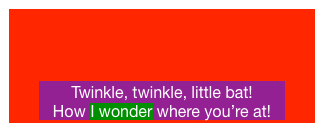
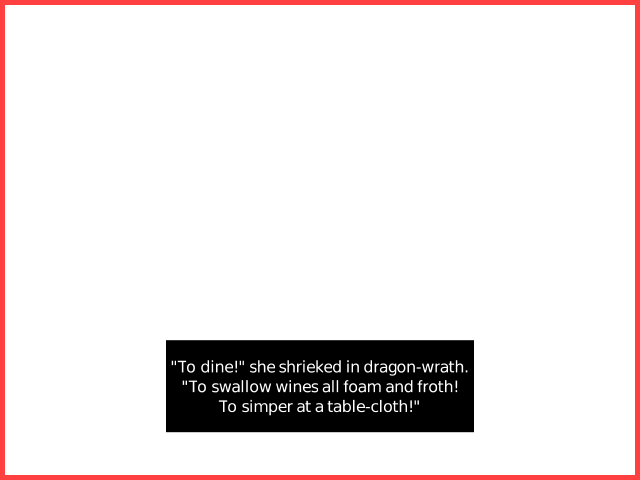
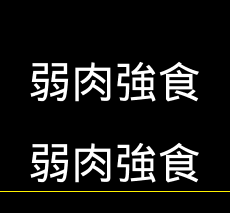
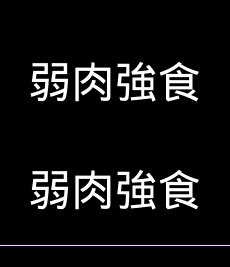
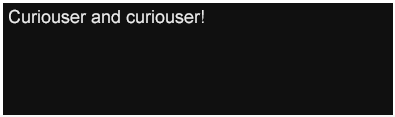
첫 번째 자막 자막 1 – 시간 간격 [0.76,
3.45)은
0.76초부터 3.45초까지의 시간 간격 동안 제시된다.
이
자막은 제시되는 영역으로부터 글꼴 계열, 글꼴 크기,
전경색 및 텍스트 정렬을 상속한다. 문단에 영역이 명시적으로 지정되어 있지 않으므로,
영역을 지정하는 가장 가까운 조상이 대상 영역을 결정한다.
또한 영역 정의에 tts:displayAlign="after"가 지정되어 있으므로
콘텐츠가 포함 영역의 아래쪽(after edge)에 제시됨에 유의한다.
참고:
표기 "[X,Y]"는 X와 Y를 포함하는 X부터 Y까지의 닫힌 간격을 나타내며, "[X,Y)"는 X는 포함하지만 Y는 포함하지 않는 오른쪽 반열린 간격을 나타내고, "(X,Y]"는 X는 포함하지 않지만 Y는 포함하는 왼쪽 반열린 간격을 나타내며, "(X,Y)"는 X와 Y를 모두 포함하지 않는 열린 간격을 나타낸다.
참고:
이 예제에서 p 요소는 언어적 문단과 같은 의미론적 요소가 아니라
프레젠테이션 요소로 사용된다. 의도한 의미를 전달하기 위해 어떤 TTML 요소를
사용할지는 저자가 결정할 사항이다. 예를 들어 이 예제는
의미론적 문단의 완전성을 보존하기 위해 span 요소에 타이밍을
사용하는 방식으로 작성될 수도 있다.
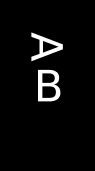
![]() |
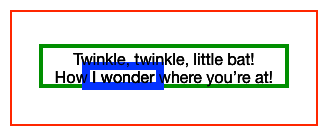
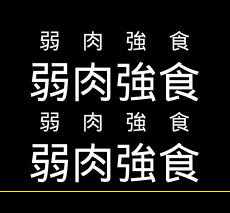
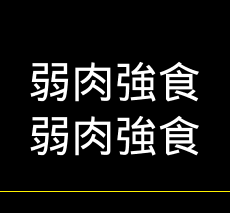
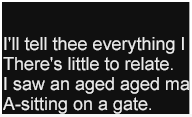
두 번째 자막은 기본 스타일을 계속 사용하지만,
저자가 지정한 줄 바꿈이 사이에 있는 두 줄의 텍스트를 포함한다.
인라인 진행 방향에서 문단 정렬을 지정하기 위해 tts:textAlign="center"를
사용하는 효과에 유의한다.
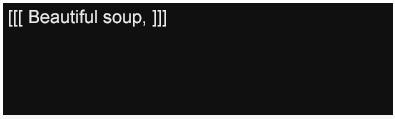
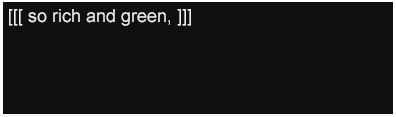
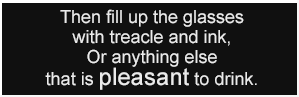
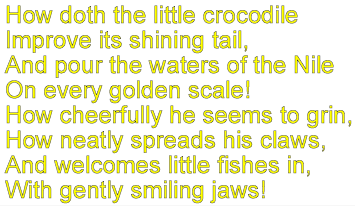
![]() |
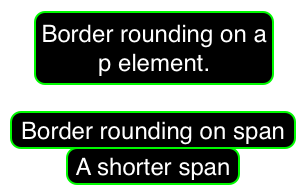
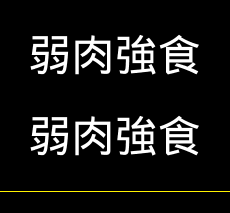
세 번째 자막은 기본 스타일의 전경색을 다른 색으로 재정의하는 변형 스타일을 사용하여 계속된다.
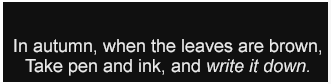
![]() |
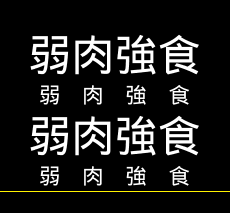
네 번째 자막은 기본 스타일로 되돌아간다.
![]() |
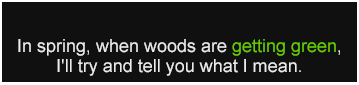
다섯 번째 자막은 다시 기본 스타일의 전경색을 다른 색으로 재정의하는 변형 스타일을 사용하여 계속된다.
![]() |
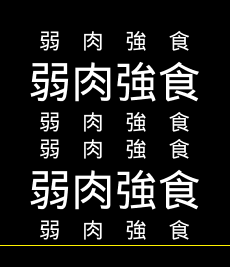
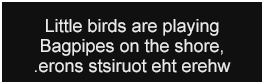
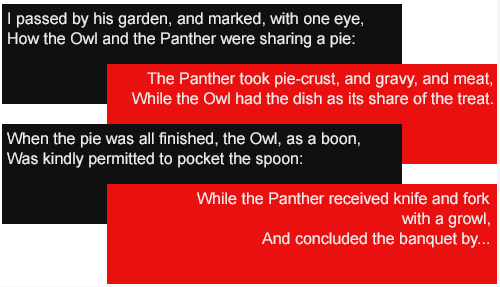
다음 활성 시간 간격 동안에는 두 개의 서로 다른 자막이 동시에 활성화되며, 각 자막을 표현하는 문단은 기본 스타일의 색상과 문단 텍스트 정렬을 재정의하는 서로 다른 스타일을 사용한다. 흐름 순서는 콘텐츠 계층에 나타나는 요소의 어휘 순서에 의해 결정된다는 점에 유의한다.
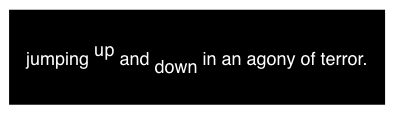
|
다음 자막은 비슷한 방식으로 지정되며, 인라인 진행 방향에서 문단에 오른쪽(end) 정렬을 부여하기 위해 스타일 재정의를 사용한다.
|
여덟 번째 자막은 문단의 오른쪽(end) 정렬을 유지하기 위해 이전 자막과 동일한 스타일 재정의를 사용한다.
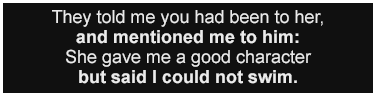
![]() |
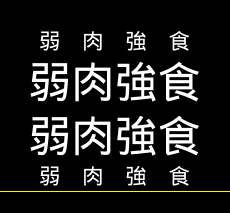
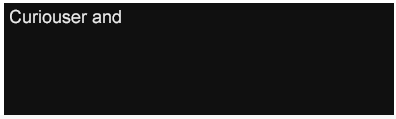
마지막(아홉 번째) 활성 시간 간격 동안에는 두 개의 서로 다른 자막이 다시 동시에 활성화되지만, 두 번째 문단에는 기본 색상을 재정의하는 다른 스타일이 적용된다. 흐름 순서는 콘텐츠 계층에 나타나는 요소의 어휘 순서에 의해 결정된다는 점에 유의한다.
|
위에 표시된 예제는 TTML을 사용해 저작할 수 있는 주요 정보 유형인 메타데이터, 스타일링, 레이아웃, 타이밍 및 콘텐츠를 보여준다. 일반적인 경우 스타일링 및 레이아웃 정보는 문서 인스턴스 안에서 별도로 지정된다. 콘텐츠 정보는 공간적(흐름) 정보와 타이밍 정보의 구성을 모두 구현하는 계층적 방식으로 표현된다. 콘텐츠는 스타일링 및 레이아웃 정보를 직접 또는 간접적으로 참조하며 스타일링에 대한 인라인 재정의를 지정할 수 있다.
| BPD |
Block Progression Dimension |
| DAR |
Display Aspect Ratio |
| DFXP |
Distribution Format Exchange Profile |
| IPD |
Inline Progression Dimension |
| ISD |
Intermediate Synchronic Document |
| PAR |
Pixel Aspect Ratio |
| SAR |
Storage Aspect Ratio |
| TT |
Timed Text |
| TTML |
Timed Text Markup Language |
| TTAF |
Timed Text Authoring Format |
| TTWG |
Timed Text Working Group |
horizontal axis 또는 vertical axis 중 하나에서 길이를 나타내는 스칼라 값.
reduced xml infoset으로 표현되는 추상 데이터 집합의 인스턴스.
XML Information Sets [XML InfoSet]의 한 클래스를 정의하는 제약 집합.
undesignated profile을 참조.
document instance에는 존재하지 않지만,
11.3.1.3 중간 동기 문서 구성 또는
11.3.1.4 동기 흐름 처리
단계 동안
[construct anonymous
spans] 절차에 의해 해당
abstract document instance에 합성되어
삽입되는 span 요소.
[XSL-FO 1.1], Rectangular Areas, §4.2에 의해 정의된 대로 어떤 출력 매체의 평면 위에서 경계가 있는 직사각형 영역의 시각적 콘텐츠를 나타내는 주소 지정 가능한 logical pixels의 모음. 특히 [CSS2] 및 [HTML 5.2]의 맥락에서는 box라고도 한다.
XML 문서의 각 지정되었거나 기본값이 적용된 속성은 [XML InfoSet], §2.3에 정의된 attribute information item에 대응한다.
audio 요소가
audio presentation context의 다른
audio 요소가 참조할 수 있는
공유 가능한 정의로 쓰이도록 지정되는 맥락.
audio presentation context의
audio 요소, 또는 문자 콘텐츠가
speech data resource를 생성하는 데 사용되는
span 요소.
audio 요소가
제시(렌더링)되기 위한 목적으로 지정되는 맥락. 그러한
audio 요소는
source 요소 자식 안의
data 요소를 사용하여 오디오 데이터를
인라인으로 지정할 수 있으며, 또는
audio defining context에 지정된 다른
audio 요소를 참조할 수도 있고,
둘 다 수행할 수도 있다.
코딩되었거나 인코딩되지 않은 오디오 샘플을 포함하는 data resource.
오디오 샘플의 시퀀스.
배경 프레젠테이션 아티팩트(예: 색상 또는 이미지)가 (가능하면) 클리핑되고 칠해지는 기준이 되는 document coordinate space의 직사각형. 더 구체적으로는, 배경과 연결된 요소가 생성하는 영역의 border rectangle, padding rectangle 또는 content rectangle 중 하나이다. tts:backgroundClip 속성이 지정하는 스타일 속성의 계산 값이 어떤 직사각형이 적용되는지를 결정한다.
배경 프레젠테이션 아티팩트(예: 색상 또는 이미지)가 위치 지정되거나 크기 지정되는 기준이 되는 document coordinate space의 직사각형. 더 구체적으로는, 배경과 연결된 요소가 생성하는 영역의 border rectangle, padding rectangle 또는 content rectangle 중 하나이다. tts:backgroundOrigin 속성이 지정하는 스타일 속성의 계산 값이 어떤 직사각형이 적용되는지를 결정한다.
ttp:profile 요소의 use 속성으로 참조되는
profile로, 참조하는 프로필을 채우기 위한 기준(초기)
명세 집합으로 사용된다.
[XSL-FO 1.1], Block-areas, §4.4가 정의한 기본적인 area 유형으로, 자식은 모두 block areas (block area가 line area가 아닌 경우)이거나 모두 inline areas (block area가 line area인 경우)로 구성된다.
Block display는 특정 맥락에서 content element에 적용될 수 있는 레이아웃 의미론의 집합으로, 자식 영역은 block progression direction에서 순차적으로 조판된다.
참고:
[CSS2]에서는 프레젠테이션 처리 중
block 값을 가진 CSS display 속성이
content element에 적용될 때
block display가 표시된다. [XSL-FO 1.1]에서는
fo:block 요소를 조판할 때 block display가 발생한다.
block progression 축, 즉 양의 block progression direction에 있는 relative dimension으로, bpd 또는 BPD로 약칭한다.
어떤 서식 지정 맥락에서 block area의 진행이 취하는 방향. 수평 writing mode의 맥락에서는 block progression direction이 일반적으로 위에서 아래이며, 수직 writing mode의 맥락에서는 일반적으로 오른쪽에서 왼쪽 또는 왼쪽에서 오른쪽이다.
content processor가 제공하고
timed text content document
instance가 제공하지 않는 콘텐츠를 가진
data resource. 이는
source 요소나
source 요소 또는
embedded
content element의
src 속성을 통해 참조된다.
XML 문서에 나타나는 각 데이터 문자는 [XML InfoSet], §2.6에 정의된 character information item에 대응한다.
자식 chunk 요소를 사용하여
embedded data resource의 실제 바이트 표현을
직접 임베드하는 data 요소.
연결된 profile instance의 combined specification set component의 constituents component가 둘 이상의 non-null designator를 포함하는 profile.
root container region의 너비를 cell column count,
즉 horizontal axis의 셀 수로 나누고,
root container region의 높이를 cell row count,
즉 vertical axis의 셀 수로 나누어 계산한 셀의 크기(extent). 여기서 cell column 및 row count는
ttp:cellResolution 매개변수 속성에 의해 결정된다.
참고:
root container region의 너비와 높이는 H.2 해상도에 지정된 root container region의 공간적 범위의 너비와 높이에 대응한다. 따라서 computed cell size는 logical pixels로 표현된다.
10.4.4.3 Computed Style Set Processing에 의해 결정된 computed style values를 포함하는 style set.
이 명세에서 또는 이 명세에 사용되도록 정의된 유형의 요소 중,
평가 결과가 해당 요소의 정의된 의미론이 적용되는지 무시되는지를 결정하는
condition 속성의 지정을
허용하는 모든 요소. 그러한 속성이 없으면 요소의 의미론은 항상 적용된다.
conditionalized
element의 condition expression이 false로 평가되면,
그 요소와 그 하위 요소들은 conditionally excluded되었다고 한다.
요소가 conditionally excluded되지 않았다면,
conditionally included되었다고 한다.
참고:
조건부로 포함되었지만 condition
속성의 사용을 허용하지 않거나 이를 지정하지 않는 요소는
unconditionally included 요소라고 부를 수 있다.
요소가 conditionally excluded되면, 달리 명시되지 않는 한 그 모든 의미론은
무시된다. 이에 대한 자세한 conditional exclusion 의미론은
condition을 참조한다.
참고:
특정 요소, 예를 들어 style 요소의 경우,
conditional exclusion은 요소의 의미론 일부만 무시하고 전부를 무시하지 않을 수 있으며,
그러한 경우 해당 동작은 명시적으로 설명된다.
Content Module이 정의한 모든 요소 유형과, audio presentation context 또는 image presentation context에서 각각 나타날 때 Audio Module 및 Image Module이 정의한 모든 요소 유형.
참고:
8.1 콘텐츠 요소 어휘에서 정의되는
tt
및 head 요소 유형은
위 정의의 범위에 의도적으로 포함되지 않지만,
표 5-3 – 요소 어휘의
Document 및
Head Module 정의에는 포함된다.
의미상 중요한 콘텐츠를 포함하는 image resource. 예를 들어 캡션 렌더링을 나타내는 래스터 이미지.
콘텐츠의 변환, 프레젠테이션 또는 기타 처리를 목적으로 Timed Text Markup Language 콘텐츠를 가져올(수신할) 수 있는 처리 시스템.
(1) 연결된 profile instance의
type component 값이 content이고,
(2) Timed Text Markup Language 콘텐츠가 반드시 사용하지 않아야 하거나, 반드시 사용해야 하거나,
사용할 수 있는 features 및
extensions의 모음을 나타내는
profile.
프레젠테이션 처리를 수행할 때 콘텐츠가 렌더링되는 논리적 직사각형 영역.
맥락이 명확하면 단순히 region으로 약칭한다. 각 content region은
명시적으로 지정되었거나 암시된 region 요소에 의해
정의되며, 이 요소는 root container region에
대한 content region의 extent와 기타 스타일 및 시간 특성을 정의한다.
data 요소가 의미론적
바인딩(연결)을 목적으로 지정되는 맥락. 그러한
data 요소는
source 요소 자식 안의
data 요소를 사용하여 데이터를
인라인으로 지정할 수 있으며, 또는
data defining context에 지정된 다른
data 요소를 참조할 수도 있고,
둘 다 수행할 수도 있다. 이 맥락(또는 어떤 맥락)에서든
data 요소가 존재한다는 사실만으로
프레젠테이션(렌더링) 의미론이 암시되지는 않는다.
data 요소가
data binding context의 다른
data 요소에 의해 참조될
공유 가능한 정의로 사용되도록 지정되는 맥락. 즉 부모가
resources 요소인
data 요소.
Data Module이 정의한 모든 요소 유형.
data element를 사용해 표현되거나 참조되는 임의의 데이터 리소스. 예를 들어 data resource는 timed text content document instance 안에서 오디오 클립, 글꼴, 이미지 또는 임의의 애플리케이션 데이터를 임베드하거나 참조하는 데 사용할 수 있다.
선언되었거나 추론된 processor profile이 없는 경우 effective processor profile을 계산하는 데 사용되는 기본 processor profile. 이 default processor profile은 construct default processor profile 절차에 의해 결정된다.
명시적으로 지정된 out-of-line region 요소가 없을 때,
즉 layout 요소의 자식으로
region 요소가 지정되지 않은 경우
암시되는 기본 out-of-line region.
profile 명세의 designator 속성 또는 설명 텍스트를 통해
<profile-designator>와 연결된
profile.
DAR의 정의를 참조.
document instance를 서식 지정하고 제시하는 데 사용되는 root container region의 종횡비와 해상도를 결정하는 논리 좌표 공간. 자세한 내용은 H 루트 컨테이너 영역 의미론을 참조.
문서 교환이 발생하는 content processor 외부의 암시적 맥락 또는 환경이며, 여기서 대역 외 프로토콜 또는 명세가 암시된 프로필과 같은 특정 동작 기본값을 정의할 수 있다.
문서 처리가 발생하는 content processor 내부의 암시적 맥락 또는 환경이며, 여기서 대역 외 프로토콜 또는 명세가 synthetic document syncbase의 설정 또는 생성과 같은 특정 동작 기본값을 정의할 수 있다.
document instance에서 계산된 시간 표현식이 해석되는 기준인 시간 좌표계. 자세한 내용은 7.2.11 ttp:timeBase를 참조.
명시적 또는 암시적 profile 및 profile specification combination method를 적용한 뒤, TTML document instance가 명시적 또는 암시적으로 참조하거나 할당받은 모든 content profiles 집합에서 계산되는 content profile. 자세한 내용은 construct effective content profile 절차를 참조. 주어진 document instance에 대해 검증을 수행할 때, 그 검증은 문서의 effective content profile을 사용하여 수행된다.
명시적 또는 암시적 profile 및 profile specification combination method를 적용한 뒤, TTML document instance가 명시적 또는 암시적으로 참조하거나 할당받은 모든 processor profiles 집합에서 계산되는 processor profile. 자세한 내용은 construct effective processor profile 절차를 참조. content processor가 주어진 document instance를 처리할 수 있는지 여부를 결정할 때, 이 결정은 문서의 effective processor profile을 사용하여 수행된다.
construct effective validation profile 절차에 의해 결정되는, validation processing 중 사용할 스키마 (또는 스키마 집합)를 선택하는 데 사용되는 profile.
construct effective validation schemas 절차에 의해 결정되는, validation processing 중 사용되는 스키마 집합.
참고:
어떤 스키마 언어도 이 명세가 정의한 TTML 콘텐츠의 모든 제약을 포착하지 못하므로, validating content processor는 추가적인 내장형, 프로그램적(코드 기반) 스키마를 사용할 것으로 예상된다.
XML 문서에 나타나는 각 요소는 [XML InfoSet], §2.2에 정의된 element information item에 대응한다.
Audio Module, Data Module, Font Module 또는 Image Module이 정의한 모든 요소 유형.
audio resource, data resource, font resource, 또는 image resource.
timed text content document
instance 안에 임베드된
data resource. 이는
data 요소가
data resource의 실제 바이트를 표현하는지 또는
external data resource를 참조하는지와 관계없이
data 요소를 통해 표현된다.
렌더링 가능한 콘텐츠를 포함하지 않으며, 추가로 이 리소스를 일련의 콘텐츠 샘플로 해석하려는 시도를 해도 샘플이 생성되지 않는 data resource.
포함된 feature 또는 component를 둘러싸거나 그 밖의 방식으로 포함하는 document instance.
콘텐츠 교환을 위한 일련의 필요를 충족하는 콘텐츠 profile.
다른(공개 또는 비공개) 명세에서 정의되고 extension designation을 사용하여 라벨링된 구문적 또는 의미론적 표현 또는 기능.
extension과 관련된 제약 또는 요구 사항의 명세로,
일반적으로 ttp:extension 요소로
표현된다.
timed text content document
instance 외부의
data resource. 이는
source 요소나
source 요소 또는
embedded
content element의
src 속성을 통해 참조된다.
(1) external data resource를 참조하는
source 요소 또는
src 속성, 또는 (2) 참조된
external data resource.
이 명세(또는 이 명세의 과거 또는 미래 개정판)에서 정의되고 feature designation을 사용하여 라벨링된 구문적 또는 의미론적 표현 또는 기능.
feature와 관련된 제약 또는 요구 사항의 명세로,
일반적으로 ttp:feature 요소로
표현된다.
자막(또는 캡션)이 활성화되어 있지 않더라도 항상 표시되도록 의도된 자막(또는 캡션). Forced subtitles(captions)는 미디어에 나타나는 표지판과 같은 외국어 또는 외계어, 또는 텍스트의 번역과 관련된 자막(캡션)을 open captioning, 즉 burn in으로 처리하는 것을 방지하는 데 사용된다.
font 요소가
font selection process에 의해 간접 참조될
공유 가능한 정의로 사용되도록 지정되는 맥락.
presentation processor가 사용하는 내부 프로세스. 이 프로세스의 목적은 레이아웃 및 프레젠테이션 처리 중 사용할 저자 정의 글꼴 및 플랫폼 글꼴의 집합을 선택하는 것이며, 이 프로세스의 입력 매개변수에는 글꼴 관련 속성의 계산 값, 개별 글꼴의 기능, 그리고 제시되는 텍스트 콘텐츠가 포함된다.
문자를 글리프로 매핑하는 데이터, 글리프 외곽선 또는 이미지, 글리프 메트릭 및 문자-글리프 매핑 및 렌더링 과정에 사용되는 기타 데이터를 포함하는 data resource.
vertical axis상의 absolute dimension.
참고:
일부 예외적인 경우 height라는 용어는 horizontal axis를 가리킬 수 있다. 자세한 내용은 10.2.27 tts:lineHeight를 참조.
[URI], §3.5에 정의된 fragment identifer 구문을 따르는 <uri> 값의 구문적 하위 집합.
[XSL-FO 1.1], Glyph-areas, §4.6.2에 의해 정의된 inline area의 한 유형. 이 명세에서 glyph area는 하나 이상의 콘텐츠 문자 및 특정 글꼴의 하나 이상의 글리프와 연결되며, glyph area를 제시할 때 렌더링되는 것은 이러한 글리프이다. spacing glyph area는 적어도 하나의 spacing glyph, 즉 advance(너비 또는 높이)가 0이 아닌 글리프와 연결된 glyph area이다. non-spacing glyph area는 spacing glyph area가 아닌 glyph area, 즉 전적으로 non-spacing glyph로 구성된 glyph area이다.
사용 맥락에서 암시되는 어떤 다른 area의 하위 area인
glyph area.
예를 들어 inline area I의 하위 area가
glyph area라면, 이는
I의 glyph area descendant이다.
image 요소가
image presentation context의 다른
image 요소가 참조할 수 있는
공유 가능한 정의로 사용되도록 지정되는 맥락.
image 요소가
제시(렌더링)되기 위한 목적으로 지정되는 맥락. 그러한
image 요소는
source 요소 자식 안의
data 요소를 사용하여 이미지 데이터를
인라인으로 지정할 수 있으며, 또는
image defining context에 지정된 다른
image 요소를 참조할 수도 있고,
둘 다 수행할 수도 있다.
래스터 이미지를 포함하는 data resource.
construct inferred processor profile 절차에 의해 결정되는 processor profile로, validation processing을 수행하는 데 사용되는 effective processor profile 역할을 할 수 있다.
애니메이션과 연결된
content element 또는
region 요소의 직접 자식으로
인라인 정의되는 animate 또는
set 요소.
inline animation element와 그 부모
content
element 또는 region 요소 사이에는
일대일 관계가 있다.
[XSL-FO 1.1], Inline-areas, §4.6에 의해 정의된 area의 한 유형으로, 자식은 모두 inline areas, 예를 들어 glyph areas로 구성된다.
Inline block display는 특정 맥락에서 content element에 적용될 수 있는 레이아웃 의미론의 집합으로, 생성된 block area가 inline layout context에서 조판될 원자적 area로 취급된다. 즉 block area는 외부적으로 고려될 때 자신이 inline area인 것처럼 취급되지만, 내부적으로 고려될 때는 block area로 취급된다.
Inline display는 특정 맥락에서 content element에 적용될 수 있는 레이아웃 의미론의 집합으로, 자식 area가 inline progression direction에서 순차적으로 조판된다.
참고:
[CSS2]에서는 프레젠테이션 처리 중
inline 값을 가진 CSS display 속성이
content element에 적용될 때
inline display가 표시된다. [XSL-FO 1.1]에서는
fo:inline 요소를 조판할 때 inline display가 발생한다.
inline progression 축, 즉 양의 inline progression direction에 있는 relative dimension으로, ipd 또는 IPD로 약칭한다.
어떤 서식 지정 맥락에서 inline area의 진행이 취하는 방향. 수평 writing mode의 맥락에서는 inline progression direction이 일반적으로 왼쪽에서 오른쪽 또는 오른쪽에서 왼쪽이며, 수직 writing mode의 맥락에서는 일반적으로 위에서 아래이다.
region으로 선택(대상 지정)될 어떤
content element에 대해 인라인 방식으로 정의되는
region.
inline region은 특정 content elements의 자식
region 요소로
명시적으로 지정된다.
인라인 region 요소와 그 부모
content element 사이에는 일대일 관계가 있다.
inline region에는 부모 요소의 시간 간격이 활성 시간 간격으로 할당된다.
어떤 region 속성도 inline region을 참조하지 않는다.
사용 맥락에 따라
timed text intermediate document 또는
timed text intermediate document
instance를 의미하며,
루트(문서) 요소가 isd:isd 요소이고, 원본
timed text content document의 콘텐츠,
스타일링, 레이아웃 및 타이밍과 교차하는 겹치지 않는 시간 간격을 나타낸다.
사용 맥락에 따라
timed text intermediate document 또는
timed text intermediate document
instance를 의미하며,
루트(문서) 요소가 isd:sequence 요소이고, 원본
timed text content document의 콘텐츠,
스타일링, 레이아웃 및 타이밍을 효과적으로 나타내는
intermediate synchronic
document 인스턴스의 시퀀스를 나타낸다.
intermediate synchronic document sequence 또는 intermediate synchronic document의 구체적 표현에 사용되는 형식 체계.
block level content의 시퀀스를 제한 없는 block container area로 서식 지정하고, 결과로 생성된 서식 지정된 block container의 너비와 높이를 결정하여 산출한 extent, 즉 너비와 높이.
이미지 자체 내부의 정보, 예를 들어 이미지의 픽셀 배열의 너비와 높이로부터 결정된 이미지의 extent, 즉 너비와 높이.
inline level content의 시퀀스를 제한 없는 inline container area로 서식 지정하고, 결과로 생성된 서식 지정된 inline container의 너비와 높이를 결정하여 산출한 extent, 즉 너비와 높이.
이 명세의 범위를 벗어나는 document processing context의 프로토콜 또는 프로세스.
수평면에 평행한 축.
[XSL-FO 1.1], Line-areas, §4.5에 의해 정의된 block area의 한 유형으로, 자식은 하나 이상의 inline areas로 구성된다.
Metadata Module이 정의한 모든 요소 유형.
nesting profile의 구성
profile, 즉 상위 수준(조상)
ttp:profile 요소의 하위 ttp:profile 요소 중 하나.
주어진 ttp:profile은
nested profile 및
nesting profile 둘 다로 사용될 수 있다.
하나 이상의 자식 ttp:profile 요소를 참조하여 정의되는
profile이며, 여기서 profile combination method는
여러 자식 ttp:profile 요소의 profile specifications가 어떻게 결합되는지를
결정한다. nesting profile과 연결된
profile instance의 constituents
component는 null이 아니다.
simple data embedding 또는
chunked data embedding을 통해
embedded data resource의 실제 바이트를
임베드하는 자식
data 요소를 지정하는
source 요소.
연결된 profile instance의 combined specification set component의 constituents component가 하나 이하의 non-null designator를 포함하는 profile.
의미상 중요한 콘텐츠를 포함하지 않는 image resource. 예를 들어 배경 디자인을 나타내는 래스터 이미지로, 제시되지 않더라도 의미상 중요한 콘텐츠의 프레젠테이션에 영향을 주지 않는 이미지.
embedded data resource의 실제 바이트 표현을
임베드하지 않는 자식
data 요소를 지정하는
source 요소.
하나 이상의 자식 ttp:profile 요소를 참조하지 않고 정의되는
profile, 즉 자식 ttp:profile 요소를 포함하지 않는
profile. non-nesting profile과 연결된
profile instance의 constituents
component는 null이다.
애니메이션과 연결된
content element 또는
region 요소로부터
out-of-line으로 정의되는 animate 또는
set 요소.
out-of-line animation은 document instance의
헤더(head 요소)에 있는
animation 요소의 자식으로 나타나며,
애니메이션될 연결 요소의
animate 속성이 참조하는 값을 가진
xml:id 속성을 지정한다.
참조된 out-of-line animation element와 이를 참조하는
content elements 및
region 요소 사이에는 일대다 관계가 있다.
region과 연결된(선택될)
content element로부터 out-of-line으로 정의되는
region 요소.
out-of-line region은 document instance의
헤더(head 요소)에 있는
layout 요소의 자식으로 나타나며,
연결된 요소를 해당 region으로 선택하기 위해
region 속성이 참조하는 값을 가진
xml:id 속성을 지정한다.
참조된 out-of-line region element와 이를 참조하는
content elements 사이에는 일대다 관계가 있다.
명시적으로 지정된 out-of-line region이 없으면
default out-of-line region이 암시된다.
content profile의 다른 모든 가능한 결정을 재정의하도록 결정된 content profile.
processor profile의 다른 모든 가능한 결정을 재정의하도록 결정된 processor profile.
PAR의 정의를 참조.
root container region과 related media object region이 제시되는 가상의 표시 장치.
presentation context와 연결된 좌표 공간.
참고:
presentation processor의 주어진 구현에서는 document coordinate space의 logical pixels와 연결된 display pixels가 presentation context coordinate space의 presentation pixels와 정확히 대응할 수 있다. 그러나 그러한 정확한 대응이 반드시 적용될 필요는 없으며, 특히 이러한 좌표 공간 간의 (구현 정의) 매핑은 픽셀 종횡비, 해상도, 색 공간, 색 샘플 깊이 및 기타 구현별 속성의 변환을 받을 수 있다.
(1) 제시 가능한 콘텐츠를 포함하거나 표현하거나, (2) 콘텐츠의 프레젠테이션에 영향을 주는
모든 요소. 전자의 예에는 모든 content elements 및
특정 embedded content elements, 특히
audio와
image가 포함된다.
후자의 예에는 인라인
animate 및
set이 포함된다.
metadata elements는 이 정의에서 제외된다는 점에
특히 유의한다.
이 명세에 정의된 프레젠테이션 의미론을 적용하여 Timed Text Markup Language 콘텐츠를 레이아웃하고, 서식 지정하고, 렌더링하는, 즉 제시하는 것을 목적으로 하는 content processor.
content processor를 참조.
(1) 연결된
profile instance의 type component 값이
processor이고,
(2) content processor가 반드시 또는 선택적으로 구현(지원)해야 하는
features 및
extensions의 모음을 나타내는
profile.
features 및 extensions의 모음으로, interned(인스턴스화)될 때 profile instance 상태 객체로 표현된다. profile은 content profile 또는 processor profile로 유형화된다.
사용 맥락에 따라 timed text profile document 또는 timed text profile document instance.
내부적으로 정의된 profile을 라벨링하거나 참조하는 데 사용되는 fragment identifier. 여기서 내부란 document instance 내부임을 의미한다.
[abort if unsupported processor profile] 절차를 수행하는 과정으로, 그 부수 효과로 document instance의 effective content profile(필요한 경우) 및 effective processor profile을 결정한다.
feature specification 또는 extension specification, 또는 그 내부 상태 표현.
B 축소 XML 정보 집합이 지정한 제약을 만족하는 XML Information Set [XML InfoSet].
root container region 또는 content region이며, 한정 없이 사용되면 후자를 가리킨다.
참고:
문서 프레젠테이션과 연결된 root container region은 하나뿐이며 고유하지만, 이 명세는 시간에 따라 또는 특정 시점에 사용되는 content region의 수에 제한을 두지 않는다. 그러나 일부 content profiles는 그러한 제한을 지정한다.
document instance와 연결되었거나 그 밖의 방식으로 관련된 (null일 수도 있는) media object. 예를 들어, document instance가 캡션 또는 자막 정보를 제공하고 그 document instance와 연결되는 집합적 audio/video media object가 있다.
non-null인 시각적 related media object가 제시되는 presentation processing context의 region.
적용 가능한 writing mode에 따라 inline 또는 block progression 축 중 하나에서 길이를 나타내는 스칼라 값.
content regions가 배치되고 선택적으로 클리핑되는 좌표계를 설정하는 고유한 논리적 직사각형 region. 자세한 내용은 H 루트 컨테이너 영역 의미론도 참조.
참고:
root container region에는 border나 padding이 없다. 따라서 그 border, padding 및 content rectangle은 같은 경계를 공유한다.
어떤 외부 애플리케이션 또는 프레젠테이션 맥락과의 관계에서 document instance의 시간적 시작과 끝으로 정의되는 temporal extent(간격).
자식 chunk 요소를 사용하지 않고
embedded data resource의 실제 바이트 표현을
직접 임베드하는 data 요소.
[SMPTE ST 12-1]에 의해 형식과 의미론이 수립된 time code로, 방송 audio/video stream과 같은 미디어 콘텐츠에 임베드되거나 그 밖의 방식으로 연결될 수 있다.
자식 source 요소를 사용하여
embedded data resource의 콘텐츠를
간접적으로 참조하는 data 요소.
10.4.4.2 Specified Style Set Processing에 의해 결정된 specified style values를 포함하는 style set.
speech synthesis processor의 출력에 의해 생성된 샘플로 구성되는 data resource.
텍스트 콘텐츠의 오디오 음성 렌더링을 합성하는 기능을 가진 content processor의 선택적 구성 요소.
SAR의 정의를 참조.
style property set에 의해 정의된 style property set.
computed style set과 연결되어 있거나 연결될 수 있는 요소.
related media object 또는 기타 처리 기준에 따라 document processing context에 의해 합성되거나 그 밖의 방식으로 설정되는 문서 수준 syncbase [SMIL 3.0], §5.7.1.
related media object에 임베드되었거나 연결된 smpte time code 값으로부터, 또는 그 밖에 document processing context에 의해 결정되어 구성된 synthetic document syncbase.
구문적 또는 의미론적 feature, 예를 들어 요소 또는 요소의 프레젠테이션은 선택된 time base의 현재 시간이 그 feature의 활성 시간 간격과 교차할 때 temporally active이다.
glyph area의 방향을 회전 각도로 특성화한 것.
여기서 0°는 upright 방향을 지정하고,
90°, 즉 시계 방향 90도는 sideways 방향을 지정한다.
자세한 내용은 10.2.45
tts:textOrientation도 참조.
begin 속성의 지정을 허용하는
유형의 모든 요소.
본질적으로 또는 외재적으로 타이밍 정보와 연결된 텍스트 정보.
Timed Text Markup Language 콘텐츠를 가져오고 내보낼 수 있는 콘텐츠 저작 시스템.
TTML Content Document Type의 valid abstract document instance라고 주장되거나 확인된 추상 문서.
timed text content document의 구체적 실현. 자세한 내용은 A 구체적 인코딩도 참조.
timed text markup language document의 구체적 실현으로, 그 구체적 형태는 참조 맥락에 따라 다르다. TTML document instance 또는 단순히 document instance라고도 한다.
TTML Intermediate Document Type의 valid abstract document instance라고 주장되거나 확인된 추상 문서.
timed text intermediate document의 구체적 실현. 자세한 내용은 A 구체적 인코딩을 참조.
timed text content, 이 콘텐츠의 중간 표현, 또는 이 콘텐츠나 콘텐츠 프로세서의 프로필을 나타내는 콘텐츠 유형.
valid abstract document instance라고 주장되거나 확인된 추상 문서.
TTML Profile Document Type의 valid abstract document instance라고 주장되거나 확인된 추상 문서.
timed text profile document의 구체적 실현. 자세한 내용은 A 구체적 인코딩을 참조.
head 요소의 자식으로 나타나는 ttp:profile 요소에 의해
정의된 profile.
Timed Text Markup Language 콘텐츠를 Timed Text Markup Language 또는 다른(임의의) 콘텐츠 형식으로 변환하거나 그 밖의 방식으로 다시 쓰는 것을 목적으로 하는 content processor. 전자의 예로는 TTML profile에 부합하도록 TTML feature를 제거하거나 다시 쓰는 프로세서가 있다. 후자의 예로는 TTML을 완전히 다른 timed text 형식으로 번역하는 프로세서가 있다. 이 명세는 transformation processing을 위한 대상 profile 또는 형식을 달리 정의하지 않으므로, 이 명세에서 더 이상의 변환 의미론은 정의되지 않는다.
profile designator와 연결되지 않고, profile 정의의 맥락에서 암시적으로 참조되는 profile. anonymous profile이라고도 한다.
유효성 평가를 거쳐 4 문서 유형이 정의한 대로 유효하다고 판정된 abstract document instance.
validation processor가 수행하는 기능.
content processor의 선택적 구성 요소로, 특정 다른 유형의 처리를 수행하기 전에 후보 document instance에 대해 validation processing을 수행하는 기능을 가진다. 여기서 validation processing은 5.3 검증에 정의된 [validate document] 절차를 수행하는 것으로 구성된다.
content processor로서의 주 기능을 수행하기 전에 전처리 단계로 validation processor 구성 요소를 구현하는 content processor.
참고:
validating content processor는 (1) document instance를 검증(또는 확인)하는 단일 기능만 가질 수 있으며, 이 경우 그 출력이 유효성 여부를 나타내는 validating transformation processor로 간주될 수 있다. 또는 (2) 여러 기능을 가질 수 있으며, 그중 첫 번째는 document instance를 검증(또는 확인)한 다음 transformation processor 또는 presentation processor로서의 주 기능을 수행하는 것이다.
참고:
validation processing이 수행될 때, conforming validating content processor는 후자가 주어진 콘텐츠 단위에 대해 전자보다 시간적으로 앞서지 않는 한 validation processing과 content processing을 교차 수행할 수 있다.
수평면에 수직인 축.
토큰의 열거 모음으로, 각 토큰은 inline 및 block 지향 콘텐츠 모두의 축과 흐름 방향의 조합을 지정한다. 자세한 내용은 10.2.51 tts:writingMode를 참조.
이 명세의 규범적 설명에서 단어 may, should, must는 다음과 같이 정의된다.
준수 문서 및/또는 TTML 프로세서는 설명된 대로 동작할 수 있지만, 반드시 그렇게 동작할 필요는 없다.
준수 문서 및/또는 TTML 프로세서는 설명된 대로 동작할 것을 강하게 권장받지만, 반드시 그렇게 동작할 필요는 없다.
준수 문서 및/또는 TTML 프로세서는 설명된 대로 동작해야 하며, 그렇지 않으면 오류이다.
규범적 명세 언어가 명령형을 취하는 경우, 이는 must 용어가 적용되는 것처럼 처리되어야 한다. 또한 규범적 언어가 선언형을 취하고, 이 언어가 must에 의해 지배되는 경우, 이 역시 must 용어가 적용되는 것처럼 처리되어야 한다.
참고:
예를 들어 "treat X as an error" 및 "consider X as an error"라는 구문은 사용 맥락에서 필수 요구 사항으로 읽어야 한다. 마찬가지로, 명세 설명이 "X must apply", "X applies" 또는 "X is mandatory"이고, "X"가 추가로 "X is Y and Z"로 정의되어 있다면, 이 마지막 선언형 구문은 추이적 폐쇄에 의해 사용 맥락에서 "Y is mandatory" 및 "Z is mandatory"로 읽어야 한다.
XML 표현과 기타 관련 용어의 모든 규범적 구문 정의는 밝은 노란색-주황색 배경색으로 표시되고 "XML Representation" 또는 "Syntax Representation"으로 라벨링된다. 예를 들면 다음과 같다.
<example count = xsd:integer size = ("large" | "medium" | "small" | "tiny" | "micro") : medium> Content: (all | any*) </example> |
XML 표현에서 굵은 글꼴 속성 이름(예: 위의 count)은
필수 attribute information item을 나타내며, 나머지는 선택적이다.
attribute information item이 열거형 정의를 가지는 경우,
값은 위의 size처럼 세로 막대로 구분되어 표시된다.
기본값이 있는 경우에는 콜론 뒤에 표시된다.
attribute information item이
[XML Schema Part 2]에 정의된 내장 단순 유형 정의를 가지는 경우,
그 정의로 연결되는 하이퍼링크가 제공된다.
이 명세에서 명시적으로 정의되지 않는 한, 한정되지 않은 속성은 허용되지 않는다.
참고:
N.1 요소 파생을 제외하고,
속성의 (네임스페이스로 한정될 수 있는) 이름에는 속성과 같은 이름의 요소 유형을
구분하기 위해 '@'(COMMERCIAL AT) 문자가 접두된다. 이 경우
'@' 문자는 속성의 리터럴 이름의 일부로 의도된 것이 아니다.
예를 들어 @ttm:agent는
ttm:agent 속성을 가리키는 반면,
ttm:agent는
ttm:agent 요소를 가리킨다.
밝은 노란색 주황색 배경색으로 표시된 정보 항목은
deprecated이다(예: 위에 표시된 size 속성의
tiny 값).
deprecated된 정보 항목은 TTML 문서 인스턴스에 나타날 수는
있지만 나타나지 않는 것이 좋으며,
validating content processor는 그것이 나타날 경우
경고를 보고하는 것이 좋다.
밝은 자홍색 빨간색 배경색으로 표시된 정보 항목은
obsoleted이다(예: 위에 표시된 size 속성의
micro 값).
obsoleted된 정보 항목은 TTML 문서 인스턴스에 나타나서는 안 되며,
validating content processor는 그것이 나타날 경우
오류를 보고하는 것이 좋다.
항목의 이러한 지정은 명세 텍스트에서도 명시적으로 언급된다.
정보 항목의 허용된 콘텐츠는 Kleene 연산자 ?, *,
+를 사용하는 문법 조각으로 표시된다.
그 안의 각 요소 이름은 자체 예시로 연결되는 하이퍼링크이다.
linear white-space(LWSP)라는 용어는
SPACE(U+0020), TAB(U+0009), CARRIAGE RETURN(U+000D) 또는 LINE FEED(U+000A)의
비어 있지 않은 시퀀스로 해석되어야 하며,
이는 [XML 1.0]에 정의된 production [3] S에 대응한다.
값 구문 표현식의 명세에는 다음 관례가 사용된다.
리터럴 용어(따옴표 안에 지정됨)가 존재하는 경우, 따옴표 자체를 제외하고 지정된 그대로 정확히 나타나야 한다.
연결된(병치된) 용어는 모든 용어가 명시된 순서로 나타나야 함을 의미한다.
예를 들어 a b는
a와 b라는 용어가 존재하고 전자가 후자보다 앞선다는 뜻이다.
세로 막대(|)는 둘 이상의 대안을 구분하며, 그중 정확히 하나가
나타나야 한다.
이중 세로 막대(||)는 둘 이상의 선택지를 구분하며,
그중 하나 이상이 중복 없이 임의의 순서로 나타나야 하고,
<lwsp>로 구분된다.
여는 괄호와 닫는 괄호(())는 그룹화 및 연산자 우선순위 해소에 사용된다.
여는 대괄호와 닫는 대괄호([])는 문자 클래스를 표현하는 데 사용된다.
여는 중괄호와 닫는 중괄호({})는 두 가지 방식으로 사용되며,
일반적으로 맥락만으로 어느 것이 적용되는지 충분히 결정할 수 있다
(그렇지 않은 경우 주변 설명이 어느 것이 적용되는지를 명확히 한다).
반복 횟수 또는 범위를 표현하기 위해 사용되며, 다음 형식 중 하나를 취한다.
{count}
{minimum,maximum}
문자 모음을 표현하며, 그중 하나가 반드시 나타나야 한다.
또한 모음은 {char-{specials}}와 같이 모음의 차집합으로
지정될 수 있으며,
이는 모든 XML 문자에서 special 문자 모음을 뺀 것을 나타낸다.
Kleene 연산자 ?, *, +는 각각
선행 용어의 0회 또는 1회,
0회 이상, 1회 이상을 표현한다.
연산자 우선순위(높은 것부터 낮은 것까지)는 다음과 같으며, 모두 왼쪽에서 오른쪽으로 결합한다.
그룹화
연결(병치)
||
|
|| 값 구문을 만족하는 표현식 사이에 반드시 나타나야 하는 linear whitespace를
제외하고,
값 구문 정의에 <lwsp> non-terminal이 나타나
명시적으로 표시되지 않는 한 공백은 허용되지 않는다.
달리 명시되지 않는 한, horizontal 및 vertical이라는 용어는 writing mode에 상대적인 의미가 아니라 절대적 의미로 해석되며, width는 horizontal axis를 따른 차원을 가리키고 height는 vertical axis를 따른 차원을 가리킨다. 모든 예외는 본문에 명시적으로 언급된다.
이 명세의 모든 콘텐츠 중 명시적으로 비규범적이라고 표시되지 않은 것은 규범적인 것으로 간주된다. 절 또는 부록의 제목에 "Non-Normative"라는 표현이 포함된 경우, 해당 절 또는 부록 전체가 비규범적인 것으로 간주된다.
Note로 표시된 모든 문단은 비규범적인 것으로 간주된다.
예제 코드 조각은 밝은 청록색 배경색으로 표시되고 "Example Fragment"로 라벨링된다. 예를 들면 다음과 같다.
<tt xml:lang="" xmlns="http://www.w3.org/ns/ttml">
<head>
<metadata/>
<styling/>
<layout/>
</head>
<body/>
</tt>
|
참고:
여기에 표시된 예제 코드 조각은 well-formed XML로 표현되어 있지만, 완전하고 유효한 TTML 문서로 의도된 것은 아니다. 오히려 의도한 예제에 초점을 맞추기 위해 일반적으로 축약되어 있다. 특히 조각은 일반적으로 TTML 문서 적합성 요구 사항을 만족하기 위해 추가 요소 및/또는 속성으로 보강되어야 한다.
달리 명시되지 않는 한, 이 명세의 어휘 정의 절은 논리적 순서가 아니라 알파벳 순서로 어휘를 정의한다.
이 절은 TTML2 문서와 프로세서에 대한 일반 적합성 요구 사항을 명시한다.
timed text document instance는 다음 기준이 충족되는 경우 이 명세를 준수한다.
교환되는 document instance의 콘텐츠 유형을
Media Type [MIME Media Types]이 식별하는
document interchange context에서
document instance를 전송할 때, 지정된 미디어 유형은
[XML Media
Types] §7에 따른 application/ttml+xml이며, 선택적
profile 매개변수가 나타날 수 있고, 그 값은
<profile-designator> 표현식을 준수한다.
document instance는 B 축소 XML 정보 집합에 정의된 reduced xml infoset으로 표현되거나 표현될 수 있다.
document instance에 대응하는 reduced xml infoset은 4 문서 유형에 정의된 abstract document types 중 하나와 연결되어 있거나 연결될 수 있다.
document instance에 대응하는 reduced xml infoset은 연결된 abstract document type의 valid abstract document instance이다.
reduced xml infoset은 이 명세가 정의한 모든 추가 필수 구문 및 의미론적 제약을 만족한다. 또한 이 infoset은 [WCAG]가 지정한 웹 콘텐츠 접근성 지침을 만족하는 것이 좋다.
이 절은 TTML2 프로세서의 적합성 요구 사항을 일반 프로세서 적합성과 두 가지 특수 프로세서 적합성 유형인 변환 프로세서 적합성 및 프레젠테이션 프로세서 적합성의 관점에서 명시한다.
참고:
이 절에서 정의한 적합성 요구 사항은 TTML document instance의 정적 표현에 대해 동작하는 프로세서로 범위가 한정된다. 특히 저작 또는 편집 도구처럼 TTML document instance를 수정하는 프로세서는, TTML document instance에 일련의 수정을 수행한 최종 결과가 3.1 문서 적합성에 정의된 TTML 콘텐츠의 형식적 유효성을 만족하는 범위를 제외하고는 이 명세의 적용을 받지 않는다.
TTML2 content processor는 다음 일반 프로세서 기준이 충족되는 경우 이 명세를 준수한다.
프로세서는 준수하는 document instance의 reduced xml infoset 표현을 개념적으로 인스턴스화하기 위한 메커니즘을 하나 이상 제공한다.
프로세서는 profile processing을 수행한다.
참고:
profile processing의 수행은 아래 다음 항목에서 설명하는 [validate document] 절차를 수행하는 것에는 미치지 않는 일정 수준의 부분 검증을 함축한다. 특히 profile 관련 어휘의 구문적 표현과 이 어휘의 사용에 적용되는 모든 필수 구문 또는 의미론적 제약은 구현이 이 어휘를 사용하기 전에 명목상 확인할 것으로 예상된다. profile processing이 구문 또는 의미론적 제약의 중대한 위반을 감지하지 않고 완료되면, 더 완전한 검증을 [validate document] 절차로 수행할 수 있다.
프로세서가 validating content processor인 경우, 그것은
후보 document instance의 reduced xml infoset 표현을 4 문서 유형에 정의된 Abstract Document Types 중 하나와 암시적으로 또는 명시적으로 연결하기 위한 메커니즘을 하나 이상 제공하고,
[validate document] 절차를 수행한다.
참고:
이 명세는 이전 항목에서 설명한 validation processing의 수행과 profile processing의 수행 사이에 엄격한 순서를 정의하지 않는다. 특히 이 두 처리 단계는 document instance에 대해 추가적인 (변환 또는 프레젠테이션) 처리를 수행하기 전에 둘 다 완료되도록 교차 수행되거나 반복될 수 있다.
위 내용에도 불구하고, validation processing과
profile processing 사이에는 암시적인 순서 관계가 있다.
구체적으로, validation processing을 수행하려면
effective validation profile의 값을
해석할 필요가 있으며, 그 값을 위해서는
effective content profile의 값을 해석하거나,
그 값이 null이면
effective processor profile의 값을
해석할 필요가 있다. 후자의 두 값은
profile processing 중에 얻어진다.
참고:
validation processing과 profile processing을 교차 수행하는 예로, 다음 시나리오를 고려한다(주어진 순서대로).
입력 문서 소스의 well-formedness 확인(validation processing);
입력 문서 소스를 잠재적으로 유효한 abstract document instance로 인스턴스화(general processing);
내장 애플리케이션 의미론을 사용하여 validation state 초기화 (validation processing);
내장 애플리케이션 의미론을 사용하여 profile state 초기화(profile processing);
validation 관련 어휘 검증(validation processing);
유효한 validation 관련 어휘를 사용하여 validation state 갱신 (validation processing);
profile 관련 어휘 검증(validation processing);
유효한 profile 관련 어휘를 사용하여 profile state 갱신(profile processing);
[abort if unsupported processor profile] 절차의 중단 단계 수행 (profile processing);
새 profile state를 기반으로 필요에 따라 validation 및 profile 어휘를 다시 검증하면서 전체 문서 검증(validation processing);
처리가 중단되지 않은 경우, 변환 또는 프레젠테이션 처리로 계속 진행 (general processing).
프로세서는 다음 경우를 제외하고, 준수하는 document instance의 처리를 a priori 거부하거나 중단하지 않는다.
프로세서가 document instance에 적용된다고 선언된 TTML profile에 의해 지정되거나 암시된 어떤 필수(mandatory) feature를 지원하지 않는 경우, 또는
[validate document] 절차를 수행할 때 validation error가 발생하는 경우.
프로세서는 이 명세가 정의한 모든 필수 처리 의미론을 지원한다.
참고:
mandatory semantics라는 구문은 적합성 핵심 구문 must 및 must not의 모든 명시적 사용과, 그러한 핵심 구문으로부터 합리적으로 추론할 수 있는 모든 선언문을 가리킨다.
참고:
feature 또는 extension의 mandatory semantics에 대한 지원은 해당 feature 또는 extension이 TTML content processor에 의해 지원되는 경우에만 적용된다.
프로세서가 이 명세가 정의한 어떤 선택적 처리 의미론을 지원하는 경우, 정의된 의미론과 일관된 방식으로 그렇게 한다.
참고:
optional semantics라는 구문은 적합성 핵심 구문 should, should not, may, may not의 모든 명시적 사용과, 그러한 핵심 구문으로부터 합리적으로 추론할 수 있는 모든 선언문을 가리킨다.
TTML content processor는 다음 기준이 충족되는 경우 준수하는 TTML2 transformation processor이다.
프로세서는 3.2.1 일반 프로세서 적합성에 지정된 모든 요구 사항을 만족한다.
프로세서는 G.3 TTML2 변환 프로필에 지정된 TTML Transformation profile을 지원한다.
프로세서는 G.6 DFXP 변환 프로필에 지정된 DFXP Transformation profile을 지원한다.
TTML content processor는 다음 기준이 충족되는 경우 준수하는 TTML2 presentation processor이다.
프로세서는 3.2.1 일반 프로세서 적합성에 지정된 모든 요구 사항을 만족한다.
프로세서는 G.2 TTML2 프레젠테이션 프로필에 지정된 TTML Presentation profile을 지원한다.
프로세서는 G.5 DFXP 프레젠테이션 프로필에 지정된 DFXP Presentation profile을 지원한다.
프로세서는 11.3.1.3 중간 동기 문서 구성 및 11.3.1.4 동기 흐름 처리를 수행한다.
참고:
두 개의 준수하는 presentation processor가 동일한 준수 문서를 처리할 때 동일한 프레젠테이션을 생성해야 하는 것은 아니다. 예를 들어 서로 다른 presentation processor는 서로 다른 글꼴, 서로 다른 글꼴 래스터라이저, 서로 다른 줄 바꿈 알고리즘, 그리고 이 명세가 규정하지 않는 동작의 서로 다른 구현을 사용할 수 있다.
TTML document instance 또는 content processor의 적합성과 관련된 모든 준수 주장은 implementation compliance statement(ICS)를 참조해야 한다.
implementation compliance statement는 문서 인스턴스 또는 content processor 구현이 만족하는 이 명세의 모든 필수 및 선택 feature를 식별해야 한다. 특히 그 statement는 5.2 프로파일링에 정의된 대로 사용되거나 지원되는 TTML vocabulary profile을 식별해야 하며, subset 또는 superset profile이 사용되거나 지원되는 경우 subset 또는 superset profile에 어떤 feature가 제외되거나 포함되는지도 식별해야 한다.
참고:
위에 지정된 변환 프로세서 적합성 및 프레젠테이션 프로세서 적합성의 정의는 이러한 각 유형의 프로세서가 (최소한) 두 개의 특정 profile, 즉 [TTML1]이 정의한 유형별 profile과 이 명세가 정의한 유형별 profile을 지원할 것을 요구한다.
이 요구 사항에도 불구하고, Generic Processor Conformance 요구 사항을 만족하면서 변환 또는 프레젠테이션 처리 기능을 수행하지만, Transformation Processor Conformance 또는 Presentation Processor Conformance가 요구하는 profile 중 어느 것도 지원하지 않고, 대신 이 명세의 범위 밖에서 정의된 profile만 지원하는 TTML content processor를 구성하는 것이 가능하다. 그러한 경우 프로세서는 Generic Processor Conformance를 준수한다고 주장할 수 있고, 더 나아가 TTML transformation processor 또는 TTML presentation processor일 수 있지만, Transformation Processor Conformance 또는 Presentation Processor Conformance를 준수한다고 주장할 수는 없다.
준수 주장이 이루어지는 document instance는 다음 중 하나와 연결되어야 한다.
명시적으로 지정된
ttp:contentProfiles 속성 또는
하나 이상의 top-level
content profiles에서 파생된 non-null
effective content profile, 또는
명시적으로 지정된
ttp:processorProfiles 또는
ttp:profile 속성, 또는 하나 이상의
top-level
processor profiles에서 파생된 non-null
effective processor profile.
이 하위 절은 비규범적이다.
준수하는 TTML1 프로세서는 TTML2 content document instance를 처리할 수 있을 수도 있다. 단, 알 수 없는 어휘를 무시하고, 준수하는 TTML1 content document instance에서 허용되지 않는 맥락에 나타나는 알려진 어휘도 무시해야 한다. 그러나 그러한 처리는 준수하는 TTML2 프로세서가 처리할 때와 달리 콘텐츠를 버리거나 제시하지 못할 수 있고, 또는 의도와 다르게 콘텐츠를 제시할 수 있다.
참고:
예를 들어 TTML1 프로세서가 TTML2에 정의된 tts:ruby 속성을 무시하는 경우,
그 프로세서는 ruby feature를 사용하는 TTML2 콘텐츠를 여전히 제시할 수 있지만,
의도한 대로 제시되지는 않을 수 있다. 마찬가지로 TTML1 프로세서가 다른
style 요소의 자식으로 나타나는 style 요소를 만나면,
전자의 중첩 style은 무시될 수 있다(이 기능은 TTML1에 정의되어 있지 않았기 때문이다).
TTML2는 다음과 같이 설계되었다.
준수하는 TTML1 content document instance는 준수하는 TTML2 content document instance이다.
준수하는 TTML2 프로세서는 준수하는 TTML1 content document instance를 처리하여, TTML2 프로세서가 생성하는 출력이 TTML1에서 허용하는 변형 범위 안에 있도록 한다. 그러나 deprecated feature를 만나면 경고를 내보낼 수 있다.
이 절은 다음 TTML Abstract Document Types를 정의한다.
각 abstract document type은 다음 제약으로 구성된다.
비어 있지 않은 element type 모음. 여기서 각 element type은 이름, (비어 있을 수 있는) 속성 모음 및 콘텐츠 명세로 구성된다.
문서 요소로 나타날 수 있는, 비어 있지 않은 element type 모음
abstract document instance는 유효성의 관점에서 평가될 수 있으며, 다음 조건을 만족하면 valid abstract document instance로 간주된다. 즉, 다음을 수행한 뒤
이름이 연결된 abstract document type이 정의한 element type 모음의 구성원이 아닌 모든 element information item을 가지치기한 다음,
남아 있는 어떤 요소의 모든 문자 자식이 XML 공백 문자를 나타내고, 그 요소의 유형이 연결된 abstract document type에서 empty로 정의된 경우, 해당 요소에서 character information item 자식을 가지치기한 다음,
expanded name의 namespace URI가 표 5-1 – 네임스페이스에 나열되어 있지 않거나, 표 5-1 – 네임스페이스에 나열되어 있더라도 그 owning element information item과 함께 사용하기 위해 연결된 abstract document type이 정의한 속성 모음의 구성원이 아닌 expanded name을 가진 모든 attribute information item을 가지치기한다.
그런 다음 문서 요소가 연결된 abstract document type에서 허용하는 문서 요소 유형 중 하나이고, 문서 요소의 하위 요소들이 각자의 element type content specification을 만족하며, 모든 필수 속성이 존재하고, 각 속성의 선언된 값이 연결된 abstract document type이 선언한 유형을 만족한다면 유효하다.
참고:
준수 프로세서는 준수하는 document instance를 a priori 거부하지 않을 수 있지만, 주어진 document instance는 저자 또는 저작 도구에 의해 더 제한적인 유효성 정의를 만족하도록 제약될 수 있다.
참고:
다음 예에 나타난 것처럼, abstract
document instance는
namespace name이 표 5-1 – 네임스페이스에 나열되어
있지만 local name이 이 명세 버전에서 정의한 어휘의 일부가 아닌 요소와 속성을 포함하더라도,
valid abstract document instance일 수 있다.
구체적으로, foo 요소와 tts:foo 속성은 각각 위 단계 (1) 및 (3)에 의해
가지치기된다. 이는 그 namespace name이 표 5-1 – 네임스페이스에
나열되어 있더라도 연결된 abstract document type의
구성원이 아니기 때문이다.
<tt xml:lang="en" xmlns="http://www.w3.org/ns/ttml"
xmlns:tts="http://www.w3.org/ns/ttml#styling">
<body>
<foo>Foo</foo>
<div>
<p tts:foo="bar">Bar</p>
</div>
</body>
</tt>
|
TTML Content Document Type은 배포 시스템 간 교환에 사용되도록 의도된 Timed Text Markup Language profile의 abstract document type이다. 이 문서 유형은 5 어휘에 지정된 요소 및 속성 어휘의 관점에서 정의된다.
이 명세는 timed text content document instances의 superset/subset을 검증하는 데 사용할 수 있는 두 가지 유형의 스키마를 참조한다.
TTML Content document
instance의 (루트) 문서 요소는
8.1.1
tt에 정의된 tt 요소여야 한다.
참고:
이 명세가 참조하는 스키마는 이 명세가 정의한 모든 구문 제약을 검증하지 않으므로,
준수하는 TTML Content의 superset을 나타낸다. 특히 위에서 참조한 스키마 중 하나로
검증을 수행하면 유효성에 대한 false positive 표시가 발생할 수 있다.
예를 들어 RNC 및 XSD 스키마는 모두 tts:fontFamily 속성이
xsd:string XSD 데이터 유형을 만족해야 한다고 지정하지만,
이 데이터 유형은 tts:fontFamily 속성에 사용할 수 있도록 허용된 값들의
superset이다.
또한 RNC 스키마는 foreign namespace의 요소와 함께 xml:id 속성을 사용할 때
유효성에 대한 false negative 표시를 생성할 수 있으며, 따라서 준수하는
TTML Content의 subset을 나타낸다. 이는 Relax NG 스키마에서 xsd:ID 유형 속성과
관련된 wildcard pattern을 표현할 때의 특정 제한 때문이다. 이 명세는
document instance의 형식적 유효성을 모든 foreign namespace
요소와 속성이 제거된 abstract document instance에
기반하여 정의한다는 점에 유의한다. 따라서 이 false negative의 예외적 보고는
document instance 유효성의 형식적 평가에 영향을 주지 않는다.
참고:
이 명세가 참조하는 스키마는 4 문서 유형에 지정된 가지치기 단계 (1)-(3)이 적용된 후 사용되도록 의도된다.
참고:
준수하는 Generic Processor는 timed text content document의 수집 및 처리를 지원해야 한다.
TTML Intermediate Document Type은 timed text content document의 콘텐츠를 나타내는 데 사용되도록 의도된 abstract document type이다. 이때 타이밍 정보는 비계층적(flat), 시간적으로 선형인 방식으로 표시되며, 스타일링 사항과 같은 특정 정보는 후속 처리를 단순화하기 위해 해석되거나 병합될 수 있다. 이 문서 유형은 J 중간 문서 구문 및 5 어휘에 지정된 요소 및 속성 어휘의 관점에서 정의된다.
이 명세는 timed text intermediate document instances를 검증하는 데 사용할 수 있는 두 가지 유형의 스키마를 참조한다.
TTML Intermediate Synchronic document instance의 (루트) 문서 요소는
J 중간 문서 구문에 정의된 대로
isd:sequence 또는 isd:isd 요소여야 한다.
참고:
준수하는 Generic Processor는 timed text intermediate document의 수집 또는 처리를 지원해야 하는 것은 아니다.
TTML Profile Document Type은 TTML feature 또는 extension의 지원 또는 사용에 대한 제약을 정의하고 전달하는 데 사용되도록 의도된 abstract document type이다. 이 문서 유형은 5 어휘에 지정된 요소 및 속성 어휘의 관점에서 정의된다.
이 명세는 timed text profile document instances를 검증하는 데 사용할 수 있는 두 가지 유형의 스키마를 참조한다.
TTML Profile document
instance의 (루트) 문서 요소는
6.1.1
ttp:profile에 정의된 ttp:profile 요소여야 한다.
참고:
준수하는 Generic Processor는
timed text profile document의 수집 또는 처리를
지원하는 것이 권장되지만 필수는 아니다. 그러나
http://www.w3.org/ns/ttml/feature/#profile feature를 지원한다고 주장하는
content processor는 이것
(즉 timed text profile document의 수집 및 처리)을
지원해야 한다.
이 절은 Timed Text Markup Language (TTML)의 네임스페이스, 프로필 및 어휘(요소 및 속성 카탈로그로서)를 다음과 같이 정의한다.
Timed Text Markup Language (TTML)는 요소와 특정 전역 속성에 대해 여러 XML Namespaces [XML Namespaces 1.0]를 사용한다. 다음 표는 이 네임스페이스 집합을 지정하고, 이 명세 안에서 사용되는 기본 접두사와 각 네임스페이스를 나타내는 규범적 URI를 표시한다.
| 이름 | 접두사 | 값 |
|---|---|---|
| TT | tt: |
http://www.w3.org/ns/ttml |
| TT Parameter | ttp: |
http://www.w3.org/ns/ttml#parameter |
| TT Style | tts: |
http://www.w3.org/ns/ttml#styling |
| TT Audio Style | tta: |
http://www.w3.org/ns/ttml#audio |
| TT Metadata | ttm: |
http://www.w3.org/ns/ttml#metadata |
| TT Intermediate Synchronic Document | isd: |
http://www.w3.org/ns/ttml#isd |
| TT Profile | 없음 | http://www.w3.org/ns/ttml/profile/ |
| TT Feature | 없음 | http://www.w3.org/ns/ttml/feature/ |
| TT Extension | 없음 | http://www.w3.org/ns/ttml/extension/ |
| TT Resource | 없음 | http://www.w3.org/ns/ttml/resource/ |
모든 TTML Namespaces는 mutable [NSState]이다. 이 네임스페이스들에서 정의되지 않은 모든 이름은 W3C에 의한 향후 표준화를 위해 예약된다.
TT Style Namespace (http://www.w3.org/ns/ttml#styling)와
TT Audio Style Namespace (http://www.w3.org/ns/ttml#audio)는 함께
TT Style Namespaces라고
부른다. 특히 이 후자의 모음이 명세 텍스트에서 언급되는 경우,
해당 어휘 항목이 TT Style Namespace 또는 TT Audio Style Namespace 중 하나에 있음을 의미한다.
참고:
특정 document instance에서는 위에 표시된 기본 접두사를 사용해야 하는 것은 아니다. XML Namespaces [XML Namespaces 1.0]의 제약을 만족하고 지정된 네임스페이스 URI와 연결된 임의의 접두사 또는 네임스페이스 바인딩을 사용할 수 있다.
참고:
이 명세에서 요소 유형에 대한 참조가 사용되고 그 요소 유형의 이름이 네임스페이스로 한정되어 있지 않다면, TT Namespace가 적용된다.
이 명세에서 속성에 대한 참조가 사용되고 그 속성의 이름이 네임스페이스로 한정되어 있지 않다면, 그 속성은 함께 사용되는 요소 유형에 의해 암시적으로 한정된다. 즉, 그 속성은 이른바 per-element-type namespace partition [NSOriginal] 안에 있으며, 그 구성원은 자신이 나타나는 요소 유형의 정의에 따라 해석된다.
위에 정의된 특정 네임스페이스의 경우, 이 명세가 해당 네임스페이스에 XML 어휘를 정의하지 않으며(또는 이 명세의 향후 버전에서 정의될 것으로 기대되지도 않으면), 기본 접두사는 없음으로 지정된다. 이러한 경우 네임스페이스 URI의 사용은 XML 어휘를 정의하는 것 이외의 목적, 예를 들어 프로필, 기능, 확장을 지정하고 표준 프로필 정의를 역참조하기 위한 목적이다.
이 절은 TTML 프로파일링 하위 시스템과 이 하위 시스템에 적용되는 상위 수준 요구 사항을 설명한다. 이 절의 끝에는 profile specification의 예와 이러한 명세가 어떻게 참조되고 사용되는지에 대한 예를 포함한 하위 절이 나타난다.
이 하위 절은 비규범적이다.
주어진 profile은 Timed Text Markup Language 콘텐츠 저자가 두 가지 기능 중 하나를 위해 사용할 수 있다. (1) document instance가 어떤 어휘를 사용하고 그것이 어떻게 사용되는지에 대한 제약 모음을 준수함을 선언하거나, (2) processor가 콘텐츠 처리 방식에 대한 특정 조건을 만족해야 함을 선언하는 것이다. 이들 기능 중 첫 번째는 content profile이라고 하며, 두 번째는 processor profile이라고 한다.
content profile은 저자가 저작 시점에 document instance에 적용하고자 하는 제약을 선언할 수 있도록 하는 데 사용된다. 이러한 선언은 downstream processor가 콘텐츠 검증 또는 확인을 수행할 수 있게 하며, 저자가 지정한 content profile에 대한 준수를 유지하기 위해 콘텐츠의 후속 변환 또는 편집을 안내하거나 제한할 수 있게 한다. 또한 downstream processor는 content profile 선언을 사용하여 content profile이 암시하는 기능들을 처리할 수 있는지 여부를 조기에 판단할 수 있다.
Content profile은 (1) 루트 tt 요소의
ttp:contentProfiles
속성, (2) content 유형의 하나 이상의 최상위
ttp:profile
요소, 또는 (3) 이 두 메커니즘의 조합을 사용하여 선언된다. 선언되지 않은 경우,
어떤 content profile도 암시되지 않는다.
processor profile은 저자가 저작 시점에 document instance를 처리할 때 어떤 처리가 지원되어야 하는지를 선언할 수 있도록 하는 데 사용된다. 따라서 프로세서가 표시된 처리를 수행할 수 없다면 처리는 중단되는 것이 좋다. 이러한 선언은 downstream processor가 콘텐츠 저자의 요구 사항을 충족하는 방식으로 처리할 수 없는 콘텐츠를 처리하지 않도록 할 수 있게 한다.
Processor profile은 (1) 루트 tt 요소의
ttp:processorProfiles
속성, (2) processor 유형의 하나 이상의
ttp:profile
요소, 또는 (3) 루트 tt 요소의
ttp:profile 속성을 사용하여 선언된다.
선언되지 않은 경우, processor profile은 선언된 content profile 또는
default processor profile에서 추론된다.
참고:
준수하는 document
instance에 대해 processor profile이
ttp:profile
요소를 사용하여 내부적으로 선언되거나,
ttp:profile 또는
ttp:processorProfiles
속성으로 내부적으로 참조되어야 하는 것은 요구 사항이 아니다. 더 구체적으로는,
document
interchange context가 사적 합의, 대역 외 프로토콜, 또는 외부 명세가 정의한
processor profile의 공통 사용(송신자와 수신자 사이)을 통해 적용 가능한 processor profile을
결정하는 것이 허용된다.
참고:
저자가 TTML Content의 표준 사전 정의 processor profile 중 하나(또는 그 이상)를
참조하고자 하며, 해당 profile을 수정(상위집합화 또는 부분집합화)하고 싶지 않은 경우
ttp:profile 또는
ttp:processorProfiles
속성을 사용하도록 의도되어 있다. 이러한 속성은 저자가 비표준 profile의 사용을
나타내는 데도 사용할 수 있으며, 이 경우 지정된
<profile-designator>는 외부에서 정의된
profile definition document를 나타내는
URI를 표현한다. 그러나 준수하는 TTML
content processor가 그러한 외부 지정 profile definition을
역참조할 수 있어야 하는 것은 요구되지 않는다.
반대로, 저자가 수정된 사전 정의 profile을 사용하고자 하거나,
사전 정의 profile 중 하나에 기반하지 않는 비표준 profile definition을
document instance 안에 포함하고자 할 때에는
ttp:profile 요소를 사용하도록
의도되어 있다.
사전 정의 profile은 underlying baseline profile에 지정되지 않았거나 baseline profile에서
optional(voluntary)로 지정된 어떤 feature 또는 extension을
required(mandatory)로 지정함으로써 상위집합화된다.
사전 정의 profile은 underlying baseline profile에서 required(mandatory)로 지정된
어떤 feature 또는 extension을 optional(voluntary)로 지정함으로써
부분집합화된다.
baseline profile이 부분집합화에 의해 수정되면, 그 결과 파생 profile은 subtractive profile이라고 부른다. 상위집합화에 의해 수정되면, 그 결과는 additive profile이라고 부른다. 동시에 subtractive이면서 additive인 파생 profile을 정의하는 것도 가능하다.
콘텐츠 저자는 단일 profile 사용으로 제한되지 않으며, 두 유형 중 여러 profile, 즉 여러 content profiles 및/또는 여러 processor profiles를 참조할 수 있다. 여러 profile이 참조되면, 각 명세는 결합되어 문서에 적용되는 단일 effective content profile과 프로세서가 문서를 처리할 때 적용되는 단일 effective processor profile을 형성한다. 또한 저자는 외부에서 정의된 profile을 참조하는 것으로 제한되지 않으며, 문서 안에서 하나 이상의 profile을 인라인으로 정의할 수 있다.
이 하위 절은 비규범적이다.
저자가 정의한 TTML Presentation profile의 additive 파생 profile 예가 아래 예제 조각 – TTML Additive Profile에 표시되어 있다.
<tt xml:lang="" xmlns="http://www.w3.org/ns/ttml">
<head>
<profile use="ttml2-presentation" xmlns="http://www.w3.org/ns/ttml#parameter">
<features xml:base="http://www.w3.org/ns/ttml/feature/">
<feature value="required">#fontStyle-italic</feature>
</features>
</profile>
</head>
<body/>
</tt>
|
참고:
위 예제에서 baseline profile은 TTML2 Presentation profile로 선언되고,
그 뒤 #fontStyle-italic feature를
G.2 TTML2 Presentation Profile에서
정의된 것처럼 optional이 아니라 required로 만듦으로써 additively 수정된다.
또한 profile 요소에서 기본 XMLNS 바인딩을 TT Parameter Namespace로
재설정한다는 점에도 유의한다.
profile은 참조하는 문서 외부에서 정의되는지 또는 참조하는 문서 안에서 인라인으로 정의되는지에 따라 두 가지 방식 중 하나로 참조된다. 외부에서 정의되는 경우, profile은 <absolute-profile-designator> 또는 <relative-profile-designator> 표현식을 통해 참조된다. 내부(인라인)에서 정의되는 경우, profile은 암시적으로 참조되거나 <fragment-profile-designator> 표현식을 통해 참조된다.
profile designator는 <uri> 값 구문을 준수해야 한다. profile designator가 상대 URI로 표현되는 경우, TT Profile Namespace 값을 기본 URI로 사용하여 절대화해야 한다.
TT Profile Namespace를 접두사로 가지지만 표 5-2 – 프로필에 나열되지 않은 모든 profile designator는 향후 표준화를 위해 예약되며, 준수하는 document instance에 나타나서는 안 된다. 이 제약에도 불구하고, profile designator는 표 5-2 – 프로필에 열거된 designator 집합으로 제한되지 않으며, TT Profile Namespace를 접두사로 사용하지 않는 한, TTML profile definition document를 실현 가능하게 역참조하는 임의의 URI일 수 있다.
Timed Text Markup Language (TTML)는 그 어휘와 관련 의미론에 대해 여러 표준 사전 정의 profile을 사용한다.
다음 표는 이 profile 집합을 지정하며, 각 사전 정의 profile에 대한 규범적 이름과 designator를 표시하고, 각 profile이 G 표준 프로필, [TTML1], 또는 다른 TTWG 명세에서 어디에 형식적으로 상세화되어 있는지 나타낸다.
| 이름 | 절대 지정자 |
|---|---|
| DFXP Full | http://www.w3.org/ns/ttml/profile/dfxp-full |
| DFXP Presentation | http://www.w3.org/ns/ttml/profile/dfxp-presentation |
| DFXP Transformation | http://www.w3.org/ns/ttml/profile/dfxp-transformation |
| SDP US | http://www.w3.org/ns/ttml/profile/sdp-us |
| TTML2 Full | http://www.w3.org/ns/ttml/profile/ttml2-full |
| TTML2 Presentation | http://www.w3.org/ns/ttml/profile/ttml2-presentation |
| TTML2 Transformation | http://www.w3.org/ns/ttml/profile/ttml2-transformation |
이 절은 이후에 정의되는 알고리즘(절차 및 함수)에서 사용되는 여러 개념적 state object를 정의한다. 구현이 이러한 객체를 여기 지정된 형태로 생성해야 하는 것은 아니며, 동등한 정보를 표현하는 편리한 내부 표현을 사용할 수 있다.
profile
specification은
ttp:feature 또는
ttp:extension
요소에 대응하는 다음 내부 state 정보를 나타낸다.
type에 따라 feature 또는 extension designator를
나타내는 <uri> 값
"feature" | "extension"
"optional" | "required" | "prohibited"
combined profile specification set은 profile specifications 집합에 대응하는 다음 내부 state 정보를 나타내며, 추가로 이러한 specifications가 획득(또는 파생)된 구성 profile들을 기록한다.
<absolute-profile-designator> 표현식의 순서 있는 목록으로, 각 designator는 constituent profile, 즉 이 combined profile specification set을 구성하는 profile을 나타낸다.
profile specifications의 순서 있는 목록.
combined profile specification set으로, 그 constituents 및 specifications 필드가 빈 집합인 것
profile
instance는 명시적으로 지정되었든 암시되었든
ttp:profile 요소에 대응하는
다음 내부 state 정보를 나타낸다.
이 profile과 연결되어(그리고 이를 고유하게 라벨링하여) 있는 <absolute-profile-designator> 표현식.
"content" | "processor"
"leastRestrictive" | "mostRestrictive" | "replace"
null 또는 이 profile의 baseline profile 역할을 하는
profile을 나타내는
<profile-designator>
표현식.
profile이 nesting profile인 경우,
<fragment-profile-designator>
표현식의 순서 있는 목록이며, 여기서 각 designator는 constituent
nested profile을 나타낸다. 그렇지 않으면
null.
profile이 non-nesting profile인 경우,
profile specifications의 순서 있는 목록.
그렇지 않으면 null.
이 profile이 지정하거나 참조한 specifications를 결합한 결과를 나타내는 combined profile specification set.
모든 TTML document instance는 (null일 수 있는) effective content profile과 연결되며, 이는 content processor가 다음 중 일부 (또는 전부)를 수행하는 데 사용할 수 있다.
effective processor profile 추론;
content profile 불변성을 유지하기 위해 document instance에 대한 transformation processing을 제약.
effective content profile은 다음 절차에 따라 구성된다.
document processing context가 특정 override content profile PO가 다른 모든 결정을 재정의해야 한다고 판단하면, effective content profile은 PO이다.
참고:
예를 들어, 이 명세를 준수하는 [EBU-TT-D] 문서는
[EBU-TT-D] content profile 준수를 알리기 위해
ebuttm:conformsToStandard 요소를 지정할 수 있다.
그러한 경우 해당 profile을 지원하는
content
processor는 그 요소의 존재를 override로 사용하여
effective content
profile을 결정할 수 있다.
그렇지 않고 루트 tt 요소에
ttp:contentProfiles 속성이 지정되어 있으면,
effective content profile은
지정된 profile들의 combined profile specification set을 결합하여 생성된
combined profile specification set이다. 이때 루트 tt 요소의
ttp:contentProfileCombination 속성이 지정한 content profile
combination method(또는 그 기본값)가 적용된다.
그렇지 않고 하나 이상의 top-level
content profiles가 정의되어 있으면,
effective content profile은
그러한 모든 top-level
content profiles의 combined profile
specification set을 결합하여 생성된 combined profile specification set이다.
이때 루트 tt 요소의
ttp:contentProfileCombination 속성이 지정한 content profile
combination method(또는 그 기본값)가 적용된다.
그렇지 않으면, effective content
profile은 null이다.
Generic
Processor Conformance를 준수하기 위해,
주어진 document instance를 처리할 때
effective content profile은
일단 profile
instance에 대한 non-null 참조로 설정되면,
그 처리 기간 동안 상수 profile
instance에 대한 상수 참조로 유지된다.
마찬가지로 null 참조로 설정되면,
그 처리 기간 동안 상수 null 참조로 유지된다.
construct effective processor profile 절차를 수행하여 얻은 effective processor profile로 EPP를 설정한다.
EPP의 combined profile specification set 안의 각 profile specification S에 대해 다음 단계를 수행한다.
S의 value 필드가
required이고,
content processor가
S를 지원하지 않으면, 최종 사용자 또는 최종 사용자나 사용자 또는
시스템 구성 설정으로 추적 가능한 어떤 구현별 매개변수가 재정의하지 않는 한
document instance의 처리를
중단한다.
모든 TTML document instance는 (non-null) effective processor profile과 연결되며, 이는 content processor가 콘텐츠 저자가 신호한 최소 처리 요구 사항을 충족하는지 여부를 결정하는 데 사용된다.
effective processor profile은 다음 절차에 따라 구성된다.
document processing context가 특정 override processor profile PO가 다른 모든 결정을 재정의해야 한다고 판단하면, effective processor profile은 PO이다.
그렇지 않고 루트 tt 요소에
ttp:processorProfiles 속성이 지정되어 있으면,
ttp:processorProfiles 속성이 all(...)
함수 구문을 사용하여 지정되었거나 함수 구문 없이, 즉 designator의
목록만으로 지정된 경우,
effective processor
profile은 지정된 profile들의 combined profile specification
set을 결합하여 생성된 combined profile specification set이다.
이때 루트 tt 요소의
ttp:processorProfileCombination 속성이 지정한
content profile combination method(또는 그 기본값)가 적용된다.
그렇지 않고 ttp:processorProfiles 속성이
any(...) 함수 구문을 사용하여 지정된 경우,
각 지정 profile에 대해
effective processor
profile은
content processor가 지원하는
지정 profile 목록 중 첫 번째 profile의 combined profile specification
set이다.
그렇지 않고 하나 이상의 top-level
processor profiles가 정의되어 있으면,
effective processor
profile은
그러한 모든 top-level
processor profiles의 combined profile
specification set을 결합하여 생성된 combined profile specification set이다.
이때 루트 tt 요소의
ttp:processorProfileCombination 속성이 지정한 processor profile
combination method(또는 그 기본값)가 적용된다.
그렇지 않고 루트 tt 요소에 ttp:profile 속성이
지정되어 있으면,
effective processor
profile은
이 속성이 지정한 profile의 combined profile specification set이다.
그렇지 않으면, effective processor profile은 construct inferred processor profile 절차를 수행한 결과이다.
Generic Processor Conformance를 준수하기 위해, 주어진 document instance를 처리할 때 effective processor profile은 일단 profile instance에 대한 참조로 설정되면, 그 처리 기간 동안 상수 profile instance에 대한 상수 참조로 유지된다.
ECP를 effective content profile로 설정한다.
ECP가 null이 아니면 다음 단계를 수행한다.
ttp:inferProcessorProfileSource 매개변수의 계산 값이
combine이면,
inferred processor
profile은 ECP의 combined profile specification set에
infer processor profile 함수를
적용한 결과이다.
그렇지 않고
ttp:inferProcessorProfileSource 매개변수의 계산 값이
first이면,
inferred processor
profile은
content processor가 지원하는
IPP가 되도록, ECP의 combined profile specification set의
각 constituent와 연결된
profile
instance의 combined specification set component에
infer processor profile 함수를
적용하여 생성된 첫 번째 inferred processor profile IPP이다.
그렇지 않으면, inferred processor profile은 construct default processor profile 절차를 수행한 결과이다.
inferred processor profile IPP를 empty combined profile specification set으로 구성된 content profile로 초기화한다.
combined profile specification set CPSS 안의 각 profile specification S에 대해:
ttp:inferPresentationProfileMethod 매개변수의 계산 값과
표 6-2 –
Infer Processor Profile Method에 따라
content profile specification S를 processor profile
specification S' 로 매핑한다.
S' 를 IPP의 combined profile specification set에 추가한다.
IPP를 inferred processor profile로 반환한다.
document interchange context가 processor profile 또는 content profile과 연결되어 있고, 그로부터 processor profile을 추론할 수 있다면, default processor profile은 그 processor profile이다.
그렇지 않고 content processor가
주로 presentation processor로
특성화된다면,
default processor profile은
TTML2 Presentation profile
(http://www.w3.org/ns/ttml/profile/ttml2-presentation)을
interning하여 구성된
profile instance이다.
그렇지 않고 content processor가
주로 transformation processor로
특성화된다면,
default processor profile은
TTML2 Transformation profile
(http://www.w3.org/ns/ttml/profile/ttml2-transformation)을
interning하여 구성된
profile instance이다.
참고:
하나 이상의 서로 다른 TTML 버전과 함께 사용되도록 의도된 content processor는 TTML presentation 또는 transformation profile의 향후 버전에 기반하여 default processor profile을 선택할 수 있다.
이 절은 TTML validation 하위 시스템과 이 하위 시스템에 적용되는 상위 수준 요구 사항을 설명한다.
Validation은 validation processor가 수행하는 선택적 기능으로, 후보 document instance가 validating content processor에 의해 소비되거나 그 밖의 방식으로 처리될 때 발생할 수 있다. 그러한 처리가 이루어지고 예외 조건이 발생하면, 아래에 더 자세히 설명한 대로 처리가 중단될 수 있다.
validation processing 중 처리가 중단되면, 그 결과에는 다음이 포함된다.
비준수 문서의 일부만 transformation processor에 의해 변환되어 불완전한 변환이 발생할 수 있다.
비준수 문서의 일부만 presentation processor에 의해 제시되어 불완전한 프레젠테이션이 발생할 수 있다.
validation processing의 결과로 abort processing이 발생하면, 그 뒤로 더 이상 콘텐츠가 처리되지 않는 document instance 안의 위치는 이 명세에 의해 정의되지 않는다. 특히 구현은 첫 번째 validation error를 만났을 때 처리를 중단할 수도 있고, 임의 개수의 validation errors를 만난 뒤 처리를 중단할 수도 있다. 그 결과, 비준수 문서에서 소비되는 입력 콘텐츠의 양과 이에 대응하는 (변환 또는 프레젠테이션) 출력은 구현마다 달라질 수 있다.
이 절은 이후에 정의되는 알고리즘(절차 및 함수)에서 사용되는 여러 개념적 state object를 정의한다. 구현이 이러한 객체를 여기 지정된 형태로 생성해야 하는 것은 아니며, 동등한 정보를 표현하는 편리한 내부 표현을 사용할 수 있다.
validation exception은 validation processing 중 발생하는 예외 조건에 대응하는 다음 내부 state 정보를 나타낸다.
error 유형의
validation exception은
validation
error라고 하며,
warning 유형의
validation exception은
validation
warning이라고 한다.
higher level protocol이 적용되지 않는 한, (1) 이 명세의 prescription 또는 proscription 위반이 감지되면 validation error exception이 적용되고, (2) 이 명세의 recommendation 또는 disrecommendation 위반이 감지되면 validation warning이 적용된다.
참고:
이 맥락에서 higher level protocol의 예는 warning을 error로 취급하거나 그 반대로 취급하게 하는 document processing context의 시스템 또는 최종 사용자 정의 구성 옵션이다.
문서의 effective content
profile이 null이 아니면,
effective validation
profile은
effective content profile이다.
그렇지 않으면, effective validation profile은 effective processor profile이다.
Generic Processor Conformance를 준수하기 위해, 주어진 document instance를 처리할 때 effective validation profile은 일단 profile instance에 대한 참조로 설정되면, 그 처리 기간 동안 상수 profile instance에 대한 상수 참조로 유지된다.
문서의 effective validation profile이 하나 이상의 스키마와 연결되어 있으면, effective validation schemas 집합은 document processing context의 요구 사항을 기반으로 하는 이러한 연결 스키마의 적절한 부분집합이다.
그렇지 않으면, effective validation schemas는 document processing context가 선택한 기본 스키마 집합이다.
참고:
appropriate한 스키마 집합을 무엇으로 볼 것인지에 대한 결정은 이 명세에서 형식적으로 정의되지 않는다. 그럼에도 선택 과정은 (1) 구현에서 사용할 수 있고 지원되는 스키마 유형과 (2) heuristic으로서 effective validation profile이 결정한 required 또는 optional feature와 연결된 최대 버전 번호를 사용할 것으로 예상된다.
higher
level protocol에 의해 validation이 비활성화되었거나
ttp:validation
매개변수의 계산 값이 prohibited이면,
최종 사용자 또는 애플리케이션이 이 금지를 재정의하지 않는 한 이 절차를 종료한다.
ttp:validation
매개변수의 계산 값이 optional이고
document processing
context가
선택적 validation을 수행하지 않기로 판단하면,
이 절차를 종료한다.
그렇지 않으면, 필요에 따라 effective validation schemas 및 기타 validation 도구를 사용하여 문서 적합성을 다음과 같이 검증한다.
validation
error 조건이
감지되면,
ttp:validationAction
매개변수 속성의 계산 값에 적용되는 의미론을 수행한다.
validation warning 조건이
감지되면,
ttp:validationAction
매개변수 속성의 계산 값에 적용되는 의미론을 수행한다.
validation processing이 수행될 때, 다음 의미론이 적용된다.
입력 문서가 구체적인 XML 표현, 예를 들어 부록 A 구체적 인코딩이 정의한 구체적 형식을 취하는 경우, 다음을 확인한다.
입력 문서의 인코딩된 문자가 문서의 해석된 문자 인코딩에 따라 well-formed인지, 그리고
입력 문서가 well-formed XML 문서인지, 그리고
입력 문서가 effective validation schemas에 관해 유효한지 확인하고,
입력 문서가 effective validation schemas에 직접 표현되지 않은, 이 명세가 정의한 다른 모든 구문 및 의미론적 제약을 준수하는지 확인한다.
위의 검증 단계 중 어느 하나라도 prescription(must) 또는 proscription(must not)에 관한 비적합 상태를 감지하면, validation error 조건이 적용된다. 위의 검증 단계 중 어느 하나라도 recommendation(should) 또는 disrecommendation(should not)에 관한 비적합 상태를 감지하면, validation warning 조건이 적용된다.
참고:
effective validation schemas의 결정은 구현 의존적이고, effective validation schemas가 가능한 모든 validation error를 감지해야 한다는 요구 사항도 없으므로, [validate document] 절차를 수행해도 validation exception이 생성되지 않을 수 있으며, 이 경우 validation processing의 결과는 false positive로 간주될 수 있다.
예를 들어, content profile은
ttp:feature
또는 ttp:extension
요소의 value 속성의 prohibited 값을 통해 feature의
사용을 금지할 수 있다. 그러나
[validate document]
절차의 특정 구현은
document instance 안의 그러한 prohibited
usage를 감지하지 못할 수 있으며, 따라서 false positive validation results를
생성할 수 있다.
이러한 제한의 결과로, [validate document] 절차의 명세 언어는 잠재적 validation error 또는 validation warning이 감지되는지 여부에 기반하지만, 가능한 모든 validation errors 및 validation warnings가 감지되어야 한다고 요구하지는 않는다.
false positives에 대한 자세한 정보는 4.1 TTML Content Document Type 아래의 첫 번째 참고도 참조한다.
Timed Text Markup Language (TTML)의 어휘는 다음 주요 카탈로그(어휘의 구분)에서 정의된다.
core catalog는 TTML의 기준 핵심 어휘, 특히 TTML Content의 어휘를 정의한다. extension catalog는 TTML이 정의한 core vocabulary에 대한 확장을 위한 placeholder 역할을 한다.
core vocabulary catalog는 TTML의 필요를 만족하면서 향후 profile을 위한 기준 어휘를 제공하도록 의도된다. 이 어휘는 다음 절들에 자세히 지정된 별개의 범주로 나뉜다.
document instance와 함께 사용하도록 지정된 core element vocabulary는 표 5-3 – 요소 어휘에 열거되어 있다.
| 모듈 | 요소 |
|---|---|
| Animation | animate, animation, set |
| Audio | audio |
| Content | body, br, div, p, span |
| Data | chunk, data, resources, source |
| Document | tt |
| Font | font |
| Head | head |
| Image | image |
| Layout | layout, region |
| Metadata | metadata |
| Metadata Items | ttm:actor, ttm:agent, ttm:copyright, ttm:desc, ttm:item, ttm:name, ttm:title |
| Profile | ttp:features, ttp:feature, ttp:extensions, ttp:extension, ttp:profile |
| Styling | initial, styling, style |
TTML 요소 유형의 콘텐츠 모델을 정의하는 데 사용되는 element vocabulary group은 표 5-4 – 요소 어휘 그룹에 열거되어 있다.
| 그룹 | 요소 |
|---|---|
| Animation.class | animate | set |
| Block.class | div | p |
| Data.class | data |
| Embedded.class | audio, image |
| Font.class | font |
| Inline.class |
span |
br |
#PCDATA
|
| Layout.class | region |
| Metadata.class | metadata | ttm:agent | ttm:copyright | ttm:desc | ttm:item | ttm:title |
| Profile.class | ttp:profile |
core vocabulary catalog와 함께 사용하도록 지정된 attribute vocabulary는 표 5-5 – 속성 어휘에 열거되어 있다.
참고:
(1) 전역, 즉 네임스페이스로 한정된 속성 또는 (2) 공유 요소별 속성, 즉 네임스페이스로 한정되지 않았지만 여러 요소 유형에 걸쳐 공유되는 속성으로 정의된 속성만 위 표 5-5 – 속성 어휘에 나열되어 있다.
참고:
TTML이 정의한 모든 어휘는 일관되게 이른바 lowerCamelCase 명명 규칙을 사용한다. 어떤 경우에는 이름이 다른 명명 규칙을 사용한 다른 명세에 기반했을 때 이로 인해 이름이 변경된다.
extension vocabulary catalog는 TTML의 향후 profile에서 사용되도록 의도되며, 이 TTML 버전에서는 더 이상 정의되지 않는다.
표준화된 extension vocabulary 외에도, 준수하는 document instance는 이 명세와 함께 사용하도록 정의된 네임스페이스가 아닌 다른 임의의 네임스페이스에 속하는 임의의 네임스페이스 한정 요소를 포함할 수 있다. 또한 준수하는 document instance는 TTML이 정의한 어휘 위에 임의의 네임스페이스 한정 속성을 포함할 수 있으며, 그러한 속성은 이 명세와 함께 사용하도록 정의된 네임스페이스가 아닌 다른 임의의 네임스페이스에 속할 수 있다.
이 절은 핵심 어휘 카탈로그의 profile 사항을 지정한다. 여기서 profile 사항은 timed text content document의 저작 또는 처리와 관련된 요구 사항이나 선택성을 표현하는 정보로 이해되어야 한다.
다음 요소들은 모두 TT Parameter Namespace에서 정의되며, document instance 또는 content processor에 적용되는 매개변수 정보를 지정한다.
참고:
이 절의 하위 절들은 논리적 순서(가장 높은 수준의 구성에서 가장 낮은 수준의 구성까지)로 배열되어 있다.
ttp:profile 요소는
content profile 또는
processor profile을 지정하는 데 사용된다.
processor profile은
그러한 features 및 extensions를 사용하거나 사용할 수 있는
document instance를 처리하기 위해
content processor가 반드시 또는 선택적으로
지원해야 하는 required(mandatory) 및 optional(voluntary) features와 extensions의 모음을
지정한다.
content profile은
그 profile을 준수한다고 선언하는 document instance에
각각 반드시 없어야 하거나, 반드시 있어야 하거나, 있을 수 있는
prohibited, required 및 optional features와 extensions의 모음을 지정한다.
참고:
feature와 extension의 차이는 그것이 어디에서 정의되고 어떻게 라벨링되는지에 있다. 이 명세(또는 그 향후 개정판)에서 정의되고 E 기능에서 feature designation으로 라벨링되면 feature로 간주된다. 다른 명세에서 정의되고 그곳에서 extension designation으로 라벨링되면 extension으로 간주된다. 일반적으로 features는 W3C 표준 프로세스에 의해 정의될 것으로 예상되는 반면, extensions는 제3자에 의해 정의될 것으로 예상된다.
이 명세는 ttp:profile 요소에 대해 두 가지 서로 다른 사용 맥락을 정의한다.
TTML document instance 안에서
head 요소 또는 ttp:profile 요소의 자식으로 사용되는 경우;
TTML profile definition document instance의 루트 요소로 사용되는 경우;
ttp:profile 요소가 TTML
document instance 안에 나타나는 경우,
그 목적은 (1) 수신 content processor가 그 문서를 처리하기 위해 어떤
features 및 extensions를 반드시 또는 선택적으로 지원해야 하는지, 또는 (2) 어떤 features 및
extensions가 해당 document instance에 반드시
포함되지 않아야 하거나, 반드시 포함되어야 하거나, 포함될 수 있거나 그 밖의 방식으로 사용될 수 있는지에
대한 저자의 의도를 표현하는 것이다.
ttp:profile 요소가 TTML
profile definition document instance에 의해
사용되는 경우, 이는 TTML document instances가
참조할 수 있는 특정 TTML profile의 기계 판독 가능 명세를 공개하는 역할을 한다.
이 명세는 여러 표준 Profile Definition Documents를
G 표준 프로필에서 정의한다.
ttp:profile 요소는 자식으로
Metadata.class 요소 그룹에 속하는
0개 이상의 요소를 허용하며, 그 뒤에 (1)
0개 이상의 ttp:features 요소와 그 뒤의
0개 이상의 ttp:extensions 요소, 또는 (2)
0개 이상의 ttp:profile 요소를 허용한다.
ttp:profile 요소가 자식 ttp:profile 요소를 포함하는 경우,
그 자식은 nested profile이라 하고,
부모는 nesting profile이라 한다.
그렇지 않으면 non-nesting profile이라 한다.
<ttp:profile
combine = ("leastRestrictive" | "mostRestrictive" | "replace") : replace
designator = xsd:string
type = ("processor" | "content") : processor
use = xsd:string
xml:base = <uri>
xml:id = ID
Content: Metadata.class*, ((ttp:features*, ttp:extensions*)|ttp:profile*)
</ttp:profile>
|
type 속성은 profile이
content profile인지
processor profile인지를 결정하는 데 사용된다.
지정되지 않으면 profile은 processor profile로
간주된다. ttp:profile 요소가
baseline profile 또는
nested profile을 참조하는 경우,
참조된 profile의 type은 참조하는 profile의 type과 같아야 한다. 예를 들어
processor profile을 정의하는
ttp:profile 요소는 다른
processor profiles만 참조할 수 있으며,
content profile을 참조할 수 없다.
combine 속성은 동일한 feature 또는 extension에 여러 specification이 각각
적용되는 경우, feature 또는 extension specifications가 결합되는 방식을 지정하는 데 사용된다.
combine 속성의 값이 replace이면,
어휘적으로 나중에 오는 feature 또는 extension specification이 어휘적으로 앞선
specification을 대체하며, specification 요소는 다음 순서로 배열된다.
use 속성이 참조하는
baseline profile에 의해 정의된 specifications;
post-order traversal 순서의 하위 ttp:profile 요소들이 정의한
specifications;
post-order traversal 순서의 하위 ttp:feature 또는
ttp:extension 요소로 정의된 specifications.
값이 leastRestrictive이면 가장 제한이 적은 specification 값이 적용되고,
값이 mostRestrictive이면 가장 제한이 큰 specification 값이 적용된다.
제한성의 순서는 다음과 같다(가장 적은 것부터 가장 큰 것까지).
optional, required, prohibited.
combine 속성이 지정되지 않으면 replacement semantics가 적용된다.
지정된 경우, designator 속성은
<absolute-profile-designator>
값 구문을 준수해야 한다.
designator 속성은 TTML
document instance에 나타나는
ttp:profile 요소에 지정될 수 있으며, 지정되지 않으면 정의된 profile은
undesignated profile로 간주된다.
designator 속성은 TTML
profile definition document instance에 나타나는
ttp:profile 요소에 지정되는 것이 좋으며, 지정되지 않으면 정의 맥락(예: 외부 명세)이
그 부속 정의 텍스트에서 designator를 지정해야 한다.
지정된 경우, use 속성은
<uri> 값 구문을 준수해야 하며, 또한
5.2 프로파일링에 따라 profile designator를
나타내야 한다. 이 경우 profile designator는 (1)
6 프로필에서 정의한 표준 사전 정의
profile definition document, 또는 (2) 유효한
Profile Definition Document instance를 나타내는, 실현 가능하게 역참조 가능한 리소스를
참조해야 한다. 어느 경우든 참조된 profile은 지정하는
ttp:profile 요소의
baseline profile 역할을 한다.
use 속성이 지정되지 않으면,
ttp:profile 요소의
baseline profile은 빈(null) profile, 즉 feature 또는
extension specifications를 포함하지 않는 undesignated profile definition으로 간주되어야 한다.
profile P의 features 및 extensions의 combined profile specification set
CPSS는 다음 순서 규칙에 따라 결정된다. 여기서 specification S를
CPSS에 병합한다는 것은 combine 속성의 지정된(또는 기본) 값에 따라
combination method를 적용한다는 뜻이며, combined specification set
CPSS' 를 CPSS에 병합한다는 것은
CPSS' 의 각 순서 있는 specification을 CPSS에 병합한다는 뜻이다.
CPSS를 빈 집합으로 초기화한다.
use 속성이 있으면, 참조된
baseline profile의 combined specification set을
CPSS에 병합한다.
P의 각 ttp:profile 자식에 대해,
post-order traversal을 사용하여 자식 profile의 combined specification set을
CPSS에 병합한다.
ttp:profile 요소의 각 ttp:feature 및
ttp:extension 자식에 대해,
post-order traversal을 사용하여 feature 또는 extension specification을
CPSS에 병합한다.
준수하는 TTML processor는 G 표준 프로필에서 정의한 표준 사전 정의 profile 중 하나가 아닌 profile definition document를 역참조할 수 있어야 하는 것은 아니다. 또한 준수하는 TTML processor는 네트워크 리소스의 역참조를 요구하지 않도록 각 표준 사전 정의 profile의 내장된 정적 형식을 사용할 수 있다.
TTML processor가 비표준 profile definition document를 역참조할 수 없다면, 최종 사용자 또는 최종 사용자나 사용자 또는 시스템 구성 설정으로 추적 가능한 구현별 매개변수의 명시적 override가 없는 한, 문서를 더 이상 처리해서는 안 된다. TTML processor가 비표준 profile definition document를 참조할 수 없어서 document instance의 처리를 중단하는 경우, 최종 사용자 또는 시스템이 그러한 알림을 비활성화했거나, 프로세서가 최종 사용자의 개입을 허용하지 않거나 수반하지 않는 경우가 아니라면, 최종 사용자에게 어떤 알림이 제공되는 것이 좋다.
준수하는 TTML processor는 combined profile 또는 nesting profile을 지원할 수 있어야 하는 것은 아니다. (1) combined profiles가 지원되지 않고 profile의 처리가 그것을 combined profile로 간주하게 만들거나, (2) nesting profiles가 지원되지 않고 profile의 처리가 그것을 nesting profile로 간주하게 만든다면, 최종 사용자 또는 최종 사용자나 사용자 또는 시스템 구성 설정으로 추적 가능한 구현별 매개변수의 명시적 override가 없는 한, profile의 추가 처리는 발생해서는 안 된다. TTML processor가 combined profiles 또는 nesting profiles에 대한 지원 부족으로 document instance의 처리를 중단하는 경우, 최종 사용자 또는 시스템이 그러한 알림을 비활성화했거나, 프로세서가 최종 사용자의 개입을 허용하지 않거나 수반하지 않는 경우가 아니라면, 최종 사용자에게 어떤 알림이 제공되는 것이 좋다.
참고:
document instance가 combined profiles에 대한 지원을 요구하지 않는다면, 다음을 사용하지 않는 것이 좋다.
ttp:profile 요소의
combine 속성,
ttp:contentProfiles
속성의 여러 designator,
ttp:processorProfiles
속성의 여러 designator,
ttp:inferProcessorProfileSource
속성의 combined 값.
참고:
document instance가 nesting profiles에 대한 지원을 요구하지 않는다면, nested profile을 사용하지 않는 것이 좋다.
ttp:profile 요소는 다음 예제로 설명된다.
<ttp:profile use="ttml2-presentation">
<ttp:features xml:base="http://www.w3.org/ns/ttml/feature/">
<ttp:feature>#text-outline</ttp:feature>
</ttp:features>
</ttp:profile>
|
참고:
위 예제에서 TTML2 Presentation profile은
baseline profile로 사용된다. 이 baseline profile은 그 다음
#text-outline feature에 대한 지원을 요구함으로써 상위집합화된다
(따라서 additive derived profile을 생성한다).
ttp:features 요소는 feature 지원 및 사용 요구 사항에 대한 정보를 그룹화하는 데
사용되는 컨테이너 요소이다.
ttp:features 요소는 자식으로
Metadata.class 요소 그룹에 속하는
0개 이상의 요소를 허용하며, 그 뒤에
0개 이상의 ttp:feature 요소를 허용한다.
<ttp:features xml:base = <uri> : TT Feature Namespace xml:id = ID Content: Metadata.class*, ttp:feature* </ttp:features> |
지정된 경우, xml:base
속성은 (1)
<uri> 값 구문을 준수하고, (2)
[XML Base]를 준수하는 절대 URI를 표현하며,
(3) E.1 기능 지정에서 정의된
feature namespace를 표현해야 한다. 지정되지 않으면
xml:base 속성의 기본값이 적용되며, 이는 TT Feature Namespace이다.
xml:base 속성은 자식 ttp:feature 요소가 표현하는
feature designation URI의 축약을 허용하는 데 사용된다.
ttp:feature 요소는 특정 feature에 대한 지원 및 사용 요구 사항 정보를
지정하는 데 사용된다.
<ttp:feature extends = xsd:string restricts = xsd:string value = ("optional" | "required" | "use" | "prohibited") : see prose below xml:id = ID Content: #PCDATA </ttp:feature> |
ttp:feature 요소의 자식은
character information items의 비어 있지 않은
시퀀스를 표현해야 하며, 그 연결 결과는
<uri> 값 구문을 준수해야 한다.
지정된 경우, extends 속성 및/또는 restricts
속성은 (1)
<uri> 값 구문을 준수하고,
(2) E.1 기능 지정에서 정의된
feature designation을 표현해야 한다.
extends 속성은 정의되는 feature가 구문적 또는(및) 의미론적 관점 중
하나 또는 둘 모두에서 extends 속성이 참조하는 feature의 proper superset임을
나타내는 데 사용될 수 있다.
restricts 속성은 정의되는 feature가 구문적 또는(및) 의미론적 관점 중
하나 또는 둘 모두에서 restricts 속성이 참조하는 feature의 proper subset임을
나타내는 데 사용될 수 있다.
extends 속성이 지정되면 ttp:feature 요소에
restricts 속성이 지정되어서는 안 된다. 마찬가지로 restricts
속성이 지정되면 extends 속성이 지정되어서는 안 된다.
(1) ttp:feature 요소의 콘텐츠, (2) extends 속성, 또는
(3) restricts 속성이 표현하는 URI가 상대 URI인 경우,
가장 가까운 조상 ttp:features 요소의
xml:base 속성이 표현하는 feature namespace 값과 결합될 때
절대 URI를 표현해야 한다. 어느 경우든(원래의 절대 URI 또는 그 결과 절대화된 URI),
ttp:feature 요소가 표현하는 URI는
E.1 기능 지정에서 정의된 feature designation의
구문을 추가로 준수해야 하며, 또한 이 URI에 나타나는 특정 designation, 즉 fragment identifier
separator '#'로 시작하는 feature designation 부분은 이 명세 또는 REC 지위에 도달한
그 공개 버전 중 하나에 의해 정의되어야 한다.
ttp:feature 요소의 콘텐츠, extends 속성 또는
restricts 속성이 표현하는 URI가 상대 URI인 경우, 가장 가까운 조상
ttp:features 요소에 xml:base 속성을 지정하는 것이 좋다.
value 속성은 profile type에 따라 지정된 feature의 지원 또는 사용에 대한
제약을 지정한다.
profile이 processor profile인 경우, 다음 의미론이 적용된다.
value 속성의 값이 optional이면, processor는 문서를
처리하기 위해 feature를 구현하거나 그 밖의 방식으로 지원할 수 있지만 반드시 그럴 필요는 없다.
값이 required이면 다음 단계를 수행한다.
feature가 processor에 의해 구현되었거나 그 밖의 방식으로 지원되면, 문서 처리를 계속한다.
그렇지 않고
(1) 이 ttp:feature 요소에 extends 속성이 지정되어 있고,
(2) extends 속성의 값이 processor에 의해 구현되었거나 그 밖의 방식으로
지원되는 feature를 지정하며,
(3) 루트 tt 요소의
ttp:permitFeatureNarrowing
속성의 계산 값이 false가 아니면,
문서 처리를 계속한다.
그렇지 않고
(1) 이 ttp:feature 요소에 restricts 속성이 지정되어 있고,
(2) restricts 속성의 값이 processor에 의해 구현되었거나 그 밖의 방식으로
지원되는 feature를 지정하며,
(3) 루트 tt 요소의
ttp:permitFeatureWidening
속성의 계산 값이 false가 아니면,
문서 처리를 계속한다.
그렇지 않으면, 최종 사용자 또는 최종 사용자나 사용자 또는 시스템 구성 설정으로 추적 가능한 구현별 매개변수에 의해 재정의되지 않는 한 문서 처리를 중단한다.
value 속성이 지정되지 않으면, feature specification은 값
required가 지정된 것처럼 해석되어야 한다.
profile이 content profile인 경우 다음 의미론이 적용된다.
value 속성의 값이 optional이면, 그 profile에 대한 준수를
주장하는 문서에 feature가 나타날 수 있지만 반드시 나타날 필요는 없다.
value 속성의 값이 required이면, 그 profile에 대한 준수를
주장하는 문서에 feature가 반드시 나타나야 한다.
value 속성의 값이 prohibited이면, 그 profile에 대한 준수를
주장하는 문서에 feature가 나타나서는 안 된다.
value 속성이 지정되지 않으면, feature specification은 값
optional이 지정된 것처럼 해석되어야 한다.
value 속성의 값 use는
deprecated이다. profile specification에 나타나면
required가 지정된 것처럼 해석되어야 한다.
정의된(즉, 표준화된) 또는 그 밖의 잘 알려진 어떤 feature가 content profile 안에서
ttp:feature 요소로 지정되지 않은 경우, 그 feature는
value 속성이 optional과 같은 값으로 지정된 것처럼 해석되어야 한다.
그러나 processor profile 안에서 지정되지 않은 경우, 그 feature의 지원 또는 지원 부재에 대한
어떤 주장도 암시되지 않는다.
참고:
특히 어떤 feature가 content profile definition에 존재하지 않는다면,
그것은 그 feature의 사용이(document instance 안에서)
허용되지 않거나 그 밖의 방식으로 금지된다는 의미로 해석되어서는 안 된다.
어떤 feature를 content profile에서 허용하지 않으려면,
prohibited 값을 사용하여 지정하는 것이 좋다.
document instance가 E.1 기능 지정에서 정의된 feature를 사용하고, 문서의 의도된 사용이 그 feature의 인식과 처리를 요구한다면, 문서는 선언되었거나 참조된 profile 중 하나에 required feature specification을 포함해야 한다.
ttp:feature 요소는 다음 예제로 설명된다.
<ttp:profile use="http://www.w3.org/ns/ttml/profile/ttml2-presentation">
<ttp:features xml:base="http://www.w3.org/ns/ttml/feature/">
<ttp:feature value="required">#fontStyle-italic</ttp:feature>
<ttp:feature value="required">#textDecoration-under</ttp:feature>
<ttp:feature value="prohibited">#textOutline-blurred</ttp:feature>
</ttp:features>
</ttp:profile>
|
참고:
위 예제에서 TTML presentation profile은
baseline profile로 사용된다. 이 baseline profile은 세 개의
ttp:feature 요소에 의해 수정되어 (1)
baseline profile을 상위집합화한다. 이는
#fontStyle-italic과 #textDecoration-under 둘 다
TTML presentation profile에서 요구되지 않기 때문이다. 또한
(2) #textOutline-blurred feature의 사용을 금지한다
(이는 TTML presentation profile에서 optional이다).
이 예제의 효과는 italic 글꼴 스타일과 텍스트 밑줄이 반드시 지원되어야 하며, 텍스트 outline blurring은 문서에서 사용되어서는 안 된다는 저자의 의도를 표현하는 것이다.
ttp:extensions 요소는 extension 지원 및 사용 요구 사항에 대한 정보를
그룹화하는 데 사용되는 컨테이너 요소이다.
ttp:extensions 요소는 자식으로
Metadata.class 요소 그룹에 속하는
0개 이상의 요소를 허용하며, 그 뒤에
0개 이상의 ttp:extension 요소를 허용한다.
<ttp:extensions xml:base = <uri> : TT Extension Namespace xml:id = ID Content: Metadata.class*, ttp:extension* </ttp:extensions> |
지정된 경우, xml:base
속성은 (1)
<uri> 값 구문을 준수하고, (2)
[XML Base]를 준수하는 절대 URI를 표현하며,
(3) F.1 확장 지정에서 정의된
extension namespace를 표현해야 한다. 지정되지 않으면
xml:base 속성의 기본값이 적용되며, 이는 TT Extension Namespace이다.
xml:base 속성은 자식 ttp:extension 요소가 표현하는
feature designation URI의 축약을 허용하는 데 사용된다.
ttp:extension 요소는 특정 extension에 대한 지원 및 사용 요구 사항 정보를
지정하는 데 사용된다.
<ttp:extension extends = xsd:string restricts = xsd:string value = ("optional" | "required" | "use" | "prohibited") : see prose below xml:id = ID Content: #PCDATA </ttp:extension> |
ttp:extension 요소의 자식은
character information items의 비어 있지 않은
시퀀스를 표현해야 하며, 그 연결 결과는
<uri> 값 구문을 준수해야 한다.
지정된 경우, extends 속성 및/또는 restricts
속성은 (1)
<uri> 값 구문을 준수하고,
(2) 각각 E.1 기능 지정 또는
F.1 확장 지정에서 정의된
feature designation 또는 extension designation을 표현해야 한다.
extends 속성은 정의되는 extension이 구문적 또는(및) 의미론적 관점 중
하나 또는 둘 모두에서 extends 속성이 참조하는 feature 또는 extension의 proper
superset임을 나타내는 데 사용될 수 있다.
restricts 속성은 정의되는 extension이 구문적 또는(및) 의미론적 관점 중
하나 또는 둘 모두에서 restricts 속성이 참조하는 feature 또는 extension의 proper
subset임을 나타내는 데 사용될 수 있다.
extends 속성이 지정되면 ttp:extension 요소에
restricts 속성이 지정되어서는 안 된다. 마찬가지로 restricts
속성이 지정되면 extends 속성이 지정되어서는 안 된다.
(1) ttp:extension 요소의 콘텐츠, (2) extends 속성, 또는
(3) restricts 속성이 표현하는 URI가 상대 URI인 경우,
가장 가까운 조상 ttp:extensions 요소의
xml:base 속성이 표현하는 extension namespace 값과 결합될 때
절대 URI를 표현해야 한다. 어느 경우든(원래의 절대 URI 또는 그 결과 절대화된 URI),
ttp:extension 요소가 표현하는 URI는
F.1 확장 지정에서 정의된 extension designation의
구문을 추가로 준수해야 하며, extends 속성 및/또는
restricts 속성이 표현하는 URI는 각각
E.1 기능 지정 또는
F.1 확장 지정에서 정의된 feature designation 또는
extension designation의 구문을 준수해야 한다.
ttp:extension 요소의 콘텐츠, extends 속성 또는
restricts 속성이 표현하는 URI가 상대 URI인 경우, 가장 가까운 조상
ttp:extensions 요소에 xml:base 속성을 지정하는 것이 좋다.
value 속성은 profile type에 따라 지정된 extension의 지원 또는 사용에 대한
제약을 지정한다.
profile이 processor profile인 경우, 다음 의미론이 적용된다.
value 속성의 값이 optional이면, processor는 문서를
처리하기 위해 extension을 구현하거나 그 밖의 방식으로 지원할 수 있지만 반드시 그럴 필요는 없다.
값이 required이면 다음 단계를 수행한다.
extension이 processor에 의해 구현되었거나 그 밖의 방식으로 지원되면, 문서 처리를 계속한다.
그렇지 않고
(1) 이 ttp:extension 요소에 extends 속성이 지정되어 있고,
(2) extends 속성의 값이 processor에 의해 구현되었거나 그 밖의 방식으로
지원되는 extension을 지정하며,
(3) 루트 tt 요소의
ttp:permitFeatureNarrowing
속성의 계산 값이 false가 아니면,
문서 처리를 계속한다.
그렇지 않고
(1) 이 ttp:extension 요소에 restricts 속성이 지정되어 있고,
(2) restricts 속성의 값이 processor에 의해 구현되었거나 그 밖의 방식으로
지원되는 extension을 지정하며,
(3) 루트 tt 요소의
ttp:permitFeatureWidening
속성의 계산 값이 false가 아니면,
문서 처리를 계속한다.
그렇지 않으면, 최종 사용자 또는 최종 사용자나 사용자 또는 시스템 구성 설정으로 추적 가능한 구현별 매개변수에 의해 재정의되지 않는 한 문서 처리를 중단한다.
value 속성이 지정되지 않으면, extension specification은 값
required가 지정된 것처럼 해석되어야 한다.
profile이 content profile인 경우 다음 의미론이 적용된다.
value 속성의 값이 optional이면, 그 profile에 대한 준수를
주장하는 문서에 extension이 나타날 수 있지만 반드시 나타날 필요는 없다.
value 속성의 값이 required이면, 그 profile에 대한 준수를
주장하는 문서에 extension이 반드시 나타나야 한다.
value 속성의 값이 prohibited이면, 그 profile에 대한 준수를
주장하는 문서에 extension이 나타나서는 안 된다.
value 속성이 지정되지 않으면, extension specification은 값
optional이 지정된 것처럼 해석되어야 한다.
value 속성의 값 use는
deprecated이다. profile specification에 나타나면
required가 지정된 것처럼 해석되어야 한다.
잘 알려진 어떤 extension이 content profile 안에서
ttp:extension 요소로 지정되지 않은 경우, 그 extension은
value 속성이 optional과 같은 값으로 지정된 것처럼 해석되어야 한다.
그러나 processor profile 안에서 지정되지 않은 경우, 그 extension의 지원 또는 지원 부재에 대한
어떤 주장도 암시되지 않는다.
참고:
특히 어떤 extension이 content profile definition에 존재하지 않는다면,
그것은 그 extension의 사용이(document instance 안에서)
허용되지 않거나 그 밖의 방식으로 금지된다는 의미로 해석되어서는 안 된다.
어떤 extension을 content profile에서 허용하지 않으려면,
prohibited 값을 사용하여 지정하는 것이 좋다.
document instance가 F.1 확장 지정으로 지정 가능한 extension을 사용하고, 문서의 의도된 사용이 그 extension의 인식과 처리를 요구한다면, 문서는 선언되었거나 참조된 profile 중 하나에 required extension specification을 포함해야 한다.
ttp:extension 요소는 다음 예제로 설명된다.
<ttp:profile use="http://www.w3.org/ns/ttml/profile/ttml2-transformation">
<ttp:extensions xml:base="http://example.org/ttml/extension/">
<ttp:extension value="use">#prefilter-by-language</ttp:extension>
</ttp:extensions>
</ttp:profile>
|
참고:
위 예제에서 TTML transformation profile은 baseline profile로 사용된다. 이 baseline profile은 그 뒤 제3자 namespace에 정의된 private extension에 대한 지원과 사용이 required임을 지정함으로써 상위집합화된다.
이 예제의 효과는 수신 processor가 TTML transformation profile을 반드시 지원해야 하며, 또한 제3자가 정의한 extension을 반드시 지원하고 활성화해야 한다는 저자의 의도를 표현하는 것이다.
다음 속성들은 TT Parameter Namespace에서 정의된다.
ttp:contentProfiles 속성은 content author가
Timed Text Markup Language (TTML)의 하나 이상의
content profiles를 표현하는 데 사용할 수 있으며,
여기서 enclosing document instance는
지정된 content profiles 집합의 all에 대한
준수를 주장한다.
지정된 경우, 이 속성의 값은 다음 구문을 준수해야 한다.
여기서 각 profile-designator 항목은
<uri> 값 구문을 준수하며,
또한 5.2 프로파일링에 따라
profile designator에 정의된 제약을 준수한다.
ttp:contentProfiles
: designators
| "all(" <lwsp> designators <lwsp> ")"
designators
: designator (<lwsp> designator)*
designator
: <profile-designator>
|
designator 목록이 함수 구문 all(...)로 둘러싸여 있거나 함수 구문이 사용되지 않으면,
지정된 모든 content profiles에 대한 준수가 주장된다.
여러 designator가 지정되면, 각 designator의 absolutized form은 서로 달라야 한다. 즉, absolutized form으로 변환한 뒤 중복 designator는 허용되지 않는다.
ttp:contentProfiles
속성은 tt 요소에 지정된 경우에만 의미가 있는 것으로 간주된다.
ttp:contentProfileCombination 속성은 여러
content profiles를 결합하는 방법을 지정하는 데 사용된다.
지정된 경우, 이 속성의 값은 다음 구문을 준수해야 한다.
ttp:contentProfileCombination : "leastRestrictive" | "mostRestrictive" | "replace" | "ignore" |
지정되지 않으면, 이 매개변수의 값은 ignore로 간주되어야 한다.
두 개의 순서 있는 profile specification 값 arg1과 arg2, 그리고 content profile combination method가 주어지면, 표 6-1 – Content Profile Combination은 두 specification 값을 결합한 결과를 지정한다. 여기서 인자의 순서는 document instance 안의 content profiles의 어휘 순서에 따라 결정된다.
| arg1 | arg2 | leastRestrictive |
mostRestrictive |
replace |
ignore |
|---|---|---|---|---|---|
| optional | optional | optional | optional | optional | optional |
| optional | required | optional | required | required | optional |
| optional | prohibited | optional | prohibited | prohibited | optional |
| required | optional | optional | required | optional | required |
| required | required | required | required | required | required |
| required | prohibited | required | prohibited | prohibited | required |
| prohibited | optional | optional | prohibited | optional | prohibited |
| prohibited | required | required | prohibited | required | prohibited |
| prohibited | prohibited | prohibited | prohibited | prohibited | prohibited |
ttp:contentProfileCombination 속성은
tt 요소에 지정된 경우에만 의미가 있는 것으로 간주된다.
ttp:inferProcessorProfileMethod 속성은 content profile specification 값을
대응하는 processor profile specification 값으로 매핑하는 방법을 지정하는 데 사용된다.
지정된 경우, 이 속성의 값은 다음 구문을 준수해야 한다.
ttp:inferProcessorProfileMethod : "loose" | "strict" |
이 매개변수의 값이 loose이면, content profile specification에서
processor profile specification을 추론할 때 loose(liberal) mapping이 적용된다.
이 매개변수의 값이 strict이면, content profile specification에서
processor profile specification을 추론할 때 strict(conservative) mapping이 적용된다.
지정되지 않으면, 이 매개변수의 값은
loose로 간주되어야 한다.
입력 content profile specification 값 input과 infer processor profile method가 주어지면, 표 6-2 – Infer Processor Profile Method는 입력 specification 값을 매핑한 결과를 지정한다.
| input | loose |
strict |
|---|---|---|
| optional | optional | required |
| required | required | required |
| prohibited | optional | optional |
ttp:inferProcessorProfileMethod 속성은
tt 요소에 지정된 경우에만 의미가 있는 것으로 간주된다.
ttp:inferProcessorProfileSource 속성은 content profile specification 값을
대응하는 processor profile specification 값으로 매핑하기 위한 source를 지정하는 데 사용된다.
지정된 경우, 이 속성의 값은 다음 구문을 준수해야 한다.
ttp:inferProcessorProfileSource : "combined" | "first" |
이 매개변수의 값이 combined이면, processor profile을 추론할 때
effective content profile의
combined profile specification set이 추론의 source로 사용된다.
이 매개변수의 값이 first이면, processor profile을 추론할 때
effective content profile의 combined profile
specification set의 첫 번째 constituent profile 중, 그 constituent profile에서 추론된
processor profile이 content processor에 의해
지원되는 profile이 추론의 source로 사용된다. 자세한 내용은
construct inferred processor
profile 절차를 참조한다.
지정되지 않으면, 이 매개변수의 값은
first로 간주되어야 한다.
ttp:inferProcessorProfileSource 속성은
tt 요소에 지정된 경우에만 의미가 있는 것으로 간주된다.
ttp:permitFeatureNarrowing 속성은 feature 또는 extension과 관련된 요구 사항이
feature 또는 extension의 (구문적 또는 의미론적으로) 더 좁은 해석으로 충족될 수 있는지를
지정하는 데 사용된다.
지정된 경우, 이 속성의 값은 다음 구문을 준수해야 한다.
ttp:permitFeatureNarrowing : xsd:boolean // see [XML Schema Part 2], §3.2.2 |
이 매개변수의 값이 true이면, feature 또는 extension에 대한 지원 요구 사항은
feature 또는 extension의 정의가 extends 속성을 지정하고, 그 속성이 참조하는
feature 또는 extension이 processor에 의해 지원되는 경우 충족될 수 있다.
이 매개변수의 값이 false이면, feature 또는 extension에 대한 지원 요구 사항은
extends 속성으로 지정된 더 좁게 정의된 feature 또는 extension에 의해
충족될 수 없다.
지정되지 않으면, 이 매개변수의 값은
false로 간주되어야 한다.
ttp:permitFeatureNarrowing 속성은
tt 요소에 지정된 경우에만 의미가 있는 것으로 간주된다.
ttp:permitFeatureWidening 속성은 feature 또는 extension과 관련된 요구 사항이
feature 또는 extension의 (구문적 또는 의미론적으로) 더 넓은 해석으로 충족될 수 있는지를
지정하는 데 사용된다.
지정된 경우, 이 속성의 값은 다음 구문을 준수해야 한다.
ttp:permitFeatureWidening : xsd:boolean // see [XML Schema Part 2], §3.2.2 |
이 매개변수의 값이 true이면, feature 또는 extension에 대한 지원 요구 사항은
feature 또는 extension의 정의가 restricts 속성을 지정하고, 그 속성이 참조하는
feature 또는 extension이 processor에 의해 지원되는 경우 충족될 수 있다.
이 매개변수의 값이 false이면, feature 또는 extension에 대한 지원 요구 사항은
restricts 속성으로 지정된 더 넓게 정의된 feature 또는 extension에 의해
충족될 수 없다.
지정되지 않으면, 이 매개변수의 값은
false로 간주되어야 한다.
ttp:permitFeatureWidening 속성은
tt 요소에 지정된 경우에만 의미가 있는 것으로 간주된다.
ttp:profile 속성은
document instance를 처리할 때 적용되는
Timed Text Markup Language (TTML)의
processor profile을 나타낸다.
참고:
저자가 단일 processor profile이 아니라 processor profiles 모음 중 하나 이상이 적용됨을
지정하고자 하는 경우, content author는
6.2.8 ttp:processorProfiles에
지정된 ttp:processorProfiles를 사용하는 것이 권장된다.
참고:
content profile(s)을 신호하는 것에 관한 정보는 6.2.1 ttp:contentProfiles를 참조한다.
지정된 경우, 이 속성의 값은 다음 구문을 준수해야 한다.
여기서 designator는
<uri> 값 구문을 준수하며, 또한
5.2 프로파일링에 따라 profile designator를
지정해야 한다.
ttp:profile : designator designator : <profile-designator> |
ttp:profile
속성은 tt 요소에 지정된 경우에만 의미가 있는 것으로 간주된다.
document instance 안에
top-level
processor profile이 정의되어 있으면,
tt 요소에
ttp:profile
속성을 지정하지 않는 것이 좋다.
참고:
문서를 처리할 때 하나 이상의 메커니즘이 (가능한) 사용을 위해 하나 이상의 profile을 지정하는 경우, effective processor profile이 어떻게 결정되는지에 대한 정보는 5.2.4 프로필 의미론을 참조한다.
ttp:processorProfiles 속성은 content author가
Timed Text Markup Language (TTML)의 하나 이상의
processor profiles를 표현하는 데 사용할 수 있으며,
여기서 enclosing document instance는
(1) 지정된 processor profiles 집합의
all 또는 (2) 지정된 processor profiles 집합의
any 하나에 대한 지원을 요구한다.
지정된 경우, 이 속성의 값은 다음 구문을 준수해야 한다.
여기서 각 profile-designator 항목은
<uri> 값 구문을 준수하며,
또한 5.2 프로파일링에 따라
profile designator에 정의된 제약을 준수한다.
designator 목록이 함수 구문 all(...)로 둘러싸여 있거나 함수 구문이 사용되지 않으면,
지정된 모든 processor
profiles에 대한 지원이 요구된다. designator 목록이 함수 구문 any(...)로
둘러싸여 있으면, 지정된
processor profiles 중 적어도 하나에 대한 지원이
요구된다.
여러 designator가 지정되면, 각 designator의 absolutized form은 서로 달라야 한다. 즉, absolutized form으로 변환한 뒤 중복 designator는 허용되지 않는다.
ttp:processorProfiles
속성은 tt 요소에 지정된 경우에만 의미가 있는 것으로 간주된다.
ttp:processorProfileCombination 속성은 여러
processor profiles를 결합하는 방법을 지정하는 데 사용된다.
지정된 경우, 이 속성의 값은 다음 구문을 준수해야 한다.
ttp:processorProfileCombination : "leastRestrictive" | "mostRestrictive" | "replace" | "ignore" |
지정되지 않으면, 이 매개변수의 값은 ignore로 간주되어야 한다.
두 개의 순서 있는 profile specification 값 arg1과 arg2, 그리고 processor profile combination method가 주어지면, 표 6-3 – Processor Profile Combination은 두 specification 값을 결합한 결과를 지정한다. 여기서 인자의 순서는 document instance 안의 processor profiles의 어휘 순서에 따라 결정된다.
| arg1 | arg2 | leastRestrictive |
mostRestrictive |
replace |
ignore |
|---|---|---|---|---|---|
| optional | optional | optional | optional | optional | optional |
| optional | required | optional | required | required | optional |
| required | optional | optional | required | optional | required |
| required | required | required | required | required | required |
ttp:processorProfileCombination 속성은
tt 요소에 지정된 경우에만 의미가 있는 것으로 간주된다.
ttp:validation 속성은
validating content processor가
document instance에 대해
validation processing을 수행할 수 있는지 또는
반드시 수행해야 하는지를 지정하는 데 사용된다.
지정된 경우, 이 속성의 값은 다음 구문을 준수해야 한다.
ttp:validation : "required" | "optional" | "prohibited" |
이 매개변수의 값이 required이면,
validating content processor는
presentation 또는 transformation processing과 같은 다른 유형의 처리를 수행하기 전에
TTML document instance에 대해
validation processing을 수행해야 한다.
이 매개변수의 값이 optional이면,
validating content processor는
presentation 또는 transformation processing과 같은 다른 유형의 처리를 수행하기 전에
TTML document instance에 대해
validation processing을 수행할 수 있지만,
반드시 수행할 필요는 없다.
이 매개변수의 값이 prohibited이면,
validating content processor는
최종 사용자 또는 애플리케이션이 이 금지를 재정의하지 않는 한, presentation 또는
transformation processing과 같은 다른 유형의 처리를 수행하기 전에
TTML document instance에 대해
validation processing을 수행해서는 안 된다.
TTML document instance에 대해
validation processing이 수행되고 validation이 실패하면,
ttp:validationAction 속성의 계산 값이 추가 처리를 수행하기 전에
어떤 동작을 취할지를 결정하는 데 사용된다.
지정되지 않으면, 이 매개변수의 값은
optional로 간주되어야 한다.
ttp:validation 속성은
tt 요소에 지정된 경우에만 의미가 있는 것으로 간주된다.
ttp:validationAction 속성은
document instance의 validation이 실패할 때
validating content processor가 취해야 하는
동작을 지정하는 데 사용된다.
지정된 경우, 이 속성의 값은 다음 구문을 준수해야 한다.
ttp:validationAction : "abort" | "warn" | "ignore" |
이 매개변수의 값이 abort이면, abort processing이 최종 사용자 또는 애플리케이션에 의해
재정의되지 않는 한,
validating content processor는
validation error exception이
발생할 때 TTML document instance의 처리를 중단해야 한다.
이 매개변수의 값이 warn이면,
validating content processor는
validation error 또는
validation warning exception이
발생할 때 최종 사용자에게 경고하고, 최종 사용자에게 처리를 계속할지 중단할지 선택할 수 있게 하는 것이 좋다.
이 매개변수의 값이 ignore이면,
validating content processor는
validation exception이 발생할 때
중단하지 않고 최종 사용자에게 경고하지 않는 것이 좋다.
지정되지 않으면, 이 매개변수의 값은 다음과 같이 결정된다.
ttp:validation 속성의 계산 값이
required이면
값은 abort로 간주되어야 한다.
optional이면
값은 warn으로 간주되어야 한다.
그렇지 않고 prohibited이면
값은 ignore로 간주되어야 한다.
ttp:validationAction 속성은
tt 요소에 지정된 경우에만 의미가 있는 것으로 간주된다.
이 절은 핵심 어휘 카탈로그의 parameter 사항을 지정한다. 여기서 매개변수는 (1) 필수적이거나 (2) 핵심 어휘 항목으로 표현되는 다른 유형의 정보 의미론을 해석하거나 TTML Content가 외부 환경과 관련될 수 있게 하는 document processing context를 설정하기 위해 상당히 중요한 정보로 이해되어야 한다.
다음 속성들은 TT Parameter Namespace에서 정의된다.
ttp:cellResolution 속성은 저자가 균일한 격자를 기준으로
프레젠테이션 의미론을 표현하기 위해
root container region
영역을 나누는 가로 및 세로 셀 수를 표현하는 데 사용할 수 있다.
지정된 경우, 이 속성의 값은 다음 구문을 준수해야 한다.
지정되지 않으면, columns와 rows의 수는 각각 32와 15로 간주되어야 한다. 지정된 경우 columns 또는 rows는 0이어서는 안 된다.
참고:
32와 15라는 값의 선택은 이것이 [CTA-608-E]에서 정의된 최대 columns 및 rows 수라는 점에 기반한다.
ttp:cellResolution 속성은
tt 요소에 지정된 경우에만 의미가 있는 것으로 간주된다.
참고:
균일한 격자의 사용은 길이를 측정하고 좌표를 표현하기 위한 목적으로만 사용된다. 특히 텍스트의 프레젠테이션이나 개별 glyph areas의 정렬이 이 격자와 조정된다고 가정하지 않는다. 그러한 정렬은 가능하지만, monospaced 글꼴과 EM square가 셀 크기와 정확히 일치하는 글꼴 크기를 사용해야 한다.
달리 표시된 경우를 제외하고, cells로 표현된 <length>가 inline 또는 block progression dimension과 평행한 차원을 나타내는 경우, 각각 inline 또는 block progression dimension에서의 셀 차원이 적용된다.
참고:
예를 들어 padding(네 가장자리 모두)이 0.1c로 지정되고, cell resolution이 20 by 10이며, root container region의 extent가 640 by 480인 경우, 위에서 아래로, 왼쪽에서 오른쪽으로 쓰는 writing mode라고 가정하면, start 및 end padding은 (640 / 20) * 0.1 pixels가 되고, before 및 after padding은 (480 / 10) * 0.1 pixels가 된다.
ttp:clockMode 속성은
7.2.11 ttp:timeBase에서 정의한 것처럼
time base가 clock으로 동작할 때
time expressions를 real-time time coordinates로 해석하는 방식을 지정하는 데 사용된다.
참고:
time expression 구문과 의미론의 명세는 12.3 Time Value Expressions를 참조한다.
지정된 경우, 이 속성의 값은 다음 구문을 준수해야 한다.
ttp:clockMode : "local" | "gps" | "utc" |
7.2.11
ttp:timeBase가 정의한 time base가
clock으로 지정되면 이 매개변수는 다음과 같이 적용된다.
매개변수 값이 local이면 time expressions는
local wall-clock time(및 date) coordinates로 해석된다.
utc이면 time expressions는
UTC time coordinates
[UTC]로 해석된다.
gps이면 time expressions는
GPS time coordinates
[GPS]로 해석된다.
참고:
local clock mode가 적용될 때 time(및 date) expressions에는
특정 timezone이 암시되지 않는다. 특히
content processor는
local time(및 date) expression을 처리가 수행되는 곳의 local timezone으로
해석할 것으로 예상된다.
저자가 time(및 date) expressions가 특정 time zone에 고정되도록 의도한다면,
time(및 date) expressions를 UTC로 변환하고 utc clock mode 사용을
지정할 수 있다.
참고:
GPS time과 UTC time의 주요 차이는 GPS time은 leap seconds에 맞춰 조정되지 않지만, UTC time은 다음과 같이 조정된다는 점이다. UTC = TAI (Temp Atomique International) + 1972년 이후 누적된 leap seconds. TAI는 프랑스 Sevres의 Bureau International des Poids et Mesures (BIPM)에 의해 유지된다. GPS system time은 미국 Naval Observatory의 Master Clock (MC)에 맞춰 조정되며, 이는 TAI와 가깝지만 지정되지 않은 허용 오차 이내로 유지된다.
지정되지 않으면, 이 매개변수의 값은
utc로 간주되어야 한다.
ttp:clockMode 속성은
tt 요소에 지정된 경우에만 의미가 있는 것으로 간주된다.
ttp:displayAspectRatio 속성은
H Root Container Region Semantics에서
상세히 설명한 대로 root container region의
display aspect ratio를 지정하는 데 사용된다.
지정된 경우, 이 속성의 값은 다음 구문을 준수해야 한다.
지정된 경우 numerator와 denominator는 모두 0이 아니어야 한다. 지정되지 않으면 root container region의 display aspect ratio는 H Root Container Region Semantics에 의해 결정된다.
ttp:displayAspectRatio 속성은
tt 요소에 지정된 경우에만 의미가 있는 것으로 간주된다.
ttp:dropMode 속성은
7.2.11 ttp:timeBase에서 정의한 것처럼
time base가 smpte로 동작할 때
[SMPTE ST 12-1] time coordinates에 대응하는 frame counts의
해석 및 사용에 대한 제약을 지정하는 데 사용된다.
지정된 경우, 이 속성의 값은 다음 구문을 준수해야 한다.
ttp:dropMode : "dropNTSC" | "dropPAL" | "nonDrop" |
7.2.11
ttp:timeBase가 정의한 time base가
smpte로 지정되면 이 매개변수는 다음과 같이 적용된다.
매개변수 값이 nonDrop이면, time expression의 임의의 주어진 second 안에서
frames는 0부터 N−1까지 count된다. 여기서 N은
ttp:frameRate 매개변수가 지정한 값이지만,
ttp:frameRateMultiplier 매개변수가 지정한 어떤 값도 무시한다.
참고:
nonDrop mode로 동작할 때,
time expression의 1초는 normal(1x speed) forward playback 중 실제 시간의
1초와 같을 수도 있고 같지 않을 수도 있다.
ttp:frameRateMultiplier 매개변수가 지정되어 있고
1:1과 같지 않다면, time expression의 1초는 실제 시간의 elapsed play 1초보다
짧거나 길다.
이 매개변수 값이 dropNTSC이면, time expression의 임의의 주어진 second 중
second 00을 제외하고,
frames는 0부터 N−1까지 count된다. 여기서 N은
ttp:frameRate 매개변수가 지정한 값이지만,
ttp:frameRateMultiplier 매개변수가 지정한 어떤 값도 무시한다.
time expression의 second가 00이고 time expression의 minute이
00, 10, 20, 30,
40 또는 50이 아니면,
frame codes 00 및 01은 그 second 동안 drop된다.
그렇지 않으면 이러한 frame codes는 drop되지 않는다.
참고:
예를 들어 ttp:frameRate가 30인
dropNTSC mode로 동작할 때, frame count의 불연속은 다음 time expressions
시퀀스에서 보이는 것처럼 연속 frame 사이에서 발생한다.
01:08:59:28,
01:08:59:29, 01:09:00:02,
01:09:00:03.
이 매개변수 값이 dropPAL이면, time expression의 임의의 주어진 second 중
second 00을 제외하고,
frames는 0부터 N−1까지 count된다. 여기서 N은
ttp:frameRate 매개변수가 지정한 값이지만,
ttp:frameRateMultiplier 매개변수가 지정한 어떤 값도 무시한다.
time expression의 second가 00이고 time expression의 minute이
짝수이지만 00, 20 또는 40이 아니면,
frame codes 00부터 03까지가 그 second 동안 drop된다.
그렇지 않으면 이러한 frame codes는 drop되지 않는다.
참고:
예를 들어 ttp:frameRate가 30인
dropPAL mode로 동작할 때, frame count의 불연속은 다음 time expressions
시퀀스에서 보이는 것처럼 연속 frame 사이에서 발생한다.
01:09:59:28,
01:09:59:29, 01:10:00:04,
01:10:00:05.
참고:
dropPAL mode는
M/PAL 또는 PAL (M) drop-frame
code로도 알려져 있으며, 이는 NTSC frame rate인 약 29.97
frames/second와 함께 PAL modulation을 사용한다. M/PAL 시스템은 주로 브라질에서 사용된다.
지정되지 않으면 nonDrop이 적용된다고 가정해야 한다.
ttp:dropMode 속성은
tt 요소에 지정된 경우에만 의미가 있는 것으로 간주된다.
ttp:frameRate 속성은 related
media object의 frame rate 또는 document
instance가 독립 media object로 기능하도록 의도된 경우 그 intrinsic frame rate를
지정하는 데 사용된다.
지정된 경우, 이 속성의 값은 다음 구문을 준수해야 한다.
ttp:frameRate : <digit>+ // value > 0 |
document instance에 적용되는 frame rate는 12.3.1 <time-expression>에서 정의한 것처럼 frames로 표현되는 time expressions를 해석하는 데 사용된다.
media time base가 적용되고 effective frame rate가 정수이면,
frame은 media time 1초의 분할로 해석된다.
따라서 frame rate가 F로 지정되면,
media time 1초는 동일한 지속 시간을 가진 F개의 interval로 나뉘며,
각 interval은 frame f로 라벨링되고
f ∈ [0…F−1]이다.
참고:
media time base에 대한 time expressions의 해석에 대한 자세한 내용은
I.2 Media Time Base를 참조한다.
지정되지 않으면 frame rate는 어떤 application defined frame rate와 같다고 간주되어야 하며, application defined frame rate가 적용되지 않으면 초당 thirty (30) frames로 간주되어야 한다. 지정된 경우 frame rate는 0보다 커야 한다.
ttp:frameRate 속성은
tt 요소에 지정된 경우에만 의미가 있는 것으로 간주된다.
ttp:frameRateMultiplier 속성은 effective
frame rate를 계산하기 위해 ttp:frameRate 속성이 지정한
frame rate에 적용할 multiplier를 지정하는 데 사용된다.
지정된 경우, 이 속성의 값은 다음 구문을 준수해야 한다.
원하는 frame rate를 초당 정수 frame 수로 표현할 수 없는 경우 frame rate multiplier가 사용된다.
지정되지 않으면 frame rate multiplier는 어떤 application defined frame rate multiplier와 같다고 간주되어야 하며, application defined frame rate multiplier가 적용되지 않으면 one (1:1)로 간주된다. numerator와 denominator는 모두 0이 아니어야 한다.
ttp:frameRateMultiplier 속성은
tt 요소에 지정된 경우에만 의미가 있는 것으로 간주된다.
참고:
초당 30 frames인 NTSC [SMPTE ST 170] formatted video objects와 동기화하기 위해 사용되는 frame rate multiplier는 명목상 1000:1001이다. NTSC video의 nominal frame rate는 chrominance sub-carrier frequency 3,579,545.45…Hz (= 5.0MHz × 63/88)에 비율 2/455를 곱하고 frame당 horizontal lines 수 525로 나눈 값으로 정의되며, 그 결과 frame rate는 초당 29.970029970029… (= 30 × 1000/1001) frames가 된다. 다른 frame rate multipliers는 서로 다른 사용 지역과 video format standards에 적용된다.
참고:
PAL/M의 경우를 제외하면, 초당 25 frames인 PAL formatted video objects와 동기화하기 위해 사용되는 frame rate multiplier는 명목상 1:1이다.
ttp:markerMode 속성은
7.2.11 ttp:timeBase에서 정의한 것처럼
time base가 smpte로 동작할 때
[SMPTE ST 12-1] time coordinates에 대응하는
time expressions의 해석 및 사용에 대한 제약을 지정하는 데 사용된다.
지정된 경우, 이 속성의 값은 다음 구문을 준수해야 한다.
ttp:markerMode : "continuous" | "discontinuous" |
7.2.11
ttp:timeBase가 정의한 time base가
smpte로 지정되면 이 매개변수는 다음과 같이 적용된다.
매개변수 값이 continuous이면 [SMPTE ST 12-1] time
coordinates는 선형이며 단조 증가하거나 감소한다고 가정될 수 있다.
그러나 discontinuous이면 time coordinates의 선형성 또는 단조성에 관한 어떤
가정도 해서는 안 된다.
지정되지 않으면, 이 매개변수의 값은
discontinuous로 간주되어야 한다.
참고:
이 매개변수의 기본값은 원래
(TTML 1.0 First
Edition에서)
continuous로 지정되었으나, 업계 현황을 추가로 평가한 결과 이 선택이
잘못되었으며 가장 일반적인 기본값은 discontinuous임이 나타났다.
ttp:markerMode 속성은
tt 요소에 지정된 경우에만 의미가 있는 것으로 간주된다.
continuous 값이 적용되면 time
expressions는 ttp:dropMode 매개변수가 표현하는 computed frame rate와
drop mode를 고려하여 real time coordinates로 변환될 수 있다.
이 경우 content processor는
이러한 time expressions가 12.4 Timing Semantics에서
더 설명된 것처럼 해석되는
synthetic smpte document syncbase를
생성하고 유지해야 한다.
참고:
smpte time base와
continuous marker mode로 동작할 때, computed frame rate와 drop mode를
고려하면서 단조 증가(또는 감소)하는
[SMPTE ST 12-1] time coordinates에 의해 정의되는
암시적 time coordinate space, 즉
synthetic smpte document
syncbase가 존재한다. 모든 time expressions는
smpte time code synchronization events(markers)에 기반하여
이 time coordinate space와의 관계에서 해석되며, 여기서
document processing context는
dropped frames가 있을 때 time coordinate monotonicity 및 resynchronization에 관한
암시적 제약과 함께 이러한 events를 방출한다.
smpte time base와 함께 continuous marker mode를 사용하는 것은
media time base를 사용하는 것과 다르다. 그 이유는
(1) ttp:dropMode 매개변수의 의미론이 전자에는 적용되지만 후자에는 적용되지 않으며,
(2) [SMPTE ST 12-1] time coordinates는 시간상 팽창,
시간상 수축 또는 시간상 반전을 받은 media에 단조적으로 적용될 수 있기 때문이다.
discontinuous 값이 적용되면 time
expressions는 real time coordinates로 변환되어서는 안 되며,
산술 연산자(덧셈, 곱셈)는 time expressions에 대해 정의되지 않고,
따라서 duration의 어떤 (well-formed) expression도 invalid로 간주되어야 한다.
참고:
smpte time base와
discontinuous marker mode로 동작할 때,
effective time coordinate space는 없다. 오히려 모든 time expressions는
라벨이 붙은 synchronization events(markers)로 해석되며, 여기서
document processing context가
이러한 events를 방출하고, 이 events가 같은 label을 나타내는 time expressions에
대응할 때 temporal interval이 그에 따라 시작되거나 끝나게 한다.
discontinuous
mode로 동작할 때의 추가 부수 효과는 children의 time expressions가 temporal container의
time expressions와 반드시 관계를 가질 필요가 없다는 점이다. 즉 temporal containers와
이러한 containers의 children은 라벨이 붙은 synchronization(marker) event의 발생에 기반하여
독립적으로 temporally activated 및 inactivated된다.
참고:
<time-expression>과 라벨이 붙은 synchronization event(marker)의 비교는 implementation dependent로 간주된다. 특히 이 명세는 구현이 time expressions 또는 markers에 대한 특정 내부 형식이나 특정 비교 알고리즘을 사용하도록 요구하지 않는다. 그럼에도 구현은 그러한 비교를 수행할 때 time expressions의 의미론과 marker labels에 적용되는 모든 암시적 의미론을 존중할 것으로 예상된다.
참고:
이 매개변수가 포착하는 marker discontinuity의 개념은
ttp:dropMode 매개변수가 표현하는 frame count 방식과 논리적으로 독립적이다.
특히 ttp:dropMode 매개변수가
dropNTSC 또는 dropPAL로 지정되더라도,
marker mode는 frame counting method에 의해 유발된 frame count discontinuities가 있는 경우에도
continuous로 지정될 수 있다. 다만 예를 들어
10:00:00:00 및 10:00:01:00로 라벨링된 두 연속 frame처럼
marker labeling에 어떤 다른 비선형성 또는 불연속성이 있는 경우는 제외한다.
ttp:pixelAspectRatio 속성은
H Root Container Region Semantics에서
상세히 설명한 대로 root container region의
pixel aspect ratio를 지정하는 데 사용된다.
지정된 경우, 이 속성의 값은 다음 구문을 준수해야 한다.
지정된 경우 numerator와 denominator는 모두 0이 아니어야 한다. 지정되지 않으면 root container region의 pixel aspect ratio는 H Root Container Region Semantics에 의해 결정된다.
ttp:pixelAspectRatio 속성은
tt 요소에 지정된 경우에만 의미가 있는 것으로 간주된다.
ttp:pixelAspectRatio 속성은
px(pixel) 단위를 사용하는 두 개의
<length> 명세로 구성된
tts:extent 속성도
tt 요소에 지정되지 않는 한,
지정하지 않는 것이 좋으며,
그것 없이 ttp:pixelAspectRatio 속성을 사용하는 것은
deprecated이다.
ttp:subFrameRate 속성은 related
media object의 sub-frame rate 또는 document
instance가 독립 media object로 기능하도록 의도된 경우 그 intrinsic sub-frame rate를
지정하는 데 사용된다.
지정된 경우, 이 속성의 값은 다음 구문을 준수해야 한다.
ttp:subFrameRate : <digit>+ // value > 0 |
document instance에 적용되는 sub-frame rate는 12.3.1 <time-expression>에서 정의한 것처럼 sub-frames로 표현되는 time expressions를 해석하는 데 사용된다.
media time base가 적용되고 effective frame rate가 정수이면,
sub-frame은 media time의 frame 하나를 분할한 것으로 해석된다.
따라서 sub-frame rate가 S로 지정되면,
media time의 frame 하나는 동일한 지속 시간을 가진 S개의 interval로 나뉘며,
각 interval은 sub-frame s로 라벨링되고
s ∈ [0…S−1]이다.
참고:
media time base에 대한 time expressions의 해석에 대한 자세한 내용은
I.2 Media Time Base를 참조한다.
지정되지 않으면 sub-frame rate는 어떤 application defined sub-frame rate와 같다고 간주되어야 하며, application defined sub-frame rate가 적용되지 않으면 one (1)로 간주되어야 한다. 지정된 경우 sub-frame rate는 0보다 커야 한다.
ttp:subFrameRate 속성은
tt 요소에 지정된 경우에만 의미가 있는 것으로 간주된다.
참고:
sub-frame은 interlaced video media object와 동기화하는 맥락에서 때때로 field라고 불린다.
ttp:tickRate 속성은 related
media object의 tick rate 또는 document instance의 콘텐츠가 독립
media object로
기능하도록 의도된 경우 그 intrinsic tick rate를 지정하는 데 사용된다.
지정된 경우, 이 속성의 값은 다음 구문을 준수해야 한다.
ttp:tickRate : <digit>+ // value > 0 |
document instance에 적용되는 tick rate는
12.3.1
<time-expression>에서 정의한 것처럼 t metric을 사용하여
ticks로 표현되는 time expressions를 해석하는 데 사용된다.
media time base가 적용되면,
tick은 media time 1초의 정수 분할로 해석된다.
따라서 tick rate가 T로 지정되면,
media time 1초는 동일한 지속 시간을 가진 T개의 interval로 나뉘며,
각 interval은 tick t로 라벨링되고
t ∈ [0…T−1]이다.
참고:
media time base에 대한 time expressions의 해석에 대한 자세한 내용은
I.2 Media Time Base를 참조한다.
지정되지 않으면, frame rate가 지정되어 있는 경우 tick rate는 effective frame rate에 sub-frame rate를 곱한 값으로 간주되어야 한다 (즉, ticks는 sub-frames로 해석된다). 또는 frame rate가 지정되어 있지 않으면 tick rate는 media time 1초당 one (1) tick으로 간주되어야 한다. 지정된 경우 tick rate는 0이어서는 안 된다.
참고:
ticks와 frames 또는 sub-frames 사이에는 사전 정의된 관계가 없다. Ticks는 초의 임의 분할이며, 초를 fractional(그리고 잠재적으로 부정확한) expressions로 표현하는 대신 fixed point arithmetic을 사용할 수 있게 한다.
ttp:tickRate 속성은
tt 요소에 지정된 경우에만 의미가 있는 것으로 간주된다.
ttp:timeBase 속성은
document temporal coordinate space를
지정하는 데 사용된다.
지정된 경우, 이 속성의 값은 다음 구문을 준수해야 한다.
ttp:timeBase : "media" | "smpte" | "clock" |
time base가 media로 지정되면, time
expression은 어떤 media object의 time line 안의 coordinate를 나타낸다.
여기서 media object는 document instance의 콘텐츠와
동기화될 external media object일 수도 있고,
timed text content가 독립 time line을 설정하도록 의도된 경우에는
document instance 자체의 콘텐츠일 수도 있다.
참고:
media time base를 사용할 때, 그 time base가 paused되거나 양수 또는 음수로 scaled되는 경우, 즉 media play rate가 unity가 아니면, 연결된 Timed Text content의 프레젠테이션도 각각 동일하게 paused, accelerated 또는 decelerated될 것으로 예상된다. 외부 media time base를 제어하는 수단은 이 명세의 범위를 벗어난다.
time base가 smpte로 지정되면,
time expression은 [SMPTE ST 12-1] time
coordinate를 나타내며, document instance의 콘텐츠는
이에 동기화된다. 이 경우 ttp:markerMode 및
ttp:dropMode 매개변수의 값이 각각
7.2.7 ttp:markerMode 및
7.2.4 ttp:dropMode에서 정의한 대로 적용된다.
참고:
time base가 smpte로 지정되면,
모든 time expression은 [SMIL 3.0], §5.4.3에서
정의한 것과 유사한 media marker value를 나타낸다. 다만 opaque marker name을 사용하는 대신
구조화된 [SMPTE ST 12-1] time coordinate가 marker name 역할을 한다.
time base가 clock으로 지정되면, time
expression은 local wall-clock time 또는 UTC (Coordinated Universal Time) 또는
GPS (Global Positioning System) time lines와 같은 real-time clock에 의해 설정되는
어떤 실제 세계 time line 안의 coordinate를 나타낸다.
지정되지 않으면 기본 time base는
media로 간주되어야 한다.
ttp:timeBase 속성은
tt 요소에 지정된 경우에만 의미가 있는 것으로 간주된다.
media 또는 smpte
time bases로 동작할 때, document
instance의 diachronic presentation은 temporal reversal, dilation(expansion) 또는
constriction(compression)과 같은 controlling time line의 변환을 받을 수 있다.
그러나 clock time base로 동작할 때는 어떤 변환도 허용되지 않으며,
diachronic presentation은 실제 시간의 경과에 기반한 선형의 단조 증가 time line에서 진행된다.
참고:
주어진 document instance에 적용되는 time base 매개변수가 하나뿐이므로, time expressions의 해석은 document instance 전체에서 균일하다.
참고:
지정된 time base에 따른 time expressions의 해석에 대한 자세한 내용은 I Time Expression Semantics를 참조한다.
이 절은 핵심 어휘 카탈로그의 content 사항을 지정한다.
다음 요소들은 document instance의 구조와 주요 콘텐츠 측면을 지정한다.
참고:
이 절의 하위 절들은 논리적 순서(가장 높은 수준의 구성에서 가장 낮은 수준의 구성까지)로 배열되어 있다.
tt 요소는
document instance의 루트 문서 요소 역할을 한다.
tt 요소는 자식으로 0개 또는 1개의 head 요소를 허용하고,
그 뒤에 0개 또는 1개의 body 요소를 허용한다.
<tt tts:extent = xsd:string xml:base = <uri> xml:id = ID xml:lang = xsd:string xml:space = ("default" | "preserve") : default {any attributes in TT Parameter Namespace} Content: head?, body? </tt> |
root temporal extent, 즉
document instance가 활성 상태인 시간 구간은
문서에 body 요소가 있으면 그 body 요소의 implicit duration과 같은
implicit duration을 가지며, body 요소가 없으면 0의 duration을 가진다.
tts:extent 속성이
tt 요소에 지정된 경우, 이는
10.2.16 tts:extent를 준수해야 하며,
이 경우 content regions가 위치하고 제시되는
root container region의
spatial extent를 지정한다.
tts:extent 속성이 지정되지 않은 경우,
root container region의
spatial extent는
H Root Container Region
Semantics에 지정된 규칙에 의해 결정된다.
root container region의 origin은
document processing context에 의해 결정된다.
참고:
다른 요구 사항이 없고 related media object가 존재한다면, document processing context가 다음을 결정하는 것이 권장된다.
root container region의 origin은 이 region이 related media object region의 중앙에 위치하도록 설정된다.
참고:
저자가
root container region의
(storage 또는 image) aspect ratio를 resolution 지정 없이 신호하려는 경우,
ttp:displayAspectRato
parameter attribute를 사용하여 이를 수행할 수 있다.
xml:lang 속성은 tt 요소에 지정되어야 한다.
속성 값이 비어 있으면, 이는 document instance 안에
포함된 텍스트에 적용되는 기본 언어가 없음을 의미한다.
tt 요소에 xml:space 속성이 지정되지 않은 경우,
그 속성이 default 값을 가진 것으로 지정된 것처럼 간주되어야 한다.
head 요소는 metadata, profile, embedded content resources,
styling 및 layout 정보를 포함하는 header matter를 그룹화하는 데 사용되는 컨테이너 요소이다.
head 요소는 자식으로
Metadata.class 요소 그룹에 속하는
0개 이상의 요소를 허용하고,
그 뒤에
Profile.class 요소 그룹에 속하는
0개 이상의 요소를 허용하며,
그 뒤에 0개 또는 1개의
resources 요소,
그 뒤에 0개 또는 1개의 styling 요소,
그 뒤에 0개 또는 1개의 layout 요소,
그 뒤에 0개 또는 1개의 animation
요소를 허용한다.
Metadata.class
요소 그룹의 자식으로 지정된 모든 metadata는 의미론적으로
head 요소에만이 아니라
document instance 전체에 적용된다.
Parameters.class
요소 그룹의 자식으로 지정된 모든 parameters는 의미론적으로
head 요소에만이 아니라
document instance 전체에 적용된다.
resources 자식 요소는 특정 style constructs 및
embedded content elements에서 참조되는
embedded content constructs를 지정하는 데 사용된다.
styling 자식 요소는 다른 style constructs, layout constructs 및
content elements에서 참조되는
style constructs를 지정하는 데 사용된다.
layout 자식 요소는
content elements에서 참조되는 layout constructs를 지정하는 데
사용된다.
animation 자식 요소는 animatable
content element 또는
Layout 요소를 대상으로 하는 animation constructs를
지정하는 데 사용된다.
<head xml:base = <uri> xml:id = ID xml:lang = xsd:string xml:space = ("default" | "preserve") Content: Metadata.class*, Profile.class*, resources?, styling?, layout?, animation? </head> |
time semantics가 head 요소의 콘텐츠에 적용되는 범위에서,
이 요소의 implied time interval은
root temporal
extent와 coterminous한 것으로 정의된다.
body 요소는 logical divisions로 표현되는 textual content units의
시퀀스를 위한 logical container 및 temporal structuring element로 기능한다.
body 요소는 자식으로
Metadata.class 요소 그룹에 속하는
0개 이상의 요소를 허용하고,
그 뒤에
Animation.class
요소 그룹에 속하는 0개 이상의 요소를 허용하며,
그 뒤에 0개 이상의 div 요소를 허용한다.
Metadata.class
요소 그룹의 자식으로 지정된 모든 metadata는 의미론적으로 body 요소와 그
descendants 전체에 적용된다.
Animation.class
요소 그룹의 자식으로 지정된 모든 animation elements는 의미론적으로
body 요소에 적용된다.
<body animate = IDREFS begin = <time-expression> condition = <condition> dur = <time-expression> end = <time-expression> region = IDREF style = IDREFS timeContainer = ("par" | "seq") xml:base = <uri> xml:id = ID xml:lang = xsd:string xml:space = ("default" | "preserve") {any attributes in TT Metadata Namespace} {any attributes in TT Style Namespaces} Content: Metadata.class*, Animation.class*, div* </body> |
저자는 begin, dur, end 속성을 사용하여
body 요소에 temporal interval을 지정할 수 있다. 이 interval의 begin point가
지정되지 않은 상태로 남아 있으면, begin point는
document temporal coordinate
space의 beginning point와
root temporal extent의 beginning point 중
더 나중의 것으로 해석된다.
이 interval의 end point가 지정되지 않은 상태로 남아 있으면,
end point는 root
temporal extent의 ending point로 해석된다.
참고:
SMIL presentation에서 참조되는 document instance는 다른 SMIL media objects에 적용되는 것과 같은 timing rules를 따를 것으로 예상된다.
body 요소에 relative begin 또는 end times가 지정된 경우,
이러한 times는
document temporal coordinate
space의 beginning을 참조하여 해석된다.
root temporal extent가
body 요소의 computed duration보다 짧으면,
body 요소의 active time interval은
root temporal
extent의 active end point로 truncate된다.
저자는 style 속성, inline style attributes 또는 이들의 조합을 통해
style properties 집합을 body 요소와 연결할 수 있다.
참고:
document instance 안의
body 요소와 연결된 style properties는
descendant content elements에 의한 style
inheritance에 사용할 수 있다.
body 요소에 timeContainer 속성이 지정되지 않은 경우,
이는 parallel time containment semantics를 가지는 것으로 해석되어야 한다.
div 요소는 logical sub-divisions 또는 paragraphs로 표현되는
textual content units의 시퀀스를 위한 logical container 및 temporal structuring element로
기능한다.
참고:
continuous(non-paged) visual presentation medium에서 렌더링될 때,
div 요소는
div 요소의 descendant p 요소들에 의해 생성된
0개 이상의 child block areas를 포함하는 하나 이상의 block areas를 생성할 것으로
예상된다.
div 요소가 생성한 어떤 block area가
child areas를 전혀 포함하지 않는 경우, 그것은 제시될 것으로 예상되지 않는다.
div 요소는 자식으로
Metadata.class 요소 그룹에 속하는
0개 이상의 요소를 허용하고,
그 뒤에
Animation.class
요소 그룹에 속하는 0개 이상의 요소를 허용하며,
그 뒤에
Layout.class 요소 그룹에 속하는
0개 또는 1개의 요소를 허용하고,
그 뒤에 Block.class 또는
Embedded.class 요소 그룹에 속하는
0개 이상의 요소를 허용한다.
Metadata.class
요소 그룹의 자식으로 지정된 모든 metadata는 의미론적으로 div 요소와 그
descendants 전체에 적용된다.
Animation.class
요소 그룹의 자식으로 지정된 모든 animation elements는 의미론적으로
div 요소에 적용된다.
<div animate = IDREFS begin = <time-expression> condition = <condition> dur = <time-expression> end = <time-expression> region = IDREF style = IDREFS timeContainer = ("par" | "seq") xml:base = <uri> xml:id = ID xml:lang = xsd:string xml:space = ("default" | "preserve") {any attributes in TT Metadata Namespace} {any attributes in TT Style Namespaces} Content: Metadata.class*, Animation.class*, Layout.class?, (Block.class|Embedded.class)* </div> |
저자는 style 속성, inline style attributes 또는 이들의 조합을 통해
style properties 집합을 div 요소와 연결할 수 있다.
참고:
document instance 안의
div 요소와 연결된 style properties는
descendant content
elements에 의한 style inheritance에 사용할 수 있다.
div 요소에 timeContainer 속성이 지정되지 않은 경우,
이는 parallel time containment semantics를 가지는 것으로 해석되어야 한다.
p 요소는 logical paragraph를 나타내며,
block level과 inline level formatting semantics 사이의 전환 역할을 한다.
p 요소는 자식으로
Metadata.class 요소 그룹에 속하는
0개 이상의 요소를 허용하고,
그 뒤에
Animation.class
요소 그룹에 속하는 0개 이상의 요소를 허용하며,
그 뒤에
Layout.class 요소 그룹에 속하는
0개 또는 1개의 요소를 허용하고,
그 뒤에 Inline.class 또는
Embedded.class 요소 그룹에 속하는
0개 이상의 요소를 허용한다.
Metadata.class
요소 그룹의 자식으로 지정된 모든 metadata는 의미론적으로 p 요소와 그 descendants 전체에
적용된다.
Animation.class
요소 그룹의 자식으로 지정된 모든 animation elements는 의미론적으로
p 요소에 적용된다.
<p animate = IDREFS begin = <time-expression> condition = <condition> dur = <time-expression> end = <time-expression> region = IDREF style = IDREFS timeContainer = ("par" | "seq") xml:base = <uri> xml:id = ID xml:lang = xsd:string xml:space = ("default" | "preserve") {any attributes in TT Metadata Namespace} {any attributes in TT Style Namespaces} Content: Metadata.class*, Animation.class*, Layout.class?, (Inline.class|Embedded.class)* </p> |
저자는 style 속성, inline style attributes 또는 이들의 조합을 통해
style properties 집합을 p 요소와 연결할 수 있다.
참고:
document instance 안의
p 요소와 연결된 style properties는
descendant content elements에 의한 style
inheritance에 사용할 수 있다.
p 요소에 timeContainer 속성이 지정되지 않은 경우,
이는 parallel time containment semantics를 가지는 것으로 해석되어야 한다.
p 요소의 자식 시퀀스가 오직
character information items로만 구성된 경우,
그 시퀀스는 span 요소에 적용되는 style properties를 적용하기 위한 목적으로
anonymous span으로 간주되어야 한다. 자세한 내용은
[construct anonymous
spans] 절차를 참조한다.
참고:
TTML의 presentation semantics는 실질적으로
p 요소가 줄 바꿈을 구성함을 의미한다. 특히 이는
처음 생성된 line area 앞과 마지막 생성된 line area 뒤 모두에서 block-stacking constraint와
연결된다. 자세한 내용은
11.3.1.4 Synchronic Flow Processing을
참조한다.
span 요소는 inline level formatting semantics를 가진 textual content units의
시퀀스를 위한 logical container 및 temporal structuring element로 기능한다.
visual medium에서 제시될 때, span 요소는 각각 하나 이상의
glyph area를 포함하는 inline areas의 시퀀스를 생성하도록 의도된다.
span 요소는 자식으로
Metadata.class 요소 그룹에 속하는
0개 이상의 요소를 허용하고,
그 뒤에
Animation.class
요소 그룹에 속하는 0개 이상의 요소를 허용하며,
그 뒤에 Inline.class 또는
Embedded.class 요소 그룹에 속하는
0개 이상의 요소를 허용한다.
Metadata.class
요소 그룹의 자식으로 지정된 모든 metadata는 의미론적으로 span 요소와 그 descendants 전체에
적용된다.
Animation.class
요소 그룹의 자식으로 지정된 모든 animation elements는 의미론적으로
span 요소에 적용된다.
<span animate = IDREFS begin = <time-expression> condition = <condition> dur = <time-expression> end = <time-expression> region = IDREF style = IDREFS timeContainer = ("par" | "seq") xlink:arcrole = <uri-list> xlink:href = <uri> xlink:role = <uri-list> xlink:show = ("new" | "replace" | "embed" | "other" | "none") : new xlink:title = xsd:string xml:base = <uri> xml:id = ID xml:lang = xsd:string xml:space = ("default" | "preserve") {any attributes in TT Metadata Namespace} {any attributes in TT Style Namespaces} Content: Metadata.class*, Animation.class*, (Inline.class|Embedded.class)* </span> |
저자는 style 속성, inline style attributes 또는 이들의 조합을 통해
style properties 집합을 span 요소와 연결할 수 있다.
참고:
document instance 안의
span 요소와 연결된 style properties는
descendant content elements에 의한 style
inheritance에 사용할 수 있다.
span 요소에 timeContainer 속성이 지정되지 않은 경우,
이는 parallel time containment semantics를 가지는 것으로 해석되어야 한다.
linking attributes xlink:*는 지정된 location(href), roles 및 title을
사용하여 span 요소를 related content와 연결하는 데 사용할 수 있다.
link activation의 동작은 xlink:show 속성의 영향을 받으며,
그 정확한 의미는 document processing context에
의해 결정된다.
span 요소가 xlink:href 속성을 지정하는 경우,
nested span element descendant는
xlink:href 속성을 지정해서는 안 되며, 지정하더라도 후자는 presentation 또는
activation processing의 목적으로 무시되어야 한다.
span 요소의 자식 시퀀스가 오직
character information items로만 구성된 경우,
그 시퀀스는 span 요소에 적용되는 style properties를 적용하기 위한 목적으로
anonymous span으로 간주되어야 한다. 자세한 내용은
[construct anonymous
spans] 절차를 참조한다.
br 요소는 명시적 줄 바꿈을 나타낸다.
Metadata.class
요소 그룹의 자식으로 지정된 모든 metadata는 의미론적으로 br 요소와 그 descendants 전체에
적용된다.
Animation.class 자식의 사용은 deprecated이다.
참고:
br 요소에는 style attributes가 적용되지 않으므로 animation은
br에 효과가 없다.
<br condition = <condition> style = IDREFS xml:base = <uri> xml:id = ID xml:lang = xsd:string xml:space = ("default" | "preserve") {any attributes in TT Metadata Namespace} {any attributes in TT Style Namespaces} Content: Metadata.class*, Animation.class* </br> |
visual medium에서 제시될 때, br 요소의 존재는 강제 줄 바꿈으로 해석되어야 한다.
참고:
br 요소의 visual presentation은
teletype device에서 제시될 때 control character
CR (U+000D)에 이어 control code LF (U+000A)가 오는 것과
같은 효과를 생성하도록 의도된다.
따라서 연속된 두 개의 br 요소는 단일 br 요소와는
다른 효과를 생성한다.
이 절은 핵심 어휘 카탈로그의 많은 또는 모든 요소 유형과 함께 사용되는 다음 공통 속성을 정의한다.
또한 이 절은 핵심 어휘 카탈로그의 특정 요소 유형에서 사용되는 다음 linking vocabulary를 정의한다.
condition 속성은 요소와 그 descendants를 semantic processing에서
conditionally exclude하는 데 사용되며,
이 경우 그 요소는
conditionalized element라고 한다.
참고:
요소가 condition 속성을 사용한다고 해서
그 요소(및 그 descendants)의 parsing 또는
그 요소(및 그 descendants)의 parsed representation을 포함하는
document instance와 연결된
reduced xml infoset에 삽입하는 것이
방지되지는 않는다.
condition 속성은 profile matter, 즉
Profile
Module의 요소를 제외하고 핵심 어휘 카탈로그의 모든 요소와 함께 사용할 수 있다.
condition 속성의 값은
<condition> 표현식을 준수해야 하며,
이는 presentation processing 시점(lazy evaluation) 또는 presentation processing 이전
시점(eager evaluation)에 평가된다. 여기서 eager evaluation은 evaluation으로부터 얻어진 값이
presentation processing 중에 변경될 수 없거나 변경되지 않는 것으로 알려진 경우에만 발생할 수 있다.
참고:
예를 들어 condition expression이 condition function의 값에 의존한다면, condition expression의 값은 presentation processing 중에 변경될 수 있으므로, 이 경우 eager evaluation은 사용할 수 없다.
presentation processing의 목적상, 어떤 요소가 condition 속성을 지정하고
그 <condition> expression 값이
false로 평가되면,
그 요소와 그 descendant elements의 semantics는 명시적으로 예외 처리되지 않는 한
무시되어야 한다. 즉, 그 descendant elements에 지정된 어떤
<condition> expressions의 평가와 관계없이,
그 요소와 그 descendant elements는
conditionally excluded된다.
참고:
예를 들어 p 요소가
false로 평가되는 condition 속성을 지정하면,
그 요소와 그 descendants의 콘텐츠는 presentation 목적으로 무시된다.
참고:
ancestor elements 중 하나가
conditionally excluded되어 어떤 요소가
conditionally excluded된 경우,
그 요소에 대한 condition 속성의 평가는 요구되지 않으며 관련도 없다.
즉, ancestor가 conditionally
excluded된 경우, 어떤 요소는 자신의 condition 속성 평가에 의해
conditionally
included될 수 없다.
참고:
특정 경우에는 condition 속성을 통해 요소의 semantics를 무시(excluding)하는 것이
요소의 semantics를 전체적으로가 아니라 부분적으로 무시하는 것으로 구성된다.
이에 대해서는 다음 텍스트와 특정 요소 정의를 참조한다.
higher level protocol이 적용되지 않는 한,
<condition> expression 값이
false로 평가될 때 어떤 semantics를 무시해야 하는지 결정하기 위해 다음 예외가 적용된다.
timed element의 timing semantics는 무시되지 않는다.
style 요소의
chained referential
semantics는 무시되지 않는다.
참고:
위에서 언급한 예외는 conditionally excluded element의 descendants에도 적용된다.
xlink:arcrole 속성은 [XLink
1.1]에서 정의한 대로 사용된다.
xlink:href 속성은 [XLink 1.1]에서 정의한 대로 사용된다.
xlink:role 속성은 [XLink 1.1]에서 정의한 대로 사용된다.
xlink:show 속성은 [XLink 1.1]에서 정의한 대로 사용된다.
xlink:title 속성은 [XLink 1.1]에서 정의한 대로 사용된다.
xml:base 속성은
[XML Base]에서 정의한 대로 사용된다.
xml:base 속성은 핵심 어휘 카탈로그에서
(1) condition 속성,
(2) Metadata.class 요소 그룹의
descendant element, 또는
(3) xml:base 속성을 허용하는 descendant element를 허용하는 모든 요소와 함께
사용할 수 있다.
xml:lang 속성은
[XML 1.0], §2.12, Language Identification에서 정의한 대로
사용된다.
xml:lang 속성은 tt 요소에 지정되어야 하며,
parameter vocabulary를 제외한 핵심 어휘 카탈로그의 다른 모든 요소 유형의 instance에서
지정될 수 있다.
참고:
[XML 1.0], §2.12에서 지정한 대로, 언어와 요소의 연결은 descendant에 의해 재정의되지 않는 한 해당 요소의 모든 descendants에 적용된다. 다시 말해, 요소와 연결된 언어는 그 요소에 지정되거나, 그 요소의 nearest ancestor element로부터 실질적으로 상속된다.
이 language association process는 document instance의 reduced xml infoset 구조만을 기반으로 하며, intermediate synchronic document construction을 수행하기 전에 발생한다.
content 및 metadata 요소에서 xml:lang을 사용하는 방식은 다음 예제로 설명된다.
<tt ... xml:lang=""> ... <p xml:lang="en">Jean said hello.</p> <p xml:lang="fr">Jean dit bonjour.</p> <p> <image src="#talking-image"> <ttm:item name="altText" xml:lang="en">Talking</ttm:item> <ttm:item name="altText" xml:lang="fr">Parlant</ttm:item> </image> </p> ... </tt> |
참고:
이 예제에서 루트 tt 요소는 empty language tag로 식별되며,
이는 unknown 또는 unspecified language를 의미한다. 이러한 식별은
descendant elements에 실질적으로 상속된다(재정의되지 않는 한). 다음으로
처음 두 p(paragraph) 요소는 각각
en(English) 및 fr(French) language identifiers와 연결된다.
마지막으로 세 번째 p(paragraph) 요소는 foreground image로 구성되며,
이는 named metadata items를 사용하여 두 개의
alternative text descriptions와 연결되고,
이 text descriptions는 다시 각각 en(English) 및
fr(French) language identifiers와 연결된다.
xml:space 속성은
[XML 1.0], §2.10, White Space Handling에서 정의한 대로
사용된다.
xml:space 속성은 parameter vocabulary를 제외한 핵심 어휘 카탈로그의 모든 요소와
함께 사용할 수 있다.
참고:
[XML 1.0], §2.10에서 지정한 대로, 요소에 적용되는 application whitespace signalling은 descendant에 의해 재정의되지 않는 한 해당 요소의 모든 descendants에 적용된다. 다시 말해, 요소에 적용되는 application whitespace signaling은 그 요소에 지정되거나, 그 요소의 nearest ancestor element로부터 실질적으로 상속된다.
이 application whitespace signalling process는 document instance의 reduced xml infoset 구조만을 기반으로 하며, intermediate synchronic document construction을 수행하기 전에 발생한다.
default 값의 semantics는
11.3.1.4 Synchronic Flow
Processing에서 설명한 대로
document
instance의 presentation processing을 수행할 때,
equivalent intermediate XSL-FO document의 영향을 받는 요소에 다음 properties가 지정된 것처럼
processing이 발생해야 함을 의미하도록 고정된다.
suppress-at-line-break="auto"
linefeed-treatment="treat-as-space"
white-space-collapse="true"
white-space-treatment="ignore-if-surrounding-linefeed"
마찬가지로 preserve 값의 semantics는
presentation processing을 수행할 때, equivalent intermediate XSL-FO document의 영향을 받는
요소에 다음 properties가 지정된 것처럼 processing이 발생해야 함을 의미하도록 고정된다.
suppress-at-line-break="retain"
linefeed-treatment="preserve"
white-space-collapse="false"
white-space-treatment="preserve"
unnormalized horizontal tab 	 (HT) character가
reduced xml infoset의
character information item에 나타나는 경우,
visually presented될 때 그 tab character는 단일  (SPACE) character인 것처럼
처리된다.
이 명세에서 설명한 방식이 아닌 수단으로 결국 visual presentation을 결과로 만들도록 의도된
다른 유형의 processing을 수행할 때,
위에서 설명한 space collapsing 및 preservation의 semantics는 존중되는 것이 좋다.
다른 유형의 processing의 경우 xml:space 속성의 처리는 processor dependent이지만,
가능하다면 위에서 설명한 semantics를 존중하는 것이 좋다.
참고:
위에서 인용한 네 가지 XSL-FO properties의 semantics는 각각 [XSL-FO 1.1], §7.17.3, 7.16.7, 7.16.12 및 7.16.8에서 정의된다.
참고:
TAB (U+0009) character에는 presentation semantics가 지정되어 있지 않다. 또한 TAB
(U+0009) character는 glyph area를 생성할 수 있다.
그 결과, p 및 span 요소 안의 #PCDATA content에서
TAB (U+0009) character를 사용하는 것은 권장되지 않는다.
Core vocabulary는 다음 expressions를 사용할 수 있다.
<absolute-profile-designator> 값 표현식은 (1) locally defined profile과 연결된 absolute designator를 정의하거나 (2) remotely defined profile을 참조하는 데 사용된다.
<absolute-profile-designator> : <absolute-uri> |
참고:
현재 맥락에서 locally defined는 현재 문서 안에서 정의됨을 의미하고, remotely defined는 다른 문서 안에서 정의됨을 의미한다.
<absolute-uri> 값 표현식은 absolute URI [URI]를 지정하는 데 사용된다.
<absolute-uri> : <uri> // absolute form only |
<absolute-uri> 값 표현식의 맥락에서 <uri> 표현식의 값 구문은 [URI], §4.3에서 정의한 URI의 absolute form을 준수해야 한다.
<arguments> 값은
<expression> 값의
function-expression non-terminal과 함께 사용되는 sub-expression이다.
<arguments>
: "(" <lwsp>? ")"
| "(" <lwsp>? argument-list <lwsp>? ")"
argument-list
: <expression> (<lwsp>? "," <lwsp>? <expression>)*
|
<bound-parameter> 값은 content processor에 의해 값에 binding된 named parameters의 열거된 모음 중 하나이다.
<bound-parameter> : "forced" | "mediaAspectRatio" | "mediaLanguage" | "userLanguage" |
forcedcontent processor가
forced subtitles를 활성화하여 동작하는지 여부를
나타내는 boolean value로 평가된다.
document instance에서 사용되는 경우,
usesForced
named metadata item을
head 요소의 자식으로
지정하는 것이 좋다.
mediaAspectRatio
related media object의 aspect ratio와 같은 numeric value로 평가된다.
mediaLanguagerelated media object의 (primary) language와 같은 string value로 평가된다.
userLanguagedocument processing context에 의해 결정되는 사용자의 (primary) language와 같은 string value로 평가된다.
<condition> 값은 content processing 중 conditionalized element의 semantics가 존중되는지 또는 무시되는지를 결정하는 데 사용되는 binary value로 평가되는 expression을 지정하는 데 사용된다.
<condition> : <expression> |
<condition> 값에 나타나는 function-expression은
<condition-function> expression의 형태를
취해야 한다.
<condition-function> 값은 <condition> 값 표현식에서 사용할 수 있는 sub-expression이다.
<condition-function> : <media-function> | <parameter-function> | <supports-function> |
<expression> 값은 <condition> 값의 sub-expression이다.
<expression> : logical-or-expression logical-or-expression : logical-and-expression | logical-or-expression <lwsp>? "||" <lwsp>? logical-and-expression logical-and-expression : equality-expression | logical-and-expression <lwsp>? "&&" <lwsp>? equality-expression equality-expression : relational-expression | equality-expression <lwsp>? "==" <lwsp>? relational-expression | equality-expression <lwsp>? "!=" <lwsp>? relational-expression relational-expression : additive-expression | relational-expression <lwsp>? "<" <lwsp>? additive-expression | relational-expression <lwsp>? ">" <lwsp>? additive-expression | relational-expression <lwsp>? "<=" <lwsp>? additive-expression | relational-expression <lwsp>? ">=" <lwsp>? additive-expression additive-expression : multiplicitive-expression | additive-expression <lwsp>? "+" <lwsp>? multiplicitive-expression | additive-expression <lwsp>? "-" <lwsp>? multiplicitive-expression multiplicitive-expression : unary-expression | multiplicitive-expression <lwsp>? "*" <lwsp>? unary-expression | multiplicitive-expression <lwsp>? "/" <lwsp>? unary-expression | multiplicitive-expression <lwsp>? "%" <lwsp>? unary-expression unary-expression : primary-or-function-expression | "+" <lwsp>? unary-expression | "-" <lwsp>? unary-expression | "!" <lwsp>? unary-expression primary-or-function-expression : primary-expression | function-expression primary-expression : identifier | literal | "(" <lwsp>? expression <lwsp>? ")" function-expression : identifier <arguments> identifier : xsd:NCName literal : boolean-literal | numeric-literal | string-literal boolean-literal : "true" | "false" numeric-literal : decimal-literal decimal-literal : decimal-integer-literal "." decimal-digits? exponent-part? | decimal-integer-literal exponent-part? | "." decimal-digits exponent-part? decimal-integer-literal : "0" | non-zero-digit decimal-digits? decimal-digits : decimal-digit | decimal-digits decimal-digit decimal-digit : "0" | "1" | "2" | "3" | "4" | "5" | "6" | "7" | "8" | "9" non-zero-digit : "1" | "2" | "3" | "4" | "5" | "6" | "7" | "8" | "9" exponent-part : exponent-indicator signed-integer exponent-indicator : "e" | "E" signed-integer : decimal-digits | "+" decimal-digits | "-" decimal-digits string-literal : <quoted-string> |
참고:
의심의 여지를 피하기 위해,
function-expression의
identifier token과 뒤따르는
<arguments> expression의 최초 여는 괄호
'(' 문자 사이에는 linear whitespace (LWSP)가 허용되지 않는다는 점에 유의한다.
<fragment-profile-designator> 값 표현식은 local profile을 참조로 지정하는 데 사용된다.
<fragment-profile-designator> : <fragment-uri> |
<fragment-uri> 값 표현식은 fragment URI [URI]를 지정하는 데 사용된다.
<fragment-uri> : <uri> // fragment component only |
<fragment-uri> 값 표현식의 맥락에서 <uri> 표현식의 값 구문은 [URI], §3 및 §3.5에서 정의한 URI의 fragment component를 준수해야 한다. 즉 scheme, authority, path 및 query components는 비어 있고(지정되지 않으며), fragment component만 비어 있지 않다(지정된다).
<media-function> 값은 related media object 또는 document processing context에 대해 media query를 수행하기 위해 <condition> 값 표현식에서 사용할 수 있는 sub-expression이다.
<media-function>
: "media(" <lwsp>? media-query <lwsp>? ")"
media-query
: <quoted-string>
|
<media-function> 값 표현식의 media-query 인자는
[Media
Queries], §3에서 정의한 media_query_list의 구문을 준수해야 한다.
<media-function> 값 표현식은 지정된 media query가 true로 평가되면
true로 평가되고, 그렇지 않으면 값 표현식은 false로 평가된다.
<media-function> expression의 semantics가 지원되지 않으면, 그 expression은
false로 평가되어야 한다.
<profile-designator> 값 표현식은 profile을 정의하기 위한 목적 또는 정의된 profile을 참조하기 위한 목적으로 profile을 지정하는 데 사용된다.
<profile-designator> : <absolute-profile-designator> | <relative-profile-designator> | <fragment-profile-designator> |
<parameter-function> 값은 document processing context의 named parameter를 얻기 위해 <condition> 값 표현식에서 사용할 수 있는 sub-expression이다.
<parameter-function>
: "parameter(" <lwsp>? parameter-name <lwsp>? ")"
parameter-name
: <quoted-string>
|
de-quoted될 때, <parameter-function> 값 표현식의 parameter-name 인자는
xsd:NCName을 준수해야 하며,
이는 다시 <bound-parameter>가 열거한
값 중 하나여야 한다.
<parameter-function> 값 표현식은 지정된 parameter name과 연결된(bound to) 값으로 평가된다.
<quoted-string> 값 표현식은 double 또는 single quoted string을 지정하는 데 사용된다.
<quoted-string> : double-quoted-string | single-quoted-string double-quoted-string : '"' ([^"\\] | escape)* '"' single-quoted-string : "'" ([^'\\] | escape)* "'" escape : '\\' char |
참고:
의심의 여지를 피하기 위해, quoted string expression 안에는 linear whitespace (LWSP)가 허용되지만, timed text document instance에서 reduced xml infoset을 구성할 때 XML Attribute-Value Normalization의 적용을 받는다는 점에 유의한다.
<relative-profile-designator> 값 표현식은 relative profile designators가 absolutized되는 데 사용되는 base URI 역할을 하는 TT Profile Namespace를 기준으로 standardized profile을 참조하는 데 사용된다.
<relative-profile-designator> : <relative-uri> |
참고:
예를 들어 relative profile designator가
ttml2-presentation으로 표현되면,
absolutized profile designator는
http://www.w3.org/ns/ttml/profile/ttml2-presentation가 된다.
<relative-uri> 값 표현식은 relative URI [URI]를 지정하는 데 사용된다.
<relative-uri> : <uri> // no scheme component present |
<relative-uri> 값 표현식의 맥락에서 <uri> 표현식의 값 구문은 [URI], §3에서 정의한 URI의 relative form을 준수해야 한다. 즉 scheme과 authority components는 비어 있고(지정되지 않으며), path와 선택적으로 query 및 fragment components는 지정된다.
<supports-function> 값은 지정된 feature 또는 extension이 지원되는지 여부를 나타내는 boolean value를 얻기 위해 <condition> 값 표현식에서 사용할 수 있는 sub-expression이다.
<supports-function>
: "supports(" <lwsp>? feature-or-extension-designator <lwsp>? ")"
feature-or-extension-designator
: <quoted-string>
|
<supports-function> 값 표현식의 feature-or-extension-designator 인자는
각각 E.1 Feature Designations 및
F.1 Extension Designations에서 정의된
feature designation 또는 extension designation을 표현해야 한다. 여기서 designation의
feature-namespace 또는 extension-namespace component는 optional이며,
지정되지 않으면 각각 TT Feature Namespace 또는 TT
Extension Namespace와 같은 것으로 간주된다.
<supports-function> 값 표현식은 지정된 feature 또는 extension
designator가 content
processor에 의해 (semantically) 지원되는 경우 true로 평가된다.
<uri> 값 표현식은 URI [URI]를 지정하는 데 사용된다.
<uri> : xsd:anyURI |
xsd:anyURI data type의 값 구문은
[XML Schema Part 2], §3.2.17에서 지정한 정의를 준수해야 한다.
이 절은 핵심 어휘 카탈로그의 embedded content 사항을 지정한다. 여기서 이 맥락에서 content는 임의의 콘텐츠 유형(형식)의 데이터로 이해되어야 하며, embedded는 이 데이터의 임베딩(인라인화) 또는 외부 데이터에 대한 참조의 임베딩을 가리킨다.
다음 요소들은 embedded content를 지정하는 데 사용될 수 있다.
9.1.3 data 요소는 embedded data resource를 위한 일반 컨테이너 요소 역할을 하며, 이는 chunks로 fragment될 수도 있고 그렇지 않을 수도 있다. 이 경우 data fragment는 9.1.2 chunk 요소를 사용하여 표현된다. 9.1.1 audio, 9.1.4 font, 및 9.1.5 image 요소는 특정 유형의 embedded content를 참조하는 데 사용되는 특수 요소이다. 9.1.6 resources 요소는 후속 요소들이 참조할 embedded content의 정의를 그룹화하는 데 사용된다. 9.1.7 source 요소는 embedded content의 source를 표현하는 데 사용될 수 있다.
audio 요소는
audio resource를 정의하거나 참조하는 데 사용된다.
audio 요소는 두 가지 맥락에 나타날 수 있다. (1)
resources 요소의 자식으로,
(2) Block.class 요소 그룹에 속하는 요소의 자식,
즉
div 또는
p 요소의 자식으로, 또는
span 요소의 자식으로 나타날 수 있다.
전자는 audio defining context라고 하며,
후자는 audio presentation context라고 한다.
audio 요소가
audio
defining context에 나타나는 경우, 이는
enclosing document instance 안의 다른
audio 요소가 참조할 수 있는
audio resource의 sharable definition 역할을 한다.
참고:
audio resource의 sharable definition은
audio
presentation context의 audio 요소에서 참조될 수 있도록
xml:id 속성을 지정한다.
audio 요소가
audio presentation context에 나타나는 경우,
이는 presentation(rendering) semantics, 즉 재생되도록 의도되었음을 암시하는
audio resource의 non-sharable definition 역할을 한다.
참고:
audio resource의 non-sharable definition은
xml:id 속성을 지정할 수도 있고
지정하지 않을 수도 있지만, 이 identifier는 다른 audio 요소에서 참조되지 않으며,
참조되더라도 그 참조는 무시된다.
audio 요소는 자식으로
Metadata.class 요소 그룹에 속하는
0개 이상의 요소를 허용하고, 그 뒤에
Animation.class 요소 그룹에 속하는
0개 이상의 요소를 허용하며, 그 뒤에 0개 이상의
source 요소를 허용한다.
참고:
audio 요소의 text node descendant는
[construct anonymous spans] 절차를
수행하기 위한 significant text node가 아니다.
<audio animate = IDREFS begin = <time-expression> clipBegin = <time-expression> clipEnd = <time-expression> condition = <condition> dur = <time-expression> end = <time-expression> src = <audio> style = IDREFS timeContainer = ("par" | "seq") type = xsd:string xml:base = <uri> xml:id = ID xml:lang = xsd:string xml:space = ("default" | "preserve") {any attributes in TT Style Namespaces} {any attributes in TT Metadata Namespace} Content: Metadata.class*, Animation.class*, source* </audio> |
audio 요소는 (1)
built-in data resource를 참조하거나,
(2) external data resource를 참조하거나,
(3) embedded data resource를 정의하거나
참조함으로써 audio resource를 지정한다.
여기서 data resource는 audio content를 포함한다.
audio 요소가
src 속성을 지정하는 경우,
자식 source 요소를
지정해서는 안 된다. 반대로 audio 요소가
src 속성을 지정하지 않는 경우,
하나 이상의 자식
source 요소를 지정해야 한다.
audio 요소가
src 속성을 지정하고 그 값이
enclosing document instance의 fragment를
참조하지 않는 경우,
type 속성을 지정하는 것이 좋으며,
이 경우
type 속성의 값은
참조된 리소스의 media(content) type과 대응해야 한다. 그렇지 않으면
type 속성을 지정해서는 안 된다.
지정된 경우, clipBegin 속성의 값은
12.3.1 <time-expression>의
offset-time 형식을 준수해야 하며, 이 경우 이 표현식의 값은
참조된 audio content의 시작에 대한 normal play time offset을 나타내고,
audio presentation이 시작되는 지점을 지정한다.
이 지정 값이 참조된 audio content의 intrinsic duration보다 크면,
clipBegin의 resolved value는 intrinsic duration으로 간주된다.
clipBegin 속성이 지정되지 않은 경우 0 값이 적용된다.
마찬가지로 지정된 경우, clipEnd 속성의 값은
12.3.1 <time-expression>의
offset-time 형식을 준수해야 하며, 이 경우 이 표현식의 값은
참조된 audio content의 시작에 대한 normal play time offset을 나타내고,
presentation이 중지되는 지점을 지정한다.
이 지정 값이 참조된 audio content의 intrinsic duration보다 크면,
clipEnd의 resolved value는 intrinsic duration으로 간주된다.
clipEnd 속성이 지정되지 않은 경우 audio content의 intrinsic duration과 같은 값이
적용된다.
audio 요소의 사용은 다음 예제로 설명된다.
... <audio src="http://example.com/audio/description.mp3" type="audio/mp3"/> ... |
chunk 요소는 데이터의 별개 chunk(fragment)를 나타내는 데 사용된다.
chunk 요소는
data 요소의 자식으로 나타날 수 있다.
<chunk condition = <condition> encoding = ("base16" | "base32" | "base32hex" | "base64" | "base64url") : base64 length = xsd:nonNegativeInteger xml:base = <uri> xml:id = ID Content: #PCDATA </chunk> |
encoding 속성이
지정된 경우, 이는 chunk 요소가 나타내는 byte sequence의 실제 encoding을
나타내야 한다. encoding
속성이 지정되지 않은 경우, encoding은 base64로 간주되어야 한다.
length 속성이 지정된 경우, 이는
chunk 요소가 나타내는 byte sequence 안의 decoded bytes 수를 나타내야 한다.
decoding할 때 지정된 length 값이 decoded bytes 수와 일치하지 않으면, chunk와 그 container
data 요소는 zero length byte sequence를 반환해야 한다.
length 속성이 지정되지 않은 경우, chunk는 실제 decoded bytes 수와 같은 length를
가지는 것으로 간주된다.
chunked data의 사용은 다음 예제로 설명된다.
...
<data type="text/plain; charset=us-ascii" length="44">
<chunk length="19">
VGhlIHF1aWNrIGJyb3duIGZveA==
</chunk>
<chunk length="25">
IGp1bXBzIG92ZXIgdGhlIGxhenkgZG9nLg==
</chunk>
</data>
...
|
data 요소는 임의의 데이터를 위한 또는 그에 대한 참조를 위한 일반 컨테이너로
기능한다.
data 요소는 세 가지 맥락에 나타날 수 있다.
(1) resources 요소의 자식으로,
이는 data defining context라고 하며,
(2) metadata 요소의 자식으로,
이는 data binding context for
metadata라고 하며, 또는
(3) source 요소의 자식으로,
이는 data binding context for
source라고 한다.
이 후자의 두 맥락은 통틀어
data binding contexts라고 한다.
data 요소가
data
defining context에 나타나는 경우, 이는
(1) 다른 data 요소,
(2) embedded content element, 또는
(3) source 요소의
src 속성에 의해 참조될 수 있는
data resource의 sharable definition 역할을 한다.
이 경우 data 요소의 contextualized active time interval은
그 부모 resources 요소의
active time interval과 그 referring element의 active time interval의 intersection이다.
참고:
data resource의 sharable definition은
data binding context에서 사용되는 fragment
identifier로 참조될 수 있도록
xml:id 속성을 지정한다.
data 요소가
data binding
context에 나타나는 경우, 이는 binding semantics를 암시하는 data resource의
non-sharable definition 역할을 한다. 즉, reference의 immediate context에 bound to(연결)되도록
의도되었음을 의미한다. 이 경우 data 요소의 active time interval은
가장 가까운 조상 timed
element의 active time interval과 같다.
참고:
data resource의 non-sharable definition은
xml:id 속성을 지정할 수도 있고
지정하지 않을 수도 있지만, 이 identifier는 다른
data binding
contexts에서 참조되지 않으며, 참조되더라도 binding semantics를 가지지 않는다.
data 요소는 다음 세 가지 콘텐츠 모델 중 하나를 허용한다.
(1) 하나 이상의 text nodes(즉, #PCDATA),
(2) Metadata.class 요소 그룹에 속하는
0개 이상의 요소 뒤에 하나 이상의
chunk 요소가 오는 것, 또는
(3) Metadata.class 요소 그룹에 속하는
0개 이상의 요소 뒤에 하나 이상의
source 요소가 오는 것이다.
여기서 첫 번째는 simple data embedding,
두 번째는 chunked data embedding,
세 번째는 sourced data embedding이라고 한다.
simple data embedding이 사용되면,
data resource는 #PCDATA content를 decoding하여 얻어진다.
chunked data embedding이 사용되면,
data resource는 각 자식
chunk 요소를 decoding하여
얻은 byte sequences를 concatenate함으로써 얻어진다.
sourced data embedding이 사용되면,
data resource는 처음 resolve 가능한 자식
source 요소에서 얻어진다.
또한 자식 source 요소는
data 요소를 포함해서는 안 되지만,
data defining context의
data 요소를 참조할 수 있다.
<data condition = <condition> encoding = ("base16" | "base32" | "base32hex" | "base64" | "base64url") : see prose below format = <data-format> length = xsd:nonNegativeInteger src = <data> type = xsd:string : see prose below xml:base = <uri> xml:id = ID xml:lang = xsd:string xml:space = ("default" | "preserve") Content: #PCDATA | (Metadata.class*, chunk+) | (Metadata.class*, source+) </data> |
simple data embedding이 사용되는 경우, 즉 data 요소의 content가 하나 이상의
text nodes인 경우,
encoding 속성이
지정될 수 있으며, 지정되지 않으면 base64로 간주되어야 한다.
chunked 또는 sourced data embedding이 사용되는 경우, 즉 data 요소의 content가
자식 chunk 또는
source 요소를 포함하는 경우,
encoding 속성은 지정되어서는
안 되며, 지정되더라도 content processing의 목적으로 무시되어야 한다.
length 속성이 지정된 경우, 이는
data 요소가 나타내는 byte sequence 안의 decoded bytes 수를 나타내야 한다.
decoding할 때 지정된 length 값이 decoded bytes 수와 일치하지 않으면,
zero length byte sequence가 반환되어야 한다.
length 속성이 지정되지 않은 경우, data resource는 실제 decoded bytes 수와 같은
length를 가지는 것으로 간주된다.
sourced data embedding을 사용할 때는 length 속성을 지정해서는 안 된다.
참고:
length 속성의 의도는 decoded data에 대해 간단한 integrity check를 수행할
수단을 제공하는 것이다. 이 check는 transport 중 data integrity를 보장하지 않는다는 점에 유의한다.
즉, data는 length를 수정하지 않고도 수정될 수 있다.
simple 또는 chunked data embedding이 사용되는 경우,
type 속성이 지정되어야 하며,
data resource의 media(content) type과 대응해야 한다. 이러한 경우 정의된 type이 없으면
application/octet-stream type을 사용하는 것이 좋다. sourced data embedding의 경우,
resolved source 요소의 media(content) type이
type으로 사용된다.
type 속성이 지정되지 않았거나
resolve되지 않았거나, application/octet-stream과 같은 generic type으로 지정되고,
Media Type [MIME Media Types] parameter로 표현할 수 없는
referenced data resource에 대한 추가 format information을 알고 있는 경우,
content processor에 대한 hint로
format 속성이 지정될 수 있다.
simple data embedding의 사용은 다음 예제로 설명된다.
<head>
<resources>
<data xml:id="sharedImageData" type="image/png" length="119">
iVBORw0KGgoAAAANSUhEUgAAAAEAAAABCAIAAACQd1PeAAAAAXNSR0IArs4c6QAAAARnQU1BAACxjwv8
YQUAAAAJcEhZcwAADsMAAA7DAcdvqGQAAAAMSURBVBhXY2BgYAAAAAQAAVzN/2kAAAAASUVORK5CYII=
</data>
<image xml:id="sharedImage">
<source src="#sharedImageData"/>
</image>
</resources>
</head>
...
<body xmlns:tts="http://www.w3.org/ns/ttml#styling">
<div tts:backgroundImage="#sharedImage"/>
</body>
|
<div>
<metadata xmlns:ttm="http://www.w3.org/ns/ttml#metadata">
<ttm:desc>caption with metadata containing tunneled data</ttm:desc>
<data encoding="base64">
TWFuIGlzIGRpc3Rpbmd1aXNoZWQsIG5vdCBvbmx5IGJ5IGhpcyByZWFzb24sIGJ1dCBieSB0aGlz
IHNpbmd1bGFyIHBhc3Npb24gZnJvbSBvdGhlciBhbmltYWxzLCB3aGljaCBpcyBhIGx1c3Qgb2Yg
dGhlIG1pbmQsIHRoYXQgYnkgYSBwZXJzZXZlcmFuY2Ugb2YgZGVsaWdodCBpbiB0aGUgY29udGlu
dWVkIGFuZCBpbmRlZmF0aWdhYmxlIGdlbmVyYXRpb24gb2Yga25vd2xlZGdlLCBleGNlZWRzIHRo
ZSBzaG9ydCB2ZWhlbWVuY2Ugb2YgYW55IGNhcm5hbCBwbGVhc3VyZS4=
</data>
</metadata>
<p>Caption with Tunneled Data</p>
</div>
|
<div>
<image>
<source>
<data type="image/png" length="119">
iVBORw0KGgoAAAANSUhEUgAAAAEAAAABCAIAAACQd1PeAAAAAXNSR0IArs4c6QAAAARnQU1BAACxjwv8
YQUAAAAJcEhZcwAADsMAAA7DAcdvqGQAAAAMSURBVBhXY2BgYAAAAAQAAVzN/2kAAAAASUVORK5CYII=
</data>
</source>
</image>
</div>
|
font 요소는
font
resource를 정의하거나 참조하는 데 사용된다.
font 요소는
resources 요소의 자식으로
나타날 수 있으며, 이를
font defining context라고 한다.
font 요소는 자식으로
Metadata.class 요소 그룹에 속하는
0개 이상의 요소를 허용하고, 그 뒤에 0개 이상의
source 요소를 허용한다.
<font condition = <condition> family = xsd:string range = <unicode-range> style = ("normal" | "italic" | "oblique") : see prose below src = <font> type = xsd:string weight = ("normal" | "bold") : see prose below xml:base = <uri> xml:id = ID xml:lang = xsd:string xml:space = ("default" | "preserve") Content: Metadata.class*, source* </font> |
font 요소는 (1)
built-in data resource를 참조하거나,
(2) external data resource를 참조하거나,
(3) embedded data
resource를 정의하거나 참조함으로써
font resource를 정의한다.
여기서 data resource는 font content를 포함한다.
font 요소가
src 속성을 지정하는 경우,
자식 source 요소를
지정해서는 안 된다. 반대로 font 요소가
src 속성을 지정하지 않는 경우,
하나 이상의 자식
source 요소를 지정해야 한다.
font 요소가
src 속성을 지정하고 그 값이
enclosing document instance의 fragment를
참조하지 않는 경우,
type 속성을 지정하는 것이 좋으며,
이 경우 type 속성의 값은
참조된 리소스의 media(content) type과 대응해야 한다. 그렇지 않으면
type 속성을 지정해서는 안 된다.
family, range, style, 또는 weight
속성 중 하나라도 지정되면, 이는 실제
font resource의 family name, supported character ranges,
style 및 weight를 override한다. 특히 지정된 attribute value(s)가
font resource에 encoded된 이러한 font characteristics의
value(s)와 다르면, 지정된 attribute value(s)가
font resource에 encoded된 font characteristics 대신
사용되어야 한다.
family, range, style, 또는 weight
속성 중 하나라도 지정되지 않은 경우, 그 값은
font resource에 encoded된 동일한 이름의 font characteristics의
value(s)와 같은 것으로 간주되어야 한다.
참고:
저자에게는 가능한 경우 subset fonts를 사용하는 것이 권장된다. subset font는 참조되지 않는 glyphs와 참조되지 않는 glyph metrics를 제거한 구문적으로 유효한 font resource이다. 일반적으로 subset font는 특정 문서에 묶여 있는데, 그 문서의 실제 문자 콘텐츠를 기반으로 생성되었을 수 있기 때문이다.
font resources를 dereferencing(downloading)하기 위한 목적으로, content processor는 필요한 (transformation 또는 presentation) processing을 수행하기 위해 font resource의 content가 필요한 시점까지 downloading process를 지연할 수 있다.
font 요소의 사용은 다음 예제로 설명된다.
...
<head>
<resources>
<data xml:id="lastResortFont" type="application/font-woff">
... base64 encoded data ...
</data>
<font family="MyFont" range="u+20-7f,u+90-9f">
<source src="http://example.com/fonts/myfont.otf" type="font/otf"/>
<source src="#lastResortFont"/>
</font>
</resources>
</head>
...
<p tts:fontFamily="MyFont">use my font or last resort font</p>
...
|
image 요소는
image resource를 정의하거나 참조하는 데 사용된다.
image 요소는 두 가지 맥락에 나타날 수 있다. (1)
resources 요소의 자식으로,
(2) Block.class 요소 그룹에 속하는 요소의 자식,
즉
div 또는
p 요소의 자식으로, 또는
span 요소의 자식으로 나타날 수 있다.
전자는 image defining context라고 하며,
후자는 image presentation context라고 한다.
image 요소가
image
defining context에 나타나는 경우, 이는 다른 image 요소 또는
enclosing document instance 안의
tts:backgroundImage style
attribute가 참조할 수 있는
image resource의 sharable definition 역할을 한다.
참고:
image resource의 sharable definition은
image presentation context에서
image 요소 또는
tts:backgroundImage style
attribute가 참조할 수 있도록
xml:id 속성을 지정한다.
image 요소가
image presentation context에 나타나는 경우,
이는 presentation(rendering) semantics를 암시하는
image resource의 non-sharable definition 역할을 한다.
참고:
image resource의 non-sharable definition은
xml:id 속성을 지정할 수도 있고
지정하지 않을 수도 있지만, 이 identifier는 다른 image 요소에서 참조되지 않으며,
참조되더라도 그 참조는 무시된다.
image 요소가
div 요소의 자식으로 나타나는 경우,
그 presentation은 image가 렌더링되는 block area를 생성한다. 즉,
image 요소 앞뒤에 block boundary가 암시된다. 반대로
image 요소가
p 또는
span 요소의 자식으로 나타나는 경우,
그 presentation은 image가 렌더링되는 inline area를 생성한다. 즉,
image 요소 앞뒤에 block boundary가 암시되지 않는다.
참고:
[CSS2]에서 이러한 semantics는 image 요소가
각각 block 또는 inline 값을 가진
display style property와 연결되는 것에 해당한다.
tts:backgroundImage style attribute가
참조하는 image resource의 presentation은
content layout에 영향을 주어서는 안 된다.
image 요소는 자식으로
Metadata.class 요소 그룹에 속하는
0개 이상의 요소를 허용하고, 그 뒤에
Animation.class 요소 그룹에 속하는
0개 이상의 요소를 허용하며, 그 뒤에
0개 이상의 source 요소를
허용한다.
참고:
image 요소의 text node descendant는
[construct anonymous spans] 절차를
수행하기 위한 significant text node가 아니다.
<image animate = IDREFS begin = <time-expression> condition = <condition> dur = <time-expression> end = <time-expression> region = IDREF src = <image> style = IDREFS timeContainer = ("par" | "seq") type = xsd:string xlink:arcrole = <uri-list> xlink:href = <uri> xlink:role = <uri-list> xlink:show = ("new" | "replace" | "embed" | "other" | "none") : new xlink:title = xsd:string xml:base = <uri> xml:id = ID xml:lang = xsd:string xml:space = ("default" | "preserve") {any attributes in TT Style Namespaces} {any attributes in TT Metadata Namespace} Content: Metadata.class*, Animation.class*, source* </image> |
image 요소는 (1)
built-in data resource를 참조하거나,
(2) external data resource를 참조하거나,
(3) embedded data
resource를 정의하거나 참조함으로써
image resource를 정의한다.
여기서 data resource는 image content를 포함한다.
image 요소가
src 속성을 지정하는 경우,
자식 source 요소를
지정해서는 안 된다. 반대로 image 요소가
src 속성을 지정하지 않는 경우,
하나 이상의 자식
source 요소를 지정해야 한다.
image 요소가
src 속성을 지정하고 그 값이
enclosing document instance의 fragment를
참조하지 않는 경우,
type 속성을 지정하는 것이 좋으며,
이 경우 type 속성의 값은
참조된 리소스의 media(content) type과 대응해야 한다. 그렇지 않으면
type 속성을 지정해서는 안 된다.
image 요소는 intrinsic width 또는 height information을 사용할 수 없거나
override하려는 경우 image의 presentation width 또는 height를 지정하기 위해
tts:extent
style attribute를 지정할 수 있다. 이 속성이
image presentation
context의 image 요소와, 전자가 참조하는
image defining
context의 image 요소 둘 다에 지정되면,
전자에 지정된 속성이 후자에 지정된 것보다 우선한다.
tts:extent style attribute가 적용되는
image의 presentation은 지정된 extent의 width와 height를 얻기 위해 (possibly anamorphic)
scaling operation의 대상이 된다.
linking attributes xlink:*는 지정된 location(href), roles 및 title을
사용하여 image 요소를 related content와 연결하는 데 사용할 수 있다.
link activation의 동작은 xlink:show 속성의 영향을 받으며,
그 정확한 의미는
document processing context에 의해 결정된다.
image가
image defining
context에 나타나는 경우 다음 추가 제약이 적용된다.
attributes
animate,
begin,
dur,
end,
region, 및
timeContainer는
지정되어서는 안 되며, 나타나는 경우 presentation processing의 목적으로 무시되어야 한다.
Animation.class 요소 그룹의
elements는 자식 요소로 나타나서는 안 되며, 나타나는 경우 presentation processing의
목적으로 무시되어야 한다.
image 요소의 사용은 다음 예제로 설명된다.
<div> <p>This division has a content image that appears as a block area after this paragraph.</p> <image src="http://example.com/images/caption.png" type="image/png"/> <div> ... <div tts:backgroundImage="http://example.com/images/background.png"> <p>This division has a background image that appears under this paragraph.</p> <div> ... |
<head>
<resources>
<data xml:id="caption" type="image/png" length="119">
iVBORw0KGgoAAAANSUhEUgAAAAEAAAABCAIAAACQd1PeAAAAAXNSR0IArs4c6QAAAARnQU1BAACxjwv8
YQUAAAAJcEhZcwAADsMAAA7DAcdvqGQAAAAMSURBVBhXY2BgYAAAAAQAAVzN/2kAAAAASUVORK5CYII=
</data>
</resources>
</head>
<body>
<div>
<p>
<image>
<source src="#caption"/>
</image>
<p>
...
<p>
<image>
<source src="#caption"/>
</image>
<p>
</div>
</body>
|
<div>
<image>
<source src="http://example.com/images/caption.png" type="image/png"/>
<source>
<data type="image/png" length="119">
iVBORw0KGgoAAAANSUhEUgAAAAEAAAABCAIAAACQd1PeAAAAAXNSR0IArs4c6QAAAARnQU1BAACxjwv8
YQUAAAAJcEhZcwAADsMAAA7DAcdvqGQAAAAMSURBVBhXY2BgYAAAAAQAAVzN/2kAAAAASUVORK5CYII=
</data>
</source>
</image>
</div>
|
참고:
image 요소는
[SMPTE ST 2052-1]에서 도입된
#image extension의 기능을 통합하고 확장한다. 특히
content image를 참조하는
smpte:backgroundImage 속성은
src 속성이 smpte:backgroundImage 속성의 값과 같은
image 요소로 매핑될 수 있다.
resources 요소는 이 embedded content에 적용되는 metadata를 포함하여
embedded content의 정의를 그룹화하는 데 사용되는 컨테이너 요소이다.
resources 요소는 자식으로
Metadata.class 요소 그룹에 속하는
0개 이상의 요소를 허용하고,
그 뒤에
Data.class,
Embedded.class, 또는
Font.class 요소 그룹에 속하는
0개 이상의 요소를 허용한다.
<resources xml:base = <uri> xml:id = ID xml:lang = xsd:string xml:space = ("default" | "preserve") Content: Metadata.class*, (Data.class|Embedded.class|Font.class)* </resources> |
time semantics가 resources 요소의 content에 적용되는 범위에서,
이 요소의 implied time interval은
root temporal
extent와 coterminous한 것으로 정의된다.
source 요소는
embedded content resource의 source를
지정하는 데 사용된다.
source 요소는 자식으로
Metadata.class 요소 그룹에 속하는
0개 이상의 요소를 허용하고, 그 뒤에 0개 또는 1개의
data 요소를 허용한다.
source 요소가
src 속성을 지정하는 경우,
자식 data 요소를
지정해서는 안 된다. 이 경우
src 속성이 외부 리소스를 참조하면
external source라고 하며,
src 속성이
enclosing document instance 안의 embedded
resource를
참조하면
non-nested embedded source라고 한다.
source 요소가
src 속성을 지정하지 않는 경우,
자식 data 요소를 지정해야 하며,
이 경우
nested embedded source라고 한다.
source 요소는 조상 source 요소를 가져서는 안 된다.
<source condition = <condition> format = <data-format> src = <data> type = xsd:string xml:base = <uri> xml:id = ID xml:lang = xsd:string xml:space = ("default" | "preserve") Content: Metadata.class*, data? </source> |
format 속성이 지정된 경우,
이는 embedded content의 format(즉 formal syntax)에 대한 추가 hint information을 제공한다.
이러한 정보는 표준 media(content) type label이 정의되지 않았거나 그 정보를
Media Type parameter [MIME Media Types]로 표현할 수 없는 경우에
유용할 수 있다. source 요소의 사용 맥락에 따라 이 속성의 값은 추가로
제약될 수 있다.
src 속성이 지정되고 그 값이
enclosing
document instance의 fragment를 참조하는 경우,
그 fragment로 식별되는, 즉 fragment identifier와 일치하는 값을 가진
xml:id 속성을 가지는
resources 요소의 자식
data 요소가 있어야 한다.
src 속성이 지정되고 그 값이
enclosing document instance의 fragment를
참조하지 않는 경우,
type 속성을 지정하는 것이 좋으며,
이 경우 참조된 리소스의 media(content) type과 대응해야 한다.
src 속성이 지정되고 그 값이
enclosing document instance의 fragment를
참조하는 경우,
type 속성을 지정해서는 안 된다.
대신 embedded resource의 content type은 참조되거나 embedded된
data 요소의
type 속성 값에 의해 결정된다.
source 요소의 사용은 다음 예제로 설명된다.
... <image> <source src="http://example.com/images/caption.png" type="image/png"/> </image> ... |
... <data xml:id="caption" type="image/png" length="119"> iVBORw0KGgoAAAANSUhEUgAAAAEAAAABCAIAAACQd1PeAAAAAXNSR0IArs4c6QAAAARnQU1BAACxjwv8 YQUAAAAJcEhZcwAADsMAAA7DAcdvqGQAAAAMSURBVBhXY2BgYAAAAAQAAVzN/2kAAAAASUVORK5CYII= </data> ... <image> <source src="#caption"/> </image> ... |
...
<image>
<source>
<data type="image/png" length="119">
iVBORw0KGgoAAAANSUhEUgAAAAEAAAABCAIAAACQd1PeAAAAAXNSR0IArs4c6QAAAARnQU1BAACxjwv8
YQUAAAAJcEhZcwAADsMAAA7DAcdvqGQAAAAMSURBVBhXY2BgYAAAAAQAAVzN/2kAAAAASUVORK5CYII=
</data>
</source>
</image>
...
|
이 절은 특정 embedded content element vocabulary와 함께 사용하기 위한 다음 속성을 정의한다.
encoding 속성은 data의 encoding format을 지정하는 데 사용된다.
encoding 속성은 다음 element types의 instance가 지정할 수 있다.
지정된 경우, encoding 속성의 값은
[Data Encodings]에서 정의한 다음 값 중 하나를 가져야 한다.
base16
base32
base32hex
base64
base64url
지정되지 않은 경우 base64 semantics가 적용된다.
format 속성은
type 속성이 제공하는
media(content) type information을 넘어 embedded content resource의 media(content) format에
대한 hints를 지정하는 데 사용된다.
참고:
format 속성은 registered media(content) type이 없는 경우,
예를 들어 media(content) type을 사용할 수 없거나
application/octet-stream과 같은 generic type이 사용되는 경우에 유용하다.
format 속성은 다음 element types의 instance가 지정할 수 있다.
format 속성의 값은
<data-format> expression을 준수해야 한다.
사용 맥락에 따라 추가 제약이 적용될 수 있다.
src 속성은 data resource의 location 또는 location에 매핑되는 identifier를
지정하는 데 사용된다.
src 속성은 다음 element types의 instance가 지정할 수 있다.
지정된 경우, src 속성의 값은
<uri> 값 구문을 준수해야 한다.
사용 맥락에 따라 추가 제약이 적용될 수 있다.
type 속성은 data resource의 media(content) type을 지정하는 데 사용되며,
data를 특성화하는 추가 parameters를 표현할 수 있다.
type 속성은 다음 element types의 instance가 지정할 수 있다.
지정된 경우, type 속성의 값은
[MIME], §5.1에서 정의한
Content-Type MIME header의 값 구문을 준수해야 한다.
지정되지 않은 경우 media(content) type은 unknown 또는 deliberately unspecified이다.
type 속성이 지정된 data resource를 decoding할 때,
content processing은 그것이 올바른지 여부와 관계없이 지정된 type을 존중해야 한다.
즉 type 속성이 data resource의 type을 잘못 지정한 경우,
content processing은 content sniffing을 수행하여 그 type을 override하려고 해서는 안 된다.
Embedded content elements와 특정 style property values는 다음 expressions를 사용한다.
<audio> 값 표현식은 audio resource를 참조로 지정하는 데 사용된다.
<audio> : <uri> |
<audio> 값 표현식이 bare
fragment identifier 형식을 취하는 경우,
그 fragment identifier는
enclosing document instance 안의
resources 요소의 자식인
audio 요소를 참조해야 한다.
<audio> 값 표현식이
http://www.w3.org/ns/ttml/resource/#empty 값을 취하는 경우,
참조된 audio resource는
empty data resource이다.
<audio> 값 표현식이
http://www.w3.org/ns/ttml/resource/#speech 값을 취하는 경우,
speech synthesis processor가 지원되고
enabled이면,
참조된 audio resource는
speech data resource이다.
그렇지 않으면(즉 speech synthesis processor가
지원되지 않거나 지원되지만 disabled인 경우),
참조된 audio resource는
empty data resource이다.
<data> 값 표현식은 data resource를 참조로 지정하는 데 사용된다.
<data> : <uri> |
<data> 값 표현식이
fragment identifier 형식을 취하는 경우,
그 fragment identifier는
enclosing document instance 안의
resources 요소의 자식인
data 요소를 참조해야 한다.
<data-format> expression은 data resource의 format을 지정하는 데 사용된다. 추가 format information은 registered media(content) type이 없는 data resources의 경우에 유용하다.
<data-format> : xsd:NCName | <uri> |
format expression이 <uri> 값의 형태를 취하는 경우, 이는 absolute URI를 표현해야 한다.
참고:
이 명세는 data content와 함께 사용할 format tokens의 집합을 표준화하지 않는다.
저자에게는 일반적으로 사용되는 tokens를 사용하거나, 그것이 없으면
private use token을 형성하기 위해 "x-" prefix를 추가하는 것이 권장된다.
<font> expression은 font resource를 참조로 지정하는 데 사용된다.
<font> : <uri> |
<font> expression이
fragment
identifier 형식을 취하는 경우,
그 fragment identifier는
enclosing document instance 안의
resources 요소의 자식인
font 요소를 참조해야 한다.
<image> expression은 image resource를 참조로 지정하는 데 사용된다.
<image> : <uri> |
<image> expression이
fragment
identifier 형식을 취하는 경우,
그 fragment identifier는
enclosing document instance 안의
resources 요소의 자식인
image 요소를 참조해야 한다.
<unicode-range> expression은 singleton codepoints 또는 codepoints의 ranges를 열거하여 Unicode codepoints의 collection을 지정하는 데 사용된다.
<unicode-range> : range (<lwsp>? "," <lwsp>? range)* range : codepoint | codepoint "-" codepoint codepoint : ("U"|"u") "+" hexdigit-or-wildcard{1,6} hexdigit-or-wildcard : <hex-digit> | "?" |
이 절은 핵심 어휘 카탈로그의 styling 사항을 지정한다. 여기서 styling은 content에 적용되며 그 content의 presentation에 대한 저자의 의도를 나타내는 분리 가능한 정보 계층으로 이해되어야 한다.
Styling attributes는 self-contained document 안에 presentation에 대한 저자의 의도를 포함할 수 있도록 TTML에 포함된다. 이 절은 표준 processing model의 관점에서 style presentation의 semantics를 설명한다. TTML Processors는 document instances를 어떤 특정한 방식으로 presentation해야 하는 것은 아니다. 그러나 이 model과 일치하는 externally observable results를 제공하는 TTML presentation processor에 의한 이 model의 구현은 documents의 저자가 의도한 experience와 매우 유사한 user experience로 이어질 가능성이 높다.
참고:
TTML style presentation의 semantics는 [XSL-FO 1.1]에서 정의한 layout 및 formatting model의 관점에서 설명된다. 이 절의 attributes의 효과는 이 model과 호환되도록 의도된다. 그러나 presentation agents는 문서의 저자 의도를 충족하기 위해 어떤 기술이든 사용할 수 있다. 예를 들어, [CSS2] processor가 이 model과 공통으로 가지는 features를 구현하는 데 사용될 수 있다.
이 명세에서는
<?xml-stylesheet ... ?> processing instruction의
규범적 사용을 정의하지 않는다.
이 절에서 정의된 styling attributes는 TT Style Namespaces 안의 attributes 사용을 허용하는 어떤 element type에도 지정될 수 있다. 그러나 이러한 attributes는 각 attribute의 정의에서 표시된 element types에만 style properties로 적용된다. 또한 element type definition에서 명시적으로 허용하지 않는 한, TT Style Namespaces 안의 attribute는 해당 element에 적용되거나 inheritable style property를 나타내는 경우가 아니라면 element에 지정하지 않는 것이 좋다. 해당 element에 적용되지 않고 inheritable style property도 나타내지 않는다면, non-validation processing의 목적으로는 무시되어야 한다. validation processing의 경우, 이러한 사용은 warning으로 보고하는 것이 좋다.
style property의 적용 가능성을 결정하기 위한 목적으로, style property가
span 요소에 적용되도록 정의되어 있다면,
이는 anonymous span 요소에도 적용된다.
다음 요소들은 document instance의 구조와 주요 styling 측면을 지정한다.
initial 요소는 하나 이상의 style properties의 initial value를 수정하는 데 사용된다.
즉, 명세가 정의한 initial value(s)와 다른 value(s)의 사용을 지정하는 데 사용된다.
initial 요소는 자식으로 0개 이상의 metadata
요소를 허용한다.
<initial condition = <condition> xml:base = <uri> xml:id = ID xml:lang = xsd:string xml:space = ("default" | "preserve") {any attributes in TT Style Namespaces} Content: Metadata.class* </initial> |
둘 이상의 initial 요소가 같은 style property에 대해 initial value를 지정하면,
마지막으로 지정된 값(pre-traversal order)이 적용된다.
initial 요소는 다음 예제로 설명된다. 여기서는
tts:color property의 initial value가 yellow로 정의된다.
...
<head>
<styling>
<initial tts:color="yellow"/>
<styling>
<head>
...
|
style 요소는
10.4.4.2 Specified Style Set
Processing에 따라
specified style set으로 표현되는 style specifications의 집합을 정의하는 데 사용된다.
style 요소는 자식으로 0개 이상의 metadata
요소를 허용한다.
<style condition = <condition> style = IDREFS xml:base = <uri> xml:id = ID xml:lang = xsd:string xml:space = ("default" | "preserve") {any attributes in TT Style Namespaces} Content: Metadata.class* </style> |
style 요소가
region 요소의 descendant로 나타나는 경우,
그 style 요소는
10.4.1.2 Referential Styling 및
10.4.1.3 Chained Referential
Styling에서 정의한 referential styles를 계산하기 위한 목적으로
무시되어야 한다.
참고:
즉, 어떤 요소가 referential styling을 사용하여
style 요소를 참조하는 경우, 참조된 style
요소는 styling 요소의 descendant로 나타나야 하며,
다른 어떤 맥락에도 나타나서는 안 된다.
참고:
condition 속성이
style 요소에 적용되고 그 condition이 false로 평가되면,
그 nested 및 inline styles는 무시된다. 그러나 referential 또는 chained referential styling을
통해 포함될 styles는 무시되지 않는다.
자세한 내용은 10.4.4.2 Specified Style Set
Processing을 참조한다.
styling 요소는 styling matter에 적용되는 metadata를 포함하여
styling matter를 그룹화하는 데 사용되는 컨테이너 요소이다.
styling 요소는 자식으로
Metadata.class 요소 그룹에 속하는
0개 이상의 요소를 허용하고,
그 뒤에 0개 이상의 initial 요소,
그 뒤에 0개 이상의 style 요소를 허용한다.
<styling xml:base = <uri> xml:id = ID xml:lang = xsd:string xml:space = ("default" | "preserve") Content: Metadata.class*, initial*, style* </styling> |
time semantics가 styling 요소의 content에 적용되는 범위에서,
이 요소의 implied time interval은
root temporal
extent와 coterminous한 것으로 정의된다.
이 절은 특정 animation elements, content elements, 특정 layout elements 및 style definition elements와 함께 사용되는 10.2.1 style 속성을 정의한다.
또한 이 절은 inline style specifications를 지원하는 style definition elements, 특정 layout elements 및 content elements와 함께 사용하기 위한 TT Style Namespace의 다음 속성을 지정한다.
위 visual styling attributes에 더해, 이 절은 inline style specifications를 지원하는 style definition elements 및 content elements와 함께 사용하기 위한 TT Audio Style Namespace의 다음 audio styling attributes를 지정한다.
이 절에서 정의된 각 style attribute(및 대응하는 property)는 style property definition table을 사용하며, 이는 style의 다음 측면 중 하나 이상을 지정한다. value syntax, initial value, style이 의미론적으로 적용되는 elements, style이 inherited되는지 여부, percentage values가 해석되는 방식(적용 가능한 경우), style이 animatable인지 여부(및 방식), 그리고 semantic basis(derivation).
animatable styles의 경우, discrete라는 용어는
set 요소 또는
그 <calculation-mode>에
discrete 값을 가진
animate 요소의 사용을 가리킨다.
continuous라는 용어는 그
<calculation-mode>에
linear, paced, 또는 spline 값을 가진
animate 요소의 사용을 가리킨다.
none이라는 용어는 style이 animatable하지 않음을 나타낸다.
참고:
이 명세는 [XSL-FO 1.1]에서 정의한 같은 이름의 properties를 기반으로 하는 style attributes에 대해 lowerCamelCased local names를 사용한다. 이 규약은 그러한 properties의 token values에도 마찬가지로 확장된다.
참고:
inheritable style property는 그 property가 해당 element type에 적용되는지 여부와
독립적으로
region 요소 또는
content element type에 specified attribute로 표현될 수 있다.
이 기능은 property가 적용되지 않는 ancestor elements에 inheritable style property를
표현할 수 있게 한다.
참고:
style attributes가 지정되는 방식과 관련하여, 특히 inheritance를 지원하기 위한 목적으로, 이 명세(및 그것이 참조하는 schemas)의 일반 구문 때문에, 저자가 어떤 element 또는 그 descendants 중 어느 것에도 적용되지 않는 non-inheritable style attribute를 실수로 지정하면서도 content validity 관점에서는 여전히 conformant인 상태로 남는 것이 가능하다. Content authors는 그러한 사용을 감지하고 warning하는 TTML content verification tools를 사용할 수 있다.
style 속성은 referential style association에 의해 각각 style(property)
set을 정의하는 하나 이상의 style 요소를 참조하는 데 사용된다.
style 속성은 다음 element types의 instance가 지정할 수 있다.
지정된 경우, style 속성의 값은
[XML Schema Part 2], §3.3.10에서 정의한
IDREFS data type을 준수해야 하며, 또한 각 IDREF는
styling 요소를 ancestor로 가지는 style 요소를 참조해야 한다.
동일한 IDREF, ID1이
style 속성 값 안에 한 번보다 더 많이 나타나는 경우,
intervening IDREF인 ID2가 있는 것이 좋으며,
여기서 ID2는 ID1과 같지 않다.
참고:
이 제약은 redundant referential styling의 사용을 억제하면서도, 예를 들어 IDREFS list 안에서 intervening distinct style이 참조될 때 이전에 참조된 styles를 잠재적으로 override하기 위해 같은 style을 여러 번 참조하는 것을 여전히 허용하기 위한 것이다.
참고:
style 속성의 의미론에 대한 자세한 내용은
style 속성의 사용을 허용하는 특정 element type definitions뿐 아니라
10.4.1.2 Referential Styling
및 10.4.1.3 Chained
Referential Styling을 참조한다.
tts:backgroundClip 속성은 배경이 그 안에서 칠해지는
background painting rectangle을
결정하는 style property를 지정하는 데 사용된다.
| 값: |
"border" |
"content" |
"padding"
|
| 초기값: | border |
| 적용 대상: |
body,
div,
image,
p,
region,
span
|
| 상속됨: | 아니요 |
| 백분율: | N/A |
| 애니메이션 가능: | discrete |
| 의미론적 근거: | backgroundClip derivation |
tts:backgroundClip style은 다음 예제로 설명된다.
<region xml:id="r1"> <style tts:extent="306px 114px"/> <style tts:backgroundColor="red"/> <style tts:backgroundOrigin="padding"/> <style tts:padding="27px 72px"/> <style tts:backgroundRepeat="noRepeat"/> <style tts:backgroundImage="#blue102px57px"/> <style tts:backgroundClip="content"/> </region> |
![]() |
tts:backgroundColor 속성은 region 또는 region으로 flowed된 content가 생성한 area의
background color를 정의하는 style property를 지정하는 데 사용된다.
| 값: | <color> |
| 초기값: | transparent |
| 적용 대상: |
body,
div,
image,
p,
region,
span
|
| 상속됨: | 아니요 |
| 백분율: | N/A |
| 애니메이션 가능: | discrete; continuous |
| 의미론적 근거: | backgroundColor derivation |
tts:backgroundColor style은 다음 예제로 설명된다.
<region xml:id="r1"> <style tts:extent="306px 114px"/> <style tts:backgroundColor="red"/> <style tts:color="white"/> <style tts:displayAlign="after"/> <style tts:padding="3px 30px"/> </region> ... <p region="r1" tts:backgroundColor="purple" tts:textAlign="center"> Twinkle, twinkle, little bat!<br/> How <span tts:backgroundColor="green">I wonder</span> where you're at! </p> |
|
tts:backgroundExtent 속성은 이미지의 intrinsic extent(size)와 독립적으로
background image의 extent(size)를 지정하는 데 사용될 수 있다.
| 값: | <extent> |
| 초기값: | auto |
| 적용 대상: |
body,
div,
image,
p,
region,
span
|
| 상속됨: | 아니요 |
| 백분율: | 적용 가능한 background positioning rectangle의 width와 height에 상대적 |
| 애니메이션 가능: | discrete |
| 의미론적 근거: | backgroundExtent derivation |
이 속성의 값이 auto이면, style property의 computed value는
연결된 background image의 intrinsic extent(size)와 같은 것으로 간주되어야 한다.
이 속성의 값이 contain이면, style property의 computed value는
[compute containment
scaling] 절차를 수행하여 결정된다.
여기서 target rectangle TR은 이미지의 intrinsic width 및 height로 초기화되고,
reference rectangle RR은
background positioning rectangle로
설정되며, target rectangle TR의 결과 output value가 computed value이다.
이 속성의 값이 cover이면, style property의 computed value는
[compute cover
scaling] 절차를 수행하여 결정된다.
여기서 target rectangle TR은 이미지의 intrinsic width 및 height로 초기화되고,
reference rectangle RR은
background positioning rectangle로
설정되며, target rectangle TR의 결과 output value가 computed value이다.
이 속성의 값이 두 개의 <measure> specifications로 구성되면, 첫 번째 specification은 computed value of this property의 width이고 두 번째 specification은 height이다. 이 경우 두 <measure> specifications는 non-negative lengths로 resolve되어야 한다(또는 resolve 가능해야 한다).
이 style property의 computed value가 이미지의 intrinsic extent(size)와 다르면, image raster는 computed extent value와 일치하도록 각 dimension에서 독립적으로 scale된다.
이 속성과 연결된 property의 computed value가 지원되지 않는 경우, presentation processor는 closest supported value를 사용해야 한다.
참고:
이 맥락에서 closest supported value라는 구는 computed background extent와 supported background extent 사이의 Euclidean distance가 최소화되는 값을 의미한다. computed value로부터 같은 거리의 closest supported values가 여러 개 있으면, [0,0]으로부터 가장 먼 값, 즉 가장 큰 extent의 값이 사용된다.
closest supported value를 resolve하는 이 규칙은 nearest smaller supported distance가 아니라 nearest larger supported distance를 사용한다.
tts:backgroundExtent style은 다음 예제로 설명된다.
<region xml:id="r1"> <style tts:extent="306px 114px"/> <style tts:backgroundColor="red"/> <style tts:backgroundRepeat="noRepeat"/> <style tts:backgroundImage="#blue102px57px"/> <style tts:backgroundExtent="cover"/> </region> |
|
tts:backgroundImage 속성은 region 또는 region으로 flowed된 content가 생성한
area의 background image로 렌더링될 background
non-content image를 지정하는 style property를 지정하는 데
사용된다.
tts:backgroundImage 속성은 caption의 raster image rendering과 같이 실제 content를
표현하는 데 사용되는 content image를 참조하지 않는 것이 좋다.
대신 tts:backgroundImage의 사용은 content가 다른 수단으로 표현되는 element의
background를 styling하는 것으로 제한하는 것이 좋다. raster image를 사용하여 content를 표현해야 하는
경우에는 block 또는 inline context의
image 요소를 통해 표현하는 것이 좋다.
| 값: |
"none" | <image>
|
| 초기값: | none |
| 적용 대상: |
body,
div,
image,
p,
region,
span
|
| 상속됨: | 아니요 |
| 백분율: | N/A |
| 애니메이션 가능: | discrete |
| 의미론적 근거: | backgroundImage derivation |
이 style property와 함께 사용되는
<image> expression은 외부
image resource를 직접 참조할 수 있다.
그러나 저자는 그렇게 하지 않는 것이 좋으며, 대신
resources 요소의 자식인
image만 참조하도록 사용을
제한하는 것이 좋다.
참고:
image 요소를 통해 이미지를
간접적으로 참조하면, 이미지를
embedded data resource로 지정하고,
content type 등 이미지에 대한 추가 정보를 지정할 수 있다. 또한
image 요소 안에서 여러
source 자식을 사용하는 것을
활용하면, resolution specific images 및 fallback
image resources를 지정할 수 있다.
background image와 연결된 element가 생성한 area의 content rectangle의 extent는 background image의 resolved extent에 의해 영향을 받지 않는다.
참고:
[SMPTE ST 2052-1] 및 그 dependent profiles와 같은
TTML1의 일부 profiles는 background image가 연결된 element가 생성한 area의
content rectangle의 extent에 영향을 준다고 지정한다. 이러한 profiles와 TTML2 사이에서
transformation할 때, 그런 background image는
tts:backgroundImage 속성이
아니라 image 요소로
매핑하는 것이 좋다.
tts:backgroundImage style은 다음 예제로 설명된다.
<head>
<resources>
<image xml:id="blue102px57px">
<source>
<data type="image/png" length="119">
iVBORw0KGgoAAAANSUhEUgAAAAEAAAABCAIAAACQd1PeAAAAAXNSR0IArs4c6QAAAARnQU1BAACxjwv8
YQUAAAAJcEhZcwAADsMAAA7DAcdvqGQAAAAMSURBVBhXY2BgYAAAAAQAAVzN/2kAAAAASUVORK5CYII=
</data>
</source>
</image>
</resources>
</head>
...
<region xml:id="r1">
<style tts:extent="306px 114px"/>
<style tts:backgroundColor="red"/>
<style tts:backgroundClip="padding"/>
<style tts:backgroundRepeat="noRepeat"/>
<style tts:backgroundImage="#blue102px57px"/>
<style tts:padding="27px 72px"/>
</region>
|
|
tts:backgroundOrigin 속성은 background가 그 안에서 positioned되는
background positioning
rectangle을 결정하는 style property를 지정하는 데 사용된다.
| 값: |
"border" |
"content" |
"padding"
|
| 초기값: | padding |
| 적용 대상: |
body,
div,
image,
p,
region,
span
|
| 상속됨: | 아니요 |
| 백분율: | N/A |
| 애니메이션 가능: | discrete |
| 의미론적 근거: | backgroundOrigin derivation |
tts:backgroundOrigin style은 다음 예제로 설명된다.
<region xml:id="r1"> <style tts:extent="306px 114px"/> <style tts:backgroundColor="red"/> <style tts:backgroundRepeat="noRepeat"/> <style tts:backgroundImage="#blue102px57px"/> <style tts:backgroundOrigin="content"/> </region> |
|
tts:backgroundPosition 속성은 background image가 region 또는 region으로 flowed된
content가 생성한 area 안에서 positioned되는지 여부와 방식을 정의하는 style property를
지정하는 데 사용된다.
| 값: | <position> |
| 초기값: | 0% 0% |
| 적용 대상: |
body,
div,
image,
p,
region,
span
|
| 상속됨: | 아니요 |
| 백분율: | 아래 설명 참조 |
| 애니메이션 가능: | discrete |
| 의미론적 근거: | backgroundPosition derivation |
horizontal position offset에 대한 percentage value component는 background positioning rectangle의 width에서 background image의 width를 뺀 값에 상대적이다. vertical position offset에 대한 percentage value component는 background positioning rectangle의 height에서 background image의 height를 뺀 값에 상대적이다.
tts:backgroundPosition style은 다음 예제로 설명된다.
<region xml:id="r1"> <style tts:extent="306px 114px"/> <style tts:backgroundColor="red"/> <style tts:backgroundRepeat="noRepeat"/> <style tts:backgroundImage="#blue102px57px"/> <style tts:backgroundPosition="center"/> </region> |
![]() |
tts:backgroundRepeat 속성은 background image가 region 또는 region으로 flowed된
content가 생성한 area 안에서 repeated(tiled)되는지 여부와 방식을 정의하는 style property를
지정하는 데 사용된다.
| 값: |
"repeat" |
"repeatX" |
"repeatY" |
"noRepeat"
|
| 초기값: | repeat |
| 적용 대상: |
body,
div,
image,
p,
region,
span
|
| 상속됨: | 아니요 |
| 백분율: | N/A |
| 애니메이션 가능: | discrete |
| 의미론적 근거: | backgroundRepeat derivation |
tts:backgroundRepeat style은 다음 예제로 설명된다.
<region xml:id="r1"> <style tts:extent="306px 114px"/> <style tts:backgroundColor="red"/> <style tts:backgroundImage="#blue102px57px"/> <style tts:backgroundRepeat="repeatX"/> </region> |
|
tts:border 속성은 region 또는 region으로 flowed된 content가 생성한 area의
border를 정의하는 style property를 지정하는 데 사용된다.
참고:
region에 적용되는 경우, border는 region의 extent에 inset으로 적용된다. 즉 region area의 content rectangle은 region에 적용된 border의 존재로 인해 축소된다.
| 값: | <border> |
| 초기값: | none |
| 적용 대상: |
body,
div,
image,
p,
region,
span
|
| 상속됨: | 아니요 |
| 백분율: | N/A |
| 애니메이션 가능: | discrete; continuous (color only) |
| 의미론적 근거: | border derivation |
tts:border property의 값에 border thickness가 지정되지 않은 경우,
border thickness는 medium의 thickness가 지정된 것처럼 해석되어야 한다.
이 속성과 연결된 border thickness의 computed value가 지원되지 않는 경우, presentation processor는 closest supported value를 사용해야 한다.
참고:
이 맥락에서 closest supported value라는 구는 computed border thickness와 supported border thickness 사이의 one-dimensional Euclidean distance가 edge별로 최소화되는 값을 의미한다. 특정 edge에 대해 computed value로부터 같은 거리의 closest supported values가 여러 개 있으면, 0으로부터 가장 덜 먼 값, 즉 가장 작은 border thickness가 사용된다.
tts:border property의 값에 border style이 지정되지 않은 경우,
border style은 none style이 지정된 것처럼 해석되어야 한다.
이 속성과 연결된 border style의 computed value가 지원되지 않는 경우,
presentation processor는
solid 값을 사용해야 한다.
tts:border property의 값에 border color가 지정되지 않은 경우,
border color는 element의 tts:color style property의 computed value와 같은
color가 지정된 것처럼 해석되어야 한다.
tts:border property의 값에 border radii가 지정되지 않은 경우,
border radii는 0의 radii가 지정된 것처럼 해석되어야 한다.
이 속성과 연결된 border radii의 computed value가 지원되지 않는 경우, presentation processor는 closest supported value를 사용해야 한다.
참고:
이 맥락에서 closest supported value라는 구는 computed border radii와 supported border radii가 최소화되는 값을 의미한다.
tts:border style은 다음 예제로 설명된다.
<region xml:id="r1"> <style tts:extent="306px 114px"/> <style tts:border="2px solid red"/> <style tts:color="white"/> <style tts:displayAlign="center"/> <style tts:padding="3px 30px"/> </region> ... <p region="r1" tts:border="4px solid green" tts:textAlign="center"> Twinkle, twinkle, little bat!<br/> How <span tts:border="8px solid blue">I wonder</span> where you're at! </p> |
|
rounding이 있는 tts:border style은 다음 예제로 설명된다.
<style xml:id="roundedBorder" tts:border="2px solid lime 10px" tts:backgroundColor="black"/>
...
<div tts:color="white" tts:textAlign="center">
<p style="roundedBorder">Border rounding on a <br/>p element.</p>
<p>
<span style="roundedBorder">Border rounding on span</span>
<br/>
<span style="roundedBorder">A shorter span</span>
</p>
</div>
|
|
tts:bpd 속성은 region으로 flowed된 content가 생성한 area의
block progression dimension, 또는 더 간단히 bpd를 지정하는 데 사용된다.
참고:
block progression dimension이라는 용어는 writing mode relative 방식으로 해석되므로, bpd는 항상 block progression direction의 거리에 대응한다. 따라서 horizontal writing modes에서는 bpd가 vertical distance를 표현하고, vertical writing mode에서는 bpd가 horizontal distance를 표현한다. 여기서 horizontal과 vertical은 항상 absolute sense로 해석된다.
| 값: | <measure> |
| 초기값: | auto |
| 적용 대상: |
body,
div,
p,
span
|
| 상속됨: | 아니요 |
| 백분율: | 아래 설명 참조 |
| 애니메이션 가능: | discrete |
| 의미론적 근거: | bpd derivation |
<measure>가 <length> 값으로 표현되면, 이는 non-negative이어야 한다.
tts:bpd 속성이
span 요소에 지정되고,
그 요소에 적용되는 tts:display property의 computed value가
inlineBlock이 아닌 경우,
tts:bpd의 semantics는 적용 가능한 background color 또는 image의
block progression dimension을 계산할 때만 적용된다.
그러나 생성된 areas의 content rectangles의 dimensions는 변경되지 않는다.
이 속성의 <length> expression에서 percentage value가 사용되면, 이는 생성된 area의 containing area(가장 가까운 ancestor area)의 적용 가능한 absolute dimension을 기준으로 resolve된다.
참고:
이 속성과 함께 사용되는 <length> expression은 특정 writing mode relative dimension과 연결되며, 그런 다음 적용 가능한 writing mode에 따라 absolute dimension으로 resolve된다. 그 absolute dimension이 vertical(horizontal)이면, percentage value는 reference area(가장 가까운 ancestor area)의 같은 vertical(horizontal) absolute dimension을 기준으로 resolve된다.
tts:bpd style은 다음 예제로 설명된다.
<p tts:fontSize="24px" tts:lineHeight="48px" tts:bpd="96px"> the woods are <span tts:display="inlineBlock" tts:bpd="36px">getting green</span> ... </p> |
tts:color 속성은 region으로 flowed된 content가 생성한 area와 연결된 marks의
foreground color를 정의하는 style property를 지정하는 데 사용된다.
| 값: | <color> |
| 초기값: | 아래 설명 참조 |
| 적용 대상: |
span
|
| 상속됨: | 예 |
| 백분율: | N/A |
| 애니메이션 가능: | discrete; continuous |
| 의미론적 근거: | color derivation |
tts:color property의 initial value는
implementation dependent인 것으로 간주된다.
end-user preference information이 없을 때, conformant
presentation processor는
root container region의 background color와
매우 대비되는 initial value를 사용하는 것이 좋다.
tts:color style은 다음 예제로 설명된다.
<region xml:id="r1"> <style tts:backgroundColor="black"/> <style tts:color="white"/> <style tts:displayAlign="after"/> <style tts:textAlign="center"/> </region> ... <p region="r1"> In spring, when woods are <span tts:color="green">getting green</span>,<br/> I'll try and tell you what I mean. </p> |
![]() |
tts:direction 속성은 사용 맥락에 따라
(1) bidirectional paragraph level, 또는 (2) bidirectional embedding 또는 override의 directionality를
결정하는 style property를 지정하는 데 사용된다.
이에 대해서는 [UAX9]를 참조한다.
| 값: |
"ltr" |
"rtl"
|
| 초기값: |
ltr
|
| 적용 대상: |
p,
span
|
| 상속됨: | 예, 그러나 special semantics 참조 |
| 백분율: | N/A |
| 애니메이션 가능: | discrete |
| 의미론적 근거: | direction derivation |
p 요소에 적용될 때, 이 property의 computed value는
[UAX9], §4.3, Higher Level Protocol
HL1에서 지정한 paragraph level을 명시적으로 설정한다.
span 요소(또는 anonymous
span)에 적용될 때, 이 property의 computed value는
tts:unicodeBidi style property의 computed value와 결합하여
[UAX9], §4.3, Higher Level Protocol
HL3에서 지정한 bidirectional embedding 또는 override의
directionality를 결정한다.
이 속성과 연결된 property의 computed value가 지원되지 않는 경우,
presentation processor는
ltr 값을 사용해야 한다.
tts:direction style은 다음 예제로 설명된다.
<p>
The title of the book is
"<span tts:unicodeBidi="embed" tts:direction="rtl">نشاط التدويل، W3C</span>"
</p>
|
|
style resolution processing을 수행할 때(10.4.4
Style Resolution
Processing 참조),
region 요소
R에서 tts:direction의 computed value resolution은
다음 순서가 있는 규칙에 따라 결정되며, 처음 적용 가능한 규칙이 적용된다.
tts:direction 속성이 R에 지정되어 있으면,
computed value
tts:direction은 지정된 값이다.
tts:writingMode 속성이 R에 지정되어 있으면,
computed value
tts:direction은
R의
tts:writingMode computed value에 의해 결정되는
inline progression direction이다.
그렇지 않으면 tts:direction의 computed value는 initial value이다.
참고:
위와 같이 결정된
region 요소에서의
tts:direction computed value는
region style inheritance
semantics의 대상이 되는 elements가 상속하는 tts:direction 값이 된다.
다른 모든 요소 E의 경우, 여기서 E가
region 요소가 아니라면,
tts:writingMode 속성의 존재 여부는
E의 tts:direction computed value resolution에
영향을 주지 않는다.
tts:disparity 속성은 stereopsis(stereoscopic depth)를 시뮬레이션하기 위해
적용될 binocular disparity를 지정하는 데 사용된다. 0의 disparity는 display plane에 해당하며,
음수 값은 display plane 앞쪽의 depth에 해당하고, 양수 값은 display plane 뒤쪽의 depth에 해당한다.
disparity와 perceived depth 사이의 관계에 대한 자세한 내용은
[SMITH]를 참조한다.
| 값: | <length> |
| 초기값: | 0px |
| 적용 대상: |
region;
div 및
p에 대해서는
special usage 참조
|
| 상속됨: | 아니요 |
| 백분율: | root container region의 width에 상대적 |
| 애니메이션 가능: | discrete; continuous |
| 의미론적 근거: | disparity derivation |
stereoscopic image pair의 오른쪽(왼쪽) image에 region을 렌더링할 때,
region의 center는 horizontal axis를 따라
tts:disparity computed value의 ½(-½)에 해당하는 값만큼 offset된다.
여기서 양의 offset은 오른쪽이고, 음의 offset은 왼쪽이다.
stereoscopic image pair에 렌더링하지 않는 한,
tts:disparity 속성은 presentation processing의 목적으로 무시된다.
저자는 region이 보이는 전체 시간 동안 region의 perceived depth가 scene의 어떤 object보다 앞에 위치하도록 보장하는 것이 좋다. scene의 object가 region 앞에 있다고 perceive되면 stereoscopic effect가 깨진다.
이 속성과 연결된 property의 computed value가 지원되지 않는 경우, presentation processor는 closest supported value를 사용해야 한다.
참고:
이 맥락에서 closest supported value라는 구는 computed disparity와 supported disparity 사이의 Euclidean distance가 최소화되는 값을 의미한다. computed value로부터 같은 거리의 closest supported values가 여러 개 있으면, 0으로부터 가장 덜 먼 값이 사용된다.
참고:
일반적으로 stereoscopic content의 presentation은 sub-pixel(anti-aliasing) rendering techniques의 사용에 의존한다. 따라서 disparity adjusted positions를 integral value로 quantize하는 구현은 바람직하지 않은 부작용을 만들 수 있다. 이는 특히 smooth animation of disparity가 적용될 때, 예를 들어 저자가 subject와 그 associated text 사이에 일정한 거리를 유지하려고 할 때 문제가 된다.
tts:disparity style은 다음 example fragment와 rendition으로 설명된다.
일반적인 television scenarios에서 disparity는 screen width의 -1%에서 2% 범위라는 점에 유의한다.
5%의 disparity를 사용하는 이 예제는 illustration의 명확성을 위해 disparity의 효과를 과장한다.
<region xml:id="r1">
<style tts:extent="80% 10%"/>
<style tts:origin="10% 10%"/>
<style tts:disparity="5%"/>
...
</region>
...
<p region="r1">
Stereoscopic
</p>
|
![]() |
tts:disparity가 예외적으로
div 또는
p에 지정되면,
11.1.2.1 Special
Semantics of Inline Animation이 적용된다.
tts:display 속성은 element가 region 안에서 layout 및 composition의 candidate인지
여부를 정의하는 style property를 지정하는 데 사용된다.
| 값: |
"auto" |
"none" |
"inlineBlock"
|
| 초기값: |
auto
|
| 적용 대상: |
body,
div,
image,
p,
region,
span
|
| 상속됨: | 아니요 |
| 백분율: | N/A |
| 애니메이션 가능: | discrete |
| 의미론적 근거: | display derivation |
이 속성의 값이 auto이면,
affected element는 region layout 및 presentation의 candidate이다.
그러나 값이 none이면, affected element와 그 descendants는 region
layout 및 presentation에 부적격한 것으로 간주되어야 한다.
이 속성의 값이 inlineBlock이고 이 속성이
span 요소에 적용되면,
inline block display semantics가 적용되며
그 요소는 region layout 및 presentation의 candidate이다. 또한
inlineBlock 값이
span 요소가 아닌 어떤 요소에 적용되면
error로 간주된다.
tts:display style은 다음 예제로 설명된다.
<region xml:id="r1">
<style tts:extent="369px 119px"
tts:backgroundColor="black"
tts:color="white"
tts:displayAlign="before"
tts:textAlign="start"/>
</region>
...
<div region="r1">
<p dur="5s">
[[[
<span tts:display="none">
<set begin="1s" dur="1s" tts:display="auto"/>
Beautiful soup,
</span>
<span tts:display="none">
<set begin="2s" dur="1s" tts:display="auto"/>
so rich and green,
</span>
<span tts:display="none">
<set begin="3s" dur="1s" tts:display="auto"/>
waiting in a hot tureen!
</span>
]]]
</p>
</div>
|
|
|
|
|
|
tts:displayAlign 속성은 block progression direction에서 block areas의
alignment를 정의하는 style property를 지정하는 데 사용된다.
| 값: |
"before" |
"center" |
"after" |
"justify"
|
| 초기값: |
before
|
| 적용 대상: |
body,
div,
p,
region
|
| 상속됨: | 아니요 |
| 백분율: | N/A |
| 애니메이션 가능: | discrete |
| 의미론적 근거: | displayAlign derivation |
이 속성의 값이 justify이면,
block progression dimension의
(unused) available space는 이 속성이 적용되는 element가 생성한 block area의
block area children 사이에 균등하게 분배된다.
이 속성과 연결된 property의 computed value가 지원되지 않는 경우,
presentation processor는
before 값을 사용해야 한다.
tts:displayAlign style은 다음 예제로 설명된다.
<region xml:id="r1">
<style tts:extent="128px 66px" tts:origin="0px 0px"
tts:backgroundColor="black" tts:color="white"/>
<style tts:displayAlign="before"/>
<style tts:textAlign="start"/>
</region>
<region xml:id="r2">
<style tts:extent="192px 66px" tts:origin="128px 66px"/>
tts:backgroundColor="green" tts:color="white"/>
<style tts:displayAlign="after"/>
<style tts:textAlign="start"/>
</region>
<region xml:id="r3">
<style tts:extent="128px 66px"/> style tts:origin="0px 132px"
tts:backgroundColor="black" tts:color="white"/>
<style tts:displayAlign="before"/>
<style tts:textAlign="start"/>
</region>
<region xml:id="r4">
<style tts:extent="192px 66px" tts:origin="128px 198px"/>
tts:backgroundColor="green" tts:color="white"/>
<style tts:displayAlign="after"/>
<style tts:textAlign="start"/>
</region>
...
<div>
<p region="r1">I sent a message to the fish:</p>
<p region="r2">I told them<br/> "This is what I wish."</p>
<p region="r3">The little fishes of the sea,</p>
<p region="r4">They sent an<br/> answer back to me.</p>
</div>
|
![]() |
tts:extent 속성은 다음 목적을 위해 사용될 수 있다.
root container region의 width 및 height를 지정하는 것. 이는 document coordinate space를 정의하는 효과가 있으며, 이에 대해서는 H.3 Coordinate Space를 참조한다.
content region의 width 및 height를 지정하거나 override하는 것.
이미지의 intrinsic extent를 override하면서 이미지의 width 및 height를 지정하는 것.
참고:
border 또는 padding 중 하나(또는 둘 다)가 region에 적용되면, region의 extent는 그 border 및 padding을 포함한다. 즉 border와 padding은 모두 inset으로 적용되며, 따라서 region의 extent 내부에 있다.
| 값: | <extent> |
| 초기값: | auto |
| 적용 대상: |
tt,
region,
image;
div 및
p에 대해서는
special usage 참조
|
| 상속됨: | 아니요 |
| 백분율: | root container region의 width 및 height에 상대적 |
| 애니메이션 가능: | discrete |
| 의미론적 근거: | extent derivation |
tts:extent 속성이
tt 요소에 지정되면,
지정된 값은 다음 중 하나로 제한된다.
(1) auto keyword,
(2) contain keyword, 또는
(3) 두 개의 <length> specifications.
여기서 이러한 specifications는 pixel units를 사용한 non-percentage, definite lengths로 표현된다.
다른 모든 syntactically legal values는 이 맥락에서 사용해서는 안 되며,
사용되면 validation processing의 목적으로
error로 간주되어야 하고, presentation processing의 목적으로는 무시되어야 한다.
이 경우 initial value(auto)가 적용된다.
tts:extent 속성이
region 요소에 지정되면,
그 computed value는 연결된
content region의
width 및 height를 결정한다.
tts:extent 속성이
image 요소에 지정되면,
그 computed value는 image의
width 및 height를 결정한다.
tts:extent 속성이
div 또는
p 요소에 지정되면,
10.2.16.1 Special Usage of Extent에서
지정한 semantics가 적용된다.
이 속성의 값이 auto이면, 그 associated property의 computed value는
다음과 같이 결정된다.
property가
tt 요소에 적용되면,
auto는 contain 값이 지정된 것처럼 해석된다.
property가 직접 또는 간접적으로
region 요소에 적용되면,
auto는
"100% 100%" 값이 지정된 것처럼 해석된다.
property가
image 요소에 적용되면,
auto는 예를 들어
"200px 100px"처럼 두 개의 pixel-based
<length> components를 사용하여
image의 intrinsic extent와 같은 값이 지정된 것처럼 해석된다.
참고:
이 속성은 단일 keyword "auto"로 구성된 값과 두 keyword
"auto auto"로 구성된 다른 값을 허용한다. 이 두 값은 서로 다른 의미를 가지며
동등하지 않다. 특히 단일 keyword 값 "auto"는 바로 위에서 설명한 semantics를 가진다.
그러나 두 keyword 값 "auto auto"는 두 개의
<measure> expressions로 구성되며,
각각은 10.3.24 <measure>에서 정의한
<measure> keyword auto를 사용한다.
이 속성의 값이 contain이면, 그 associated property의 computed value는
다음과 같이 결정된다.
property가
tt 요소에 적용되면,
contain은
H Root Container Region Semantics에
지정된 대로 해석된다.
property가
region 요소에 적용되면,
computed value는
[compute containment
scaling] 절차를 수행하여 결정된다.
여기서 target rectangle TR은 region content의
intrinsic block content extent로
초기화되고,
reference rectangle RR은
root container region의 extent로
설정되며, target rectangle TR의 결과 output value가 computed value이다.
property가
image 요소에 적용되면,
computed value는
[compute containment
scaling] 절차를 수행하여 결정된다.
여기서 target rectangle TR은 image의
intrinsic image extent로 초기화되고,
reference rectangle RR은 현재 formatting context가 각각 block formatting
context인지 inline formatting context인지에 따라 containing block area 또는 line area의
available content space로 설정되며, target rectangle TR의 결과 output value가
computed value이다.
이 속성의 값이 cover이면, 그 associated property의 computed value는
다음과 같이 결정된다.
property가
region 요소에 적용되면,
computed value는
[compute cover
scaling] 절차를 수행하여 결정된다.
여기서 target rectangle TR은 region content의
intrinsic block content extent로
초기화되고,
reference rectangle RR은
root container region의 extent로
설정되며, target rectangle TR의 결과 output value가 computed value이다.
property가
image 요소에 적용되면,
computed value는
[compute cover
scaling] 절차를 수행하여 결정된다.
여기서 target rectangle TR은 image의
intrinsic image extent로 초기화되고,
reference rectangle RR은 현재 formatting context가 각각 block formatting
context인지 inline formatting context인지에 따라 containing block area 또는 line area의
available content space로 설정되며, target rectangle TR의 결과 output value가
computed value이다.
이 속성의 값이 두 개의 <measure> specifications로 구성되면, 그것들은 width 및 height로 해석되어야 한다. 여기서 첫 번째 specification은 width이고, 두 번째 specification은 height이다. 이 경우 두 <measure> specifications는 non-negative lengths로 resolve되어야 한다(또는 resolve 가능해야 한다).
이 속성과 연결된 property의 computed value가 지원되지 않는 경우, presentation processor는 closest supported value를 사용해야 한다.
참고:
이 맥락에서 closest supported value라는 구는 computed extent와 supported extent 사이의 Euclidean distance가 최소화되는 값을 의미한다. computed value로부터 같은 거리의 closest supported values가 여러 개 있으면, [0,0]으로부터 가장 먼 값, 즉 greatest extent의 값이 사용된다.
closest supported value를 resolve하는 이 규칙은 nearest smaller supported distance가 아니라 nearest larger supported distance를 사용한다. 이러한 처리 차이에 대한 rationale은 더 큰 extent를 사용하면 affected content가 region overflow를 일으키지 않고 region area 안에 포함되도록 보장하는 반면, 더 작은 extent를 사용하면 region overflow 가능성이 더 커지기 때문이다.
tts:extent style은 다음 예제로 설명된다.
<region xml:id="r1">
<style tts:extent="330px 122px"/>
<style tts:backgroundColor="black"/>
<style tts:color="white"/>
<style tts:displayAlign="after"/>
<style tts:textAlign="center"/>
</region>
...
<p region="r1">
'Tis the voice of the Lobster:<br/>
I heard him declare,<br/>
"You have baked me too brown,<br/>
I must sugar my hair."
</p>
|
![]() |
tts:extent가 예외적으로
div 또는
p에 지정되면,
11.1.2.1 Special
Semantics of Inline Animation이 적용된다.
tts:fontFamily 속성은 region으로 flowed된 content가 생성한
glyph
areas에 대해 glyphs가 선택되는 font family를 정의하는 style property를
지정하는 데 사용된다.
| 값: | <font-families> |
| 초기값: | default |
| 적용 대상: |
span
|
| 상속됨: | 예 |
| 백분율: | N/A |
| 애니메이션 가능: | discrete |
| 의미론적 근거: | fontFamily derivation |
참고:
initial value인 default는 generic font family name이며,
아래 10.3.19
<generic-family-name>에서 추가로 설명된다.
span에 적용되는 것에 더해, 이 property의
computed value는
p 요소에서
tts:lineHeight 속성과 연결된
style property의 normal 값을
10.2.27 tts:lineHeight에 지정된 대로
resolve하는 데 사용된다.
이 속성과 연결된 property의 computed value가 지원되지 않는 경우,
presentation processor는 computed font family를
유사한 typographic characteristics를 가진 지원되는 font family에 매핑하려고 시도해야 하며,
그러한 매핑이 없으면
default 값을 사용해야 한다.
tts:fontFamily style은 다음 예제로 설명된다.
<region xml:id="r1"> <style tts:extent="474px 146px"/> <style tts:backgroundColor="black"/> <style tts:color="white"/> <style tts:displayAlign="center"/> <style tts:textAlign="start"/> <style tts:fontFamily="proportionalSansSerif"/> </region> ... <div region="r1"> <p> "The time has come," the Walrus said,<br/> "to talk of many things: </p> <p tts:textAlign="end" tts:fontFamily="monospaceSerif"> Of shoes, and ships, and sealing wax,<br/> Of cabbages and kings, </p> <p> And why the sea is boiling hot,<br/> and whether pigs have wings." </p> </div> |
![]() |
tts:fontKerning 속성은
glyph
areas를 positioning할 때 font kerning이 적용되는지 여부를 결정하는 style property를
지정하는 데 사용된다.
| 값: |
"none" |
"normal"
|
| 초기값: | normal |
| 적용 대상: |
span
|
| 상속됨: | 예 |
| 백분율: | N/A |
| 애니메이션 가능: | discrete |
| 의미론적 근거: | fontKerning derivation |
이 속성의 값이 normal이면, kerning data가 사용 가능할 경우 kerning을 적용하는 것이 좋다.
이 속성의 값이 none이면, kerning data가 사용 가능한지 여부와 관계없이
kerning을 적용하지 않는 것이 좋다.
이 속성과 연결된 property의 computed value가 지원되지 않는 경우,
presentation processor는
normal 값을 사용해야 한다.
tts:fontKerning style은 다음
예제로 설명된다.
<p>
WAVE<br/>
<span tts:fontKerning="none">WAVE</span>
</p>
|
![]() |
tts:fontSelectionStrategy 속성은 presentation processing 중 가능한 fonts의
목록에서 font를 선택할 때 적용될 strategy를 결정하는 style property를 지정하는 데 사용된다.
| 값: |
"auto" |
"character"
|
| 초기값: | auto |
| 적용 대상: |
span
|
| 상속됨: | 예 |
| 백분율: | N/A |
| 애니메이션 가능: | discrete |
| 의미론적 근거: | fontSelectionStrategy derivation |
이 property의 presentation semantics는 [XSL-FO 1.1], §7.9.3에서 정의한 것이며, selection criteria의 집합은 다음 properties를 포함하도록 확장된다.
font selection criteria를 만족하는 font resources 중에서 선택할 때,
font 요소가 참조하는
font resources는 application 또는 system supplied font resources보다 우선한다.
이 속성과 연결된 property의 computed value가 지원되지 않는 경우,
presentation processor는
auto 값을 사용해야 한다.
tts:fontSelectionStrategy style은 다음
예제로 설명된다.
<p tts:fontFamily="font1,font2">
<span tts:fontSelectionStrategy="character">⃝</span>
</p>
|
참고:
위 예제에서 font1 font family와 연결된 font resource가
단일 문자 을 매핑하는 glyph는 포함하지만,
전체 contextual character sequence
⃝ 또는 단일 문자 ⃝ 중
어느 것도 매핑하는 glyph는 포함하지 않는다고 가정한다.
또한 font2 font family와 연결된 font resource가 complete contextual character
sequence에 대한 mapping과 단일 문자
⃝에 대한 mapping을 포함한다고 가정한다.
저자가 font2를 통한 complete contextual character sequence에 대한 mapping을
받아들이려는 경우, auto 값이 사용된다(명시적으로 또는 initial value defaulting에 의해).
그러나 저자가 은 font1을 통해 매핑되고
⃝는 font2를 통해 매핑되기를 원한다면,
character 값이 지정된다. 이 예제에서 저자는 후자의 동작을 원하므로
character 값을 지정한다.
tts:fontShear 속성은
glyph areas에 shear transformation이 적용되는지 여부와
방식을 결정하는 style property를 지정하는 데 사용된다.
| 값: | <percentage> |
| 초기값: | 0% |
| 적용 대상: |
span
|
| 상속됨: | 예 |
| 백분율: | 아래 설명 참조 |
| 애니메이션 가능: | discrete |
| 의미론적 근거: | fontShear derivation |
이 속성이 적용되는 각 glyph area에 대해, 10.4.5.3 Shear Calculations에 지정된 대로 glyph area에 2D shear transformation을 적용한다.
tts:fontShear style은 다음 예제로 설명된다.
<p region="horizontal"> <span tts:fontShear="16.78842%">三日坊主</span><br/> <span tts:fontShear="50%">三日坊主</span><br/> <span tts:fontShear="64.333%">三日坊主</span> </p> <p region="vertical"> <span tts:fontShear="16.78842%">三日坊主</span><br/> <span tts:fontShear="50%">三日坊主</span><br/> <span tts:fontShear="64.333%">三日坊主</span> </p> |
![]() |
<p region="horizontal"> <span tts:fontShear="-16.78842%">三日坊主</span><br/> <span tts:fontShear="-50%">三日坊主</span><br/> <span tts:fontShear="-64.333%">三日坊主</span> </p> <p region="vertical"> <span tts:fontShear="-16.78842%">三日坊主</span><br/> <span tts:fontShear="-50%">三日坊主</span><br/> <span tts:fontShear="-64.333%">三日坊主</span> </p> |
![]() |
tts:fontSize 속성은 region으로 flowed된 content가 생성한
glyph
areas에 대해 선택되는 glyphs의 font size를 정의하는 style property를
지정하는 데 사용된다.
| 값: | <font-size> |
| 초기값: | 1c |
| 적용 대상: |
span
|
| 상속됨: | 예, 단 10.2.21.1 Special Semantics of Font Size는 예외 |
| 백분율: | region 요소가 아니면,
가장 가까운 조상 styled
element의 computed font size에 상대적이다. 그렇지 않으면
computed cell size에 상대적이다.
|
| 애니메이션 가능: | discrete |
| 의미론적 근거: | fontSize derivation |
단일 <length> 값이 지정되면, 이 length는 glyph의 EM square의 horizontal 및 vertical size를 동일하게 결정한다. 두 개의 <length> 값이 지정되면, 첫 번째는 horizontal size를 결정하고 두 번째는 vertical size를 결정한다.
horizontal 및 vertical sizes가 독립적으로 표현되는 경우, <length> 값의 단위는 동일해야 한다.
참고:
glyph의 EM square는 관례적으로 그 glyph를 포함하는 font의 EM square로 정의된다. 즉, glyphs는 해당 font의 EM square와 구별되는 별도의 EM square를 가지지 않는다.
이 속성에 나타나는 Relative <length> values,
즉 percentage(%), cell(c), 또는 EM(em) units로
표현된 values는 width component와 height component라는 두 components로 구성된 참조된
2-dimensional size value와 관련하여 resolve된다. relative unit이 percentage인 경우,
참조된 값은 가장 가까운 styled ancestor element의 font size의 computed value 또는
computed cell size 중 하나이다.
relative unit이 cells(c)이면, 참조된 값은
computed cell size이다.
relative unit이 EMs(em)이면, 참조된 값은 percentage units가 사용된 것처럼
결정되며, 여기서 1em은 100%와 같다.
단일 relative <length> 값이 지정되면, 이 <length>는 참조된 값의 height component를 기준으로 resolve된다. 두 개의 relative <length> 값이 지정되면, 첫 번째 <length>는 참조된 값의 width component를 기준으로 resolve되고, 두 번째 <length>는 참조된 값의 height component를 기준으로 resolve된다.
참고:
Anamorphic font scaling, 즉 독립적이고 서로 다른 horizontal 및 vertical sizes로 scale된 fonts는 저자가 narrow 또는 wide font face를 합성하려는 경우, 저자가 non-square cell units를 기반으로 font sizes를 사용하려는 경우 등 여러 맥락에서 사용될 것으로 예상된다.
참고:
Presentation processors는 font resource에 정의된 EM square의 height가 computed font size height와 일치하도록, font에 적절한 algorithm을 사용하여 glyphs를 scale할 것으로 예상된다. anamorphic font scaling이 사용되는 경우, 즉 computed font size width가 computed font size height와 다르면, presentation processors는 추가로 width 대 height의 ratio에 따라 EM square를 anamorphically scale하고, 더 나아가 presentation되는 glyphs도 같은 ratio로 scale되도록 보장할 것으로 예상된다.
font size를 표현하는 데 사용되는 <length> value(s)는 non-negative이어야 한다.
이 속성의 값이 <length> component에
c unit을 지정하는 경우,
이는 10.3.22
<length>에서 정의한 cell length unit의 height(only) 또는
width와 height(both)를 기준으로 resolve된다. 즉
computed cell size를 기준으로 한다.
참고:
예를 들어 paragraph(p) 요소 P를 고려한다.
computed cell size가 (24px,36px)이고
tts:fontSize="1c"가 P에 지정되면,
tts:fontSize의 computed value는 (36px,36px)로 resolve된다.
반면 tts:fontSize="1c 1c"가 P에 지정되면,
computed value는 (24px,36px)로 resolve된다.
이 속성의 값이 <length> component에
em unit을 지정하는 경우,
이는 동등한 percentage value가 지정된 것처럼 처리되며, 여기서 1em은
100%와 같다.
참고:
예를 들어 paragraph(p) 요소 P의 자식인 span 요소
S를 고려한다.
P의 tts:fontSize computed value가 (18px,24px)이고
tts:fontSize="1em"이 S에 지정되면, 이는
100%를 지정하는 것과 동등하며,
(24px,24px)로 resolve된다. 그러나 tts:fontSize="1em 1em"이
S에 지정되면, 이는 100% 100%를 지정하는 것과 동등하며
(18px,24px)로 resolve된다.
span에 적용되는 것에 더해, 이 property의
computed value는
p 요소에서
tts:lineHeight 속성과 연결된
style property의 normal 값을
10.2.27 tts:lineHeight에 지정된 대로
resolve하는 데 사용된다.
이 속성과 연결된 property의 computed value가 지원되지 않는 경우, presentation processor는 closest supported value를 사용해야 한다.
참고:
이 맥락에서 closest supported value라는 구는 computed font size와 supported font size 사이의 Euclidean distance가 최소화되는 값을 의미한다. computed value로부터 같은 거리의 closest supported values가 여러 개 있으면, 0(단일 length specification) 또는 [0,0](두 length specifications)으로부터 가장 먼 값, 즉 가장 큰 font size가 사용된다.
tts:fontSize style은 다음 예제로 설명된다.
<region xml:id="r1"> <style tts:extent="299px 97px"/> <style tts:backgroundColor="black"/> <style tts:color="white"/> <style tts:displayAlign="center"/> <style tts:textAlign="center"/> <style tts:fontFamily="proportionalSansSerif"/> <style tts:fontSize="18px"/> </region> ... <p region="r1"> Then fill up the glasses<br/> with treacle and ink,<br/> Or anything else<br/> that is <span tts:fontSize="24px">pleasant</span> to drink. </p> |
![]() |
이 속성과 연결된 property의 computed value는 2-tuple로 구성되며, 그 entries는 각각 font size의 width 및 height components의 computed values를 나타낸다.
tts:ruby의 computed value가
textContainer 또는 text인
span 요소에 적용될 때,
tts:fontSize의 computed value를
resolve할 때 다음 special inheritance rules가 적용된다.
ruby text container는
explicit인지
implied인지와 관계없이
부모로부터 tts:fontSize를 상속하지
않는다.
대신 그것이 explicit ruby
text container이고
tts:fontSize 속성을 지정하지 않았거나,
또는 implied ruby text container이면,
가장 가까운 조상 ruby container에서의
tts:fontSize computed value의 50%와
같은 값이 적용된다.
그렇지 않으면 지정된 값이 적용된다.
tts:ruby의 computed value가
text인 span 요소가
tts:fontSize 속성을 지정하지 않은 경우,
그것이 explicit인지
implied
ruby text container인지와 관계없이
부모 ruby text container로부터
tts:fontSize의 computed value를
상속한다.
tts:fontStyle 속성은 region으로 flowed된 content가 생성한
glyph areas에 대해 선택되는 glyphs에 적용할 font style을
정의하는 style property를 지정하는 데 사용된다. 여기서 font
style value에서 특정 font face 또는 style parameterization으로의 mapping은
이 명세에 의해 결정되지 않는다.
| 값: |
"normal" |
"italic" |
"oblique"
|
| 초기값: | normal |
| 적용 대상: |
span
|
| 상속됨: | 예 |
| 백분율: | N/A |
| 애니메이션 가능: | discrete |
| 의미론적 근거: | fontStyle derivation |
oblique 값의 사용은 inline progression direction에서
shear transformation(지정되지 않은 angle)을 나타낸다.
span에 적용되는 것에 더해, 이 property의
computed value는
p 요소에서
tts:lineHeight 속성과 연결된
style property의 normal 값을
10.2.27 tts:lineHeight에 지정된 대로
resolve하는 데 사용된다.
이 속성과 연결된 property의 computed value가 지원되지 않는 경우,
presentation processor는
normal 값을 사용해야 한다.
tts:fontStyle style은 다음 예제로 설명된다.
<region xml:id="r1">
<style tts:extent="331px 84px"/>
<style tts:backgroundColor="black"/>
<style tts:color="white"/>
<style tts:displayAlign="after"/>
<style tts:textAlign="center"/>
<style tts:fontFamily="proportionalSansSerif"/>
</region>
...
<p region="r1">
In autumn, when the leaves are brown,<br/>
Take pen and ink, and <span tts:fontStyle="italic">write it down.</span>
</p>
|
![]() |
tts:fontVariant 속성은 typographic glyph variants의 선택을 가능하게 하는 데
사용된다.
| 값: | <font-variant> |
| 초기값: | normal |
| 적용 대상: |
span
|
| 상속됨: | 예 |
| 백분율: | N/A |
| 애니메이션 가능: | discrete |
| 의미론적 근거: | fontVariant derivation |
span에 적용되는 것에 더해, 이 property의
computed value는
p 요소에서
tts:lineHeight 속성과 연결된
style property의 normal 값을
10.2.27 tts:lineHeight에 지정된 대로
resolve하는 데 사용된다.
이 속성과 연결된 property의 computed value가 지원되지 않는 경우,
presentation processor는
normal 값을 사용해야 한다.
tts:fontVariant style은 다음 예제로 설명된다.
<region xml:id="r1"> <style tts:extent="376px 95px"/> <style tts:backgroundColor="black"/> <style tts:color="white"/> <style tts:displayAlign="center"/> <style tts:textAlign="center"/> <style tts:fontFamily="proportionalSansSerif"/> </region> ... <p region="r1"> jumping <span tts:fontVariant="super">up</span> and <span tts:fontVariant="sub">down</span> in an agony of terror. </p> |
![]() |
tts:fontWeight 속성은 region으로 flowed된 content가 생성한
glyph areas에 대해 선택되는 glyphs에 적용할
font weight를 정의하는 style property를 지정하는 데 사용된다. 여기서 font
weight value에서 특정 font face 또는 weight parameterization으로의 mapping은
이 명세에 의해 결정되지 않는다.
| 값: |
"normal" |
"bold"
|
| 초기값: | normal |
| 적용 대상: |
span
|
| 상속됨: | 예 |
| 백분율: | N/A |
| 애니메이션 가능: | discrete |
| 의미론적 근거: | fontWeight derivation |
span에 적용되는 것에 더해, 이 property의
computed value는
p 요소에서
tts:lineHeight 속성과 연결된
style property의 normal 값을
10.2.27 tts:lineHeight에 지정된 대로
resolve하는 데 사용된다.
이 속성과 연결된 property의 computed value가 지원되지 않는 경우,
presentation processor는
normal 값을 사용해야 한다.
tts:fontWeight style은 다음 예제로 설명된다.
<region xml:id="r1"> <style tts:extent="376px 95px"/> <style tts:backgroundColor="black"/> <style tts:color="white"/> <style tts:displayAlign="center"/> <style tts:textAlign="center"/> <style tts:fontFamily="proportionalSansSerif"/> </region> ... <p region="r1"> They told me you had been to her,<br/> <span tts:fontWeight="bold">and mentioned me to him:</span><br/> She gave me a good character<br/> <span tts:fontWeight="bold">but said I could not swim.</span> </p> |
![]() |
tts:ipd 속성은 region으로 flowed된 content가 생성한 area의
inline progression dimension, 또는 더 간단히 ipd를 지정하는 데 사용된다.
참고:
inline progression dimension이라는 용어는 writing mode relative 방식으로 해석되므로, ipd는 항상 inline progression direction의 거리에 대응한다. 따라서 horizontal writing modes에서는 ipd가 horizontal distance를 표현하고, vertical writing mode에서는 ipd가 vertical distance를 표현한다. 여기서 horizontal과 vertical은 항상 absolute sense로 해석된다.
| 값: | <measure> |
| 초기값: | auto |
| 적용 대상: |
body,
div,
p,
span
|
| 상속됨: | 아니요 |
| 백분율: | 아래 설명 참조 |
| 애니메이션 가능: | discrete |
| 의미론적 근거: | ipd derivation |
<measure>가 <length> 값으로 표현되면, 이는 non-negative이어야 한다.
tts:ipd 속성이
span 요소에 지정되고,
그 요소에 적용되는 tts:display property의 computed value가
inlineBlock이 아닌 경우,
tts:ipd의 semantics는 적용 가능한 background color 또는 image의
inline progression dimension을 계산할 때만 적용된다.
그러나 생성된 areas의 content rectangles의 dimensions는 변경되지 않는다.
이 속성의 <length> expression에서 percentage value가 사용되면, 이는 생성된 area의 containing area(가장 가까운 ancestor area)의 적용 가능한 absolute dimension을 기준으로 resolve된다.
참고:
이 속성과 함께 사용되는 <length> expression은 특정 writing mode relative dimension과 연결되며, 그런 다음 적용 가능한 writing mode에 따라 absolute dimension으로 resolve된다. 그 absolute dimension이 horizontal(vertical)이면, percentage value는 reference area(가장 가까운 ancestor area)의 같은 horizontal(vertical) absolute dimension을 기준으로 resolve된다.
tts:ipd style은 다음 예제로 설명된다.
<p tts:fontSize="24px" tts:lineHeight="48px" tts:ipd="300px"> the woods are <span tts:display="inlineBlock" tts:ipd="150px">getting green</span> ... </p> |
tts:letterSpacing 속성은
glyph areas 사이의 nominal distance를 증가시키거나 감소시키는
style property를 지정하는 데 사용된다.
Letter spacing은 line area의 시작 또는 끝에서는 영향을 주지 않으며, zero-advance glyphs에는 적용되어서는 안 된다. 또한 letter spacing은 일반적으로 연결된 glyphs, 예를 들어 cursive scripts에서 사용되거나 cursive fonts와 함께 사용되는 glyphs가 끊어지게 해서는 안 된다.
Letter spacing은 kerning 및 justification과 독립적으로 적용된다. 사용 중인 font(s), presentation되는 script(s), 그리고 presentation processor의 capabilities에 따라 kerning과 justification 중 하나 또는 둘 모두가 letter spacing에 더해 적용될 수 있다.
| 값: |
"normal" |
<length>
|
| 초기값: | normal |
| 적용 대상: |
span
|
| 상속됨: | 예 |
| 백분율: | N/A |
| 애니메이션 가능: | discrete |
| 의미론적 근거: | letterSpacing derivation |
normal 값은 0의 <length> 값을 지정하는 것에 해당한다.
즉 adjacent glyph spacing을 expand하지도 compress하지도 않는다.
<length> 값이 positive scalar로 표현되면, adjacent glyphs 사이의 spaces는 해당 scalar value와 같은 추가량만큼 확장된다. negative scalar로 표현되면, adjacent glyphs 사이의 spaces는 해당 scalar value와 같은 추가량만큼 압축되며, 그 결과 glyph areas가 겹칠 수 있다. 이는 effective advance가 0이 되는 최대량까지 가능하다.
이 속성과 연결된 letter spacing의 computed value가 지원되지 않는 경우, presentation processor는 closest supported value를 사용해야 한다.
참고:
이 맥락에서 closest supported value라는 구는 computed letter spacing과 supported letter spacing 사이의 one-dimensional Euclidean distance가 최소화되는 값을 의미한다. 특정 edge에 대해 computed value로부터 같은 거리의 closest supported values가 여러 개 있으면, 0으로부터 가장 덜 먼 값이 사용된다.
tts:letterSpacing style은 다음
예제로 설명된다.
<p>
WAVE<br/>
<span tts:letterSpacing="20px">WAVE</span>
</p>
|
![]() |
tts:lineHeight 속성은 region으로 flowed된 content가 생성한 line areas 사이의
inter-baseline separation을 정의하는 style property를 지정하는 데 사용된다.
참고:
예외적으로, token lineHeight 안의 height라는 용어 또는
line height라는 구는
associated line area의 block progression dimension에 대응하는 axis를 가리킨다.
이는 horizontal writing modes에서는 vertical axis이지만,
vertical writing modes에서는 horizontal axis이다.
참고:
line height와 관련된 추가 정보는 11.3.2.2 Line Stacking을 참조한다.
| 값: |
"normal" |
<length>
|
| 초기값: | normal |
| 적용 대상: |
p
|
| 상속됨: | 예, 그러나 special semantics 참조 |
| 백분율: | 이 element의 font size에 상대적 |
| 애니메이션 가능: | discrete |
| 의미론적 근거: | lineHeight derivation |
참고:
p elements에 명시적으로 적용되는 것에 더해,
p 요소의 descendants인
span element 및
anonymous span이 상속하는 이 style property의 값은
그들이 생성한 inline areas의 half leading을
계산하는 데 사용된다. 이에 대해서는 [XSL-FO
1.1], §4.5 및 [CSS2], §10.8.1을 참조한다.
이 속성의 값이 normal이면, 이 style property의
used value는 다음과 같이 결정된다.
P를 이 style property가 적용되는
p 요소라고 하자.
FF를 P의
tts:fontFamily
style property의 computed value라고 하자.
FS를 P의
tts:fontSize style property의
computed value라고 하자.
F0를 FF의 각 font family를 available fonts의 집합에
순차적으로 mapping할 때 얻어지는 첫 번째 font라고 하자.
여기서 이 available fonts 집합은 필요에 따라 P의
tts:fontStyle,
tts:fontWeight, 및
tts:fontVariant
style properties의 computed values를 만족하도록 제한된다.
F0가 altitude A, depth D, 및 line gap G를 지정하는 font metrics와 연결되어 있으면, LH를 scaled(A), scaled(D), 및 scaled(G)의 합으로 설정한다. 여기서 scaled(X)는 font size FS에 따라 scaling된 font metric X를 나타낸다.
참고:
여기서 참조된 altitude, depth, 및 line gap parameters는 OpenType
[OFF] font의 OS/2 table에 있는
sTypoAscender,
-sTypoDescender, 즉
sTypoDescender에 -1을 곱한 값, 및
sTypoLineGap fields(또는 다른 font formats의 동등한 항목)에
대응하도록 의도된다. 또한 일반적으로 expressions scaled(A) 및 scaled(D)는
[XSL-FO 1.1]에서 associated properties
text-altitude 및 text-depth와 함께
use-font-metrics 값이 사용될 때 사용하는
text-altitude 및 text-depth
area traits에 각각 대응하도록 의도된다.
그렇지 않으면 LH는 implementation dependent인 것으로 간주된다. 그러나 implementation specific requirements가 없는 경우, LH는 FS의 125%로 설정하는 것이 권장된다.
이 style property의 used value를 LH로 설정한다.
참고:
content author가 available fonts의 집합 차이 등으로 인해
normal에 대한 서로 다른 해석 가능성을 피하고자 한다면,
line height value를 명시적으로 지정하기 위해
<length> value expression을 사용하는 것이 권장된다.
위 algorithm이 [XSL-FO 1.1] 및 [CSS2]와 호환되도록 하는 것이 이 명세의 의도이다.
<length>로 지정되는 경우, 그 length는 non-negative이어야 한다.
이 속성과 연결된 property의 computed value가 지원되지 않는 경우, presentation processor는 closest supported value를 사용해야 한다.
참고:
이 맥락에서 closest supported value라는 구는 computed line height와 supported line height 사이의 Euclidean distance가 최소화되는 값을 의미한다. computed value로부터 같은 거리의 closest supported values가 여러 개 있으면, 0으로부터 가장 먼 값, 즉 가장 큰 line height가 사용된다.
tts:lineHeight style은 다음 예제로 설명된다.
<region xml:id="r1">
<style tts:extent="255px 190px"/>
<style tts:backgroundColor="black"/>
<style tts:color="white"/>
<style tts:displayAlign="center"/>
<style tts:textAlign="start"/>
<style tts:fontFamily="proportionalSansSerif"/>
<style tts:fontSize="16px"/>
<style tts:lineHeight="32px"/>
</region>
...
<p region="r1">
He thought he saw an elephant,<br/>
That practised on a fife:<br/>
He looked again, and found it was<br/>
A letter from his wife.<br/>
"At length I realise," he said,<br/>
"The bitterness of Life.
"</p>
|
![]() |
이 속성의 specified value가 normal이면, computed value는 specified value이다.
따라서 inheritance semantics를 적용할 때 normal 값은 inherited value이다.
그러나 이 computed value가 paragraph layout을 수행하는 데 사용될 때는,
위에서 설명한 대로 used value를 얻기 위해
추가로 처리된다.
tts:lineShear 속성은
p 요소가 생성한 각
line areas에 shear transformation이 적용되는지 여부와
방식을 결정하는 style property를 지정하는 데 사용된다.
| 값: | <percentage> |
| 초기값: | 0% |
| 적용 대상: |
p
|
| 상속됨: | 예 |
| 백분율: | 아래 설명 참조 |
| 애니메이션 가능: | discrete |
| 의미론적 근거: | lineShear derivation |
이 속성이 적용되는 각 line area에 대해, 10.4.5.3 Shear Calculations에 지정된 대로 line area에 2D shear transformation을 적용한다.
tts:lineShear style은 다음 예제로 설명된다.
<region xml:id="right" tts:writingMode="tbrl" tts:displayAlign="center" .../> <region xml:id="left" tts:writingMode="tbrl" tts:displayAlign="center" .../> ... <div> <p region="right" tts:lineShear="0%"> 山の<span tts:ruby="container"><span tts:ruby="base">遭難</span><span tts:ruby="text">そうなん</span></span><br/> <span tts:ruby="container"><span tts:ruby="base">最多</span><span tts:ruby="text">さいた</span></span><span tts:ruby="container"><span tts:ruby="base">年</span><span tts:ruby="text">ねん</span></span> </p> <p region="left" tts:lineShear="16.67%"> 山の<span tts:ruby="container"><span tts:ruby="base">遭難</span><span tts:ruby="text">そうなん</span></span><br/> <span tts:ruby="container"><span tts:ruby="base">最多</span><span tts:ruby="text">さいた</span></span><span tts:ruby="container"><span tts:ruby="base">年</span><span tts:ruby="text">ねん</span></span> </p> </div> |
![]() |
참고:
위 예제에서 노란색 lines는 특정 presentation processor가 layout issues의 debugging을
돕기 위해 만든 decorations이다. 이러한 lines는 이 명세에서 정의한 규범적 TTML presentation의
일부가 아니다.
여기서 decorations는 (1) region
elements가 생성한 outer block
areas의 boundaries,
(2) p elements가 생성한 outer
block areas의 line area
children의 boundaries, 그리고
(3) implied ruby text containers가 생성한
line areas의 inline area
children의 boundaries를 묘사한다.
이 예제는 shear(skew) transform이 각 affected line area 전체에 어떻게 적용되는지를 보여준다.
그러나 line shear가 line에 적용될 때,
line에 할당될 수 있는 available distance, 즉 shear transformation 이전의 maximum inline
progression dimension length는 B*sin(θ)만큼 줄어든다. 여기서
B는 line area의 block progression dimension이고
θ는 shear angle이며, 이는 paragraph의 outer block area의 content rectangle 안에
line을 맞추기 위한 것이다.
tts:luminanceGain 속성은 region의 presentation이
[SRGB] color space가 제공하는 것보다 더 큰 dynamic range를 필요로 하고,
그 presentation이 absolute luminance value를 필요로 할 때,
region의 absolute luminance를 지정하는 데 사용된다.
참고:
[SRGB] color space는 80 cd∙m-2의 absolute reference white point luminance를 지정한다. 그 결과, [SRGB] space에서 지정된 colors는 perceptual quantizer electro-optical transfer function(PQ EOTF)을 사용하는 content와 같이 훨씬 더 큰 peak luminance로 표시되도록 의도된 high-dynamic range(HDR) content와 안정적으로 composited될 수 없다. 이는 [ITU BT.2100-1]에 지정되어 있다. 구체적으로,
| 값: |
<non-negative-number>
|
| 초기값: | 1.0 |
| 적용 대상: |
region
|
| 상속됨: | 아니요 |
| 백분율: | N/A |
| 애니메이션 가능: | discrete; continuous |
| 의미론적 근거: | luminanceGain derivation |
tts:luminanceGain 속성과 연결된 computed value는
[SRGB] color value에서 absolute luminance value로 변환이 필요한
associated region 안의 모든 pixels에
적용된다. absolute luminance pixel values를 생성해야 하는 모든 requirement는
document
processing context에서 파생된다.
참고:
예를 들어 [PQ PNG]에 적합한 이미지처럼, processing이 absolute luminance pixel values를 생성하는 image가 text 또는 processing이 [SRGB] pixel values를 생성하는 images도 포함하는 region에 배치되고 absolute luminance output이 요구되는 경우, [SRGB] pixel values만 변환된다.
tts:luminanceGain을 적용할 때, region의 pixel components의
linear optical output values
(Cr, Cg, Cb)는
80 ∙ tts:luminanceGain ∙ (r, g, b)로 정의된다. 여기서 (r, g, b)는 pixel의
normalized linear [SRGB] components이다.
이 속성과 연결된 property의 computed value가 지원되지 않는 경우, presentation processor는 closest supported value를 사용해야 한다.
tts:luminanceGain style은 다음 예제로 설명된다.
<region xml:id="r1"> <style tts:extent="60% 20%"/> <style tts:origin="10% 70%"/> <style tts:backgroundColor="black"/> <style tts:color="white"/> <style tts:luminanceGain="3.8"/> </region> <region xml:id="r2"> <style tts:extent="60% 20%"/> <style tts:origin="10% 10%"/> <style tts:backgroundColor="black"/> <style tts:color="white"/> <style tts:luminanceGain="1.0"/> </region> ... <p region="r1"> The absolute luminance of the text in region one "r1" should be 3.8 times brighter than the absolute luminance of the text in region two "r2". </p> <p region="r2"> Other text with the identity luminance adjustment (1.0). </p> |
luminance adjustment calculations의 예는 아래에 설명된다.
tts:luminanceGain="1.5"가 주어졌을 때,
color rgb(218,165,32)를 가진 rendered pixel의 components의
absolute linear optical output은
(82.37, 42.21, 0.82) ≈ 80 ∙ 1.5 ∙((218/255)2.4,
(165/255)2.4, (32/255)2.4)이다.
여기서 exponent 2.4는 [SRGB] EOTF가 적용한 gamma correction이다.
|
참고:
tts:luminanceGain을 사용하여
[SRGB] pixels를 HDR pixels 위에 compositing하는 자세한 예는
Appendix Q.1 Perceptual Quantizer에 제공된다.
참고:
10.3.9 <color>에 지정된 대로, rendered document instance의 regions를 target medium 위에 compositing하는 것은 일반적으로 linear light로 표현된 pixel components와는 달리 target medium의 inverse EOTF를 사용해 encoded된 pixel components를 사용하여 수행된다. 그 결과, semi-transparent regions의 사용은 target medium이 사용하는 inverse EOTF에 따라 perceptually different results를 만들 수 있으며, 특히 rendered document instance의 pixels와 target medium 사이의 luminance 차이가 클 때 그렇다. 따라서 authors는 semi-transparent elements를 포함하는 visual results를 고려하는 것이 권장된다.
tts:opacity 속성은 region 또는 region으로 flowed된 content가 생성한 area와
연결된 marks의 opacity(또는 반대로 transparency)를 정의하는 style property를
지정하는 데 사용된다.
visual medium에 presentation될 때, region의 opacity는 content가 생성한 areas에 어떤 content element specific opacity를 적용한 후, region을 대상으로 하는 content가 생성한 모든 marks에 균일하고 linear scale로 적용된다.
| 값: | <alpha> |
| 초기값: |
1.0
|
| 적용 대상: |
body,
div,
image,
p,
region,
span
|
| 상속됨: | 아니요 |
| 백분율: | N/A |
| 애니메이션 가능: | discrete; continuous |
| 의미론적 근거: | opacity derivation |
tts:opacity style은 다음 예제로 설명된다.
<p> <span tts:opacity="1.00">And </span> <span tts:opacity="0.75">then </span> <span tts:opacity="0.50">there </span> <span tts:opacity="0.25">were </span> <span tts:opacity="0.00">none.</span> </p> |
|
tts:origin 속성은
root
container region의 origin에 대한
region area origin의 x 및 y coordinates를 지정하는 데 사용된다.
tts:origin 및
tts:position attributes가 모두
element에 지정되어 있고 tts:position이
supported property라면,
tts:origin 속성은 presentation processing의 목적으로 무시되어야 한다.
| 값: | <origin> |
| 초기값: | auto |
| 적용 대상: |
region;
div 및
p에 대해서는
special usage 참조
|
| 상속됨: | 아니요 |
| 백분율: | root container region의 width 및 height에 상대적 |
| 애니메이션 가능: | discrete |
| 의미론적 근거: | origin derivation |
이 속성의 값이 두 개의 <length> specifications로 구성되면, 그것들은 x 및 y coordinates로 해석되어야 한다. 여기서 첫 번째 specification은 x coordinate이고, 두 번째 specification은 y coordinate이다.
이 속성의 값이 auto이면, style property의 computed value는
root container region의 origin과 같은 것으로
간주되어야 한다.
이 속성과 연결된 property의 computed value가 지원되지 않는 경우, presentation processor는 closest supported value를 사용해야 한다.
참고:
이 맥락에서 closest supported value라는 구는 computed origin과 supported origin 사이의 Euclidean distance가 최소화되는 값을 의미한다. computed value로부터 같은 거리의 closest supported values가 여러 개 있으면, [0,0]으로부터 가장 덜 먼 값, 즉 coordinate space origin에 가장 가까운 값이 사용된다.
tts:origin style은 다음 예제로 설명된다.
<region xml:id="r1">
<style tts:origin="40px 40px"/>
<style tts:extent="308px 92px"/>
<style tts:backgroundColor="black"/>
<style tts:color="white"/>
<style tts:displayAlign="center"/>
<style tts:textAlign="center"/>
</region>
...
<p region="r1">
"To dine!" she shrieked in dragon-wrath.<br/>
"To swallow wines all foam and froth!<br/>
To simper at a table-cloth!"
</p>
|
![]() |
tts:origin이 예외적으로
div 또는
p에 지정되면,
11.1.2.1 Special
Semantics of Inline Animation이 적용된다.
tts:overflow 속성은 region의 descendant areas가 region의 extent를 overflow하는 경우
region area가 clipped되는지 여부를 정의하는 style property를 지정하는 데 사용된다.
| 값: |
"visible" |
"hidden"
|
| 초기값: | hidden |
| 적용 대상: |
region
|
| 상속됨: | 아니요 |
| 백분율: | N/A |
| 애니메이션 가능: | discrete |
| 의미론적 근거: | overflow derivation |
이 속성의 값이 visible이면, content는 affected region 밖에서
clipped되지 않는 것이 좋다.
값이 hidden이면, content는 affected region 밖에서
clipped되는 것이 좋다.
참고:
region의 content rectangle과 연결된 content가 생성한 marks는 그 content rectangle 밖에
rendered되어 region의 padding 및 border rectangles와 교차할 수 있으며,
tts:overflow 속성의 영향을 받지 않는다. 그러한 marks는
region의 extent 밖으로 확장될 때에만 region overflow의 candidate가 된다.
이 extent는 region의 border rectangle과 일치하며,
그 border rectangle은 region의 padding rectangle을 포함하고,
그 padding rectangle은 region의 content rectangle을 포함한다.
참고:
content author가 manual line break element br을 사용하지 않는 한,
주어진 region의 paragraph는 region의 tts:overflow 및
tts:wrapOption
style properties의 computed values가 각각 visible 및 noWrap이면,
그 region 안에서 하나를 초과하는 line area를 생성하지 않는다.
이 속성과 연결된 property의 computed value가 지원되지 않는 경우,
presentation processor는
hidden 값을 사용해야 한다.
tts:overflow style은 다음 예제로 설명된다.
<?xml version="1.0"?>
<tt xmlns="http://www.w3.org/ns/ttml" xmlns:tts="http://www.w3.org/ns/ttml#styling"
xml:lang="en" tts:extent="320px 240px">
<head>
<styling>
<style xml:id="s1" tts:backgroundColor="black" tts:padding="6px"/>
<style xml:id="s2" tts:color="red" tts:backgroundColor="white"
tts:wrapOption="noWrap" tts:fontFamily="proportionalSansSerif"
tts:fontSize="10px"/>
</styling>
<layout>
<region xml:id="r1" style="s1" tts:extent="100px 40px" tts:origin="20px 20px"
tts:overflow="visible"/>
<region xml:id="r2" style="s1" tts:extent="100px 40px" tts:origin="20px 180px"
tts:overflow="hidden"/>
</layout>
</head>
<body>
<div>
<p region="r1" style="s2">
"But wait a bit," the Oysters cried,<br/>
"Before we have our chat;
</p>
<p region="r2" style="s2">
For some of us are out of breath,<br/>
And all of us are fat!"
</p>
</div>
</body>
</tt>
|
![]() |
참고:
위 예제에서 tts:noWrap은 automatic line wrapping(breaking)을 방지하기 위해
noWrap으로 설정되어 있다.
이것이 지정되지 않았다면 overflow는 inline progression direction이 아니라
block progression direction에서 발생했을 것이다.
tts:padding 속성은 region 또는 region으로 flowed된 content가 생성한 area의
하나 이상의 sides에 padding(또는 inset) space를 지정하는 데 사용된다.
참고:
Padding은 region area에 inset으로 적용된다. 즉, region area의 content rectangle은 region에 적용된 padding의 존재로 인해 축소된다.
| 값: | <padding> |
| 초기값: | 0px |
| 적용 대상: |
body,
div,
image,
p,
region,
span
|
| 상속됨: | 아니요 |
| 백분율: | 아래 설명 참조 |
| 애니메이션 가능: | discrete |
| 의미론적 근거: | padding derivation |
이 속성의 값이 하나의 <length> specification으로 구성되면, 그 length는 affected areas의 모든 edges에 적용된다. 값이 두 개의 <length> specifications로 구성되면, 첫 번째는 before 및 after edges에 적용되고, 두 번째는 start 및 end edges에 적용된다. 세 개의 <length> specifications가 제공되면, 첫 번째는 before edge에 적용되고, 두 번째는 start 및 end edges에 적용되며, 세 번째는 after edge에 적용된다. 네 개의 <length> specifications가 제공되면, 그것들은 각각 before, end, after, start edges에 적용된다.
참고:
Percentage values는 적용되는 region의 dimension에 상대적이다. 예를 들어,
before 및 after edges가 region의 top 및 bottom edges에 대응하는 경우,
tts:writingMode가 "lrtb"인 Latin text의 경우처럼,
두 edges 중 하나에 적용되는 percentage values는 region의 height에 상대적이다.
반대로 before 및 after edges가 region의 right 및 left edges에 대응하는 경우,
tts:writingMode가 "tbrl"인 Japanese text의 경우처럼,
두 edges 중 하나에 적용되는 percentage values는 region의 width에 상대적이다.
padding을 표현하는 데 사용되는 <length> value(s)는 non-negative이어야 한다.
padding이 span 요소에 적용되고,
그 element의 content가 여러 line areas에 걸쳐 나뉘는 경우,
지정된 padding은 각 line break boundary에 적용되어야 한다. 반대로
단일 line area 안에서 element가 여러 inline areas를 생성하는 경우, 지정된 padding은
containing block level element의 inline progression order에서 line area 안의
첫 번째 및/또는 마지막 generated inline area에 적용되어야 한다.
참고:
span 요소에서의 padding 동작은
line breaks에서는 clone 값을 가진 CSS box-decoration-break
property를 사용하고, non-terminal, 즉 first도 last도 아닌 inline area boundaries에서는
slice 값을 사용하는 것과 대응한다. 이는
[CSS Fragmentation], §5.4에서 정의되어 있다.
이 속성의 <length> component에서 percentage value가 사용되면, 다음과 같이 resolve된다.
region 요소에 적용될 때,
percentage는 region의 resolved extent의 applicable
absolute dimension에 상대적이다. 단, 그 dimension이
region content의 size에 의존하는 경우 percentage는 applicable initial value의
대응하는 component로 resolve된다.
다른 모든 elements에 적용될 때, percentage는 가장 가까운 ancestor area의 대응하는 absolute dimension에 상대적이다. 단, 그 dimension이 해당 area content의 size에 의존하는 경우 percentage는 applicable initial value의 대응하는 component로 resolve된다.
참고:
이 속성과 함께 사용되는 각 <length> component는 특정 writing mode relative edge와 연결되며, 그런 다음 적용 가능한 writing mode에 따라 absolute dimension으로 resolve된다. 그 absolute dimension이 horizontal(vertical)이면, percentage value는 reference area(root container region 또는 가장 가까운 ancestor area)의 같은 horizontal(vertical) absolute dimension을 기준으로 resolve된다.
이 속성과 연결된 property의 computed value가 지원되지 않는 경우, presentation processor는 closest supported value를 사용해야 한다.
참고:
이 맥락에서 closest supported value라는 구는 computed padding과 supported padding 사이의 one-dimensional Euclidean distance가 edge별로 최소화되는 값을 의미한다. 특정 edge에 대해 computed value로부터 같은 거리의 closest supported values가 여러 개 있으면, 0으로부터 가장 덜 먼 값, 즉 가장 작은 padding이 사용된다.
tts:padding style은 다음 예제로 설명된다.
<region xml:id="r1">
<style tts:extent="446px 104px"/>
<style tts:backgroundColor="black"/>
<style tts:color="white"/>
<style tts:displayAlign="after"/>
<style tts:textAlign="center"/>
<style tts:padding="10px 40px"/>
</region>
...
<p region="r1" tts:backgroundColor="red">
Just the place for a Snark! I have said it twice:<br/>
That alone should encourage the crew.<br/>
Just the place for a Snark! I have said it thrice:<br/>
What I tell you three times is true.
</p>
|
padding이 적용되는 area를 rendering할 때, 그 area에 적용되는 background color는 area의 padded portion에 rendered된다.
|
참고:
위 예제는 padding이 region area에 inset으로 적용되는 방식을 나타낸다. 특히
10px의 padding이 before(top) 및 after(bottom) edges에 적용되고,
40px의 padding이 start(left) 및 end(right) edges에 적용된다.
이를 region area의 extent에서 빼면 region의 content rectangle은
366px width와 84px height를 갖게 된다.
region의 black background color는 region의 padding rectangle에 나타나고,
paragraph의 red background color는 region의 content rectangle에 나타난다.
<region xml:id="r1">
<style tts:extent="446px 72px"/>
<style tts:displayAlign="center"/>
<style tts:textAlign="center"/>
<style tts:backgroundColor="green"/>
</region>
...
<p region="r1">
<span tts:backgroundColor="black" tts:color="white" tts:padding="0c 0.5c">
The crew was complete: it included a Boots--<br/>
A maker of Bonnets and Hoods--
</span>
</p>
|
padding이 적용되는 spans를 rendering할 때, padding은 각 generated line area에 독립적으로 적용된다.
|
tts:position 속성은 positioning rectangle에 대한 region area의 position을
지정하는 대체 방법으로 사용된다.
tts:position 및
tts:origin attributes가 모두
element에 지정되어 있고 tts:position이 supported property이면,
tts:origin 속성은 presentation processing의 목적으로 무시되어야 한다.
| 값: | <position> |
| 초기값: | top left |
| 적용 대상: |
region;
div 및
p에 대해서는
special usage 참조
|
| 상속됨: | 아니요 |
| 백분율: | 아래 설명 참조 |
| 애니메이션 가능: | discrete; continuous |
| 의미론적 근거: | position derivation |
horizontal position offset에 대한 percentage value component는 positioning rectangle의 width에서 associated region의 width를 뺀 값에 상대적이다. vertical position offset에 대한 percentage value component는 positioning rectangle의 height에서 associated region의 height를 뺀 값에 상대적이다.
다음 이미지는 position value "75% 50%"를 나타낸다. dashed line이 있는 rectangle은 positioning rectangle을 나타내고 solid line이 있는 rectangle은 positioned되는 region을 나타낸다. 이 경우 region은 그 width의 75%에 위치한 vertical line이 positioning rectangle의 width의 75%에 위치한 vertical line과 일치하고, 그 height의 50%에 위치한 horizontal line이 posititoning area의 width의 50%에 위치한 vertical line과 일치하도록 positioned된다.
|
region 요소에 지정된 경우,
positioning rectangle은 root container region의
content rectangle에 대응한다.
이 속성과 연결된 property의 computed value가 지원되지 않는 경우, presentation processor는 closest supported value를 사용해야 한다.
참고:
이 맥락에서 closest supported value라는 구는 computed position과 supported position 사이의 Euclidean distance가 최소화되는 값을 의미한다. computed value로부터 같은 거리의 closest supported values가 여러 개 있으면, [0,0]으로부터 가장 덜 먼 값, 즉 coordinate space position에 가장 가까운 값이 사용된다.
tts:position style은 다음 예제로 설명된다. 이 예제는
region이 horizontal dimension에서 centered되고 vertical dimension에서
positioning rectangle의 bottom 위쪽 10%에 bottom edge offset을 갖도록 positioned한다.
여기서 이 offset은 positioning rectangle의 height와 region의 height 사이의 차이의
10%와 같다.
<tt tts:extent="640px 480px">
...
<region xml:id="r1">
<style tts:position="center bottom 10%"/>
<style tts:extent="308px 92px"/>
<style tts:backgroundColor="black"/>
<style tts:color="white"/>
<style tts:displayAlign="center"/>
<style tts:textAlign="center"/>
</region>
...
<p region="r1">
"To dine!" she shrieked in dragon-wrath.<br/>
"To swallow wines all foam and froth!<br/>
To simper at a table-cloth!"
</p>
|
![]() |
tts:position이 예외적으로
div 또는
p에 지정되면,
11.1.2.1 Special
Semantics of Inline Animation이 적용된다.
tts:ruby 속성은 ruby styling의 적용을 지정하는 데 사용된다.
| 값: |
"none" |
"container" |
"base" |
"baseContainer" |
"text" |
"textContainer" |
"delimiter"
|
| 초기값: | none |
| 적용 대상: |
span
|
| 상속됨: | 아니요 |
| 백분율: | N/A |
| 애니메이션 가능: | none |
| 의미론적 근거: | ruby derivation |
이 속성의 값이 none이면 ruby semantics가 적용되지 않는다. 그렇지 않으면
표 10-1 – Ruby Semantics Mapping이
열거하는 ruby semantics가 적용된다.
이 속성과 연결된 property의 computed value가 지원되지 않는 경우,
presentation processor는
none 값을 사용해야 한다.
| Category | tts:ruby | Annotation [Ruby] | CSS display [CSS Ruby] |
|---|---|---|---|
| ruby container | container |
ruby |
ruby |
| ruby base content | base |
rb |
ruby-base |
| ruby text content | text |
rt |
ruby-text |
| ruby base container | baseContainer |
rbc |
ruby-base-container |
| ruby text container | textContainer |
rtc |
ruby-text-container |
| ruby fallback delimiter | delimiter |
rp |
none | inline |
presentation processing의 목적을 위해, document processing context는 presentation mode, 즉 normal 또는 fallback을 결정한다. ruby text annotations의 normal presentation processing을 수행할 때, delimiter content는 inline areas를 생성해서는 안 된다. ruby의 fallback presentation을 수행할 때, delimiter 및 non-delimiter ruby(base 및 text) content는 모두 normal inline areas를 생성해야 한다. presentation processor가 ruby presentation을 지원하지 않으면 fallback ruby presentation을 수행해야 한다.
tts:ruby를 사용할 때, 다음 nesting constraints가
ruby container에 적용된다. 즉,
span 요소의
tts:ruby computed value가 container이면:
그 모든 ancestor elements의 tts:ruby computed value는
none이다.
그 child elements 각각의 tts:ruby computed value는
none이 아니다.
그 첫 번째 child element의 tts:ruby computed value는
baseContainer
또는 base이다.
그 text node children 각각은 <lwsp>만 포함한다.
tts:ruby를 사용할 때, 다음 nesting constraints가
ruby base container에 적용된다. 즉,
span 요소의
tts:ruby computed value가 baseContainer이면:
그 parent element의 tts:ruby computed value는
container이다.
그 child elements 각각의 tts:ruby computed value는
none이 아니다.
그 첫 번째 child element의 tts:ruby computed value는
base이다.
그 preceding sibling은 null이다(즉, preceding sibling 없음).
그 text node children 각각은 <lwsp>만 포함한다.
tts:ruby를 사용할 때, 다음 nesting constraints가
ruby text container에 적용된다. 즉,
span 요소의
tts:ruby computed value가 textContainer이면:
그 parent element의 tts:ruby computed value는
container이다.
그 child elements 각각의 tts:ruby computed value는
none이 아니다.
그 첫 번째 child element의 tts:ruby computed value는
text 또는 delimiter 중 하나이다.
그 preceding sibling의 tts:ruby computed value는
baseContainer 또는
textContainer이다.
그 siblings 중 하나를 초과하는 sibling의 tts:ruby computed value가
textContainer여서는 안 된다.
그 text node children 각각은 <lwsp>만 포함한다.
tts:ruby를 사용할 때, 다음 nesting constraints가
ruby base content에 적용된다. 즉,
span 요소의
tts:ruby computed value가 base이면:
그 parent element의 tts:ruby computed value는
container 또는
baseContainer 중 하나이다.
그 preceding sibling은 null(즉, preceding sibling 없음)이거나,
그 preceding sibling의 tts:ruby computed value가 base이다.
그 parent element의 tts:ruby computed value가
container이면,
어떤 sibling의 tts:ruby computed value도 base가 아니다.
그 descendant element 중 tts:ruby computed value가
none이 아닌 것이 있어서는 안 된다.
그 descendant elements 중 어떤 것도 br
element가 아니다.
그 text node descendants 각각은 U+2028 (LINE SEPARATOR) 또는 U+2029 (PARAGRAPH SEPARATOR)를 포함하지 않는다.
tts:ruby를 사용할 때, 다음 nesting constraints가
ruby text content에 적용된다. 즉,
span 요소의
tts:ruby computed value가 text이면:
그 parent element의 tts:ruby computed value는
container 또는
textContainer 중 하나이다.
그 preceding sibling은 null(즉, preceding sibling 없음)이거나,
그 preceding sibling의 tts:ruby computed value가 base,
text, 또는 delimiter이다.
그 parent element의 tts:ruby computed value가
container이면,
어떤 sibling의 tts:ruby computed value도 text가 아니다.
그 descendant element 중 tts:ruby computed value가
none이 아닌 것이 있어서는 안 된다.
그 descendant elements 중 어떤 것도 br
element가 아니다.
그 text node descendants 각각은 U+2028 (LINE SEPARATOR) 또는 U+2029 (PARAGRAPH SEPARATOR)를 포함하지 않는다.
tts:ruby를 사용할 때, 다음 nesting constraints가
ruby fallback delimiter에 적용된다. 즉,
span 요소의
tts:ruby computed value가 delimiter이면:
그 parent element의 tts:ruby computed value는
container 또는 textContainer 중 하나이다.
그 preceding sibling은 null(즉, preceding sibling 없음)이거나,
그 preceding sibling의 tts:ruby computed value가 base 또는
text이다.
정확히 하나의 sibling의 tts:ruby computed value가
delimiter이다.
tts:ruby computed value가 delimiter이면,
어떤 descendant element의 tts:ruby computed value도
none이 아닌 것이 있어서는 안 된다.
그 descendant elements 중 어떤 것도 br
element가 아니다.
그 text node descendants 각각은 U+2028 (LINE SEPARATOR) 또는 U+2029 (PARAGRAPH SEPARATOR)를 포함하지 않는다.
validating content processor는 위 제약 중
어느 하나라도 위반하면 error로 처리해야 한다.
presentation processing의 목적으로, 이러한 제약 중 하나라도 위반하면 ruby text annotations의
fallback(inline) presentation이 발생하는 것이 좋으며, 어떤 제약을 위반한 content가
br element 또는 U+2028 (LINE SEPARATOR) 또는
U+2029 (PARAGRAPH SEPARATOR) character인 경우,
이는 U+0020 (SPACE) character로 매핑하는 것이 좋고, 또는 다른 content라면 무시하는 것이 좋다
(presentation하지 않음).
참고:
위에 나열된 constraints는 다음 nesting model을 지정하는 것으로 해석되도록 의도된다.
container
: base text
| base delimiter text delimiter
| baseContainer textContainer textContainer?
baseContainer
: base+
textContainer
: text+
| delimiter text+ delimiter
base | text | delimiter
: (#PCDATA | { span - tts:ruby })*
이 model은 [Ruby], §2.1에서 정의한 ruby element의
maximal content model에 대응한다. 다만 rtc가 delimiters(rp)의
optional use를 허용하도록 실질적으로 확장된다는 점은 예외이다.
ruby : rb rt | rb rp rt rp | rbc rtc rtc? rbc : rb+ rtc : rt+ | rp rt+ rp // extension to [Ruby]
또한 이 model은 [Ruby], §2.6과 일관되며, ruby containers의 nesting이 지원되지 않는다는 constraint에 관한 것이다(이에 대해서는 위 nesting constraint 참조).
참고:
[HTML 5.2]가 허용하는 만큼 많은 markup minimization 기회를 지원하지는 않지만, 여기서 정의된 ruby annotation의 formulation은 다음 shorthands를 허용한다.
base text =
baseContainer
base
textContainer
text
base delimiter text delimiter =
baseContainer
base
textContainer
delimiter text delimiter
base의 content가 B이고 text의 content가
T라고 할 때, expression base text는
[HTML 5.2]에서 다음과 같이 여러 방식으로 표현될 수 있다.
<ruby>B<rt>T</ruby> <ruby>B<rt>T</rt></ruby> <ruby><rb>B<rt>T</ruby> <ruby><rb>B</rb><rt>T</ruby> <ruby><rb>B</rb><rt>T</rt></ruby> <ruby>B<rtc><rt>T</ruby> <ruby>B<rtc><rt>T</rtc></ruby> <ruby>B<rtc><rt>T</rt></ruby> <ruby>B<rtc><rt>T</rt></rtc></ruby> <ruby><rb>B<rtc><rt>T</ruby> <ruby><rb>B<rtc><rt>T</rtc></ruby> <ruby><rb>B</rb><rtc><rt>T</ruby> <ruby><rb>B</rb><rtc><rt>T</rtc></ruby> <ruby><rb>B</rb><rtc><rt>T</rt></ruby> <ruby><rb>B</rb><rtc><rt>T</rt></rtc></ruby>
반면, TTML2에서는 다음 alternative expressions가 가능하다.
<span tts:ruby="container"> <span tts:ruby="base">B</span> <span tts:ruby="text">T</span> </span>
또는 그 equivalent
<span tts:ruby="container">
<span tts:ruby="baseContainer">
<span tts:ruby="base">B</span>
</span>
<span tts:ruby="textContainer">
<span tts:ruby="text">T</span>
</span>
</span>
참고:
TTML의 syntax는 동일한 ruby container 안에서 ruby base container 내부의 여러 ruby base content 및 ruby text container 내부의 여러 ruby text content를 사용할 수 있도록 허용한다. 이 TTML 버전은 동일한 ruby container 안에서 ruby text content의 수가 ruby base content의 수와 같지 않을 때, ruby base content와 ruby text content 사이의 mapping을 정의하지 않은 채로 둔다.
참고:
ruby text container 또는 ruby text content에 대해 presentation processing을 수행하여 inline area가 생성되면, 그 inline area는 연결된 ruby base content를 포함하는 line area에 parent된다(그 descendant가 된다).
simple ruby annotation을 지정하기 위한 tts:ruby의 사용은 다음 예제로 설명된다.
<span tts:ruby="container" tts:rubyAlign="spaceAround"> <span tts:ruby="base">利用許諾</span> <span tts:ruby="text">ライセンス</span> </span> |
![]() |
double-sided ruby annotation을 지정하기 위한 tts:ruby의 사용은 다음 예제로
설명된다.
<span> <span tts:ruby="container" tts:rubyAlign="spaceAround"> <span tts:ruby="baseContainer"> <span tts:ruby="base">東南</span> </span> <span tts:ruby="textContainer" tts:rubyPosition="before"> <span tts:ruby="text">とうなん</span> </span> <span tts:ruby="textContainer" tts:rubyPosition="after"> <span tts:ruby="text">たつみ</span> </span> </span> <span>の方角</span> </span> |
![]() |
참고:
bopomofo characters와 함께 사용되는 것과 같은 ruby annotations의 inter-character positioning mode는 market requirements의 부족으로 인해 이 TTML 버전에서 지원되지 않는다.
tts:ruby 속성은 annotation이 Latin characters를 사용하는 경우에도 사용할 수 있다.
예를 들어 [CLREQ]에서 설명한 pinyin의 경우이며,
다음 예제로 설명된다.
<p> <span tts:ruby="container" tts:rubyAlign="center"> <span tts:ruby="base">周杰伦</span><span tts:ruby="text">Jay Chou</span> </span> |
![]() |
implementation specific requirements가 없을 때, line area의 overflowing을 잠재적으로 일으킬 수 있는 ruby text content와 ruby base content 사이의 alignment 제약은 ruby text content를 line area의 start 또는 end edge에서 멀어지도록 shifting하여 resolve하는 것이 좋다.
참고:
추가 정보는 [JLREQ], §3.3.8, Adjustments of Ruby with Length Longer than that of the Base Characters, 및 [CSS Ruby], §5, Edge Effects를 참조한다.
implementation specific requirements가 없을 때, ruby text content는 base text가 [JLREQ], Appendix A, Character Classes에서 정의한 다음 character classes 중 하나에 속하는 경우에만 ruby base content를 overhang하도록 허용하는 것이 좋다.
hiragana
ideographic
punctuationMarks
참고:
추가 정보는 [JLREQ], §3.3.8, Adjustments of Ruby with Length Longer than that of the Base Characters를 참조한다.
presentation processing을 수행할 때, isolated ruby content, 즉 각각 ruby base container 또는 ruby text container 없이 지정된 ruby base content 또는 ruby text content는 필요에 따라 anonymous ruby base container 및(또는) anonymous ruby text container의 존재를 imply하는 방식으로 처리된다. implied ruby base container 및(또는) implied ruby text container는 isolated ruby content가 생성한 inline areas를 포함하는 inline block area에 implied 또는 collective styling semantics를 생성하고 적용하기 위해 필요하다.
tts:ruby의 computed value가
baseContainer인 명시적으로 지정된
span element는
explicit ruby base
container라고 한다.
마찬가지로, tts:ruby의 computed value가
textContainer인 명시적으로 지정된
span element는
explicit ruby text
container라고 한다.
tts:rubyAlign 속성은
ruby text
container annotation이 생성한 inline area 안에서 ruby text의 position을
지정하는 데 사용된다.
| 값: |
"start" |
"center" |
"end" |
"spaceAround" |
"spaceBetween" |
"withBase"
|
| 초기값: | center |
| 적용 대상: |
span, 단
tts:ruby의 computed value가
container인 경우에만
|
| 상속됨: | 예 |
| 백분율: | N/A |
| 애니메이션 가능: | discrete |
| 의미론적 근거: | rubyAlign derivation |
이 속성이 tts:ruby의 computed value가
container인
span 요소에 지정되면,
associated style property의 ruby alignment semantics는 container를 구성하는
ruby containers 및 ruby content가 생성한 inline areas에
collective하게 적용된다.
참고:
ruby container 전체에 ruby alignment를 적용하는 결과로, container와 그 constituents에 적용되는 ruby alignment는 uniform(unvarying)하다.
IR 및 IB를 각각 (1) ruby text container 또는 ruby text annotation, 그리고 (2) associated ruby base container 또는 ruby base가 생성한 inline areas라고 하자. 또한 NR 및 NB를 각각 이러한 inline areas의 glyph area descendants 수라고 하자.
이 속성의 값이 start이면,
IR의 첫 번째
glyph area descendant의 start edge가
그 inline area의 start edge에 align된다.
값이 center이면, excess whitespace는 각각 첫 번째 및 마지막 ruby annotation
glyph areas의 앞과 뒤에 균등하게 분배된다.
이 속성의 값이 end이면,
IR의 첫 번째
glyph area descendant의 end edge가
그 inline area의 end edge에 align된다.
값이 spaceBetween이면, excess whitespace는 각 ruby annotation
glyph area 사이에 균등하게 분배된다.
값이 spaceAround이면, excess whitespace는 각 ruby annotation
glyph area descendant의 앞과 뒤에 균등하게 분배된다.
이 속성의 값이 withBase이면, NR와
NB가 같을 경우,
IR의 ith
glyph area descendant가
IB의 ith
glyph area descendant와
center aligned(수평 또는 수직)된다.
그렇지 않으면(ruby와 base glyph areas의 수가 같지 않으면),
center의 semantics가 적용된다.
참고:
위 semantics의 맥락에서 glyph area descendant를 해석하기 위한 목적으로, spacing glyph area descendants만 고려된다. 즉, combining marks와 같은 non-spacing glyph area descendants는 ruby alignment에 영향을 주지 않는다.
이 속성과 연결된 property의 computed value가 지원되지 않는 경우,
presentation processor는
center 값을 사용해야 한다.
참고:
이 명세에서는 timed text applications의 ruby annotations가 좁다고 가정한다.
presentation space와 available time이 종종 제한되기 때문이다.
그 결과, 이 TTML 버전은 ruby annotation이 base text보다 넓을 때 spacing이
어떻게 분배되는지 authors가 제어할 수 있도록 하지 않는다. 이는 line의 start 또는 end edge에 있는
wide ruby annotations에서 문제가 될 수 있다. 문제를 피하기 위해 authors는 적절한
tts:rubyAlign 값을 사용하거나 wide ruby annotations를 포함하는 events를
여러 lines 또는 여러 events로 split하는 것이 권장된다.
tts:rubyAlign style은 다음 예제로 설명된다.
<p> <span tts:ruby="container" tts:rubyAlign="start"> <span tts:ruby="base">自業自得</span><span tts:ruby="text">一二三</span> </span> <span tts:ruby="container" tts:rubyAlign="spaceAround"> <span tts:ruby="base">自業自得</span><span tts:ruby="text">一二三</span> </span> <br/> <span tts:ruby="container" tts:rubyAlign="end"> <span tts:ruby="base">自業自得</span><span tts:ruby="text">一二三</span> </span> <span tts:ruby="container" tts:rubyAlign="spaceBetween"> <span tts:ruby="base">自業自得</span><span tts:ruby="text">一二三</span> </span> </p> |
![]() |
tts:rubyPosition 속성은 associated ruby base에 대한
block progression dimension에서 ruby text의 position을 지정하는 데 사용된다.
| 값: |
<annotation-position>
|
| 초기값: | outside |
| 적용 대상: |
span, 단
tts:ruby의 computed value가
textContainer 또는 text인 경우에만
|
| 상속됨: | 예 |
| 백분율: | N/A |
| 애니메이션 가능: | discrete |
| 의미론적 근거: | rubyPosition derivation |
이 속성과 연결된 style property는 ruby text containers 및 ruby text annotations에서 생성된 inline areas의 associated base text containers 및 base text에 대한 relative positioning을 결정한다. 여기서 <annotation-position>의 directional semantics가 적용된다.
이 속성이 tts:ruby의 computed value가
textContainer인
span 요소에 지정되면,
associated style property의 ruby position semantics는
explicit ruby text container 및
그 구성 ruby text content가 생성한 inline areas에
collective하게 적용된다.
이 속성이 tts:ruby의 computed value가
text인
span 요소에 지정되면,
associated style property의 ruby position semantics는 그
implied ruby text container와 그 자체의
ruby text content가 생성한 inline areas에
collective하게 적용된다.
이 속성은 tts:ruby의 computed value가
text인
span 요소에 지정되어서는 안 된다.
해당 span 요소의 parent가
tts:ruby의 computed value가 textContainer인
span 요소인 경우가 이에 해당한다.
지정된 경우(전자의 ruby text content에),
이는 error로 간주되며, presentation processing의 목적으로 무시되어야 한다.
ruby text container 또는 ruby text annotation의
absolute position은 affected content가 placed되는 region의
tts:writingMode style property의 computed value에 따라 결정된다.
특히, 표 10-2 – Writing Mode별 Absolute Ruby
Position
Semantics Mapping이 열거한 mappings가
[CSS Ruby], §4.1에서 추가로 정의된 대로 적용된다.
두 ruby text containers가 같은 ruby base container에 적용되는 경우, 이 속성과 연결된 property의 used value가 두 ruby text containers 모두를 ruby base container의 같은 relative side에 배치하게 만들면 error로 간주된다. 이 경우 이 property의 presentation semantics는 이 명세에서 정의되지 않는다.
이 속성과 연결된 property의 computed value가 지원되지 않는 경우,
presentation processor는
before 값을 사용해야 한다.
| tts:rubyPosition | lrtb |
rltb |
tbrl |
tblr |
|---|---|---|---|---|
before |
over |
over |
right |
left |
after |
under |
under |
left |
right |
참고:
vertical left-to-right lines로 설정된 Mongolian script를 사용할 때,
ruby position에 할당되는 initial value가 outside 대신
after인 것이 바람직할 수 있다. outside는 모든 non-final lines에 대해
before로 resolve된다. 이 경우 author는 문서의 styling element에
<initial tts:rubyPosition="after"/> element를 포함하여
이 속성의 default initial value를 다시 정의할 수 있다.
tts:rubyPosition style은 다음 예제로 설명된다. 이 예제는
ruby position의 resolution이 writing mode에 어떻게 의존하는지를 보여준다.
예제는 [JLREQ]에서 정의한 mono ruby를 사용한다는 점에 유의한다.
<region xml:id="left" tts:writingMode="tblr"/> <region xml:id="middle" tts:writingMode="lrtb"/> <region xml:id="right" tts:writingMode="tbrl"/> ... <p region="left"> <span tts:ruby="container" tts:rubyPosition="before"> <span tts:ruby="base">一</span> <span tts:ruby="text">一</span> </span> <span tts:ruby="container" tts:rubyPosition="before"> <span tts:ruby="base">二</span> <span tts:ruby="text">二</span> </span>三四<br/>五六 <span tts:ruby="container" tts:rubyPosition="after"> <span tts:ruby="base">七</span> <span tts:ruby="text">七</span> </span> <span tts:ruby="container" tts:rubyPosition="after"> <span tts:ruby="base">八</span> <span tts:ruby="text">八</span> </span> </p> <p region="middle"> <span tts:ruby="container" tts:rubyPosition="before"> <span tts:ruby="base">一</span> <span tts:ruby="text">一</span> </span> <span tts:ruby="container" tts:rubyPosition="before"> <span tts:ruby="base">二</span> <span tts:ruby="text">二</span> </span>三四<br/>五六 <span tts:ruby="container" tts:rubyPosition="after"> <span tts:ruby="base">七</span> <span tts:ruby="text">七</span> </span> <span tts:ruby="container" tts:rubyPosition="after"> <span tts:ruby="base">八</span> <span tts:ruby="text">八</span> </span> </p> <p region="right"> <span tts:ruby="container" tts:rubyPosition="before"> <span tts:ruby="base">一</span> <span tts:ruby="text">一</span> </span> <span tts:ruby="container" tts:rubyPosition="before"> <span tts:ruby="base">二</span> <span tts:ruby="text">二</span> </span>三四<br/>五六 <span tts:ruby="container" tts:rubyPosition="after"> <span tts:ruby="base">七</span> <span tts:ruby="text">七</span> </span> <span tts:ruby="container" tts:rubyPosition="after"> <span tts:ruby="base">八</span> <span tts:ruby="text">八</span> </span> </p> |
![]() |
참고:
위 예제에서 whitespace는 formatting을 돕기 위해 span elements 안과 주변에
도입되었다. 표시된 것과 같은 example rendition을 생성하려면, rendered output에 나타나지 않도록
그 extra whitespace를 제거해야 한다.
tts:rubyReserve 속성은 line areas의 bounds 안에 배치된
ruby text containers가 생성한 inline
areas를 포함할 수 있도록 block progression dimension에 충분한 공간을 reserve하기 위해,
affected line areas에 적용할 additional space를 지정하는 데 사용된다.
참고:
author는 ruby text annotations의 존재 여부와 관계없이 block area 안에서 연속적인
line areas의 baselines가 fixed placement를 유지하도록 하기 위해
tts:rubyReserve 속성을 사용할 수 있다.
| 값: | <ruby-reserve> |
| 초기값: | none |
| 적용 대상: |
p
|
| 상속됨: | 예 |
| 백분율: | 이 element의 font size에 상대적 |
| 애니메이션 가능: | discrete |
| 의미론적 근거: | rubyReserve derivation |
이 속성의 값이 none이면 ruby space reservation은 적용되지 않는다.
그렇지 않으면 이 속성의 값은 position component와 그 뒤에 오는 optional length component를
지정한다.
position component가 before이면, affected line areas의 before leading은
length component의 used value에 의해 결정되는
양만큼 증가한다.
position component가 after이면, affected line areas의 after leading은
length component의 used value에 의해 결정되는
양만큼 증가한다.
position component가 both이면, before 및
after positions의 semantics가 각 affected line area에 모두 적용된다.
position component가 outside이면, 현재 block area가 정확히 하나의 line area를
포함하는 경우에는 both position이 적용된다. 그렇지 않으면 before
position의 semantics가 현재 block area의 첫 번째 line area에 적용되고,
after position의 semantics가 현재 block area의 다른 모든 line areas에 적용된다.
length component는 affected line areas의 before 및 after leading이 증가하는 양을
간접적으로 결정하는 데 사용된다. length component의 computed value는
그러한 content가 실제로 p 요소에 존재한다면
hypothetical ruby text content의
tts:fontSize 속성과 연결된
style property의 computed value를 표현하는 것으로 간주된다.
length component가 지정되지 않은 경우, 그러한 content가 실제로
p 요소에 존재한다면
hypothetical ruby text container 또는
ruby text content가 상속할
tts:fontSize 속성과 연결된
style property의 값과 같은 것으로 간주되어야 한다. 여기서 이 inherited value를 계산하기 위해
10.2.21.1 Special Semantics of Font
Size의 semantics가 적용된다.
<length> component가 지정되면, 이는 non-negative이어야 한다.
tts:rubyReserve가
p 요소에 지정되고 그 요소가
ruby text content를 포함하는 경우,
reserved leadings는 위에 표시된 대로 line areas에 적용되고, 그런 다음 실제
ruby text content의 존재를 수용하기 위해
필요에 따라 이 leadings에 추가 adjustments가 이루어진다.
tts:rubyReserve |
Ruby 없음 | Ruby 있음 |
|---|---|---|
none |
![]() |
![]() |
before |
![]() |
![]() |
after |
![]() |
![]() |
both |
![]() |
![]() |
outside |
![]() |
![]() |
tts:shear 속성은 affected element가 생성한 최외곽
block area에 shear transformation이 적용되는지 여부와
방식을 결정하는 style property를 지정하는 데 사용된다.
| 값: | <percentage> |
| 초기값: | 0% |
| 적용 대상: |
p
|
| 상속됨: | 예 |
| 백분율: | 아래 설명 참조 |
| 애니메이션 가능: | discrete |
| 의미론적 근거: | shear derivation |
이 속성이 적용되는 각 block area에 대해, 10.4.5.3 Shear Calculations에 지정된 대로 block area에 2D shear transformation을 적용한다.
tts:shear style은 다음 예제로 설명된다.
<region xml:id="right" tts:writingMode="tbrl" tts:displayAlign="center" .../> <region xml:id="left" tts:writingMode="tbrl" tts:displayAlign="center" .../> ... <div> <p region="right" tts:shear="0%"> 山の<br/> 最多<span tts:textCombine="all">1998</span>年 </p> <p region="left" tts:shear="16.67%"> 山の<br/> 最多<span tts:textCombine="all">1998</span>年 </p> </div> |
![]() |
참고:
위 예제에서 노란색 lines는 특정 presentation processor가 layout issues의 debugging을
돕기 위해 만든 decorations이다. 이러한 lines는 이 명세에서 정의한 규범적 TTML presentation의
일부가 아니다.
여기서 decorations는 (1) region
elements가 생성한 outer block
areas의 boundaries 및
(2) p elements가 생성한 outer
block areas의 line area
children의 boundaries를 묘사한다.
이 예제는 shear(skew) transform이
p elements가 생성한 affected outer
block areas에 어떻게 적용되는지를 보여준다. 그러나
shear가 outer block area에 적용될 때,
block area에 할당될 수 있는 available distance, 즉 shear transformation 이전의
maximum inline progression dimension length는 B*sin(θ)만큼 줄어든다.
여기서 B는 outer block area의
block progression dimension이고 θ는 shear angle이며, 이는 paragraph의
immediate ancestor block area의 content rectangle 안에 block area를 맞추기 위한 것이다.
tts:showBackground 속성은 region의 background가 언제 presentation될 의도인지에
대한 constraints를 지정하는 데 사용된다.
참고:
region의 background는 해당 region에 적용되는 경우 (1) background color 또는 (2) background image 중 하나(또는 둘 다)가 생성한 marks를 포함한다.
| 값: |
"always" |
"whenActive"
|
| 초기값: | always |
| 적용 대상: |
region
|
| 상속됨: | 아니요 |
| 백분율: | N/A |
| 애니메이션 가능: | discrete |
| 의미론적 근거: | showBackground derivation |
region이 temporally active가 아니면 그 background는 rendered되지 않는다. 그러나 temporally active이면,
이 속성의 값이 whenActive이면, region의 background는 content가
region으로 selected되고 그 content도
temporally active인 경우에만 rendered된다.
그렇지 않고 이 속성의 값이 always이면, content가 region으로 selected되는지
여부와 관계없이 region의 background가 rendered된다.
이 속성과 연결된 property의 computed value가 지원되지 않는 경우,
presentation processor는
always 값을 사용해야 한다.
tts:showBackground style은 다음 예제로 설명된다.
<region xml:id="r1"> <style tts:origin="0px 0px"/> <style tts:extent="265px 100px"/> <style tts:backgroundColor="black"/> <style tts:showBackground="always"/> <style tts:color="white"/> <style tts:displayAlign="before"/> <style tts:textAlign="start"/> </region> <region xml:id="r2"> <style tts:origin="205px 60px"/> <style tts:extent="290px 100px"/> <style tts:backgroundColor="red"/> <style tts:color="white"/> <style tts:displayAlign="before"/> <style tts:textAlign="end"/> <style tts:showBackground="whenActive"/> </region> |
tts:textAlign 속성은 inline progression direction에서 containing block area 안에
inline areas가 어떻게 aligned되는지를 정의하는 style property를 지정하는 데 사용된다.
| 값: |
"left" |
"center" |
"right" |
"start" |
"end" |
"justify"
|
| 초기값: | start |
| 적용 대상: |
p
|
| 상속됨: | 아래 설명 참조 |
| 백분율: | N/A |
| 애니메이션 가능: | discrete |
| 의미론적 근거: | textAlign derivation |
이 속성과 연결된 property의 computed value가 지원되지 않는 경우,
presentation processor는
start 값을 사용해야 한다.
tts:textAlign style은 다음 예제들로 설명된다.
<region xml:id="r1"> <style tts:extent="355px 43px"/> <style tts:origin="0px 0px"/> <style tts:backgroundColor="black"/> <style tts:color="white"/> <style tts:textAlign="start"/> </region> <region xml:id="r2"> <style tts:extent="355px 43px"/> <style tts:origin="0px 47px"/> <style tts:backgroundColor="black"/> <style tts:color="white"/> <style tts:textAlign="end"/> </region> ... <p region="r1"> Beware the Jabberwock, my son!<br/> The jaws that bite, the claws that catch! </p> <p region="r2"> Beware the Jubjub bird, and shun<br/> The frumious Bandersnatch! </p> |
![]() |
참고:
p 요소가 생성한 마지막 block area의
마지막 line area의 text alignment는 [XSL-FO 1.1], §7.16.10에
따른 relative 값을 가진 text-align-last property의 semantics를
따른다.
vertical writing mode가 적용될 때, tts:textCombine 속성은
주변 vertical text의 single line width 안에 여러 characters의
glyph areas가 맞도록 horizontally combined되는지 여부와
방식을 결정하는 style property를 지정하는 데 사용된다.
horizontal writing mode가 적용되면, 이 property는 presentation processing의 목적으로 무시된다.
Combination processing은 주변 vertical text의 em square 안으로 visual combination을 달성하기 위해 하나 이상의 techniques를 사용할 수 있다. 예를 들어 half-width variant forms가 선택될 수 있고, ligature가 선택될 수 있으며, smaller font size가 적용될 수 있다. 최소한 이 style property를 지원하는 implementation은 가능한 경우 half-width variant forms를 선택할 수 있어야 한다. 이러한 techniques 중 어느 것도 containing line area의 block progression dimension을 따라 target dimension을 달성할 수 없는 경우, 유효한 line stacking strategy가 허용한다면 containing line area의 이 dimension이 증가될 수 있다.
| 값: | <text-combine> |
| 초기값: | none |
| 적용 대상: |
span
|
| 상속됨: | 예 |
| 백분율: | N/A |
| 애니메이션 가능: | discrete |
| 의미론적 근거: | textCombine derivation |
이 속성의 specified value가 none이면 combination processing은 적용되지 않는다.
이 속성의 specified value가 all이면 모든 affected characters가 combined되는
것이 좋다.
Combination은 모든 affected characters가 horizontal writing mode가 적용된 것처럼 처리된 후에
적용된다. 특히 bidirectional processing, ligatures, glyph substitutions 또는 사용되는 경우
Unicode combining characters의 combination은 tts:textCombine 속성이 지정한
combination process 이전에 적용된다.
Combination은 element boundary, bidirectional boundary 또는 non-glyph area boundary를 가로질러서는 안 된다.
이 속성과 연결된 property의 computed value가 지원되지 않는 경우,
presentation processor는
none 값을 사용해야 한다.
tts:textCombine style은 다음 예제로 설명된다.
<p region="tbrlLeft">あい <span tts:textCombine="none">AB34</span>三四 </p> <p region="tbrlCenter">あい <span tts:textCombine="all">AB34</span>三四 </p> |
![]() |
참고:
위 예제에서 tts:textCombine의 all 값에 대해,
presentation processor는 affected characters의 half-width variants를 선택했지만,
readability issues를 피하고 TTML이 허용하는 대로 resulting width는 주변 vertical text의
em square보다 크다.
tts:textDecoration 속성은 region으로 flowed된 content가 생성한
glyph areas 또는 다른 inline areas에 적용할
text decoration effect를 정의하는 style property를 지정하는 데 사용된다.
| 값: | <text-decoration> |
| 초기값: | none |
| 적용 대상: | span |
| 상속됨: | 예, 그러나 special semantics 참조 |
| 백분율: | N/A |
| 애니메이션 가능: | discrete |
| 의미론적 근거: | textDecoration derivation |
이 속성과 연결된 property의 computed value가 지원되지 않는 경우,
presentation processor는
none 값을 사용해야 한다.
참고:
이 property의 값을 정의하는 데 위에서 사용한 syntax는
[CSS2], §1.4.2.1에서 정의한 value component syntax를 기반으로 한다.
본질적으로 ||로 구분된 값 중 하나 이상이
"noUnderline overline lineThrough"와 같이 property value 안에
어떤 순서로든 나타날 수 있다.
tts:textDecoration style은 다음 예제로 설명된다.
<region xml:id="r1"> <style tts:extent="385px 82px"/> <style tts:origin="0px 0px"/> <style tts:backgroundColor="black"/> <style tts:color="white"/> <style tts:padding="5px 2px"/> <style tts:textDecoration="underline"/> </region> ... <p region="r1"> The sea was wet<span tts:textDecoration="noUnderline"> as </span>wet <span tts:textDecoration="noUnderline"> could be,<br/> The sand was dry as dry.<br/> <span tts:textDecoration="lineThrough">There weren't any</span> You <span tts:textDecoration="lineThrough">couldn't</span> could not see a cloud<br/> Because no cloud was in the sky. </span> </p> |
![]() |
이 속성과 연결된 property의 computed value는 3-tuple로 구성되며, 각 entry는 affected text에 underline, line through 또는 overline decoration이 적용될지 여부를 각각 나타낸다. 또한 inheritance semantics를 적용할 때, 이러한 각 entries는 서로 독립적으로 inherited되는 것으로 간주된다.
참고:
예를 들어 div (division) element에 적용되는
tts:textDecoration의 computed value가 tuple
(noUnderline, lineThrough, overline)이고 그 div의 자식
p (paragraph) element가
tts:textDecoration="noLineThrough"를 지정하면,
p element에 적용되는 aggregate computed value는
(noUnderline, noLineThrough, overline)이며, 이 값은 그 다음
p element의 children에 상속된다.
tts:textEmphasis 속성은 region으로 flowed된 content가 생성한
glyph areas 또는 다른 inline areas에 적용할
text emphasis effect를 정의하는 style property를 지정하는 데 사용된다.
| 값: | <text-emphasis> |
| 초기값: | none |
| 적용 대상: |
span
|
| 상속됨: | 예 |
| 백분율: | N/A |
| 애니메이션 가능: | discrete; continuous (color only) |
| 의미론적 근거: | textEmphasis derivation |
emphasis style이 지정되지 않은 경우,
emphasis style은 auto의 style이 지정된 것처럼 해석되어야 한다.
emphasis color가 지정되지 않은 경우,
emphasis color는 current의 color가 지정된 것처럼 해석되어야 한다.
emphasis position이 지정되지 않은 경우,
emphasis position은 outside의 position이 지정된 것처럼 해석되어야 한다.
참고:
vertical left-to-right lines로 설정된 Mongolian script를 사용할 때,
emphasis position에 할당되는 initial value가 outside 대신
after인 것이 바람직할 수 있다. outside는 모든 non-final lines에 대해
before로 resolve된다. 이 경우 author는 문서의 styling element에
<initial tts:textEmphasis="none transparent after"/> element를 포함하여
이 속성의 default initial value를 다시 정의할 수 있다.
tts:textEmphasis style은 다음 예제로 설명된다.
<p> <span tts:textEmphasis="filled circle before">花</span> <span tts:textEmphasis="filled dot before">よ</span> <span tts:textEmphasis="filled sesame before">り</span> <span tts:textEmphasis="open circle before">だ</span> <span tts:textEmphasis="open dot before">ん</span> <span tts:textEmphasis="open sesame before">ご</span> <br/> <span tts:textEmphasis="filled circle after">花</span> <span tts:textEmphasis="filled dot after">よ</span> <span tts:textEmphasis="filled sesame after">り</span> <span tts:textEmphasis="open circle after">だ</span> <span tts:textEmphasis="open dot after">ん</span> <span tts:textEmphasis="open sesame after">ご</span> </p> |
![]() |
tts:textOrientation 속성은 vertical writing mode가 적용되는 region으로
flowed된 content가 생성한 glyph areas에 적용할
text orientation을 정의하는 style property를 지정하는 데 사용된다.
| 값: |
"mixed" |
"sideways" |
"upright"
|
| 초기값: | mixed |
| 적용 대상: |
span
|
| 상속됨: | 예 |
| 백분율: | N/A |
| 애니메이션 가능: | discrete |
| 의미론적 근거: | textOrientation derivation |
이 style property의 presentation semantics는 vertical writing mode가 적용될 때에만 적용된다. 따라서 horizontal writing mode가 적용되면 이 style property는 효과가 없다.
다음에서 content characters와 연결된 glyph areas는
vertical writing modes에서 rotated되는지 또는 rotated되지 않는지의 관점에서 설명된다.
여기서 이러한 결정은 [UTR50]에 의해 결정되는 각 content character의
Vertical_Orientation에 따라 이루어진다.
이 속성의 값이 mixed이면, rotated
glyph areas는 sideways로 설정되고
non-rotated glyph areas는 upright로 설정된다.
여기서 sideways는 90° clockwise로 rotated됨을 의미하고,
upright는 rotated되지 않음을 의미한다.
참고:
[UTR50]에 따르면, glyph areas의 visual rotation은 rotated glyph areas를 substitution하거나, glyph areas의 outline(또는 raster image)에 affine rotation transformation을 수행함으로써 발생할 수 있다. 이 중 어느 것이 적용되는지는 presentation processing 중 사용되는 specific font에 따라 결정된다.
이 속성의 값이 sideways이면, 모든
glyph areas는 90° clockwise로 rotated된다.
이 속성의 값이 upright이면, 모든 characters는 U의 vertical
orientation을 가지는 것으로 간주되며, 이 경우 어떤
glyph areas도 rotated되지 않는다. 이 경우 rotated
glyph areas의 (potential) substitution 및 affine rotation
transformation의 적용은 disabled되며, rendered되는
glyph area는 non-rotated form이다.
또한 bidirectional processing의 목적으로, 이 값은 모든 affected characters가 strong
left-to-right로 처리되도록 한다. 즉 tts:direction의 ltr 및
tts:unicodeBidi의 override가 적용된 것처럼 처리한다.
이 속성과 연결된 property의 computed value가 지원되지 않는 경우,
presentation processor는
mixed 값을 사용해야 한다.
tts:textOrientation style은 다음
예제로 설명된다.
<region xml:id="vertical" tts:writingMode="tblr"/> ... <p region="vertical"> <span tts:textOrientation="mixed">A</span> <span tts:textOrientation="upright">B</span> </p> |
|
tts:textOutline 속성은 region으로 flowed된 content가 생성한
glyph areas에 대해 선택되는 glyphs에 적용할
text outline effect를 정의하는 style property를 지정하는 데 사용된다.
| 값: | <text-outline> |
| 초기값: | none |
| 적용 대상: |
span
|
| 상속됨: | 예 |
| 백분율: | 이 element의 font size에 상대적 |
| 애니메이션 가능: | discrete; continuous (color only) |
| 의미론적 근거: | textOutline derivation |
이 속성의 값은 optional <color> term과
그 뒤에 오는 하나 또는 두 개의 <length> terms로
구성된다. color term이 있으면 outline color를 나타낸다. color term이
없으면 tts:color의 computed value가 적용된다. 첫 번째
length term은 outline thickness를 나타내며, 두 번째 length
term이 있으면 blur radius를 나타낸다.
relative <length> value가 outline thickness 또는 blur radius에 지정되면, 이는 referenced font size 또는 computed cell size의 height component를 기준으로 resolve된다.
thickness와 blur radius를 표현하는 데 사용되는 <length> value(s)는 non-negative이어야 한다.
blur radius가 지정되지 않은 경우, 즉 하나의
<length> term만 존재하는 경우,
0px의 computed value가 적용된다.
참고:
cells로 표현된 <length>가
tts:textOutline 값에서 사용될 때,
cell의 height가 적용된다.
예를 들어 text outline thickness가 0.1c로 지정되고, cell resolution이 20 by 10이며,
root container
region의 extent가 640 by 480이면, outline thickness는 rasterization effects를
고려하지 않고 nominal 480 / 10 * 0.1 pixels, 즉 4.8px가 된다.
이 속성과 연결된 property의 computed value가 지원되지 않는 경우,
presentation processor는
none 값을 사용해야 한다.
tts:textOutline style은 다음
예제로 설명된다.
<region xml:id="r1">
<style tts:backgroundColor="transparent"/>
<style tts:color="yellow"/>
<style tts:textOutline="black 2px 0px"/>
<style tts:fontFamily="proportionalSansSerif"/>
<style tts:fontSize="24px"/>
</region>
...
<p>
How doth the little crocodile<br/>
Improve its shining tail,<br/>
And pour the waters of the Nile<br/>
On every golden scale!<br/>
How cheerfully he seems to grin,<br/>
How neatly spreads his claws,<br/>
And welcomes little fishes in,<br/>
With gently smiling jaws!
</p>
|
![]() |
tts:textShadow 속성은 region으로 flowed된 content가 생성한
glyph areas에 대해 선택되는 glyphs에 적용할
하나 이상의 text shadow decorations를 정의하는 style property를 지정하는 데 사용된다.
multiple text shadows가 적용되면, 그것들은 적용 대상인 glyph area를 drawing하기 직전에 specified order로 그려진다.
| 값: | <text-shadow> |
| 초기값: | none |
| 적용 대상: |
span
|
| 상속됨: | 예 |
| 백분율: | 이 element의 font size에 상대적 |
| 애니메이션 가능: | discrete; continuous (color only) |
| 의미론적 근거: | textShadow derivation |
이 속성과 연결된 property의 computed value가 지원되지 않는 경우,
presentation processor는
none 값을 사용해야 한다.
<style xml:id="s1"
tts:backgroundColor="black"
tts:color="white"
tts:lineHeight="125%"
tts:textAlign="center"/>
...
<p style="s1">
<span tts:padding="1%">
I serve it with greens in those
<span tts:textShadow="10% -20% 5% lime">shadowy scenes,</span><br/>
And I use it for striking a light:</span>
</p>
|
|
tts:unicodeBidi 속성은 Unicode bidirectional algorithm에 따라
explicit directional embedding, override 또는 isolate를 정의하는 style property를
지정하는 데 사용된다.
| 값: |
"normal" |
"embed" |
"bidiOverride" |
"isolate"
|
| 초기값: |
normal
|
| 적용 대상: |
p,
span
|
| 상속됨: | 아니요 |
| 백분율: | N/A |
| 애니메이션 가능: | discrete |
| 의미론적 근거: | unicodeBidi derivation |
이 속성과 연결된 property의 computed value가 지원되지 않는 경우,
presentation processor는
normal 값을 사용해야 한다.
tts:unicodeBidi style은 다음 예제로 설명된다.
<region xml:id="r1">
<style tts:extent="265px 84px"/>
<style tts:padding="5px"/>
<style tts:backgroundColor="black"/>
<style tts:color="white"/>
<style tts:displayAlign="after"/>
<style tts:textAlign="center"/>
</region>
...
<p region="r1">
Little birds are playing<br/>
Bagpipes on the shore,<br/>
<span tts:unicodeBidi="bidiOverride" tts:direction="rtl">where the tourists snore.</span>
</p>
|
|
tts:visibility 속성은 visual presentation medium에서 rendered될 때
generated areas가 visible인지 아닌지를 정의하는 style property를 지정하는 데 사용된다.
| 값: |
"visible" |
"hidden"
|
| 초기값: |
visible
|
| 적용 대상: |
body,
div,
image,
p,
region,
span
|
| 상속됨: | 예 |
| 백분율: | N/A |
| 애니메이션 가능: | discrete |
| 의미론적 근거: | visibility derivation |
tts:visibility style은 content layout 또는 composition에는 영향을 주지 않고,
단지 composed content가 visible인지 아닌지만 결정한다.
이 속성과 연결된 property의 computed value가 visible이면,
이 element가 생성한 areas는 visual medium에서 presented될 때 visible하게 rendered된다.
computed value가 hidden이면, 그것들은 visible하게 rendered되지 않는다.
즉 hidden된다. 앞의 내용에도 불구하고, hidden element의 descendant element는
descendant에서 이 property의 computed value가 visible이면 visible하게 rendered된다.
이 속성과 연결된 property의 computed value가 지원되지 않는 경우,
presentation processor는
visible 값을 사용해야 한다.
tts:visibility style은 다음 예제로 설명된다.
<region xml:id="r1"> <style tts:extent="398px 121px"/> <style tts:backgroundColor="black"/> <style tts:color="white"/> <style/> </region> ... <p region="r1" dur="4s"> <span tts:visibility="hidden"> <set begin="1s" tts:visibility="visible"/> Curiouser </span> <span tts:visibility="hidden"> <set begin="2s" tts:visibility="visible"/> and </span> <span tts:visibility="hidden"> <set begin="3s" tts:visibility="visible"/> curiouser! </span> </p> |
|
|
|
|
tts:wrapOption 속성은 affected element의 context 안에서
automatic line wrapping(breaking)이 적용되는지 여부를 정의하는 style property를
지정하는 데 사용된다.
| 값: |
"wrap" |
"noWrap"
|
| 초기값: | wrap |
| 적용 대상: |
span
|
| 상속됨: | 예 |
| 백분율: | N/A |
| 애니메이션 가능: | discrete |
| 의미론적 근거: | wrapOption derivation |
이 속성과 연결된 property의 computed value가 지원되지 않는 경우,
presentation processor는
wrap 값을 사용해야 한다.
tts:wrapOption style은 다음 예제로 설명된다.
<region xml:id="r1">
<style tts:extent="192px 117px"/>
<style tts:backgroundColor="black"/>
<style tts:color="white"/>
<style tts:displayAlign="after"/>
<style tts:overflow="hidden"/>
<style tts:wrapOption="noWrap"/>
</region>
...
<p>
I'll tell thee everything I can:<br/>
There's little to relate.<br/>
I saw an aged aged man,<br/>
A-sitting on a gate.
</p>
|
![]() |
tts:writingMode 속성은 region area 안에서 block 및 inline areas를
stacking하기 위한 목적으로 사용되는 block 및 inline progression directions를 정의하는
style property를 지정하는 데 사용된다.
| 값: |
"lrtb" |
"rltb" |
"tbrl" |
"tblr" |
"lr" |
"rl" |
"tb"
|
| 초기값: | lrtb |
| 적용 대상: |
region
|
| 상속됨: | 아니요 |
| 백분율: | N/A |
| 애니메이션 가능: | discrete |
| 의미론적 근거: | writingMode derivation |
이 속성과 연결된 property의 computed value가 지원되지 않는 경우,
presentation processor는
lrtb 값을 사용해야 한다.
참고:
inline progression direction이 left-to-right 또는 right-to-left인 writing mode는 horizontal writing mode라고 하며, inline progression direction이 top-to-bottom인 writing mode는 vertical writing mode라고 한다.
tts:writingMode style은 다음 예제로 설명된다.
<tt ... xml:lang="en"> ... <region xml:id="top" tts:origin="10% 10%" tts:extent="55% 10%" tts:writingMode="rltb"/> <region xml:id="right" tts:origin="70% 10%" tts:extent="10% 80%" tts:writingMode="tbrl"/> ... <p region="top"><span xml:lang="ar">نشاط التدويل،</span> W3C</p> <p region="right">hello <span xml:lang="ja">みなさん、<br/>こんにちは</span></p> ... </tt> |
![]() |
참고:
이 예제에서는 textual content의 natural language가 여러
xml:lang attributes를 사용하여
식별된다. tts:writingMode 속성을 설명하는 데 기술적으로 필수는 아니지만,
여러 natural languages의 content를 포함하는 markup에서는 explicit language identification의
사용이 권장된다.
tts:zIndex 속성은 region areas가 overlap하는 경우 front-to-back ordering을
정의하는 style property를 지정하는 데 사용된다.
| 값: |
"auto" |
<integer>
|
| 초기값: | auto |
| 적용 대상: |
region
|
| 상속됨: | 아니요 |
| 백분율: | N/A |
| 애니메이션 가능: | discrete |
| 의미론적 근거: | zIndex derivation |
두 areas가 같은 Z-index value와 연결되어 있으면, 그 areas가 space에서 overlap하는 경우 lexically subsequent elements가 생성한 area(s)는 lexically prior elements가 생성한 area(s) 위에 rendered되어야 한다. 여기서 lexical order는 document instance의 postorder traversal로 정의된다.
auto 값의 semantics는
[XSL-FO 1.1], §7.30.18에서 정의한 것과 같으며, 여기서
tt element는 root stacking context를 establish하는 것으로 간주된다.
이 속성과 연결된 property의 computed value가 지원되지 않는 경우, presentation processor는 closest supported value를 사용해야 한다.
참고:
이 맥락에서 closest supported value라는 구는 computed z-index와 supported z-index 사이의 Euclidean distance가 최소화되는 값을 의미한다. computed value로부터 같은 거리의 closest supported values가 여러 개 있으면, 0으로부터 가장 덜 먼 값, 즉 current stacking context의 base stack level에 가장 가까운 값이 사용된다.
tts:zIndex style은 다음 예제로 설명된다.
<region xml:id="r1"> <style tts:origin="0px 0px"/> <style tts:extent="400px 100px"/> <style tts:padding="5px"/> <style tts:backgroundColor="black"/> <style tts:color="white"/> <style tts:zIndex="0"/> </region> <region xml:id="r2"> <style tts:origin="100px 60px"/> <style tts:extent="400px 100px"/> <style tts:padding="5px"/> <style tts:backgroundColor="red"/> <style tts:color="white"/> <style tts:textAlign="end"/> <style tts:zIndex="1"/> </region> <region xml:id="r3"> <style tts:origin="0px 120px"/> <style tts:extent="400px 100px"/> <style tts:padding="5px"/> <style tts:backgroundColor="black"/> <style tts:color="white"/> <style tts:zIndex="2"/> </region> <region xml:id="r4"> <style tts:origin="100px 180px"/> <style tts:extent="400px 100px"/> <style tts:padding="5px"/> <style tts:backgroundColor="red"/> <style tts:color="white"/> <style tts:textAlign="end"/> <style tts:zIndex="3"/> </region> ... <p region="r1"> I passed by his garden, and marked, with one eye,<br/> How the Owl and the Panther were sharing a pie. </p> <p region="r2"> The Panther took pie-crust, and gravy, and meat,<br/> While the Owl had the dish as its share of the treat. </p> <p region="r3"> When the pie was all finished, the Owl, as a boon,<br/> Was kindly permitted to pocket the spoon: </p> <p region="r4"> While the Panther received knife and fork<br/> with a growl,<br/> And concluded the banquet by... </p> |
![]() |
tta:gain 속성은 이 속성이 지정된 element의 active duration 동안
applicable audio content에 적용될 gain multiplier를 결정하는
audio style property를 지정하는 데 사용된다.
| 값: |
<number>
|
| 초기값: | 1 |
| 적용 대상: |
audio,
body,
div,
p,
span
|
| 상속됨: | 아니요 |
| 백분율: | N/A |
| 애니메이션 가능: | discrete; continuous |
이 속성의 specified value가 [-1,1] interval에 포함되지 않으면,
이 속성과 연결된 property의 computed value는 이 bounded interval로 clamped된다.
이 속성과 연결된 property의 computed value가 negative이면, gain은 computed value의 absolute value로 설정되고 phase inversion이 적용된다.
gain이 0이면 active audio content는 완전히 muted된다. gain이 1이면 active
audio content의 amplitude는 수정되지 않는다. 그렇지 않으면 gain은 0보다 크고 1보다 작으며,
이 경우 combined active audio content에 relative attenuation이 적용된다. 여기서 이 attenuation은
[0,1] interval에서 linear하다.
tta:gain style은 다음 예제로 설명된다.
<div> <audio src="#track1" tta:gain="0.5"/> <p tta:gain="0.3"> <audio src="#track2" tta:gain="0.8"/> </p> </div> |
참고:
이 예제에서는 두 audio sources인 track1 및 track2가 active하다.
div element는 하나의 active audio track을 그 자식
p에 output으로 제공하고,
이 자식 p는 두 번째 active audio track을 결합하여 그 children에 대한 output을
형성한다.
또한 각 source audio와 p의 output에 서로 다른 gains가 지정되어,
최종 output은 0.3[0.5(track1) + 0.8(track2)]가 된다.
참고:
이 속성이 나타내는 style property의 semantics는
[WEBAUDIO], §2.7에서 정의한 것에 기반한다. 여기서 property가
지정된 element는 audio graph 안에 GainNode를 생성하며,
그 gain attribute는 같은 computed value를 가진다. 또한
audio generating element가 아닌
content element에 대한 input은
이 element의 parent element의 audio output과 모든 child audio generating elements의
combined(linearly summed) audio output의 합이다. 그렇지 않으면, 즉 audio generating
element의 경우 input은 element가 generated한 audio이다.
tta:pan 속성은 이 속성이 지정된 element의 active duration 동안
applicable audio content에 적용될 stereoscopic pan vector를 결정하는
audio style property를 지정하는 데 사용된다.
| 값: |
<number>
|
| 초기값: | 0 |
| 적용 대상: |
audio,
body,
div,
p,
span
|
| 상속됨: | 아니요 |
| 백분율: | N/A |
| 애니메이션 가능: | discrete; continuous |
이 속성의 specified value가 [-1,1] interval에 포함되지 않으면,
이 속성과 연결된 property의 computed value는 이 bounded interval로 clamped된다.
이 속성과 연결된 property의 computed value가 negative이면, pan direction은 center의
왼쪽이다.
pan value가 0이면 active audio content의 stereoscopic directionality는 수정되지 않는다.
그렇지 않으면 pan value는 positive이고,
이 경우 pan direction은 center의 오른쪽이다. 여기서 -1 값은 fully left를
지정하고 1 값은 fully right를 지정한다.
tta:pan style은 다음 예제로 설명된다.
<div> <audio src="#track1" tta:pan="0.5"/> <p tta:pan="0.3"> <audio src="#track2" tta:pan="0.8"/> </p> </div> |
참고:
이 예제에서는 두 audio sources인 track1 및 track2가 active하다.
div element는 하나의 active audio track을 그 자식
p에 output으로 제공하고,
이 자식 p는 두 번째 active audio track을 결합하여 그 children에 대한 output을
형성한다.
또한 각 source audio와 p의 output에 서로 다른 pans가 지정되어,
최종 output pan은 0.3[0.5(track1) + 0.8(track2)]가 된다.
참고:
이 속성이 나타내는 style property의 semantics는
[WEBAUDIO], §2.21에서 정의한 것에 기반한다. 여기서 property가
지정된 element는 audio graph 안에 StereoPannerNode를 생성하며,
그 pan
attribute는 같은 computed value를 가진다. 또한
audio generating element가 아닌
content element에 대한 input은
이 element의 parent element의 audio output과 모든 child audio generating elements의
combined(linearly summed) audio output의 합이다. 그렇지 않으면, 즉 audio generating
element의 경우 input은 element가 generated한 audio이다.
tta:pitch 속성은 affected content에 대해 speech synthesis가 enabled될 때
speech pitch를 결정하는 audio style property를 지정하는 데 사용된다
| 값: |
<pitch>
|
| 초기값: | 0% |
| 적용 대상: |
span
|
| 상속됨: | 예 |
| 백분율: | input audio pitch에 상대적 |
| 애니메이션 가능: | none |
tta:pitch style은 다음 예제로 설명된다.
<p>Apply relative pitch adjustment to <span tta:pitch="+10hz">this</span> word.</p>
|
참고:
이 속성이 나타내는 style property의 semantics는
[SSML 1.0] §3.2.4에서 정의한 것에서 파생된다. 여기서 computed value와
같은 pitch attribute를 가진 prosody
element에 상당하는 것이 spoken character content에 적용된다.
tta:speak 속성은 affected content에 대해 speech synthesis가 enabled되는지 여부와,
enabled되는 경우 적용할 speech rate를 결정하는 audio style property를 지정하는 데 사용된다.
| 값: |
"none" |
"normal" |
"fast" |
"slow"
|
| 초기값: | none |
| 적용 대상: |
span
|
| 상속됨: | 예 |
| 백분율: | N/A |
| 애니메이션 가능: | none |
이 속성의 값이 none이면 affected content에 대해 speech synthesis가 disabled된다.
그렇지 않고 이 속성의 값이 normal, fast, 또는 slow이면,
speech synthesis는 각각 normal, fast, 또는 slow speech rate로 enabled된다.
tta:speak style은 다음 예제로 설명된다.
<p>Speak <span tta:speak="normal">this</span> word.</p>
|
참고:
이 속성이 나타내는 style property의 semantics는
[SSML 1.0] §3.2.4에서 정의한 것에서 파생된다. 여기서 computed value와
같은 rate attribute를 가진 prosody
element에 상당하는 것이 spoken character content에 적용된다.
Style property values에는 다음 expressions의 사용이 포함된다:
<alpha> expression은 opacity value를 표현하는 데 사용되며, 여기서 0은 fully transparent를 의미하고 1은 fully opaque를 의미한다.
<alpha> : float |
위 syntax representation에서 syntactic element
float는 [XML Schema Part 2], §3.2.4.1에서
정의한 lexical representation을 따라야 한다.
표현된 값이 0.0보다 작으면,
0.0과 같은 것으로 해석해야 한다. 마찬가지로 표현된 값이
1.0보다 크면, 1.0으로 해석해야 한다.
NaN 값은 0.0으로 해석해야 한다.
<alpha>에 대한 specified value는 NaN이거나,
0보다 작거나, 1보다 커서는 안 된다.
presentation processor가 특정한 valid opacity value를 지원하지 않는 경우, 이를 closest supported value와 같은 것으로 해석해야 한다.
참고:
이 맥락에서 closest supported value라는 구는 computed opacity와 supported opacity 사이의 Euclidean distance가 최소화되는 값을 의미한다. computed value로부터 같은 거리의 closest supported values가 여러 개 있으면, 0으로부터 가장 먼 값, 즉 greatest opacity가 사용된다.
<annotation-color> expression은 ruby 또는 emphasis marks와 같은 text annotation marks의 color를 표현하는 데 사용된다.
<annotation-color> : "current" | <color> |
implementation이 annotation color value를 recognize하지 못하거나 달리 구분하지 못하는 경우,
이는 current style이 지정된 것처럼 해석해야 한다. 따라서 text annotation marks를
지원하는 implementation은 최소한 current 값을 지원해야 한다.
<annotation-position> expression은 ruby 또는 emphasis marks와 같은 text annotation marks의 position을 표현하는 데 사용된다.
<annotation-position> : "before" | "after" | "outside" |
beforeaffected glyph areas의 before edge 쪽.
horizontal writing mode가 적용되면, 이는
glyph areas의 top 쪽이다. vertical writing mode가
적용되면, 이는 tts:writingMode가 각각
tbrl 또는 tblr로 resolve되는지에 따라
glyph areas의 right 또는 left 쪽이다.
afteraffected glyph areas의 after edge 쪽.
horizontal writing mode가 적용되면, 이는
glyph areas의 bottom 쪽이다. vertical writing mode가
적용되면, 이는 tts:writingMode가 각각
tbrl 또는 tblr로 resolve되는지에 따라
glyph areas의 left 또는 right 쪽이다.
outsideannotated text를 포함하는 p
요소가 생성한 (1) 유일한 line area 또는 (2) 마지막 block area의 첫 번째 line
area에 대해서는 before와 동등하다. 그렇지 않으면
after와 동등하다.
implementation이 annotation position value를 recognize하지 못하거나 달리 구분하지 못하는 경우,
이는 before position이 지정된 것처럼 해석해야 한다. 따라서 text annotation marks를
지원하는 implementation은 최소한 before 값을 지원해야 한다.
<border> expression은 하나 이상의 border style component expressions를 표현하는 데 사용된다.
<border> : <border-thickness> || <border-style> || <border-color> || <border-radii> |
적어도 하나의 border style component가 존재해야 한다. 예를 들어 값이 none인
<border-style>
component가 있을 수 있다. Component order는 중요하지 않다.
<border-color> expression은 하나 이상의 borders의 color를 표현하는 데 사용된다.
<border-color> : <color> |
<border-radii> expression은 하나 이상의 borders의 radii를 표현하는 데 사용된다.
두 개의 <length> expressions가 지정되면, 첫 번째 length는 inline progression dimension(content의 경우) 또는 horizontal direction(region의 경우)에 대한 quarter ellipse radius에 대응하고, 두 번째 length가 있으면 block progression dimension(content의 경우) 또는 vertical direction(region의 경우)에 대한 quarter ellipse radius에 대응한다. 또는 하나의 length만 존재하면, 같은 값을 가진 두 lengths가 지정된 것처럼 해석된다.
<border-style> expression은 하나 이상의 borders의 style을 표현하는 데 사용된다.
<border-style> : "none" | "dotted" | "dashed" | "solid" | "double" |
dotted, dashed, 및 double의 해석은
implementation dependent인 것으로 간주된다.
implementation이 이러한 border style values 중 하나를 recognize하지 못하거나 달리 구분하지
못하는 경우, 이는 solid style이 지정된 것처럼 해석해야 한다. 따라서 borders를
지원하는 implementation은 최소한 solid 값을 지원해야 한다.
<border-thickness> expression은 하나 이상의 borders의 thickness를 표현하는 데 사용된다.
<border-thickness> : "thin" | "medium" | "thick" | <length> |
thin, medium, 및 thick의 해석은
implementation dependent인 것으로 간주된다. 그러나 resolved lengths는 다음 constraints를
따라야 한다: thickness(thin) < thickness(medium); thickness(medium) < thickness(thick).
border thickness가 <length>로 표현되면, percentage value의 형태를 가져서는 안 된다. 즉 scalar value의 형태를 가져야 한다.
<color> expression은 named color, exact RGB color triple 또는 exact RGBA color tuple을 지정하는 데 사용된다. 여기서 alpha component가 표현되면, 100% opacity에서는 maximum(255)이고 0% opacity에서는 minimum(0)이며, applicable color space는 [SRGB]에 의해 정의된다.
<color>
: "#" rrggbb
| "#" rrggbbaa
| "rgb(" r-value "," g-value "," b-value ")"
| "rgba(" r-value "," g-value "," b-value "," a-value ")"
| <named-color>
rrggbb
: <hex-digit>{6}
rrggbbaa
: <hex-digit>{8}
r-value | g-value | b-value | a-value
: <lwsp>? component-value <lwsp>?
component-value
: <non-negative-integer> // valid range: [0,255]
|
RGB component values를 표현할 때, 이러한 값들은 alpha에 의해 premultiplied되지 않은 것으로 간주된다.
non-opaque 또는 non-transparent alpha 또는 opacity values가 적용되도록 presentation processing을 수행하는 목적상, compositing functions의 semantics는 composition function의 inputs와 outputs 모두에 [SRGB] color space를 사용하는 것과 관련하여 정의된다.
참고:
composition의 stated semantics를 위해 [SRGB]를 사용하는 것은 actual processor가 internal 또는 external 목적을 위해 다른 color space를 사용하는 것을 막으려는 의미가 아니다. 예를 들어, presentation processor는 여기서 사용되는 SRGB values를 television device에서 rendition하기 위해 최종적으로 YUV color space로 변환할 수 있다.
presentation processor가 특정한 valid color 또는 alpha value를 지원하지 않는 경우, 이를 closest supported value와 같은 것으로 해석해야 한다.
참고:
이 맥락에서 closest supported value라는 구는
RGB color space에서 computed color 및 alpha와 supported color 및 alpha 사이의
Euclidean distance가 최소화되는 값을 의미한다. computed value로부터 같은 거리의 closest
supported values가 여러 개 있으면, opaque black
rgba(0,0,0,255)로부터 가장 덜 먼 값, 즉 opaque black에 가장 가까운 값이
사용된다.
<digit>은 integers 및 다른 types of numbers 또는 tokens를 표현하는 데 사용된다.
<digit> : "0" | "1" | "2" | "3" | "4" | "5" | "6" | "7" | "8" | "9" |
<emphasis-color> expression은 text emphasis marks의 color를 표현하는 데 사용된다.
<emphasis-color> : <annotation-color> |
<emphasis-position> expression은 text emphasis marks의 position을 표현하는 데 사용된다.
<emphasis-position> : <annotation-position> |
<emphasis-style> expression은 text emphasis marks의 style을 표현하는 데 사용된다.
<emphasis-style> : "none" | "auto" | ( "filled" | "open" ) || ( "circle" | "dot" | "sesame" ) | <quoted-string> |
text emphasis style values의 semantics는 다음과 같이 정의된다:
nonetext emphasis mark 없음.
autovertical writing mode가 적용되면 filled sesame와 동등하다. 그렇지 않으면
filled circle과 동등하다.
filledEmphasis mark는 emphasis color로 채워진다.
openEmphasis mark는 채워지지 않는다. 즉 outline은 emphasis color로 stroked되지만 채워지지 않는다.
circleEmphasis mark는 circle이다. filled이면 U+25CF '●'와 동등하고, open이면 U+25CB '○'와 동등하다
dotEmphasis mark는 dot이다. filled이면 U+2022 '•'와 동등하고, open이면 U+25E6 '◦'와 동등하다
sesameEmphasis mark는 sesame이다. filled이면 U+FE45 '﹅'와 동등하고, open이면 U+FE46 '﹆'와 동등하다
Emphasis mark는 string의 첫 번째 grapheme cluster이며, string의 remainder는 ignored된다.
filled 또는 open만 지정된 경우, 각각
filled circle 및 open circle과 동등하다.
circle, dot, 또는 sesame만 지정된 경우, 각각
filled circle, filled dot, 및
filled sesame와 동등하다.
implementation이 emphasis style value를 recognize하지 못하거나 달리 구분하지 못하는 경우,
이는 auto style이 지정된 것처럼 해석해야 한다. 따라서 text emphasis marks를
지원하는 implementation은 최소한 auto 값을 지원해야 한다.
<family-name> expression은 font family name을 지정한다.
<family-name>
: unquoted-string
| <quoted-string>
unquoted-string
: identifier (<lwsp> identifier)*
identifier
: [-]? identifier-start identifier-following*
identifier-start
: [_a-zA-Z]
| non-ascii-or-c1
| escape
identifier-following
: [_a-zA-Z0-9-]
| non-ascii-or-c1
| escape
non-ascii-or-c1
: [^\0-\237]
escape
: "\\"
|
위에 지정된 syntax rules를 따르는 것에 더해, 다음 semantic rules가 적용된다:
<family-name> expression의 semantic value는, 어느 것이 적용되는지에 따라,
그 unquoted-string 또는 quoted-string
non-terminal의 semantic value이다;
unquoted-string non-terminal의 semantic value는 pair
<quoted, content>이며,
여기서 quoted는 boolean false이고,
content는 각 identifier
non-terminal의 값을 lexical order로 append한 결과이다. 여기서 각 identifier의 값 앞에는
첫 번째 identifier가 아닌 경우 single SPACE (U+0020) character가 선행한다;
quoted-string non-terminal의 semantic value는 pair
<quoted, content>이며,
여기서 quoted는 boolean true이고,
content는 quoted string의 unquoted content, 즉 delimiting quotes 사이의
character sequence이다.
escape non-terminal의 semantic value는 escaped
char의 value이다;
두 개의 - HYPHEN-MINUS (U+002D) characters로 시작하는
identifier를 포함하는 unquoted-string 형태를 취하는
<family-name>은 invalid인 것으로 간주되어야 한다;
<generic-family-name>과 (case sensitive comparison으로) 일치하는 단일
identifier를 포함하는 unquoted-string 형태를 취하는
<family-name>은 해당 <generic-family-name>으로 해석해야 한다;
content(unquoted value)가 <generic-family-name>과 (case sensitive comparison으로)
일치하는 quoted-string 형태를 취하는 <family-name>은 해당
<generic-family-name>으로 해석해서는 안 되며,
non-generic font family의 실제 name으로 해석해야 한다.
Syntactic element char는
[XML 1.0], §2.2에서 정의한 Char production에 따라
해석되어야 한다.
참고:
[CSS2], §4.1.1에서 정의한 {unicode} escape mechanism은
이 syntax에서 지원되지 않는다. 대신 authors는 (1) document encoding을 사용하여 character를
직접 encode하거나 (2) [XML 1.0], §4.1에 따라 XML character reference를
사용할 것으로 기대된다. syntactically significant character를 그 normal syntactic interpretation
없이 사용해야 하는 경우, 위에 지정된 backslash(reverse solidus)
escape non-terminal을 사용하여 escape할 수 있다.
backslash(reverse solidus) escape non-terminal을 사용할 때, 위 syntax는
어떤 character가 escaped될 수 있는지에 대해 제한을 두지 않는다. 예를 들어
\\[\n\r\f0-9a-f]가
허용된다. 이러한 latter escapes 중 하나가 <family-name> expression에 나타나면,
standard XSL-FO 또는 CSS parser와 함께 사용하려면 {unicode} escape로
변환해야 한다. 특히, newline이 뒤따르는 backslash는 CSS에서는 ignored되지만,
위 syntax에서는 ignored되지 않는다. 이러한 ignored되지 않는 escaped newline은
CSS에서 표현하기 위해 \a와 같은 equivalent {unicode} escape를
사용하여 표현해야 한다.
<font-families> expression은 font families의 non-empty list를 지정한다.
<font-families> : font-family (<lwsp>? "," <lwsp>? font-family)* font-family : <family-name> | <generic-family-name> |
<font-size> expression은 하나 또는 두 개의 <length> expressions로 font size를 지정한다.
<font-variant> expression은 character to glyph mapping process에 영향을 주는 하나 이상의 keywords를 지정하며, 구체적으로 presentation processing을 수행할 때 (applicable font에서 available하면) variant glyph가 선택될지 여부 및 어떤 type의 variant glyph가 선택될지를 지정한다.
<font-variant>
: "normal"
| ("super" | "sub") || ("full" | "half") || "ruby"
|
normal 값이 적용되면, higher level protocol이
적용되지 않는 한,
subscript, superscript, full, half 또는 ruby
glyph variations 중 어느 것도 선택되지 않는다.
super keyword가 적용되면 superscript glyph variants가 선택된다(available한 경우).
예를 들어 OpenType font로 rendering할 때 OpenType sups feature가 enabled된다.
sub keyword가 적용되면 subscript glyph variants가 선택된다(available한 경우).
예를 들어 OpenType font로 rendering할 때 OpenType subs feature가
enabled된다.
full keyword가 적용되면 full width glyph variants가 선택된다(available한 경우).
예를 들어 OpenType font로 rendering할 때 OpenType fwid feature가 enabled된다.
half keyword가 적용되면 half width glyph variants가 선택된다(available한 경우).
예를 들어 OpenType font로 rendering할 때 OpenType hwid feature가
enabled된다.
ruby keyword가 적용되면 ruby glyph variants가 선택된다(available한 경우).
예를 들어 OpenType font로 rendering할 때 OpenType ruby feature가
enabled된다.
참고:
OpenType font의 정의는 [OFF]를 참조한다.
multiple variations가 적용되면, applicable variations의 최대 개수를 만족하는 glyphs가 선택된다.
예를 들어 super와 half variations가 모두 지정되면,
superscript 및 half width variations로 동시에 지정된 glyphs가 선택된다(available한 경우).
requested variations의 subsets만 만족될 수 있고, selected variation glyphs에 차이를
발생시키는 가능한 subset이 둘 이상 있으면, 어떤 subset이 적용되는지는 implementation
dependent, 즉 document
processing context에 의해 결정되는 것으로 간주된다.
<generic-family-name> expression은 font families의 class를 나타내는 general token을 사용하여 font family를 지정한다.
generic family name을 concrete font instance로 resolve하는 것은 content authoring 및 content interpretation 모두의 경우에 implementation dependent인 것으로 간주된다.
<generic-family-name> : "default" | "monospace" | "sansSerif" | "serif" | "monospaceSansSerif" | "monospaceSerif" | "proportionalSansSerif" | "proportionalSerif" |
generic (font) family name과 actual font 사이의 mapping은 이 명세에 의해 결정되지 않는다. 그러나 presentation을 수행할 때 가능하면 monospace 대 proportional 및 serif 대 sans-serif의 distinction이 유지되어야 한다.
monospace의 generic (font) family name이 지정되면,
이는 monospaceSansSerif 또는 monospaceSerif 중 하나와 동등하게
해석될 수 있다. generic family names sansSerif 및 serif는 각각
proportionalSansSerif 및 proportionalSerif와 동등하게 해석되어야
한다.
generic family name default가 지정되면(또는 initial value에 의해 implied되면),
그 typographic characteristics는 implementation dependent인 것으로 간주된다. 그러나 이 default
font family는 monospaced, sans-serif font에 매핑하는 것이 권장된다.
<hex-digit>은 base 16 arithmetic을 사용하는 integers 및 다른 types of numbers 또는 tokens를 표현하는 데 사용된다.
parsing의 목적상, lower case와 upper case 사이의 distinction을 두어서는 안 된다.
<hex-digit> : <digit> | "a" | "b" | "c" | "d" | "e" | "f" | "A" | "B" | "C" | "D" | "E" | "F" |
<integer> expression은 arbitrary, signed integral value를 표현하는 데 사용된다.
<integer> : ( "+" | "-" )? <non-negative-integer> |
<length> expression은 cartesian space에서 point의 coordinate component 또는 cartesian space에서 두 points 사이의 distance를 표현하는 데 사용된다.
<length> : scalar | <percentage> scalar : <number> units units : "px" | "em" | "c" // abbreviation of "cell" | "rw" | "rh" |
scalar length value의 units component를 생략하는 것은 error이다.
unit px (pixel)는
H.3 Coordinate
Space에서 정의한 대로
document coordinate space의
logical pixel에 대응한다. 그러나
px (pixel) unit은 px (pixel) units를 사용하는 두 개의
<length> specifications로 구성된
tts:extent 속성이
tt element에 지정되지 않은 한,
<length> expression에서 사용해서는 안 되며,
그것 없이 px (pixel) unit을 사용하는 것은 deprecated된다
size가 single length로 표현되거나 동일한 length의 two lengths로 표현되는 font에 상대적으로
지정될 때, unit em은 [XSL-FO 1.1], §5.9.13에서
정의한 것과 동일한 것으로 간주된다. 그러나 size가 같지 않은 two lengths로 표현되는 font에
상대적으로 지정될 때, one em은 inline progression direction에서 lengths를 지정하는 데
사용되는 경우 anamorphically scaled font의 inline progression dimension과 같고,
block progression direction에서 lengths를 지정하는 데 사용되는 경우 scaled font의
block progression dimension과 같다.
달리 지정되지 않는 한, em unit은 em unit이 resolve되는 context의
element에 적용되는 tts:fontSize 속성과 연결된 property의 computed
value와
관련하여 resolve된다.
unit c (cell)의 semantics는
parameter 7.2.1
ttp:cellResolution에 의해 정의된다.
root container
relative
units rw 및 rh는 각각
root container region의 width 및 height의
one percent (1%)로 정의된다.
예를 들어 length 25rw는
root container region width의 25%로 해석된다.
<lwsp>는 common linear whitespace (LWSP) syntactic construct를 표현하는 데 사용된다.
<lwsp> : <whitespace>+ |
<measure> value는 distance를 absolute dimension 또는 relative dimension으로 표현하며, use context가 어떤 dimension이 적용되는지를 결정한다.
두 absolute dimensions 중 하나인 height 또는 width가 적용되면, associated relative dimension인 bpd 또는 ipd는 applicable writing mode 및 text orientation에 따라 결정되며, 아래에서 설명하는 것처럼 associated relative dimension이 specified value의 해석을 지배한다.
그렇지 않으면 두 relative dimensions 중 하나인 bpd 또는 ipd가 적용되며, 이 경우 해당 relative dimension이 아래 정의된 대로 speccified value의 해석을 지배한다.
<measure> : "auto" | "fitContent" | "maxContent" | "minContent" | <length> |
이 values의 semantics는 다음과 같이 정의된다:
autoipd의 경우,
image에 적용될 때는 inline progression
direction의 intrinsic size;
그렇지 않으면
100% 값이 지정되었을 때 얻어지는 numeric value이다.
bpd의 경우,
image에 적용될 때는 block progression
direction의 intrinsic size;
그렇지 않으면
100% 값이 지정되었을 때 얻어지는 numeric value이다.
fitContent(1) minContent의 value와 (2) maxContent 및
auto values의 minimum 중 더 큰 값과 같은 numeric value.
maxContentipd의 경우, hard, 즉 mandatory break points에서만 lines가 broken되어 parent의 ipd를 overflow하더라도 element의 모든 content를 감싸는 maximum numeric value.
bpd의 경우, 모든 가능한 line break positions, 즉 hard(mandatory) 및 soft(optional) break points 모두에서 lines가 broken되어 element의 모든 content를 감싸는 maximum numeric value.
minContentipd의 경우, 모든 가능한 line break positions, 즉 hard(mandatory) 및 soft(optional) break points 모두에서 lines가 broken되어 element의 모든 content를 감싸는 minimum numeric value.
bpd의 경우, hard, 즉 mandatory break points에서만 lines가 broken되어 parent의 ipd를 overflow하더라도 element의 모든 content를 감싸는 minimum numeric value.
<length>scalar 또는 percentage로 표현되는 non-negative numeric value.
<named-color>는 convenient name을 가진 RGBA color를 표현하는 데 사용되며, applicable color space는 [SRGB]에 의해 정의된다.
parsing의 목적상, lower case와 upper case 사이의 distinction을 두어서는 안 된다.
<named-color> : "transparent" // #00000000 | "black" // #000000ff | "silver" // #c0c0c0ff | "gray" // #808080ff | "white" // #ffffffff | "maroon" // #800000ff | "red" // #ff0000ff | "purple" // #800080ff | "fuchsia" // #ff00ffff | "magenta" // #ff00ffff (= fuchsia) | "green" // #008000ff | "lime" // #00ff00ff | "olive" // #808000ff | "yellow" // #ffff00ff | "navy" // #000080ff | "blue" // #0000ffff | "teal" // #008080ff | "aqua" // #00ffffff | "cyan" // #00ffffff (= aqua) |
참고:
transparent를 제외하고, 위에 지정된 named colors의 집합은
[SVG 1.1], §4.2에서 지정한 named colors 집합의 proper subset을
구성한다.
<non-negative-integer> expression은 arbitrary, non-negative integral value를 표현하는 데 사용된다.
<non-negative-integer> : <digit>+ |
<non-negative-number> expression은 arbitrary, non-negative integer 또는 real valued number를 표현하는 데 사용된다.
<non-negative-number> : <non-negative-integer> | non-negative-real non-negative-real : <digit>* "." <digit>+ |
<number> expression은 arbitrary, optionally signed integer 또는 real valued number를 표현하는 데 사용된다.
<number> : sign? <non-negative-number> sign : "+" | "-" |
<padding> expression은 area의 padding rectangle에 적용되는 insets를 지정한다.
<percentage> expression은 arbitrary, signed integral 또는 real valued percentage를 표현하는 데 사용된다.
<percentage> : <number> "%" |
<pitch> value는 synthesized speech에 적용될 absolute 또는 relative pitch frequency adjustment를 표현한다.
<pitch> : <percentage> | <number> pitch-units? pitch-units : "hz" | "st" |
<percentage>로 지정되면, output pitch(frequency)는
input pitch (frequency) * (1.0 + (percentage/100))이다.
<number>로 지정되고
sign이 지정되면, sign이 positive(negative)인지에 따라 output pitch는 input pitch에서
positive(negative) 방향으로 adjusted된다. 그러나 sign이 지정되지 않으면 input pitch는 specified
value로 설정된다. 즉 input pitch에 relative하지 않다. units component가 존재하면
Hertz(hz) 또는 semi-tones(st), 즉 standard diatonic scale의
half steps를 지정한다.
units component가 지정되지 않으면 Hertz가 implied된다.
<position> expression은 reference area에 대한 area 또는 image의 origin을 간접적으로 결정하는 데 사용된다.
<position> : offset-position-h // single component value | edge-keyword-v // single component value | offset-position-h <lwsp> offset-position-v // two component value | position-keyword-v <lwsp> position-keyword-h // two component value | position-keyword-h <lwsp> edge-offset-v // three component value | position-keyword-v <lwsp> edge-offset-h // three component value | edge-offset-h <lwsp> position-keyword-v // three component value | edge-offset-v <lwsp> position-keyword-h // three component value | edge-offset-h <lwsp> edge-offset-v // four component value | edge-offset-v <lwsp> edge-offset-h // four component value offset-position-h : position-keyword-h | <length> offset-position-v : position-keyword-v | <length> edge-offset-h : edge-keyword-h <lwsp> <length> edge-offset-v : edge-keyword-v <lwsp> <length> position-keyword-h : "center" | edge-keyword-h position-keyword-v : "center" | edge-keyword-v edge-keyword-h : "left" | "right" edge-keyword-v : "top" | "bottom" |
<position> expression은 위 syntax에서 formally defined된 것처럼 하나부터 네 개의 component values로 구성될 수 있다:
horizontal offset position 또는 vertical edge keyword 중 하나
horizontal position offset 뒤의 vertical position offset, 또는 vertical position keyword 뒤의 horizontal position keyword
horizontal edge offset 및 vertical position keyword, 또는 horizontal position keyword 및 vertical edge offset, 어느 순서든 가능
horizontal edge offset 및 vertical edge offset, 어느 순서든 가능
모든 <position> expression은 다음 equivalence tables를 통해
left <length> top <length>
형식의 four component equivalent로 변환할 수 있다:
| Value | Equivalent |
|---|---|
center |
center center |
left |
left center |
right |
right center |
top |
center top |
bottom |
center bottom |
<length> |
<length> center |
| Value | Equivalent |
|---|---|
bottom center |
left 50% top 100% |
bottom left |
left 0% top 100% |
bottom right |
left 100% top 100% |
center center |
left 50% top 50% |
center top |
left 50% top 0% |
center bottom |
left 50% top 100% |
center left |
left 0% top 50% |
center right |
left 100% top 50% |
center <length> |
left 50% top <length> |
left center |
left 0% top 50% |
left top |
left 0% top 0% |
left bottom |
left 0% top 100% |
left <length> |
left 0% top <length> |
right center |
left 100% top 50% |
right top |
left 100% top 0% |
right bottom |
left 100% top 100% |
right <length> |
left 100% top <length> |
top center |
left 50% top 0% |
top left |
left 0% top 0% |
top right |
left 100% top 0% |
<length> center |
left <length> top 50% |
<length> top |
left <length> top 0% |
<length> bottom |
left <length> top 100% |
<length-1> <length-2>
|
left <length-1> top <length-2>
|
참고:
two component expression이 두 <length> values로 구성된 경우, possibly ambiguous interpretation을 피하기 위해, 위 table의 마지막 row에 표시된 것처럼 첫 번째는 horizontal length로, 두 번째는 vertical length로 해석된다.
| Value | Equivalent |
|---|---|
bottom left <length> |
left <length> top 100% |
bottom right <length> |
right <length> top 100% |
bottom <length> center |
left 50% bottom <length> |
bottom <length> left |
left 0% bottom <length> |
bottom <length> right |
left 100% bottom <length> |
center bottom <length> |
left 50% bottom <length> |
center left <length> |
left <length> top 50% |
center right <length> |
right <length> top 50% |
center top <length> |
left 50% top <length> |
left bottom <length> |
left 0% bottom <length> |
left top <length> |
left 0% top <length> |
left <length> bottom |
left <length> top 100% |
left <length> center |
left <length> top 50% |
left <length> top |
left <length> top 0% |
right bottom <length> |
left 100% bottom <length> |
right top <length> |
left 100% top <length> |
right <length> bottom |
right <length> top 100% |
right <length> center |
right <length> top 50% |
right <length> top |
right <length> top 0% |
top left <length> |
left <length> top 0% |
top right <length> |
right <length> top 0% |
top <length> center |
left 50% top <length> |
top <length> left |
left 100% top <length> |
top <length> right |
left 100% top <length> |
| Value | Equivalent |
|---|---|
bottom <length-v> left <length-h>
|
left <length-h> top (100% - <length-v>)
|
bottom <length-v> right <length-h>
|
left (100% - <length-h>) top (100% - <length-v>)
|
left <length-h> bottom <length-v>
|
left <length-h> top (100% - <length-v>)
|
right <length-h> bottom <length-v>
|
left (100% - <length-h>) top (100% - <length-v>)
|
right <length-h> top <length-v>
|
left (100% - <length-h>) top <length-v>
|
top <length-v> left <length-h>
|
left <length-h> top <length-v>
|
top <length-v> right <length-h>
|
left (100% - <length-h>) top <length-v>
|
<length> component가 percentage로 표현되면, 해당 percentage는 어떤 reference dimension과 관련하여 해석되며, 그 reference dimension은 use context에 의해 정의된다.
<position> expression의 <length> component는
positive 또는 negative일 수 있다. Positive lengths는 referenced edge로부터의 insets로 해석되고,
negative lengths는 referenced edge로부터의 outsets로 해석된다. 예를 들어 left
edge로부터의 inset은 (non-zero이면) 그 edge의 오른쪽에 위치하는 반면,
left edge로부터의 outset은 (non-zero이면) 그 edge의 왼쪽에 위치한다. 반대로
right edge로부터의 inset은 (non-zero이면) 그 edge의 왼쪽에 위치하는 반면,
right edge로부터의 outset은 (non-zero이면) 그 edge의 오른쪽에 위치한다.
유사한 arrangement가 top 및 bottom edges에도 적용된다.
four component equivalent conversion을 수행할 때, expression
(100% - <length-h>)는
100%와 <length-h>
expression의 percentage equivalent 사이의 차이로 해석되어야 한다. 마찬가지로, expression
(100% - <length-v>)는
100%와 <length-v> expression의 percentage equivalent
사이의 차이로 해석되어야 한다.
두 경우 모두 resulting difference는 negative percentage일 수 있다.
<ruby-reserve> expression은 ruby text content의 placement를 위한 공간을 reserve하는 데 사용된다.
<ruby-reserve>
: "none"
| ("both" | <annotation-position>) (<lwsp> <length>)?
|
<shadow> value는 generated area에 적용할 shadow decoration을 표현한다. generated area가 glyph area이면, 이는 glyph의 outline에 적용된다 (glyph area bounding box가 아님). generated area가 glyph area가 아니면, 이는 area의 border rectangle에 적용된다.
shadow value expression은 두 개에서 세 개의 <length> terms와 optional <color> term으로 구성되며, terms는 linear white space (LWSP)로 서로 구분된다.
첫 번째 <length> term은 associated area의 horizontal axis dimension을 따른 offset을 나타내며, positive는 right edge 쪽, negative는 left edge 쪽을 나타낸다. 두 번째 <length> term은 associated area의 vertical axis dimension을 따른 offset을 나타내며, positive는 bottom edge 쪽, negative는 top edge 쪽을 나타낸다. 세 번째 <length> term이 있으면 blur radius를 나타내며, non-negative이어야 한다.
blur radius가 지정되지 않은 경우, 즉 두 개의
<length> terms만 존재하는 경우,
0px의 computed value가 적용된다.
<color> term이
존재하지 않으면, tts:color property의 computed value가 적용된다.
참고:
cells로 표현된 <length>가
tts:textShadow 값에서 사용될 때,
block progression dimension에서 cell의 dimension이 적용된다.
예를 들어 text shadow thickness가 0.1c로 지정되고, cell resolution이 20 by 10이며,
root container
region의 extent가 640 by 480이면, shadow thickness는 rasterization effects를
고려하지 않고 nominal 480 / 10 * 0.1 pixels, 즉 4.8px가 된다.
<text-combine> expression은 vertical text에서 text combination effects의 behavior를 결정하는 데 사용된다.
<text-combine> : "none" | "all" |
<text-decoration> expression은 text decoration effects의 behavior를 결정하는 데 사용된다.
<text-decoration>
: "none"
| (("underline" | "noUnderline") || ("lineThrough" | "noLineThrough") || ("overline" | "noOverline"))
|
<text-emphasis> expression은 text emphasis effects의 behavior를 결정하는 데 사용된다.
<text-emphasis> : <emphasis-style> || <emphasis-color> || <emphasis-position> |
<text-outline> expression은 text outline effects의 behavior를 결정하는 데 사용된다.
이 section은 다음과 같은 standard processing model의 관점에서 style resolution의 semantics를 정의한다:
externally observable results가 이 model이 생성한 results와 일관된다면, 이 model의 어떤 implementation도 허용된다.
참고:
여기서 사용되는 style resolution의 semantics는 [XSL-FO 1.1], §5에 기반한다.
Style association은 각 content 및 layout element의 specified style set을 결정하는 데 사용되는 10.4.4 Style Resolution Processing의 sub-process이다.
Style matter는 여러 방식으로 content 및 layout matter와 associate될 수 있다:
위에 더해, style matter는 다음을 사용하여 layout matter와 associate될 수 있다:
Style properties는 affected element에서 TT Style Namespaces의 attribute를 직접 지정하여 inline 방식으로 표현될 수 있다. 이러한 방식으로 표현될 때, style information의 association은 inline styling이라고 한다.
inline styling으로 associated된 Style properties는 다른 모든 style association 형식보다 더 높은 priority를 가진다.
<p tts:color="white">White 1 <span tts:color="yellow">Yellow</span> White 2</p> |
참고:
위 예제에서 anonymous spans로 해석되는 두 text nodes
"White 1 " 및 " White 2"는 color style property와
associated되지 않는다. 대신 아래 10.4.2.1
Content Style
Inheritance에서 설명한 대로 parent p element로부터
color style을 inherit한다.
Style properties는 out-of-line 방식으로 표현될 수 있으며,
affected element가 style attribute를 사용하여 reference할 수 있다.
이러한 방식으로 표현될 때 style information의 association은
referential styling이라고 한다.
style attribute가 multiple references를 지정하면, 그 references는
specified order로 evaluated되며, 동일한 style property가 여러 reference paths를 따라
지정되는 경우 그 order가 style property value의 resolution에 적용된다.
referential styling의 사용은 styling element의 descendant인
style element를 reference하는 것으로 제한된다.
layout element의 descendant인 style
element를 reference하는 것은 error로 간주된다.
참고:
referential styling의 사용은 locality of reference를 희생하면서 style specifications의 reuse를 장려한다.
참고:
content element는 inline 및 referential styling의 hybrid mixture를 통해 style properties와 associated될 수 있으며, 이 경우 위 10.4.1.1 Inline Styling에서 설명한 대로 inline styling에 priority가 부여된다.
<style xml:id="s1" tts:color="white"/> <style xml:id="s2" tts:color="yellow"/> ... <p style="s1">White 1 <span style="s2">Yellow</span> White 2</p> |
참고:
위 예제에서 anonymous spans로 해석되는 두 text nodes
"White 1 " 및 " White 2"는 color style property와
associated되지 않는다. 대신 아래 10.4.2.1
Content Style
Inheritance에서 설명한 대로 parent p element로부터
color style을 inherit한다.
Style properties는 out-of-line 방식으로 표현될 수 있으며, 그 자체가 다른 out-of-line style properties를 reference할 수 있다. 따라서 affected element에서 시작하는 reference chain을 생성한다. 이러한 방식으로 표현될 때 style information의 association은 chained referential styling이라고 한다.
chained style references sequence 안의 loop는 error로 간주되어야 한다.
referential styling의 사용은 styling element의 descendant인
style element를 reference하는 것으로 제한된다.
layout element의 descendant인 style
element를 reference하는 것은 error로 간주된다.
참고:
chained referential styling의 사용은 style specifications를 general 및 specific sets로 grouping하는 것을 장려하며, 이는 style specification reuse를 더욱 돕는다.
참고:
content element는 inline, referential styling, 및 chained referential styling의 hybrid mixture를 통해 style properties와 associated될 수 있으며, 이 경우 10.4.1.1 Inline Styling에서 위에 설명한 대로 inline styling에 priority가 부여된다.
<style xml:id="s1" tts:color="white" tts:fontFamily="monospaceSerif"/> <style xml:id="s2" style="s1" tts:color="yellow"/> ... <p style="s1">White Monospace</p> <p style="s2">Yellow Monospace</p> |
참고:
위 예제에서 두 번째 paragraph의 text는 yellow이다. 이는
tts:color='yellow'가 style
s2가 style s1에 대한 reference로 얻는
tts:color='white'를 effectively overwrites(is merged over)하기 때문이다.
Style properties는 affected element의 하나 이상의 style element children을
직접 지정하여 nested 방식으로 표현될 수 있다.
이러한 방식으로 표현될 때 style information의 association은
nested styling이라고 한다.
nested styling으로 associated된 Style properties는 inline styling보다 낮은 priority를 가지지만 referential styling보다 높은 priority를 가진다.
<region xml:id="r1"> <style tts:extent="128px 66px"/> <style tts:origin="0px 0px"/> <style tts:displayAlign="center"/> </region> |
참고:
이 TTML 버전에서 nested styling은 region element에만 적용된다.
Style inheritance는 각 content 및 layout element의 specified style set을 결정하는 데 사용되는 10.4.4 Style Resolution Processing의 sub-process이다.
Styles는 다음을 사용하여 content matter로 further propagated된다:
inherited styles를 결정하기 위한 목적으로, document instance의 intermediate synchronic document form의 element hierarchy를 사용해야 하며, 이러한 intermediate forms는 11.3.1.3 Intermediate Synchronic Document Construction에서 정의된다.
참고:
intermediate synchronic document form은 region inheritance processing을 용이하게 하기 위해 original form 대신 사용된다.
Style properties는 intermediate synchronic document 안에서 ancestor content elements로부터 inherited된다. 이는 style property가 content element(또는 anonymous span)와 associated되지 않고, 해당 style property가 inheritable로 designated된 경우이다.
style property가 inheritance를 require하는 것으로 결정되면, inherited value는 applicable intermediate synchronic document 안에서 해당 property를 define하는 element의 nearest ancestor element의 computed style set 안의 same named style property 값이어야 한다.
<p tts:fontFamily="monospaceSansSerif">
<span tts:color="yellow">Yellow Monospace</span>
</p>
|
참고:
위 예제에서 character items
Yellow Monospace를 감싸는 span element는
tts:fontFamily style property를 지정하지 않고, 이 property는 inheritable이다.
따라서 tts:fontFamily style의 value는 ancestor p element의
computed style set으로부터 inherited되어,
span element의 specified style set에 추가된다.
Style properties는 다음 경우에 region element로부터 inherited된다:
inheritable style property P가 content element 또는 anonymous span E와 associated되지 않고,
그 style property P가 region R의 computed style set 안에 있으며,
그 element E가 region R으로 flowed into(presented within)되는 경우.
<region xml:id="r1"> <style tts:color="yellow"/> <style tts:fontFamily="monospaceSerif"/> </region> ... <p region="r1">Yellow Monospace</p> |
참고:
위 예제에서 character items Yellow Monospace를 감싸는
anonymous span은 p element가
flowed(presented)되는 region element에 지정된
tts:color 및 tts:fontFamily styles를 effectively inherit한다.
style resolution, layout, 및 presentation processing 동안, style property values의 세 categories는 다음과 같이 distinguished된다:
element 또는 anonymous span와 associated되거나 inherited된 style property의 value는 specified value라고 한다. 주어진 element의 모든 specified style properties의 set은 그 element의 specified style set이라고 한다.
style properties가 named color, relative unit(e.g., cell), 또는 percentage와 같은 relative value expressions를 사용하여 specified되면, RGB triple, pixels 등과 같은 absolute units로 further resolved되어야 한다.
style resolution process 동안 specified style value는 absolute terms로 reinterpreted(또는 recalculated)된 다음 computed values로 recorded될 수 있다. 주어진 element의 모든 computed style properties의 set은 그 element의 computed style set이라고 한다.
style value가 explicitly 또는 implicitly inherited될 때, 이는 ancestor element로부터 inherited된 style의 computed value이다. 이는 percentage와 같은 특정 relative units의 resolution이, related(resolving) expression이 available하지 않은 distant(remote) context of reference가 아니라, immediate(local) context of reference에서 expression을 evaluate해야 하기 때문에 required된다.
style inheritance 이후에, computed value는 특정 property의 semantics에 의해 그러한 resolution이 required되거나 resolution을 수행하는 데 필요한 information이 layout 또는 presentation processing이 발생할 때까지 available하지 않은 경우, layout 또는 presentation time에 further resolution을 require할 수 있다. 이러한 value는 used value라고 하며, 아래 설명하는 final actual value와 같은 value일 필요는 없다.
참고:
used value의 determination은 항상 computed value의 inheritance 뒤에 온다. 즉, used value computation은 nominally 10.4.4.4 Style Resolution Process가 완료된 후 수행된다.
참고:
[CSS2], §6.1.3도 참조한다.
actual presentation process 동안, 일부 value expressions를 concrete, physical values로 map하는 다른 transformations가 발생한다. 예를 들어, computed style values의 colors는 display process 동안 closest color approximation 및 gamma correction의 대상이 된다. 또한 computed style values에서 pixels를 사용하는 length value expressions는 physical(device) pixels가 아니라 logical pixels를 표현하는 것으로 간주된다. 따라서 이러한 logical pixels는 presentation 동안 physical(device) pixels로 further transformed 또는 mapped될 수 있다.
logical to device mapping process에서 resulting되는 final value는 actual value라고 한다. 주어진 element의 모든 actual style properties의 set은 그 element의 actual style set이라고 한다.
참고:
presentation process 동안 하나 이상의 actual values set이 생성될 수 있다. 예를 들어 TTML presentation processor device가 RGBA component video signal을 output하고, 이것이 NTSC 또는 PAL television에 의해 final image를 생성하도록 further transformed될 수 있다. 이 경우 color와 dimensions 모두 presentation 전에 further modified될 수 있다.
참고:
일반적으로 TTML presentation processor는 actual style set values에 access하지 못한다. 그 결과 아래에서 style resolution process를 formally describing할 때 actual values에 대한 further use 또는 reference는 이루어지지 않는다.
style resolution process는 content 및 layout elements에 적용되는 모든 style properties의 computed values를 resolving(determining)하기 위한 procedure(및 그 results)로 여기서 정의된다:
여기서 설명하는 process는 11.3.1 Region Layout and Presentation의 integral sub-process를 형성한다.
아래에 지정된 style resolution processing model을 해석하기 위한 목적으로, 다음 conceptual definitions가 적용된다:
style property P는 tuple [name, value]로 구성되는 것으로
간주되며, 여기서 property의 name은 tuple [namespace value,
unqualified name]이고 property의 value는 tuple
[category, type, value expression]이다
[ ["http://www.w3.org/ns/ttml#styling", "color"], ["specified", color, "red"] ] |
style (property) set은 unordered collection of style properties로 구성되며, set 안의 두 style properties는 identical name을 가지지 않는다. 여기서 "identical name"은 name tuple의 namespace value 및 name tuple의 unqualified name이 같은 것을 의미한다;
specified style (property) set에서 각 style property의 category는 "specified"이다. element E의 specified style (property) set은 SSS(E)라고 한다;
{
[
["http://www.w3.org/ns/ttml#styling", "backgroundColor"],
["specified", color, 0x00FF00 ]
],
[
["http://www.w3.org/ns/ttml#styling", "color"],
["specified", color, "red" ]
],
[
["http://www.w3.org/ns/ttml#styling", "fontSize"],
["specified", length, "1c" ]
],
[
["http://www.w3.org/ns/ttml#styling", "lineHeight"],
["specified", length, "117%" ]
]
}
|
computed style (property) set에서 각 style property의 category는 "specified" 또는 "computed" 중 하나이다. element E의 computed style (property) set은 CSS(E)라고 한다;
{
[
["http://www.w3.org/ns/ttml#styling", "backgroundColor"],
["specified", color, 0x00FF00 ]
],
[
["http://www.w3.org/ns/ttml#styling", "color"],
["computed", color, 0xFF0000 ]
],
[
["http://www.w3.org/ns/ttml#styling", "fontSize"],
["computed", length, "24px" ]
],
[
["http://www.w3.org/ns/ttml#styling", "lineHeight"],
["computed", length, "28px" ]
]
}
|
style property Pnew는 style (property) set SS로 다음과 같이 merged된다: Pnew의 name이 Pold의 name과 identical한 style property Pold가 이미 SS 안에 존재하면, SS 안의 Pold를 Pnew로 replace한다. 그렇지 않으면 Pnew를 SS에 add한다;
style (property) set SSnew는 existing style (property) set SSold로 다음과 같이 merged된다: SSnew 안의 각 style property Pnew에 대해, Pnew를 SSold로 merge한다;
element 또는 anonymous span E의 specified style set SSS, 즉 SSS(E)는 다음 ordered rules에 따라 결정된다:
[initialization] E의 specified style set SSS를 empty set으로 initialize한다;
[referential and chained referential
styling] E에 지정된 style attribute가 reference하는
각 style element SREF에 대해, 그리고
style attribute에 지정된 order로, 만약
SREF가 styling element의 descendant이면,
SREF의 specified style set
SSS(SREF)를 E의 specified style set
SSS(E)로 merge한다;
[nested styling]
E가 conditionally
excluded되지 않은 경우,
E의 각 nested conditionally
included
style element child SNEST에 대해,
child elements의 specified order로,
SNEST의 specified style set
SSS(SNEST)를 E의 specified style set
SSS(E)로 merge한다;
[inline styling] E가 conditionally excluded되지 않은 경우, E의 specified styling attribute로 표현된 각 style property P에 대해, P를 E의 specified style set SSS(E)로 merge한다;
[animation styling] E의 element type이 inline animation element가 아니면, element E의 각 conditionally included inline animation element child A에 대해, A의 specified style set SSS(A)를 E의 specified style set SSS(E)로 merge한다;
[implicit inheritance and initial value fallback]
E의 element type이 animation element type animate 또는
set도 아니고 styling element type style도 아니면,
위 10.2 Styling Attribute
Vocabulary에서 정의된 style properties의 set 안의 각 style property
P에 대해, 다음 ordered sub-steps를 수행한다:
P가 E의 specified style set SSS(E) 안에 존재하면, next style property로 continue한다;
P가 inheritable이고 E가
region element가
아니면, 다음을 수행한다:
P′를 E의 nearest ancestor element NEAREST-ANCESTOR(E)의 computed style set에서 P의 value를 looking up한 result로 set한다. 단, CSS(NEAREST-ANCESTOR(E))는 P의 definition을 contain해야 한다;
(1) P가 inheritable이고 E가
region element이거나,
(2) P가 inheritable이 아니고 P가 E에
적용되면, 다음을 수행한다:
P′를 property P의 initial value로 set한다. 여기서 property의 initial value는 다음과 같이 결정된다:
initial
element가 P의 initial value를 define하면,
그 value를 사용한다;
그렇지 않으면, 위 10.2 Styling Attribute Vocabulary에서 찾은 P의 property definition이 지정한 initial value를 사용한다;
P′의 value가 undefined가 아니면, P′를 E의 specified style set SSS(E)로 merge한다.
element 또는 anonymous span E의 computed style set CSS, 즉 CSS(E)는 다음 ordered rules에 따라 결정된다:
[resolve specified styles] 10.4.4.2 Specified Style Set Processing에 따라 E의 specified style set SSS, 즉 SSS(E)를 determine(obtain)한다;
[initialization] CSS(E)를 SSS(E)의 (deep) copy로 initialize한다;
[filter]
E가 animate, set, 또는 style
element이면,
further resolution 없이 CSS(E)를 resulting computed style set으로 return한다.
그렇지 않으면 next rule로 continue한다;
[relative value resolution] CSS(E) 안의 각 style property P 중 P의 value type이 relative인 것에 대해, 다음 ordered sub-steps를 수행한다:
가능하면 P의 relative value를 equivalent, non-relative(computed) value로 replace한다;
P의 category를 "computed"로 set한다;
참고:
위 filtering rule의 result로, animate, set, 또는
style element의 computed style set은 specified values만 포함하며,
이 경우 relative value expressions는 relative로 남는다. 따라서
relative value expressions의 resolution(이는 referential style association을 통해
assigned될 수 있음)은 항상 presentation context를 가진 layout 또는
content element의 context에서 일어나며,
animate, set, 또는 referable style element의
non-presentation, declaration context에서 일어나지 않는다.
참고:
위 relative value resolution rule은 relative value를 resolve하지 못할 수 있다. 예를 들어 resolution이 layout 또는 presentation time까지 발생할 수 없는 경우, computed value의 further resolution이 used value를 얻기 위해 required될 수 있다.
top-level style resolution process는 다음과 같이 정의된다: intermediate synchronic document DOCinter의 각 element 및 anonymous span E에 대해 preorder traversal을 사용하여, 다음 ordered sub-steps를 수행한다:
[filter] E가 다음 중 하나가 아니면, preorder traversal에서 next element로 continue한다. 즉, 아래 subsequent step을 E에 수행하지 않는다:
[resolve computed styles] 10.4.4.3 Computed Style Set Processing에 따라 E의 computed style set CSS, 즉 CSS(E)를 determine(obtain)한다.
이 section은 이 specification의 다른 곳에서 referenced되는 miscellaneous style related procedures를 정의한다.
target rectangle TR 및 reference rectangle RR의 units가 같지 않으면, error condition을 raise한다.
target rectangle TR의 width, Wt가 zero이면, Wt를 one으로 set한다. 마찬가지로, target rectangle TR의 height, Ht가 zero이면, Ht를 one으로 set한다.
SARr를 reference rectangle RR의 storage aspect ratio라고 하자.
SARt를 target rectangle TR의 storage aspect ratio라고 하자.
scaling factor SF를 다음과 같이 determine한다:
SARr가 SARt보다 작거나 같으면, SF는 Wr / Wt이다. 여기서 Wr 및 Wt는 각각 reference 및 target rectangles의 widths이다.
그렇지 않으면 SARr는 SARt보다 크며, 이 경우 SF는 Hr / Ht이다. 여기서 Hr 및 Ht는 각각 reference 및 target rectangles의 heights이다.
SF가 1.0과 같지 않으면, Wt를 SF * Wt로 set하고 Ht를 SF * Ht로 set한다. 즉 target rectangle TR을 scale factor SF로 in place scale한다.
참고:
위 algorithm을 implementing하기 위한 목적으로, storage aspect ratios 및 scaling factors는 적어도 7 significant decimal digits를 제공하는 form으로 represented되어야 한다.
target rectangle TR 및 reference rectangle RR의 units가 같지 않으면, error condition을 raise한다.
target rectangle TR의 width, Wt가 zero이면, Wt를 one으로 set한다. 마찬가지로, target rectangle TR의 height, Ht가 zero이면, Ht를 one으로 set한다.
SFW 를 WR /WT 라고 하자. 여기서 WR 및 WT 는 각각 reference rectangle RR 및 target rectangle TR의 widths이다.
SFH 를 HR /HT 라고 하자. 여기서 HR 및 HT 는 각각 reference rectangle RR 및 target rectangle TR의 heights이다.
SFW 와 SFH 가 모두 one보다 크면, SF를 SFW 와 SFH 중 lesser로 한다. 그렇지 않으면 SF를 SFW 와 SFH 중 greater로 한다.
SF가 1.0과 같지 않으면, Wt를 SF * Wt로 set하고 Ht를 SF * Ht로 set한다. 즉 target rectangle TR을 scale factor SF로 in place scale한다.
참고:
위 algorithm을 implementing하기 위한 목적으로, scaling factors는 적어도 7 significant decimal digits를 제공하는 form으로 represented되어야 한다.
shear value가 0%이면 shear transformation이 적용되지 않는다. value가
100%이면 inline progression direction과 associated된 axis에서 90 degrees의
2D shear transformation이 적용된다. value가 -100%이면 -90 degrees의
shear transformation이 적용된다. specified percentage의 absolute value가 100%보다 크면,
appropriate sign을 가진 100%가 specified된 것처럼 해석해야 한다.
참고:
resulting shear angle의 absolute value가 90 degrees이면, shear angle의 used value는 used value의 tangent가 defined되도록 some small epsilon만큼 reduced된다.
inline progression direction이 X axis에 대응하면, 2D shear transformation은 다음 matrix로 설명된다:
| 1 a 0 | | 0 1 0 | | 0 0 1 |
여기서 a는 shear angle의 tangent와 같다.
inline progression direction이 Y axis에 대응하면, 2D shear transformation은 다음 matrix로 설명된다:
| 1 0 0 | | a 1 0 | | 0 0 1 |
이 section은 core vocabulary catalog의 layout matter를 지정한다. 여기서 layout은 content에 적용되고 해당 content의 presentation에 대한 authorial intentions를 나타내는 separable layer of information으로 이해되어야 한다.
참고:
layout 및 style matter라는 두 layers는 독립적으로 separable한 것으로 간주된다. Layout matter는 content가 presentation될 의도인 하나 이상의 spaces 또는 areas를 지정하는 반면, style matter는 layout 안에서 presentation이 발생하는 방식을 지정한다.
특정 경우에 content author는 style matter를 layout 또는 content matter 안에 직접 embed(inline)하도록 선택할 수 있다. 이러한 경우에는 alternative, 즉 style matter가 embedded(inlined)되지 않는 referential styling의 사용이 존재한다.
다음 elements는 document instance의 structure와 principal layout aspects를 지정한다:
layout element는 layout matter에 적용되는 metadata를 포함하여
out-of-line layout matter를 grouping하는 데 사용되는 container element이다.
layout element는 그 children으로
Metadata.class element group의
zero or more elements를 허용하고, 그 뒤에 zero or more region elements를
허용한다.
<layout xml:base = <uri> xml:id = ID xml:lang = xsd:string xml:space = ("default" | "preserve") Content: Metadata.class*, region* </layout> |
layout element의 content에 time semantics가 적용되는 범위에서,
이 element의 implied time interval은 root temporal
extent와 coterminous한 것으로 정의된다.
region element는 presentation의 목적으로 content가 flowed될 rectangular space 또는
area를 정의하는 데 사용된다.
region element는 (1)
layout element의 child 또는 (2)
Block.class element group의 elements의 child로
나타날 수 있다. 전자의 경우 region은
out-of-line region이라고 하고, 후자의 경우
inline region이라고 한다.
또한
10.4.2.2 Region Style Inheritance에
따라, region element는 그 안으로 flowed되는 content가 inherit할
inheritable style properties를 지정하는 데 사용될 수 있다.
region element는 그 children으로
Metadata.class element group의
zero or more elements를 허용하고,
그 뒤에 Animation.class
element group의 zero or more elements를 허용하며,
그 뒤에 zero or more style elements를 허용한다.
Metadata.class
element group의 children이 지정한 metadata는 region element와 그 descendants
전체에 semantically 적용된다.
Animation.class
element group의 children이 지정한 animation elements는 region element에
semantically 적용된다.
모든 style child element는 containing region
element에만 적용되는 local style definition으로 간주되어야 한다. 즉 referential styling을
resolving하는 데는 적용되지 않지만, region style inheritance에는 적용된다.
<region animate = IDREFS begin = <time-expression> condition = <condition> dur = <time-expression> end = <time-expression> style = IDREFS timeContainer = ("par" | "seq") ttm:role = xsd:string xml:base = <uri> xml:id = ID xml:lang = xsd:string xml:space = ("default" | "preserve") {any attributes in TT Style Namespaces} Content: Metadata.class*, Animation.class*, style* </region> |
out-of-line region element는
xml:id attribute를 지정해야 한다.
out-of-line region element는
timing attributes인 begin, end, dur 중 하나 이상을
지정할 수 있다. inline region element는
timing attribute를 지정해서는 안 되며, 지정된 경우 presentation processing의 목적으로
ignored되어야 한다.
begin 및(또는) end attributes가 out-of-line
region element에 지정되면, 그것들은 region이 activation에 eligible하고
region의 animation child elements가 timed되는 time interval의 beginning 및(또는) ending points를
지정한다.
지정된 경우 이러한 begin 및 end points는, 그 interval이 explicit인지 implied인지와 관계없이,
time interval과 associated된 nearest ancestor element의 time interval에 상대적이다.
time interval과 associated된 out-of-line region element의 nearest ancestor element는
layout element이다.
dur attribute가 out-of-line region element에 지정되면,
이는 region의 simple duration을 지정한다.
inline region element의 active time interval은
그 parent content element의 active time interval이다.
presentation processing의 semantics를 결정하기 위한 목적으로, temporally inactive인 region은 visual medium에 presented될 때 visible marks를 생성해서는 안 된다.
참고:
out-of-line region element는
두 가지 목적으로 time interval과 associated될 수 있다:
(1) region 및 그 content의 presentation을 temporally bound하기 위해, 그리고
(2) region styles의 animations가 effected될 수 있는 temporal context를 제공하기 위해서이다.
예를 들어 author는 otherwise empty이지만 어떤 time에 시작되어 region의 duration 동안
continuing하여 presented될 visible background color를 가질 수 있는
out-of-line region element를 지정하고자
할 수 있다. region의 simple duration은 region을 target으로 하는 content의 presentation effects를
scope하는 역할도 한다. Author는 animation effects를 통해
root container region 안에서 region을 이동하거나
region의 background color를 변경하고자 할 수도 있다. 이 두 경우 모두 region에 대해
active time interval을 posit할 필요가 있다.
out-of-line regions와 달리, inline regions는 그 parent content elements의 temporal context에 specifically bound되므로, independent timing의 specification을 require하지도 admit하지도 않는다.
region element에 timeContainer attribute가 지정되지 않으면,
이는 parallel time containment semantics를 가지는 것으로 해석되어야 한다.
tts:origin 및
tts:position attributes가 모두
region element에 존재하면,
tts:origin은 presentation processing의
목적으로 ignored되어야 한다.
tts:origin 및
tts:position attribute가 어느 것도
존재하지 않으면, tts:position attribute의
initial value semantics가 presentation processing의 목적으로 적용된다.
ttm:role attribute가
region element에 지정되면, 이는
Syntax Representation –
ttm:role에서 정의한 value syntax를 따라야 하며, 이 attribute가 식별한 roles는
region의 semantic roles를 그 region을 target으로 하는(associated with) 어떤 content의
semantic roles와 독립적으로 표현한다.
div 또는
p element E에 지정될 때,
다음 style attributes는 아래에서 further specified되는 대로 E와 associated된
region R에 예외적으로 적용된다:
이러한 경우, 각 style attribute의 application은
set animation element
A의 form을 취하는 anonymous
inline animation과 equivalent한 것으로 간주된다.
여기서 animation은 E의 active time interval과 equivalent한 active time interval 동안
R에 적용되며, multiple animation elements
(Ai, ..., Aj)가 이미 R에 적용되는 경우,
A는 이러한 existing animations 중 마지막 것, 즉 Aj 직후에
subsequent하게 적용된다.
참고:
같은 style attribute의 multiple anonymous
inline animations가 어떤 region R에
적용되는 경우, 해당
set animation elements
Aj, ..., Ak는 이러한 animations를 생성한
elements Ej, ..., Ek의 pre-order traversal
order에 따라 R에 added된다.
또한 given element의 specific style attribute에 multiple animations를 적용하는 semantics는 10.4.4.2 Specified Style Set Processing의 step (5), [animation styling]에 의해 governed된다는 점에 유의한다.
이 special semantics는 tts:extent style attribute를 사용하는 다음 model example로
묘사되지만, 이 model은 위에 나열된 모든 style attributes에 generally 적용된다:
<region xml:id="r1" tts:extent="80% 10%" .../> ... <p region="r1" begin="10s" end="12s" tts:extent="70% 20%">change extent</p> |
위 input fragment example에서 tts:extent attribute가 paragraph(p)
element에 지정되며, 일반성을 잃지 않고 time interval [10s,12s)에
assigned된다. 이 attribute는 다음 output fragment에서 set element 형식의
anonymous animation을 synthesize하는 데 사용되며, attribute는 equivalent timing attributes와
함께 set element로 copied된다. 그런 다음 original tts:extent는
paragraph(p)에서 removed된다.
<region xml:id="r1" tts:extent="80% 10%" ...> <set begin="10s" end="12s" tts:extent="70% 20%"</set> </region> ... <p region="r1" begin="10s" end="12s">change extent</p> |
resulting output fragment는 region의 original extent가 retained되지만, child animation이 indicated time interval 동안 이 extent를 override하여, desired한 대로 region의 extent를 (temporarily) changing하는 effect를 생성함을 보여준다.
이 section은 content elements와 함께 사용되는 11.2.1 region attribute를 정의한다.
region attribute는 content
element가 flowed될 의도인 space 또는 area를 정의하는 region
element를 reference하는 데 사용된다.
지정된 경우, region attribute의 value는
[XML Schema Part 2], §3.3.9에서 정의한 IDREF data type을
따라야 하며, 또한 이 IDREF는 layout element를 ancestor로 가지는
region element를 reference해야 한다.
region attribute는 다음 element types의 instance가 지정할 수 있다:
참고:
region attribute가 reference하는
region element가
conditionally excluded이면,
그 region은 region attribute가 지정된 element와 associated되지 않는다.
참고:
region 안의 content flow에 대한 further information은 아래 11.3.1 Region Layout and Presentation을 참조한다.
이 section은 다음과 같은 standard processing model의 관점에서 region layout 및 presentation의 semantics를 정의한다:
externally observable results가 이 model이 생성한 results와 일관된다면, 어떤 implementation도 허용된다.
document instance가 out-of-line region을 지정하지 않으면, 다음 characteristics를 가진 default region이 implied된다:
default region의 identity는 anonymous out-of-line region으로 간주된다;
default region의 extent는 root container region의 extent와 같다;
default region의 temporal interval은 root temporal extent가 정의한 interval과 같다;
또한 out-of-line region이 지정되지 않으면,
region attribute는
document instance 안의 어떤
content element에도 지정되어서는 안 된다.
given document instance에 대해 default region이
implied되면,
body element는
implicitly default region을 target으로 한다(associated with).
default region을 implying할 때, document instance는
다음 예제에 표시된 것처럼
region element 및 그 parent
layout element가
head element 안에
지정되고, matching region attribute가
body element에 지정된 것처럼
treated되어야 한다:
<tt xml:lang="" xmlns="http://www.w3.org/ns/ttml">
<head>
<layout>
<region xml:id="anonymous"/>
</layout>
</head>
<body region="anonymous"/>
</tt>
|
참고:
위 예제에서 default region element와 region attribute가
implied된다. 또한 implied region element에 대해 layout
container element가 implied된다.
inline region은 region specification과 그 region을 reference하는 content 사이의 syntactic distance를 최소화하는 방식으로 region을 지정하기 위한 syntactic mechanism이다. Semantically, 각 inline region은 그 inline region이 지정(또는 implied)된 context의 content element에 의해서만 implicitly referenced되는 unique out-of-line region을 지정하는 것과 equivalent하다.
inline region은
Block.class element group 안의
content element의 child로
region element를 지정하여 declared되며,
이를 inline region
specification이라고 한다.
Inline regions는 inline regions에 대응하는 out-of-line regions를 생성하는 [process inline regions] procedure에 따라 processed된다. 이 procedure는 추가로 inline regions와 associated된 content elements를 해당 generated out-of-line regions에 binds한다.
참고:
content element는 (given
intermediate synchronic
document 안에서)
attribute specification 또는 child
region element를 통해
단 하나의 region과만 associated될 수 있다.
따라서 content element가
region attribute를 지정하면,
모든 inline region specification은
ignored된다.
Block.class element group 안의 각 content element B에 대해, 다음 ordered steps를 수행한다:
B의 [attributes] information item property가
region attribute를
포함하면, 이 procedure를 exit한다
B의 [children] information item property가
region element
R을 포함하지 않으면, 이 procedure를 exit한다;
empty region
element R' 를 create하고, 다음과 같이 initialized한다:
R' 의 [children] information item property를
R의 [children] information item property의
deep copy로 set한다;
R' 의 [attributes] information item
property를
R의 [attributes] information item property의
deep copy로 set한다;
R' 의 [attributes] information item
property가
xml:id attribute를 include하지 않으면,
TTML document instance의
scope 안에서 unique한 generated value ID를 가진 implied
xml:id attribute를 add한다;
그렇지 않으면 ID를 R' 의
xml:id attribute value로 한다;
존재하면, R' 의 [attributes]
information item property에서 다음 attributes를 remove한다:
begin,
dur, 및
end;
R' 의 [attributes] information item
property에
begin 및 end attributes를 다음과 같이 add한다:
smpte time base 및 discontinuous marker mode에서 operating하지
않는 경우, 이 begin 및
end attributes의 values를
document
temporal coordinate space 안에서 B의
respective active begin 및 end times와 equivalent한 values로
set한다;
그렇지 않으면(smpte discontinuous mode), 이
begin 및 end attributes의 values를
document
temporal coordinate space 안에서 B의
respective begin 및 end times에 적용되는 labeled synchronization
events(markers)에 대응하는 values로 set한다;
TTML document instance가
head element를
가지지 않으면,
empty head
element를 tt
element의 first child로 insert한다;
head
element가
layout child element를
가지지 않으면, empty
layout element를,
존재하는 경우 styling
element 바로 뒤에, 그리고 존재하는 경우
animation
element 바로 앞에 insert하거나, 둘 다 존재하지 않으면
head
element의 last child로 insert한다;
R' 를
head element의
layout element child의
[children] information item property에 append한다;
value ID를 가진
region attribute를
B의 [attributes] information item property에 add한다;
R을 B의 [children] information item property에서
remove한다.
inline region specification의 사용 및 resulting generated out-of-line region은 다음 예제로 표시된다.
<tt xml:lang="" xmlns="http://www.w3.org/ns/ttml">
<head/>
<body>
<div begin="5s" dur="10s">
<region tts:extent="540px 100px" tts:origin="50px 339px"/>
<p>Some Content</p>
<div/>
<body/>
</tt>
|
<tt xml:lang="" xmlns="http://www.w3.org/ns/ttml">
<head>
<layout>
<region xml:id="region3451" begin="5s" end="15s"
tts:extent="540px 100px" tts:origin="50px 339px"/>
</layout>
</head>
<body>
<div begin="5s" dur="10s" region="region3451">
<p>Some Content</p>
<div/>
<body/>
</tt>
|
참고:
위 pair of examples에서 generated out-of-line region의 timing attributes는
inline region element의
parent div element의 original
dur attribute가 아니라 end attribute를 사용한다는 점에
유의한다. dur에서 end로의 이 translation은
root temporal extent 안에서 generated out-of-line region의 active time interval을
지정하기 위해 위 procedure에 의해 required된다.
참고:
이 예제에서 generated된 region ID region3451은 implementation dependent이며,
유일한 requirement는 그것이 xml:id
attribute의 valid value여야 한다는 것이고, 이는 document instance의 scope 안에서
unique해야 함을 포함한다.
presentation processing을 수행하기 위한 목적으로, (1) [resolve timing] procedure를 invoke한 다음, (2) [construct immediate document] procedure를 invoke한다.
optionally, procedure [construct anonymous spans]를 invoke한다; 그렇지 않고 이 시점에 invoked되지 않으면, 이 procedure가 invoked되었더라면 implicit duration이 resolved되었을 각 text node에 대해 implicit duration을 resolve한다;
current document instance의
active time duration을 ordered sequence of time coordinates
{T0, T1, T2, ...}로
divide한다. 여기서 각 time coordinate Ti에서
어떤 element가 temporally active 또는 inactive가 된다.
content element 안의 각 significant text node에 대해, text node를 감싸는 anonymous span을 synthesize하고, sibling 및 parent hierarchy 안에서 original text node child를 new anonymous span으로 substitute한다;
anonymous spans의 각 contiguous sequence에 대해, 그 sequence를 original sequence of anonymous spans의 individual text node children을 representing하는 sequence of text nodes를 포함하는 single anonymous span으로 replace한다;
child가 single anonymous span인 각 span element에 대해, anonymous span을 그 sequence of child text nodes로 replace한다.
[resolve timing]
procedure로부터 얻은 각 time interval에 대해,
여기서 각 such interval은 time coordinates의 sequential pair
(Ti,Ti+1)로 구성된다.
즉 (T0,T1),
(T1,T2), …에 대해, current
document instance를 그 original, source form
DOCsource 에서 intermediate synchronic document form
DOCinter 로 다음 ordered steps에 따라 map한다:
procedure [process inline regions]를 invoke한다;
각 temporally active region R에 대해,
body element가 headed하는 DOCsource의
sub-tree를 replicate한다;
이 sub-tree를 postorder traversal로 evaluating하면서, 다음 conditions 중 하나라도 true이면 elements를 prune한다:
그들이 presentation related element가 아니거나;
temporally inactive이거나;
[associate region] procedure에 따라 region R과 associated되지 않은 경우.
pruned sub-tree가 non-empty이면, 이를 R element로 reparent한다;
마지막으로, 위 steps를 완료한 후 intermediate document에서 original
body element를 prune하고, 더 이상 semantically relevant하지 않은
모든 region, begin, end, 및
dur attributes를 prune한다.
참고:
이 section에서 element와 관련하여 사용되는 prune이라는 용어는 해당 element가 그 parent의 children에서 removed되어야 함을 의미하며, 이는 다시 pruned element의 descendants가 더 이상 그 element의 parent의 descendants가 아니게 됨을 imply한다. Attribute와 관련하여 prune이 사용되면, 그 attribute가 associated(owning) element node에서 removed되어야 함을 의미한다.
참고:
compliant presentation processor는 위 procedure의 post-processing step으로 early style resolution을 수행하는 것이 허용되며, 이에 대한 자세한 내용은 [flow transformation] procedure의 step (2)를 참조한다.
content element는 다음 ordered rules에 따라 region과 associated된다. 여기서 처음 satisfied된 rule이 사용되고 나머지 rules는 skipped된다:
element가 region
attribute를
지정하고 그 region이 conditionally
excluded가 아니면,
element는 그 attribute가 reference하는 region과 associated된다;
그 element의 어떤 ancestor가
region attribute를
지정하고 그 region이 conditionally
excluded가 아니면,
element는 이 attribute를 지정한 most immediate ancestor가 reference하는
region과 associated된다;
element가 region
attribute를 지정하는 descendant element를 포함하고
그 region이 conditionally
excluded가 아니면,
element는 그 attribute가 reference하는 region과 associated된다;
(어떤 region element도
없기 때문에) default region이 implied된 경우,
element는 default region과 associated된다;
element는 어떤 region과도 associated되지 않는다.
위에 설명된 processing을 수행한 result는 N개의 intermediate synchronic document instances, DOCinter0 … DOCinterN−1의 sequence가 된다.
참고:
implementation이 두 adjacent synchronic document instances, DOCinterN DOCinterN−1 사이의 significant similarity를 detect할 수 있는 경우, implementation은 예를 들어 [CTA-608-E], §C.3 및 [CC-DECODER-REQ]에서 설명한 것처럼 두 instances를 presenting하는 transition을 가능한 한 smooth하게 만들기 위한 processing을 적용할 수 있다.
temporal(synchronic) slice와 그 뒤의 regionally selected content hierarchy의 remapping을 수행한 후, resulting intermediate synchronic document는 flow transformation step의 대상이 된다. 이 step은 [XSL-FO 1.1]에서 정의한 XSL FO document instance로 represented되는 rooted flow object tree를 생성하며, XSL FO counterpart가 없는 TTML specific style properties에 의해 semantically extended된다.
참고:
이 section에서 XSL FO의 사용은 conceptual한 것만을 의도하며, TTML의 normative presentation semantics를 정의하기 위한 목적으로만 employed된다. 이 algorithm의 actual implementation은 XSL-FO representations를 create하거나 process할 필요가 없다. 특히 Cascading Style Sheets(CSS)와 같은 alternative presentation models를 사용하여 이러한 semantics를 implement하는 것이 가능하다.
참고:
given document instance 안에 [XSL-FO 1.1] counterpart가 없는 TTML style properties 또는 style property values가 존재할 수 있으므로, Implementors는 이 specification이 reference하는 것은 [XSL-FO 1.1]의 layout model이지, compliant [XSL-FO 1.1] formatting processor를 사용해야 한다는 requirement가 아니라는 점에 유의해야 한다. 그러한 processor는 이 specification이 정의하는 full presentation semantics를 반드시 satisfy하기에는 충분하지 않을 수 있으며, TTML의 presentation semantics를 implement하는 데 필요하지 않은 많은 features를 포함할 수 있다.
presentation processing을 수행하기 위한 목적으로, 11.3.1.3 Intermediate Synchronic Document Construction가 생성한 각 intermediate synchronic document DOCinteri에 대해, (1) 다음 [flow transformation] procedure를 invoke하여 XSL FO document instance Fi를 obtain한 다음, (2) processing이 visual medium에서의 presentation을 require하는 경우, [XSL-FO 1.1] 및 이 specification이 prescribed한 것과 consistent한 모든 relevant formatting and rendering semantics를 Fi에 apply한다.
previously invoked되지 않았으면, procedure [construct anonymous spans]를 수행한다;
참고:
compliant presentation processor는 이 step을 earlier processing stage에서 수행할 수 있으며, 이 경우 여기서 이 step을 반복하지 않는다. 11.3.1.3 Intermediate Synchronic Document Construction에서 정의한 intermediate synchronic document construction 전에 anonymous span construction이 발생하면, intermediate synchronic document는 anonymous spans를 포함하게 됨에 유의한다.
10.4.4.4 Style Resolution Process에 따라 styles를 resolve한다;
참고:
compliant presentation processor는 [construct intermediate document] procedure를 수행하는 동안 이 step을 post-processing step으로 수행할 수 있으며, 이 경우 11.3.1.3 Intermediate Synchronic Document Construction가 생성한 각 intermediate synchronic document는 computed style sets를 포함하게 되므로, 이 step은 여기서 반복되지 않는다.
tt element를 fo:root element로 map한다.
이 element는 initially fo:layout-master-set element로
populated되며, 이 element는 valid fo:simple-page-master를 포함하고,
그 fo:simple-page-master는 다시 fo:region-body child를
포함한다. 여기서 tt element에 표현된
root container region의 extent는
fo:simple-page-master element의 page-width 및
page-height attributes로 mapped된다;
layout element를 fo:page-sequence element와
위에서 생성된 simple page master가 정의한 page master 및 page region을
reference하는 child fo:flow element로 map한다;
참고:
[XSL-FO 1.1] formatting processor를 사용하여
F를 formatting함으로써 생성된 XSL FO area tree에서,
sole generated fo:simple-page-master element를 reference하여
fo:page-sequence element에 의해 생성되는
page-viewport-area는 위
2 Definitions에서 정의한
root container region에
대응한다.
각 non-empty region element를
absolute 값을 가진 absolute-position attribute를
가진 fo:block-container element로 map한다. 여기에는 region의
origin 및 extent(padding 포함)에 equivalent한 rectangle을 표현하는
top, left, bottom, 및
right attributes와,
line-height 값을 가진 line-stacking-strategy
attribute가 포함된다;
참고:
region의 extent는 fo:block-container가 생성한 block area의
allocation rectangle과 대응한다.
참고:
region element를 fo:block-container로 mapping할 때,
region이 containing block 밖으로 extend되는 경우
top, left, bottom, 및
right XSL-FO properties 중 하나 이상의 value로
negative offset을 사용해야 할 수 있다.
block level context 안의 (1) body, div, 및
p element 또는 (2) image element,
즉 Block.class element group 안의
element의 image child 각각에 대해, 해당 element가
none value를 가진 tts:display style property와
associated되지 않은 경우:
element가 image element가 아니면, element를 distinct
fo:block element로 map하고, 각 original TTML
content element와 associated된
computed style set을 사용하여 fo:block의 style properties를
populate한다;
그렇지 않으면(element가 image element인 경우),
element를 single fo:external-graphic child element를
포함하는 distinct fo:block element로 map하고,
각 original TTML content
element와
associated된 computed style set을 사용하여 fo:block 및
fo:external-graphic의 style properties를 populate하며,
related image resource에 대한
appropriate reference를 사용하여 fo:external-graphic
element의 src property를 populate한다;
previous step에서 생성되고 body element에 대응하는 resulting
fo:block formatting object에 대해, 다음 ordered sub-steps를
invoke한다:
이 fo:block의 display-align style property가
center 또는 after value를 가지면,
이 fo:block의 first child로 empty
fo:block를 synthesize하여 insert한다. 이 element는
다음 attributes를 가진다:
space-after.optimum, space-after.maximum,
및 space-after.conditionality. 여기서 former two
attributes의 value는 containing fo:block-container
element의 height 또는 width 중 block progression dimension으로
designated된 것이며, last value는 retain이다;
이 fo:block의 display-align style property가
center 또는 before value를 가지면,
이 fo:block의 last child로 empty
fo:block를 synthesize하여 insert한다. 이 element는
다음 attributes를 가진다:
space-after.optimum, space-after.maximum,
및 space-after.conditionality. 여기서 former two
attributes의 value는 containing fo:block-container
element의 height 또는 width 중 block progression dimension으로
designated된 것이며, last value는 retain이다;
참고:
body element에 대응하는 fo:block의
block progression dimension에 additional, collapsible space를 insert하는
목적은, 이 fo:block의 before 및 after edges가 containing
region에 대응하는 fo:block-container의 before 및
after edges와 coincident하도록 보장하는 동시에, block progression dimension에서
alignment를 satisfy해야 하는 needs를 고려하기 위한 것이다. 예를 들어 이는
body element와 associated된 background color가
transparent가 아니면 containing region을 wholly fill하도록
보장한다.
inline level context 안의 (1) 각 span element 및
anonymous span 또는 (2)
image element, 즉 p 또는 span
element의 image child에 대해, element 또는
anonymous span이
none value를 가진 tts:display style property와
associated되지 않은 경우:
object가 anonymous
span이면, anonymous span의
sequence of character items를 distinct fo:inline
element로 map하고,
anonymous span과 associated된
computed style set을 사용하여 fo:inline의 style
properties를 populate한다;
object가 span element이면, element를 distinct
fo:inline element로 map하고, span과
associated된 computed style set을 사용하여 fo:inline의
style properties를 populate한다;
그렇지 않으면(object가 image element인 경우),
element를 single fo:external-graphic child element를
포함하는 distinct fo:inline element로 map하고,
image element와 associated된 computed style set을 사용하여
fo:inline 및 fo:external-graphic의 style
properties를 populate하며,
related image resource에 대한
appropriate reference를 사용하여 fo:external-graphic
element의 src property를 populate한다;
none value를 가진 tts:display style property와
associated되지 않은 각 br element에 대해,
해당 element를 다음 properties를 가진 distinct fo:character
element로 map한다:
character="
"
suppress-at-line-break="retain"
어떤 computed style set 안의 각 TTML style property attribute 중 [XSL-FO 1.1]에 counterpart가 없는 것에 대해, 그 attribute를 해당 style property가 적용되는 input TTML content element가 생성한 relevant formatting object로 직접 map한다;
optionally, 각 resulting formatting object element에 그 element를
해당 formatting object element를 resulted in한 input element와 related시키는
unique id attribute를 synthesize한다;
위에서 설명한 processing steps의 예제는 Example – Sample Source Document로 시작하여 아래에 elaborated된다.
<tt tts:extent="640px 480px" xml:lang="en"
xmlns="http://www.w3.org/ns/ttml"
xmlns:tts="http://www.w3.org/ns/ttml#styling">
<head>
<layout>
<region xml:id="r1">
<style tts:origin="10px 100px"/>
<style tts:extent="620px 96px"/>
<style tts:fontSize="40px"/>
<style tts:fontWeight="bold"/>
<style tts:backgroundColor="black"/>
<style tts:color="red"/>
<style tts:textAlign="center"/>
<style tts:displayAlign="center"/>
</region>
<region xml:id="r2">
<style tts:origin="10px 300px"/>
<style tts:extent="620px 96px"/>
<style tts:fontSize="40px"/>
<style tts:fontWeight="bold"/>
<style tts:backgroundColor="black"/>
<style tts:color="yellow"/>
<style tts:textAlign="center"/>
<style tts:displayAlign="center"/>
</region>
</layout>
</head>
<body xml:id="b1">
<div xml:id="d1" begin="0s" dur="2s">
<p xml:id="p1" region="r1">Text 1</p>
<p xml:id="p2" region="r2">Text 2</p>
</div>
<div xml:id="d2" begin="1s" dur="2s">
<p xml:id="p3" region="r2">Text 3</p>
<p xml:id="p4" region="r1">Text 4</p>
</div>
</body>
</tt>
|
위 document에서 content hierarchy는 두 divisions로 구성되며, 각 division은 두 paragraphs를 포함한다. 이 content는 position 및 foreground colors를 제외하고 identically styled된 두 non-overlapping regions 중 하나를 target으로 한다(associated with). 후자의 colors는 regions로 reparent된 (그리고 이 경우 anonymous인) spans에 inherited되어 적용된다.
다음 first intermediate document는 time interval [0,1)에 대한 synchronic state를 보여준다.
이 time 동안 division d1만 temporally active이고,
paragraphs p1 및 p2(및 그 ancestors)는 각각 regions
r1 및 r2와 associated된다.
참고:
아래 표시된 intermediate documents는 valid document instances가 아니라, didactic purposes를 위해 사용되는 possible internal processing states의 representations이다.
<tt tts:extent="640px 480px" xml:lang="en"
xmlns="http://www.w3.org/ns/ttml"
xmlns:tts="http://www.w3.org/ns/ttml#styling">
<head>
<layout>
<region xml:id="r1">
<style tts:origin="10px 100px"/>
<style tts:extent="620px 96px"/>
<style tts:fontSize="40px"/>
<style tts:fontWeight="bold"/>
<style tts:backgroundColor="black"/>
<style tts:color="red"/>
<style tts:textAlign="center"/>
<style tts:displayAlign="center"/>
<body xml:id="b1-1">
<div xml:id="d1-1">
<p xml:id="p1">Text 1</p>
</div>
</body>
</region>
<region xml:id="r2">
<style tts:origin="10px 300px"/>
<style tts:extent="620px 96px"/>
<style tts:fontSize="40px"/>
<style tts:fontWeight="bold"/>
<style tts:backgroundColor="black"/>
<style tts:color="yellow"/>
<style tts:textAlign="center"/>
<style tts:displayAlign="center"/>
<body xml:id="b1-2">
<div xml:id="d1-2">
<p xml:id="p2">Text 2</p>
</div>
</body>
</region>
</layout>
</head>
</tt>
|
TTML과 consistent한 rendering을 yield하고, first intermediate document에 대해 flow processing을 수행하여 produced될 수 있는 XSL FO document instance가 아래에 illustrated된다.
<fo:root xmlns:fo="http://www.w3.org/1999/XSL/Format">
<fo:layout-master-set>
<fo:simple-page-master master-name="m1"
page-width="640px" page-height="480px">
<fo:region-body/>
</fo:simple-page-master>
</fo:layout-master-set>
<fo:page-sequence master-reference="m1">
<fo:flow flow-name="xsl-region-body">
<!-- region (r1) -->
<fo:block-container id="r1" absolute-position="absolute"
left="10px" top="100px" width="620px" height="96px"
background-color="black" display-align="center">
<!-- body (b1) -->
<fo:block id="b1-1">
<!-- body's space (before) filler -->
<fo:block
space-after.optimum="96px"
space-after.maximum="96px"
space-after.conditionality="retain"/>
<!-- div (d1) -->
<fo:block id="d1-1">
<!-- p (p1) -->
<fo:block id="p1" text-align="center">
<fo:inline font-size="40px" font-weight="bold"
color="red">Text 1</fo:inline>
</fo:block>
</fo:block>
<!-- body's space (after) filler -->
<fo:block
space-after.optimum="96px"
space-after.maximum="96px"
space-after.conditionality="retain"/>
</fo:block>
</fo:block-container>
<!-- region (r2) -->
<fo:block-container id="r2" absolute-position="absolute"
left="10px" top="300px" width="620px" height="96px"
background-color="black" display-align="center">
<!-- body (b1) -->
<fo:block id="b1-2">
<!-- body's space (before) filler -->
<fo:block
space-after.optimum="96px"
space-after.maximum="96px"
space-after.conditionality="retain"/>
<!-- div (d1) -->
<fo:block id="d1-2">
<!-- p (p2) -->
<fo:block id="p2" text-align="center">
<fo:inline font-size="40px" font-weight="bold"
color="yellow">Text 2</fo:inline>
</fo:block>
</fo:block>
<!-- body's space (after) filler -->
<fo:block
space-after.optimum="96px"
space-after.maximum="96px"
space-after.conditionality="retain"/>
</fo:block>
</fo:block-container>
</fo:flow>
</fo:page-sequence>
</fo:root>
|
다음 second intermediate document는 time interval [1,2)에 대한 synchronic state를 보여준다.
이 time 동안 divisions d1 및 d2가 모두 temporally active이고,
paragraphs p1 및 p4(및 그 ancestors)는 region
r1과 associated되며, paragraphs p2 및 p3
(및 그 ancestors)는 region r2와 associated된다.
<tt tts:extent="640px 480px" xml:lang="en"
xmlns="http://www.w3.org/ns/ttml"
xmlns:tts="http://www.w3.org/ns/ttml#styling">
<head>
<layout>
<region xml:id="r1">
<style tts:origin="10px 100px"/>
<style tts:extent="620px 96px"/>
<style tts:fontSize="40px"/>
<style tts:fontWeight="bold"/>
<style tts:backgroundColor="black"/>
<style tts:color="red"/>
<style tts:textAlign="center"/>
<style tts:displayAlign="center"/>
<body xml:id="b1-1">
<div xml:id="d1-1">
<p xml:id="p1">Text 1</p>
</div>
<div xml:id="d2-1">
<p xml:id="p4">Text 4</p>
</div>
</body>
</region>
<region xml:id="r2">
<style tts:origin="10px 300px"/>
<style tts:extent="620px 96px"/>
<style tts:fontSize="40px"/>
<style tts:fontWeight="bold"/>
<style tts:backgroundColor="black"/>
<style tts:color="yellow"/>
<style tts:textAlign="center"/>
<style tts:displayAlign="center"/>
<body xml:id="b1-2">
<div xml:id="d1-2">
<p xml:id="p2">Text 2</p>
</div>
<div xml:id="d2-2">
<p xml:id="p3">Text 3</p>
</div>
</body>
</region>
</layout>
</head>
</tt>
|
다음 third intermediate document는 time interval [2,3)에 대한 synchronic state를 보여준다.
이 time 동안 division d2만 temporally active이고,
paragraphs p4 및 p3(및 그 ancestors)는 각각 regions
r1 및 r2와 associated된다.
<tt tts:extent="640px 480px" xml:lang="en"
xmlns="http://www.w3.org/ns/ttml"
xmlns:tts="http://www.w3.org/ns/ttml#styling">
<head>
<layout>
<region xml:id="r1">
<style tts:origin="10px 100px"/>
<style tts:extent="620px 96px"/>
<style tts:fontSize="40px"/>
<style tts:fontWeight="bold"/>
<style tts:backgroundColor="black"/>
<style tts:color="red"/>
<style tts:textAlign="center"/>
<style tts:displayAlign="center"/>
<body xml:id="b1-1">
<div xml:id="d2-1">
<p xml:id="p4">Text 4</p>
</div>
</body>
</region>
<region xml:id="r2">
<style tts:origin="10px 300px"/>
<style tts:extent="620px 96px"/>
<style tts:fontSize="40px"/>
<style tts:fontWeight="bold"/>
<style tts:backgroundColor="black"/>
<style tts:color="yellow"/>
<style tts:textAlign="center"/>
<style tts:displayAlign="center"/>
<body xml:id="b1-2">
<div xml:id="d2-2">
<p xml:id="p3">Text 3</p>
</div>
</body>
</region>
</layout>
</head>
</tt>
|
p element, 즉 paragraph의 representation이
presentation processor에 의해 processed될 때,
그 content는 line breaking에 의해 segmented되고,
각 segment는 unique line area에 assigned된다.
이 측면에서 이 specification은 [XSL-FO 1.1]가 정의한
formatting model, 특히 §4.5, §4.6, 및 §4.7에 기반한 model을 adopts한다.
document instance에 적용되는 profile이 #lineBreak-uax14 feature의 support 또는 use를 require하면, document instance의 content에 대해 line layout을 수행할 때 Line Breaking Algorithm [UAX14]이 정의한 recommendations가 적용된다.
이 sub-section은 non-normative이다.
일반적으로 line height라고 불리는 line area의 block progression dimension 계산은 특히 multiple font families, font sizes, font styles, font resources, 그리고 ruby, text emphasis, 및 text combination(tate-chu-yoko)과 같은 advanced text formatting features가 적용될 때 매우 복잡할 수 있다.
이 process가 생성한 각 line area는
horizontal lines의 context에서는 preceding line area 아래에
vertically, 또는 vertical lines의 context에서는 preceding line의 side에 horizontally
stacked된다.
[flow
transformation] procedure의 step (5)가 지정한 대로,
TTML은 line-height line stacking strategy를 사용하며, 이는
[XSL-FO 1.1], §4.5에서 formally defined되고,
그 terms 및 concepts를 아래에서 사용한다.
이 strategy를 사용할 때, line area의 dimensions는 해당 specific line area에 대해 computed된 per-inline-height-rectangle의 dimensions와 대응하며, 이는 다시 (1) paragraph의 각 line area에 대해 uniform한 expanded-nominal-requested-line-rectangle의 dimensions와 (2) line area의 각 inline area child의 expanded-rectangle의 dimensions를 evaluating하여 결정된다. 후자는 paragraph의 각 line area의 각 inline area마다 vary할 수 있다.
위에서 언급된 line height라는 phrase는 tts:lineHeight attribute와 associated된 style property의 computed value와 혼동되어서는 안 된다. 후자의 value는 line area 및 individual inline areas에 적용되는 half leading을 computing하기 위한 parameter로 사용되며, 이는 각각 (1) line area의 expanded-nominal-requested-line-rectangle의 dimensions 및 (2) line area의 inline area child의 expanded-rectangle의 dimensions를 결정하기 위한 parameter이다. line area에 적용되는 half leading과 그 line area의 inline area child에 적용되는 half leading은 often distinct values임에 유의해야 하며, 이에 대한 more details는 [XSL-FO 1.1], §6.5.2 (line area에 적용될 때)에서 찾을 수 있다. given inline area에 대해서도 analogous treatment가 적용되지만, 이는 [XSL-FO 1.1]에 의해 explicitly indicated되지는 않으며, [CSS2], §10.8.1에서 발견되는 language에서 infer할 수 있다.
요약하면, [XSL-FO 1.1], §4.5에서 정의되고 TTML이 adopted한
line-height line stacking strategy가 정의하는 behavior는
[CSS2]의 line stacking strategy와 compatible하도록 intended되며,
이는 다음을 의미한다:
paragraph의 tts:lineHeight computed value가
normal이면, (1) paragraph의 각
line area는 그 paragraph의 preceding
line area와 정확히 abuts하고 intersect하지 않으며,
(2) paragraph의 line areas의
line height는 각 line area의 styled content에
따라 vary한다;
paragraph의 tts:lineHeight computed value가 specified <length>이면, paragraph의 line areas는 서로 정확히 abut하지만, 그 content rectangles는 (1) content를 fit하는 데 필요한 것보다 block progression dimension에서 less space를 consume할 수 있으며, 이 경우 해당 content가 그 paragraph의 preceding line area와 intersect할 수 있거나, 또는 (2) content를 fit하는 데 필요한 것보다 block progression dimension에서 more space를 consume할 수 있다.
참고:
다음 advanced text formatting features 중 어느 것이 line의 content에 적용되면, line height에 additional adjustments가 발생할 수 있다:
ruby text annotations
text combination (tate-chu-yoko)
text emphasis
(per-glyph) font shear
이 section은 formatted TTML document instance의 rendering의 특정 aspects에 대한 details를 지정한다.
presentation processor가 사용하는 rendering order는 [XSL-FO 1.1], §4.9가 지정한 rendering model과 consistent해야 한다. 또한 다음 constraints가 적용된다:
ruby text spans가 생성한 line area의 inline area descendants는 line area의 다른 inline area descendants 뒤에 rendered된다;
image element가 생성한
block area 또는 inline area의 intrinsic marks는 associated image의 raster로 구성된다.
참고:
tts:backgroundImage
attribute가 reference하는
image element가 생성한 marks는
block area 또는 inline area의 intrinsic marks에 포함되지 않는다. 즉 그것들은 area의
background marks의 일부이다.
이 section은 core vocabulary catalog의 timing matter를 지정한다. 여기서 timing은 content에 적용되고 해당 content의 temporal presentation에 대한 authorial intentions를 나타내는 separable layer of information으로 이해되어야 한다.
core vocabulary catalog에서 사용하기 위한 timing related element vocabulary는 정의되지 않는다.
이 section은 timed elements와 함께 사용하기 위한 다음 basic timing attributes를 정의한다:
또한 이 section은 timing containers로 동시에 serve하는 timed elements와 함께 사용하기 위한 12.2.4 timeContainer attribute를 정의한다.
begin attribute는 timed element와 associated된
temporal interval의 begin point를 지정하는 데 사용된다.
지정된 경우, begin attribute의 value는
12.3.1 <time-expression>에서 정의한
<time-expression> specification을 따라야 한다.
temporal interval의 begin point는 interval에 포함된다. 즉 interval은 left-wise closed이다.
begin attribute의 semantics는
[SMIL 3.0], §5.4.3에서 정의한 것이며,
이 specification이 정의한 overriding semantics를 고려한다.
참고:
[SMIL 3.0], §5.4.3에서 정의한 것처럼,
timed element에 begin attribute가
explicitly specified되지 않으면,
attribute의 default value는 nearest time container ancestor에 의해 determined된다. 그러나
TTML에서 그 ancestor는 parallel time container 또는 sequential time container이며,
둘 모두 0s의 default value를 적용한다.
dur attribute는 timed element와 associated된
temporal interval의 duration을 지정하는 데 사용된다. 지정된 경우,
dur attribute의 value는
12.3.1 <time-expression>에서 정의한
<time-expression> specification을 따라야 한다.
참고:
<time-expression> specification의 clock-time form이
dur attribute와 함께 사용될 때, 이는 두 implied clock time expressions 사이의
difference로 해석되는 것으로 intended된다.
document instance가
smpte time base 및 discontinuous marker
mode의 사용을 지정하면, (well-formed) dur attribute는 어떤 element에도 지정되어서는
안 된다.
dur attribute의 semantics는
[SMIL 3.0], §5.4.3에서 정의한 것이며,
이 specification이 정의한 overriding semantics를 고려한다.
[SMIL 3.0], §5.4.3과의 deliberate divergence로,
dur attribute의 value는 zero(0s)가 permitted된다.
참고:
이 specification이 지원하는 [SMIL 3.0] semantics의 subset의 context에서,
end 및 dur attributes를 모두 지정하는 element의 active duration은
dur attribute의 value와 end attribute의 value와 element의
begin time 사이의 difference 중 lesser와 같다.
end attribute는 timed element와 associated된
temporal interval의 ending point를 지정하는 데 사용된다. 지정된 경우,
end attribute의 value는
12.3.1 <time-expression>에서 정의한
<time-expression> specification을 따라야 한다.
temporal interval의 ending point는 interval에 포함되지 않는다. 즉 interval은 right-wise open이다.
non-empty active temporal interval의 presentation effects는 ending point가 지정한 time과 같거나 그 직후의 frame(or tick) 바로 이전 frame을 포함하지만, 이 latter frame(or tick)까지 extend되지는 않는다.
참고:
예를 들어 active interval이 [10s,10.33333s)이고 frame rate가 초당 30 frames이면, interval의 presentation effects는 frames 300 through 309로만 제한된다 (0s가 frame 0에 대응한다고 가정). active interval이 [300f,310f)로 지정된 경우에도 동일하다.
end attribute의 semantics는
[SMIL 3.0], §5.4.3에서 정의한 것이며,
이 specification이 정의한 overriding semantics를 고려한다.
timeContainer attribute는 timed child elements가 temporally situated되는
local temporal context를 지정하는 데 사용된다.
지정된 경우, timeContainer attribute의 value는 다음 중 하나여야 한다:
par
seq
element instance의 time container semantics가 par이면,
child elements의 temporal intervals는 parallel, 즉 time상 simultaneously 적용되는 것으로
간주된다. 또한 각 child element의 time interval specification은 container element instance의
temporal interval에 relative한 것으로 간주된다. par time container의
[SMIL 3.0] endsync semantics를 결정하기 위한 목적으로,
all의 default value가 적용된다.
참고:
endsync behavior에 all의 default value를 사용하는 것은
last의 default value를 사용하는 [SMIL 3.0]과 distinct하다.
element instance의 time container semantics가 seq이면,
child elements의 temporal intervals는 sequence, 즉 time상 sequentially 적용되는 것으로
간주된다. 또한 각 child element의 time interval specification은, 그것이 first child element인
경우를 제외하고, sibling elements의 temporal interval에 relative한 것으로 간주된다. first child
element인 경우에는 container element instance의 temporal interval에 relative한 것으로 간주된다.
각 time container는 independent time base, 즉 time coordinate system을 구성하는 것으로 간주된다.
time container semantics를 가진 element에 timeContainer attribute가 지정되지 않으면,
par time container semantics가 적용되어야 한다.
Time container semantics는 다음 element types에만 적용된다:
parallel 및 sequential time containment의 semantics는 [SMIL 3.0], §5.4.4에서 정의한 것이며, 이 specification이 정의한 overriding semantics를 고려한다.
Timing attribute values에는 다음 expressions의 사용이 포함된다:
<time-expression>은 어떤 time base 안의 coordinate를 지정하는 데 사용되며,
applicable time base는 ttp:timeBase parameter에 의해 determined되고,
I Time Expression Semantics가 정의한
semantics가 적용된다.
참고:
frame rate, sub-frame rate, tick rate, 및 time base의 explicit specification에 대한 further information은 7.2.5 ttp:frameRate, 7.2.9 ttp:subFrameRate, 7.2.10 ttp:tickRate, 및 7.2.11 ttp:timeBase를 참조한다.
<time-expression>
: clock-time
| offset-time
| wallclock-time
clock-time
: hours ":" minutes ":" seconds ( fraction | ":" frames ( "." sub-frames )? )?
offset-time
: time-count fraction? metric
wallclock-time
: "wallclock(" <lwsp>? ( date-time | wall-time | date ) <lwsp>? ")"
date-time
: date "T" wall-time
wall-time
: ( hhmm-time | hhmmss-time )
date
: years "-" months "-" days
hhmm-time
: hours2 ":" minutes
hhmmss-time
: hours2 ":" minutes ":" seconds fraction?
years
: <digit> <digit> <digit> <digit>
hours
: hours2
| hours3plus
hours3plus
: <digit> <digit> <digit>+
months | days | hours2 | minutes | seconds
: <digit> <digit>
frames
: <digit> <digit>
| <digit> <digit> <digit>+
sub-frames
: <digit>+
fraction
: "." <digit>+
time-count
: <digit>+
metric
: "h" // hours
| "m" // minutes
| "s" // seconds
| "ms" // milliseconds
| "f" // frames
| "t" // ticks
|
<time-expression>은 preceding syntax definition에서 <lwsp> non-terminal의 appearance에 의해 explicitly permitted된 경우를 제외하고 <whitespace> character를 포함해서는 안 된다.
<time-expression>이 clock-time으로 표현되면, 10보다 작은 hours,
minutes, seconds, 및 frames를 표현할 때 leading zeroes가 사용된다. Minutes는 [0…59]로
constrained되고, seconds(그 fractional part 포함)는 closed interval [0,60]으로 constrained되며,
value 60은 leap seconds에만 적용된다.
ttp:timeBase가 clock이고
ttp:clockMode가
local 또는 utc인 경우를 제외하고,
leap second를 나타내기 위한 60 seconds의 special value 사용은
deprecated된다.
presentation processing을 수행할 때, 다른 time bases 또는 clock modes에서 이 special value의
appearance는 value 59가 specified된 것처럼 해석되어야 한다.
<time-expression>이 clock-time으로 표현되고 frames term이 지정되면,
이 term의 value는 [0…F-1] interval로 constrained되어야 하며, 여기서 F는
7.2.5 ttp:frameRate에서 정의한
ttp:frameRate parameter에 의해 determined되는 frame rate이다.
clock time base가 적용될 때 frames term 또는 f
(frames) metric이 지정되면 error로 간주된다.
<time-expression>이 clock-time으로 표현되고 sub-frames term이
지정되면, 이 term의 value는 [0…S-1] interval로 constrained되어야 하며, 여기서
S는 7.2.9 ttp:subFrameRate에서
정의한 ttp:subFrameRate parameter에 의해 determined되는 sub-frame rate이다.
clock time base가 적용될 때 sub-frames term이 지정되면 error로
간주된다.
<time-expression>의 wallclock-time form이
document instance에서 사용되고 governing time base가
clock이 아니면 error로 간주된다.
governing time base의 computed value가 smpte이면,
(1) <time-expression>의 offset-time form 사용은
deprecated된다, 그리고
(2) <time-expression>의 clock-time form에서
fraction seconds component 사용은 deprecated된다.
참고:
위에 지정된 <time-expression> syntax는 time zone information의 representation을
explicitly excludes한다. author가 <time-expression>을 specific time zone과
correlate하고자 하는 경우, time expressions를 UTC로 convert하고 utc clock mode의
사용을 지정할 수 있으며, 이에 대해서는
7.2.2 ttp:clockMode를 참조한다.
[SMIL 3.0]이 정의한 time containment, durations, 및 intervals의 semantics는, 다음 constraints가 주어진 경우, 이 specification이 정의한 like-named timed elements 및 timing vocabulary의 interpretation에 적용된다:
anonymous span의 implicit duration은 다음과 같이
정의된다: anonymous span의 parent time container가
parallel time container이면, implicit duration은 [SMIL 3.0]에서 정의한
indefinite duration value와 equivalent하다. anonymous span의 parent time container가 sequential time
container이면, implicit duration은 zero와 equivalent하다.
animate, audio, br,
image, 또는 set element의 implicit duration은 해당 element가
anonymous span으로 treated된 경우와 동일한 것으로
정의된다.
non-mixed content, 즉 #PCDATA text nodes만 가진 span element의
implicit duration은 span element가
anonymous span으로 treated된 경우와 동일한 것으로
정의된다.
mixed content를 가진 body, div, p,
또는 span element의 implicit duration은 (1) element가 parallel 또는 sequential
time container인지 여부, (2) 위
12.2.4 timeContainer에서 정의한
default endsync semantics, 및 (3) 이러한 time containers에 적용되는
[SMIL 3.0]의 semantics에 따라 determined된다.
region element의 implicit duration은
[SMIL 3.0]에서 정의한 indefinite
duration value와 equivalent한 것으로 정의된다.
governing time base가 clock이면, time expressions는
[SMIL 3.0]의 wall-clock based timing과 equivalent한 것으로 간주되며,
I.1 Clock Time Base의 specific
semantics가 적용된다.
governing time base가 media이면, time expressions는
[SMIL 3.0]의 offset based timing과 equivalent한 것으로 간주되며,
I.2 Media Time Base의 specific
semantics가 적용된다.
governing time base가 smpte이면, time expressions는
[SMIL 3.0]의 offset based timing 또는 event based timing 중 하나와
equivalent한 것으로 간주되며,
I.3 SMPTE Time Base의 specific
semantics가 적용된다.
이 sub-section은 non-normative이다.
다음 예제는 sequential 및 parallel time containers의 children인
anonymous spans의 timing semantics를 설명한다.
words Hello 및 Allo는 모두 sequential time container(p
element)의 children인 anonymous spans 안에 포함된다.
따라서 anonymous spans의 implicit duration이 0이므로
Hello와 Allo는 표시되지 않는다.
반대로 word Guten을 포함하는 anonymous span과
word Tag를 포함하는 innermost span은 parallel time container
semantics를 가진 element(outermost span element)의 children이다.
그 결과, respective parent anonymous span 및
span element의 implicit duration이 indefinite이므로 Guten과
Tag 모두 표시되며, 그 span, p, div 및
body ancestors의 implicit duration 역시 indefinite가 된다.
...
<body>
<div>
<p timeContainer="seq">
Hello
<span>Guten <span>Tag</span></span>
Allo
</p>
</div>
</body>
|
이 section은 core vocabulary catalog의 animation matter를 지정한다. 여기서 animation은 content의 (temporally) dynamic styling에 대한 authorial intention을 나타내기 위해 timing과 styling을 combine하는 separable layer of information으로 이해되어야 한다.
다음 elements는 document instance의 structure와 principal animation aspects를 지정한다:
animate element는 associated elements의 하나 이상의 style property attributes에
applied(targeted)될 series of changes(animations)를 표현한다.
animate element는 (1) content element 또는
region element의 child로 나타날 수 있으며,
이를 inline animation이라고 하거나,
(2) animation element의 child로 나타날 수 있으며,
이를 out-of-line animation이라고 한다.
전자의 경우 animate element의 parent가 associated element이다. 후자의 경우
animate attribute를 사용하여 animate element를 reference하는 모든 element가
associated element이다.
animate element는 그 children으로
Metadata.class element group의
zero or more elements를 허용한다.
<animate begin = <time-expression> calcMode = <calculation-mode> condition = <condition> dur = <time-expression> end = <time-expression> fill = <fill> keySplines = <key-splines> keyTimes = <key-times> repeatCount = <repeat-count> xml:base = <uri> xml:id = ID xml:lang = xsd:string xml:space = ("default" | "preserve") {any attributes in TT Style Namespaces} Content: Metadata.class* </animate> |
out-of-line animate element는
xml:id attribute를 지정해야 한다.
animate element가 target으로 하는 style property attributes는
TT Style Namespaces의 attributes 또는 TT Namespace가 아닌 namespace의 attributes를 사용하여
직접 지정된다. 여기서 animation values의 list(sequence)는
<animation-value-list> syntax를
따라야 하며, 각 constituent
<animation-value>는 specified attribute의
syntax를 따라야 한다.
참고:
[SVG 1.1], §19.2.12와 달리, 여기서 정의된 single
animate element는 single style property attribute만 target하도록 제한되는 대신,
targeted style property attributes의 set에 대해 continuous animations를 수행하는 데
사용될 수 있다.
[SVG 1.1]에서는 single animate element가 아니라
multiple animate elements의 사용이 필요하다.
또한 animated style property와 key values의 direct specification을 사용함으로써,
[SVG 1.1], §19.2.9에서 정의한 from,
to, by, 또는 values animation value attributes를
employ할 필요가 없다.
animate element와 위에 enumerated된 attributes의 semantics는
[SVG 1.1], §19.2에서 specified한 것으로 정의되며, 아래에서 constrained되거나
further clarified된다:
animate element가 target으로 하는 attributes와 이 attributes에 적용될 values는
TT Style Namespaces의 attributes 또는 TT Namespace가 아닌 namespace의 attributes를
direct use하여 지정된다.
따라서 [SVG 1.1]에서 정의한 attributeName,
from, to, by, 및 values attributes는
이 version of TTML에서 지원되지 않는다.
참고:
directly named style attributes를 사용하는 effect는
각각 attributeName 및 values attribute를 지정하는
multiple [SVG 1.1] animate elements를 지정하는 것과
equivalent하다.
참고:
예를 들어 tts:color="red;green;blue"를 지정하는 것은
[SVG 1.1]에서 attributeName="tts:color" 및
values="red;green;blue"를 지정하는 것과 equivalent한 것으로 간주된다.
calcMode attribute가 지정되지 않으면,
linear의 calcMode value가 적용된다.
참고:
이 implied value는 [SVG 1.1], §19.2.9에서 지정한 default value에 대응한다.
fill attribute가 지정되지 않으면,
remove의 fill value가 적용된다.
참고:
이 implied value는 [SVG 1.1], §19.2.9에서 지정한 default value에 대응한다.
keyTimes attribute가 지정되고 calcMode의 computed value가
"paced"이면,
이 usage는 validation processing의 목적으로 error로 간주되어야 하며, animation은
presentation processing의 목적으로 ignored되어야 한다.
keyTimes attribute가 지정되고 calcMode의 computed value가
"paced"가 아니면,
keyTimes attribute에 지정된 time components의 number는 각 animated attribute가
지정한 animation values의 number와 match해야 한다.
참고:
이 constraint는 single 또는 multiple attributes가 same
animate element에 의해 targeted되는지 여부와 관계없이 적용된다.
이는 multiple attributes가 targeted될 때 각 animated attribute의 value가
그 <animation-value-list>에서
same number of values를 지정해야 함을 imply한다.
참고:
예를 들어 아래 표시된 first animate element는 valid하다. animated
attribute는 3 values를 가지기 때문이다.
반면 second 및 third는 valid하지 않다. second case에서는 animated attribute가 2 values를
가지지만 3 key times가 지정되고,
third case에서는 first animated attribute가 2 values를 가지고 second animated attribute가
4 values를 가지지만 3 key times가 지정되기 때문이다:
<!-- valid animation of single attribute with matching key times --> <animate xml:id="a1" keyTimes="0;0.2;1" tts:color="red;green;blue"/> <!-- invalid animation of single attribute with non-matching key times --> <animate xml:id="a2" keyTimes="0;0.2;1" tts:color="red;green"/> <!-- invalid animation of multiple attributes with non-matching key times --> <animate xml:id="a3" keyTimes="0;0.2;1" tts:color="red;green" tts:backgroundColor="cyan;magenta;yellow;black"/> |
keyTimes attribute가 지정되지 않고 calcMode의 computed value가
"paced"가 아니면,
animation의 simple duration over specified animation values의 even(linear) spacing에
대응하는 keyTimes value가 적용된다.
참고:
예를 들어 animated style이 tts:color="red;green;blue"로 지정되면,
keyTimes의 implied value는 "0;0.5;1"이다.
keySplines attribute가 지정되고 calcMode의 computed value가
"spline"이 아니면,
이 usage는 validation processing의 목적으로 error로 간주되어야 하며, animation은
presentation processing의 목적으로 ignored되어야 한다.
keySplines attribute가 지정되고 calcMode의 computed value가
"spline"이면,
keySplines attribute에 지정된 control components의 number는
keyTimes attribute의 computed value 안의 time components number보다 하나 적어야
한다.
keySplines attribute가 지정되지 않고 calcMode의 computed value가
"spline"이면,
이 usage는 validation processing의 목적으로 error로 간주되어야 하며, animation은
presentation processing의 목적으로 ignored되어야 한다.
repeatCount attribute가 지정되지 않으면,
1의 repeatCount value가 적용된다.
[SVG 1.1], §19.2.10에서 정의한 additive attribute는
이 version of TTML에서 지원되지 않는다. 따라서 그것이 없는 경우 이 attribute의
"replace" value의 semantics가 적용된다.
[SVG 1.1], §19.2.10에서 정의한 accumulate attribute는
이 version of TTML에서 지원되지 않는다. 따라서 그것이 없는 경우 이 attribute의
"none" value의 semantics가 적용된다.
content styling을 animate하기 위해 animate element를 사용하는 예제는 아래에
illustrated된다:
...
<p dur="5s">
<animate tts:color="yellow;red;green;blue;yellow"/>
Text with Continuously Varying Colors!
</p>
...
|
참고:
위 예제에서 content "Text with Continuously Varying Colors!"의 foreground color는
5 second period 동안 yellow에서 red, green, red, 그리고 다시 yellow로 continuously animated되고,
이후 animation effect가 removed되어 original color가 restored된다(fill은
"remove"로 default되기 때문이다).
region styling을 animate하기 위해 animate element를 사용하는 예제는 아래에
illustrated된다:
<tt xml:lang="" xmlns="http://www.w3.org/ns/ttml"
xmlns:ttp="http://www.w3.org/ns/ttml#parameter"
xmlns:tts="http://www.w3.org/ns/ttml#styling"
ttp:extent="640px 480px">
<head>
<layout>
<region xml:id="r1" timeContainer="seq" tts:opacity="0">
<animate dur="1s" tts:opacity="0;1"/>
<set dur="5s" tts:opacity="1"/>
<animate dur="1s" tts:opacity="1;0"/>
<style tts:extent="480px 60px"/>
<style tts:origin="80px 400px"/>
</region>
</layout>
</head>
<body region="r1">...</body>
</tt>
|
참고:
위 예제에서 region r1은 initially 0% opacity,
fully transparent로 설정된 다음, one second interval 동안 100% opacity,
fully opaque로 faded in된다. Opacity는 five more seconds 동안 100%로 유지된 다음,
one second interval 동안 0%로 faded out되고, 그 상태로 remains한다.
참고:
animate element의 semantics는 [SVG 1.1],
§19.2.12에서 정의한 것에 기반하며, 이는 다시 [SMIL 3.0], §12에
기반한다.
animation element는 animation matter에 적용되는 metadata를 포함하여
out-of-line animation matter를 grouping하는 데
사용되는 container element이다.
animation element는 그 children으로
Metadata.class element group의
zero or more elements를 허용하고, 그 뒤에
Animation.class element group의
zero or more elements를 허용한다.
<animation xml:base = <uri> xml:id = ID xml:lang = xsd:string xml:space = ("default" | "preserve") Content: Metadata.class*, Animation.class* </animation> |
animation element의 content에 time semantics가 적용되는 범위에서,
이 element의 implied time interval은 root temporal
extent와 coterminous한 것으로 정의된다.
set element는 associated elements의 style property attributes에
applied(targeted)될 one or more discrete changes(animations)를 표현한다.
set element는 (1) content element 또는
region element의 child로 나타날 수 있으며,
이를 inline animation이라고 하거나,
(2) animation element의 child로 나타날 수 있으며,
이를 out-of-line animation이라고 한다.
전자의 경우 set element의 parent가 associated element이다. 후자의 경우
animate attribute를 사용하여 set element를 reference하는 모든 element가
associated element이다.
set element는 그 children으로
Metadata.class element group의
zero or more elements를 허용한다.
<set begin = <time-expression> condition = <condition> dur = <time-expression> end = <time-expression> fill = <fill> repeatCount = <repeat-count> xml:base = <uri> xml:id = ID xml:lang = xsd:string xml:space = ("default" | "preserve") {any attributes in TT Style Namespaces} Content: Metadata.class* </set> |
out-of-line set element는
xml:id attribute를 지정해야 한다.
set element가 target으로 하는 style property attributes는
TT Style Namespaces의 attributes 또는 어떤 TT Namespace가 아닌 namespace의 attributes를 사용하여
직접 지정된다. 여기서 single target animation(key) value는
<animation-value> syntax를 따른다.
참고:
[SVG 1.1], §19.2.13과 달리, 여기서 정의된 single
set element는 single style property attribute만 target하도록 제한되는 대신,
targeted style property attributes의 set에 대해 discrete animations를 수행하는 데
사용될 수 있다.
[SVG 1.1]에서는 single set element가 아니라
multiple set elements의 사용이 필요하다.
아래 enumerated된 constraints 또는 variations를 제외하고, set element와 위에
enumerated된 attributes의 semantics는 [SVG 1.1], §19.2.13에서
specified한 것으로 정의된다:
set element가 target으로 하는 attributes와 이 attributes에 적용될 discrete
values는 TT Style Namespaces의 attributes 또는 TT Namespace가 아닌 namespace의 attributes를
direct use하여 지정된다(SVG의 attributeName 및 to attributes를
사용하는 것과 대조됨).
참고:
예를 들어 tts:color="red"를 지정하는 것은
[SVG 1.1]에서 attributeName="tts:color" 및
to="red"를 지정하는 것과 equivalent한 것으로 간주된다.
fill attribute가 지정되지 않으면,
remove의 fill value가 적용된다.
content styling을 animate하기 위해 set element를 사용하는 예제는 아래에
illustrated된다:
... <p dur="5s" tts:color="yellow"> <set begin="1s" dur="1s" tts:color="red"/> <set begin="2s" dur="1s" tts:color="green"/> <set begin="3s" dur="1s" tts:color="red"/> Text with Flashing Colors! </p> ... |
참고:
위 예제에서 content "Text with Flashing Colors!"의 foreground color는 5 second period 동안 yellow에서 red, green, red, 그리고 다시 yellow로 animated된다.
region styling을 animate하기 위해 set element를 사용하는 예제는 아래에
illustrated된다:
<tt xml:lang="" xmlns="http://www.w3.org/ns/ttml"
xmlns:ttp="http://www.w3.org/ns/ttml#parameter"
xmlns:tts="http://www.w3.org/ns/ttml#styling"
ttp:cellResolution="40 16">
<head>
<layout>
<region xml:id="r1" timeContainer="seq">
<set dur="10s" tts:origin=" 8c 14c"/>
<set dur="2s" tts:origin=" 2c 2c"/>
<set dur="3s" tts:origin=" 8c 14c"/>
<set dur="2s" tts:origin="14c 4c"/>
<set dur="10s" tts:origin=" 8c 14c"/>
<style tts:extent="24c 2c"/>
</region>
</layout>
</head>
<body region="r1">...</body>
</tt>
|
참고:
위 예제에서 root container region은
40 columns와 16 rows의 cell grid로 divided된다. 그런 다음 24 columns 및 2 rows의
dimensions를 가진 region r1이
root container region 안에 positioned되며,
그 position은 time over varying하여 region을 moving하는 effect를 create한다. 이는 captions로
underlying video의 characters를 obscure하는 것을 피하기 위해 desirable할 수 있다.
참고:
set element의 semantics는 [SVG 1.1],
§19.2.13에서 정의한 것에 기반하며, 이는 다시 [SMIL 3.0], §12에
기반한다.
이 section은 content elements 및 certain layout elements와 함께 사용되는 13.2.1 animate attribute를 정의한다.
animate attribute는 각각 specific
out-of-line animation을 정의하는 하나 이상의
animate 또는
set elements를 reference하는 데 사용된다.
animate attribute는 다음 element types의 instance가 지정할 수 있다:
지정된 경우, animate attribute의 value는
[XML Schema Part 2], §3.3.10에서 정의한 IDREFS data type을
따라야 하며, 또한 각 IDREF는
animation element를 ancestor로 가지는
animate 또는
set element를 reference해야 한다.
given IDREF는 animate attribute의 value 안에서 두 번 이상 appear해서는 안 된다.
element E의 animate attribute가 reference하는 각
out-of-line animation element A에 대해,
다음 steps를 수행한다(specified IDREFs의 order로):
A의 deep copy인 A'를 create한다;
A' 에서
xml:id attribute를 remove한다;
A'를 E의 [children] information item property에 insert하여
A'가 E의 content model의
Animation.class* wildcard에
corresponding하는 child elements의 subsequence에서 last element로 appear하도록 한다.
참고:
out-of-line-animation의 semantics는 본질적으로 inline animations를 지정하기 위한 shortcut을 형성하며, 이는 same animation이 multiple referring elements에서 사용되는 경우 useful하다.
참고:
animate attribute의 사용을 permit하는 specific element type definitions도
참조한다.
Animation attribute values에는 다음 expressions의 사용이 포함된다:
<animation-value> expression은 animation이 target으로 하는 attribute의 starting(initial), intermediate, 또는 ending(final)을 지정하는 데 사용된다.
<animation-value> : ([^;] | escape)+ escape : '\\' char |
<animation-value> expression의 syntax는 animation이 target으로 하는 attribute에 적용되는 모든 syntax requirements를 satisfy해야 하며, 또한 unescaped semicolon을 포함해서는 안 된다.
<animation-value> expression의 semantics는 [SVG 1.1], §19.2.9에서 정의한 것이다.
<animation-value-list> expression은 animation이 target으로 하는 attribute에 sequentially 적용되는 animation values의 list를 지정하는 데 사용된다.
<animation-value-list> : <animation-value> (<lwsp>? ";" <lwsp>? <animation-value>)+ |
<animation-value-list> expression 안의 <animation-value> syntax는 animation이 target으로 하는 attribute에 적용되는 모든 syntax requirements를 satisfy해야 한다.
<animation-value-list> expression의 semantics는 [SVG 1.1], §19.2.9에서 정의한 것이다.
<calculation-mode> expression은 animation의 interpolation mode를 control하는 데 사용된다.
<calculation-mode> : "discrete" | "linear" | "paced" | "spline" |
<calculation-mode> expression의 semantics는 [SVG 1.1], §19.2.9에서 정의한 것이다.
<fill> expression은 animation의 active end 이후 animation의 effect를 determine하는 데 사용된다.
<fill> : "freeze" | "remove" |
<fill> expression의 semantics는 [SVG 1.1], §19.2.8에서 정의한 것이다.
<key-splines> expression은 animation의 pacing을 control하는 Bezier control points의 list를 지정하는 데 사용되며, 여기서 각 pair of values는 optionally linear white-space(LWSP) characters로 둘러싸인 SEMICOLON(U+003B) character로 separated된다.
<key-splines> expression의 semantics는 key-splines attribute에 적용되는
[SVG 1.1], §19.2.9에서 정의한 것이다.
<key-times> expression은 animation의 pacing을 control하는 relative time values의 list를 지정하는 데 사용되며, 여기서 각 pair of values는 optionally linear white-space(LWSP) characters로 둘러싸인 SEMICOLON(U+003B) character로 separated된다.
<key-times> expression의 semantics는 key-times attribute에 적용되는
[SVG 1.1], §19.2.9에서 정의한 것이다.
<repeat-count> expression은 repeated animation의 (possibly fractional) number of iterations를 determine하는 데 사용된다.
<repeat-count> : count // value > 0 | "indefinite" count: : whole | whole "." fraction | "." fraction whole, fraction : <digit>+ |
<repeat-count> expression의 semantics는 [SVG 1.1], §19.2.8에서 정의한 것이다.
이 section은 core vocabulary catalog의 metadata matter를 지정한다. 여기서 metadata는 parameters, content, style, layout, timing, 그리고 metadata 자체에도 적용되는 separable layer of information으로 이해되어야 한다. metadata가 represented하는 information은 두 forms 중 하나를 취한다: (1) document instance에서 standardized use를 위해 이 specification이 정의한 metadata, 그리고 (2) 이 specification의 scope 밖에서 정의된 arbitrary metadata로, 그 use 및 semantics는 application의 TTML Content 사용에 전적으로 depend한다.
이 specification은 metadata에 대한 presentation semantics를 정의하지 않는다. 따라서 conformant presentation processor는 모든 metadata matter를 ignore할 수 있다.
참고:
이 specification은 metadata에 presentation semantics를 ascribe하지 않지만, 이 specification의 superset profile은 그렇게 할 수 있으며, 이 경우 그러한 profile이 정의한 metadata dependent presentation semantics는 이 specification의 scope 밖으로 간주된다.
14.1.1 metadata element는 metadata information을 grouping하기 위한 generic container element로 serve한다.
또한 TT Metadata Namespace에서 모두 정의된 다음 elements는 document instance에서 commonly used될 것으로 expected되는 metadata를 위한 standard representations를 제공한다:
metadata element는 metadata information을 위한 generic container로 function한다.
Metadata information은 metadata element를 사용하여
(1) metadata element에 하나 이상의 metadata attributes 또는 foreign namespace
attributes를 지정하거나,
(2) 하나 이상의 metadata item 또는 foreign namespace child elements를 지정하거나,
(3) 하나 이상의 data child
elements를 지정하거나,
(4) 앞의 것들의 combination을 지정함으로써 expressed될 수 있다.
참고:
이 specification은 document instance의 formal validity가 모든 foreign namespace elements 및 attributes가 removed된 abstract document instance에 기반하도록 정의한다. 따라서 다음 XML Representation은 foreign namespace attributes 또는 foreign namespace child elements를 그 content model에 formally include하지 않는다. 그럼에도 이러한 foreign namespace child elements는 TTML document instance의 concrete encoding에 나타날 수 있다.
<metadata
condition = <condition>
xml:base = <uri>
xml:id = ID
xml:lang = xsd:string
xml:space = ("default" | "preserve")
{any attributes in TT Metadata Namespace}
Content: (
|
참고:
specific metadata item의 meaning은 그것이 나타나는 context에서 evaluated되어야 한다.
core vocabulary catalog는 어떤
content element type에도 arbitrary number of
metadata element children을 permit한다. 이러한 usage에 적용되는 constraints는
specific element vocabulary definitions를 참조한다.
document metadata의 사용은 다음 예제로 설명된다.
...
<head>
<metadata xmlns:ttm="http://www.w3.org/ns/ttml#metadata">
<ttm:title>Document Metadata Example</ttm:title>
<ttm:desc>This document employs document metadata.</ttm:desc>
</metadata>
</head>
...
|
element metadata의 사용은 다음 예제로 설명된다.
...
<div>
<metadata xmlns:ttm="http://www.w3.org/ns/ttml#metadata">
<ttm:title>Chapter 6 – Sherlock Holmes Gives a Demonstration</ttm:title>
<ttm:desc>Holmes shows Watson how the murderer entered the window.</ttm:desc>
</metadata>
</div>
...
|
metadata attribute items의 사용은 다음 예제로 설명된다.
... <div xmlns:ext="http://example.org/ttml#metadata"> <metadata ext:ednote="remove this division prior to publishing"/> </div> ... |
참고:
위 예제에서는 foreign(external) namespace의 global attribute가 containing
div element에 semantically 적용되는 metadata attribute를 express하는 데
사용된다. attribute는 div element에 직접 expressed될 수도 있지만, 이 경우
author는 특정 metadata attributes를 metadata elements에 indirectly 표현함으로써
segregate하고자 한다.
참고:
TTML document instance의 concrete encoding에 foreign namespace attributes가 존재해도, 4 Document Types가 selected한 applicable abstract document type에 대한 document instance의 formal validity에는 영향을 주지 않는다.
foreign element metadata의 사용은 다음 예제로 설명된다.
... <metadata xmlns:dc="http://purl.org/dc/elements/1.1/" xmlns:dcterms="http://purl.org/dc/terms/" xmlns:xsi="http://www.w3.org/2001/XMLSchema-instance"> <dc:title>Foreign Element Metadata Example</dc:title> <dc:description>Express metadata using elements in foreign namespace.</dc:description> <dc:format xsi:type="dcterms:IMT">application/ttml+xml</dc:format> </metadata> ... |
참고:
위 예제에서는 Dublin Core metadata vocabulary가 정의한 여러 elements가 document level metadata를 express하는 데 사용된다.
참고:
TTML document instance의 concrete encoding에 foreign namespace elements가 존재해도, 4 Document Types가 selected한 applicable abstract document type에 대한 document instance의 formal validity에는 영향을 주지 않는다.
ttm:actor element는 (role-based) character agent의 definition을 그 character를
portrays하는 다른 agent와 link하는 데 사용된다.
<ttm:actor agent = IDREF condition = <condition> xml:base = <uri> xml:id = ID xml:lang = xsd:string xml:space = ("default" | "preserve") Content: EMPTY </ttm:actor> |
ttm:actor element의 agent attribute는 character의 part를 acting하는
agent를 denoted하는 significant ttm:agent element를 reference해야 한다.
ttm:actor element의
agent attribute에서 그 parent ttm:agent element로의 reference
사용은 deprecated된다. 또한 이러한 circular chain of references의 semantics는
이 specification에 의해 정의되지 않는다.
참고:
implementation이 이러한 circular chain of agent references를 follow하는 경우, infinite loop를 피하기 위해 이 condition을 detect하고 agent references의 further dereferencing을 terminated하는 것이 권장된다.
참고:
actor가 themselves를 playing하는 경우, 예를 들어 The Trip에서 Steve Coogan이
Steve Coogan을 playing하는 경우, expected practice는 두 ttm:agent elements를
사용하는 것이다. first element(Steve Coogan the person에 대응)는 value person의
type attribute를 사용하고, second element(Steve Coogan the character에 대응)는
(i) value character의 type attribute와 (ii) first
ttm:agent element를 reference하는 child ttm:actor element를
사용한다.
ttm:actor element의 예제는 위의
Example Fragment – Agent Metadata에
표시되어 있다.
ttm:agent element는 content information을 그 content의 production 또는 expression에
involved된 agent와 associating하기 위한 목적으로 agent를 define하는 데 사용된다.
ttm:agent element는 그 children으로 zero or more ttm:name elements를
허용하고, 그 뒤에 zero or one ttm:actor element를 허용한다.
person, character, group, 또는 organization의 name인지 여부와 관계없이, agent에 대한 name을
express하는 적어도 하나의 ttm:name element child가 지정되어야 한다.
<ttm:agent condition = <condition> type = ("person" | "character" | "group" | "organization" | "other") xml:base = <uri> xml:id = ID xml:lang = xsd:string xml:space = ("default" | "preserve") Content: ttm:name*, ttm:actor? </ttm:agent> |
type attribute는 각 ttm:agent element에 지정되어야 하며,
지정된 경우 다음 values 중 하나를 가져야 한다:
person
character
group
organization
other
type attribute의 value가 character이면,
ttm:agent element instance는 actor의 role을 playing하는 agent를 지정하는
ttm:actor child를 지정해야 한다.
ttm:agent metadata item은 head element의 child로 지정되거나
head element의 metadata element child의 child로 지정될 때만
significant한 것으로 간주된다.
참고:
ttm:agent element instance는 일반적으로
content element type의 ttm:agent
attribute를 사용하여 referenced된다.
참고:
character agent가 multiple actors에 의해 played되는 경우, character의 different definitions가 different actors를 지정하는 multiple character agents가 specified(and referenced)될 수 있다.
agent metadata의 사용은 다음 예제로 설명된다.
<tt xml:lang="en" xmlns="http://www.w3.org/ns/ttml" xmlns:ttm="http://www.w3.org/ns/ttml#metadata">
<head>
<ttm:agent xml:id="connery" type="person">
<ttm:name type="family">Connery</ttm:name>
<ttm:name type="given">Thomas Sean</ttm:name>
<ttm:name type="alias">Sean</ttm:name>
<ttm:name type="full">Sir Thomas Sean Connery</ttm:name>
</ttm:agent>
<ttm:agent xml:id="bond" type="character">
<ttm:name type="family">Bond</ttm:name>
<ttm:name type="given">James</ttm:name>
<ttm:name type="alias">007</ttm:name>
<ttm:actor agent="connery"/>
</ttm:agent>
</head>
<body>
<div>
...
<p ttm:agent="bond">I travel, a sort of licensed troubleshooter.</p>
...
</div>
</body>
</tt>
|
참고:
위 예제에서는 두 agents, 즉 real(person) agent인 Sean Connery와 fictitious(character)
agent인 James Bond가 defined되며, latter는 ttm:actor element를 통해 former와
linked된다. 그런 다음 content(p element)에서 그 content와 associated된
(responsible for producing) character agent로 reference가 이루어진다. 이 예제에서
ttm:agent metadata items는 container metadata element 안에
placed되지 않고 document의 head element의 immediate children으로 specified됨에
유의한다.
ttm:copyright element는 어떤 scoping level에 적용되는 human-readable copyright를
express하는 데 사용된다.
document as a whole에 적용되는 copyright statement는 head element의 child로
나타나야 한다.
<ttm:copyright condition = <condition> xml:base = <uri> xml:id = ID xml:lang = xsd:string xml:space = ("default" | "preserve") Content: #PCDATA </ttm:copyright> |
참고:
이 specification은 ttm:copyright element의 specific use를 정의하지 않는다.
ttm:desc element는 specific element instance의 human-readable description을
express하는 데 사용된다.
<ttm:desc condition = <condition> xml:base = <uri> xml:id = ID xml:lang = xsd:string xml:space = ("default" | "preserve") Content: #PCDATA </ttm:desc> |
참고:
이 specification은 ttm:desc element의 specific use를 정의하지 않는다.
ttm:desc element의 examples는 위의
Example Fragment – Document
Metadata 및
Example Fragment – Element
Metadata에 표시되어 있다.
ttm:item element는 arbitrary named metadata items를 express하는 데 사용된다.
ttm:item element는 다음 두 content models 중 하나를 허용한다:
(1) one or more text nodes(즉, #PCDATA) 또는
(2) zero or more nested ttm:item elements.
<ttm:item condition = <condition> name = <item-name> xml:base = <uri> xml:id = ID xml:lang = xsd:string xml:space = ("default" | "preserve") Content: #PCDATA | ttm:item* </ttm:item> |
item의 name을 identify하기 위해 name attribute가 지정되어야 하며, 그 value는
<item-name> value expression을 따라야 한다.
참고:
same name을 지정하는 multiple named metadata items의 appearance에는 general constraint가 placed되지 않는다. 그러나 specific named item의 definition은 use context 및 same name을 share하는 multiple items의 potential appearance를 further constrain할 수 있다.
named metadata item의 value는
(1) element가 child text 또는 element nodes를 가지지 않으면 empty이고,
(2) ttm:item element의 children이 solely text nodes로 구성될 때
ttm:item element의 character content이며, 또는
(3) named metadata sub-items의 collection이다.
참고:
particular named item의 definition은 일반적으로 permitted values의 set을 constrain한다. 또한 specified value가 없는 경우 particular value가 implied된다고 specify할 수 있다.
참고:
named metadata item의 value가 natural language text로 구성되면,
xml:lang attribute가 metadata item
element에 directly specified되거나, named metadata item value에 적용되는 language를 identify하기
위해 그 element의 nearest ancestor로부터 indirectly inherited될 수 있다.
named metadata item의 사용은 다음 예제로 설명되며, 이는 simple data embedding을 original file name과 associate하기 위한 named metadata item의 사용을 보여준다.
...
<image>
<source>
<data type="image/png">
<ttm:item name="originalFileName"
xmlns:ttm="http://www.w3.org/ns/ttml#metadata">image.png</ttm:item>
<chunk length="119">
iVBORw0KGgoAAAANSUhEUgAAAAEAAAABCAIAAACQd1PeAAAAAXNSR0IArs4c6QAAAARnQU1BAACxjwv8
YQUAAAAJcEhZcwAADsMAAA7DAcdvqGQAAAAMSURBVBhXY2BgYAAAAAQAAVzN/2kAAAAASUVORK5CYII=
</chunk>
</data>
</source>
</image>
...
|
ttm:name element는 person, character, group, 또는 organization의 name을 지정하는 데
사용된다.
<ttm:name condition = <condition> type = ("full" | "family" | "given" | "alias" | "other") xml:base = <uri> xml:id = ID xml:lang = xsd:string xml:space = ("default" | "preserve") Content: #PCDATA </ttm:name> |
type attribute는 각 ttm:name element에 지정되어야 하며,
지정된 경우 다음 values 중 하나를 가져야 한다:
full
family
given
alias
other
name의 type과 name의 syntactic expression 사이의 relationship은 이 specification에 의해 정의되지 않는다.
ttm:name element의 두 examples는 위의
Example Fragment – Agent Metadata에
표시되어 있다.
ttm:title element는 specific element instance의 human-readable title을 express하는 데
사용된다.
<ttm:title condition = <condition> xml:base = <uri> xml:id = ID xml:lang = xsd:string xml:space = ("default" | "preserve") Content: #PCDATA </ttm:title> |
참고:
이 specification은 ttm:title element의 specific use를 정의하지 않는다.
ttm:title element의 examples는 위의
Example Fragment – Document
Metadata 및
Example Fragment – Element
Metadata에 표시되어 있다.
이 section은 metadata element 및
content elements와 함께 사용하기 위한 TT Metadata Namespace의
다음 attributes를 지정한다:
ttm:agent attribute는 IDREFS value를 취하며, content를 perform하거나
content의 performance에 involved되는 agents를 designate하기 위해
content elements와 함께 사용된다.
지정된 경우, ttm:agent attribute는 significant
ttm:agent element instances를 reference해야 한다.
same IDREF, ID는 ttm:agent attribute의 value 안에 두 번 이상
appear하지 않아야 한다.
참고:
이 constraint는 redundant agent references의 사용을 discourage하기 위한 것이다.
ttm:agent attribute의 예제는 위의
Example Fragment – Agent Metadata에
표시되어 있다.
ttm:role attribute는 content author가 그렇게 labeled된
content elements의 roles, functions, 또는 characteristics를
express하는 데 사용할 수 있다.
지정된 경우, 이 attribute의 value는 다음 syntax를 따라야 한다:
ttm:role role (<lwsp> role)* role : "action" | "caption" | "description" | "dialog" | "expletive" | "kinesic" | "lyrics" | "music" | "narration" | "quality" | "sound" | "source" | "suppressed" | "reproduction" | "thought" | "title" | "transcription" | extension-role extension-role : "x-" token-char+ token-char : { XML NameChar } // [XML 1.1] Production [4a] |
same role token, R은
ttm:role attribute의 value 안에 두 번 이상 appear하지 않아야 한다.
참고:
이 constraint는 redundant role tokens의 사용을 discourage하기 위한 것이다.
참고:
x- prefix로 시작하지 않는 ttm:role의 모든 values는 future
standardization을 위해 reserved된다.
참고:
ttm:role의 custom x- prefixed form을 사용하는 경우,
collisions를 prevent하기 위해 organization unique infix도 사용하는 것이 권장된다.
예: x-example-org-custom-role. 또한 interoperability 및 collision avoidance를
promote하기 위해 role values를 위한 registry가
https://www.w3.org/wiki/TTML/RoleRegistry에
available하다.
Metadata vocabulary는 다음 expressions를 사용할 수 있다:
<item-name> expression은 ttm:item element로 expressed되는 metadata item의 name을 지정하는 데 사용된다.
<item-name> : <named-item> | xsd:QName |
item name expression이 qualified name(xsd:QName)의 form을 취하면, 그 qualified name의 prefix는 [XML Namespaces 1.0]에서 지정한 namespace declaration에 declared되어 있어야 한다.
qualified name(xsd:QName)의 form을 취하지 않는 <item-name>의 모든 values는 이 specification이 정의하거나 W3C의 future standardization을 위해 reserved된다.
참고:
이 specification이 정의한 모든 item names는 unqualified(prefix 없음)이고, external specifications가 정의한 것들은 qualified(prefix 있음)인 것으로 intended된다.
참고:
qualified item namespaces의 registry는 https://www.w3.org/wiki/TTML/ItemNameRegistry를 참조한다.
<named-item> value는
ttm:item element에 의해 value와 associated된
named metadata items의 enumerated collection의 member이다.
<named-item> : "altText" | "usesForced" |
altTextalternate text content를 express하는 string이며, 그 value는 xsd:string을 따른다. 일반적으로 어떤 related image content에 대한 text equivalent 또는 summary를 provide하는 데 사용된다.
참고:
이 text equivalent는 content의 indexing을 support하고 authoring 동안 document의 quality checking을 facilitate하는 데 사용될 수 있다.
참고:
[HTML 5.2]와 달리, 이 named metadata item의 text content는 referring element의 primary(alternate와 대비되는) content가 presented될 수 없는 경우 그 element 대신 presented되는 것으로 intended되지 않는다. 그러나 이 alternate text content는 assistive technologies에 의해 사용될 수 있다.
usesForced어떤 <condition> expression이
forced bound parameter를 사용하는지
여부를 express하는 boolean이며, 그 value는
xsd:boolean을 따른다.
이 named metadata item이 document instance에
present하면, head
element의 child로 지정되어야 한다.
이 appendix는 normative이다.
다른 requirements가 없는 경우, document instance는 UTF-8 character encoding을 사용하여 well-formed XML 1.0 [XML 1.0] document로 concretely encoded되어야 한다.
참고:
XML 1.0 [XML 1.0]을 TTML의 concrete encoding으로 사용할 때,
다음 named character entities만 정의된다:
&, ', >, <, 및
".
이 appendix는 normative이다.
이 specification의 목적상, reduced xml infoset은 다음 information items 및 information item properties만으로 구성되는 XML Information Set [XML InfoSet]이다:
[namespace URI]
[local name]
[children]
[attributes]
Child information items [children]는
element information items 및
character information items로만 reduced된다.
[namespace URI]
[local name]
[normalized value]
참고:
reduced xml infoset이 XML document entity의 concrete
representation으로부터 constructed되면, [normalized value] information item은
[XML 1.0], §3.3.3, step (3), first bullet에서 지정한
unnormalized XML whitespace characters
	 (HT), (LF), (CR), 및  (SPACE)를 포함할 수 있다.
특히 whitespace character 자체(이는 normalized됨)를 사용하는 대신 이러한 whitespace characters 중
하나를 denoted하기 위해 numeric character reference가 사용되는 경우(이는 normalized되지 않음)
이런 일이 발생할 수 있다.
참고:
attribute information item도 참조한다.
[character code]
Contiguous character information items는 distinct하게 represented될 필요는 없지만, character codes의 sequence(즉 character string)로 aggregated(chunked)될 수 있다.
참고:
character information item도 참조한다.
이 appendix는 normative이다.
이 appendix는 document instances와 함께 사용하기 위한 다음 schemas를 지정한다:
Relax NG, Compact Syntax (RNC) Schema
XML Schema Definition (XSD) Schema
이 appendix가 지정한 schema가 이 specification 본문에서 정의한 document type, element type, 또는 attribute type의 normative definitions와 다른 경우에는, 이 specification의 본문이 precedence를 가진다.
TTML Content를 위한 Relax NG Compact Syntax (RNC) [RELAX NG] based schema는 ZIP Archive에서 available하다. 이 schema는 이 specification이 정의한 Timed Text Markup Language content의 validity를 정의하기 위한 목적으로는 non-normative로 간주된다. 특히 TTML Content의 formal validity는 3.1 Document Conformance에 의해 정의된다.
TTML Content를 위한 W3C XML Schema Definition (XSD) [XML Schema Part 1] based schema는 ZIP Archive에서 available하다. 이 schema는 이 specification이 정의한 Timed Text Markup Language content의 validity를 정의하기 위한 목적으로는 non-normative로 간주된다. 특히 TTML Content의 formal validity는 3.1 Document Conformance에 의해 정의된다.
이 appendix는 normative이다.
이 appendix는 (1) 이 specification이 정의한 하나 이상의 syntactic 및/또는 semantic features에 각각 label을 붙이는 feature designations의 set, 그리고 (2) 각 designated feature에 대해, 3.2.2 Transformation Processor Conformance 또는 3.2.3 Presentation Processor Conformance의 requirements를 준수하는 TTML content processor에서 해당 feature가 mandatory인지 optional인지를 지정한다.
참고:
TTML processor는 transformation 또는 presentation processing에 관련되는 feature designation F의 definition에 관해 이 appendix의 requirements를 satisfy하면, feature designation F의 transformation semantics를 implement한다 또는 presentation semantics를 implement한다고 한다.
참고:
아래 feature designation의 definition이 specific element type 또는 context로 scoped되지 않은 경우, 그 designated feature를 supporting한다는 것은 permitted contexts of use 전체에서 이를 supporting하는 것을 의미하도록 intended된다.
예를 들어 #length-root-container-relative
feature를 supporting한다는 것은 otherwise prohibited되지 않는 모든
<length> expression에서 그 사용을 supporting한다는 뜻이다.
참고:
TTML processor의 implementation이 어떤 feature의 semantics를 support하지 않지만, 그 feature의 syntactic expression이 implementation에 알려져 있으면, implementation은 expression을 parse할 수 있지만 expression의 unsupported components의 semantics를 ignore할 수 있도록 하는 것이 권장된다.
예를 들어 #textEmphasis-minimal은
supported되지만 #textEmphasis-color는
supported되지 않는 경우,
tts:textEmphasis의 values가
<emphasis-color> component를 포함한다면,
그 unsupported component의 semantics는 ignoring하면서 parse되어야 한다(하지만 attribute value의 다른
supported components의 semantics를 ignoring해서는 안 된다).
feature designation은 다음 form을 따르는 string으로 expressed된다:
feature-designation
: feature-namespace designation
feature-namespace
: TT Feature Namespace // http://www.w3.org/ns/ttml/feature/
designation
: "#" token-char+
token-char
: { XML NameChar } // [XML 1.1] Production [4a]
이 specification이 정의하지 않은 feature-designation의 모든 values는
future standardization을 위해 reserved된다.
다음 sub-sections는 TT Feature Namespace base URI에 대해 relative URIs(fragment identifiers)로 expressed되는 모든 feature designations를 정의한다.
이 section의 feature designator definition이 [TTML1]에서 같은 feature designator의 definition을 reference하고, latter(referenced) definition이 "all defined values"라는 phrase를 사용하는 경우, those values는 [TTML1]에서 정의한 모든 values로 구성된다. 그렇지 않고 "all defined values" phrase가 바로 아래에 나타나는 경우, those values는 이 specification에서 정의한 모든 values로 구성된다.
참고:
suffix -version-2를 가진 이 section의 Feature designations는
TTML specification의 이(second) version, 즉 TTML2에 의해 새로 정의된다.
TTML processor는 다음 features를 support하는 경우 #animate feature를 support한다:
#animate feature는
#animate-minimal feature의 syntactic 및 semantic
extension이다.
content profile이 #animate feature의 사용을 require하거나 permit하지만 다음
features 중 하나의 사용을 prohibit하는 것은 error이다:
#animate-fill,
#animate-minimal,
#animate-paced,
#animate-repeat, 또는
#animate-spline.
TTML transformation processor는
calcMode attribute의 discrete 및 linear values와 함께
사용될 때 animate element의
semantics를 recognize하고 transform할 수 있으면
#animate-minimal feature를 support한다.
TTML presentation processor는 위에 enumerated된
same vocabulary에 대한 presentation semantic support를 implement하면
#animate-minimal feature를 support한다.
참고:
calcMode attribute의 discrete 및 linear values에 대한
support는 keyTimes attribute에 대한 support도 imply한다.
참고:
#animate-minimal feature에 대한 support는 다음 features 중 어떤 것도
support한다는 것을 imply하지 않는다:
#animate-fill,
#animate-paced,
#animate-repeat, 또는
#animate-spline.
TTML transformation processor는
animate element의
fill attribute의 semantics를 recognize하고 transform할 수 있으면
#animate-fill feature를 support한다.
TTML presentation processor는 위에 enumerated된
same vocabulary에 대한 presentation semantic support를 implement하면
#animate-fill feature를 support한다.
TTML transformation processor는
calcMode attribute의 paced value와 함께 사용될 때
animate element의 semantics를
recognize하고 transform할 수 있으면
#animate-paced feature를 support한다.
TTML presentation processor는 위에 enumerated된
same vocabulary에 대한 presentation semantic support를 implement하면
#animate-paced feature를 support한다.
TTML transformation processor는
animate element의
repeatCount attribute의 semantics를 recognize하고 transform할 수 있으면
#animate-repeat feature를 support한다.
TTML presentation processor는 위에 enumerated된
same vocabulary에 대한 presentation semantic support를 implement하면
#animate-repeat feature를 support한다.
TTML transformation processor는
calcMode attribute의 spline value와 함께 사용될 때
animate element의 semantics를
recognize하고 transform할 수 있으면
#animate-spline feature를 support한다.
TTML presentation processor는 위에 enumerated된
same vocabulary에 대한 presentation semantic support를 implement하면
#animate-spline feature를 support한다.
참고:
calcMode attribute의 spline value에 대한 support는
keySplines attribute에 대한 support도 imply한다.
TTML content processor는 [TTML1], §D.1.1에서 정의된
#animation feature를 support하면
#animation feature를 support한다.
참고:
#animation feature에 대한 support는
#set feature에 대한 support와 functionally equivalent하다.
content profile이 #animation feature의 사용을 require하거나 permit하지만
#set feature의 사용을 prohibit하는 것은 error이다.
TTML transformation processor는
13 Animation에서 정의한 다음 vocabulary를 recognize하고
transform할 수 있으면
#animation-out-of-line feature를 support한다:
그리고 13.2 Animation Attribute Vocabulary에서 정의한 다음 attribute를 support한다:
TTML presentation processor는 위에 enumerated된
same vocabulary에 대한 presentation semantic support를 implement하면
#animation-out-of-line feature를 support한다.
TTML processor는 다음 features를 support하는 경우
#animation-version-2 feature를 support한다:
#animation-version-2 feature는
#animation feature의 syntactic 및 semantic
extension이다.
content profile이 #animation-version-2 feature의 사용을 require하거나 permit하지만
다음 features 중 하나의 사용을 prohibit하는 것은 error이다:
#animate,
#animation-out-of-line, 또는
#animation.
TTML transformation processor는
9 Embedded Content에서 정의한 다음 vocabulary를
recognize하고 transform할 수 있으면
#audio feature를 support한다:
TTML presentation processor는 위에 enumerated된
same vocabulary에 대한 presentation semantic support를 implement하면
#audio feature를 support한다.
TTML processor는 다음 features를 support하는 경우
#audio-description feature를 support한다:
content profile이 #audio-description feature의 사용을 require하거나 permit하지만
다음 features 중 하나의 사용을 prohibit하는 것은 error이다:
#audio,
#gain, 또는
#pan.
TTML processor는 다음 features를 support하는 경우
#audio-speech feature를 support한다:
content profile이 #audio-speech feature의 사용을 require하거나 permit하지만
다음 features 중 하나의 사용을 prohibit하는 것은 error이다:
#pitch,
#speak, 또는
#speech.
TTML processor는 다음 features를 support하는 경우
#background feature를 support한다:
content profile이 #background feature의 사용을 require하거나 permit하지만
다음 features 중 하나의 사용을 prohibit하는 것은 error이다:
#backgroundColor 또는
#background-image.
TTML processor는 다음 features를 support하는 경우
#background-image feature를 support한다:
content profile이 #background feature의 사용을 require하거나 permit하지만
다음 features 중 하나의 사용을 prohibit하는 것은 error이다:
#backgroundClip,
#backgroundExtent,
#backgroundImage,
#backgroundOrigin,
#backgroundPosition, 또는
#backgroundRepeat.
TTML transformation processor는
tts:backgroundClip attribute의
모든 defined values를 recognize하고 transform할 수 있으면
#backgroundClip feature를 support한다.
TTML presentation processor는
tts:backgroundClip attribute의
모든 defined values에 대한 presentation semantic support를 implement하면
#backgroundClip feature를 support한다.
TTML content processor는 [TTML1], §D.1.2에서 정의된
#backgroundColor feature를 support하면
#backgroundColor feature를 support한다.
참고:
#backgroundColor feature에 대한 support는 다음 features에 대한 support와
functionally equivalent하다:
content profile이 #backgroundColor feature의 사용을 require하거나 permit하지만
다음 features 중 하나의 사용을 prohibit하는 것은 error이다:
#backgroundColor-block,
#backgroundColor-inline, 또는
#backgroundColor-region.
TTML content processor는 [TTML1], §D.1.3에서 정의된
#backgroundColor-block feature를 support하면
#backgroundColor-block feature를 support한다.
TTML content processor는 [TTML1], §D.1.4에서 정의된
#backgroundColor-inline feature를 support하면
#backgroundColor-inline feature를 support한다.
TTML content processor는 [TTML1], §D.1.5에서 정의된
#backgroundColor-region feature를 support하면
#backgroundColor-region feature를 support한다.
TTML transformation processor는
tts:backgroundExtent attribute의
모든 defined values를 recognize하고 transform할 수 있으면
#backgroundExtent feature를 support한다.
TTML presentation processor는
tts:backgroundExtent attribute의
모든 defined values에 대한 presentation semantic support를 implement하면
#backgroundExtent feature를 support한다.
TTML transformation processor는
tts:backgroundImage attribute의
모든 defined values를 recognize하고 transform할 수 있으면
#backgroundImage feature를 support한다.
TTML presentation processor는
tts:backgroundImage attribute의
모든 defined values에 대한 presentation semantic support를 implement하면
#backgroundImage feature를 support한다.
TTML transformation processor는
tts:backgroundOrigin attribute의
모든 defined values를 recognize하고 transform할 수 있으면
#backgroundOrigin feature를 support한다.
TTML presentation processor는
tts:backgroundOrigin attribute의
모든 defined values에 대한 presentation semantic support를 implement하면
#backgroundOrigin feature를 support한다.
TTML transformation processor는
tts:backgroundPosition attribute의
모든 defined values를 recognize하고 transform할 수 있으면
#backgroundPosition feature를 support한다.
TTML presentation processor는
tts:backgroundPosition attribute의
모든 defined values에 대한 presentation semantic support를 implement하면
#backgroundPosition feature를 support한다.
TTML transformation processor는
tts:backgroundRepeat attribute의
모든 defined values를 recognize하고 transform할 수 있으면
#backgroundRepeat feature를 support한다.
TTML presentation processor는
tts:backgroundRepeat attribute의
모든 defined values에 대한 presentation semantic support를 implement하면
#backgroundRepeat feature를 support한다.
TTML transformation processor는
6.1 Profile Element Vocabulary에서 정의된
다음 vocabulary에 적용될 때
xml:base attribute를 recognize하고
transform할 수 있으면 #base feature를 support한다:
TTML presentation processor는 위에 enumerated된
same vocabulary에 대한 presentation semantic support를 implement하면
#base feature를 support한다.
TTML transformation processor는
다음을 제외하고 이 attribute가 permitted되는
6.1
Profile Element Vocabulary에서 정의한 모든 vocabulary에 적용될 때
xml:base attribute를 recognize하고
transform할 수 있으면 #base-general feature를 support한다:
TTML presentation processor는 위에 enumerated된
same vocabulary에 대한 presentation semantic support를 implement하면
#base-general feature를 support한다.
TTML processor는 다음 features를 support하는 경우
#base-version-2 feature를 support한다:
#base-version-2 feature는
#base feature의 syntactic 및 semantic extension이다.
content profile이 #base-version-2 feature의 사용을 require하거나 permit하지만
다음 features 중 하나의 사용을 prohibit하는 것은 error이다:
#base 또는
#base-general.
TTML content processor는 [TTML1], §D.1.6에서 정의된
#bidi feature를 support하면
#bidi feature를 support한다.
참고:
#bidi feature에 대한 support는 다음 features에 대한 support와 functionally
equivalent하다:
content profile이 #bidi feature의 사용을 require하거나 permit하지만 다음 features 중
하나의 사용을 prohibit하는 것은 error이다:
#direction,
#unicodeBidi, 또는
#writingMode-horizontal.
TTML processor는 다음 features를 support하는 경우
#bidi-version-2 feature를 support한다:
#bidi-version-2 feature는
#bidi feature의 syntactic 및 semantic extension이다.
content profile이 #bidi-version-2 feature의 사용을 require하거나 permit하지만
다음 features 중 하나의 사용을 prohibit하는 것은 error이다:
#bidi 또는
#unicodeBidi-isolate.
TTML processor는 다음 features를 support하는 경우
#border feature를 support한다:
content profile이 #border feature의 사용을 require하거나 permit하지만
다음 features 중 하나의 사용을 prohibit하는 것은 error이다:
#border-block,
#border-inline, 또는
#border-region.
TTML transformation processor는 presentation
processing 동안 block area를 generate할
content element에 적용될 때
tts:border attribute의 모든 defined values를
recognize하고 transform할 수 있으면
#border-block feature를 support한다.
TTML presentation processor는 block area를
generate하는 content element에 적용될 때
tts:border attribute에 대한 presentation
semantic support를 implement하면
#border-block feature를 support한다.
TTML transformation processor는 presentation
processing 동안 inline area를 generate할
content element에 적용될 때
tts:border attribute의 모든 defined values를
recognize하고 transform할 수 있으면
#border-inline feature를 support한다.
TTML presentation processor는 inline area를
generate하는 content element에 적용될 때
tts:border attribute에 대한 presentation
semantic support를 implement하면
#border-inline feature를 support한다.
TTML processor는 다음 features를 support하는 경우
#border-radii feature를 support한다:
content profile이 #border-radii feature의 사용을 require하거나 permit하지만
다음 features 중 하나의 사용을 prohibit하는 것은 error이다:
#border-radii-1 또는
#border-radii-2.
TTML transformation processor는
tts:border attribute에 지정된
<border-radii> value expression의
one component values를 recognize하고 transform할 수 있으면
#border-radii-1 feature를 support한다.
TTML presentation processor는
tts:border attribute에 지정된
<border-radii> value expression의
one component values에 대한 presentation semantic support를 implement하면
#backgroundClip feature를 support한다.
TTML transformation processor는
tts:border attribute에 지정된
<border-radii> value expression의
two component values를 recognize하고 transform할 수 있으면
#border-radii-2 feature를 support한다.
TTML presentation processor는
tts:border attribute에 지정된
<border-radii> value expression의
two component values에 대한 presentation semantic support를 implement하면
#backgroundClip feature를 support한다.
TTML transformation processor는
region element에 적용될 때
tts:border attribute의 모든 defined values를
recognize하고 transform할 수 있으면
#border-region feature를 support한다.
TTML presentation processor는
region element에 적용될 때
tts:border attribute에 대한 presentation
semantic support를 implement하면
#border-region feature를 support한다.
TTML transformation processor는
tts:bpd attribute를 recognize하고 transform할 수
있으면 #bpd feature를 support한다.
TTML presentation processor는
tts:bpd attribute에 대한 presentation semantic
support를 implement하면
#bpd feature를 support한다.
TTML content processor는 [TTML1], §D.1.7에서 정의된
#cellResolution feature를 support하면
#cellResolution feature를 support한다.
TTML transformation processor는
9 Embedded Content에서 정의한 다음 vocabulary를 recognize하고
transform할 수 있으면
#chunk feature를 support한다:
TTML presentation processor는 위에 enumerated된
same vocabulary에 대한 presentation semantic support를 implement하면
#chunk feature를 support한다.
TTML content processor는 [TTML1], §D.1.8에서 정의된
#clockMode feature를 support하면
#clockMode feature를 support한다.
TTML content processor는 [TTML1], §D.1.9에서 정의된
#clockMode-gps feature를 support하면
#clockMode-gps feature를 support한다.
TTML content processor는 [TTML1], §D.1.10에서 정의된
#clockMode-local feature를 support하면
#clockMode-local feature를 support한다.
TTML content processor는 [TTML1], §D.1.11에서 정의된
#clockMode-utc feature를 support하면
#clockMode-utc feature를 support한다.
TTML content processor는 [TTML1], §D.1.12에서 정의된
#color feature를 support하면
#color feature를 support한다.
TTML processor는 다음 features를 support하는 경우 #condition feature를 support한다:
content profile이 #condition feature의 사용을 require하거나 permit하지만
다음 features 중 하나의 사용을 prohibit하는 것은 error이다:
#condition-fn-media,
#condition-fn-parameter,
#condition-fn-supports,
#condition-primary.
TTML content processor는
<condition> value expression에서 사용될 때
<media-function> sub-expression을 support하면
#condition-fn-media feature를 support한다.
TTML content processor는
<condition> value expression에서 사용될 때
<parameter-function> sub-expression을
support하면
#condition-fn-parameter feature를 support한다.
TTML content processor는
<condition> value expression에서 사용될 때
<supports-function> sub-expression을
support하면
#condition-fn-supports feature를 support한다.
TTML content processor는
<condition-function> sub-expression을
포함하지 않는 <condition> value expressions를
support하면
#condition-primary feature를 support한다.
TTML content processor는 [TTML1], §D.1.13에서 정의된
#content feature를 support하면
#content feature를 support한다.
TTML processor는 다음 features를 support하는 경우
#content-sizing feature를 support한다:
content profile이 #content-sizing feature의 사용을 require하거나 permit하지만
다음 features 중 하나의 사용을 prohibit하는 것은 error이다:
#bpd 또는
#ipd.
TTML transformation processor는
(1) non-combined profiles를 support하고
(2) 다음을 recognize하고 transform할 수 있으면
#contentProfiles feature를 support한다:
6.2 Profile Attribute Vocabulary에서 정의한 다음 profile attributes vocabulary:
ttp:inferProcessorProfileSource
attribute의 first value,
ttp:profile element의
designator attribute,
ttp:profile element의
type attribute의 content value, 그리고
ttp:feature 및
ttp:extension elements의
value attribute의 prohibited value.
TTML presentation processor는 위에 enumerated된
same vocabulary에 대한 presentation semantic support를 implement하면
#contentProfiles feature를 support한다.
참고:
#contentProfiles feature에 대한 support는
combined profiles 또는
nesting profiles에 대한 support를 imply하지 않는다.
TTML transformation processor는
(1) #contentProfiles feature를 support하고,
(2) combined profiles를 support하며 (3) 다음을 recognize하고
transform할 수 있으면
#contentProfiles-combined feature를 support한다:
6.2 Profile Attribute Vocabulary에서 정의한 다음 profile attributes vocabulary:
ttp:inferProcessorProfileSource
attribute의 combined value, 그리고
ttp:profile element의
combine attribute.
TTML presentation processor는 위에 enumerated된
same vocabulary에 대한 presentation semantic support를 implement하면
#contentProfiles-combined feature를 support한다.
#contentProfiles-combine feature는
#contentProfiles feature의 syntactic 및
semantic extension이다.
content profile이 #contentProfiles-combine feature의 사용을 require하거나 permit하지만
#contentProfiles feature의 사용을 prohibit하는 것은
error이다.
참고:
#contentProfiles-combined feature에 대한 support는
nesting profiles에 대한 support를 imply하지 않는다.
TTML content processor는 [TTML1], §D.1.14에서 정의된
#core feature를 support하면
#core feature를 support한다.
TTML transformation processor는
9 Embedded Content에서 정의한 다음 vocabulary를 recognize하고
transform할 수 있으면
#data feature를 support한다:
TTML presentation processor는 위에 enumerated된
same vocabulary에 대한 presentation semantic support를 implement하면
#data feature를 support한다.
TTML content processor는 [TTML1], §D.1.15에서 정의된
#direction feature를 support하면
#direction feature를 support한다.
TTML transformation processor는
tts:disparity attribute를 recognize하고
transform할 수 있으면
#disparity feature를 support한다.
TTML presentation processor는
tts:disparity attribute에 대한 presentation
semantic support를 implement하면
#disparity feature를 support한다.
참고:
#disparity feature에 대한 support는
#region-implied-animation
feature에 대한 support를 imply하지 않는다.
TTML content processor는 [TTML1], §D.1.16에서 정의된
#display feature를 support하면
#display feature를 support한다.
참고:
#display feature에 대한 support는 다음 features에 대한 support와 functionally
equivalent하다:
content profile이 #display feature의 사용을 require하거나 permit하지만
다음 features 중 하나의 사용을 prohibit하는 것은 error이다:
#display-block,
#display-inline, 또는
#display-region.
TTML content processor는 [TTML1], §D.1.17에서 정의된
#display-block feature를 support하면
#display-block feature를 support한다.
TTML content processor는 [TTML1], §D.1.18에서 정의된
#display-inline feature를 support하면
#display-inline feature를 support한다.
TTML transformation processor는
presentation processing 동안 inline area를 generate할
content element에 적용될 때
tts:display attribute의
inlineBlock value를 recognize하고 transform할 수 있으면
#display-inlineBlock feature를 support한다.
TTML presentation processor는
presentation processing 동안 inline area를 generate할
content element에 적용될 때
tts:display attribute의
inlineBlock value의 presentation semantics를 support하면
#display-inlineBlock feature를 support한다.
TTML content processor는 [TTML1], §D.1.19에서 정의된
#display-region feature를 support하면
#display-region feature를 support한다.
TTML processor는 다음 features를 support하는 경우
#display-version-2 feature를 support한다:
#display-version-2 feature는
#display feature의 syntactic 및 semantic extension이다.
content profile이 #display-version-2 feature의 사용을 require하거나 permit하지만
다음 features 중 하나의 사용을 prohibit하는 것은 error이다:
#display,
#display-block,
#display-inline,
#display-inlineBlock, 또는
#display-region.
TTML content processor는 [TTML1], §D.1.20에서 정의된
#displayAlign feature를 support하면
#displayAlign feature를 support한다.
참고:
#displayAlign feature에 대한 support는 다음 features에 대한 support와
functionally equivalent하다:
content profile이 #displayAlign feature의 사용을 require하거나 permit하지만
다음 features 중 하나의 사용을 prohibit하는 것은 error이다:
#displayAlign-region 또는
#displayAlign-relative.
TTML transformation processor는 presentation
processing 동안 block area를 generate할
content element에 적용될 때
tts:displayAlign attribute에 대한
transformation semantic support를 implement하면
#displayAlign-block feature를 support한다.
TTML presentation processor는 block area를
generate하는 content element에 적용될 때
tts:displayAlign attribute에 대한
presentation semantic support를 implement하면
#displayAlign-block feature를 support한다.
TTML transformation processor는
tts:displayAlign attribute의
justify value를 recognize하고 transform할 수 있으면
#displayAlign-justify feature를 support한다.
TTML presentation processor는
tts:displayAlign attribute의
justify value에 대한 presentation semantic support를 implement하면
#displayAlign-justify feature를 support한다.
TTML transformation processor는
region element에 적용될 때
tts:displayAlign attribute에 대한
transformation semantic support를 implement하면
#displayAlign-region feature를 support한다.
TTML presentation processor는
region element에 적용될 때
tts:displayAlign attribute에 대한
presentation semantic support를 implement하면
#displayAlign-region feature를 support한다.
TTML transformation processor는
tts:displayAlign
attribute의 before, center,
및 after values를 recognize하고 transform할 수 있으면
#displayAlign-relative feature를 support한다.
TTML presentation processor는
tts:displayAlign
attribute의 before, center, 및
after values에 대한 presentation semantic support를 implement하면
#displayAlign-relative feature를 support한다.
TTML processor는 다음 features를 support하는 경우
#displayAlign-version-2 feature를 support한다:
#displayAlign-version-2 feature는
#displayAlign feature의 syntactic 및 semantic
extension이다.
content profile이 #displayAlign-version-2 feature의 사용을 require하거나 permit하지만
다음 features 중 하나의 사용을 prohibit하는 것은 error이다:
#displayAlign,
#displayAlign-block,
#displayAlign-justify,
#displayAlign-region, 또는
#displayAlign-relative.
TTML transformation processor는
ttp:displayAspectRatio
attribute를 recognize하고 transform할 수 있으면
#displayAspectRatio feature를 support한다.
TTML presentation processor는
ttp:displayAspectRatio
attribute에 대한 presentation semantic support를 implement하면
#displayAspectRatio feature를 support한다.
TTML content processor는 [TTML1], §D.1.21에서 정의된
#dropMode feature를 support하면
#dropMode feature를 support한다.
참고:
#dropMode feature에 대한 support는 다음 features에 대한 support와 functionally
equivalent하다:
content profile이 #dropMode feature의 사용을 require하거나 permit하지만
다음 features 중 하나의 사용을 prohibit하는 것은 error이다:
#dropMode-dropNTSC,
#dropMode-dropPAL, 또는
#dropMode-nonDrop.
TTML content processor는 [TTML1], §D.1.22에서 정의된
#dropMode-dropNTSC feature를 support하면
#dropMode-dropNTSC feature를 support한다.
TTML content processor는 [TTML1], §D.1.23에서 정의된
#dropMode-dropPAL feature를 support하면
#dropMode-dropPAL feature를 support한다.
TTML content processor는 [TTML1], §D.1.24에서 정의된
#dropMode-nonDrop feature를 support하면
#dropMode-nonDrop feature를 support한다.
TTML processor는 다음 features를 support하는 경우
#embedded-audio feature를 support한다:
content profile이 #embedded-audio feature의 사용을 require하거나 permit하지만
다음 features 중 하나의 사용을 prohibit하는 것은 error이다:
#embedded-data 또는
#audio.
TTML processor는 다음 features를 support하는 경우
#embedded-content feature를 support한다:
content profile이 #embedded-content feature의 사용을 require하거나 permit하지만
다음 features 중 하나의 사용을 prohibit하는 것은 error이다:
#embedded-audio,
#embedded-font, 또는
#embedded-image.
TTML processor는 다음 features를 support하는 경우
#embedded-data feature를 support한다:
content profile이 #embedded-data feature의 사용을 require하거나 permit하지만
다음 features 중 하나의 사용을 prohibit하는 것은 error이다:
#chunk,
#data,
#resources, 또는
#source.
TTML processor는 다음 features를 support하는 경우
#embedded-font feature를 support한다:
content profile이 #embedded-font feature의 사용을 require하거나 permit하지만
다음 features 중 하나의 사용을 prohibit하는 것은 error이다:
#embedded-data 또는
#font.
TTML processor는 다음 features를 support하는 경우
#embedded-image feature를 support한다:
content profile이 #embedded-image feature의 사용을 require하거나 permit하지만
다음 features 중 하나의 사용을 prohibit하는 것은 error이다:
#embedded-data 또는
#image.
TTML content processor는 [TTML1], §D.1.25에서 정의된
#extent feature를 support하면
#extent feature를 support한다.
참고:
#extent feature에 대한 support는 다음 features에 대한 support와 functionally
equivalent하다:
content profile이 #extent feature의 사용을 require하거나 permit하지만
다음 features 중 하나의 사용을 prohibit하는 것은 error이다:
#extent-region 또는
#extent-root.
참고:
#extent feature에 대한 support는
#region-implied-animation
feature에 대한 support를 imply하지 않는다.
TTML content processor는 [TTML1], §8.2.7에서 정의된 대로
tts:extent
attribute의 auto value의 syntax 및 semantics를 support하면
#extent-auto feature를 support한다.
TTML transformation processor는
이 specification이 정의한
tts:extent
attribute의 auto value의 syntax 및 semantics를 recognize하고 transform할 수 있으면
#extent-auto-version-2 feature를 support한다.
TTML presentation processor는 위에서 설명한
tts:extent attribute의
auto value에 대한 semantic extensions에 대해 presentation semantic support를
implement하면 #extent-auto-version-2
feature를 support한다.
#extent-auto-version-2 feature는
#extent-auto feature의 semantic extension이다.
content profile이 #extent-auto-version-2 feature의 사용을 require하거나 permit하지만
(1) #extent-auto feature
또는 (2) 다음 features 모두의 사용을 prohibit하는 것은 error이다:
#extent-root,
#extent-region, 및
#extent-image.
참고:
#extent-auto-version-2 feature에 대한 support는 다음 features에 대한 support를
imply하지 않는다:
그러나 이러한 features 중 하나라도 supported되면,
#extent-auto-version-2 feature에 대한 support는
그 feature와 관련하여 #extent-auto-version-2가 supported됨을 imply한다.
더 구체적으로 말하면, 그 feature가 support하는 element(s), 즉 각각 다음 element types 중
어느 것과 관련해서도 supported됨을 의미한다:
tt,
region, 및
image.
TTML transformation processor는
tts:extent
attribute의 contain value를 recognize하고 transform할 수 있으면
#extent-contain feature를 support한다.
TTML presentation processor는
tts:extent attribute의
contain value에 대한 presentation semantic support를 implement하면
#extent-contain feature를 support한다.
TTML transformation processor는
tts:extent
attribute의 cover value를 recognize하고 transform할 수 있으면
#extent-cover feature를 support한다.
TTML presentation processor는
tts:extent attribute의
cover value에 대한 presentation semantic support를 implement하면
#extent-cover feature를 support한다.
TTML processor는 다음 features를 support하는 경우
#extent-full-version-2 feature를 support한다:
#extent-full-version-2 feature는
#extent-version-2 feature의 syntactic 및 semantic extension이다.
content profile이 #extent-full-version-2 feature의 사용을 require하거나 permit하지만
다음 features 중 하나의 사용을 prohibit하는 것은 error이다:
#extent-contain,
#extent-cover,
#extent-measure, 또는
#extent-version-2.
참고:
#extent-full-version-2 feature에 대한 support는
#region-implied-animation
feature에 대한 support를 imply하지 않는다.
TTML transformation processor는
image element에 적용될 때
#extent-auto-version-2 및
#extent-length-version-2 features가
support하는 tts:extent attribute values를
support하면 #extent-image feature를 support한다.
TTML presentation processor는 위에 enumerated된
same vocabulary에 대한 presentation semantic support를 implement하면
#extent-image feature를 support한다.
content profile이 #extent-image feature의 사용을 require하거나 permit하지만
다음 features 중 하나의 사용을 prohibit하는 것은 error이다:
#extent,
#extent-auto-version-2, 또는
#extent-length-version-2.
TTML content processor는 [TTML1], §8.2.7에서 정의된 대로
tts:extent attribute의
<length> component values를 support하면
#extent-length feature를 support한다.
TTML content processor는
tts:extent attribute의
<length> component values에 적용될 때
#length-version-2 feature를 support하면
#extent-length-version-2 feature를 support한다.
#extent-length-version-2 feature는
#extent-length feature의 syntactic 및 semantic
extension이다.
content profile이 #extent-length-version-2 feature의 사용을 require하거나 permit하지만
#extent-length
feature의 사용을 prohibit하는 것은 error이다.
TTML transformation processor는
tts:extent attribute와 함께 사용될 때
<measure> style value expression의 다음 values를
recognize하고 transform할 수 있으면 #extent-measure feature를 support한다:
auto
fitContent
maxContent
minContent
TTML presentation processor는 위에 enumerated된
same vocabulary에 대한 presentation semantic support를 implement하면
#extent-measure feature를 support한다.
TTML content processor는 [TTML1], §D.1.26에서 정의된
#extent-region feature를 support하면
#extent-region feature를 support한다.
참고:
#extent-region feature에 대한 support는
region element에 적용될 때
#extent-auto 및
#extent-length features에 대한 support를
imply한다.
TTML processor는 다음 features를 support하는 경우
#extent-region-version-2 feature를 support한다:
#extent-region-version-2 feature는
#extent-region feature의 syntactic 및 semantic
extension이다.
content profile이 #extent-region-version-2 feature의 사용을 require하거나 permit하지만
다음 features 중 하나의 사용을 prohibit하는 것은 error이다:
#extent-region,
#extent-auto-version-2, 또는
#extent-length-version-2.
참고:
#extent-region-version-2 feature에 대한 support는
#region-implied-animation
feature에 대한 support를 imply하지 않는다.
TTML content processor는 [TTML1], §D.1.27에서 정의된
#extent-root feature를 support하면
#extent-root feature를 support한다.
참고:
#extent-root feature에 대한 support는
tt element에 적용될 때
#extent-auto 및
#extent-length features에 대한 support를
imply한다.
TTML processor는 다음 features를 support하는 경우
#extent-root-version-2 feature를 support한다:
#extent-root-version-2 feature는
#extent-root feature의 syntactic 및 semantic
extension이다.
content profile이 #extent-root-version-2 feature의 사용을 require하거나 permit하지만
다음 features 중 하나의 사용을 prohibit하는 것은 error이다:
#extent-root,
#extent-auto-version-2, 또는
#extent-length-version-2.
TTML processor는 다음 features를 support하는 경우 #extent-version-2 feature를
support한다:
#extent-version-2 feature는
#extent feature의 syntactic 및 semantic extension이다.
content profile이 #extent-version-2 feature의 사용을 require하거나 permit하지만
다음 features 중 하나의 사용을 prohibit하는 것은 error이다:
#extent,
#extent-image,
#extent-region-version-2, 또는
#extent-root-version-2.
참고:
#extent-version-2 feature에 대한 support는 다음 features 중 어떤 것에 대한 support도
imply하지 않는다:
#extent-contain,
#extent-cover,
#extent-measure, 또는
#region-implied-animation.
TTML transformation processor는
9 Embedded Content에서 정의한 다음 vocabulary를
recognize하고 transform할 수 있으면
#font feature를 support한다:
TTML presentation processor는 위에 enumerated된
same vocabulary에 대한 presentation semantic support를 implement하면
#font feature를 support한다.
TTML content processor는 [TTML1], §D.1.28에서 정의된
#fontFamily feature를 support하면
#fontFamily feature를 support한다.
참고:
#fontFamily feature에 대한 support는 다음 features에 대한 support와 functionally
equivalent하다:
content profile이 #fontFamily feature의 사용을 require하거나 permit하지만
다음 features 중 하나의 사용을 prohibit하는 것은 error이다:
#fontFamily-generic 또는
#fontFamily-non-generic.
TTML content processor는 [TTML1], §D.1.29에서 정의된
#fontFamily-generic feature를 support하면
#fontFamily-generic feature를 support한다.
TTML content processor는 [TTML1], §D.1.30에서 정의된
#fontFamily-non-generic feature를 support하면
#fontFamily-non-generic feature를 support한다.
TTML transformation processor는
tts:fontKerning
attribute를 recognize하고 transform할 수 있으면
#fontKerning feature를 support한다.
TTML presentation processor는
tts:fontKerning attribute에 대한
presentation semantic support를 implement하면
#fontKerning feature를 support한다.
TTML transformation processor는
tts:fontSelectionStrategy
attribute의 auto value를 recognize하고 transform할 수 있으면
#fontSelectionStrategy feature를 support한다.
TTML presentation processor는
tts:fontSelectionStrategy
attribute의 auto value에 대한 presentation semantic support를 implement하면
#fontSelectionStrategy feature를 support한다.
TTML transformation processor는
tts:fontSelectionStrategy
attribute의 character value를 recognize하고 transform할 수 있으면
#fontSelectionStrategy-character feature를 support한다.
TTML presentation processor는
tts:fontSelectionStrategy
attribute의 character value에 대한 presentation semantic support를 implement하면
#fontSelectionStrategy-character feature를 support한다.
TTML transformation processor는
tts:fontShear attribute를 recognize하고
transform할 수 있으면
#fontShear feature를 support한다.
TTML presentation processor는
tts:fontShear attribute에 대한
presentation semantic support를 implement하면
#fontShear feature를 support한다.
TTML content processor는 [TTML1], §D.1.31에서 정의된
#fontSize feature를 support하면
#fontSize feature를 support한다.
참고:
#fontSize feature에 대한 support는 다음 features에 대한 support와 functionally
equivalent하다:
content profile이 #fontSize feature의 사용을 require하거나 permit하지만
다음 features 중 하나의 사용을 prohibit하는 것은 error이다:
#fontSize-anamorphic 또는
#fontSize-isomorphic.
TTML content processor는 [TTML1], §D.1.32에서 정의된
#fontSize-anamorphic feature를 support하면
#fontSize-anamorphic feature를 support한다.
TTML content processor는 [TTML1], §D.1.33에서 정의된
#fontSize-isomorphic feature를 support하면
#fontSize-isomorphic feature를 support한다.
TTML content processor는 [TTML1], §D.1.34에서 정의된
#fontStyle feature를 support하면
#fontStyle feature를 support한다.
참고:
#fontStyle feature에 대한 support는 (1)
#fontStyle-italic 및
#fontStyle-oblique features,
그리고 (2) tts:fontStyle attribute의
normal value에 대한 support와 functionally equivalent하다.
content profile이 #fontStyle feature의 사용을 require하거나 permit하지만
다음 features 중 하나의 사용을 prohibit하는 것은 error이다:
#fontStyle-italic 또는
#fontStyle-oblique.
TTML content processor는 [TTML1], §D.1.35에서 정의된
#fontStyle-italic feature를 support하면
#fontStyle-italic feature를 support한다.
TTML content processor는 [TTML1], §D.1.36에서 정의된
#fontStyle-oblique feature를 support하면
#fontStyle-oblique feature를 support한다.
TTML transformation processor는
tts:fontVariant
attribute를 recognize하고 transform할 수 있으면
#fontVariant feature를 support한다.
TTML presentation processor는
tts:fontVariant attribute에 대한
presentation semantic support를 implement하면
#fontVariant feature를 support한다.
TTML content processor는 [TTML1], §D.1.37에서 정의된
#fontWeight feature를 support하면
#fontWeight feature를 support한다.
참고:
#fontWeight feature에 대한 support는 (1)
#fontWeight-bold feature
및 (2) tts:fontWeight attribute의
normal value에 대한 support와 functionally equivalent하다.
content profile이 #fontWeight feature의 사용을 require하거나 permit하지만
#fontWeight-bold feature의 사용을
prohibit하는 것은 error이다.
TTML content processor는 [TTML1], §D.1.38에서 정의된
#fontWeight-bold feature를 support하면
#fontWeight-bold feature를 support한다.
TTML content processor는 [TTML1], §D.1.39에서 정의된
#frameRate feature를 support하면
#frameRate feature를 support한다.
TTML content processor는 [TTML1], §D.1.40에서 정의된
#frameRateMultiplier feature를 support하면
#frameRateMultiplier feature를 support한다.
TTML transformation processor는
tta:gain attribute를 recognize하고
transform할 수 있으면
#gain feature를 support한다.
TTML presentation processor는
tta:gain attribute에 대한 presentation
semantic support를 implement하면
#gain feature를 support한다.
TTML transformation processor는
9 Embedded Content에서 정의한 다음 vocabulary를
recognize하고 transform할 수 있으면
#image feature를 support한다:
TTML presentation processor는 위에 enumerated된
same vocabulary에 대한 presentation semantic support를 implement하면
#image feature를 support한다.
TTML transformation processor는
[PNG]에서 정의한 content type image/png의
image
resources를 recognize하고 transform할 수 있으면
#image-png feature를 support한다.
TTML presentation processor는
[PNG]에서 정의한 content type image/png의
image
resources에 대한 presentation semantic support를 implement하면
#image-png feature를 support한다.
TTML transformation processor는
10 Styling에서 정의한 다음 vocabulary를 recognize하고
transform할 수 있으면 #initial
feature를 support한다:
TTML presentation processor는 위에 enumerated된
same vocabulary에 대한 presentation semantic support를 implement하면
#initial feature를 support한다.
TTML transformation processor는
tts:ipd attribute를 recognize하고 transform할 수
있으면 #ipd feature를 support한다.
TTML presentation processor는
tts:ipd attribute에 대한 presentation semantic
support를 implement하면
#ipd feature를 support한다.
TTML content processor는 [TTML1], §D.1.41에서 정의된
#layout feature를 support하면
#layout feature를 support한다.
TTML content processor는 [TTML1], §D.1.42에서 정의된
#length feature를 support하면
#length feature를 support한다.
TTML content processor는 [TTML1], §D.1.43에서 정의된
#length-cell feature를 support하면
#length-cell feature를 support한다.
TTML content processor는 [TTML1], §D.1.44에서 정의된
#length-em feature를 support하면
#length-em feature를 support한다.
TTML content processor는 [TTML1], §D.1.45에서 정의된
#length-integer feature를 support하면
#length-integer feature를 support한다.
TTML content processor는 [TTML1], §D.1.46에서 정의된
#length-negative feature를 support하면
#length-negative feature를 support한다.
TTML content processor는 [TTML1], §D.1.47에서 정의된
#length-percentage feature를 support하면
#length-percentage feature를 support한다.
TTML content processor는 [TTML1], §D.1.48에서 정의된
#length-pixel feature를 support하면
#length-pixel feature를 support한다.
TTML content processor는 [TTML1], §D.1.49에서 정의된
#length-positive feature를 support하면
#length-positive feature를 support한다.
TTML content processor는 [TTML1], §D.1.50에서 정의된
#length-real feature를 support하면
#length-real feature를 support한다.
TTML transformation processor는
<length> style value
expression의 root
container relative values를 recognize하고
transform할 수 있으면
#length-root-container-relative feature를 support한다.
TTML presentation processor는
<length> style value expression의
root
container relative values에 대한 presentation semantic support를 implement하면
#length-root-container-relative feature를 support한다.
TTML processor는 다음 features를 support하는 경우
#length-version-2 feature를 support한다:
#length-version-2 feature는
#length feature의 syntactic 및 semantic extension이다.
content profile이 #length-version-2 feature의 사용을 require하거나 permit하지만
다음 features 중 하나의 사용을 prohibit하는 것은 error이다:
#length 또는
#length-root-container-relative.
TTML transformation processor는
tts:letterSpacing
attribute를 recognize하고 transform할 수 있으면
#letterSpacing feature를 support한다.
TTML presentation processor는
tts:letterSpacing attribute에 대한
presentation semantic support를 implement하면
#letterSpacing feature를 support한다.
TTML content processor는 [TTML1], §D.1.51에서 정의된
#lineBreak-uax14 feature를 support하면
#lineBreak-uax14 feature를 support한다.
TTML content processor는 [TTML1], §D.1.52에서 정의된
#lineHeight feature를 support하면
#lineHeight feature를 support한다.
TTML transformation processor는
tts:lineShear attribute를 recognize하고
transform할 수 있으면
#lineShear feature를 support한다.
TTML presentation processor는
tts:lineShear attribute에 대한 presentation
semantic support를 implement하면
#lineShear feature를 support한다.
TTML transformation processor는
tts:luminanceGain
attribute를 recognize하고 transform할 수 있으면
#luminanceGain feature를 support한다.
TTML presentation processor는
tts:luminanceGain에 대한
presentation semantic support를 implement하면 #luminanceGain feature를 support한다.
TTML content processor는 [TTML1], §D.1.53에서 정의된
#markerMode feature를 support하면
#markerMode feature를 support한다.
참고:
#markerMode feature에 대한 support는 다음 features에 대한 support와 functionally
equivalent하다:
content profile이 #markerMode feature의 사용을 require하거나 permit하지만
다음 features 중 하나의 사용을 prohibit하는 것은 error이다:
#markerMode-continuous 또는
#markerMode-discontinuous.
TTML content processor는 [TTML1], §D.1.54에서 정의된
#markerMode-continuous feature를 support하면
#markerMode-continuous feature를 support한다.
TTML content processor는 [TTML1], §D.1.55에서 정의된
#markerMode-discontinuous feature를 support하면
#markerMode-discontinuous feature를 support한다.
TTML content processor는 [TTML1], §D.1.56에서 정의된
#metadata feature를 support하면
#metadata feature를 support한다.
TTML transformation processor는
14 Metadata에서 정의한 다음 vocabulary를 recognize하고
transform할 수 있으면 #metadata-item
feature를 support한다:
TTML presentation processor는 위에 enumerated된
same vocabulary에 대한 presentation semantic support를 implement하면
#metadata-item feature를 support한다.
참고:
이 specification은 metadata information의 presentation에 대한 standardized form을 정의하지 않는다. metadata information의 presentation 또는 이를 present할 ability는 implementation dependent한 것으로 간주된다.
TTML processor는 다음 features를 support하는 경우
#metadata-version-2 feature를 support한다:
#metadata-version-2 feature는
#metadata feature의 syntactic 및 semantic
extension이다.
content profile이 #metadata-version-2 feature의 사용을 require하거나 permit하지만
다음 features 중 하나의 사용을 prohibit하는 것은 error이다:
#metadata 또는
#metadata-item.
TTML content processor는 [TTML1], §D.1.57에서 정의된
#nested-div feature를 support하면
#nested-div feature를 support한다.
TTML content processor는 [TTML1], §D.1.58에서 정의된
#nested-span feature를 support하면
#nested-span feature를 support한다.
TTML content processor는 [TTML1], §D.1.59에서 정의된
#opacity feature를 support하면
#opacity feature를 support한다.
참고:
#opacity feature에 대한 support는
#opacity-region feature에 대한 support와
functionally equivalent하다.
content profile이 #opacity feature의 사용을 require하거나 permit하지만
#opacity-region feature의 사용을
prohibit하는 것은 error이다.
TTML transformation processor는 presentation
processing 동안 block area를 generate할
content element에 적용될 때
tts:opacity
attribute의 모든 defined values를 recognize하고 transform할 수 있으면
#opacity-block feature를 support한다.
TTML presentation processor는
(1) block area를 generate하는
content element에 적용될 때
tts:opacity
attribute에 대한 presentation semantic support를 implement하고,
(2) opacity의 적어도 eight (8) values를 distinguish하는 output display signal을 display하거나
generate할 수 있으면 #opacity-block feature를 support한다.
TTML transformation processor는 presentation
processing 동안 inline area를 generate할
content element에 적용될 때
tts:opacity
attribute의 모든 defined values를 recognize하고 transform할 수 있으면
#opacity-inline feature를 support한다.
TTML presentation processor는
(1) inline area를 generate하는
content element에 적용될 때
tts:opacity
attribute에 대한 presentation semantic support를 implement하고,
(2) opacity의 적어도 eight (8) values를 distinguish하는 output display signal을 display하거나
generate할 수 있으면 #opacity-inline feature를 support한다.
TTML transformation processor는
region element에 적용될 때
tts:opacity
attribute의 모든 defined values를 recognize하고 transform할 수 있으면
#opacity-region feature를 support한다.
TTML presentation processor는
(1) region element에 적용될 때
tts:opacity
attribute에 대한 presentation semantic support를 implement하고,
(2) opacity의 적어도 eight (8) values를 distinguish하는 output display signal을 display하거나
generate할 수 있으면 #opacity-region feature를 support한다.
참고:
#opacity-region feature에 대한 support는
#opacity feature에 대한 support와 functionally
equivalent하다.
content profile이 #opacity-region feature의 사용을 require하거나 permit하지만
#opacity feature의 사용을 prohibit하는 것은
error이다.
TTML processor는 다음 features를 support하는 경우
#opacity-version-2 feature를 support한다:
#opacity-version-2 feature는
#opacity feature의 syntactic 및 semantic extension이다.
content profile이 #opacity-version-2 feature의 사용을 require하거나 permit하지만
다음 features 중 하나의 사용을 prohibit하는 것은 error이다:
#opacity,
#opacity-block,
#opacity-inline, 또는
#opacity-region.
TTML content processor는 [TTML1], §D.1.60에서 정의된
#origin feature를 support하면
#origin feature를 support한다.
참고:
#origin feature에 대한 support는
#region-implied-animation
feature에 대한 support를 imply하지 않는다.
TTML content processor는 [TTML1], §D.1.61에서 정의된
#overflow feature를 support하면
#overflow feature를 support한다.
참고:
#overflow feature에 대한 support는 (1)
#overflow-visible feature와
(2) tts:overflow attribute의
hidden value에 대한 support와 functionally equivalent하다.
content profile이 #overflow feature의 사용을 require하거나 permit하지만
#overflow-visible feature의 사용을
prohibit하는 것은 error이다.
TTML content processor는 [TTML1], §D.1.62에서 정의된
#overflow-visible feature를 support하면
#overflow-visible feature를 support한다.
TTML content processor는 [TTML1], §D.1.63에서 정의된
#padding feature를 support하면
#padding feature를 support한다.
참고:
#padding feature에 대한 support는 다음 features에 대한 support와 functionally
equivalent하다:
content profile이 #padding feature의 사용을 require하거나 permit하지만
다음 features 중 하나의 사용을 prohibit하는 것은 error이다:
#padding-1,
#padding-2,
#padding-3,
#padding-4,
#padding-region.
TTML content processor는 [TTML1], §D.1.64에서 정의된
#padding-1 feature를 support하면
#padding-1 feature를 support한다.
TTML content processor는 [TTML1], §D.1.65에서 정의된
#padding-2 feature를 support하면
#padding-2 feature를 support한다.
TTML content processor는 [TTML1], §D.1.66에서 정의된
#padding-3 feature를 support하면
#padding-3 feature를 support한다.
TTML content processor는 [TTML1], §D.1.67에서 정의된
#padding-4 feature를 support하면
#padding-4 feature를 support한다.
TTML transformation processor는 presentation
processing 동안 block area를 generate할
content element에 적용될 때
tts:padding
attribute의 모든 defined values를 recognize하고 transform할 수 있으면
#padding-block feature를 support한다.
TTML presentation processor는 block area를
generate하는
content element에 적용될 때
tts:padding
attribute에 대한 presentation semantic support를 implement하면
#padding-block feature를 support한다.
TTML transformation processor는 presentation
processing 동안 inline area를 generate할
content element에 적용될 때
tts:padding
attribute의 모든 defined values를 recognize하고 transform할 수 있으면
#padding-inline feature를 support한다.
TTML presentation processor는 inline area를
generate하는
content element에 적용될 때
tts:padding
attribute에 대한 presentation semantic support를 implement하면
#padding-inline feature를 support한다.
TTML content processor는 #padding feature를
support하면 #padding-region
feature를 support한다.
#padding-region feature는 null
extension
of the #padding feature이며,
null extension이란
어떤 feature가 다른 feature의 extension으로 formally marked되지만, extension
semantics가 null set인 것, 즉 두 features가 functionally equivalent하다는 것과 같음을 의미한다.
content profile이 #padding-region feature의 사용을 require하거나 permit하지만
다음 features 중 하나의 사용을 prohibit하는 것은 error이다:
#padding,
#padding-1,
#padding-2,
#padding-3, 또는
#padding-4.
TTML processor는 다음 features를 support하는 경우
#padding-version-2 feature를 support한다:
#padding-version-2 feature는
#padding feature의 syntactic 및 semantic extension이다.
참고:
#padding-region feature가
null extension of the
#padding feature이므로,
#padding-version-2 feature도
#padding-region feature의 syntactic 및
semantic
extension이다.
content profile이 #padding-version-2 feature의 사용을 require하거나 permit하지만
다음 features 중 하나의 사용을 prohibit하는 것은 error이다:
#padding,
#padding-1,
#padding-2,
#padding-3,
#padding-4.
#padding-block,
#padding-inline, 또는
#padding-region.
TTML transformation processor는
tta:pan attribute를 recognize하고
transform할 수 있으면
#pan feature를 support한다.
TTML presentation processor는
tta:pan attribute에 대한 presentation
semantic
support를 implement하면
#pan feature를 support한다.
TTML transformation processor는
(1) ttp:permitFeatureNarrowing
attribute와 (2)
ttp:feature 및
ttp:extension elements의
extends attribute를 recognize하고 transform할 수 있으면
#permitFeatureNarrowing feature를 support한다.
TTML presentation processor는 위에 enumerated된
same vocabulary에 대한 presentation semantic support를 implement하면
#permitFeatureNarrowing
feature를 support한다.
참고:
TTML processor가 #permitFeatureNarrowing feature가 optional로 designated되었을 때
이를 support하지 않으면,
extends attribute의 semantics는 ignored된다. 즉 extended되는 feature에 대한
support만으로는 extension feature가 supported되는 것으로 간주하기에 충분하지 않다.
TTML transformation processor는
(1) ttp:permitFeatureWidening
attribute와 (2)
ttp:feature 및
ttp:extension elements의
restricts attribute를 recognize하고 transform할 수 있으면
#permitFeatureWidening feature를 support한다.
TTML presentation processor는 위에 enumerated된
same vocabulary에 대한 presentation semantic support를 implement하면
#permitFeatureWidening
feature를 support한다.
참고:
TTML processor가 #permitFeatureWidening feature가 optional로 designated되었을 때
이를 support하지 않으면,
restricts attribute의 semantics는 ignored된다. 즉 restricted되는 feature에 대한
support만으로는 restricted feature가 supported되는 것으로 간주하기에 충분하지 않다.
TTML transformation processor는
tta:pitch attribute를 recognize하고
transform할 수 있으면
#pitch feature를 support한다.
TTML presentation processor는
tta:pitch attribute에 대한 presentation
semantic support를 implement하면
#pitch feature를 support한다.
TTML content processor는 [TTML1], §D.1.68에서 정의된
#pixelAspectRatio feature를 support하면
#pixelAspectRatio feature를 support한다.
TTML transformation processor는
tts:position attribute를 recognize하고
transform할 수 있으면
#position feature를 support한다.
TTML presentation processor는
tts:position attribute에 대한 presentation
semantic support를 implement하면
#position feature를 support한다.
참고:
#position feature에 대한 support는
#region-implied-animation
feature에 대한 support를 imply하지 않는다.
TTML content processor는 [TTML1], §D.1.69에서 정의된
#presentation feature를 support하면
#presentation feature를 support한다.
TTML processor는 (1)
3.2.1 Generic Processor Conformance에서
정의한 generic processor criteria를 satisfy하고
(2) 다음 features를 support하는 경우
#presentation-version-2 feature를 support한다:
#presentation-version-2 feature는
#presentation feature의 syntactic 및 semantic
extension이다.
content profile이 #presentation-version-2 feature의 사용을 require하거나 permit하지만
다음 features 중 하나의 사용을 prohibit하는 것은 error이다:
#presentation 또는
#profile-version-2.
TTML transformation processor는
(1) non-combined profiles를 support하고
(2) 다음을 recognize하고 transform할 수 있으면
#processorProfiles
feature를 support한다:
6.2 Profile Attribute Vocabulary에서 정의한 다음 profile attributes vocabulary:
ttp:profile element의
designator attribute, 그리고
ttp:profile element의
type attribute의 processor value.
TTML presentation processor는 위에 enumerated된
same vocabulary에 대한 presentation semantic support를 implement하면
#processorProfiles
feature를 support한다.
참고:
#processorProfiles feature에 대한 support는 combined profiles
또는 nesting profiles에 대한 support를 imply하지 않는다.
TTML transformation processor는
(1) #processorProfiles feature를 support하고,
(2) combined profiles를 support하며 (3) 다음을 recognize하고
transform할 수 있으면
#processorProfiles-combined
feature를 support한다:
6.2 Profile Attribute Vocabulary에서 정의한 다음 profile attributes vocabulary:
ttp:profile element의
combine attribute.
TTML presentation processor는 위에 enumerated된
same vocabulary에 대한 presentation semantic support를 implement하면
#processorProfiles-combined
feature를 support한다.
#processorProfiles-combine feature는
#processorProfiles feature의 syntactic 및
semantic extension이다.
processor profile이 #processorProfiles-combine feature의 사용을 require하거나 permit하지만
#processorProfiles
feature의 사용을 prohibit하는 것은 error이다.
참고:
#processorProfiles-combined feature에 대한 support는
nesting profiles에 대한 support를 imply하지 않는다.
TTML content processor는 [TTML1], §D.1.70에서 정의된
#profile feature를 support하면
#profile feature를 support한다.
참고:
#profile feature에 대한 support는 다음 features에 대한 support를 imply하지
않는다:
TTML content processor는 다음 features를 support하는 경우
#profile-full-version-2 feature를 support한다:
#profile-full-version-2 feature는
#profile-version-2 feature의 syntactic 및
semantic extension이다.
content profile이 #profile-full-version-2 feature의 사용을 require하거나 permit하지만
다음 features 중 하나의 사용을 prohibit하는 것은 error이다:
#contentProfiles,
#contentProfiles-combined,
#permitFeatureNarrowing,
#permitFeatureWidening,
#processorProfiles,
#processorProfiles-combined,
#profile,
#profile-nesting, 또는
#profile-version-2.
TTML content processor는 nesting profiles를 support하면
#profile-nesting
feature를 support한다.
TTML content processor는 다음 features를 support하는 경우
#profile-version-2 feature를 support한다:
#profile-version-2 feature는
#profile feature의 syntactic 및 semantic extension이다.
content profile이 #profile-version-2 feature의 사용을 require하거나 permit하지만
다음 features 중 하나의 사용을 prohibit하는 것은 error이다:
#contentProfiles,
#processorProfiles, 또는
#profile.
참고:
#profile-version-2 feature에 대한 support는 다음 features에 대한 support를
imply하지 않는다:
TTML transformation processor는
11.1.2.1 Special
Semantics of Inline Animation에 따라 implied region에 적용되는
div 또는 p element의 style attributes를 recognize하고
transform할 수 있으면
#region-implied-animation feature를 support한다.
TTML presentation processor는
11.1.2.1 Special
Semantics of Inline Animation에 따라 implied region에 적용되는
div 또는 p element의 style attributes에 대한
presentation semantic support를 implement하면
#region-implied-animation feature를 support한다.
참고:
#region-implied-animation feature에 대한 support는 다음 features에 대한 support를
imply하지 않는다:
그러나 이러한 features 중 하나라도 supported되면,
#region-implied-animation feature에 대한 support는
그 feature와 관련하여 11.1.2.1 Special
Semantics of Inline Animation이 supported됨을 imply한다.
TTML transformation processor는
region에서 further defined된 대로
content
element의 inline region element children을 recognize하고 transform할 수 있으면
#region-inline feature를 support한다.
TTML presentation processor는
region에서 further defined된 대로
content element의 inline region element children에 대한
presentation semantic support를 implement하면
#region-inline feature를 support한다.
TTML transformation processor는
region element에 적용될 때
다음 vocabulary를 recognize하고 transform할 수 있으면
#region-timing
feature를 support한다:
TTML presentation processor는
region element에 적용될 때 위에 enumerated된
same vocabulary에 대한 presentation semantic support를 implement하면
#region-timing
feature를 support한다.
#region-timing feature는 #timing feature의
semantic restriction이다.
참고:
이 feature는 #timing feature의 semantic subset을 represent하고,
latter는 모든 transformation 및 presentation processors의 mandatory feature이므로,
이 feature designation의 utility는 document instance에 의해 이 feature의 사용을 prohibit하도록
선택할 수 있는 content profile definition에서의 사용으로 effectively limited된다.
TTML transformation processor는
9 Embedded Content에서 정의한 다음 vocabulary를 recognize하고
transform할 수 있으면
#resources
feature를 support한다:
TTML presentation processor는 위에 enumerated된
same vocabulary에 대한 presentation semantic support를 implement하면
#resources
feature를 support한다.
TTML transformation processor는
tts:ruby
attribute의 모든 defined values를 recognize하고 transform할 수 있으면
#ruby feature를 support한다.
TTML presentation processor는
tts:ruby
attribute의 모든 defined values에 대한 presentation semantic support를 implement하면
#ruby feature를 support한다.
TTML processor는 다음 features를 support하는 경우
#ruby-full feature를 support한다:
content profile이 #ruby-full feature의 사용을 require하거나 permit하지만
다음 features 중 하나의 사용을 prohibit하는 것은 error이다:
#ruby,
#rubyAlign,
#rubyAlign-withBase,
#rubyPosition, 또는
#rubyReserve.
TTML processor는 다음 features를 support하는 경우
#rubyAlign feature를 support한다:
content profile이 #rubyAlign feature의 사용을 require하거나 permit하지만
다음 features 중 하나의 사용을 prohibit하는 것은 error이다:
#rubyAlign-minimal 또는
#rubyAlign-withBase.
TTML transformation processor는
tts:rubyAlign attribute의 다음 values를
recognize하고 transform할 수 있으면
#rubyAlign-minimal feature를 support한다.
start
center
end
spaceAround
spaceBetween
TTML presentation processor는 위에 enumerated된
same values
vocabulary에 대한 presentation semantic support를 implement하면
#rubyAlign-minimal feature를 support한다.
TTML transformation processor는
tts:rubyAlign attribute의
withBase value를 recognize하고 transform할 수 있으면
#rubyAlign-withBase feature를 support한다.
TTML presentation processor는 위에 enumerated된 same
value에 대한 presentation semantic support를 implement하면
#rubyAlign-withBase feature를 support한다.
TTML transformation processor는
tts:rubyPosition
attribute를 recognize하고 transform할 수 있으면
#rubyPosition feature를 support한다.
TTML presentation processor는
tts:rubyPosition attribute에 대한
presentation semantic support를 implement하면
#rubyPosition feature를 support한다.
TTML transformation processor는
tts:rubyReserve
attribute를 recognize하고 transform할 수 있으면
#rubyReserve feature를 support한다.
TTML presentation processor는
tts:rubyReserve attribute에 대한
presentation semantic support를 implement하면
#rubyReserve feature를 support한다.
TTML content processor는 #animation feature를
support하면 #set
feature를 support하며, 따라서
#set feature는
null extension of
#animation feature이다.
content profile이 #set feature의 사용을 require하거나 permit하지만
#animation feature의 사용을 prohibit하는 것은
error이다.
TTML transformation processor는
set element의 fill attribute를
recognize하고 transform할 수 있으면
#set-fill feature를 support한다.
TTML presentation processor는
set element의 fill attribute에
대한 presentation semantic support를 implement하면
#set-fill feature를 support한다.
TTML transformation processor는
set element에 지정될 때
TT Style Namespaces의 multiple attributes를 recognize하고 transform할 수 있으면
#set-multiple-styles feature를 support한다.
TTML presentation processor는
set element에 지정될 때
TT Style Namespaces의 multiple attributes에 대한 presentation semantic support를 implement하면
#set-multiple-styles feature를 support한다.
TTML transformation processor는
set element의 repeatCount
attribute를 recognize하고 transform할 수 있으면
#set-repeat feature를 support한다.
TTML presentation processor는
set element의 repeatCount
attribute에 대한 presentation semantic support를 implement하면
#set-repeat feature를 support한다.
TTML transformation processor는
tts:shear attribute를 recognize하고 transform할 수
있으면
#shear feature를 support한다.
TTML presentation processor는
tts:shear attribute에 대한 presentation
semantic support를 implement하면
#shear feature를 support한다.
TTML content processor는 [TTML1], §D.1.71에서 정의된
#showBackground feature를 support하면
#showBackground feature를 support한다.
TTML transformation processor는
9 Embedded Content에서 정의한 다음 vocabulary를 recognize하고
transform할 수 있으면
#source
feature를 support한다:
TTML presentation processor는 위에 enumerated된
same vocabulary에 대한 presentation semantic support를 implement하면
#source
feature를 support한다.
TTML transformation processor는
tta:speak attribute를 recognize하고
transform할 수 있으면
#speak feature를 support한다.
TTML presentation processor는
tta:speak attribute에 대한 presentation
semantic support를 implement하면
#speak feature를 support한다.
TTML processor는
speech synthesis processor를 support하면
#speech feature를 support한다.
TTML content processor는 [TTML1], §D.1.72에서 정의된
#structure feature를 support하면
#structure feature를 support한다.
TTML content processor는 [TTML1], §D.1.73에서 정의된
#styling feature를 support하면
#styling feature를 support한다.
TTML content processor는 [TTML1], §D.1.74에서 정의된
#styling-chained feature를 support하면
#styling-chained feature를 support한다.
TTML content processor는 [TTML1], §D.1.75에서 정의된
#inheritance-content feature를 support하면
#styling-inheritance-content feature를 support한다.
TTML content processor는 [TTML1], §D.1.76에서 정의된
#styling-inheritance-region feature를 support하면
#styling-inheritance-region feature를 support한다.
TTML content processor는 [TTML1], §D.1.77에서 정의된
#styling-inline feature를 support하면
#styling-inline feature를 support한다.
TTML content processor는 [TTML1], §D.1.78에서 정의된
#styling-nested feature를 support하면
#styling-nested feature를 support한다.
TTML content processor는 [TTML1], §D.1.79에서 정의된
#styling-referential feature를 support하면
#styling-referential feature를 support한다.
TTML content processor는 [TTML1], §D.1.80에서 정의된
#subFrameRate feature를 support하면
#subFrameRate feature를 support한다.
TTML content processor는 [TTML1], §D.1.81에서 정의된
#textAlign feature를 support하면
#textAlign feature를 support한다.
참고:
#textAlign feature에 대한 support는 다음 features에 대한 support와 functionally
equivalent하다:
content profile이 #textAlign feature의 사용을 require하거나 permit하지만
다음 features 중 하나의 사용을 prohibit하는 것은 error이다:
#textAlign-absolute 또는
#textAlign-relative.
TTML content processor는 [TTML1], §D.1.82에서 정의된
#textAlign-absolute feature를 support하면
#textAlign-absolute feature를 support한다.
TTML transformation processor는
tts:textAlign attribute의
justify value를 recognize하고 transform할 수 있으면
#textAlign-justify feature를 support한다.
TTML presentation processor는
tts:textAlign attribute의
justify value에 대한 presentation semantic support를 implement하면
#textAlign-justify feature를 support한다.
TTML content processor는 [TTML1], §D.1.83에서 정의된
#textAlign-relative feature를 support하면
#textAlign-relative feature를 support한다.
TTML processor는 다음 features를 support하는 경우
#textAlign-version-2 feature를 support한다:
#textAlign-version-2 feature는
#textAlign feature의 syntactic 및 semantic
extension이다.
content profile이 #textAlign-version-2 feature의 사용을 require하거나 permit하지만
다음 features 중 하나의 사용을 prohibit하는 것은 error이다:
#textAlign,
#textAlign-absolute,
#textAlign-justify, 또는
#textAlign-relative.
TTML transformation processor는
tts:textCombine
attribute를 recognize하고 transform할 수 있으면
#textCombine feature를 support한다.
TTML presentation processor는
tts:textCombine attribute에 대한
presentation semantic support를 implement하면
#textCombine feature를 support한다.
TTML content processor는 [TTML1], §D.1.84에서 정의된
#textDecoration feature를 support하면
#textDecoration feature를 support한다.
참고:
#textDecoration feature에 대한 support는 다음 features에 대한 support와
functionally equivalent하다:
content profile이 #textDecoration feature의 사용을 require하거나 permit하지만
다음 features 중 하나의 사용을 prohibit하는 것은 error이다:
#textDecoration-over,
#textDecoration-through, 또는
#textDecoration-under.
TTML content processor는 [TTML1], §D.1.85에서 정의된
#textDecoration-over feature를 support하면
#textDecoration-over feature를 support한다.
TTML content processor는 [TTML1], §D.1.86에서 정의된
#textDecoration-through feature를 support하면
#textDecoration-through feature를 support한다.
TTML content processor는 [TTML1], §D.1.87에서 정의된
#textDecoration-under feature를 support하면
#textDecoration-under feature를 support한다.
TTML processor는 다음 features를 support하는 경우
#textEmphasis feature를 support한다:
#textEmphasis feature는
#textEmphasis-minimal feature의
syntactic 및
semantic extension이다.
content profile이 #textEmphasis feature의 사용을 require하거나 permit하지만
다음 features 중 하나의 사용을 prohibit하는 것은 error이다:
#textEmphasis-color,
#textEmphasis-minimal, 또는
#textEmphasis-quoted-string.
TTML transformation processor는
<emphasis-color>
component를 포함하는
tts:textEmphasis
attribute의 values를 recognize하고 transform할 수 있으면
#textEmphasis-color feature를 support한다.
TTML presentation processor는 위에 enumerated된 same
vocabulary에 대한 presentation semantic support를 implement하면
#textEmphasis-color
feature를 support한다.
TTML transformation processor는
(1) <emphasis-color> component를 포함하지 않고
(2) <quoted-string> value의 form을 취하는
<emphasis-style> component를 포함하지 않는
tts:textEmphasis
attribute의 values를 recognize하고 transform할 수 있으면
#textEmphasis-minimal feature를 support한다.
TTML presentation processor는 위에 enumerated된 same
vocabulary에 대한 presentation semantic support를 implement하면
#textEmphasis-minimal
feature를 support한다.
TTML transformation processor는
<quoted-string> value의 form을 취하는
<emphasis-style>
component를 포함하는
tts:textEmphasis
attribute의 values를 recognize하고 transform할 수 있으면
#textEmphasis-quoted-string feature를 support한다.
TTML presentation processor는 위에 enumerated된 same
vocabulary에 대한 presentation semantic support를 implement하면
#textEmphasis-quoted-string
feature를 support한다.
TTML transformation processor는
tts:textOrientation
attribute를 recognize하고 transform할 수 있으면
#textOrientation feature를 support한다.
TTML presentation processor는
tts:textOrientation
attribute에 대한 presentation semantic support를 implement하면
#textOrientation feature를 support한다.
TTML content processor는 [TTML1], §D.1.88에서 정의된
#textOutline feature를 support하면
#textOutline feature를 support한다.
참고:
#textOutline feature에 대한 support는 다음 features에 대한 support와 functionally
equivalent하다:
content profile이 #textOutline feature의 사용을 require하거나 permit하지만
다음 features 중 하나의 사용을 prohibit하는 것은 error이다:
#textOutline-blurred 또는
#textOutline-unblurred.
TTML content processor는 [TTML1], §D.1.89에서 정의된
#textOutline-blurred feature를 support하면
#textOutline-blurred feature를 support한다.
TTML content processor는 [TTML1], §D.1.90에서 정의된
#textOutline-unblurred feature를 support하면
#textOutline-unblurred feature를 support한다.
TTML transformation processor는
tts:textShadow
attribute를 recognize하고 transform할 수 있으면
#textShadow feature를 support한다.
TTML presentation processor는
tts:textShadow attribute에 대한
presentation semantic support를 implement하면
#textShadow feature를 support한다.
TTML content processor는 [TTML1], §D.1.91에서 정의된
#tickRate feature를 support하면
#tickRate feature를 support한다.
TTML content processor는 [TTML1], §D.1.92에서 정의된
#timeBase-clock feature를 support하면
#timeBase-clock feature를 support한다.
TTML content processor는 [TTML1], §D.1.93에서 정의된
#timeBase-media feature를 support하면
#timeBase-media feature를 support한다.
TTML content processor는 [TTML1], §D.1.94에서 정의된
#timeBase-smpte feature를 support하면
#timeBase-smpte feature를 support한다.
TTML content processor는 [TTML1], §D.1.95에서 정의된
#timeContainer feature를 support하면
#timeContainer feature를 support한다.
TTML content processor는 [TTML1], §D.1.96에서 정의된
#time-clock feature를 support하면
#time-clock feature를 support한다.
TTML content processor는 [TTML1], §D.1.97에서 정의된
#time-clock-with-frames feature를 support하면
#time-clock-with-frames feature를 support한다.
TTML content processor는 [TTML1], §D.1.98에서 정의된
#time-offset feature를 support하면
#time-offset feature를 support한다.
TTML content processor는 [TTML1], §D.1.99에서 정의된
#time-offset-with-frames feature를 support하면
#time-offset-with-frames feature를 support한다.
TTML content processor는 [TTML1], §D.1.100에서 정의된
#time-offset-with-ticks feature를 support하면
#time-offset-with-ticks feature를 support한다.
TTML transformation processor는
다음 time expression syntax의 subset을 satisfy하는
<time-expression>의 모든 values를
recognize하고 transform할 수 있으면
#time-wall-clock feature를 support한다:
<time-expression> : wallclock-time
TTML presentation processor는 위에 지정된 same syntax에
대한 presentation
semantic support를 implement하면
#time-wall-clock feature를 support한다.
TTML content processor는 [TTML1], §D.1.101에서 정의된
#timing feature를 support하면
#timing feature를 support한다.
TTML content processor는 [TTML1], §D.1.102에서 정의된
#transformation feature를 support하면
#transformation feature를 support한다.
TTML processor는 (1)
3.2.1 Generic Processor Conformance에서
정의한 generic processor criteria를 satisfy하고
(2) 다음 features를 support하는 경우
#transformation-version-2 feature를 support한다:
#transformation-version-2 feature는
#transformation feature의 syntactic 및 semantic
extension이다.
content profile이 #transformation-version-2 feature의 사용을 require하거나 permit하지만
다음 features 중 하나의 사용을 prohibit하는 것은 error이다:
#transformation 또는
#profile-version-2.
TTML content processor는 [TTML1], §D.1.103에서 정의된
#unicodeBidi feature를 support하면
#unicodeBidi feature를 support한다.
참고:
#unicodeBidi feature에 대한 support는
#unicodeBidi-isolate feature에 대한 support를 imply하지 않는다.
TTML transformation processor는
tts:unicodeBidi
attribute의 isolate value를 recognize하고 transform할 수 있으면
#unicodeBidi-isolate feature를 support한다.
TTML presentation processor는
tts:unicodeBidi
attribute의 isolate value에 대한 presentation semantic support를 implement하면
#unicodeBidi-isolate feature를 support한다.
TTML content processor는 다음 features를 support하는 경우
#unicodeBidi-version-2 feature를 support한다:
#unicodeBidi-version-2 feature는
#unicodeBidi feature의 syntactic 및 semantic extension이다.
TTML transformation processor는
다음을 만족하면
#validation
feature를 support한다:
6.2 Profile Attribute Vocabulary에서 정의한 다음 attribute vocabulary를 recognize하고 transform할 수 있다:
TTML presentation processor는
validating content
processor이고
위에 enumerated된 same vocabulary에 대한 presentation semantic support를 implement하면
#validation
feature를 support한다.
TTML content processor는 [TTML1], §D.1.104에서 정의된
#visibility feature를 support하면
#visibility feature를 support한다.
참고:
#visibility feature에 대한 support는 다음 features에 대한 support와 functionally
equivalent하다:
content profile이 #visibility feature의 사용을 require하거나 permit하지만
다음 features 중 하나의 사용을 prohibit하는 것은 error이다:
#visibility-block,
#visibility-inline, 또는
#visibility-region.
TTML content processor는 [TTML1], §D.1.105에서 정의된
#visibility-block feature를 support하면
#visibility-block feature를 support한다.
TTML transformation processor는
image element에 적용될 때
tts:visibility attribute의 모든 defined
values를 support하면
#visibility-image feature를 support한다.
TTML presentation processor는 위에 enumerated된 same
vocabulary에 대한 presentation semantic support를 implement하면
#visibility-image
feature를 support한다.
참고:
#visibility-image feature에 대한 support는
#image feature에 대한 support를 imply하지 않는다.
그러나 latter에 대한 support가 없다면 former에 대한 support는 목적을 가지지 않는다.
TTML content processor는 [TTML1], §D.1.106에서 정의된
#visibility-inline feature를 support하면
#visibility-inline feature를 support한다.
TTML content processor는 [TTML1], §D.1.107에서 정의된
#visibility-region feature를 support하면
#visibility-region feature를 support한다.
TTML content processor는 다음 features를 support하는 경우
#visibility-version-2 feature를 support한다:
#visibility-version-2 feature는
#visibility feature의 syntactic 및 semantic extension이다.
content profile이 #visibility-version-2 feature의 사용을 require하거나 permit하지만
다음 features 중 하나의 사용을 prohibit하는 것은 error이다:
#visibility 또는
#visibility-image.
TTML content processor는 [TTML1], §D.1.108에서 정의된
#wrapOption feature를 support하면
#wrapOption feature를 support한다.
TTML content processor는 [TTML1], §D.1.109에서 정의된
#writingMode feature를 support하면
#writingMode feature를 support한다.
참고:
#writingMode feature에 대한 support는 다음 features에 대한 support와 functionally
equivalent하다:
content profile이 #writingMode feature의 사용을 require하거나 permit하지만
다음 features 중 하나의 사용을 prohibit하는 것은 error이다:
#writingMode-horizontal 또는
#writingMode-vertical.
TTML content processor는 [TTML1], §D.1.111에서 정의된
#writingMode-horizontal feature를 support하면
#writingMode-horizontal feature를 support한다.
참고:
#writingMode-horizontal feature에 대한 support는
다음 features에 대한 support와 functionally equivalent하다:
content profile이 #writingMode-horizontal feature의 사용을 require하거나 permit하지만
다음 features 중 하나의 사용을 prohibit하는 것은 error이다:
#writingMode-horizontal-lr 또는
#writingMode-horizontal-rl.
TTML content processor는 [TTML1], §D.1.112에서 정의된
#writingMode-horizontal-lr feature를 support하면
#writingMode-horizontal-lr feature를 support한다.
TTML content processor는 [TTML1], §D.1.113에서 정의된
#writingMode-horizontal-rl feature를 support하면
#writingMode-horizontal-rl feature를 support한다.
TTML content processor는 [TTML1], §D.1.110에서 정의된
#writingMode-vertical feature를 support하면
#writingMode-vertical feature를 support한다.
TTML transformation processor는
이 vocabulary를 admit하는 supported element types에서 사용하기 위해
8.2 Content Attribute
Vocabulary가 정의한 다음 attribute
vocabulary를 recognize하고 transform할 수 있으면
#xlink
feature를 support한다:
TTML presentation processor는 위에 enumerated된
same vocabulary에 대한 presentation semantic support를 implement하면
#xlink
feature를 support한다.
TTML content processor는 [TTML1], §D.1.114에서 정의된
#zIndex feature를 support하면
#zIndex feature를 support한다.
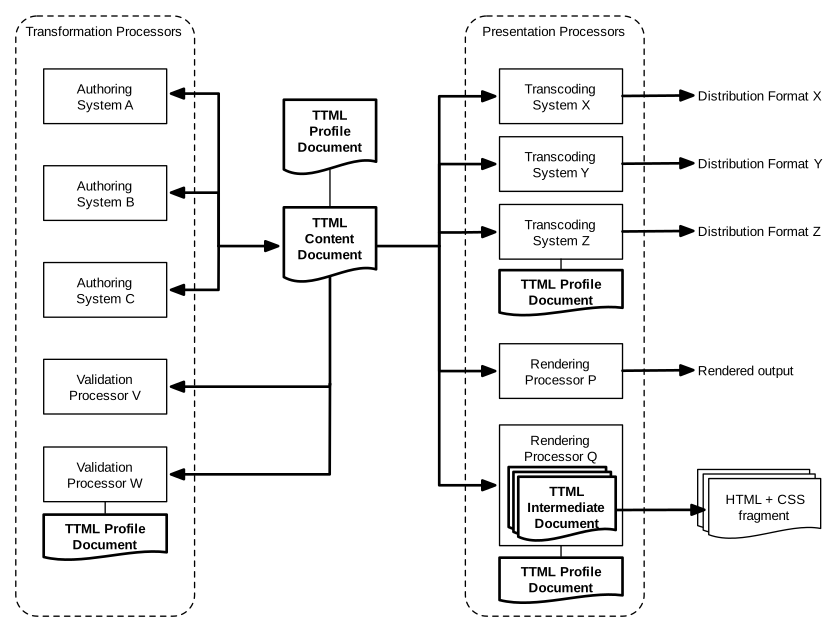
다음 table, Table E-1 – Feature Support는 정의된 모든 feature designation(TT Feature Namespace 없이 expressed됨)을 enumerate하고, 각 designated feature에 대해 (1) 해당 feature designation이 처음 정의된 TTML version, 그리고 (2) 3.2.2 Transformation Processor Conformance 또는 3.2.3 Presentation Processor Conformance의 requirements를 준수하는 TTML content processor에 대해 designated feature가 implemented되어야 하는지, 즉 mandatory(M)인지, 또는 implemented될 수 있는지, 즉 optional(O)인지 지정한다.
참고:
어떤 경우에는 이 specification의 이 version(또는 이후 version)에서 previously defined되지 않았던
new feature designation이 정의되지만, 그렇게 designated된 underlying functional feature는
earlier version에 의해 previously defined되었을 수 있다.
예를 들어 #padding-region
designation은 여기서 introduced된다. 그러나 그것이 reference하는 functionality는 이전에
#padding designation 아래에 included되었으며,
이는 이제 #padding-region의 terms로 정의된다. 여기서 TTML1에서 introduced된
#padding의 underlying meaning과
TTML2에서 introduced된 #padding-region은 identical하게 유지된다.
편의를 위해 다음 table, Table E-2 – Mandatory Features - Transformation는 3.2.2 Transformation Processor Conformance의 requirements를 준수하는 TTML content processor에 대한 모든 mandatory features를 enumerate하고, usage context 또는 feature의 nature를 summarize하기 위한 additional comments를 제공한다. corresponding TTML Transformation Profile을 정의하는 profile definition document는 G.3 TTML2 Transformation Profile에 지정되어 있다.
| Feature Designations | Comments |
#content |
body,
div,
p,
span,
br
|
#contentProfiles |
|
#core |
xml:id,
xml:lang,
xml:space
|
#processorProfiles |
|
#profile |
|
#profile-version-2 |
|
#structure |
tt,
head
|
#time-offset |
|
#timing |
begin,
dur,
end
|
#transformation |
|
#transformation-version-2
|
편의를 위해 다음 table, Table E-3 – Mandatory Features - Presentation는 3.2.3 Presentation Processor Conformance의 requirements를 준수하는 TTML content processor에 대한 모든 mandatory features를 enumerate하고, usage context 또는 feature의 nature를 summarize하기 위한 additional comments를 제공한다. corresponding TTML Presentation Profile을 정의하는 profile definition document는 G.2 TTML2 Presentation Profile에 지정되어 있다.
| Feature Designations | Comments |
#content |
body,
div,
p,
span,
br
|
#contentProfiles |
|
#core |
xml:id,
xml:lang,
xml:space
|
#processorProfiles |
|
#profile |
|
#profile-version-2 |
|
#presentation |
|
#presentation-version-2 |
|
#structure |
tt,
head
|
#time-offset |
|
#timing |
begin,
dur,
end
|
이 appendix는 normative이다.
이 appendix는 extension designations의 syntactic form을 지정하며, 이는 TTML processor에서 extension mechanisms에 대한 support와 관련된 authorial intent를 express하는 데 사용된다.
extension designation은 다음 form을 따르는 string으로 expressed된다:
extension-designation
: extension-namespace designation
extension-namespace
: TT Extension Namespace // http://www.w3.org/ns/ttml/extension/
| Other Extension Namespace // expressed as an absolute URI
designation
: "#" token-char+
token-char
: { XML NameChar } // [XML 1.1] Production [4a]
extension designation의 extension namespace가 TT
Extension Namespace이면, 다음
designation token의 모든 values는 future
standardization을 위해 reserved된다.
extension designation의 extension namespace가
TT Extension Namespace가 아니면, 즉 Other Extension Namespace이면,
extension namespace는 fragment identifier의 form을 취하는
designation token과 combination되어 사용되는 base URI로 serve할 수 있는
absolute URI로 expressed되어야 한다.
이 appendix는 normative이다.
이 appendix는 다음 standard TTML profiles를 지정하거나 reference로 incorporate한다:
각 TTML profile은 profile definition document의 terms로 정의되며, 이는 root element가 6.1.1 ttp:profile를 따르는 XML document로 expressed된다.
TTML2 Full Profile은 transformation 및 presentation processing 모두에 대한 maximum compliance를 express하는 데 사용되도록 intended된다.
참고:
이 profile은 DFXP Full Profile의 superset이다.
<?xml version="1.0" encoding="utf-8"?>
<!-- this file defines the "ttml2-full" profile of ttml -->
<profile xmlns="http://www.w3.org/ns/ttml#parameter"
designator="http://www.w3.org/ns/ttml/profile/ttml2-full">
<features xml:base="http://www.w3.org/ns/ttml/feature/">
<!-- required (mandatory) feature support -->
<feature value="required" extends="#animate-minimal">#animate</feature>
<feature value="required">#animate-fill</feature>
<feature value="required">#animate-minimal</feature>
<feature value="required">#animate-paced</feature>
<feature value="required">#animate-spline</feature>
<feature value="required">#animate-repeat</feature>
<feature value="required">#animation</feature>
<feature value="required">#animation-out-of-line</feature>
<feature value="required" extends="#animation">#animation-version-2</feature>
<feature value="required">#audio</feature>
<feature value="required">#audio-description</feature>
<feature value="required">#audio-speech</feature>
<feature value="required">#background</feature>
<feature value="required">#background-image</feature>
<feature value="required">#backgroundClip</feature>
<feature value="required">#backgroundColor-block</feature>
<feature value="required">#backgroundColor-inline</feature>
<feature value="required">#backgroundColor-region</feature>
<feature value="required">#backgroundColor</feature>
<feature value="required">#backgroundExtent</feature>
<feature value="required">#backgroundImage</feature>
<feature value="required">#backgroundOrigin</feature>
<feature value="required">#backgroundPosition</feature>
<feature value="required">#backgroundRepeat</feature>
<feature value="required">#base</feature>
<feature value="required">#base-general</feature>
<feature value="required" extends="#base">#base-version-2</feature>
<feature value="required">#bidi</feature>
<feature value="required" extends="#bidi">#bidi-version-2</feature>
<feature value="required">#border</feature>
<feature value="required">#border-block</feature>
<feature value="required">#border-inline</feature>
<feature value="required">#border-radii</feature>
<feature value="required">#border-radii-1</feature>
<feature value="required">#border-radii-2</feature>
<feature value="required">#border-region</feature>
<feature value="required">#bpd</feature>
<feature value="required">#cellResolution</feature>
<feature value="required">#chunk</feature>
<feature value="required">#clockMode</feature>
<feature value="required">#clockMode-gps</feature>
<feature value="required">#clockMode-local</feature>
<feature value="required">#clockMode-utc</feature>
<feature value="required">#color</feature>
<feature value="required">#condition</feature>
<feature value="required">#condition-fn-media</feature>
<feature value="required">#condition-fn-parameter</feature>
<feature value="required">#condition-fn-supports</feature>
<feature value="required">#condition-primary</feature>
<feature value="required">#content</feature>
<feature value="required">#content-sizing</feature>
<feature value="required">#contentProfiles</feature>
<feature value="required" extends="#contentProfiles">#contentProfiles-combined</feature>
<feature value="required">#core</feature>
<feature value="required">#data</feature>
<feature value="required">#direction</feature>
<feature value="required">#disparity</feature>
<feature value="required">#display</feature>
<feature value="required">#display-block</feature>
<feature value="required">#display-inline</feature>
<feature value="required">#display-inlineBlock</feature>
<feature value="required">#display-region</feature>
<feature value="required" extends="#display">#display-version-2</feature>
<feature value="required">#displayAlign</feature>
<feature value="required">#displayAlign-block</feature>
<feature value="required">#displayAlign-justify</feature>
<feature value="required">#displayAlign-region</feature>
<feature value="required">#displayAlign-relative</feature>
<feature value="required" extends="#displayAlign">#displayAlign-version-2</feature>
<feature value="required">#displayAspectRatio</feature>
<feature value="required">#dropMode</feature>
<feature value="required">#dropMode-dropNTSC</feature>
<feature value="required">#dropMode-dropPAL</feature>
<feature value="required">#dropMode-nonDrop</feature>
<feature value="required">#embedded-audio</feature>
<feature value="required">#embedded-content</feature>
<feature value="required">#embedded-data</feature>
<feature value="required">#embedded-font</feature>
<feature value="required">#embedded-image</feature>
<feature value="required">#extent</feature>
<feature value="required">#extent-auto</feature>
<feature value="required" extends="#extent-auto">#extent-auto-version-2</feature>
<feature value="required">#extent-contain</feature>
<feature value="required">#extent-cover</feature>
<feature value="required" extends="#extent-version-2">#extent-full-version-2</feature>
<feature value="required">#extent-image</feature>
<feature value="required">#extent-length</feature>
<feature value="required" extends="#extent-length">#extent-length-version-2</feature>
<feature value="required">#extent-measure</feature>
<feature value="required">#extent-region</feature>
<feature value="required" extends="#extent-region">#extent-region-version-2</feature>
<feature value="required">#extent-root</feature>
<feature value="required" extends="#extent-root">#extent-root-version-2</feature>
<feature value="required" extends="#extent">#extent-version-2</feature>
<feature value="required">#font</feature>
<feature value="required">#fontFamily</feature>
<feature value="required">#fontFamily-generic</feature>
<feature value="required">#fontFamily-non-generic</feature>
<feature value="required">#fontKerning</feature>
<feature value="required">#fontSelectionStrategy</feature>
<feature value="required">#fontSelectionStrategy-character</feature>
<feature value="required">#fontShear</feature>
<feature value="required">#fontSize</feature>
<feature value="required">#fontSize-anamorphic</feature>
<feature value="required">#fontSize-isomorphic</feature>
<feature value="required">#fontStyle</feature>
<feature value="required">#fontStyle-italic</feature>
<feature value="required">#fontStyle-oblique</feature>
<feature value="required">#fontVariant</feature>
<feature value="required">#fontWeight</feature>
<feature value="required">#fontWeight-bold</feature>
<feature value="required">#frameRate</feature>
<feature value="required">#frameRateMultiplier</feature>
<feature value="required">#gain</feature>
<feature value="required">#image</feature>
<feature value="required">#image-png</feature>
<feature value="required">#initial</feature>
<feature value="required">#ipd</feature>
<feature value="required">#layout</feature>
<feature value="required">#length</feature>
<feature value="required">#length-cell</feature>
<feature value="required">#length-em</feature>
<feature value="required">#length-integer</feature>
<feature value="required">#length-negative</feature>
<feature value="required">#length-percentage</feature>
<feature value="required">#length-pixel</feature>
<feature value="required">#length-positive</feature>
<feature value="required">#length-real</feature>
<feature value="required">#length-root-container-relative</feature>
<feature value="required" extends="#length">#length-version-2</feature>
<feature value="required">#letterSpacing</feature>
<feature value="required">#lineBreak-uax14</feature>
<feature value="required">#lineHeight</feature>
<feature value="required">#lineShear</feature>
<feature value="required">#luminance</feature>
<feature value="required">#markerMode</feature>
<feature value="required">#markerMode-continuous</feature>
<feature value="required">#markerMode-discontinuous</feature>
<feature value="required">#metadata</feature>
<feature value="required">#metadata-item</feature>
<feature value="required" extends="#metadata">#metadata-version-2</feature>
<feature value="required">#nested-div</feature>
<feature value="required">#nested-span</feature>
<feature value="required">#opacity</feature>
<feature value="required">#opacity-block</feature>
<feature value="required">#opacity-inline</feature>
<feature value="required">#opacity-region</feature>
<feature value="required" extends="#opacity">#opacity-version-2</feature>
<feature value="required">#origin</feature>
<feature value="required">#overflow</feature>
<feature value="required">#overflow-visible</feature>
<feature value="required">#padding</feature>
<feature value="required">#padding-1</feature>
<feature value="required">#padding-2</feature>
<feature value="required">#padding-3</feature>
<feature value="required">#padding-4</feature>
<feature value="required">#padding-block</feature>
<feature value="required">#padding-inline</feature>
<feature value="required">#padding-region</feature>
<feature value="required" extends="#padding">#padding-version-2</feature>
<feature value="required">#pan</feature>
<feature value="required">#permitFeatureNarrowing</feature>
<feature value="required">#permitFeatureWidening</feature>
<feature value="required">#pitch</feature>
<feature value="required">#pixelAspectRatio</feature>
<feature value="required">#position</feature>
<feature value="required">#presentation</feature>
<feature value="required" extends="#presentation">#presentation-version-2</feature>
<feature value="required">#processorProfiles</feature>
<feature value="required" extends="#processorProfiles">#processorProfiles-combined</feature>
<feature value="required">#profile</feature>
<feature value="required" extends="#profile-version-2">#profile-full-version-2</feature>
<feature value="required">#profile-nesting</feature>
<feature value="required" extends="#profile">#profile-version-2</feature>
<feature value="required">#region-implied-animation</feature>
<feature value="required">#region-inline</feature>
<feature value="required">#region-timing</feature>
<feature value="required">#resources</feature>
<feature value="required">#ruby</feature>
<feature value="required">#ruby-full</feature>
<feature value="required">#rubyAlign</feature>
<feature value="required">#rubyAlign-minimal</feature>
<feature value="required">#rubyAlign-withBase</feature>
<feature value="required">#rubyPosition</feature>
<feature value="required">#rubyReserve</feature>
<feature value="required" extends="#animation">#set</feature>
<feature value="required">#set-fill</feature>
<feature value="required">#set-multiple-styles</feature>
<feature value="required">#set-repeat</feature>
<feature value="required">#shear</feature>
<feature value="required">#showBackground</feature>
<feature value="required">#source</feature>
<feature value="required">#speak</feature>
<feature value="required">#speech</feature>
<feature value="required">#structure</feature>
<feature value="required">#styling</feature>
<feature value="required">#styling-chained</feature>
<feature value="required">#styling-inheritance-content</feature>
<feature value="required">#styling-inheritance-region</feature>
<feature value="required">#styling-inline</feature>
<feature value="required">#styling-nested</feature>
<feature value="required">#styling-referential</feature>
<feature value="required">#subFrameRate</feature>
<feature value="required">#textAlign</feature>
<feature value="required">#textAlign-absolute</feature>
<feature value="required">#textAlign-justify</feature>
<feature value="required">#textAlign-relative</feature>
<feature value="required" extends="#textAlign">#textAlign-version-2</feature>
<feature value="required">#textCombine</feature>
<feature value="required">#textDecoration</feature>
<feature value="required">#textDecoration-over</feature>
<feature value="required">#textDecoration-through</feature>
<feature value="required">#textDecoration-under</feature>
<feature value="required" extends="#textEmphasis-minimal">#textEmphasis</feature>
<feature value="required">#textEmphasis-color</feature>
<feature value="required">#textEmphasis-minimal</feature>
<feature value="required">#textEmphasis-quoted-string</feature>
<feature value="required">#textOrientation</feature>
<feature value="required">#textOutline</feature>
<feature value="required">#textOutline-blurred</feature>
<feature value="required">#textOutline-unblurred</feature>
<feature value="required">#textShadow</feature>
<feature value="required">#tickRate</feature>
<feature value="required">#time-clock-with-frames</feature>
<feature value="required">#time-clock</feature>
<feature value="required">#time-offset-with-frames</feature>
<feature value="required">#time-offset-with-ticks</feature>
<feature value="required">#time-offset</feature>
<feature value="required">#time-wall-clock</feature>
<feature value="required">#timeBase-clock</feature>
<feature value="required">#timeBase-media</feature>
<feature value="required">#timeBase-smpte</feature>
<feature value="required">#timeContainer</feature>
<feature value="required">#timing</feature>
<feature value="required">#transformation</feature>
<feature value="required" extends="#transformation">#transformation-version-2</feature>
<feature value="required">#unicodeBidi</feature>
<feature value="required">#unicodeBidi-isolate</feature>
<feature value="required" extends="#unicodeBidi">#unicodeBidi-version-2</feature>
<feature value="required">#validation</feature>
<feature value="required">#visibility</feature>
<feature value="required">#visibility-block</feature>
<feature value="required">#visibility-image</feature>
<feature value="required">#visibility-inline</feature>
<feature value="required">#visibility-region</feature>
<feature value="required" extends="#visibility">#visibility-version-2</feature>
<feature value="required">#wrapOption</feature>
<feature value="required">#writingMode</feature>
<feature value="required">#writingMode-horizontal-lr</feature>
<feature value="required">#writingMode-horizontal-rl</feature>
<feature value="required">#writingMode-horizontal</feature>
<feature value="required">#writingMode-vertical</feature>
<feature value="required">#xlink</feature>
<feature value="required">#zIndex</feature>
<!-- optional (voluntary) feature support -->
</features>
<extensions xml:base="http://www.w3.org/ns/ttml/extension/">
<!-- required (mandatory) extension support -->
<!-- optional (voluntary) extension support -->
</extensions>
</profile>
TTML2 Presentation Profile은 presentation processing에 대한 minimum compliance를 express하는 데 사용되도록 intended된다.
참고:
이 profile은 DFXP Presentation Profile의 superset이다.
<?xml version="1.0" encoding="utf-8"?>
<!-- this file defines the "ttml2-presentation" profile of ttml -->
<profile xmlns="http://www.w3.org/ns/ttml#parameter"
designator="http://www.w3.org/ns/ttml/profile/ttml2-presentation">
<features xml:base="http://www.w3.org/ns/ttml/feature/">
<!-- required (mandatory) feature support -->
<feature value="required">#content</feature>
<feature value="required">#contentProfiles</feature>
<feature value="required">#core</feature>
<feature value="required">#presentation</feature>
<feature value="required" extends="#presentation">#presentation-version-2</feature>
<feature value="required">#processorProfiles</feature>
<feature value="required">#profile</feature>
<feature value="required" extends="#profile">#profile-version-2</feature>
<feature value="required">#structure</feature>
<feature value="required">#time-offset</feature>
<feature value="required">#timing</feature>
<!-- optional (voluntary) feature support -->
<feature value="optional">#animate</feature>
<feature value="optional">#animate-fill</feature>
<feature value="optional">#animate-minimal</feature>
<feature value="optional">#animate-paced</feature>
<feature value="optional">#animate-spline</feature>
<feature value="optional">#animate-repeat</feature>
<feature value="optional">#animation</feature>
<feature value="optional">#animation-out-of-line</feature>
<feature value="optional" extends="#animation">#animation-version-2</feature>
<feature value="optional">#audio</feature>
<feature value="optional">#audio-description</feature>
<feature value="optional">#audio-speech</feature>
<feature value="optional">#background</feature>
<feature value="optional">#background-image</feature>
<feature value="optional">#backgroundClip</feature>
<feature value="optional">#backgroundColor-block</feature>
<feature value="optional">#backgroundColor-inline</feature>
<feature value="optional">#backgroundColor-region</feature>
<feature value="optional">#backgroundColor</feature>
<feature value="optional">#backgroundExtent</feature>
<feature value="optional">#backgroundImage</feature>
<feature value="optional">#backgroundOrigin</feature>
<feature value="optional">#backgroundPosition</feature>
<feature value="optional">#backgroundRepeat</feature>
<feature value="optional">#base</feature>
<feature value="optional">#base-general</feature>
<feature value="optional" extends="#base">#base-version-2</feature>
<feature value="optional">#bidi</feature>
<feature value="optional" extends="#bidi">#bidi-version-2</feature>
<feature value="optional">#border</feature>
<feature value="optional">#border-block</feature>
<feature value="optional">#border-inline</feature>
<feature value="optional">#border-radii</feature>
<feature value="optional">#border-radii-1</feature>
<feature value="optional">#border-radii-2</feature>
<feature value="optional">#border-region</feature>
<feature value="optional">#bpd</feature>
<feature value="optional">#cellResolution</feature>
<feature value="optional">#chunk</feature>
<feature value="optional">#clockMode</feature>
<feature value="optional">#clockMode-gps</feature>
<feature value="optional">#clockMode-local</feature>
<feature value="optional">#clockMode-utc</feature>
<feature value="optional">#color</feature>
<feature value="optional">#condition</feature>
<feature value="optional">#condition-fn-media</feature>
<feature value="optional">#condition-fn-parameter</feature>
<feature value="optional">#condition-fn-supports</feature>
<feature value="optional">#condition-primary</feature>
<feature value="optional">#content-sizing</feature>
<feature value="optional" extends="#contentProfiles">#contentProfiles-combined</feature>
<feature value="optional">#data</feature>
<feature value="optional">#direction</feature>
<feature value="optional">#disparity</feature>
<feature value="optional">#display</feature>
<feature value="optional">#display-block</feature>
<feature value="optional">#display-inline</feature>
<feature value="optional">#display-inlineBlock</feature>
<feature value="optional">#display-region</feature>
<feature value="optional" extends="#display">#display-version-2</feature>
<feature value="optional">#displayAlign</feature>
<feature value="optional">#displayAlign-block</feature>
<feature value="optional">#displayAlign-justify</feature>
<feature value="optional">#displayAlign-region</feature>
<feature value="optional">#displayAlign-relative</feature>
<feature value="optional" extends="#displayAlign">#displayAlign-version-2</feature>
<feature value="optional">#displayAspectRatio</feature>
<feature value="optional">#dropMode</feature>
<feature value="optional">#dropMode-dropNTSC</feature>
<feature value="optional">#dropMode-dropPAL</feature>
<feature value="optional">#dropMode-nonDrop</feature>
<feature value="optional">#embedded-audio</feature>
<feature value="optional">#embedded-content</feature>
<feature value="optional">#embedded-data</feature>
<feature value="optional">#embedded-font</feature>
<feature value="optional">#embedded-image</feature>
<feature value="optional">#extent</feature>
<feature value="optional">#extent-auto</feature>
<feature value="optional" extends="#extent-auto">#extent-auto-version-2</feature>
<feature value="optional">#extent-contain</feature>
<feature value="optional">#extent-cover</feature>
<feature value="optional" extends="#extent-version-2">#extent-full-version-2</feature>
<feature value="optional">#extent-image</feature>
<feature value="optional">#extent-length</feature>
<feature value="optional" extends="#extent-length">#extent-length-version-2</feature>
<feature value="optional">#extent-measure</feature>
<feature value="optional">#extent-region</feature>
<feature value="optional" extends="#extent-region">#extent-region-version-2</feature>
<feature value="optional">#extent-root</feature>
<feature value="optional" extends="#extent-root">#extent-root-version-2</feature>
<feature value="optional" extends="#extent">#extent-version-2</feature>
<feature value="optional">#font</feature>
<feature value="optional">#fontFamily</feature>
<feature value="optional">#fontFamily-generic</feature>
<feature value="optional">#fontFamily-non-generic</feature>
<feature value="optional">#fontKerning</feature>
<feature value="optional">#fontSelectionStrategy</feature>
<feature value="optional">#fontSelectionStrategy-character</feature>
<feature value="optional">#fontShear</feature>
<feature value="optional">#fontSize</feature>
<feature value="optional">#fontSize-anamorphic</feature>
<feature value="optional">#fontSize-isomorphic</feature>
<feature value="optional">#fontStyle</feature>
<feature value="optional">#fontStyle-italic</feature>
<feature value="optional">#fontStyle-oblique</feature>
<feature value="optional">#fontVariant</feature>
<feature value="optional">#fontWeight</feature>
<feature value="optional">#fontWeight-bold</feature>
<feature value="optional">#frameRate</feature>
<feature value="optional">#frameRateMultiplier</feature>
<feature value="optional">#gain</feature>
<feature value="optional">#image</feature>
<feature value="optional">#image-png</feature>
<feature value="optional">#initial</feature>
<feature value="optional">#ipd</feature>
<feature value="optional">#layout</feature>
<feature value="optional">#length</feature>
<feature value="optional">#length-cell</feature>
<feature value="optional">#length-em</feature>
<feature value="optional">#length-integer</feature>
<feature value="optional">#length-negative</feature>
<feature value="optional">#length-percentage</feature>
<feature value="optional">#length-pixel</feature>
<feature value="optional">#length-positive</feature>
<feature value="optional">#length-real</feature>
<feature value="optional">#length-root-container-relative</feature>
<feature value="optional" extends="#length">#length-version-2</feature>
<feature value="optional">#letterSpacing</feature>
<feature value="optional">#lineBreak-uax14</feature>
<feature value="optional">#lineHeight</feature>
<feature value="optional">#lineShear</feature>
<feature value="optional">#luminance</feature>
<feature value="optional">#markerMode</feature>
<feature value="optional">#markerMode-continuous</feature>
<feature value="optional">#markerMode-discontinuous</feature>
<feature value="optional">#metadata</feature>
<feature value="optional">#metadata-item</feature>
<feature value="optional" extends="#metadata">#metadata-version-2</feature>
<feature value="optional">#nested-div</feature>
<feature value="optional">#nested-span</feature>
<feature value="optional">#opacity</feature>
<feature value="optional">#opacity-block</feature>
<feature value="optional">#opacity-inline</feature>
<feature value="optional">#opacity-region</feature>
<feature value="optional" extends="#opacity">#opacity-version-2</feature>
<feature value="optional">#origin</feature>
<feature value="optional">#overflow</feature>
<feature value="optional">#overflow-visible</feature>
<feature value="optional">#padding</feature>
<feature value="optional">#padding-1</feature>
<feature value="optional">#padding-2</feature>
<feature value="optional">#padding-3</feature>
<feature value="optional">#padding-4</feature>
<feature value="optional">#padding-block</feature>
<feature value="optional">#padding-inline</feature>
<feature value="optional">#padding-region</feature>
<feature value="optional" extends="#padding">#padding-version-2</feature>
<feature value="optional">#pan</feature>
<feature value="optional">#permitFeatureNarrowing</feature>
<feature value="optional">#permitFeatureWidening</feature>
<feature value="optional">#pitch</feature>
<feature value="optional">#pixelAspectRatio</feature>
<feature value="optional">#position</feature>
<feature value="optional" extends="#processorProfiles">#processorProfiles-combined</feature>
<feature value="optional" extends="#profile-version-2">#profile-full-version-2</feature>
<feature value="optional">#profile-nesting</feature>
<feature value="optional">#region-implied-animation</feature>
<feature value="optional">#region-inline</feature>
<feature value="optional">#region-timing</feature>
<feature value="optional">#resources</feature>
<feature value="optional">#ruby</feature>
<feature value="optional">#ruby-full</feature>
<feature value="optional">#rubyAlign</feature>
<feature value="optional">#rubyAlign-minimal</feature>
<feature value="optional">#rubyAlign-withBase</feature>
<feature value="optional">#rubyPosition</feature>
<feature value="optional">#rubyReserve</feature>
<feature value="optional" extends="#animation">#set</feature>
<feature value="optional">#set-fill</feature>
<feature value="optional">#set-multiple-styles</feature>
<feature value="optional">#set-repeat</feature>
<feature value="optional">#shear</feature>
<feature value="optional">#showBackground</feature>
<feature value="optional">#source</feature>
<feature value="optional">#speak</feature>
<feature value="optional">#speech</feature>
<feature value="optional">#styling</feature>
<feature value="optional">#styling-chained</feature>
<feature value="optional">#styling-inheritance-content</feature>
<feature value="optional">#styling-inheritance-region</feature>
<feature value="optional">#styling-inline</feature>
<feature value="optional">#styling-nested</feature>
<feature value="optional">#styling-referential</feature>
<feature value="optional">#subFrameRate</feature>
<feature value="optional">#textAlign</feature>
<feature value="optional">#textAlign-absolute</feature>
<feature value="optional">#textAlign-justify</feature>
<feature value="optional">#textAlign-relative</feature>
<feature value="optional" extends="#textAlign">#textAlign-version-2</feature>
<feature value="optional">#textCombine</feature>
<feature value="optional">#textDecoration</feature>
<feature value="optional">#textDecoration-over</feature>
<feature value="optional">#textDecoration-through</feature>
<feature value="optional">#textDecoration-under</feature>
<feature value="optional" extends="#textEmphasis-minimal">#textEmphasis</feature>
<feature value="optional">#textEmphasis-color</feature>
<feature value="optional">#textEmphasis-minimal</feature>
<feature value="optional">#textEmphasis-quoted-string</feature>
<feature value="optional">#textOrientation</feature>
<feature value="optional">#textOutline</feature>
<feature value="optional">#textOutline-blurred</feature>
<feature value="optional">#textOutline-unblurred</feature>
<feature value="optional">#textShadow</feature>
<feature value="optional">#tickRate</feature>
<feature value="optional">#time-clock-with-frames</feature>
<feature value="optional">#time-clock</feature>
<feature value="optional">#time-offset-with-frames</feature>
<feature value="optional">#time-offset-with-ticks</feature>
<feature value="optional">#time-wall-clock</feature>
<feature value="optional">#timeBase-clock</feature>
<feature value="optional">#timeBase-media</feature>
<feature value="optional">#timeBase-smpte</feature>
<feature value="optional">#timeContainer</feature>
<feature value="optional">#transformation</feature>
<feature value="optional" extends="#transformation">#transformation-version-2</feature>
<feature value="optional">#unicodeBidi</feature>
<feature value="optional">#unicodeBidi-isolate</feature>
<feature value="optional" extends="#unicodeBidi">#unicodeBidi-version-2</feature>
<feature value="optional">#validation</feature>
<feature value="optional">#visibility</feature>
<feature value="optional">#visibility-block</feature>
<feature value="optional">#visibility-image</feature>
<feature value="optional">#visibility-inline</feature>
<feature value="optional">#visibility-region</feature>
<feature value="optional" extends="#visibility">#visibility-version-2</feature>
<feature value="optional">#wrapOption</feature>
<feature value="optional">#writingMode</feature>
<feature value="optional">#writingMode-horizontal-lr</feature>
<feature value="optional">#writingMode-horizontal-rl</feature>
<feature value="optional">#writingMode-horizontal</feature>
<feature value="optional">#writingMode-vertical</feature>
<feature value="optional">#xlink</feature>
<feature value="optional">#zIndex</feature>
</features>
<extensions xml:base="http://www.w3.org/ns/ttml/extension/">
<!-- required (mandatory) extension support -->
<!-- optional (voluntary) extension support -->
</extensions>
</profile>
TTML2 Transformation Profile은 transformation processing에 대한 minimum compliance를 express하는 데 사용되도록 intended된다.
참고:
이 profile은 DFXP Transformation Profile의 superset이다.
<?xml version="1.0" encoding="utf-8"?>
<!-- this file defines the "ttml2-transformation" profile of ttml -->
<profile xmlns="http://www.w3.org/ns/ttml#parameter"
designator="http://www.w3.org/ns/ttml/profile/ttml2-transformation">
<features xml:base="http://www.w3.org/ns/ttml/feature/">
<!-- required (mandatory) feature support -->
<feature value="required">#content</feature>
<feature value="required">#contentProfiles</feature>
<feature value="required">#core</feature>
<feature value="required">#processorProfiles</feature>
<feature value="required">#profile</feature>
<feature value="required" extends="#profile">#profile-version-2</feature>
<feature value="required">#structure</feature>
<feature value="required">#time-offset</feature>
<feature value="required">#timing</feature>
<feature value="required">#transformation</feature>
<feature value="required" extends="#transformation">#transformation-version-2</feature>
<!-- optional (voluntary) feature support -->
<feature value="optional">#animate</feature>
<feature value="optional">#animate-fill</feature>
<feature value="optional">#animate-minimal</feature>
<feature value="optional">#animate-paced</feature>
<feature value="optional">#animate-spline</feature>
<feature value="optional">#animate-repeat</feature>
<feature value="optional">#animation</feature>
<feature value="optional">#animation-out-of-line</feature>
<feature value="optional" extends="#animation">#animation-version-2</feature>
<feature value="optional">#audio</feature>
<feature value="optional">#audio-description</feature>
<feature value="optional">#audio-speech</feature>
<feature value="optional">#background</feature>
<feature value="optional">#background-image</feature>
<feature value="optional">#backgroundClip</feature>
<feature value="optional">#backgroundColor-block</feature>
<feature value="optional">#backgroundColor-inline</feature>
<feature value="optional">#backgroundColor-region</feature>
<feature value="optional">#backgroundColor</feature>
<feature value="optional">#backgroundExtent</feature>
<feature value="optional">#backgroundImage</feature>
<feature value="optional">#backgroundOrigin</feature>
<feature value="optional">#backgroundPosition</feature>
<feature value="optional">#backgroundRepeat</feature>
<feature value="optional">#base</feature>
<feature value="optional">#base-general</feature>
<feature value="optional" extends="#base">#base-version-2</feature>
<feature value="optional">#bidi</feature>
<feature value="optional" extends="#bidi">#bidi-version-2</feature>
<feature value="optional">#border</feature>
<feature value="optional">#border-block</feature>
<feature value="optional">#border-inline</feature>
<feature value="optional">#border-radii</feature>
<feature value="optional">#border-radii-1</feature>
<feature value="optional">#border-radii-2</feature>
<feature value="optional">#border-region</feature>
<feature value="optional">#bpd</feature>
<feature value="optional">#cellResolution</feature>
<feature value="optional">#chunk</feature>
<feature value="optional">#clockMode</feature>
<feature value="optional">#clockMode-gps</feature>
<feature value="optional">#clockMode-local</feature>
<feature value="optional">#clockMode-utc</feature>
<feature value="optional">#color</feature>
<feature value="optional">#condition</feature>
<feature value="optional">#condition-fn-media</feature>
<feature value="optional">#condition-fn-parameter</feature>
<feature value="optional">#condition-fn-supports</feature>
<feature value="optional">#condition-primary</feature>
<feature value="optional">#content-sizing</feature>
<feature value="optional" extends="#contentProfiles">#contentProfiles-combined</feature>
<feature value="optional">#data</feature>
<feature value="optional">#direction</feature>
<feature value="optional">#disparity</feature>
<feature value="optional">#display</feature>
<feature value="optional">#display-block</feature>
<feature value="optional">#display-inline</feature>
<feature value="optional">#display-inlineBlock</feature>
<feature value="optional">#display-region</feature>
<feature value="optional" extends="#display">#display-version-2</feature>
<feature value="optional">#displayAlign</feature>
<feature value="optional">#displayAlign-block</feature>
<feature value="optional">#displayAlign-justify</feature>
<feature value="optional">#displayAlign-region</feature>
<feature value="optional">#displayAlign-relative</feature>
<feature value="optional" extends="#displayAlign">#displayAlign-version-2</feature>
<feature value="optional">#displayAspectRatio</feature>
<feature value="optional">#dropMode</feature>
<feature value="optional">#dropMode-dropNTSC</feature>
<feature value="optional">#dropMode-dropPAL</feature>
<feature value="optional">#dropMode-nonDrop</feature>
<feature value="optional">#embedded-audio</feature>
<feature value="optional">#embedded-content</feature>
<feature value="optional">#embedded-data</feature>
<feature value="optional">#embedded-font</feature>
<feature value="optional">#embedded-image</feature>
<feature value="optional">#extent</feature>
<feature value="optional">#extent-auto</feature>
<feature value="optional" extends="#extent-auto">#extent-auto-version-2</feature>
<feature value="optional">#extent-contain</feature>
<feature value="optional">#extent-cover</feature>
<feature value="optional" extends="#extent-version-2">#extent-full-version-2</feature>
<feature value="optional">#extent-image</feature>
<feature value="optional">#extent-length</feature>
<feature value="optional" extends="#extent-length">#extent-length-version-2</feature>
<feature value="optional">#extent-measure</feature>
<feature value="optional">#extent-region</feature>
<feature value="optional" extends="#extent-region">#extent-region-version-2</feature>
<feature value="optional">#extent-root</feature>
<feature value="optional" extends="#extent-root">#extent-root-version-2</feature>
<feature value="optional" extends="#extent">#extent-version-2</feature>
<feature value="optional">#font</feature>
<feature value="optional">#fontFamily</feature>
<feature value="optional">#fontFamily-generic</feature>
<feature value="optional">#fontFamily-non-generic</feature>
<feature value="optional">#fontKerning</feature>
<feature value="optional">#fontSelectionStrategy</feature>
<feature value="optional">#fontSelectionStrategy-character</feature>
<feature value="optional">#fontShear</feature>
<feature value="optional">#fontSize</feature>
<feature value="optional">#fontSize-anamorphic</feature>
<feature value="optional">#fontSize-isomorphic</feature>
<feature value="optional">#fontStyle</feature>
<feature value="optional">#fontStyle-italic</feature>
<feature value="optional">#fontStyle-oblique</feature>
<feature value="optional">#fontVariant</feature>
<feature value="optional">#fontWeight</feature>
<feature value="optional">#fontWeight-bold</feature>
<feature value="optional">#frameRate</feature>
<feature value="optional">#frameRateMultiplier</feature>
<feature value="optional">#gain</feature>
<feature value="optional">#image</feature>
<feature value="optional">#image-png</feature>
<feature value="optional">#initial</feature>
<feature value="optional">#ipd</feature>
<feature value="optional">#layout</feature>
<feature value="optional">#length</feature>
<feature value="optional">#length-cell</feature>
<feature value="optional">#length-em</feature>
<feature value="optional">#length-integer</feature>
<feature value="optional">#length-negative</feature>
<feature value="optional">#length-percentage</feature>
<feature value="optional">#length-pixel</feature>
<feature value="optional">#length-positive</feature>
<feature value="optional">#length-real</feature>
<feature value="optional">#length-root-container-relative</feature>
<feature value="optional" extends="#length">#length-version-2</feature>
<feature value="optional">#letterSpacing</feature>
<feature value="optional">#lineBreak-uax14</feature>
<feature value="optional">#lineHeight</feature>
<feature value="optional">#lineShear</feature>
<feature value="optional">#luminance</feature>
<feature value="optional">#markerMode</feature>
<feature value="optional">#markerMode-continuous</feature>
<feature value="optional">#markerMode-discontinuous</feature>
<feature value="optional">#metadata</feature>
<feature value="optional">#metadata-item</feature>
<feature value="optional" extends="#metadata">#metadata-version-2</feature>
<feature value="optional">#nested-div</feature>
<feature value="optional">#nested-span</feature>
<feature value="optional">#opacity</feature>
<feature value="optional">#opacity-block</feature>
<feature value="optional">#opacity-inline</feature>
<feature value="optional">#opacity-region</feature>
<feature value="optional" extends="#opacity">#opacity-version-2</feature>
<feature value="optional">#origin</feature>
<feature value="optional">#overflow</feature>
<feature value="optional">#overflow-visible</feature>
<feature value="optional">#padding</feature>
<feature value="optional">#padding-1</feature>
<feature value="optional">#padding-2</feature>
<feature value="optional">#padding-3</feature>
<feature value="optional">#padding-4</feature>
<feature value="optional">#padding-block</feature>
<feature value="optional">#padding-inline</feature>
<feature value="optional">#padding-region</feature>
<feature value="optional" extends="#padding">#padding-version-2</feature>
<feature value="optional">#pan</feature>
<feature value="optional">#permitFeatureNarrowing</feature>
<feature value="optional">#permitFeatureWidening</feature>
<feature value="optional">#pitch</feature>
<feature value="optional">#pixelAspectRatio</feature>
<feature value="optional">#position</feature>
<feature value="optional">#presentation</feature>
<feature value="optional" extends="#presentation">#presentation-version-2</feature>
<feature value="optional" extends="#processorProfiles">#processorProfiles-combined</feature>
<feature value="optional" extends="#profile-version-2">#profile-full-version-2</feature>
<feature value="optional">#profile-nesting</feature>
<feature value="optional">#region-implied-animation</feature>
<feature value="optional">#region-inline</feature>
<feature value="optional">#region-timing</feature>
<feature value="optional">#resources</feature>
<feature value="optional">#ruby</feature>
<feature value="optional">#ruby-full</feature>
<feature value="optional">#rubyAlign</feature>
<feature value="optional">#rubyAlign-minimal</feature>
<feature value="optional">#rubyAlign-withBase</feature>
<feature value="optional">#rubyPosition</feature>
<feature value="optional">#rubyReserve</feature>
<feature value="optional" extends="#animation">#set</feature>
<feature value="optional">#set-fill</feature>
<feature value="optional">#set-multiple-styles</feature>
<feature value="optional">#set-repeat</feature>
<feature value="optional">#shear</feature>
<feature value="optional">#showBackground</feature>
<feature value="optional">#source</feature>
<feature value="optional">#speak</feature>
<feature value="optional">#speech</feature>
<feature value="optional">#styling</feature>
<feature value="optional">#styling-chained</feature>
<feature value="optional">#styling-inheritance-content</feature>
<feature value="optional">#styling-inheritance-region</feature>
<feature value="optional">#styling-inline</feature>
<feature value="optional">#styling-nested</feature>
<feature value="optional">#styling-referential</feature>
<feature value="optional">#subFrameRate</feature>
<feature value="optional">#textAlign</feature>
<feature value="optional">#textAlign-absolute</feature>
<feature value="optional">#textAlign-justify</feature>
<feature value="optional">#textAlign-relative</feature>
<feature value="optional" extends="#textAlign">#textAlign-version-2</feature>
<feature value="optional">#textCombine</feature>
<feature value="optional">#textDecoration</feature>
<feature value="optional">#textDecoration-over</feature>
<feature value="optional">#textDecoration-through</feature>
<feature value="optional">#textDecoration-under</feature>
<feature value="optional" extends="#textEmphasis-minimal">#textEmphasis</feature>
<feature value="optional">#textEmphasis-color</feature>
<feature value="optional">#textEmphasis-minimal</feature>
<feature value="optional">#textEmphasis-quoted-string</feature>
<feature value="optional">#textOrientation</feature>
<feature value="optional">#textOutline</feature>
<feature value="optional">#textOutline-blurred</feature>
<feature value="optional">#textOutline-unblurred</feature>
<feature value="optional">#textShadow</feature>
<feature value="optional">#tickRate</feature>
<feature value="optional">#time-clock-with-frames</feature>
<feature value="optional">#time-clock</feature>
<feature value="optional">#time-offset-with-frames</feature>
<feature value="optional">#time-offset-with-ticks</feature>
<feature value="optional">#time-wall-clock</feature>
<feature value="optional">#timeBase-clock</feature>
<feature value="optional">#timeBase-media</feature>
<feature value="optional">#timeBase-smpte</feature>
<feature value="optional">#timeContainer</feature>
<feature value="optional">#unicodeBidi</feature>
<feature value="optional">#unicodeBidi-isolate</feature>
<feature value="optional" extends="#unicodeBidi">#unicodeBidi-version-2</feature>
<feature value="optional">#validation</feature>
<feature value="optional">#visibility</feature>
<feature value="optional">#visibility-block</feature>
<feature value="optional">#visibility-image</feature>
<feature value="optional">#visibility-inline</feature>
<feature value="optional">#visibility-region</feature>
<feature value="optional" extends="#visibility">#visibility-version-2</feature>
<feature value="optional">#wrapOption</feature>
<feature value="optional">#writingMode</feature>
<feature value="optional">#writingMode-horizontal-lr</feature>
<feature value="optional">#writingMode-horizontal-rl</feature>
<feature value="optional">#writingMode-horizontal</feature>
<feature value="optional">#writingMode-vertical</feature>
<feature value="optional">#xlink</feature>
<feature value="optional">#zIndex</feature>
</features>
<extensions xml:base="http://www.w3.org/ns/ttml/extension/">
<!-- required (mandatory) extension support -->
<!-- optional (voluntary) extension support -->
</extensions>
</profile>
DFXP Full Profile은 [TTML1], Appendix F.3, DFXP Full Profile에 의해 specified된다.
DFXP Presentation Profile은 [TTML1], Appendix F.2, DFXP Presentation Profile에 의해 specified된다.
DFXP Transformation Profile은 [TTML1], Appendix F.1, DFXP Transformation Profile에 의해 specified된다.
이 appendix는 normative이다.
이 appendix는 root container region의 essential characteristics와 그 사용을 결정하기 위한 semantics를 지정하며, 여기에는 다음이 포함된다:
aspect ratios (display, storage, pixel);
resolution (spatial extent); 및
coordinate space.
세 가지 aspect ratios가 root container region에 적용된다:
root container의 display aspect ratio는 hypothetical display device에
presented되도록 intended된 display pixels의
terms로 root container의 aspect ratio에 대응한다.
이 display aspect ratio는
tt element의
ttp:displayAspectRatio attribute를
통해 명시적으로 specified되거나,
아래에 설명된 다른 information을 사용하여 inferred된다.
참고:
root container pixels의 실제 physical presentation은 정의된 TTML presentation processing 이후 aspect ratio, sample resolution, color space에서 수많은 transformations의 영향을 받을 수 있다. 그러한 post-TTML processing은 이 specification의 scope에서 완전히 벗어난다.
root container의 storage aspect ratio는
document coordinate space에서
logical pixels의 terms로 root container의
aspect ratio에 대응하며,
여기서 bijective (injective 및 surjective) mapping은 각 logical pixel을
unique한 display pixel과 associate한다.
이 storage aspect ratio는
tt element의
tts:extent attribute를 통해 명시적으로 specified되거나,
아래에 설명된 다른 information을 사용하여 inferred된다.
tt element에
tts:extent attribute가 specified되면,
tts:extent attribute의 value가 두 개의 pixel-valued <length> expressions로 구성되는 경우, storage aspect ratio는 specified된 것으로 간주되며, extent의 width를 그 height로 나눈 값과 같은 numeric value를 가진다;
그렇지 않으면(computed value가 contain),
storage aspect ratio는 unspecified인 것으로 간주되며 아래에 설명된 다른 information을 사용하여
inferred된다.
참고:
그 자체로 logical pixel은 intrinsic aspect ratio를 갖지 않는다. 그러나 display pixel에 mapped되면, 아래에 지정된 root container의 pixel aspect ratio가 정의하는 fixed value를 assume한다.
root container의 pixel aspect ratio는 root container의 각
display pixel의 aspect ratio를 정의하며,
이에 따라
document coordinate space의 각
logical pixel은
associated된 display pixel의 fixed aspect ratio를
취하여
DAR = SAR × PAR가 성립한다.
이 pixel aspect ratio는
tt element의
ttp:pixelAspectRato attribute를 통해
명시적으로 specified되거나,
아래에 설명된 다른 information을 사용하여 inferred된다.
다음 sub-sections는 document에서 어떤 (ratios)가 specified되는지에 따라 이러한 aspect ratios가 어떻게 resolved되는지를 지정한다.
세 가지 aspect ratios 중 아무 것도 specified되지 않은 경우, 세 가지 aspect ratios는 다음 ordered steps에 따라 결정된다:
related media object가 존재하고 defined된
DAR을 가지면,
DAR의 resolved value는 related media
object의 display aspect ratio이다;
그렇지 않으면 DAR의 value는
document processing context에 의해
(arbitrarily) 결정된다;
SAR 및 PAR의 values는 아래
H.1.2 One Aspect
Ratio에 따라 resolved된다.
세 가지 aspect ratios 중 하나만 specified된 경우, 다른 두 aspect ratios의 resolved values는 다음과 같이 결정된다:
DAR이 specified되었거나 위
H.1.1 No Aspect
Ratio에 의해 resolved된 경우,
그 resolved value는 specified 또는 resolved value이고,
SAR 및 PAR의 values는 다음과 같이 결정된다:
SAR의 resolved value는 DAR의 resolved value이다;
PAR의 resolved value는 1 (one)이다.
SAR이 specified된 경우, 그 resolved value는 specified value이고,
DAR 및 PAR의 values는 다음과 같이 결정된다:
related media object가 존재하고
defined된 DAR을 가지면,
DAR의 resolved value는
related media object의 display aspect
ratio이고, PAR의 value는
아래 H.1.3 Two Aspect
Ratios에 따라 resolved된다;
그렇지 않으면 DAR의 resolved value는
document
processing context에 의해 결정되고, PAR의 value는
아래 H.1.3 Two Aspect
Ratios에 따라 resolved된다;
PAR이 specified된 경우,
그 resolved value는 specified value이고, DAR 및
SAR의 values는 다음과 같이 결정된다:
related media object가 존재하고
defined된 DAR을 가지면,
DAR의 resolved value는
related media object의 display aspect
ratio이고, SAR의 value는
아래 H.1.3 Two Aspect
Ratios에 따라 resolved된다;
그렇지 않으면 SAR의 resolved value는
document
processing context에 의해 결정되고, DAR의 value는
아래 H.1.3 Two Aspect
Ratios에 따라 resolved된다.
세 가지 aspect ratios 중 두 개가 specified되었거나 previously resolved된 경우,
세 번째 aspect ratio의 resolved value는
DAR = SAR × PAR equation을 사용하여 결정된다.
세 가지 aspect ratios가 모두 specified되고 그 values가
DAR = SAR × PAR equation을 satisfy하면,
이들은 resolved aspect ratios로 간주된다. 그러나 equation이 satisfied되지 않으면,
validation processing을 수행할 때 error가
reported되어야 하며
(validation processor configuration의 subject),
presentation processing을 수행할 때는 specified된 PAR value가 ignored되고,
PAR의 resolved value는 위
H.1.3 Two Aspect
Ratios에 의해 결정된다.
root container region은 fixed number of row pixels와 fixed number of column pixels를 가진 logical pixels의 grid로 subdivided되며, column pixels의 수는 horizontal axis에서 root container region의 resolution을 나타내고, row pixels의 수는 vertical axis에서 root container region의 resolution을 나타낸다. 여기서 전자는 각각 root container region의 width로 정의되고, 후자는 height로 정의되며, 두 axes를 따른 (이 두) resolutions의 collection은 root container region의 collective resolution 또는 spatial extent라 한다.
참고:
위의 storage aspect ratio (SAR)에서 noted된 바와 같이, logical pixel은 intrinsic aspect ratio를 갖지 않는다. 즉, logical pixel은 defined shape를 갖지 않으며, 이는 다시 defined size를 갖지 않음을 의미한다. logical pixel이 display pixel에 mapped될 때에만 fixed shape와 size를 취한다. 그럼에도 불구하고 logical pixel을 square이고 measurable, absolute size를 가진 것으로 생각하는 것이 흔히 convenient하다. 그러나 reader는 이러한 premature(그리고 possibly incorrect) conclusion에 도달하지 않도록 주의해야 한다.
tts:extent attribute의 value가
tt element에 specified되고,
두 개의 pixel-valued <length> expressions로 구성되는 경우,
이 두 expressions는 root container region의 width 및
height를 denote하며,
consequently, 그 collective
resolution을 determine한다;
그렇지 않으면 root container region의
collective resolution은 위
H.1 Aspect Ratios에서 결정된
SAR의 resolved values를 respect하는 방식으로
document
processing context에 의해 (arbitrarily) 결정된다.
참고:
document processing context가 root container region에 arbitrary resolution을 assign하는 경우, 이는 internal processing constraints와 processing되는 document instance에 convenient한 임의의 방식으로 수행될 수 있다. 예를 들어 related media object의 storage aspect ratio에 적용되는 same resolution을 assign하거나, 같은 precision을 preserve하는 logical resolution을 assign하기 위해 document에서 발견된 length expressions의 precision을 evaluate할 수 있다.
root container region의 coordinate space, 즉
document coordinate space는
unbounded, two-dimensional plane이며, 그 위에 rectangle
R의 form을 취하는 closed set of logical pixels가 정의된다.
said pixels는 R의 boundary 내부에(interior to, inside of) 있고,
이 coordinate space의 origin(position)은 R의 upper, left-hand corner와 coincident하며,
vertical axis의 positive pixels는 downwards로 extend하고, horizontal axis의 positive pixels는
rightwards로 extend한다.
Furthermore, R의 width 및
height는 root container region의 resolved resolution으로 설정된다.
Lastly, R에 적용되는 aspect ratios는 위에서 indicated된 DAR, SAR,
및 PAR의 resolved values에 따라 established된다.
higher level protocol이 적용되지 않는 한, document coordinate space는 given document instance를 processing할 때 once and only once 결정된다.
이 appendix는 normative이다.
이 appendix는 document instances에서 time expressions를 interpreting하기 위한 semantics를 지정한다.
참고:
아래에서 사용되는 local real time phrase는 document processing context의 virtual real time clock을 model하도록 intended되며, 여기서 local은 이 processing context implementation의 immediate proximity에 있음을 의미한다. 이 virtual clock과의 relationships를 정의하는 intent는 didactic purposes를 위한 locally valid physical realization of time을 establish하는 것이다.
참고:
아래에서 사용되는 play rate phrase는 document processing context의 (possibly variable) parameter를 model하도록 intended되며, 여기서 time의 playback(or interpretation) rate는 artificially dilated 또는 narrowed될 수 있다. 예를 들어 related media object의 playback rate를 slow down 또는 speed up할 때이다. 일반성을 잃지 않고, 다음 discussion은 fixed play(back) rate를 assume한다. variable play rates의 경우, resulting computations에 appropriate adjustments가 필요할 수 있다.
document processing context는 synthetic document syncbase를 establish할 때 사용할 applicable epoch와 epoch-related offsets를 정의한다.
clock time base로 operating할 때, time expressions를 interpreting하기 위한 다음 semantics가
적용되며,
이는 <time-expression>로 정의되고 media time 및
local real time과의 relationship을 가진다.
clock time base C는
document processing context가 defined한 epoch
E에서 expressed되는 local real time
R과 다음과 같이 related된다:
|
<time-expression>로 denoted되는 time value
expressions는
clock time C와 다음과 같이 related된다:
|
참고:
clock time base를 사용할 때는 time expressions의 frames 및
sub-frames terms와 frames (f) metric이 적용되지 않는다.
clock time base C는 media time
M과 independent하다:
|
참고:
즉, clock time base가 사용될 때 timing은 media time과 disconnected되어 있다
(반드시 proportional하지 않다). 예를 들어 media play rate가 zero (0)이면 media
playback은 suspended된다. 그러나 timing coordinates는 reference clock base에 direct proportion하여
clock time의 natural progression에 따라 계속 advance한다. 또한 playback 중 media play rate가 변경되어도
presentation timing은 영향을 받지 않는다.
media time base로 operating할 때, time expressions를 interpreting하기 위한 다음 semantics가
적용되며,
이는 <time-expression>로 정의되고 media time,
document time 및 local real time과의 relationship을 가진다.
media time base M는
document processing context가 defined한 epoch
E에서 expressed되는 local real time
R과 다음과 같이 related된다:
|
참고:
playRate의 value가 document
processing context에 의해 결정되는 경우,
즉 default value 1.0으로 설정되지 않는 경우, 그 value는 document
presentation 과정에서 real time으로 vary할 수 있으며,
이 경우 given values of M에 대한 R values는
playRate의 new values에 based하여 re-evaluated될 것으로 expected된다.
<time-expression>로 denoted되는 time value
expressions는
ttp:frameRate, ttp:subFrameRate, 및
ttp:frameRateMultiplier parameters에 accordance하여
media time M과 다음과 같이 related된다:
|
참고:
computed frameRateMultiplier ratio가 integral이 아니면,
effectiveFrameRate는 non-integral rational이 된다.
참고:
위의 formalisms는 document temporal
coordinate space의
begin time이
related media object의 begin time과 related된다고
assume한다.
이 assumption이 hold하지 않으면, difference를 account하는 additional offset이 media time
M을 computing할 때 introduced될 수 있다.
이 sub-section은 non-normative이다.
ttp:timeBase="media"일 때 computed document times는 offset 없이 equivalent media
times로 사용된다.
참고:
예를 들어 wrapper format에 의해 imposed되는 any additional media time processing은 TTML specification의 scope에서 벗어난다.
예를 들어 [ISOBMFF TT]는 segmented 및 non-segmented files에서 TTML documents를 samples로 wrapping하기 위한 mechanism을 제공하고, [MPEG DASH]는 HTTP 및 MPEG-2 TS를 통한 fragmented delivery를 위한 further segmentation semantics를 제공한다.
다음 document fragments는 timing에서 equivalent하다:
<tt ttp:timeBase="media" ...>
...
<body>
<div xml:id="d1" begin="1s">
<p xml:id="p1" begin="0s" end="1s">First paragraph</p>
<p xml:id="p2" begin="2s" end="3s">Second paragraph</p>
</div>
</body>
</tt>
|
<tt ttp:timeBase="media" ...>
...
<body>
<div xml:id="d1">
<p xml:id="p1" begin="1s" end="2s">First paragraph</p>
<p xml:id="p2" begin="3s" end="4s">Second paragraph</p>
</div>
</body>
</tt>
|
이 example에서
[SMIL 3.0]의 terminology를 사용하면,
body element의 implicit duration은 computed duration과 identical하며,
이는 또한 Root Temporal
Extent이다. 그러나
document processing
context가 applicable media times의 range를 지정하면,
그것들은 resolved begin 및 end times를 limit하고 therefore
Root Temporal
Extent도 limit한다.
다음 example에서 processing context는 document가 active인 media time range가 1.5s부터 3.5s까지라고 정의하며, timed content가 이 두 times 모두에 present하므로 이것이 Root Temporal Extent를 정의한다.
gray background는 document processing context가 document를 inactive로 정의하는 periods를 indicate한다. document temporal coordinate space는 이 transformation의 영향을 받지 않는다.
document processing context가 media time range를 0-3s로 정의한다면 Root Temporal Extent는 p1에 의해 defined된 1s부터 2s까지가 되고, p2는 never shown된다.
smpte time base로 operating할 때, time expressions를 interpreting하기 위한 다음 semantics가
적용되며,
이는 <time-expression>로 정의되고 media time 및
local real time과의 relationship을 가진다.
ttp:markerMode parameter의 computed value가 discontinuous이면,
time expressions와 media time M 또는 local real time
R 사이에는 direct relationship이 없다. 이 경우
time expressions는 related media object에서
smpte time codes가 encountered될 때
document processing context에 의해 emitted되는
synchronization events(markers)를 refer한다.
그렇지 않고 ttp:markerMode parameter의 computed value가
continuous이면, time expressions와
local real time 및 media time 사이의 relationships는
여기서 SMPTE time base S라고 referred되는
synthetic smpte document syncbase의 terms로
아래에 described된다.
|
참고:
smpte time base가 적용될 때 time expressions의
offset-time form과 fraction component 둘 다의 deprecation에 관해서는
<time-expression>를 참조하라.
SMPTE time base S는 media time base
M와 다음과 같이 related된다:
|
위에 described된 derived media time base가 주어지면,
media time base M는 local real time
R과 위
I.2 Media Time Base에서 described된 대로 related된다.
이 appendix는 normative이다.
이 appendix는 timed text intermediate document의 syntactic elements와 structure를 지정한다. ISD instance는 standalone document instance로 표현되거나, ISD Sequence instance로 표현되는 collection 안에 표현될 수 있다.
모든 ISD related vocabulary는 TTML ISD Namespace에 정의되며, 여기서는
http://www.w3.org/ns/ttml#isd로 정의되고,
recommended prefix는 isd이다.
참고:
TTML ISD Namespace의 elements를 사용하는 것 외에도, ISD document instance는 일반적으로 5.1 Namespaces에 정의된 다른 TTML namespaces 중 하나 이상의 vocabulary를 포함한다.
TTML Intermediate Synchronic Document, 줄여서
ISD 또는 ISD instance는,
source TTML document의 discrete하고 temporally non-overlapping interval, 즉 ISD interval을
represent하며, non-discrete animation을 제외하고 모든 content, styling, layout
information은 해당 interval 내에서 static하게 유지된다.
특히, TTML document의 timing hierarchy는 flattened된 다음 temporally
non-overlapping intervals로 sub-divided되며, 그러한 각
interval은 그 interval 내의 source TTML document의 static view를 정의하고, 그 static
view는 ISD instance로 represented된다.
TTML
Intermediate Synchronic Document의 concrete
standalone instance는 root document element로
isd:isd element를 지정해야 한다.
Intermediate Synchronic Document의 instance가
Intermediate Synchronic Document Sequence
instance 안에 포함되는 경우, ISD instance는 root
isd:sequence element의
isd:isd child element로 represented된다.
참고:
ISD instance는 associated interval 내의 continuous animation을 denote하는 하나 이상의 animate elements를 포함할 수 있다. Continuously animated styles는 ISD interval boundaries를 가로질러 sub-divided되어, 그 step-wise concatenation이 intersecting ISD interval(s) 전체에 대해 equivalent한 continuous animation을 express하도록 한다.
TTML Intermediate Synchronic Document
Sequence는 begin times에 따라 ordered된 temporally non-overlapping
Intermediate Synchronic
Document instances의 collection을 represent한다. TTML
Intermediate Synchronic Document
Sequence의
concrete instance는 root document element로
isd:sequence element를 지정해야 한다.
isd:sequence element는 Intermediate
Synchronic Document Sequence document의 root document element로 기능한다.
isd:sequence element는 children으로 zero or more
ttm:metadata elements를 accept하고,
그 뒤에 zero or one ttp:profile
element,
그 뒤에 zero or more isd:isd elements를 accept한다.
Child isd:isd elements는 그 begin time의 media time equivalent에 따라 ordered되어야 한다.
또한 임의의 두 child isd:isd elements의 temporal
intervals는
(time에서) overlap해서는 안 된다.
<isd:sequence
extent = xsd:string
size = xsd:nonNegativeInteger
version = xsd:positiveInteger
xml:base = <uri>
xml:id = ID
xml:lang = xsd:string
{any attributes in the ISD Parameter Attribute Set}>
Content:
|
extent attribute가 specified되면, 두 개의 pixel-valued
<length> expressions로 구성되는
<extent> value syntax의 subset을 따라야 하며,
이 경우 specified value는
H.2 Resolution에서 정의된
root container region의 spatial extent를 express한다.
여기서 이 spatial extent는 child
isd:isd element가 represented하는 각 constituent
Intermediate Synchronic Document에
globally 적용된다.
size attribute가 specified되면,
isd:isd child elements의 수에 corresponding하는
non-negative integer여야 한다.
specified되지 않으면, size는
isd:sequence element가 terminated될 때까지
indefinite로 간주되어야 하며, terminated된 경우에는 inspection으로 size가
determined될 수 있다.
참고:
size attribute는 일반적으로 real time captioning의 경우 omitted될 것이다.
version attribute가 specified되면,
ISD sequence document를 authoring하는 데 사용된 이
Intermediate Synchronic Document Syntax
specification의 version에 corresponding하는 positive integer여야 한다. specified된 경우 numeric value는
two (2) 이상이어야 한다. specified되지 않으면 version은 two (2)와 같다고 간주되어야 한다.
이 Intermediate Synchronic Document Syntax
specification과 associated된 version은 two (2)이다.
참고:
[TTML1] §9.3.2에서 referred되거나 implied된 ISD abstraction은 해당 specification에 의해 concretely defined되지 않았다. 여기서는 그 earlier abstraction과 다양한 (non-standardized) realizations에 대한 informal discussion을 위해 version one (1)을 reserve한다.
xml:lang attribute는
isd:sequence element에 specified되어야 한다.
그 value가 empty이면,
Intermediate Synchronic Document
Sequence 내의 content에 적용되는 default language가 없음을 signify한다. 그렇지 않으면
specified value는 각 constituent
Intermediate Synchronic Document에
적용되는 default language를 denote한다.
J.2 ISD Parameter Attribute Set에 enumerated된 restricted parameter attribute set에서 하나 이상의 parameter properties가 specified될 수 있다. specified되면, 그것들은 각 constituent Intermediate Synchronic Document에 globally 적용된다.
Child ttp:profile element가 present하면,
해당 ttp:profile element는
다음 constraints를 satisfy해야 한다:
combine attribute가 specified되지 않는다;
designator attribute가 specified되지 않는다;
type attribute가 specified되지 않는다;
use attribute가 specified되지 않는다;
descendant element 중 ttp:profile element가 없다;
descendant ttp:feature element가 value prohibited를 가진
value attribute를 지정하지 않는다;
descendant ttp:extension element가 value prohibited를 가진
value attribute를 지정하지 않는다.
또한 그러한 child ttp:profile
element는 externally referenced profile documents를 모두 fetched한 source TTML document의 combined
processor profile과 equivalent한 profile을 지정해야 한다.
참고:
단일 ttp:profile이
isd:sequence에서 specified되는 것을 permit하는
intent는 document를 process하기 위해 충족되어야 하는 processor profile requirements를 declare하는
simplified mechanism을 제공하는 것이다(end-user override가 없는 경우).
isd:isd element는
(1) standalone Intermediate Synchronic
Document의 root
document element 또는
(2) Intermediate Synchronic Document
Sequence document의
isd:sequence element의 child로 기능한다.
여기서 isd:isd element는
construct intermediate document
procedure에 의해 생성된 각 intermediate synchronic document form, DOCinter 에
retained된 root tt element로부터
derived되어 이를
replaces한다.
isd:isd element는 children으로 zero or more
ttm:metadata elements를 accept하고,
그 뒤에 zero or one ttp:profile
element,
그 뒤에 zero or more isd:css elements,
그 뒤에 zero or more isd:region elements를
accept한다.
<isd:isd
begin = <time-expression>
end = <time-expression> | "indefinite"
extent = xsd:string
version = xsd:positiveInteger
xml:base = <uri>
xml:id = ID
xml:lang = xsd:string
{any attributes in the ISD Parameter Attribute Set}>
Content:
|
begin attribute가 specified되어야 하며, 그 value는
<time-expression>의
offset-time form을 취해야 하고, 또한
s (seconds),
f (frames),
t (ticks)의 metric을 사용하도록 restricted되거나 metric을 omit할 수 있으며,
이 경우 s seconds가 implied된다. 이
begin time은 이 isd:isd element가 derived된 source
TTML
document의
document temporal coordinate space의
begin time으로부터의 offset으로 expressed된다.
end attribute도 similarly specified되어야 하며, 동일한 constraints가 적용된다.
end attribute의 value가 <time-expression>의 form을 취하면,
이 end time은 이 isd:isd element가 derived된 source
TTML
document의 document temporal coordinate
space의
begin time으로부터의 offset으로 expressed된다;
그렇지 않으면(value가 indefinite), temporal extent는 이 attribute가 encoded되는 시점에
known하지 않거나 temporal end point가 없다.
참고:
[SMIL 3.0]의 terminology로 expressed하면, 이러한
begin 및 end attributes의 values는
document begin에 대한 active duration의 resolved begin 및 end times에
correspond한다.
extent attribute가 specified되면, 두 개의 pixel-valued
<length> expressions로 구성되는
<extent> value syntax의 subset을 따라야 하며,
이 경우 specified value는
H.2 Resolution에서 정의된
root container region의 spatial extent를 express한다.
여기서 이 spatial extent는 이 isd:isd
element가
represented하는 Intermediate Synchronic
Document에 적용된다. 또한
이 isd:isd element가
Intermediate Synchronic Document
Sequence document 안에 contained되는 경우,
container isd:sequence element가
extent attribute를 지정하면, 이 isd:isd
element는 extent attribute를 지정하지 않는 것이 좋으며, specified되는 경우 container
isd:sequence element에 specified된
extent attribute의 value와 같아야 한다.
xml:lang attribute는
isd:isd element가 standalone
Intermediate Synchronic Document document인
경우 해당 element에 specified되어야 한다; 그렇지 않으면 specified될 수 있으며,
isd:isd element의 default language가 그 parent
isd:sequence element의 default language와
다른 경우 specified되는 것이 좋다.
그 value가 empty이면,
Intermediate
Synchronic Document 내의 content에 적용되는 default language가 없음을 signify한다. 그렇지 않으면
specified value는 적용되는 default language를 denote한다.
version attribute는
isd:sequence element type의 same named
attribute의
syntax와 semantics를 따른다.
version
attribute는 root document element가 아닌, 즉
isd:sequence element의 child element인
isd:isd element에 specified되어서는 안 된다.
Child ttp:profile element는
isd:isd element가 standalone
Intermediate Synchronic Document document인
경우 present할 수 있으며, 이 경우
J.1.1 isd:sequence에 specified된 동일한 constraints와
semantics가 적용된다;
그렇지 않으면 standalone document가 아닌 경우 child
ttp:profile element는 present해서는 안 된다.
isd:css element는 동일한 computed styles set을 share하는 elements collection의
unique computed style set을 represent하는 데 사용된다. 특히,
given Intermediate Synchronic Document의
isd:region element로 selected and copied된
source TTML document의 각 element E에 대해,
E의 computed style set, CSS(E)가 determined되고, 그 CSS(E)가 기존
isd:css element에 의해 already specified되지 않았으면, unique identifier가 assigned되고
new isd:css element로 instantiated된다.
isd:css element는 children으로 zero or more
ttm:metadata elements를 accept한다.
<isd:css
xml:base = <uri>
xml:id = ID
xml:lang = xsd:string
{any attributes in TT Style Namespaces}
Content:
|
isd:isd element의 임의의
isd:css child elements pair,
S1 및 S2에 대해, S1의 specified styles set은
S2의 specified styles set과 같아서는 안 된다. 두 specified styles set을 comparing하기 위해,
styles는 canonical order로 placed된 다음 value equality에 대해 item by item으로 compared되어야 하며,
여기서 canonical order는 qualified attribute name order에 따른다. 각 qualified name은 tuple
<namespace URL, local name>으로 구성되고,
이러한 tuples는 case-sensitive lexical string order로 component-wise compared된다.
isd:region element는 layout and presentation region 및 그 region으로 selected된
content를 represent하는 데 사용되며, 그 content는
body element와 그 descendant
content elements의 form을 취한다.
isd:region element는 children으로 zero or more
ttm:metadata elements를 accept하고,
그 뒤에 zero or more animate
elements,
그 뒤에 exactly one body
element를 accept한다.
<isd:region
style = IDREF
ttm:role = xsd:string
xml:base = <uri>
xml:id = ID
xml:lang = xsd:string
Content:
|
isd:region element가 represented하는 region의 computed style set이
region에 적용되는 initial style values set이
아니면, 해당 region의 computed style set을 specifying하는
isd:css element를 references하는
style attribute가 specified되어야 한다.
body element와 그 descendant
elements에는 다음 constraints가 적용된다:
animate attribute가 specified되지 않는다;
begin attribute가 specified되지 않는다;
dur attribute가 specified되지 않는다;
end attribute가 specified되지 않는다;
region attribute가 specified되지 않는다;
timeContainer attribute가 specified되지 않는다;
TT Style Namespaces의 attribute가 specified되지 않는다;
set element가 present하지 않는다;
significant text node, 즉 #PCDATA context의 text node는 no other child를 포함하지 않는
span element 안에 contained되어야 한다.
또한 body element
B와 그 각 descendant content elements
C에 대해, B 또는 각 C의 computed style set이
its parent element의 computed style set과 equal하지 않으면, 해당 element, 즉 B 또는
C는 해당 element의 computed style set을 specifying하는
isd:css element를 references하는 style
attribute를 specified해야 한다.
defined Parameter
Attributes의 다음 subset은 위에 described된 대로
isd:sequence 또는
isd:isd element와 함께 사용할 수 있다:
Intermediate Synchronic Document
Syntax를 employ하는 concrete document instance는
UTF-8 character encoding을 사용하여 well-formed [XML 1.0] document로
encoded되어야 한다.
또한 그러한 document는 root document element로
isd:sequence element 또는
isd:isd element를 지정해야 한다.
concrete ISD Sequence 또는 ISD instance로 구성된 resource가 interchanged되고, 그 resource의 content type을
identify하기 위해 media type이 사용되는 경우, media type application/ttml+xml을 사용하는 것이
좋으며, 이에 대해서는 [TTML1] Appendix C도 참조하라.
이 media type이 사용되는 경우, optional profile parameter는 specified되어서는 안 되며,
specified되더라도 processor에 의해 ignored되어야 한다.
이 appendix는 normative이다.
참고:
이 specification의 publicly available하고 free of charge인 version에 대해서는 http://standards.iso.org/ittf/PubliclyAvailableStandards/c066391_ISO_IEC_14496-22_2015.zip을 참조하라. related OpenType Specification의 Microsoft version에 대해서는 https://docs.microsoft.com/en-us/typography/opentype/spec/을 참조하라. OpenType은 Microsoft Corporation의 registered trademark이다.
Distribution Format Exchange Profile (DFXP) of the Timed Text Authoring Format (TTAF)로도 알려진 Timed Text Markup Language (TTML)는 [TTAF1-REQ]가 established한 requirements의 subset을 satisfy한다. 다음 table은 이러한 requirements를 enumerate하고 이 specification에 의해 어느 정도 satisfied되는지 indicate하며, 여기서 S는 requirement가 satisfied됨을, P는 requirement가 partially satisfied됨을, N은 requirement가 not satisfied됨을 denote한다.
| ID | Name | Status | Comments |
|---|---|---|---|
| R100 | Specification Format | S | |
| R101 | Specification Modularity | S | |
| R102 | Specification Organization | S | |
| R103 | Core and Periphery | S | TT extension namespaces |
| R104 | Evolution of Core | S | TT extension namespaces |
| R105 | Ownership of Core | S | TT Namespaces |
| R106 | Surjection of Core | S | |
| R107 | Evolution of Periphery | S | TT extension namespaces |
| R108 | Ownership of Periphery | S | Non-TT Namespaces |
| R109 | Transformation | S | 3GPP, QText, RealText, SAMI를 support함 |
| R110 | Streamable Transformation | S | Progressive decoding |
| R111 | Accessibility – Content | S | Alternative document instances |
| R112 | Accessibility – Authoring System | S | |
| R200 | Authorability | S | |
| R201 | Multiple Natural Languages | S | Alternative document instances |
| R202 | Natural Language Coverage | S | Unicode 4.0 |
| R203 | Natural Language Association Granularity | S | xml:lang 참조 |
| R204 | Minimum Character Representability | S | Unicode 4.0 |
| R205 | Intrinsic and Extrinsic Text Content | P | Intrinsic only |
| R206 | Markup Association | P | Intrinsic only |
| R207 | Conditional Content | S | condition 참조 |
| R208 | Flowed Text | S | |
| R209 | Logical Flowed Text Vocabulary | S | |
| R210 | Presentational Flowed Text Vocabulary | S | logical flowed text로부터 implied mapping. |
| R211 | Flowed Text Vocabulary Relationship | S | |
| R212 | Flowed Text Vocabulary Separation | N | |
| R213 | Non-Flowed Text | N | |
| R214 | Non-Flowed Text Vocabulary | N | |
| R215 | Hybrid Flowed and Non-Flowed Text | N | |
| R216 | Hyperlinking | S | xlink 참조 |
| R217 | Embedded Graphics | P | image 및 아래 Note 1 참조. |
| R218 | Non-Embedded Graphics | S | image 참조 |
| R219 | Embedded Fonts | S | font 참조 |
| R220 | Non-Embedded Fonts | S | font 참조 |
| R221 | Descriptive Vocabulary | S | ttm:agent, ttm:role 참조 |
| R222 | Embedded Audio | S | audio 참조 |
| R223 | Non-Embedded Audio | S | audio 참조 |
| R290 | Markup Format | S | |
| R291 | Markup Format and Unicode Interaction | S | |
| R292 | Extrinsic Resource References | S | xlink 참조 |
| R293 | Schema Validity Specification | S | |
| R300 | Inline Styling | S | |
| R301 | Inline Styling Form | P | Inline and referential styling |
| R302 | Out-of-Line Styling | N | |
| R303 | Out-of-Line Styling Form | N | |
| R304 | Styling Prioritization | S | |
| R305 | Style Parameters – Aural | P |
tta:gain,
tta:pan,
tta:pitch
및
tta:speak 참조.
|
| R306 | Style Parameters – Visual | P | 다음을 support함: absolute position, background color, bidirectional treatment, block progression dimension, border (before, after, start, end), color, display none, display inline block, display alignment, font family, font size, font style, font weight, height, inline progression dimension, line height, line wrapping option, opacity, origin, overflow, padding (before, after, start, end), relative position, text alignment, text decoration, text shadow, visibility, white space collapse, white space treatment, width, writing mode, z-index |
| R390 | Style Parameter Symmetry | S | |
| R391 | Style Parameter Definitions | S | |
| R392 | Style Parameter Shorthands | S | |
| R401 | Inline Timing | S | |
| R402 | Out-of-Line Timing | N | |
| R403 | Synchronization Parameters | P | begin, end, dur을 support함 |
| R404 | Synchronization Parameter Value Spaces | P | offset values, media marker values (SMPTE 12M), wall-clock values를 support함 |
| R405 | Time Containment Semantics | P | sequential, parallel을 support함 |
| R500 | Animation Modes | S | animate, animation 및 set 참조 |
| R501 | Scroll Animation | N | |
| R502 | Highlight Animation | S | <set tts:backgroundColor="..."/> |
| R503 | Fade Transition Animation | S | <animate tts:opacity="..."/> |
| R504 | Animated Style Parameters – Aural | P |
<animate tta:pan="..."/>
, also applied to
tta:gain
, tta:pitch
and
tta:speak
|
| R505 | Animated Style Parameters – Visual | P | 다음의 animation을 support함: background color, border color, color, display, opacity, origin, visibility |
| N506 | Animated Content | S | |
| R600 | Metadata Item Association | S | metadata, Metadata.class 참조 |
| R601 | Metadata Item Constituents | P | name, value를 support함 |
| R602 | Metadata Item Value Representation | P | metadata 참조 |
| R603 | Metadata Item Extensibility | S | metadata 및 ttm:item 참조 |
| R604 | Metadata Item Validation | S | metadata 참조 |
| R690 | Dublin Core Preference | N | ttm:copyright, ttm:desc, ttm:title 및
generic ttm:item을 사용함 |
참고:
R217은 original text의 presence와 관련된 sub-requirement를 포함한다. 그러나 이 specification은 authorial usage에 restrictions를 두지 않으므로, 이 sub-requirement는 scope 밖으로 ruled out되었다.
이 appendix는 elements와 attributes의 derivation을 별도로 설명하면서, TTML vocabulary의 derivation에 대한 information을 제공한다.
Table N-1 – Elements의 첫 번째 column은 TTML element vocabulary item을 지정하고, 두 번째 column은 그 vocabulary item이 based되는 syntactic 및/또는 semantic model을 지정하며, 세 번째 column은 그 model을 정의하는 reference를 지정한다 (model이 indicated된 경우); 네 번째 column은 derivation에 대한 details를 지정하고, 마지막 column은 derivation의 nature를 설명하는 additional notes를 참조한다.
derivation의 details를 설명하는 네 번째 column에서는,
attribute의 addition 또는 removal을 indicate하기 위해 notation이 사용된다.
예를 들어 tt:div element의 derivation에서
details column에는 "-@class"가 포함되며, 이는
xhtml:div model element와 함께 사용하도록 specified된
class attribute가 corresponding TTML element와 함께 사용하도록 specified되지 않음을
denote한다. 반대로 details column에는
"+@begin"이 포함되며, 이는 xhtml:div model
element와 함께 사용하도록 specified되지 않은 begin attribute가 added됨을 denote한다.
| Element | Model | Reference | Details | Notes |
tt:animate |
svg:animate |
[SVG 1.1] | -@* except begin, calcMode, dur, end, fill, keySplines, keyTimes, repeatCount; +style, +@tts:*, +@xml:id | 3,6 |
tt:animation |
tt:styling |
[TTML1] | conceptual derivation | 4,12 |
tt:audio |
audio |
[HTML 5.2] | -@accesskey, -@autoplay, -@class, -@contenteditable, -@controls, -@crossorigin, -@dir, -@draggable, -@hidden, -@id, -@lang, -@loop, -@muted, -@preload, -@spellcheck, -@tabindex, -@title, -@translate; +@animate, +@begin, +@clipBegin, +@clipEnd, +@condition, +@dur, +@end, +@format, +@style, +@timeContainer, +@type, +@tta:*, +@tts:*, +@ttm:*, +@xml:id, +@xml:lang, +@xml:space | 2,3 |
tt:body |
xhtml:body |
[XHTML 1.0] | -@class, -@dir, -@lang, -@on*, -@title; +@begin, +@dur, +@end, +@region, +@timeContainer, +@ttm:*, +@tts:*; content model subsetted to zero or more division (div) children, and supersetted by optional metadata and animation children | 1,2 |
tt:br |
xhtml:br |
[XHTML 1.0] | -@class, -@title; +@ttm:*, +@tts:*, +@xml:lang, +@xml:space; content model supersetted by optional metadata and animation children for congruity with other content vocabulary | 1,2 |
tt:chunk |
none | [Data Scheme], [Data Encodings] | conceptual derivation | 4 |
tt:data |
none | [Data Scheme], [Data Encodings] | conceptual derivation | 4 |
tt:div |
xhtml:div |
[XHTML 1.0] | -@class, -@dir, -@lang, -@on*, -@title; +@begin, +@dur, +@end, +@region, +@timeContainer, +@ttm:*, +@tts:*, +@xml:space; content model subsetted to zero or more paragraph (p) children, and supersetted by optional metadata and animation children | 1,2,3 |
tt:font |
none | |||
tt:head |
xhtml:head |
[XHTML 1.0] | -@dir, -@lang, -@profile; +@id, +@xml:space; content model changed to optional metadata children, followed by optional styling child, followed by optional layout child | 1,3 |
tt:image |
img |
[HTML 5.2] | -@accesskey, -@alt, -@class, -@contenteditable, -@crossorigin, -@dir, -@draggable, -@height, -@hidden, -@id, -@ismap, -@lang, -@longdesc -@referrerpolicy -@sizes, -@spellcheck, -@srcset, -@tabindex, -@title, -@translate; -@usemap, -@width; +@animate, +@begin, +@condition, +@dur, +@end, +@format, +@region, +@timeContainer, +@type, +@tta:*, +@tts:*, +@ttm:*, +@xlink:href, +@xlink:role, +@xlink:show, +@xlink:title, +@xml:id, +@xml:lang, +@xml:space | 2,3 |
tt:initial |
none | |||
tt:layout |
fo:simple-page-master |
[XSL-FO 1.1] | conceptual derivation | 4 |
tt:metadata |
svg:metadata |
[SVG 1.1] | +@ttm:*, +@xml:lang, +@xml:space; content model is not mixed (no #PCDATA) | 3 |
tt:p |
xhtml:p |
[XHTML 1.0] | -@class, -@dir, -@lang, -@on*, -@title; +@begin, +@dur, +@end, +@region, +@timeContainer, +@ttm:*, +@tts:*, +@xml:space; content model subsetted to zero or more span children, and supersetted by optional metadata and animation children | 1,2,3 |
tt:region |
fo:region-* |
[XSL-FO 1.1] | conceptual derivation | 4 |
tt:resources |
svg:defs |
conceptual derivation | 4 | |
tt:set |
svg:set |
[SVG 1.1] | -@* except begin, dur, end; +@tts:*, +@xml:lang, +@xml:space | 3,6 |
tt:source |
source |
[HTML 5.2] | -@media, @srcset, @sizes; +@condition, @format, @xml:space | 3 |
tt:span |
xhtml:span |
[XHTML 1.0] | -@class, -@dir, -@lang, -@on*, -@title; +@begin, +@dur, +@end, +@region, +@timeContainer, +@ttm:*, +@tts:*, +@xml:space; content model subsetted to zero or more #PCDATA or break (br) children, and supersetted by optional metadata and animation children | 1,2,3 |
tt:style |
style specification | [CSS2] | XML representation of identified set of pairs of style property name and value, with optional inclusion of other styles by reference to other style elements | 7 |
tt:styling |
xhtml:style |
[XHTML 1.0] | XML representation of a set of style specifications sets, each represented by a style child element | 1,7 |
tt:tt |
xhtml:html |
[XHTML 1.0] | -@dir, -@lang; +@id, +@ttp:*, +@xml:space; content model subsetted by permitting body and/or head to be optional | 1,8 |
ttm:actor |
mpeg7:Creator |
[MPEG7-5] | conceptual derivation | 4 |
ttm:agent |
mpeg7:Agent |
[MPEG7-5] | conceptual derivation | 4 |
ttm:copyright |
mpeg7:CopyrightString |
[MPEG7-5] | conceptual derivation | 4 |
ttm:desc |
svg:desc |
[SVG 1.1] | -@class, -@style | 2,9 |
ttm:item |
meta |
[HTML 5.2] | conceptual derivation | 4 |
ttm:name |
mpeg7:Name |
[MPEG7-5] | conceptual derivation | 4 |
ttm:title |
svg:title |
[SVG 1.1] | -@class, -@style | 2,9 |
ttp:extension |
@requiredExtensions |
[SVG 1.1] | conceptual derivation | 10 |
ttp:extensions |
@requiredExtensions |
[SVG 1.1] | conceptual derivation | 10 |
ttp:feature |
@requiredFeatures |
[SVG 1.1] | conceptual derivation | 10 |
ttp:features |
@requiredFeatures |
[SVG 1.1] | conceptual derivation | 10 |
ttp:profile |
@baseProfile |
[SVG 1.1] | conceptual derivation | 11 |
참고:
Derivation은 [XHTML 1.0], §A.1에서 정의된 strict DTD에 대해 indicated된다.
class attribute는 사실상 style
attribute로 replaced되며, 이는 inline style을 specify하는 대신,
style specification sets의 set을 정의하는 하나 이상의
style
elements를 indirectly refers한다.
xml:lang 및 xml:space attributes는
foreign namespace elements의 context에서 작동하는 inheritance semantics를 support하기 위해
모든 element types에 대해 정의된다.
Derivation은 conceptual(notional) only이다.
deleted
svg:set의 attributeName 및 to attributes는
tts:* attribute를 사용하여 target attribute name과 value를 direct expression하는 것으로
replaced된다.
CSS style specification syntax는 TT Style Namespace에 정의된 attributes를 사용하여 XML에 mapped된다.
xml:id attribute는 모든 element types에서 사용하도록 정의된다.
style attribute는
10.2.1 style에서 enumerated된 element types에서
supported된다.
svg:svg element에서 @requiredExtensions 및
@requiredFeatures를 사용하는 것에서 derived되지만,
optionality의 distinct specification을 support하도록 extended된다.
svg:svg element에서 @baseProfile 및
@version을 사용하는 것에서 derived된다.
기존 tt:styling element로부터 conceptually derived되며,
이는 styling specifications를 위한 generic container이지만,
animation specifications를 정의하는 데 사용된다.
Table N-2 – Attributes의 첫 번째 column은 TTML attribute vocabulary item을 지정하고, 두 번째 column은 그 vocabulary item이 based되는 syntactic 및/또는 semantic model을 지정하며, 세 번째 column은 그 model을 정의하는 reference를 지정한다 (model이 indicated된 경우); 네 번째 column은 derivation에 대한 details를 지정하고, 마지막 column은 derivation의 nature를 설명하는 additional notes를 참조한다.
derivation의 details를 설명하는 네 번째 column에서는,
attribute value의 addition 또는 removal을 indicate하기 위해 notation이 사용된다.
예를 들어 timeContainer attribute의 derivation에서
details column에는 "-excl"이 포함되며, 이는
timeContainer model attribute와 함께 사용하도록 specified된
excl value가 corresponding TTML attribute와 함께 사용하도록 specified되지 않음을
denote한다. 이와 유사하게 details column의 "+value"는
attribute의 values가 value를 포함하도록 extended되었음을 indicate한다.
둘 이상의 TTML element type에서 사용하도록 specified된 attributes만 아래에 listed된다. 특정 TTML element type에 대해 uniquely defined되는 per-element namespace attributes는 아래에 listed되지 않지만, 위 Table N-1 – Elements에 described된 specific element type의 derivation의 일부로 간주된다.
Style attribute derivations는 아래에 separately listed된다.
| Attribute | Model | Reference | Details | Notes |
begin |
begin |
[SMIL 3.0] | see notes | 1,2,3 |
dur |
dur |
[SMIL 3.0] | see notes | 1,2,3 |
end |
end |
[SMIL 3.0] | see notes | 1,2,3 |
region |
master-reference |
[XSL-FO 1.1] | conceptual derivation | |
style |
class |
[CSS2] | dereferences style specification(s) directly | |
timeContainer |
timeContainer |
[SMIL 3.0] |
-excl,
-none;
no default attribute value
|
4 |
ttm:agent |
none | used to attribute agent of content | ||
ttm:role |
none | used to attribute role of content | ||
ttp:cellResolution |
none | expresses uniform grid resolution for cell based coordinates | ||
ttp:clockMode |
none | determines how to interpret time expressions | ||
ttp:frameRate |
none | expresses integral frame rate | ||
ttp:frameRateMultiplier
|
none | used to express non-integral, rational frame rates | ||
ttp:markerMode |
none | expresses marker continuity semantics | ||
ttp:pixelAspectRatio
|
none | expresses pixel aspect ratio of root container | ||
ttp:profile |
none | expresses profile of TTML used by a document instance | ||
ttp:dropMode |
none | expresses frame counting (drop) modes | ||
ttp:subFrameRate |
none | expresses sub-frame rate | ||
ttp:tickRate |
none | used to interpret tick based time expressions | ||
ttp:timeBase |
none | used to interpret semantics of time expressions | ||
xml:id |
xml:id |
[XML ID] | complies with model | |
xml:lang |
xml:lang |
[XML 1.0] | complies with model | |
xml:space |
xml:space |
[XML 1.0] | see notes | 5 |
참고:
ttp:timeBase attribute가 expressed하는 parameter가 각각
media, smpte, 또는 clock인지에 따라,
다음 중 하나를 denote하는 clock value를 expressing하는 것으로 restricted된다:
(1) media time line에 linked된 implicit syncbase로부터의 offset, (2) implicit media marker의
occurrence를 나타내는 event time, 또는 (3) wall-clock
time.
[SMIL 3.0]
Clock-value syntax를 syntactically subsets 및 supersets한다:
(1) non-negative Full-clock-value 또는
Timecount-value를 require한다;
(2) Full-clock-value인 경우
hours는 two or more digits여야 한다;
(3) Timecount-value인 경우 metric이
specified되어야 한다;
(4) minutes를 denote하기 위한 min metric의 alias로
m을 사용한다;
(5) 각각 frames 및 ticks를 denote하는 f 및 t metrics를 추가한다;
(6) frame count 또는 frame count with subframe count를 specifying함으로써
Full-clock-value에서 optional Fraction의 alternative expression을
추가한다.
time expression의 interpretation은
ttp:clockMode,
ttp:dropMode,
ttp:frameRate,
ttp:frameRateMultiplier,
ttp:markerMode,
ttp:subFrameRate,
ttp:tickRate, 및
ttp:timeBase attributes에 의해 expressed되는 parameters에 의해 further
constrained된다.
specified되지 않은 경우, parallel (par) container semantics가 12.2.4 timeContainer에서 specified된 element types에 적용된다.
root element에서는 default attribute value가
default로 specified되며, 이는 whitespace
normalization의 terms로 정의된다. preservation 및 default normalization의 semantics는
8.2.10 xml:space에 의해 presentation
semantics의
terms로 정의된다.
이 section은 각 style attribute가 derived되었거나 equivalent로 간주될 수 있는 references와, referenced source에 relative한 differences를 listed한다. 이는 TTML style attributes를 equivalent CSS properties에 mapping하고, available한 경우 XSL properties에 mapping하기 위한 informative reference로 사용될 수 있다. 예를 들어 [SVG 1.1]에 대한 다른 mappings도 가능하다.
CSS equivalence는 각 Intermediate Synchronic Document가 stated style properties가 given된 elements를 가진 equivalent [HTML 5.2] DOM structure에 mapped된다고 assume한다.
참고:
TTML에서는 style attribute names 및 values가 lowerCamelCase naming convention을 사용하도록 normalized된다.
| Reference | [CSS Backgrounds and Borders], §3.7 |
| Model | background-clip |
| Values | Values map directly. |
| Notes | None |
| XSL derivation | CSS derivation | |
| Reference | [XSL-FO 1.1], §7.8.2 | [CSS2], §14.2.1 |
| Model | background-color |
background-color |
| Values | -inherit |
Values map directly |
| Notes | model의 named colors subset을 사용하며, 여기에 다음과 같이 두 aliases가
added된다: magenta as fuchsia, and
cyan
as aqua.
|
model의 named colors subset을 사용하며, 여기에 다음과 같이 두 aliases가
added된다: magenta as fuchsia, and
cyan
as aqua. named color orange는 supported되지 않는다.
|
| Reference | [CSS Backgrounds and Borders], §3.9 |
| Model | background-size |
| Values | Values map directly |
| Notes | None |
| XSL derivation | CSS derivation | |
| Reference | [XSL-FO 1.1], §7.8.3 | [CSS2], §14.2.1 |
| Model | background-image |
background-image |
| Values | -inherit |
-inherit |
| Notes | None | None |
| Reference | [CSS Backgrounds and Borders], §3.8 |
| Model | background-origin |
| Values | Values map directly |
| Notes | None |
| Reference | [CSS2], §14.2 |
| Model | background-position |
| Values | Values map directly |
| Notes | None |
| XSL derivation | CSS derivation | |
| Reference | [XSL-FO 1.1], §7.8.4 | [CSS2], §14.2.1 |
| Model | background-repeat |
background-repeat |
| Values |
|
|
| Notes | None | None |
| Reference | [XSL-FO 1.1], §7.31.3, and [CSS Backgrounds and Borders], §4 and §5 |
| Model | border |
| Values | -inherit |
| Notes | None |
| Reference | [XSL-FO 1.1],
§7.15.6 및 [CSS Box Model], §9에서 정의된
height property
|
| Model | insert model |
| Values | Values map directly |
| Notes | None |
| XSL derivation | CSS derivation | |
| Reference | [XSL-FO 1.1], §7.18.1 | [CSS2], §14.1 |
| Model | color |
color |
| Values | -inherit |
-inherit |
| Notes | model의 named colors subset을 사용하며, 여기에 다음과 같이 두 aliases가
added된다: magenta as fuchsia, and
cyan
as aqua.
|
model의 named colors subset을 사용하며, 여기에 다음과 같이 두 aliases가
added된다: magenta as fuchsia, and
cyan
as aqua. named color orange는 supported되지 않는다.
|
| XSL derivation | CSS derivation | |
| Reference | [XSL-FO 1.1], §7.29.1 | [CSS Writing Modes], §2.1 |
| Model | direction |
direction |
| Values | -inherit. Special inheritance
semantics apply. |
Special inheritance semantics apply. |
| Notes | None` | None` |
No derivation, 즉 이 specification에서 introduced되었다.
참고:
tts:disparity의 computed value는 [DVBSS]에서 정의된
disparity shift value의 half와 equivalent하다.
| Reference | [CSS2], §9.2.4 |
| Model | display |
| Values | only auto, none |
| Notes | None |
| XSL derivation | CSS derivation | |
| Reference | [XSL-FO 1.1], §7.14.4 | [CSS Flex], §8.2 |
| Model | display-align |
justify-content (아래 Notes 참조) |
| Values | -inherit, +justify |
|
| Notes | None | CSS는 다양한 layouts를 제공한다. tts:displayAlign attribute와
equivalent semantics를 제공하는 그러한 layout 중 하나가 여기에서 described된다:
|
| Reference | [XSL-FO 1.1], §7.15.6 and §7.15.14 |
| Model | width, height |
| Values | Values map directly |
| Notes | shorthand property |
| XSL derivation | CSS derivation | |
| Reference | [XSL-FO 1.1], §7.9.2 | [CSS2], §15.3 |
| Model | font-family |
font-family |
| Values | -inherit. Subsets and extends generic family names |
-inherit. Subsets and extends generic family names |
| Notes | CSS에서와 같이 list delimiters 주변에 white space를 포함할 수 있다. | None |
| Reference | [CSS Fonts], §6.3 |
| Model | font-kerning |
| Values | -auto |
| Notes | None |
| Reference | [XSL-FO 1.1], §7.9.3. |
| Model | font-selection-strategy |
| Values | -inherit, character maps to
character-by-character
|
| Selection criteria is expanded. | None. |
| Reference | [CSS Transforms], §9.1 |
| Model | skewX() and skewY() 2D transform functions |
| Values |
|
| Notes | similar transformation functions는 [SVG 1.1]에서도 available하다. |
| XSL derivation | CSS derivation | |
| Reference | [XSL-FO 1.1], §7.9.4. | [CSS2], §15.7. |
| Model | font-size |
font-size |
| Values | -inherit, -<absolute-size>,
-<relative-size>. |
-inherit, -<absolute-size>,
-<relative-size>.
|
| Notes |
|
|
| XSL derivation | CSS derivation | |
| Reference | [XSL-FO 1.1], §7.9.7 | [CSS2], §15.4 |
| Model | font-style |
font-style |
| Values | -inherit, -backslant |
-inherit |
| Notes | None | None |
| Reference | [CSS Fonts], §6.11 |
| Model | font-variant-east-asian and font-variant-position and
font-feature-settings
|
| Values |
|
| Notes | None |
| Reference | [XSL-FO 1.1], §7.9.9 | [CSS2], §15.6 |
| Model | font-weight |
font-weight |
| Values | -inherit, -bolder, -lighter,
-<number> |
-inherit, -initial, -bolder,
-lighter, -<number>, -unset |
| Notes | None | None |
| Reference | [XSL-FO 1.1],
§7.15.14 및 [CSS Box Model], §9에서 정의된
width property
|
| Model | insert model |
| Values | insert values |
| Notes | insert notes |
| Reference | [CSS Text], §8.2 |
| Model | letter-spacing |
| Values | Values map directly |
| Notes | None |
line stacking semantic은 CSS line box stacking strategy와 match하도록 intended된다.
| XSL derivation | CSS derivation | |
| Reference | [XSL-FO 1.1], §7.16.4 | [CSS2], §10.8 |
| Model | line-height |
line-height |
| Values |
-inherit, -<number>, -<space>
|
-inherit, -<number>,
-<space>,
-calc, -initial, -unset
|
| Notes | line의 allocation rectangle이 [XSL-FO 1.1], §4.5에서 정의된 per-inline-height-rectangle와 consistent해야 한다는 것이 이 specification의 intention이다. 즉 CSS-style line box stacking strategy가 사용된다. | None |
No derivation, 즉 이 specification에서 introduced되었다.
| Reference | [CSS Transforms], §9.1 |
| Model | skewX() and skewY() 2D transform functions |
| Values |
|
| Notes | similar transformation functions는 [SVG 1.1]에서도 available하다. |
| Reference | [CSS3 Color], §3.2 |
| Model | opacity |
| Values | -inherit |
| Notes | None |
| Reference | [XSL-FO 1.1] |
| Model | top, left |
| Values | Values map directly |
| Notes | shorthand property |
| XSL derivation | CSS derivation | |
| Reference | [XSL-FO 1.1], §7.21.2 | [CSS2], §11.1.1 |
| Model | overflow |
overflow |
| Values | -inherit, -auto, -error-if-overflow |
-inherit, -auto, -initial,
-scroll, -unset |
| Notes | None | None |
| XSL derivation | CSS derivation | |
| Reference | [XSL-FO 1.1], §7.31.15 | [CSS2], §8.4 |
| Model | padding |
padding |
| Values | -inherit. Individual shorthand values map to
writing mode relative padding values as defined by [XSL-FO
1.1], §7.8.31,
7.8.32, 7.8.33, and 7.8.34 |
-calc, -inherit, -unset
|
| Notes | absolute padding properties가 아니라 writing mode relative padding properties의 terms로 expressed된다. |
TTML 및 XSL edge descriptors는 [CSS Writing
Modes], §6.2에서 정의된 abstract flow
relative edge descriptors로 map된다:
|
| Reference | [CSS Backgrounds and Borders], §3.6 |
| Model | background-position |
| Values | Values map directly |
| Notes | None |
| Reference | [Ruby] and [CSS Ruby]. |
| Model | ruby-* |
| Values | notes 및 specification text 참조. |
| Notes | further information은 [JLREQ], §3.3도 참조하라. 또는 [HTML 5.2] ruby markup으로 mapped될 수도 있다. |
| Reference | [CSS Ruby], §4.3 |
| Model | ruby-align |
| Values | +end, +withBase.
이 style attribute의 semantics는 이 specification에 의해 extended된다. |
| Notes | reference에 shown된 examples 및 example renderings가 apply된다. |
| Reference | [CSS Ruby], §4.1 |
| Model | insert model |
| Values | insert values |
| Notes | reference에 shown된 examples 및 example renderings는 이 specification에서 정의된 mappings를 modulo하여 apply된다. |
No derivation, 즉 이 specification에서 introduced되었다.
| Reference | [CSS Transforms], §9.1 |
| Model | skewX() and skewY() 2D transform functions |
| Values |
|
| Notes | similar transformation functions는 [SVG 1.1]에서도 available하다. |
| Reference | [SMIL 3.0], §7.4.2 |
| Model | showBackground |
| Values | -inherit |
| Notes | None |
| XSL derivation | CSS derivation | |
| Reference | [XSL-FO 1.1], §7.16.9 | [CSS2], §16.2 |
| Model | text-align |
text-align |
| Values | -inherit |
-inherit, +start, +end |
| Notes | text-align-last는 "relative"로 set되어야 한다 |
TTML은 writing mode dependent values start 및
end를 추가하며,
이는 abstract flow-relative directions로 considered되고
[CSS Writing Modes] §6.4에 따라 physical directions로 mapped될
수 있다.
further details는
tts:padding CSS derivation을 참조하라.
|
| Reference | [CSS Writing Modes], §9.1 |
| Model | text-combine-upright |
| Values | Values map directly |
| Notes | None |
| XSL derivation | CSS derivation | |
| Reference | [XSL-FO 1.1], §7.17.4 | [CSS2], §16.3.1 |
| Model | text-decoration |
text-decoration |
| Values | -blink, -inherit (keyword), -no-blink
|
-blink, -inherit (keyword),
+noUnderline, +noLineThrough,
+noOverline.
lineThrough maps to line-through.
|
| Notes | Special inheritance semantics와 함께 inheritable로 정의된다. | Special inheritance semantics apply. underlines의 position을 determining하기 위한 XSL semantic이 applies된다. |
| Reference | [CSS Text Decoration], §3 |
| Model |
|
| Values | auto를 제외하고, values는 directly map된다. auto의 semantics는
writing mode dependent이다.
|
| Notes | None |
| Reference | [UTR50] and [CSS Writing Modes], §5.1 |
| Model | text-orientation |
| Values |
-inherit,
-sideways-left,
-sideways-right,
-use-glyph-orientation
|
| Notes | None |
| Reference | [XSL-FO 1.1] |
| Model | text-shadow |
| Values | -inherit (keyword), defined to be inheritable |
| Notes | two가 아니라 one length specification만 사용하며, 여기서 one length는 glyph contour의 point에 perpendicular한 nominal edge of glyph contour outline으로부터 outline effect의 distance를 정의한다. Percentage lengths도 font size에 relative한 outline effect를 express하기 위해 추가된다. Outline effects는 outer closed contours의 outside와 inner closed contours의 inside 모두에 drawn되도록 intended된다. |
| Reference | [CSS Text Decoration], §4 |
| Model | text-shadow |
| Values | Values map directly |
| Notes | None |
| Reference | [XSL-FO 1.1], §7.29.6 and [CSS Writing Modes], §2.2 |
| Model | unicode-bidi |
| Values | -inherit,+isolate |
| Notes | [CSS Writing Modes]의 isolate를 추가한다 |
| XSL derivation | CSS derivation | |
| Reference | [XSL-FO 1.1], §7.30.17 | [CSS2], §11.2 |
| Model | visibility |
visibility |
| Values | -inherit, -collapse |
-inherit, -collapse |
| Notes | None | None |
| Reference | [XSL-FO 1.1], §7.16.13 |
| Model | wrap-option |
| Values | -inherit |
| Notes | None |
| Reference | [XSL-FO 1.1], §7.29.7 |
| Model | writing-mode |
| Values |
-inherit,
-bt-lr,
-bt-rl,
-lr-bt,
-rl-bt,
-lr-alternating-rl-bt,
-lr-alternating-rl-tb,
-lr-inverting-rl-bt,
-lr-inverting-rl-tb,
-tb-lr-in-lr-pairs
|
| Notes | None |
| XSL derivation | CSS derivation | |
| Reference | [XSL-FO 1.1], §7.30.18 | [CSS2], §9.9.1 |
| Model | z-index |
z-index |
| Values | -inherit |
-inherit |
| Notes | None | None |
이 appendix는 이 specification이 QA Framework Specifications Guidelines, [QAF SG]에서 정의된 requirements 및 guidelines를 준수하는 정도를 지정한다.
참고:
external specifications에 normative references를 만들 때, specific clauses 또는 sections가 cited된다.
N Vocabulary Derivation도 참조하라.
Test assertions 및 test suites는 Proposed Recommendation (PR) phase에 들어가기 전에 제공될 것이다.
3.2 Processor Conformance의 criterion #3과 TTML Abstract Document Instance의 definition을 참조하라.
TTML의 이 version에서는 어떤 feature도 obsoleted되지 않는다.
[XML 1.0]이 timed text document instance의 concrete encoding으로 사용되는 경우, [XML Media Types] 및 [XML Guidelines]에서 specified된 security considerations가 적용된다.
참고:
XML entities는 timed text document instance의 reduced xml infoset에 포함되지 않는다. nevertheless, implementations는 TTML processor에서 recursive entity expansion에 대한 protection을 제공하거나 entity expansion을 altogether prevent하도록 encouraged된다.
timed text document instance는 content processor에 의해 어떤 manner로 process되도록 intended된다. 이 specification은 그러한 processor가 timed text document instance를 conformant하게 processing하는 meaning을 정의하지만, 해당 processor의 actual implementation은 이 specification의 scope 밖에 있다.
이 specification은 timed text document instance가 audio, font, image 및 untyped(generic) data resources를 포함한 external resources를 reference할 수 있게 하는 mechanism을 정의한다. 그러한 resources의 fetching 및 timed text document instance의 concrete representation의 fetching은 content processor의 full control 아래에 있다. 따라서 그러한 resources에 대한 access를 allow하거나 restrict하도록 designed된 controls 역시 이 specification의 scope 밖에 있다.
external resources를 fetching할 때, content processors는 a potentially CORS-enabled request가 [HTML 5.2]에서 정의된 대로 needed한지 determine해야 한다.
그러한 resources의 fetching이 content processor에 의해 prevented되면, entire document 또는 document의 portions가 intended된 대로 processed되지 않을 수 있으며, therefore document의 일부 또는 전체 content가 presentation processing에 available하지 않을 수 있다.
media playback 중 external resources를 download하는 user agent는 resource의 origin server에 user's media consumption의 progress를 indicate한다. 많은 경우 그러한 media progress information은 다른 mechanisms를 통해, 예를 들어 scripting 또는 streaming media requests를 monitoring함으로써 media의 origin server에 available하다.
external resources를 downloading할 때 cross origin policies를 enforce하지 않는 user agents는 media를 serving하는 web site의 consent 없이, 그리고 user의 consent 없이 그러한 media progress information 및 potentially other user tracking information을 other origins에 expose한다. 이 specification은 APIs를 정의하지 않으며, implementations가 referenced resources를 어떻게 obtain할 것으로 expected되는지에 대해 statement를 하지 않는다.
여기에서 정의된 timed text document instance의 processing은 content processor가 어떤 resource 또는 processing state를 caching하거나 storing하는 것에 대해 어떤 방식으로도 specify하거나 depend하지 않는다.
이 specification은 어떤 script language 또는 executable code의 processing도 include하거나 reference하지 않는다.
이 specification은 어떤 external style sheet 또는 style specification의 processing도 include하거나 reference하지 않는다. rather, 모든 style information은 TTML document syntax에 directly integrated되며, 이 syntax의 reduced xml infoset respresentation의 terms로 processed된다.
conditional expressions가 user language preference, related media language, forced captions가 enabled인지 여부, 그리고 media query expression이 satisfied되는지 여부를 포함한 certain processing state를 고려할 수 있는 content의 conditional processing을 allow하는 mechanism이 여기에서 정의된다. 그러나 이 state에 대한 direct access는 TTML content에 제공되지 않는다. rather the content processor가 이 state에 access하고 condition이 satisfied되는지 여부에 대해 binary(yes or no) determination을 한다.
[XLink 1.1]에 based된 mechanism이 여기에서 정의되며, 이는 author가 content를 external documents와 associate할 수 있도록 permit한다. 이 mechanism에 대한 semantic support가 content processor에 의해 제공되는지 여부는 이 specification의 scope 밖에서 이루어지는 determination이다. Furthermore, link activation의 semantics도 supported되는 경우 likewise 이 specification의 scope 밖에 있다.
timed text document instance를 select하고 download 또는 interpret하게 하는 user agent는 origin server에 user가 captions 또는 subtitles를 필요로 한다는 것을 indicate할 수 있으며, therefore captions 또는 subtitles를 fetching하기 위한 user의 language preference를 indicate할 수 있다. 이 language preference는 user에 대한 information을 constitute한다. 그러나 timed text document instance를 offering하는 것과 이를 retrieve하고 process할지 선택하는 것은 offer를 만드는 application(예: [HTML 5.2]에 based한 web application)의 characteristics이지, Document Instance 자체의 characteristics가 아니다.
이 appendix는 [SRGB] pixels가 high dynamic range (HDR) pixels 위에 composited될 수 있는 방법을 illustrate한다.
다음은 perceptual quantizer (PQ) EOTF 및 full-range quantization을 사용하여
[ITU BT.2100-1]에 specified된 system colorimetry를 conform하는 HDR pixels 위에
tts:luminanceGain을 사용하여
[SRGB] pixels를 composite하는 것을 illustrate한다.
(r, g, b)를 opacity가 0과 1 사이인 full-range 8-bit [SRGB]
pixel이라고 하자.
(R, G, B) 및 (Rc, Gc, Bc)를
PQ EOTF 및 full-range quantization을 사용하여 [ITU
BT.2100-1]에 specified된 system colorimetry의
full-range 10-bit pixels라고 하며, opacity A
및 Ac는 0과 1 사이이다.
8-bit full-range quantization을 invert한다:
(r, g, b) / 255 → (r, g, b)
[SRGB] EOTF를 사용하여 linearize한다:
(r2.4, g2.4, b2.4) → (r, g, b)
tts:luminanceGain attribute와 [SRGB] illuminant를 사용하여 HDR
absolute luminance를 compute한다:
80 ∙ tts:luminanceGain ∙ (r, g, b) → (r, g, b)
[SRGB] color space에서 [ITU BT.2100-1] color space로 convert한다:
[(0.62740389593470, 0.32928303837789, 0.04331306568741),
(0.06909728935823, 0.91954039507545, 0.01136231556630),
(0.01639143887515, 0.08801330787723, 0.89559525324763)] ∙ (r, g, b) → (r, g, b)
10,000 cd∙m-2로 normalize한다:
(r, g, b) / 10000 → (r, g, b)
[ITU BT.2100-1]에 specified된 inverse PQ EOTF를 apply한다:
(PQ(r), PQ(g), PQ(b)) → (r, g, b)
여기서
PQ(L) = [(c1 + c2 ∙ Lm1) / (1 + c3 ∙ Lm1)]m2
이고 m1 = 0.1593017578125, m2 = 78.84375,
c1 = 0.8359375, c2 = 18.8515625, 그리고 c3 = 18.6875이다.
opacity를 apply한다:
(1-a) ∙ (r, g, b) → (r, g, b)
10-bit full-range quantization을 apply한다:
(Q(r), Q(g), Q(b)) → (r, g, b)
여기서 Q(N) = floor(1023 ∙ N + 0.5)
composition을 apply하여 (Rc, Gc, Bc)를 yield한다:
(clamp(r + R), clamp(g + G), clamp(b + B)) → (Rc, Gc, Bc)
1 + (1 - a) ∙ (A - 1) → Ac
where
clamp(x) = 0 for x < 0
and
clamp(x) = x for 0 ≤ x ≤ 1023
and
clamp(x) = 1023 for x > 1023
다음은 [SRGB] pixels를 Hybrid Log-Gamma (HLG) HDR pixels 위에 compositing하는 것을 illustrate한다.
(r, g, b)를 0과 255 사이의 opacity A를 가진 full-range 8-bit [SRGB]
pixel이라고 하자.
(R,G,B) 및 (Rc,Gc,Bc)를
HLG EOTF 및 narrow-range quantization을 사용하여 [ITU
BT.2100-1]에 specified된 system colorimetry의
narrow-range 10-bit pixels라고 하자. Subscript c는
post-compositing video signal을 denote한다.
(X,Y,Z)를 CIE 1931 XYZ
colour space [XYZ]에 specified된 system colorimetry의 pixels라고 하자.
8-bit full-range quantization을 invert한다:
(r, g, b)/255 → (r, g, b)
A/255 → A
[SRGB] EOTF를 사용하여 linearize한다:
(r2.0,g2.0,b2.0) → (r,g,b)
[SRGB] color space에서 [ITU BT.2100-1] color space로 convert한다:
[(0.4124, 0.3576, 0.1805),
(0.2126, 0.7152, 0.0722), (0.0193,0.1192,0.9505)]•(r,g,b)→(X,Y,Z)
[(1.7167, −0.3557, −0.2534),
(−0.6667, 1.6165, 0.0158), (0.0176,−0.04277,0.9421)]•(X,Y,Z)→(r,g,b)
simplified inverse HLG OOTF를 apply한다:
((0.265r),(0.265g),(0.265b)) → (r,g,b)
[ITU BT.2100-1]에 specified된 HLG OETF를 apply한다:
(HLG(r),HLG(g),HLG(b)) → (r,g,b)
where
HLG(x) = (3x)0.5 for 0 ≤ x ≤ 1/12
and
HLG(x) = a•ln(12x−b)+c for x > 1/12,
and a = 0.17883277 and b = 1−4a and c = 0.5−a•ln(4a)
10-bit narrow-range quantization을 apply한다:
(Q(r),Q(g),Q(b)) → (r,g,b)
where Q(x) = floor((940 − 64) • x + 64.5)
foreground graphic (r,g,b)를 opacity
A로 background video (R,G,B) 위에 composite하여
(Rc,Gc,Bc)를 yield한다:
((A•r+(1−A)R),(A•g+(1−A)G),(A•b+(1−A)B)) → (Rc,Gc,Bc)
output을 10-bit signal range로 clamp한다:
(clamp(Rc),clamp(Gc),clamp(Bc)) → (Rc,Gc,Bc)
where
clamp(x) = 0 for x < 0
and
clamp(x) = x for 0 ≤ x ≤ 1023
and
clamp(x) = 1023 for x > 1023
참고:
위 algorithm은 HLG HDR에는 absolute gain level이 필요하지 않기 때문에
tts:luminanceGain attribute를 사용하지 않는다. Rather,
이 algorithm은 peak [SRGB] white를 HLG의 "graphics white"로 map하며,
이는 [ITU BT.2100-1]에 정의된 narrow range
signal의 75%로 정의된다.
참고:
gamma index 2.0은 [SRGB]에 specified된 gamma 2.2와 intentionally 다르다. 해당 specification의 value 2.2는 그 안에 specified된 viewing environment에 specific하며, 해당 conditions에 대한 psychovisual rendering adjustment를 포함한다. 이 adjustment는 display rendering을 exclude하는 HLG signal에는 required되지 않는다.
TTML Content는 streaming scenarios에서 useful할 수 있는 다음 characteristics를 meet하도록 authored될 수 있다:
progressively encoded될 수 있다(즉, current data를 sending하기 전에 subsequent data를 computing할 필요가 없다);
progressively decoded될 수 있다(forward references가 필요하지 않고, necessary할 때 reverse references만 사용하는 경우);
same segment 또는 access unit(또는 equivalent)에 contained되지 않은 어떤 resource도 dereferencing(및 subsequent loading)을 require하지 않는다;
temporal presentation order를 따르는 content의 temporal ordering을 가능하게 하는 inline format으로 compiled된 timing structure를 가진다;
TTML Content가 streamed될 수 있는 한 possible means는 document instance의 information set을 non-overlapping fragments로 partition하는 것이다. 여기서 하나의 particular fragment, 즉 root fragment라고 부르는 것은 document instance의 front matter(head)와 top level structural elements를 represent하고, other fragments는 time intervals가 parallel로 active될 것으로 expected되는 content를 represent한다.
stream에 arbitrary(random) entry가 필요한 applications, 즉 arbitrary data access unit에서 data를 reading하기 시작할 수 있는 property가 필요한 경우, decoder가 resynchronize하고 subsequent content fragments를 interpret하기에 sufficient한 structural information을 information set에서 acquire하도록 permit하기 위해 root fragment가 stream에 repetitively transmitted(inserted)된다.
그러한 document instance의 fragmentation example은 Figure 2 – Fragment Streaming에 shown된다.
|
참고:
이 specification은 transport buffer model 또는 decoder capabilities model을 정의하지 않는다.
TTML Content가 streamed될 수 있는 another means는 document instance의 information set을 temporally bound fragments로 partition하는 것이다. 각 fragment는 itself document instance이며, 이를 present하기 위해 required되는 모든 front matter(head) 및 content를 포함하고, 각 fragment의 temporal interval은 document interchange context 또는 document processing context 또는 둘 다에 의해 constrained되어, other fragments와의 temporal overlaps가 resolved된다.
예를 들어, 어떤 document processing contexts는 timeline의 어느 moment에도 maximum one document instance만 active할 수 있다고 specifying하고, additionally multiple candidates가 있는 경우 그것이 어떤 document instance인지 establish하기 위한 precedence rules를 specify하여 temporal overlap을 resolve한다.
모든 content가 correctly displayed되도록 ensure하기 위해, interval이 more than one fragmentation interval과 overlap하는 ISD에 속하는 any content는 해당 ISD를 generate하기 위해 required되는 각 fragment 내에서 duplicated될 필요가 있을 수 있다. implementations가 intervals를 제외하고 identical한 adjacent ISDs를 identify하고, 이를 combined interval을 covering하는 single ISD로 replace하는 것이 가능하다.
이 approach의 intent는 presentation processors가 non-streamed version의 document instance에 의해 generated될 sequence와 equivalent한 ISDs sequence를 generate할 수 있게 하면서, segment duration을 varying함으로써 some controllable amount of front matter를 duplicating하지 않는 ability를 take advantage하도록 하는 것이다. original source의 reconstruction이 identical document instance를 result하는 것은 guaranteed되지 않는다.
참고:
이 technique은 예를 들어 [ISOBMFF TT] 및 [EBU-TT-Live]에서 사용된다.
그러한 document instance의 fragmentation example은 Figure 3 – Temporal Fragmentation에 shown된다.
![]() |
참고:
위 example에서 single document instance는 T1부터 T6까지의 intervals 동안 visible한 content를 가지고 있으며, two document instances(segments)로 fragmented된다. first는 T1 through T3 동안 required되는 모든 content 및 referenced styles and regions를 포함하고, second는 T4 through T6 동안 required되는 모든 content 및 referenced styles and regions를 포함한다.
document instance를 timed text intermediate document instances의 sequence로 transform하고, 이를 discrete entities로 stream하는 것이 가능하다.
이 technique은 client processing requirements를 minimise하지만, all relevant front matter가 적용되는 every ISD에 duplicated될 것을 require한다. original source의 reconstruction이 identical document instance를 result하는 것은 guaranteed되지 않는다.
이 section은 desired behavior를 obtain하기 위해 TTML Content를 사용하는 다음 common caption styles의 examples를 제공한다:
Pop-On Captions
Roll-Up Captions
Paint-On Captions
paint-on captions의 example이다. 이 example에서는 two regions가 alternating, paint-on content로 targeted되며, content는 explicit sequential time containment rules를 사용하여 timed된다. 각 paragraph는 time에서 non-overlapping이고, targeted region의 same single row에 appears한다.
<tt ttp:cellResolution="60 20" xml:lang="en" xmlns="http://www.w3.org/ns/ttml"
xmlns:ttp="http://www.w3.org/ns/ttml#parameter" xmlns:tts="http://www.w3.org/ns/ttml#styling">
<head>
<layout>
<region xml:id="r1" tts:color="white" tts:origin="10c 4c" tts:extent="40c 1c"/>
<region xml:id="r2" tts:color="yellow" tts:origin="10c 8c" tts:extent="40c 1c"/>
</layout>
</head>
<body>
<div timeContainer="seq">
<p region="r1" dur="4s">Lorem ipsum dolor sit</p>
<p region="r2" dur="4s">Amet consectetur adipiscing elit</p>
<p region="r1" dur="6s">Sed do eiusmod tempor incididunt labore</p>
<p region="r2" dur="4s">et dolore magna aliqua</p>
<p region="r1" dur="7s">Ut enim ad minim veniam quis, nostrud</p>
</div>
</body>
</tt>
|
roll-up captions의 example이다. Roll-up effects는 overlapped time intervals를 사용하여 achieved되며, 여기서 given time에 zero, one, 또는 two paragraphs가 region에 appear한다. wrapping이 발생하지 않으므로 각 paragraph는 region의 single row(line)를 consume한다. presentation processor가 smooth scrolling between adjacent synchronic intermediate document instances를 support하는지 여부에 따라, transitions, 즉 old paragraph(line)를 out하고 new paragraph(line)를 in하는 것은 smooth 또는 discrete가 된다.
<tt ttp:cellResolution="60 20" xml:lang="en" xmlns="http://www.w3.org/ns/ttml"
xmlns:ttp="http://www.w3.org/ns/ttml#parameter" xmlns:tts="http://www.w3.org/ns/ttml#styling">
<head>
<layout>
<region xml:id="r1" tts:color="white" tts:origin="10c 4c" tts:extent="40c 2c"
tts:displayAlign="after"/>
</layout>
</head>
<body>
<div region="r1">
<p>
<span begin="0s" end="8s">Lorem ipsum dolor sit</span>
<span begin="4s" end="12s"><br/>Amet consectetur adipiscing elit</span>
<span begin="8s" end="18s"><br/>Sed do eiusmod tempor incididunt labore</span>
<span begin="14s" end="25s"><br/>et dolore magna aliqua</span>
<span begin="18s" end="29s"><br/>Ut enim ad minim veniam quis, nostrud</span>
</p>
</div>
</body>
</tt>
|
paint-on captions의 example이다. Paint-on effects는 inline text units, 예: words를
어떤 time interval 동안 expose(paint)하기 위해 timed span
elements를 사용함으로써 achieved된다. 여기서는 five paragraphs의 individual words가
every second마다 one new word를 paint하도록 sequentially timed된다. 각 inline element의 active duration의 end는
div element의 parallel time container의 end와 coincides하므로, word가 once painted되면
div element의 active time interval이 lapses할 때까지 region(its rendered line)에 남아 있다.
<tt ttp:cellResolution="60 20" xml:lang="en" xmlns="http://www.w3.org/ns/ttml"
xmlns:ttp="http://www.w3.org/ns/ttml#parameter" xmlns:tts="http://www.w3.org/ns/ttml#styling">
<head>
<layout>
<region xml:id="r1" tts:color="white" tts:origin="10c 4c" tts:extent="40c 5c"/>
</layout>
</head>
<body>
<div begin="0s" end="25s">
<p>
<span begin="0s">Lorem</span>
<span begin="1s">ipsum</span>
<span begin="2s">dolor</span>
<span begin="3s">sit</span>
</p>
<p>
<span begin="4s">Amet</span>
<span begin="5s">consectetur</span>
<span begin="6s">adipiscing</span>
<span begin="7s">elit</span>
</p>
<p>
<span begin="8s">Sed</span>
<span begin="9s">do</span>
<span begin="10s">eiusmod</span>
<span begin="11s">tempor</span>
<span begin="12s">incididunt </span>
<span begin="13s">labore</span>
</p>
<p>
<span begin="14s">et</span>
<span begin="15s">dolore</span>
<span begin="16s">magna</span>
<span begin="17s">aliqua</span>
</p>
<p>
<span begin="18s">Ut</span>
<span begin="19s">enim</span>
<span begin="20s">ad</span>
<span begin="21s">minim</span>
<span begin="22s">veniam</span>
<span begin="23s">quis,</span>
<span begin="24s">nostrud</span>
</p>
</div>
</body>
</tt>
|
이 section은 document authors 및 implementers가 any given document instance의 presentation을 customise하기 위해 available한 options의 high level summary를 제공한다.
이 context에서 customisation은 specified presentation behaviour의 modification임에 유의하라. 이 section은 font rasterisation algorithms와 같은 unspecified presentation behaviour가 implemented될 수 있는 ways를 enumerate하려는 것이 아니다.
condition attribute는 document author가
authoring time에 known한 input parameters에 based하여 intended presentation을 modify할 수 있게 한다.
예를 들어 closed system에서는 content에 적용되는 styling을 modify하는 데 사용될 수 있는
text-size parameter에 대한 pre-defined enumerated values가 있을 수 있다.
또는 media function이
media query에 based하여 applicable regions의 position 및 extent를 modify하는 데 사용될 수 있다. [Media Queries]를 참조하라.
presentation 전에 document instance를 modify하기 위해 pre-processing techniques를 apply하는 것이 가능하다. 예를 들어 [XPROC] pipeline의 context에서 perhaps [XSLT3]를 사용하여, style attributes의 initial values 또는 inherited되는 root element style attributes를 modify할 수 있다. 이러한 pre-processing은 이 specification의 scope 밖에 있으며, 단 such pre-processor가 transformation processor의 instance로 간주되는 한에서만 예외이다.
이 specification은 가능한 extent까지 presentation processor conformance requirements를 define하려고 attempt하지만, 이는 any implementation이 appropriate하다고 deemed되는 경우 그러한 conformance에서 deliberately diverge하는 것을 preclude하지 않는다. 예를 들어 presentation processor는 presented text와 video playback controls 같은 other visual indicators 사이의 positional clashes를 identify하고, affected TTML region을 temporarily moving하여 이를 resolve할 수 있다. 또는 presentation processor는 unexpected line breaks를 introducing하지 않으면서 presented font size를 reduce하는 options를 user에게 offer할 수 있다.
By definition, 그러한 any non-conformance는 이 specification의 scope 밖에 있다.
이 section은 Timed Text Markup Language (TTML) Version 1 (TTML1)과 Version 2 (TTML2) 사이의 vocabulary changes에 대한 high level summary를 제공한다. 이 summary가 exhaustive하도록 하는 것은 intent가 아니다. changes에 대한 more details는 Timed Text Markup Language 2 (TTML2) Change Summary를 참조하라.
New element vocabulary는 아래에 further described된 대로 이 specification의 다음 sections에 added되었다:
다음 elements는 animation functionality에 대한 support를 enhance하기 위해 added되었다:
tt:animateone or more temporally contiguous active time intervals 내에서 및 이를 across하여 continuous animation을 support한다.
tt:animationheader matter에서 out-of-line animation directives의 grouping을 support한다.
다음 elements는 embedded content 및 content references를 support하기 위해 added되었다:
tt:audiobuilt-in, embedded, 및 external audio resources의 사용을 support한다.
tt:chunkaudio, data, font, 및 image resources를 embedding할 때 chunking의 사용을 support하며, 여기서 chunking은 resource content를 contiguous data segments(chunks)로 subdividing하는 것을 refer한다.
tt:databuilt-in, embedded, 및 external data resources의 사용을 support한다.
tt:fontbuilt-in, embedded, 및 external font resources의 사용을 support한다.
tt:imagebuilt-in, embedded, 및 external image resources의 사용을 support한다.
tt:resources
header matter에서 sharable embedded content 및 content references의 grouping을 support한다.
tt:sourceembedded content 및 content references의 alternative sources를 support한다.
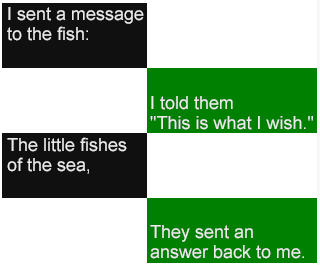
다음 element는 metadata functionality를 expand하기 위해 added되었다:
ttm:itemnamed metadata items의 extensible collection을 support한다.
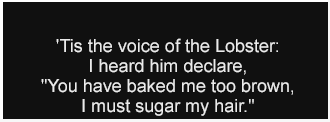
참고:
이 feature는 name과 value로 구성되는 metadata items에 대해 additional new vocabulary를 defining하지 않으려는 desire에 motivated된다. 여기서 generic, named metadata item element는 그러한 items의 unbounded collection을 defining하기 위한 future needs를 serve할 수 있다.
다음 element는 styling functionality를 expand하기 위해 added되었다:
tt:initialstyle properties에 대해 author specified initial values를 support한다.
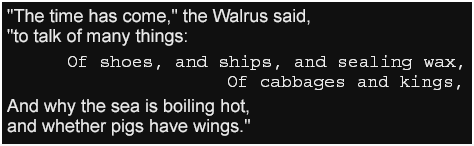
참고:
이 feature는 multiple requirements에 motivated되며, 여기에는
(1) 이 specification이 implementation dependent로 정의하는 inherited style properties의
certain initial values에 대해 fixed, determinate value를 specify할 수 있는 것이 desirable하다는
것,
예:
tts:color의 initial value,
및
(2) certain non-inherited style
properties에 대해 각 case마다 explicit하게 style value를 specify하도록 forced되는 것보다
initial value를 override할 수 있는 것이 desirable하다는 것,
예: tts:showBackground에 대한
whenActive의 initial value가 default initial value
always 대신 preferred될 수 있음이 포함된다.

New attribute vocabulary는 아래에 further described된 대로 이 specification의 다음 sections에 added되었다:
editors는 Timed Text Working Group의 current 및 former members, other W3C Working Groups의 members, 그리고 이 document의 process 또는 content에 directly 또는 indirectly contribute한 other forums의 industry experts를 다음과 같이 acknowledge한다:
Thomas Bause-Mason, John Birch, Kees Blom, Bert Bos, Brad Botkin, Dick Bulterman, Cyril Concolato, Frans de Jong, Mike Dolan, Martin Dürst, Donald Evans, Geoff Freed, Al Gilman, Giles Godart-Brown, Markus Gylling, Markku Hakkinen, Sean Hayes, Erik Hodge, Philipp Hoschka, Suzi Hyun, Richard Ishida, Michael Jordan, Masahiko Kaneko, Courtney Kennedy, George Kerscher, Dae Kim, David Kirby, Andrew Kirkpatrick, Philippe Le Hégaret, Pierre-Anthony Lemieux, Chris Lilley, Jason Livingston, Monica Martin, Matthew May, Nigel Megitt, Thierry Michel, Frank Olivier, Soohong Daniel Park, Silvia Pfeiffer, Addison Phillips, Stefan Pöschel, Rohit Puri, Brian Raymor, David Ronca, Patrick Schmitz, David Singer, Craig Smithpeters, Andreas Tai, and Mohamed Zergaoui.
editors는 current 및 past members의 다음 contributions를 especially acknowledge하고자 한다: Mike Dolan (SMPTE time codes, streaming; SMPTE liaison), David Kirby (introductory example document; SMPTE time codes, descriptive metadata; EBU/AAF liaison), Geoff Freed (styling and example images of style properties), Sean Hayes (advanced profile concepts, including applicative timing, HTML/CSS mapping proposal), Erik Hodge (timing), Thierry Michel (metadata), and Dave Singer (animation, scrolling).
editors는 또한 이 specification에 대한 their work의 following current 및 past sponsors의 support를 acknowledge하고자 한다: Cox Communications, Microsoft, Netflix, and Samsung Electronics.
Working Group은 이 specification을 our colleague David Kirby에게 dedicates한다.