1. 소개
-
이 섹션은 규범적이지 않습니다. *
필기 입력은 그림입니다. 그림은 사람의 펜팁 움직임을 디지털로 재현하는 데 필요한 정보를 담고 있습니다.
여기서 제안하는 API는 운영 체제의 기능을 웹에 노출하는 것을 목표로 합니다. 필기체 인식 능력은 운영 체제에 따라 달라질 수 있으므로, API는 운영 체제별 기능과 쉽게 통합될 수 있도록 유연한 설계를 목표로 합니다.
사용자 에이전트는 이 명세에 정의된 웹 API 데이터 구조를 호스트 운영 체제에서 사용 가능한 구조로 변환하여 웹 API와 운영 체제 API를 연결해야 합니다.
이 API는 모든 플랫폼에서 동일하게 동작하는 인식을 정의하지 않습니다.
1.1. 정의
이 명세에서는 다음 개념을 정의합니다. 손글씨 "WEB"을 예로 듭니다: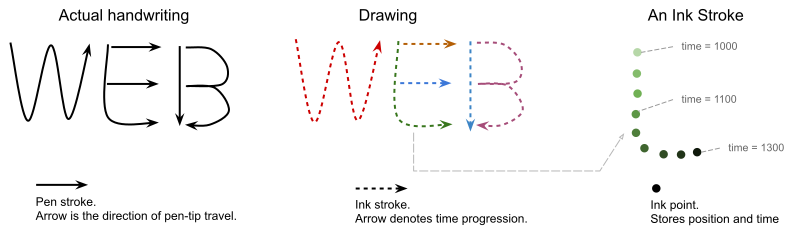
-
그림(drawing)은 여러 개의 획(stroke)으로 구성됩니다(예: 위의 E 글자는 3개의 획으로 구성됨).
-
획(stroke)은 일정 시간 동안의 연속적인 펜팁 움직임을 나타냅니다(예:
touchstart에서 대응하는touchend이벤트까지). 움직임 경로는 일련의 점(point)들로 표현됩니다. -
점(point)은 시공간 상에서 펜팁의 위치 관측입니다. 펜팁의 타임스탬프와 기록면 위 위치를 기록합니다(예:
touchmove이벤트). -
전사(transcription) 는 그림에 쓰여진 문자를 나타내는 유니코드 문자열입니다(예: "WEB" 문자열).
필기체 인식기(handwriting recognizer)는 인터페이스(일반적으로 외부 애플리케이션이나 서비스에 의해 구현됨)로서 다음을 수행:
-
그림을 입력값으로 받음
-
그림의 여러 개 전사(transcription)를 결과로 반환
-
선택적으로 각 전사에 대한 분절(segmentation) 정보를 반환
필기체 인식기의 정의는 사용자 에이전트의 재량입니다.
데이터를 필기체 인식기에 적합한 포맷으로 변환할 때, 사용자 에이전트는 이 명세에서 정의한 내용을 인식기에서 사용하는 개념과 일치시켜야 합니다.
필기체 인식기는 웹 애플리케이션이 필기 데이터를 더 잘 처리할 수 있도록 추가 정보를 출력할 수 있습니다(예: 손글씨에서 문자 삭제).
분절(Segmentation)은 그래핌(사용자 인지 문자)을 그 구성 획 및 점에 매핑합니다. 하나의 그래핌은 여러 개의 유니코드 코드포인트를 포함할 수 있습니다.
\u0078)로 구성됨 g̈는 두 개의 UTF-16 코드포인트(
\u0067\u0308)로 구성됨.षि는 두 개의 UTF-16 코드포인트(
\u0937\u093f)로 구성됨.
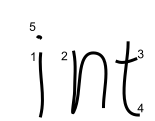
예시: 손글씨 "int"
-
획 1, 5가 글자 "i"를 이룸
-
획 2가 글자 "n"을 이룸
-
획 3, 4가 글자 "t"를 이룸
2. API 표현
작업 소스(task source)는 이 명세서에서 필기체 인식 작업 소스(handwriting recognition task source)입니다.
알고리즘이 필기체 인식 API 작업T를 큐에 넣을 때, 사용자 에이전트는 전역 작업(global task) T를 필기체 인식 작업 소스에 글로벌 객체(global object)와 함께 현재 realm 레코드에 큐잉해야 합니다.
별도 지정이 없으면, 알고리즘 단계에 의해 생성된 JavaScript 객체의 realm은 현재 realm 레코드입니다.
3. 기능 질의
기능 질의 인터페이스는 웹 애플리케이션이 구현체별 기능을 질의할 수 있도록 하여, 해당 기능을 사용할지 결정할 수 있습니다.
const modelConstraint= { languages: [ 'zh-CN' , 'en' ] }; const modelDesc= await navigator. queryHandwritingRecognizer( modelConstraint); // \`modelDesc\`는 \`modelConstraint\`에 부합하는 필기체 인식기를 설명합니다. // 조건을 충족하지 못하면, \`modelDesc\`는 null이 됩니다. { textAlternatives: true , textSegmentation: true , hints: { alternatives: true , textContext: true , inputTypes: [ 'mouse' , 'touch' , 'stylus' ] } }
[SecureContext ]partial interface Navigator {Promise <HandwritingRecognizerQueryResult ?>(queryHandwritingRecognizer HandwritingModelConstraint ); };constraint dictionary {HandwritingModelConstraint required sequence <DOMString >; };languages dictionary {HandwritingRecognizerQueryResult boolean ;textAlternatives boolean ;textSegmentation HandwritingHintsQueryResult ; };hints dictionary {HandwritingHintsQueryResult sequence <HandwritingRecognitionType >;recognitionType sequence <HandwritingInputType >;inputType boolean ;textContext boolean ; };alternatives enum {HandwritingRecognitionType ,"text" };"per-character" enum {HandwritingInputType ,"mouse" ,"stylus" };"touch"
3.1.
queryHandwritingRecognizer(constraint)
이 메서드는 웹 애플리케이션이 기본 인식기의 기능을 질의하여 해당 인식기를 사용할지 결정할 수 있도록 합니다:
-
제약조건이 충족되면, 필기체 인식기 설명을 반환,
-
제약조건을 충족하지 못하면
null로 반환
동일한 HandwritingModelConstraint
는 createHandwritingRecognizer(constraint)
를 통해 해당 조건을 만족하는 HandwritingRecognizer
를 생성할 때 사용할 수 있습니다.
queryHandwritingRecognizer(constraint)
메서드가 호출될 때, 다음을 수행:
-
constraint가
languages멤버를 포함하지 않으면, 거부된 promise를TypeError와 함께 반환합니다. -
p를 새 promise로 설정합니다.
-
다음 단계를 병렬로 실행합니다:
-
아래 중 하나라도 해당되면:
필기체 인식 API 작업 queue에 p를
null로 resolve하고 나머지 단계를 중단. -
그 외의 경우, 필기체 인식 API 작업 queue에 아래를 수행:
-
result에
HandwritingRecognizerQueryResult를 새로 만듦 -
인식기의 기능 설명 변환 후 result에 모든 멤버를 채움.
-
-
p를 반환합니다.
HandwritingRecognizerQueryResult
및 HandwritingHintsQueryResult로
변환할 때 구현체는 아래 규칙을 따라야 합니다:
-
인식기가 어떠한 힌트도 허용하지 않으면
hints를null로 설정. -
기능/힌트를 지원하지 않는 경우 해당 속성은
null로 설정. -
enum 타입 힌트를 지원하면 해당 속성에 허용 값 리스트를 할당.
-
enum이 아닌 힌트를 지원하면 해당 속성을
true로 설정.
3.2.
HandwritingModelConstraint
속성
이것은 하위 필기체 인식기(생성될 경우)가 반드시 만족해야 하는 제약조건을 설명합니다.
이는 createHandwritingRecognizer(constraint)로
필기체 인식기를 생성할 때도 사용됩니다.
languages- [BCP47] 언어 태그의 리스트로, 인식기가 인식해야 할 언어를 설명합니다.
둘 이상의 언어가 제공되면 인식기는 모든 언어를 인식해야 제약조건을 만족합니다.
사용자 에이전트는 주어진 언어 태그의 모든 스크립트를 고려해야 합니다. 예를 들어, 라틴 알파벳("az-Latn")만 인식하는 인식기는 "az" 언어 태그에 적합하지 않습니다. 아제르바이잔어는 키릴 문자("az-Cyrl")로도 쓰일 수 있기 때문입니다.
스크립트 구분이 중요한 경우 가장 구체적인 언어 태그 사용을 권장합니다. (예: 라틴 문자 아제르바이잔어만 필요한 경우 "az-Latn" 사용)
어떤 인식기는 단일 언어만 지원할 수 있습니다. 상호 운용성을 위해 언어별 인식기를 각각 생성하는 것이 도움이 될 수 있습니다.
3.3. HandwritingRecognizerQueryResult
속성
이는 필기체 인식기 구현체의 내재적 기능을 설명합니다.
textAlternatives- 구현체가 하나의 전사 대신 여러 개의 전사 문자열(transcriptions)을 반환하는지 여부를 나타내는 boolean.
textSegmentation- 구현체가 각 전사에 분절(segmentation) 정보를 반환하는지 여부를 나타내는 boolean.
hintsHandwritingHintsQueryResult객체로,startDrawing()에서 허용되는 힌트를 설명합니다.
3.3.1. HandwritingHintsQueryResult
속성
이 객체는 startDrawing()
시 선택적으로 제공할 수 있는 힌트의 집합을 설명합니다. 정확도 또는 성능을 높이는 데 도움이 됩니다.
일반적으로 이 속성의 이름은 startDrawing()
메서드에서 허용하는 이름과 일치합니다.
recognitionTypeHandwritingRecognitionType열거형의 리스트로, 그려질 텍스트의 유형을 설명합니다."text"- 자유 형식의 일반 텍스트. 그림이 실제 단어임을 의미합니다. 예: 일상적인 문장.
"per-character"- 서로 연관 없는 개별 그래핌으로 필기가 구성됨. 예: 일련번호, 라이선스 키.
inputTypeHandwritingInputType열거형의 리스트로, 그림이 어떻게 입력되는지 설명합니다."touch"- 손가락으로 그림.
"stylus"- 스타일러스로 그림.
"mouse"- 마우스 커서로 그림.
textContext- textContext가 허용되는지 나타내는 boolean.
textContext는 사용자에게 보여지는 텍스트이거나, 현재 그림 앞에 위치하는 이전에 인식된 텍스트 문자열입니다. alternatives- 대체 전사의 개수 설정이 가능한지 나타내는 boolean. 이는
getPrediction에 반환되는 최대 대체값 개수를 제한합니다.
힌트를 제공하더라도 결과 전사가 힌트 설명을 반드시 따르는 것은 아닙니다.
4. 필기체 인식기 생성
HandwritingRecognizer
는 인식을 수행하는 데 필요한 리소스를 관리합니다.
const modelConstraint= { languages: [ 'en' ] }; try { const recognizer= await navigator. createHandwritingRecognizer( modelConstraint); // recognizer를 사용하여 인식 작업을 수행합니다. } catch ( err) { // 제공된 모델 제약조건을 만족할 수 없습니다. }
[SecureContext ]partial interface Navigator {Promise <HandwritingRecognizer >(createHandwritingRecognizer HandwritingModelConstraint ); };constraint
4.1.
createHandwritingRecognizer(constraint)
메서드
이 메서드는 제공된 HandwritingModelConstraint
를 만족하는 HandwritingRecognizer
객체를 생성하고 인식 수행에 필요한 리소스를 예약합니다. 이것은 필기체 인식기의 진입점을 나타냅니다.
-
제약조건을 만족하고, 운영체제에서 인식에 필요한 충분한 리소스가 있다면
HandwritingRecognizer객체로 resolve합니다. -
그렇지 않으면 에러와 함께 reject합니다.
사용자 에이전트가 필기체 모델 설치 및 다운로드를 사용자에게 요구할 수 있습니다. 웹 애플리케이션은 이 메서드가 항상 빠르게 resolve된다고 가정하면 안 됩니다.
createHandwritingRecognizer(constraint)
메서드가 호출되면, 다음을 수행합니다:
-
constraint에
languages멤버가 없다면, 거부된 promise를TypeError와 함께 반환한다. -
p를 새 promise로 둔다.
-
다음 단계를 병렬로 실행한다:
-
constraint를 플랫폼에 종속적인 필기체 인식기 생성을 위해 적합한 형태로 변환한다.
-
-
만약 사용자 에이전트가 인식을 수행할 필기체 인식기를 생성하거나 준비할 수 없는 경우, 실패 원인에 따라 새 예외로 p를 reject한다:
-
constraint의
languages멤버가 빈 리스트인 경우,"NotSupportedError"DOMException반환. -
사용자 에이전트가 변환된 constraint를 만족하는 플랫폼 종속 필기체 인식기를 찾지 못하면,
"NotSupportedError"DOMException반환. -
필기체 인식기를 만들면 사용자 에이전트가 허용하는 총 활성 인식기 개수를 초과하게 되면,
QuotaExceededError반환. -
웹 애플리케이션이 이 메서드를 재호출할 수 있는 경우,
"OperationError"DOMException반환. -
그 외 모든 실패 원인은,
"UnknownError"DOMException반환.
-
-
그 외의 경우:
-
result를 새
HandwritingRecognizer객체로 생성한다. -
result와 직전에 생성된 플랫폼 종속 필기체 인식기를 연결한다.
-
result.active 플래그를
true로 설정한다.
-
-
-
-
p를 반환한다.
5. 인식기 사용
const drawingHints= { textContext: "Hello world." } const drawing= recognizer. startDrawing( textContext) // drawing과 함께 작업합니다. // recognizer와 연관된 리소스를 해제합니다. recognizer. finish()
5.1.
HandwritingRecognizer
객체
[Exposed =Window ,SecureContext ]interface {HandwritingRecognizer HandwritingDrawing (startDrawing optional HandwritingHints = {});hints undefined (); };finish dictionary {HandwritingHints DOMString = "text";recognitionType DOMString = "mouse";inputType DOMString ;textContext unsigned long = 3; };alternatives
HandwritingRecognizer
는 active 플래그(불리언)를 가집니다. active 플래그의 초기값은
true이며, finish()
호출 시점에 false가 됩니다.
인식기의 active 플래그가 true면, 웹 애플리케이션은 이 인식기와 연결된 새
drawing을 생성하고 인식 작업을 할 수 있습니다.
사용자 에이전트는 한 웹사이트의 active 필기체 인식기 개수에 제한을 둘 수 있습니다.
5.2.
startDrawing(hints)
이 메서드는 이후 인식을 위한 drawing 정보를 저장하는 HandwritingDrawing
을 생성합니다.
HandwritingDrawing
은 strokes (획)의 리스트를 가지며, 초기값은 비어 있습니다.
HandwritingDrawing
은 recognizer를 가지며, 이 HandwritingDrawing을
생성한 HandwritingRecognizer
참조를 가집니다.
startDrawing(hints)가
호출되면, 다음을 수행:
-
this의 active 플래그가true가 아니면, 새로운DOMException객체를 발생시키고, 이 객체의name멤버를"InvalidStateError"로 지정한 후 중단한다. -
새로운
HandwritingDrawing을 result로 생성하고, 필요하면 변환된 힌트를 그 안에 저장한다. -
result.recognizer를
this로 설정한다. -
result를 반환한다.
제공한 hints에 인식기가 지원하지 않는 기능이 포함되어 있으면, 해당 속성은 무시해야 합니다.
hints가 제공되지 않으면, 사용자 에이전트는 자체 기준으로 기본값을 적용할 수 있습니다.
user agent는 변환된 hints를 동등한 필기체 인식기 drawing 객체로 전달하고
HandwritingDrawing에
저장하지 않을 수도 있습니다.
5.3.
finish()
이 메서드는 this의 active 플래그를 false로 설정하고, 할당된 필기체 인식기
리소스를 해제하며, 이후 this와 관련된 작업은 모두 실패하게 만듭니다.
사용자 에이전트는 필기체 인식기와 연관된 리소스를 해제해야 합니다.
finish() 호출 후에는 getPrediction()
을 HandwritingDrawing
(이 this로 생성된)에 호출하면 실패하게 됩니다.
6. HandwritingDrawing
빌드
HandwritingDrawing
은 drawing의 컨텍스트 정보를 관리하며, drawing을 구성하는 획과 점을 관리합니다. drawing을 나타냅니다.
user agent는 모든 stroke와 point를 메모리에 저장한 뒤, getPrediction()
호출 시 필기체 인식기에 적합한 포맷으로 변환할 수 있습니다. 이 경우 HandwritingDrawing
과 HandwritingStroke
는 리스트처럼 동작합니다.
HandwritingStroke
및 HandwritingDrawing
메서드 호출 시 플랫폼별 객체로 감싸 동작합니다.
user agent는 drawing의 변화를 추적해 getPrediction()
성능을 높일 수 있습니다. 관련 메서드 호출 시 해당 stroke를 "수정됨"으로 표시해 변화 추적이 가능합니다. 변화 추적을 통해 인식기의 증분 인식을 수행할 수 있습니다.
예시: 세 문단으로 구성된 drawing에서 각 문단 예측값을 저장한 뒤, 웹 애플리케이션이 세 번째 문단에 stroke를 추가하면, 변화 추적으로 변경된 부분만 새로 인식하고 결과를 병합할 수 있습니다.
const handwritingStroke= new HandwritingStroke() // 획에 점을 추가합니다. handwritingStroke. addPoint({ x: 1 , y: 2 , t: 0 }); handwritingStroke. addPoint({ x: 7 , y: 6 , t: 33 }); // 이 획의 점 리스트를 조회합니다. // 모든 점의 복사본을 반환하며, 반환된 점을 수정해도 원본에는 영향이 없습니다. const points= handwritingStroke. getPoints(); [ { x: 1 : , t: 2 , t: 0 }, { x: 7 , y: 6 , t: 33 } ]; // 획의 모든 점을 삭제합니다. handwritingStroke. clear(); // drawing에 획을 추가합니다. drawing. addStroke( handwritingStroke); // drawing의 모든 획을 조회합니다. // drawing에 포함된 HandwritingStroke 리스트를 반환합니다. 웹 앱은 // stroke를 직접 수정할 수도 있습니다. 예: HandwritingStroke.addPoint() 호출. drawing. getStrokes(); [ HandwritingStroke, /* ... */ ] // drawing에서 한 획을 삭제합니다. drawing. removeStroke( handwritingStroke); // drawing의 모든 획을 삭제합니다. drawing. clear();
[Exposed =Window ,SecureContext ]interface {HandwritingDrawing undefined (addStroke HandwritingStroke );stroke undefined (removeStroke HandwritingStroke );stroke undefined ();clear sequence <HandwritingStroke >();getStrokes Promise <sequence <HandwritingPrediction >>(); }; [getPrediction SecureContext ,Exposed =Window ]interface {HandwritingStroke ();constructor undefined (addPoint HandwritingPoint );point sequence <HandwritingPoint >();getPoints undefined (); };clear dictionary {HandwritingPoint required double ;x required double ; // Optional. Number of milliseconds since a reference time point for a // drawing.y DOMHighResTimeStamp ; };t
t를 HandwritingPoint에
제공한다면,
한 HandwritingDrawing에
대해 모든 t 값은 하나의 기준시점에서부터 측정해야 합니다.
예: t === 0을 startDrawing()
호출시의 시점으로 정의. 혹은 Date.now()를 사용해 수집할 때(예: touchmove 이벤트 발생 시)
기준으로 할 수 있습니다.
6.1. HandwritingStroke
HandwritingStroke
는 획(stroke)을 나타냅니다. 하나의 움직임을 재현하는 데 필요한 정보를
저장합니다.
HandwritingStroke
는 Points라는 리스트를 가지며, 이 stroke의 점(point)을 저장합니다. points
의 초기값은 비어 있습니다.
6.1.1.
HandwritingStroke()
-
새
HandwritingStroke객체 result를 만듭니다. -
result를 반환합니다.
6.1.2.
addPoint(point)
this에 추가합니다. 호출
시 다음을 수행:
-
p를 새로운 객체로 둔다.
-
p.
x에 point.x를 할당한다. -
p.
y에 point.y를 할당한다. -
point에
t멤버가 있으면, p.t에 point.t를 할당한다.
point에 t가 없다면, 구현체가 보간(interpolate)하거나 기본값을 사용해서는 안 됩니다.
p.t에 값이 없음을 그대로 반영해야 합니다.
addPoint(point)
호출 후 point를 수정해도 HandwritingStroke에는
영향을 주지 않습니다.
6.1.3.
getPoints()
이 메서드는 이 획의 점들을 반환합니다.
깊은 복사(Deep copy)는 내부 points의 수정 방지 및 변경 추적을 가능하게 합니다.
getPoints()
반환값을 수정해도 stroke에는 영향이 없습니다.
6.1.4. clear()
이 메서드는 이 획의 모든 점을 삭제하여, 이 획을 빈 상태로 만듭니다.
6.2.
HandwritingDrawing
6.2.1.
addStroke(stroke)
-
stroke가
HandwritingStroke인스턴스가 아니면, TypeError를 throw하고 중단합니다. -
stroke 참조를
this.strokes에 추가합니다.
6.2.2.
removeStroke(stroke)
-
stroke가
HandwritingStroke인스턴스가 아니면, TypeError를 throw하고 중단합니다.
6.2.3.
getStrokes()
이 메서드는 이 drawing에 포함된 획(stroke) 리스트를 반환합니다.
6.2.4.
clear()
7. HandwritingDrawing의
예측값 얻기
// 이 drawing에 포함된 획들의 예측값을 구합니다. const predictions= await drawing. getPrediction(); // \`predictions\`는 HandwritingPrediction 리스트이며, // 각 예측값의 속성은 handwriting recognizer의 기능과, // queryHandwritingRecognizer()에서 반환한 모델 descriptor에 따라 다릅니다. // // 예시: recognizer가 textSegmentation을 지원하는 경우. [ { text: "hello" , segmentationResult: [ { grapheme: "h" , beginIndex: "0" , endIndex: "1" , drawingSegments: [ { strokeIndex: 1 , beginPointIndex: 0 , endPointIndex: 32 }, { strokeIndex: 2 , beginPointIndex: 0 , endPointIndex:: 40 }, ] }, { grapheme: "2" , beginIndex: "1" , endIndex: "2" , drawingSegments: [ { strokeIndex: 2 , beginPointIndex: 41 , endPointIndex:: 130 }, ] }, // ... ] }, { text: "he11o" , segmentationResult: [ /* ... */ ] }, // startDrawing()의 alternatives 값 만큼 최대 결과가 반환될 수 있습니다. ];
7.1.
getPrediction()
getPrediction()
메서드는 this drawing의 예측값들과 그 메타데이터 리스트를 반환합니다.
예측값들은 신뢰도(confidence) 순으로 내림차순 정렬되어 있습니다. 비어 있지 않다면 첫 번째 값이 가장 가능성이 높은 결과여야 합니다.
필기체 인식기가 어떤 것도 인식하지 못한 경우 getPrediction()
는 빈 리스트로
resolve되어야 합니다.
사용자 에이전트는 change tracking 및 증분 인식을 통해 성능을 개선할 수 있습니다.
getPrediction()
이 호출되면:
-
this.recognizer.active 가 true가 아니면 InvalidStateErrorDOMException과 함께 reject된 promise를 반환합니다. -
this.strokes가 비어 있으면 새 빈 리스트로 resolve된 promise를 반환합니다. -
p를 새 Promise로 두고, 다음 단계를 병렬로 실행합니다.
-
변환된 drawing을 필기체 인식기로 전송합니다.
-
필기체 인식기가 예측 결과를 반환할 때까지 대기합니다.
-
필기체 인식 API 작업 queue에 아래 단계 수행:
-
result를 리스트로 둡니다.
-
반환된 예측 pred 각각에 대해 반복:
-
pred를 HandwritingPrediction으로 변환하여 idl_pred에 저장합니다.
-
idl_pred를 result에 추가합니다.
-
-
p를 result로 resolve합니다.
-
-
-
p를 반환합니다.
7.2. HandwritingPrediction
속성
HandwritingPrediction
은 필기체 인식기의
예측 결과를 나타냅니다.
dictionary {HandwritingPrediction required DOMString ;text sequence <HandwritingSegment >; };segmentationResult dictionary {HandwritingSegment required DOMString ;grapheme required unsigned long ;beginIndex required unsigned long ;endIndex required sequence <HandwritingDrawingSegment >; };drawingSegments dictionary {HandwritingDrawingSegment required unsigned long ;strokeIndex required unsigned long ;beginPointIndex required unsigned long ; };endPointIndex
text- drawing의 전사(transcription)를 나타내는
DOMString입니다. segmentationResult-
인식된 그래핌(사용자가 인지하는 글자)을 해당 획과 점에 매핑하는
HandwritingSegment리스트입니다.필기체 인식기가 텍스트 분절(segmentation)을 지원하지 않는 경우
null입니다.웹 애플리케이션은
textSegmentation으로 이 속성이 null일지 여부를 확인할 수 있습니다.
7.2.1. HandwritingSegment
속성
HandwritingSegment
는 drawing에서 분절(segmentation)된 단일
그래핌에 대해 설명합니다.
grapheme- 그래핌을 나타내는
DOMString입니다. beginIndex-
이 그래핌이
text에서 시작하는 인덱스입니다. endIndex-
이 그래핌이
text에서 끝나는 인덱스(다음 그래핌이 시작하는 인덱스)입니다. drawingSegments-
이 그래핌을 구성하는 drawing의 일부를 설명하는
HandwritingDrawingSegment리스트입니다.
text
를 beginIndex와
endIndex로
자르면
grapheme이
나와야 합니다.
// 웹 애플리케이션은 \`text\`를 \`beginIndex\`, \`endIndex\`로 슬라이스할 수 있습니다. // 예시: "घोषित"의 \`HandwritingPrediction\` const prediction= { // UTF-16 code points: \u0918 \u094b \u0937 \u093f \u0924 // Graphemes: घो, षि, त text: "घोषित" , segmentationResult: [ { grapheme: "घो" , beginIndex: "0" , endIndex: "2" }, { grapheme: "षि" , beginIndex: "2" , endIndex: "4" }, { grapheme: "त" , beginIndex: "4" , endIndex: "5" }, ] } // 아래는 true입니다: prediction. text. slice( 0 , 1 ) === "घो" ; prediction. text. slice( 2 , 4 ) === "षि" ; prediction. text. slice( 4 , 5 ) === "त" ; // 웹 애플리케이션은 splice로 두 번째 그래핌(षि)만 삭제할 수 있습니다. const withoutSecondGrapheme= ( [... prediction. text] . splice( prediction. segmentationResult[ 1 ]. beginIndex, prediction. segmentationResult[ 1 ]. endIndex) . join( '' ) ); // => "घोत"
7.2.2.
HandwritingDrawingSegment
속성
HandwritingDrawingSegment
는 HandwritingStroke의
연속된 구간을 설명합니다.
이 속성들은 HandwritingStroke와
HandwritingDrawing
내 getPrediction()이
호출될 시점의 정보에 기반합니다.
strokeIndex-
HandwritingStroke가HandwritingDrawing.strokes에 저장된 인덱스입니다. beginIndex- drawing segment가 시작하는 인덱스입니다.
endIndex- drawing segment가 끝나는 인덱스(다음 drawing segment가 시작되는 위치)입니다.
8. 프라이버시 고려 사항
이 섹션은 규범적이지 않습니다.지문 벡터는 기능 탐지와 인식기 구현의 두 부분에서 비롯됩니다.
노출되는 정보(엔트로피)의 양은 사용자 에이전트의 구현에 달려 있습니다. 만능 솔루션은 없다고 생각하며, 사용자 에이전트가 사용자에게 개인정보 보호(예: 퍼미션 프롬프트)가 필요한지 여부를 스스로 결정할 것을 권장합니다.
기능 탐지는 다음과 같은 정보를 노출할 수 있습니다:
-
사용자의 언어 선택(또는 설치된 문자 인식 모델). 이 정보는
navigator.languages에서도 확인할 수 있습니다. -
지원 기능 목록을 요약함으로써 사용 중인 인식기 구현 정보. 이는 운영체제 및 버전 유추로 이어질 수 있습니다.
지문 채취는 아래와 같이 완화할 수 있습니다:
-
프라이버시 예산: 웹사이트가 과도하게 질의할 경우 사용자 에이전트가 promise를 거부함.
-
권한 요청: 사용자 에이전트가 사용자에게 필기체 인식 기능 사용 권한을 요청.
-
하드코딩 값: 컴파일 시점에 언어나 기능 판별이 가능하면, 쿼리 결과에 하드코딩된 값을 반환.
인식기 구현은 운영체제, 디바이스, 사용자의 습관 등 정보를 노출할 수 있습니다. 이는 주로 사용하는 인식 기술에 따라 다릅니다.
아래는 여러 인식기 유형 및 그에 따른 위험 예시입니다:
-
인식기 미지원: 지문 채취 위험 없음.
-
클라우드 기반 인식기: 위험 거의 없음. 웹사이트가 예측 결과를 통해 클라우드 서비스 사용 여부를 추정할 수 있지만, 사용자나 디바이스 정보는 추가로 노출되지 않음.
-
상태 비저장(stateless) 모델(일반적): 입력 drawing 및 모델 자체에만 결과가 의존.
-
브라우저 내에서만 업데이트되는 모델(예: 순수 브라우저 구현): 웹사이트가 브라우저 버전을 추정할 수 있으나, 다른 방법으로도 파악 가능.
-
브라우저 외부(예: 운영체제 API)에서도 업데이트되는 모델의 경우, 시나리오별로 웹사이트가 알 수 있는 정보:
-
모델이 OS 업데이트와 함께 항상 갱신될 경우, OS 버전.
-
일부 OS 업데이트에만 갱신된다면 OS 버전 범위.
-
필요 시(on-demand) 별도 패치 갱신 시, 특정 패치 버전.
-
-
하드웨어 가속(GPU 등)을 사용하는 경우, 결과에 따라 특정 하드웨어 정보가 노출될 수 있음.
-
-
상태 보존/온라인 학습 모델(최악의 가정): 이 모델은 이전 사용 이력을 학습함. 예: 사용자 입력 습관에 따라 변하는 OS 인식기. 이러면 매우 많은 사용자 정보가 노출될 수 있으며, 위험성이 크다.
하지만 현존 구현 가운데 이 유형이 사용된 사례는 인지하지 못했습니다. 이런 모델에는 반드시 프라이버시 보호 조치를 권고하며, 세션마다 초기화(클린 스테이트)를 권장합니다.
지문 채취 비용: 공격자는 모델별 차이점을 활용하기 위해 다양한 필기 drawing(적대적 샘플)을 신중히 생성해야 합니다. 이 샘플 생성 비용이 크겠지만, 동기가 확실한 공격자는 그런 샘플을 충분히 확보할 수 있다고 보는 것이 안전합니다.